pillrdotlol
Health Warn
- License — License: MIT
- Description — Repository has a description
- Active repo — Last push 0 days ago
- Low visibility — Only 7 GitHub stars
Code Pass
- Code scan — Scanned 12 files during light audit, no dangerous patterns found
Permissions Pass
- Permissions — No dangerous permissions requested
No AI report is available for this listing yet.
Every coding agent and every API key, in one pill at the edge of your Mac. Usage limits, sessions, done cards, approvals and API spend. Free, signed and notarized.

Every coding agent and every API key,
in one small pill at the edge of your Mac.







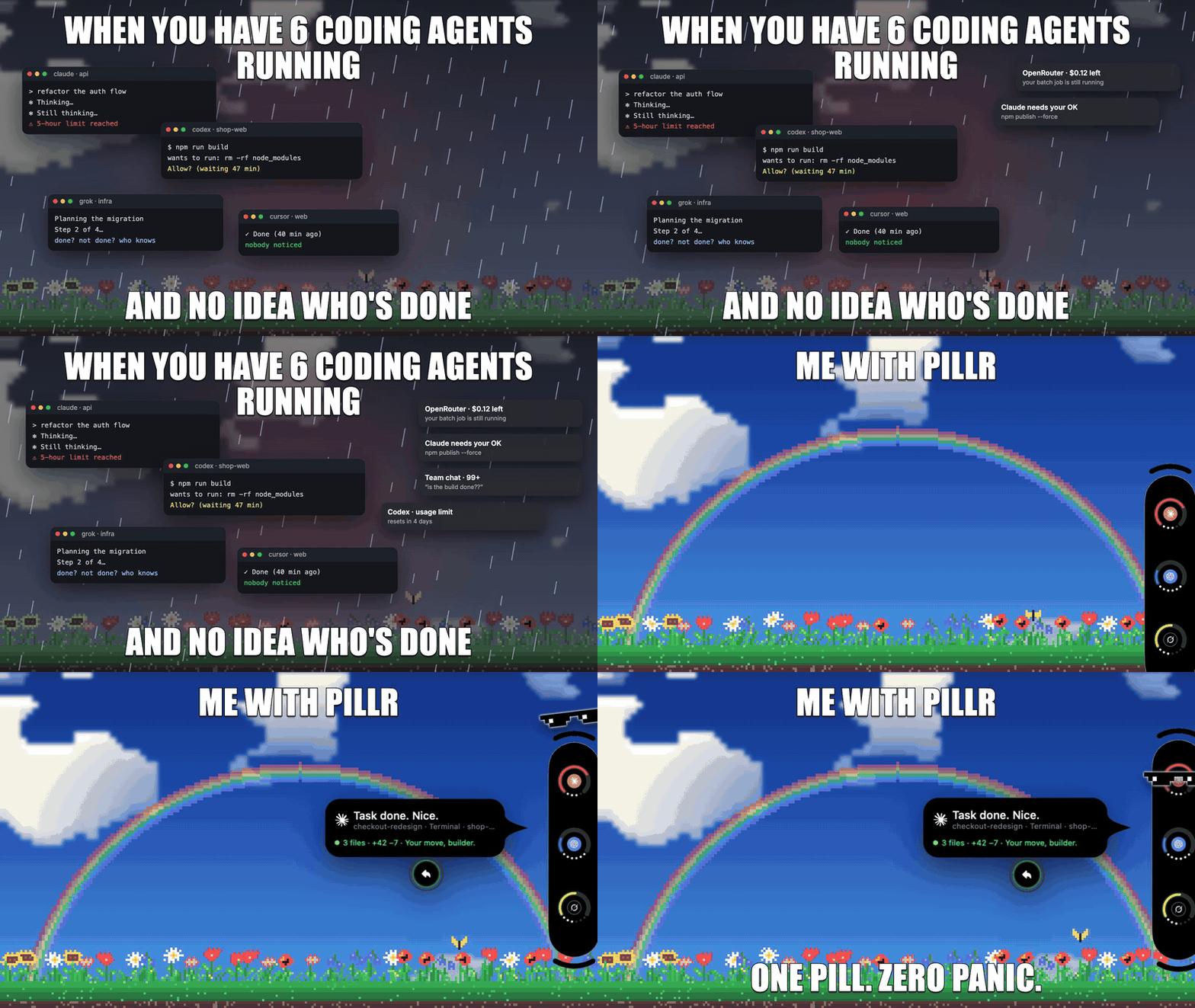
| 🧭 Limits A ring per agent, with a forecast before it runs out |
🔔 Done cards The moment a turn ends, from each agent's own hook |
🔑 API keys Credit left and spend for about 70 providers |
🎚️ The lid Hold ⌘ and tilt it to set reasoning effort |
✨ What it does
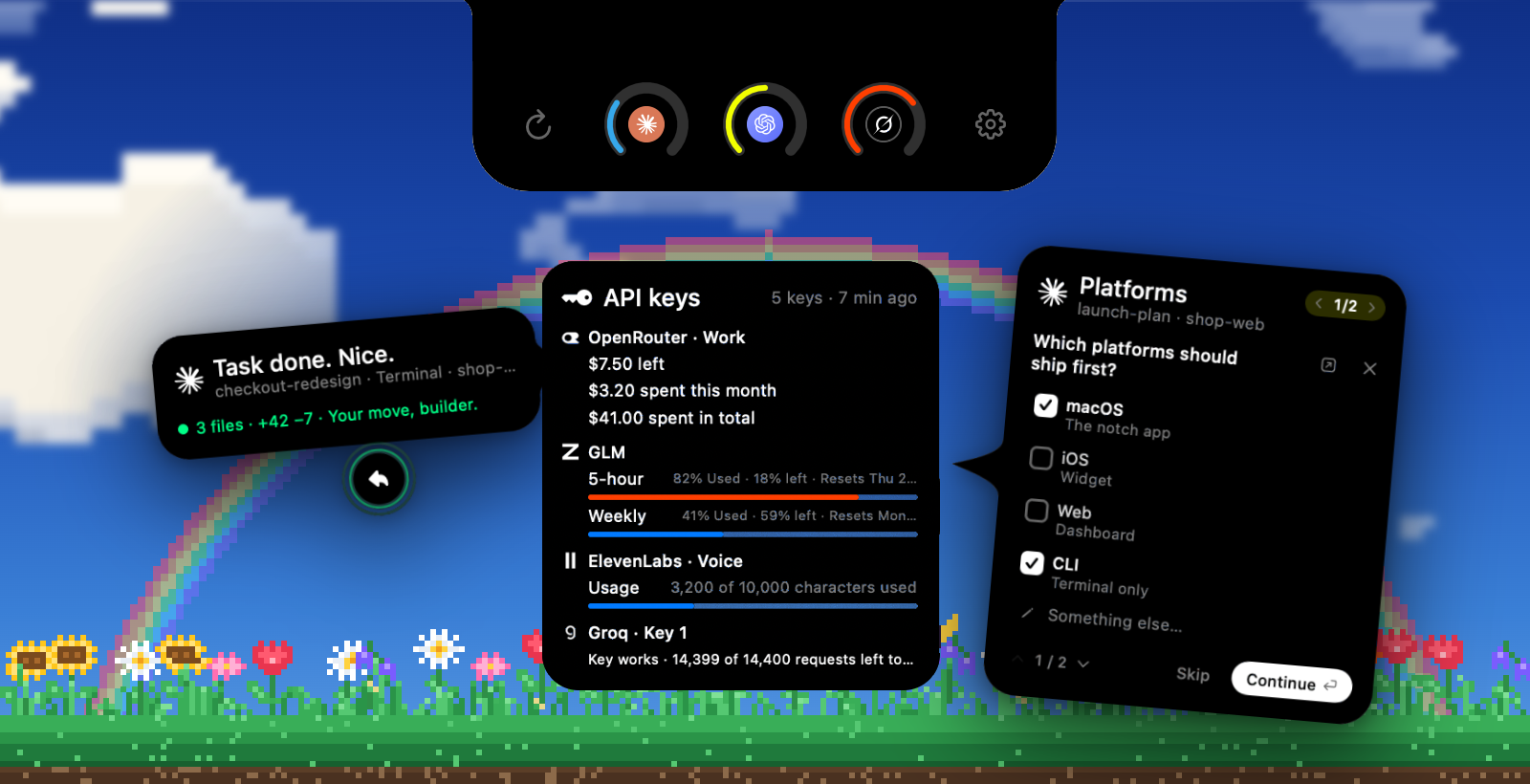
Every limit and every session, one hover away
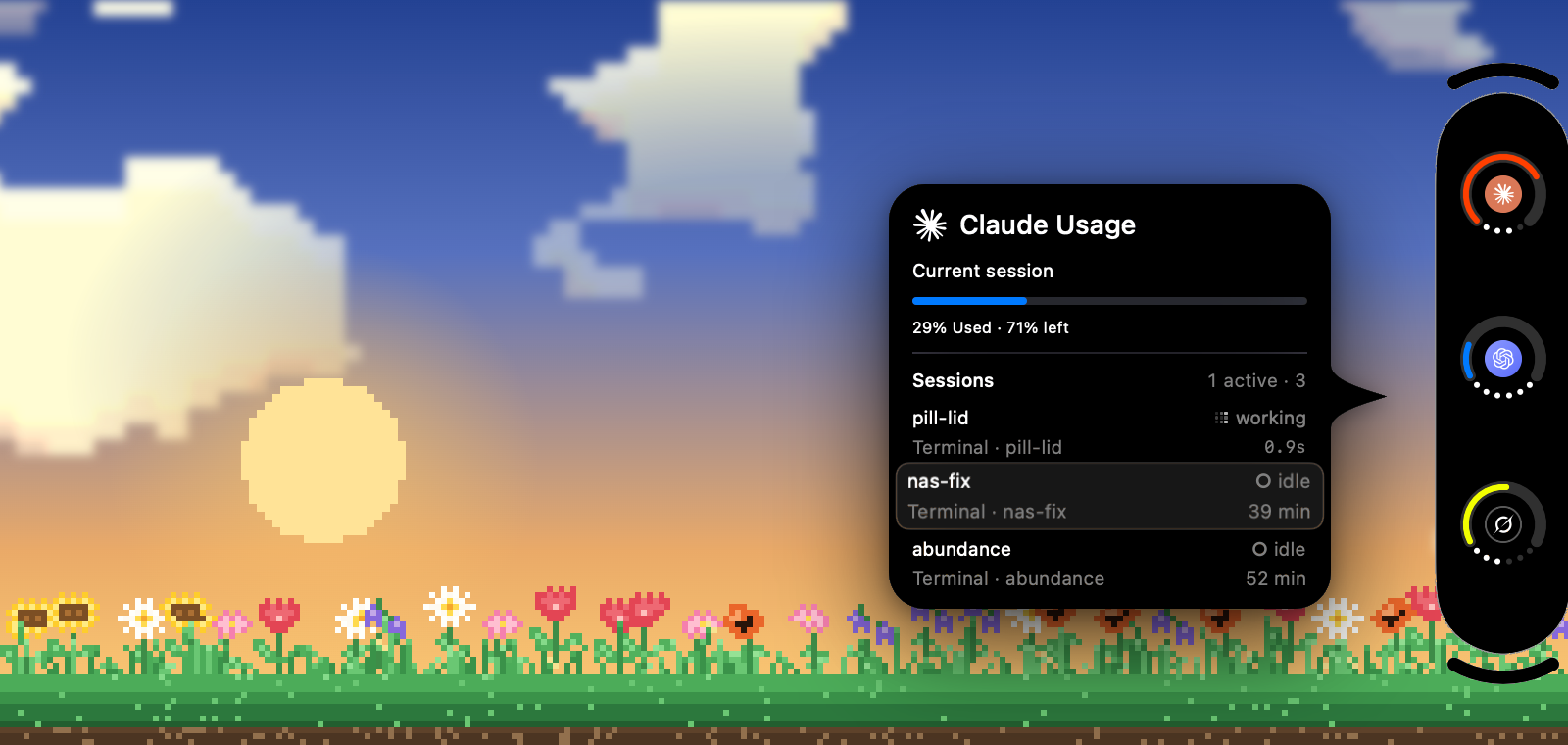
A ring for each agent shows how much of its limit is left, with a forecast when you'll run out before it resets, and a card when it comes back. Hover for the details: every window and when it resets, then each running session with its model, effort and tokens. Click one to jump straight to its terminal tab or app window.
Finished? You'll know, and you can answer
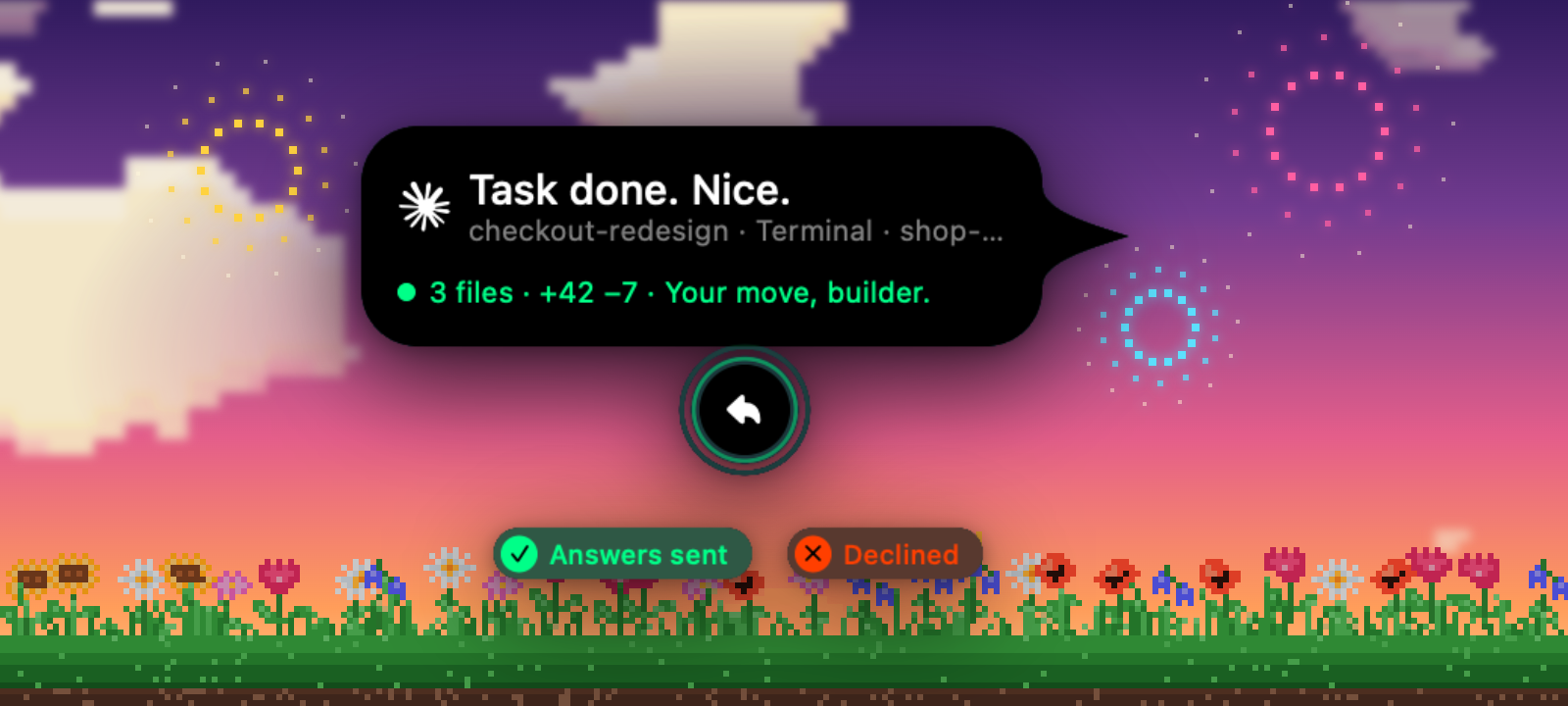
Ten agents tell pillr the moment a turn ends: Claude Code, Codex, Grok, Cursor, Kimi Code, Gemini CLI, OpenCode, Copilot CLI, Droid and Antigravity. The card says what changed. Press Reply to write back to that session. pillr types it in only when the agent is waiting, never over a draft.
Approve and answer without leaving your flow
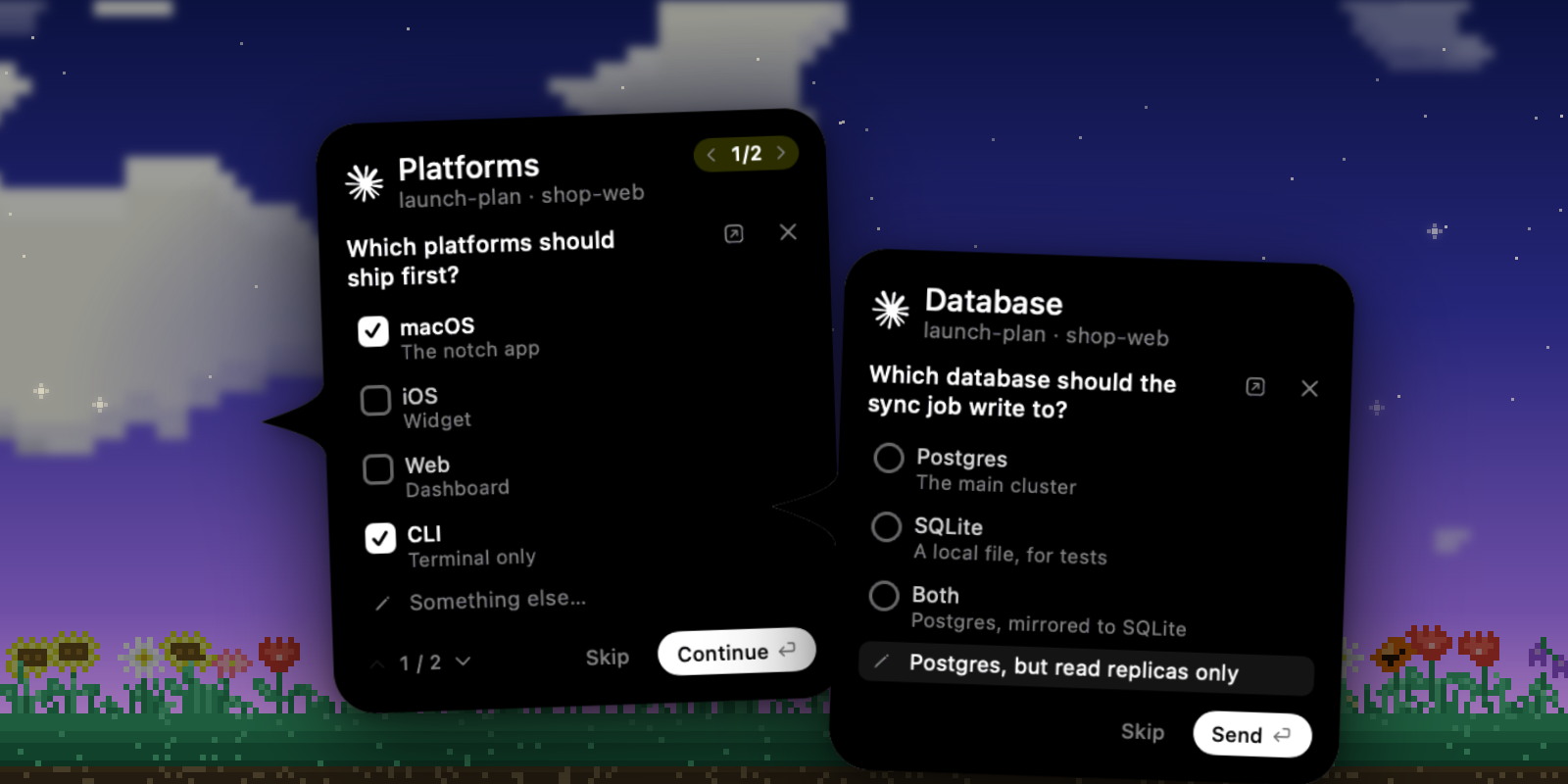
Allow or deny Claude Code's permission prompts, and answer its questions (one choice, several, or your own words) right from the notch. Your answer goes straight back to the session that asked. Answer in the terminal or the Claude app instead, and the card leaves the notch on its own.
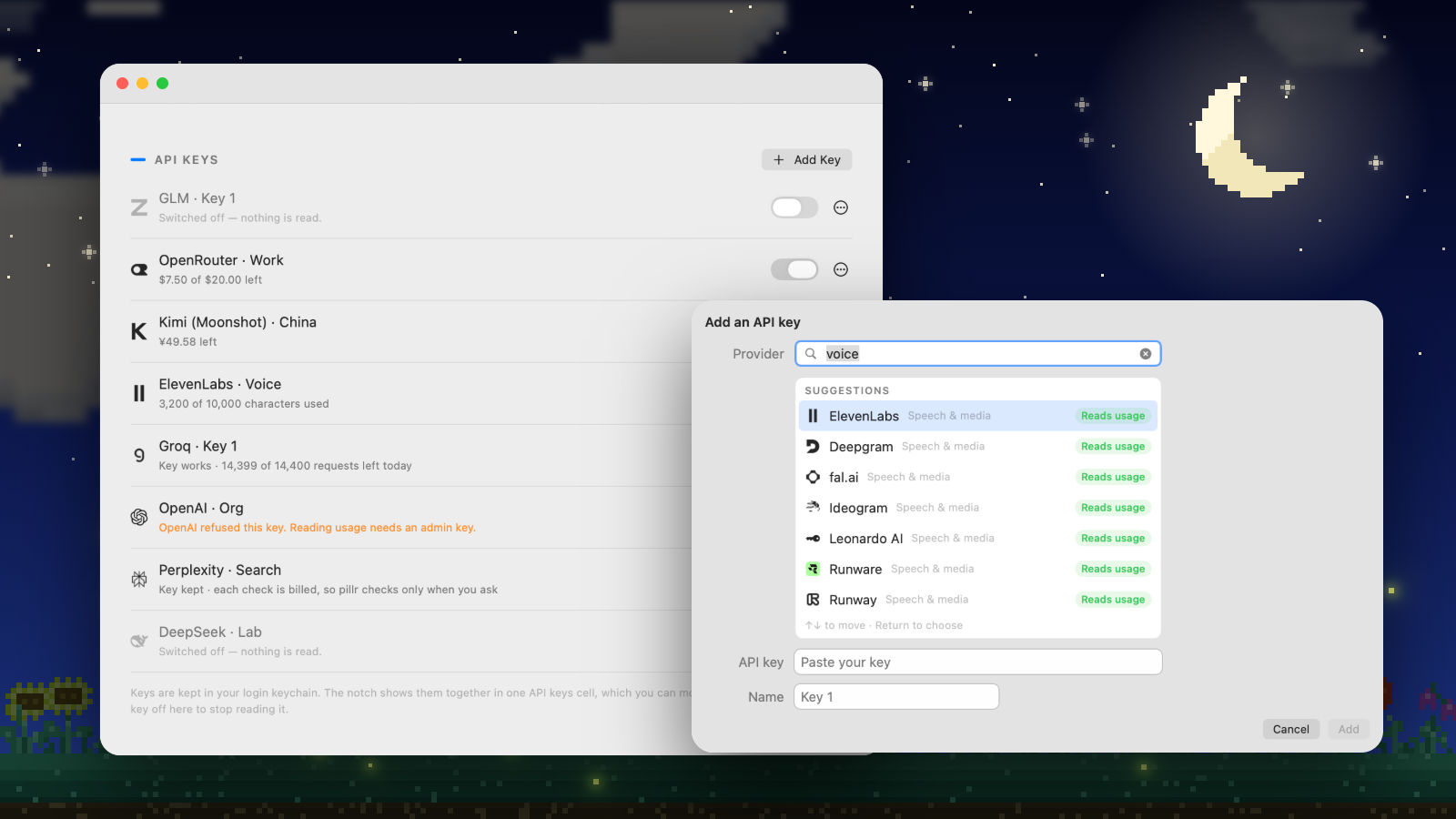
No more keys burning in the dark
Add the API keys you pay for: pick the provider as you type, paste the key. pillr reads credit left, spent this month and spent in total from each provider's own API, and keeps every key in one API keys cell whose ring follows the key closest to running out. Providers that need a special key, like xAI's management key, say so before you paste.
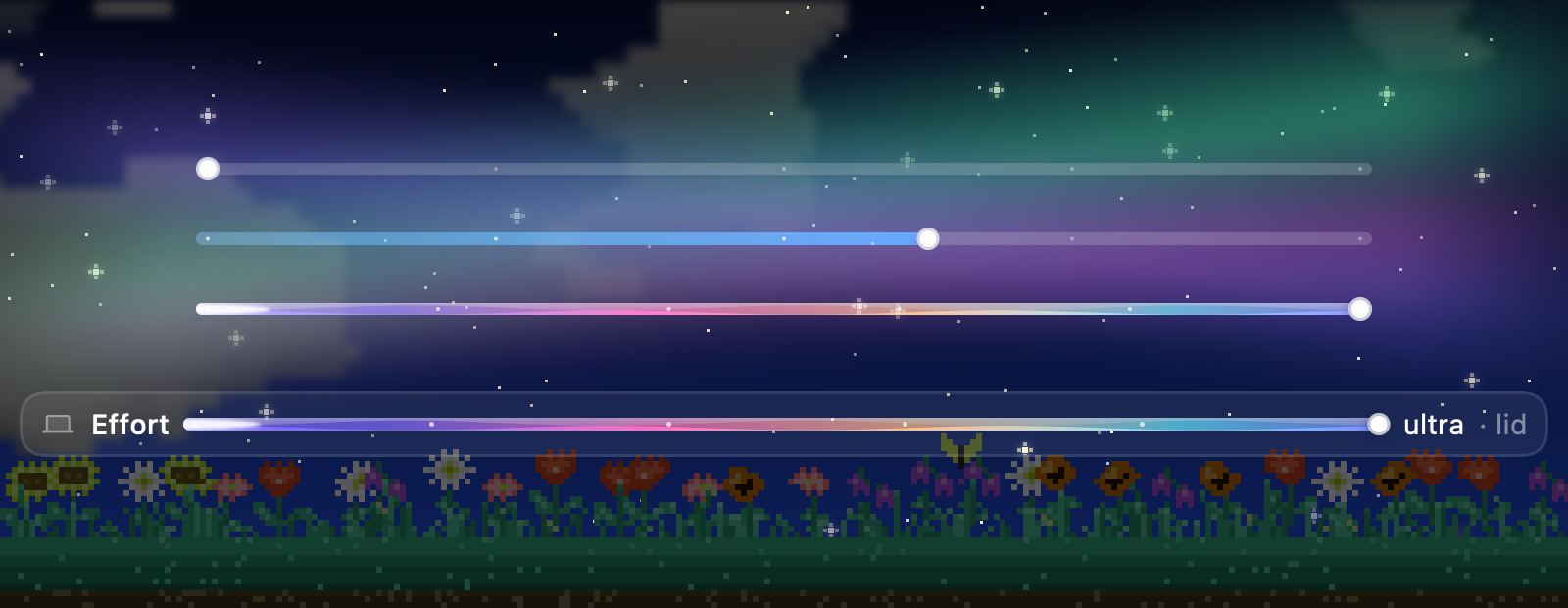
Hold ⌘. Tilt the lid.
Open the lid a little to raise reasoning effort, close it to lower it. One level per 7°, applied when you let go of ⌘, to the agent you're working with and on its model's own scale. Without ⌘, the lid is just the lid.
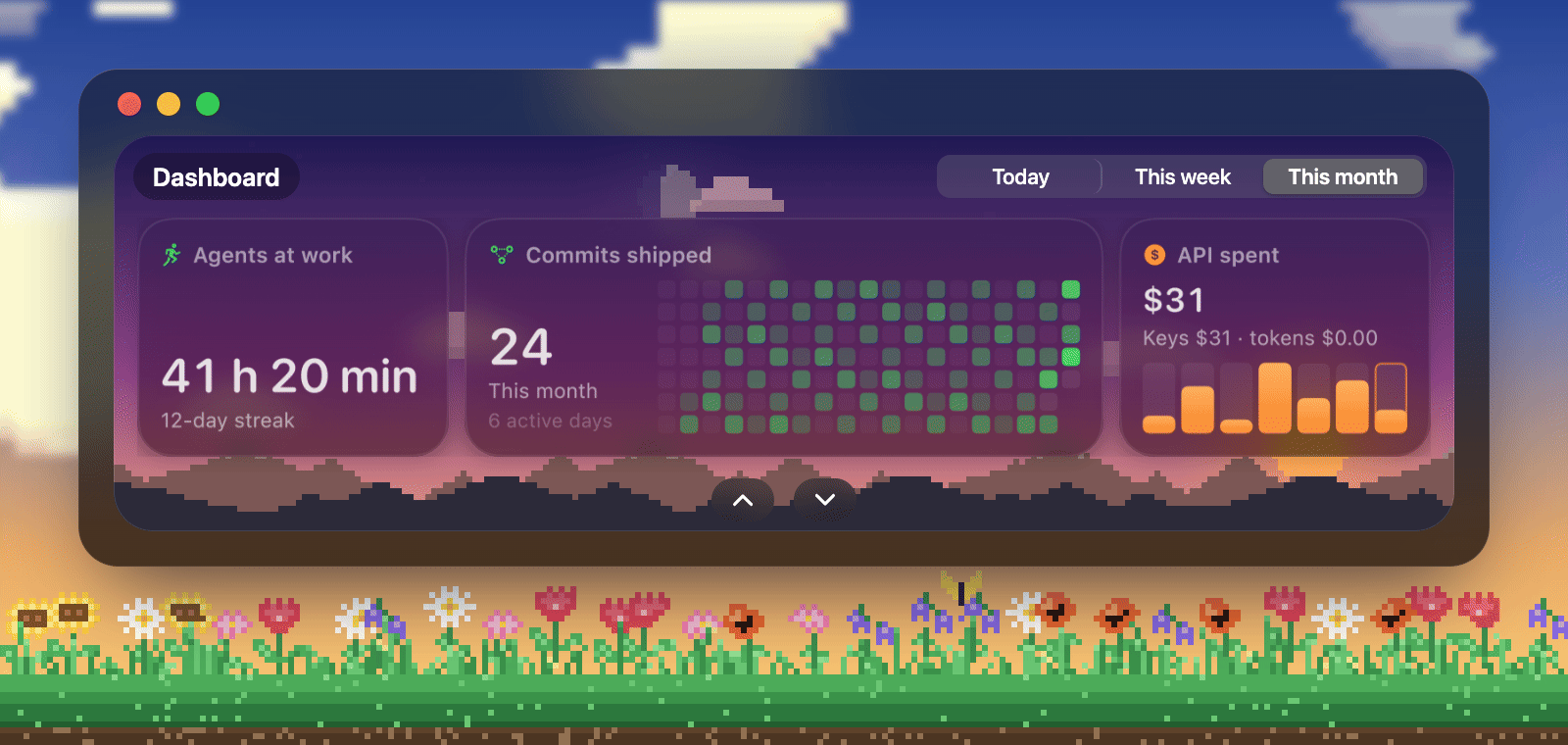
Your agents' month, under your own sky
Settings opens on a dashboard: how long your agents worked, the commits you shipped, what you paid by use, for today, this week or this month. Commits are your own, counted by git in the repos your agents worked in: a column an hour today, a column a day this week, a square a day this month, like GitHub's. Unfold it for everything (waiting on you, lines changed, streak, time by agent and by hour, coding plans priced from each vendor's list, models, recent sessions, spend by key), or slide it away to one line. Hover any column, square or row for its figure.
Behind the widgets is a pixel sky at your Mac's own hour. The sun rises and sets behind the mountains at the real times for where your Mac is, and the moon shows its real phase. Worked out from your time zone: no location asked, nothing fetched.
Beat your best, earn the badge
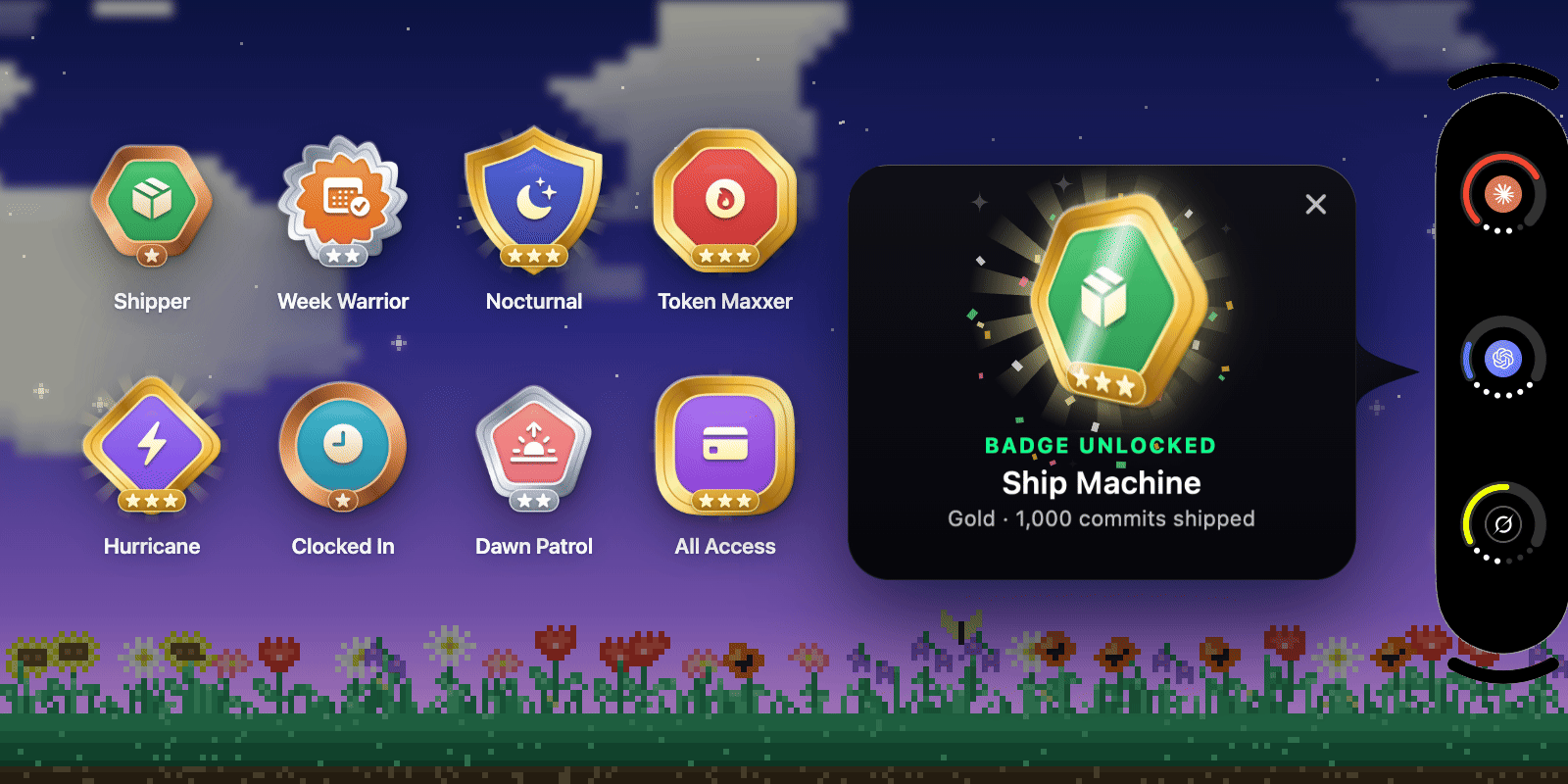
pillr says so on the notch when your agents have their best day, week or month, nudges you on a slow week, and hands out badges as you go: 48 of them, 16 families in bronze, silver and gold, from Night Owl to Token Maxxer. A new one flips onto the notch with a burst of confetti. Keep a streak going and its card catches fire, bigger at 10, 50, 100, 150 and 365 days. Only ever against your own past; no leaderboard, no one else.
And everywhere else: any edge of the screen (top, right, bottom or left), and it follows the display you're working on. Light, dark, or matching your Mac.
🤖 Supported agents
| Agent | Usage ring | Sessions | Done card | Lid effort |
|---|---|---|---|---|
| Claude Code | ✓ | ✓ | ✓ + approvals | ✓ |
| Codex | ✓ | ✓ | ✓ | ✓ |
| Grok | ✓ | ✓ | ✓ | ✓ |
| Cursor | ✓ | ✓ | ✓ | |
| Kimi Code | ✓ | ✓ | ✓ | ✓ |
| GitHub Copilot (Copilot CLI) | ✓ | ✓ | ✓ | |
| Antigravity | ✓ | ✓ | ✓ | |
| Gemini API key (Gemini CLI, OpenCode, Hermes) | ✓ | ✓ | ✓ Gemini CLI | |
| OpenCode | ✓ | ✓ | ||
| Droid | ✓ | ✓ | ||
| Hermes | ✓ | |||
| Devin | ✓ | |||
| GLM | ✓ | |||
| Command Code | ✓ | |||
| DeepSeek | ✓ | |||
| Ollama (local and cloud) | ✓ | model activity | ||
| LM Studio | ✓ | model activity |
Usage is read with the login each agent already has on your Mac; DeepSeek is
signed in once inside pillr. Only agents you have connected, and that have
something to show, take a place in the pill. Per-model effort scales are in
How it works.
Where a provider reports credit or spend, pillr shows it; where it doesn't, pillr still checks the key works. Providers that need a special key, such as xAI's management key, say so before you paste.
| AI routers & gateways | OpenRouter · Vercel AI Gateway · Requesty · AI/ML API · Poe · NanoGPT · Venice AI · Chutes · Cloudflare Workers AI |
| LLM APIs | OpenAI · Anthropic · xAI · Mistral · Google Gemini · Groq · Together AI · Fireworks AI · DeepInfra · Novita AI · Hyperbolic · Featherless · Cerebras · SambaNova · Nebius AI Studio · Cohere · Perplexity · AI21 · Hugging Face · Ollama Cloud |
| China & Asia | DeepSeek · Kimi (Moonshot) · SiliconFlow · StepFun · GLM Coding Plan · Z.ai / Zhipu · MiniMax Coding Plan · MiniMax · Baichuan |
| Speech & media | ElevenLabs · Deepgram · AssemblyAI · Cartesia · Runware · Pruna AI · Bria AI · Stability AI · Runway · Leonardo AI · Ideogram · fal.ai · Replicate |
| Search & scraping | Tavily · SerpApi · Serper · Exa · Firecrawl · Jina AI · ScrapingBee · ScraperAPI · Bright Data · Apify |
| Infra & data | Browserbase · E2B · Neon · Supabase · Upstash · Pinecone · Resend · Composio |
📦 Install
- Download
pillr-<version>.dmgfrom the latest release. - Open it and drag pillr onto Applications.
- Open pillr from Applications. It's signed with a Developer ID and notarized by Apple, so it opens with a double-click. Updates install themselves.
🚀 First run
A short tour shows what pillr does, then a setup assistant walks through what it needs: one page each, every status read live from macOS, every optional step skippable.
- Agents: every supported agent with a Connect button. Connected agents say so; one that needs something says what (sign in, open the app, allow access). One that isn't on your Mac yet shows how to install it.
- Done & approvals: adds pillr's turn-finished hook to each agent found on your Mac, and Claude Code's approvals hook.
- Terminals: Automation for Terminal, iTerm2 and cmux, so pillr can type
/effortor a reply into an idle tab and bring a session's tab forward. Superset, Ghostty, Warp, VS Code, Cursor, Zed, kitty and WezTerm need nothing. - Desktop apps: Accessibility, shown only if the Claude or Codex app is installed, so pillr can set effort and reply in the Claude app session on screen.
Both are in the menu bar later: Set Up pillr… and Take the Tour. API keys are added in Settings → API Keys, or from the API keys cell's menu.
🔒 Privacy
pillr runs entirely on your Mac. No account, no analytics, no server of ours.
What it readsEach agent's own logins (its keychain item or auth file, such as ~/.codex/auth.json), session files and transcripts under folders like ~/.claude, ~/.codex and ~/.grok, and the Claude app's session records. For the dashboard, the git history of the repos your agents worked in (your own commits, by each repo's user.email). For the sky, your wallpaper's file (to pick a card's ink by contrast) and the system's time zone table (/usr/share/zoneinfo/zone.tab). Keychain reads are only of the agents' own logins and the API keys you give pillr. Session files are never modified.
When you move the lid, the one line holding each agent's default effort (see How it works). And, once you have seen what they are in setup, its own turn-finished hook in these files (for agents present on your Mac, with pillr in Applications) and nothing else in them:
| File | Entry |
|---|---|
~/.claude/settings.json |
Stop hook; PermissionRequest hook for approvals |
~/.codex/config.toml |
notify (an existing notify program is kept and still called) |
~/.grok/hooks/pillr.json |
pillr's own file |
~/.cursor/hooks.json |
stop hook |
~/.factory/settings.json |
Stop hook (Droid) |
~/.gemini/config/hooks.json |
pillr entry (Antigravity) |
~/.copilot/hooks/pillr.json |
pillr's own file |
~/.kimi-code/config.toml |
one [[hooks]] block |
~/.gemini/settings.json |
AfterAgent hook (Gemini CLI) |
~/.config/opencode/plugins/pillr.js |
pillr's own file |
The lid gesture rewrites the single line holding the reasoning effort in ~/.claude/settings.json, ~/.codex/config.toml, ~/.grok/config.toml, ~/.hermes/config.yaml, ~/.factory/settings.json, ~/.copilot/settings.json and ~/.kimi-code/config.toml. pillr's own files live in ~/.lid-effort/ and ~/Library/Application Support/pillr/; API keys you add live in your login keychain.
Runs. Occasionally claude --print /usage to read Claude Code's usage, and claude -p to keep Claude Code's login fresh. Both use Claude Code's own credentials and start no MCP servers. For the dashboard, git log and git rev-parse in the repos your agents worked in, read-only.
Sends. Requests go only to each agent's own servers, to each API key's own provider, and to GitHub for updates. Nothing else leaves your Mac. Logs stay on your Mac and contain no message text; crash reports are kept locally and never uploaded.
Types. With your permission, /effort and your replies, only into the session you're looking at, only when it is idle, never into a draft.
🗑️ Uninstall
- Open Settings → General and click Remove pillr from my agents…. It takes pillr's entries out of every file above and leaves the rest as it was.
- Quit pillr and drag it from Applications to the Trash.
Or, from Terminal, before deleting the app:
/Applications/pillr.app/Contents/MacOS/pillr --uninstall
To remove pillr's own data as well, delete ~/.lid-effort/ and ~/Library/Application Support/pillr/. The effort levels pillr wrote stay in each agent's config as ordinary settings.
💬 FAQ
How does the lid gesture work?MacBooks have a hinge sensor that reports the lid's angle. pillr reads it, and only while you hold ⌘: one level per 7° of travel, applied when you let go. Without ⌘, moving the lid changes nothing. Desktop Macs, and MacBooks without a readable sensor, get every other feature, and effort can still be set by dragging the bar in the notch. Details in How it works. Is it safe to open?
Every release is signed with a Developer ID and notarized by Apple, so macOS checks it before the first launch. No Open Anyway, no warning. Updates are signed too, and pillr only installs one whose signature matches. Why does pillr ask for Accessibility?
To type
/effort and your replies into a Claude app session, and to press Esc when you stop a session. It acts only on the session on screen, only when its message box is empty, and never types into a draft. Without it, everything else works.
Why does pillr ask for Automation?
To script Terminal, iTerm2 and cmux: typing
/effort or a reply into an idle tab, bringing a session's tab to the front, and opening a new window when you hand work to another agent.
Does the dashboard's sky need my location?
No. Sunrise and sunset are worked out on your Mac from your time zone's place in the system's own time zone table, and the moon's phase from the date. pillr asks for no location and fetches nothing for it. Where do I report a problem?
Open an issue. Settings → General can copy local crash reports to attach.
🛠️ Contributing and building
Requires Xcode 16 or later, Apple silicon and macOS 15 or later.
script/bundle.sh --run    # build and launch build/pillr.app
swift test
The gesture mechanics, per-agent details, project layout and packaging are in docs/HOW-IT-WORKS.md; releases in RELEASING.md. Issues and pull requests are welcome.
📄 License
MIT. See LICENSE. Third-party components and their licenses are listed in THIRD_PARTY_NOTICES.md.
pillr is an independent project, not affiliated with Apple or any agent's maker.
Reviews (0)
Sign in to leave a review.
Leave a reviewNo results found