app-it
Health Gecti
- License — License: MIT
- Description — Repository has a description
- Active repo — Last push 0 days ago
- Community trust — 47 GitHub stars
Code Basarisiz
- rm -rf — Recursive force deletion command in install.sh
- rm -rf — Recursive force deletion command in plugins/app-it/skills/app-it/templates/desktop-icons.sh
Permissions Gecti
- Permissions — No dangerous permissions requested
Bu listing icin henuz AI raporu yok.
A Claude Code + Codex skill that turns a local project into a macOS Dock-launchable app — native window, its own icon, no Electron. [The Windows version is in BETA]
app-it
Turn a local web project into a macOS Dock-launchable .app bundle — a native window, its own Dock icon, and clean start/stop — without Electron, Tauri, or a rewrite.
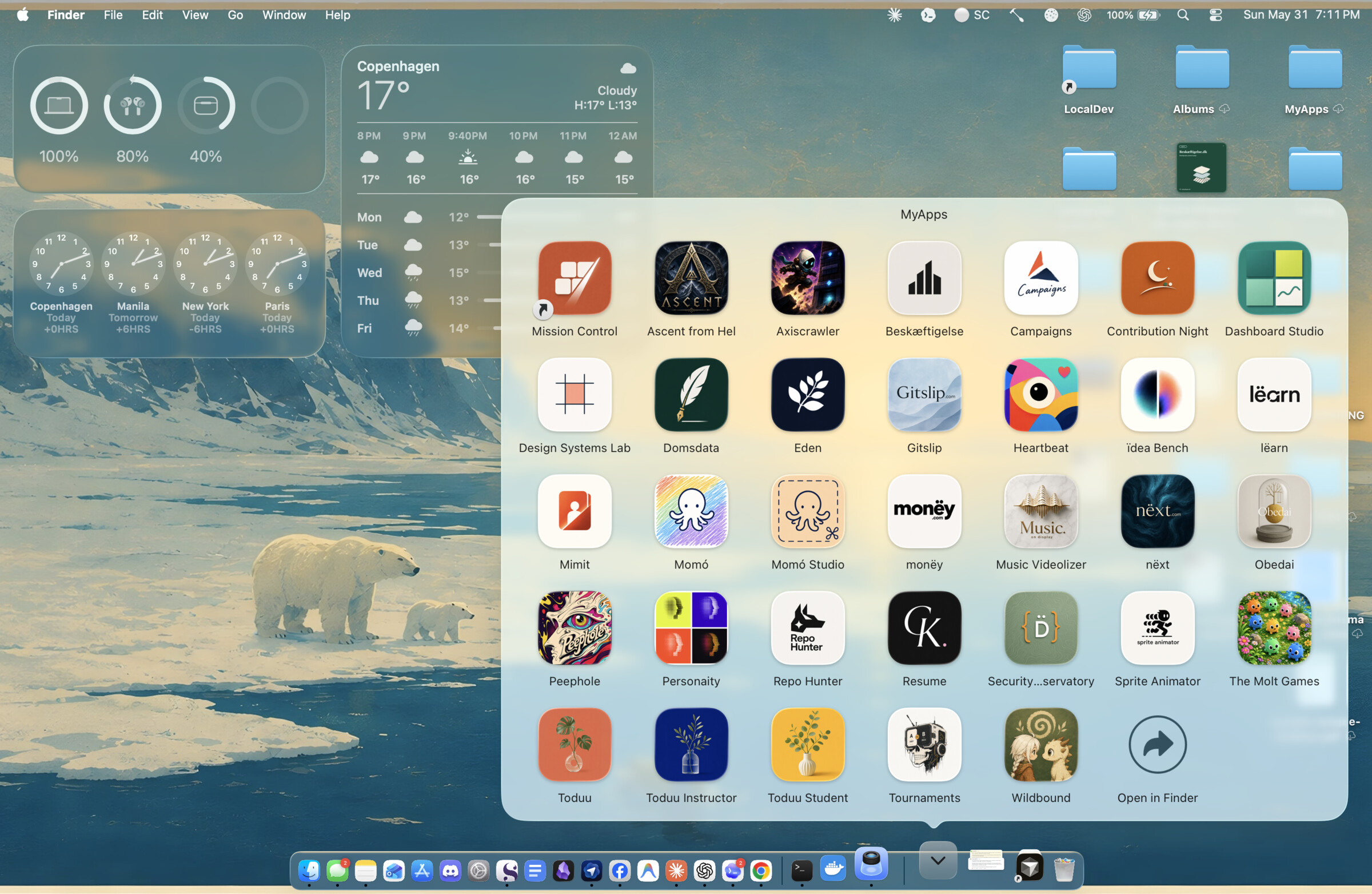
What your Dock looks like after app-it. Every one of these is an ordinary local web project turned into a native macOS app — its own icon, its own window, one click to launch. This is a real MyApps Stack, not a mockup; each icon is an app app-it built.
Status — Working, in daily use. The launcher templates are battle-tested across 12+ real projects; v0.1.0 is the first standalone, marketplace-installable release. macOS only, by design.
Windows beta — macOS is in daily use; Windows is scaffolded as an honest beta and looking for a maintainer. A complete sibling plugin (plugins/app-it-windows/), gated by a required windows-latest CI job (build · PowerShell lint · manifest parse · icon round-trip), mirrors the macOS contract with Windows primitives — but the author runs only macOS, so it has never been run on real Windows hardware. If you're on Windows and want to help finish it, the doorway is docs/WINDOWS.md.
Local-only — app-it reads your project on your machine to choose a launcher strategy. It uploads nothing, runs no telemetry, adds no runtime dependencies, and never touches your business-logic source. The only thing it produces is an .app on your own Dock.
app-it is an assistant-agnostic plugin/skill. It works with Claude Code and Codex, and builds a small, repeatable launcher around an existing local project so that double-clicking starts the dev server, opens a native window, keeps the Dock icon as your app, and cleans up when you quit.
What app-it is not
- Not Electron, Tauri, or a native rewrite. It wraps your existing dev setup; it doesn't replace it, migrate it, or add a bundler to your dependency tree.
- Not a way to ship apps to other people. No notarization, no App Store, no auto-update, no signed distribution. These are personal, ad-hoc-signed, local-use launchers.
- Not cross-platform. macOS only — and on purpose. Windows is a genuinely different problem (WebView2,
.lnk,.ico, SmartScreen), so it belongs in a separate plugin rather than a blurred promise. See Compatibility. - Not a hosted service. Nothing runs in the cloud and there is no live demo to visit — the proof is the apps on your own Dock (the Stack at the top is real).
How it works
  WHAT YOU HAVE               WHAT APP-IT DOES           WHAT YOU GET
  ───────────────────────     ──────────────────────     ───────────────────────────
  a local web project         inspects it from disk,     YourApp.app on your Dock
  Vite, Next, or a static     picks a strategy, then     · its own icon
  site, run with          ──▶ builds & signs a .app  ──▶ · native window, one click
  `npm run dev` in a tab      around a WebKit shell      · ⌘Q quits & frees the port
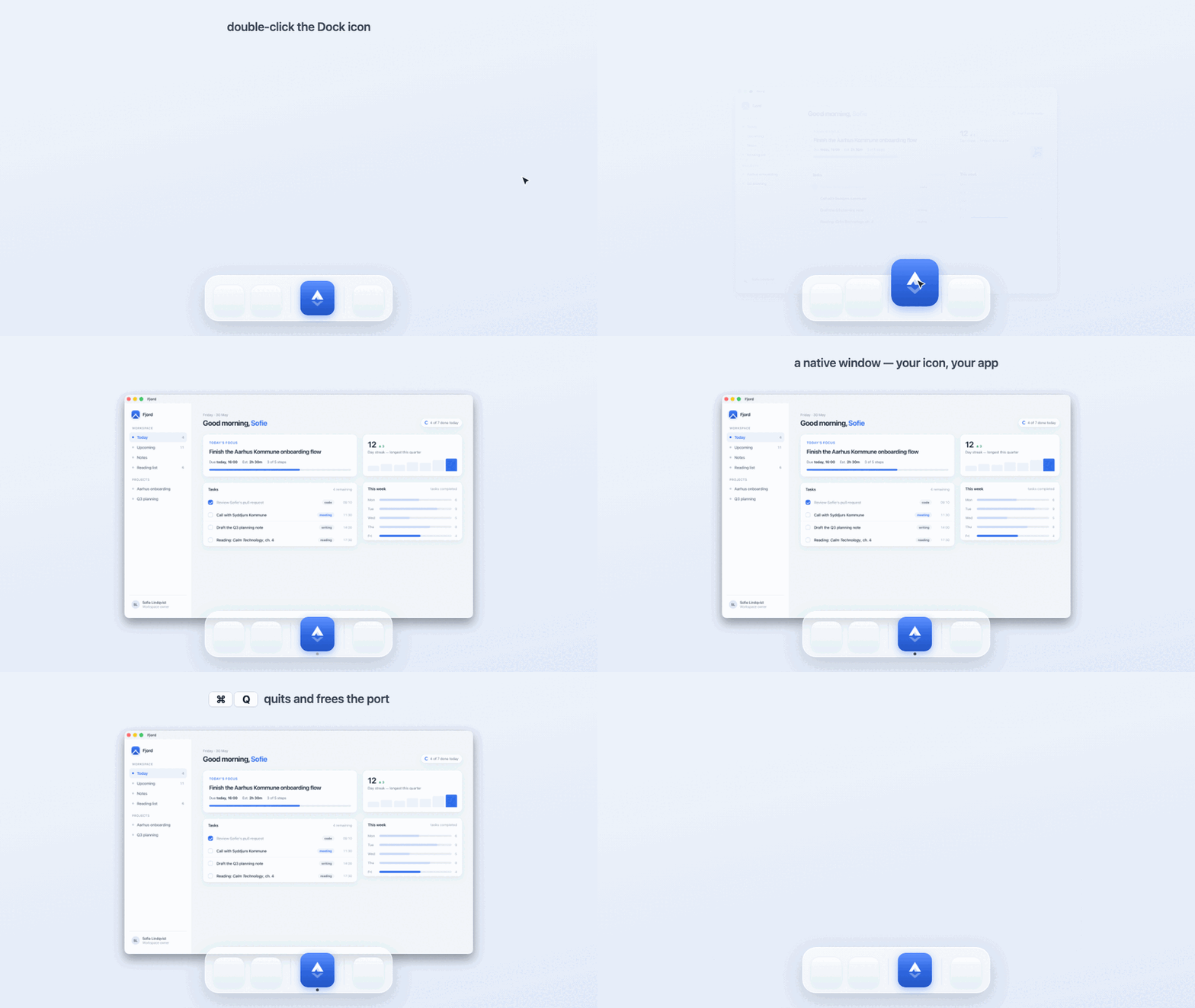
The same lifecycle, running. Fjord is an ordinary local web project (node server.js); app-it turns it into a native macOS app — double-click launches it, the window opens with its own Dock icon, and ⌘Q quits the app and frees the dev-server port.
Under the hood, app-it:
- Inspects before it touches anything — project type, dev scripts, ports, browser-API needs, icon sources.
- Picks a launcher strategy — a native Swift
WKWebViewshell by default (so the Dock icon stays yours), Chrome--appmode only when a project needs Chromium-only APIs. - Copies proven, hard-won templates into the project rather than re-deriving fragile launcher logic each time.
- Builds and ad-hoc-signs a real
.app— universal (arm64 + x86_64), Gatekeeper-friendly, with a generated.icns. - Gets the lifecycle right — closing the window (⌘W / red-X) leaves the dev server warm for a ~250 ms re-launch; ⌘Q quits the app and frees the port.
- Writes a report explaining every change and exactly how to undo it.
Requirements
- macOS.
- Claude Code or Codex for marketplace installation.
swiftc(Xcode Command Line Tools) for the native WebKit shell —xcode-select --install.- Chrome only if a project needs the Chrome fallback path.
Install
Claude Code:
claude plugin marketplace add Christian-Katzmann/app-it
claude plugin install app-it@app-it
Codex:
codex plugin marketplace add Christian-Katzmann/app-it
codex plugin add app-it@app-it
Then, from inside any local web project, ask your assistant:
/app-it
Natural triggers work too: "make this clickable from the Dock", "give this an icon", "dockify this", "package this as a local app".
Local development (before publication)
claude plugin marketplace add /path/to/app-it
claude plugin install app-it@app-it

codex plugin marketplace add /path/to/app-it
codex plugin add app-it@app-it
Manual skill install
Marketplace install is preferred. To copy just the skill folder:
./install.sh            # auto-detects Claude Code and/or Codex, asks before overwrite
./install.sh --dry-run  # show what it would do, write nothing
What it adds to a target project
All additions are additive and reversible:
scripts/app-it.config.json— single source of truth for the app(s)scripts/desktop-build.sh,desktop-install.sh,desktop-quit.sh,wrapper.swift, …assets/<slug>-icon.pngor.svgdesktop/<App Name>.app/(gitignored — regenerated by the build)docs/desktop-launcher.mdand anapp-it-report.mddecision logpackage.jsonscripts:desktop:build,desktop:install,desktop:quit
Installed apps land in ~/Applications/App It/ by default. Drag that folder to the right side of the Dock once and every future appified app appears in its Stack automatically. Override with APP_IT_INSTALL_DIR.
Safety model
app-it only makes additive, reversible changes. It will not rewrite product logic, add runtime dependencies, require a terminal window to stay open, or assume an already-running dev server. It may start and stop local dev-server processes during verification. It never collects telemetry, sends project data anywhere, or handles secrets. See SECURITY.md.
Validate this repo
./scripts/validate.sh
This is the one-command check: it validates manifest shape, shell syntax, template presence, plist syntax, Swift typechecking, and Claude plugin validation (when the claude CLI is available). CI runs the same script on macos-latest.
For AI agents
This repo is agent tooling, and agents are expected to work in it. Start with AGENTS.md — it names the non-obvious conventions (templates are canonical, trust disk over docs, the macOS-only boundary) and the safe first commands. Architectural decisions and their rejected alternatives live in docs/decisions/.
More
License
MIT — see LICENSE.
Yorumlar (0)
Yorum birakmak icin giris yap.
Yorum birakSonuc bulunamadi