vibetrack
Health Gecti
- License — License: NOASSERTION
- Description — Repository has a description
- Active repo — Last push 0 days ago
- Community trust — 29 GitHub stars
Code Gecti
- Code scan — Scanned 12 files during light audit, no dangerous patterns found
Permissions Gecti
- Permissions — No dangerous permissions requested
Bu listing icin henuz AI raporu yok.
Modern experiment tracking that follows you across servers, messengers, and LLMs.
vibetrack
Modern experiment tracking.
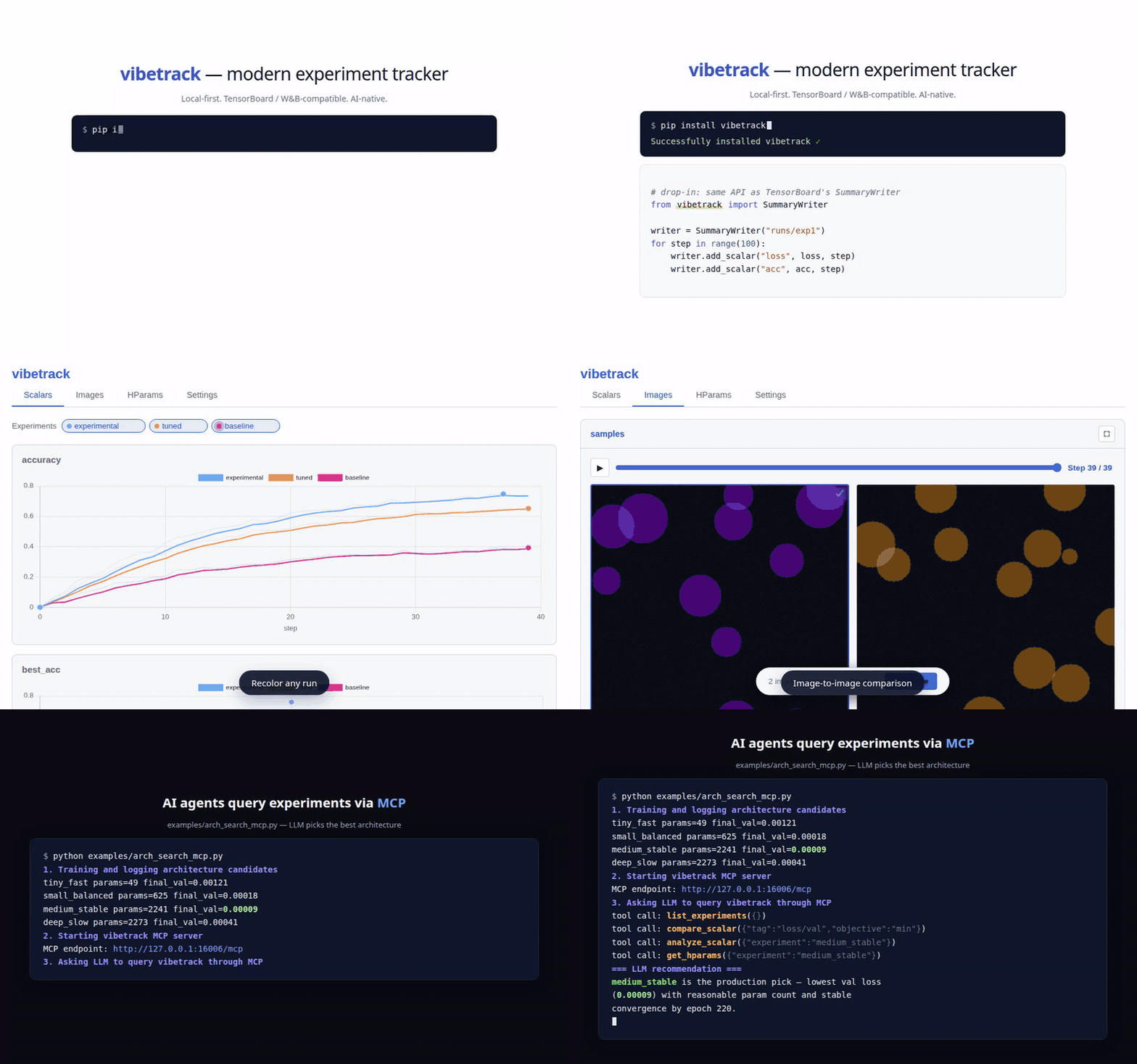
Key features:
- Send experiment results elsewhere: Telegram, Slack, Jupyter, Gradio, and MCP.
- Run locally while receiving experiment data over the network via REST API.
- Use open formats: experiment data is stored in SQLite and local files.
- Compare image-to-image results.
- Use a rich UI to show, hide, delete, and customize runs.
- TensorBoard SummaryWriter compatible drop-in APIs.
- Query results through the MCP server.
- Fast scalar logging; see the benchmark report.
Install
pip install vibetrack          # default with web
pip install vibetrack[all]     # all optional backends+dev; MCP on Python >=3.10
Quick start
TensorBoard-style API
from vibetrack import SummaryWriter

writer = SummaryWriter("runs/exp1", project_folder="my_project")
for step in range(100):
    writer.add_scalar("loss", 1.0 / (step + 1), step)
    writer.add_scalar("acc", step / 100, step)
writer.close()
See API.md for SummaryWriter and module-level logging examples.
Launch the dashboard
vibetrack --listen 0.0.0.0:6116
# -> Web UI on http://you_server:6116
# -> MCP is also mounted when installed with vibetrack[all] on Python 3.10+
Viewers and destinations syntax
writer = SummaryWriter("runs/exp1", project_folder="my_project")
writer.to("console").to("slack", every="15m")
writer.to("remote", url="http://server:8080", token="devtoken")
writer.add_scalar("loss", 0.5, step=0).to("telegram")
See VIEWERS.md for web, console, Slack, Telegram, Gradio,
Jupyter, custom viewers, remote forwarding, credentials, and HTTP ingest.
vibetrack Architecture
flowchart TB
  subgraph LOGGING["Experiment logging"]
    direction TB
    SW["SummaryWriter"]
    ADD["add_(scalar|image|*)"]
    SW --> ADD
  end
  subgraph REMOTE["remote HTTP logging"]
    direction TB
    TO_REMOTE[".to(#quot;remote#quot;)"]
  end
  VIBETRACK["vibetrack<br/>scalars • media • text"]
  subgraph PERSIST["Persist"]
    direction TB
    DB_ROWS["scalars + text + metadata"]
    DEFAULT_DB[("default DB<br/>~/.vibetrack/vibetrack.db")]
    PROJECT_DB[("per project DB<br/>project_log_dir/vibetrack.db")]
    MEDIA["media files<br/>project_log_dir/media"]
    DB_ROWS --> DEFAULT_DB
    DB_ROWS -.-> PROJECT_DB
  end
  DISPATCH[".to(viewer)"]
  FANOUT["best-effort fanout"]
  subgraph VIEWERS["live / summary viewers"]
    direction TB
    WEB["web<br/>(default)"]
    CONSOLE["console"]
    SLACK["slack"]
    GRADIO["gradio"]
    TELEGRAM["telegram"]
    JUPYTER["jupyter"]
    MCP["MCP"]
    CUSTOM[".to(#quot;custom#quot;)"]
  end

  ADD --> VIBETRACK
  TO_REMOTE -.-> VIBETRACK
  VIBETRACK --> DB_ROWS
  VIBETRACK --> MEDIA
  ADD --> DISPATCH
  DISPATCH --> FANOUT
  FANOUT --> VIEWERS
  DEFAULT_DB --> VIEWERS
  PROJECT_DB -.-> VIEWERS
  MEDIA --> VIEWERS

  classDef logging fill:#fff4e6,stroke:#f59e0b,stroke-width:2px,color:#172033;
  classDef code fill:#fff7ed,stroke:#f59e0b,stroke-width:1.5px,color:#172033,font-family:monospace;
  classDef liveCode fill:#eef2ff,stroke:#6366f1,stroke-width:1.5px,color:#172033,font-family:monospace;
  classDef event fill:#ffe4ec,stroke:#e11d48,stroke-width:2px,color:#172033;
  classDef live fill:#eef2ff,stroke:#6366f1,stroke-width:2px,color:#172033;
  classDef storage fill:#e7f8ef,stroke:#10b981,stroke-width:2px,color:#172033;
  classDef optional fill:#f8fafc,stroke:#94a3b8,stroke-width:1.5px,stroke-dasharray:5 5,color:#64748b;
  classDef optionalCode fill:#f8fafc,stroke:#94a3b8,stroke-width:1.5px,stroke-dasharray:5 5,color:#64748b,font-family:monospace;
  classDef viewer fill:#f5e8ff,stroke:#a855f7,stroke-width:2px,color:#172033;

  class SW,ADD code;
  class TO_REMOTE optionalCode;
  class VIBETRACK event;
  class DISPATCH liveCode;
  class FANOUT live;
  class DB_ROWS,DEFAULT_DB,MEDIA storage;
  class PROJECT_DB optional;
  class WEB,CONSOLE viewer;
  class SLACK,GRADIO,TELEGRAM,JUPYTER,MCP optional;
  class CUSTOM optionalCode;
FAQ
How do I collect results from another server?
Run a vibetrack ingest server on the machine that should receive results:
vibetrack --listen 0.0.0.0:8080 --token devtoken --project-folder /srv/runs
Then forward events from the training machine:
from vibetrack import SummaryWriter

writer = SummaryWriter("runs/exp1", project_folder="my_project")
writer.to("remote", url="http://server:8080", token="devtoken")
See VIEWERS.md for remote forwarding
and direct HTTP ingest.
How do I use separate databases on one machine?
By default, vibetrack writes to ~/.vibetrack/vibetrack.db. Passproject_folder to keep a separate vibetrack.db inside that project folder.
from vibetrack import SummaryWriter

writer = SummaryWriter("runs/exp1", project_folder="projects/cv")
Open that database in the dashboard with the same folder:
vibetrack --project-folder projects/cv
How does vibetrack work with distributed training?
vibetrack automatically detects RANK / LOCAL_RANK. Only rank 0 logs by
default; other ranks get a silent no-op writer.
from vibetrack import SummaryWriter

writer = SummaryWriter("runs/distributed", project_folder="project/")
writer.add_scalar("loss", loss.item(), step)
writer.close()
To force every rank to log, pass rank="all":
writer = SummaryWriter("runs/distributed", rank="all")
Can vibetrack collect system resources?
Yes. vibetrack can collect CPU, GPU, memory, and project disk metrics in a
background thread.
writer = SummaryWriter("runs/exp1", system_metrics_interval=3600) # every hour
Collected metrics include system/cpu_percent, system/mem_used_gb,system/disk_free_gb, gpu/utilization, gpu/memory_used_gb, andgpu/temperature. Use system_metrics_interval=0 to disable collection.
How do I run the MCP server for an LLM agent?
Install MCP dependencies, then run the standalone MCP server:
pip install vibetrack[all]
vibetrack --viewer mcp --project-folder my_project/
See MCP.md for MCP endpoints, tools, resources, and agent usage.
What CLI commands are available?
vibetrack                           # default
vibetrack [PROJECT_FOLDER]          # Launch dashboard (web + ingest; MCP with vibetrack[all] on Python 3.10+)
vibetrack --port 8080               # Custom port
vibetrack --token SECRET            # Protect ingest endpoints
vibetrack --listen 0.0.0.0:9009     # Open server on separate port
vibetrack migrate PROJECT_FOLDER    # Merge legacy per-run DBs into project DB
How is vibetrack configured?
Settings are stored in ~/.vibetrack/config.json. The web UI can also write
project-scoped settings through its Settings tab.
{
  "smoothing": "ema",
  "smooth_weight": 0.6,
  "system_metrics_interval": 3600,
  "web": {
    "theme": "light",
    "auto_refresh": 5,
    "image_play_fps": 2,
    "original_values_opacity": 0.17
  }
}
License
Apache 2.0
Yorumlar (0)
Yorum birakmak icin giris yap.
Yorum birakSonuc bulunamadi