win-sshpass
Health Gecti
- License — License: Apache-2.0
- Description — Repository has a description
- Active repo — Last push 0 days ago
- Community trust — 20 GitHub stars
Code Gecti
- Code scan — Scanned 9 files during light audit, no dangerous patterns found
Permissions Gecti
- Permissions — No dangerous permissions requested
Bu listing icin henuz AI raporu yok.
Cross-platform SSH client with password/key/agent auth, SFTP/SCP/Rsync, port forwarding, a full-screen Web SSH console with MCP, and a reusable Go SDK.
win-sshpass

win-sshpass is a cross-platform SSH client and automation tool for Windows,
Linux, and macOS. It combines password/key authentication, SFTP and
SCP/Rsync-style transfers, port forwarding, a browser-based SSH workspace, MCP
tools, and a reusable Go SDK.
Highlights
- SSH with password, private key, ssh-agent, or explicit empty password.
- Remote commands, JSON output, retry, timeout, proxy, and
known_hosts. - Interactive terminal,
--bg, and shell transfer viarz/sz. - SFTP upload/download, recursive directories, multiple files, and resume.
- Local/remote port forwarding and SOCKS4/SOCKS5/HTTP/HTTPS proxies.
- Full-screen Web SSH console with SFTP file manager and xterm.js PTY.
- Drag-and-drop transfers, upload percentage, resizable panes, light/dark themes.
- MCP tools for SSH execution and SFTP file operations.
- Self-update, SSH key generation, hash, and verify commands.
Install
winget install chuccp.win-sshpass
scoop bucket add chuccp https://github.com/chuccp/scoop-bucket
scoop install win-sshpass
Or download the archive, MSI, or PKG from
GitHub Releases.
No external runtime is required.
Quick Start
# Run a command
win-sshpass -p 'password' ssh [email protected] 'whoami'

# Open an interactive shell
win-sshpass -p 'password' ssh [email protected]

# Upload and download
win-sshpass -h example.com -p 'password' -local ./app.jar -remote /tmp/app.jar
win-sshpass -h example.com -p 'password' -d -remote /tmp/app.log -local ./app.log

# Start the Web SSH console at http://127.0.0.1:6326
win-sshpass -web -h 127.0.0.1 -u root -P 22 -p 'password'
The command must include an SSH host, either through -h or -f. Open
http://127.0.0.1:6326 to enter the connected workspace directly.
Web Console
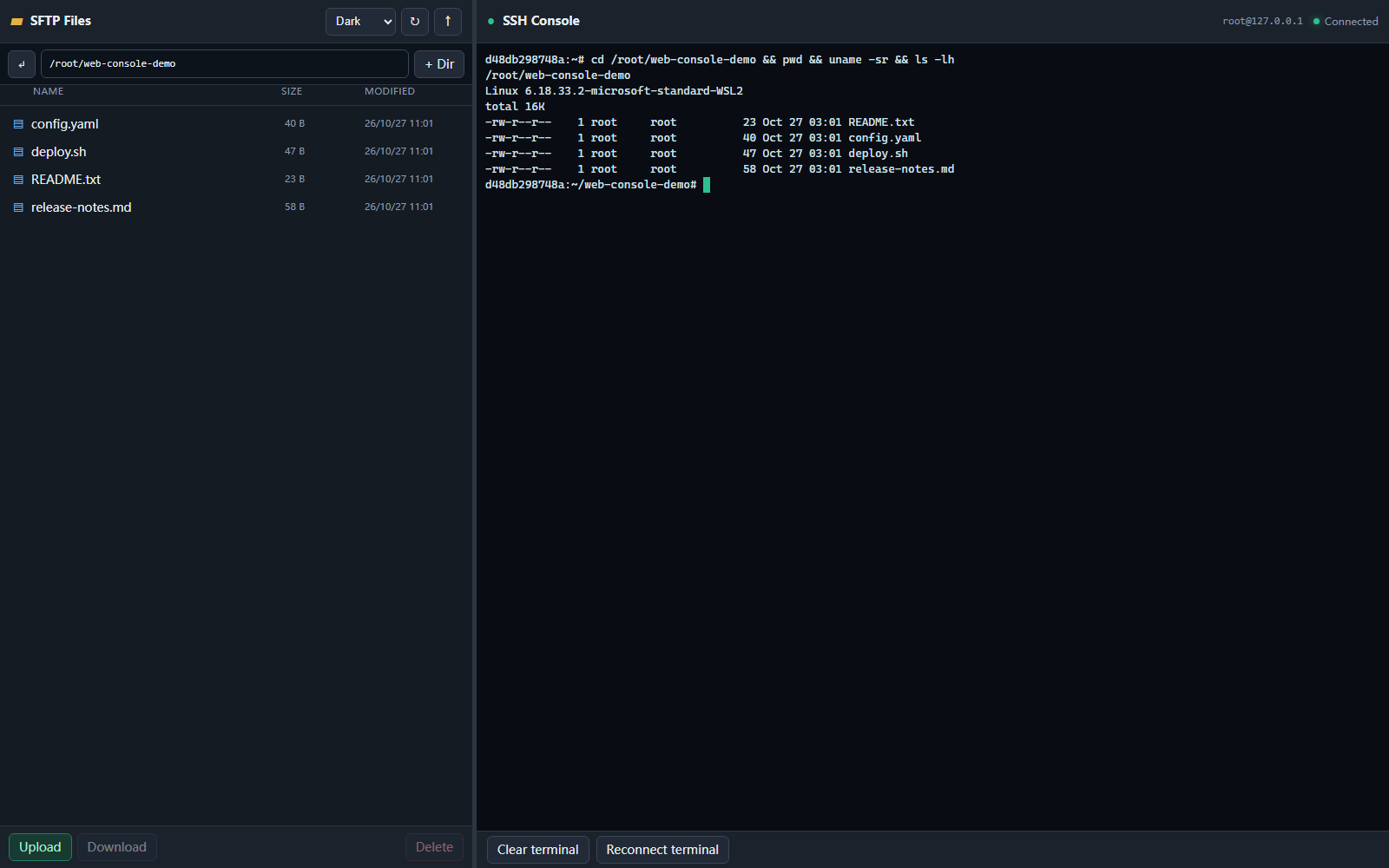
The Web workspace is designed for managing files and a live SSH session:
- Left: SFTP directory browser, upload/download, mkdir, delete, drag-and-drop.
- Right: real SSH PTY rendered with xterm.js; supports vim/top and Tab completion.
- Center divider: drag or use arrow keys to resize; width is remembered.
- Themes: System by default, plus explicit Light and Dark.
- Upload footer: aggregate file count, filename, progress bar, and percentage.
Bare win-sshpass -web is rejected. Supply a host, user and authentication
option on the command line, or use a config file:
win-sshpass -f server.config -web
Change the listener deliberately if needed:
win-sshpass -web -h example.com -u root -p 'password' -web-addr 127.0.0.1:6326
The default is loopback-only.
MCP
The Web server exposes MCP Streamable HTTP at:
http://127.0.0.1:6326/mcp
Example Codex configuration:
[mcp_servers.win-sshpass]
url = "http://127.0.0.1:6326/mcp"
Available tools:
ssh_execsftp_listsftp_readsftp_writesftp_mkdirsftp_delete
MCP reuses the SSH connection supplied with -web and maintains its ownMcp-Session-Id.
Common Commands
| Task | Command |
|---|---|
| Private key | win-sshpass -i ~/.ssh/id_ed25519 ssh user@host |
| Environment password | SSHPASS='pass' win-sshpass -e ssh user@host |
| Password file | win-sshpass -f pass.txt ssh user@host |
| Config file | win-sshpass -f server.config 'docker ps' |
| Custom port | win-sshpass -p 'pass' ssh -p 2222 user@host |
| Operation timeout | win-sshpass -t 30 -p 'pass' ssh user@host 'long-task' |
| SOCKS5 proxy | win-sshpass -proxy socks5://127.0.0.1:1080 ssh user@host |
| SCP upload | win-sshpass -p 'pass' scp -P 2222 file.txt user@host:/tmp/ |
| Rsync upload | win-sshpass -p 'pass' rsync -avz ./ user@host:/backup/ |
| Generate key | win-sshpass keygen -algo ed25519 |
| Hash / verify | win-sshpass hash sha256 file.iso |
| Update | win-sshpass update -check |
Configuration
host: 192.168.1.10
username: root
password: secret
port: 22
timeout: 0
strict_host_key: false
Run a command with the file:
win-sshpass -f server.config 'docker ps'
See the configuration guide
for key, proxy, timeout, retry, and background options.
Go SDK
cfg := sshpass.NewConfig()
cfg.Host = "example.com"
cfg.User = "root"
cfg.Password = "secret"

client, err := sshpass.NewClient(cfg)
if err != nil {
    log.Fatal(err)
}
defer client.Close()

if err := client.Exec("uname -a"); err != nil {
    log.Fatal(err)
}
go get github.com/chuccp/win-sshpass
See the Go SDK guide.
Documentation
Detailed guides cover installation, Web/MCP, SSH, shell, file transfer,
SCP/Rsync, configuration, proxies, forwarding, the SDK, and best practices.
Development
go test -race ./...
go vet ./...
go build -o win-sshpass.exe ./cmd/sshpass
Cross-compilation examples:
GOOS=linux GOARCH=amd64 CGO_ENABLED=0 go build -o win-sshpass ./cmd/sshpass
GOOS=darwin GOARCH=arm64 CGO_ENABLED=0 go build -o win-sshpass ./cmd/sshpass
License
Apache-2.0. See LICENSE.
Yorumlar (0)
Yorum birakmak icin giris yap.
Yorum birakSonuc bulunamadi