yiibu
Health Gecti
- License — License: MIT
- Description — Repository has a description
- Active repo — Last push 0 days ago
- Community trust — 10 GitHub stars
Code Gecti
- Code scan — Scanned 12 files during light audit, no dangerous patterns found
Permissions Gecti
- Permissions — No dangerous permissions requested
Bu listing icin henuz AI raporu yok.
Turn a folder of phone clips into a publish-ready 9:16 short — one step, with the quality bar enforced by gates rather than by remembering.

English · 繁體中文
yiibu(一步)
Turn a folder of phone clips into a publish-ready 9:16 short: one step
(一步, yiibu) from footage to deliverable, with the same quality bar every
time, enforced by gates rather than by remembering.
The point of this skill is not that it can cut video. It is that the quality
bar never depends on anyone remembering. Everything below exists because
something shipped broken once and the fix was turned into a check.
📘 Ten minutes, and you will know whether this is for you →
An interactive page for people who do not write code — creators, organisers,
anyone with a phone full of clips. It asks you to answer first and shows you the
answer after: what this actually makes, why the quality bar is 17 checks that
refuse to ship rather than a document somebody has to remember, and the one
sentence worth saying to it. Source:skills/yiibu/docs/lesson.zh-TW.html
(Traditional Chinese).
Install
Claude Code — one line each for the marketplace and the plugin. This
installs the skill and the four subagents together; the skill answers to/yiibu:
/plugin marketplace add chyiiiiiiiiiiii/yiibu
/plugin install yiibu
Any other agent — Codex, Antigravity, Cursor, a plain script, a person.
Clone it; your tool reads AGENTS.md at the repo root, and every rule in that
file is a command you can run rather than advice you have to remember:
git clone https://github.com/chyiiiiiiiiiiii/yiibu
cd yiibu && ./install.sh
install.sh covers what a plugin cannot: ffmpeg, Pillow and numpy, then hands
over to doctor.py, which is the authority on what is still missing. Add--full for the faster-whisper venv, which is what word-timed speech captions
need. Everything it does not install is optional and skips cleanly.
Then, from any directory:
剪影片 ~/Downloads/my_footage # or: edit video <folder> or: /yiibu <folder>
What it makes
Real outputs from both modes, the automated talking-head pipeline and the locked templates (references/*-template.md).
Every GIF and title links to the published reel on Instagram — the GIF is a silent excerpt, the link is the thing that actually shipped:
 talking-head auto B-roll + circular PiP word-timed captions |
 running vlog word-timed captions gold keywords |
 community meetup event template bilingual captions |
 event recap, 90s hook inside 1s, then the pill names the event |
 food vlog room noise defeats ASR, so captions are AUTHORED |
 product demo screen-recording B-roll behind a PiP |
Six situations, one house style — and the same gates.py blocked every one of
them until it passed. The last three are new: a 90-second event recap, a food
花絮 whose captions are authored because a restaurant defeats ASR, and a run
that turns into a product walkthrough with app screen-recordings as B-roll.
Three more exist and are deliberately held back — a food vlog with a bystander
child in frame, a conference recap carrying third-party official footage, and
one the author excluded. docs/make_demos.py lists each with its reason and
rebuilds the strip, so a hold is a recorded decision rather than a gap.
🎬 Every effect it can put on screen →
Eleven tiles, each a real render or a frame from a video that shipped, each
with the sentence you say to trigger it. SKILL.md carries the same list as
a table because an agent reads text; this page is for the person, who cannot
ask forcutout-largewithout knowing what one looks like.
Configuration (what you can change per project, per machine, or in your fork) is documented indocs/CONFIGURATION.md; a full worked example, with
the gate failures that actually happened along the way, is indocs/WALKTHROUGH.md.
How a video moves through it
flowchart TD
A["📁 footage folder<br/>(the user shoots, the editor selects)"] --> P["plan.py<br/>length from retention structure,<br/>hook candidates<br/>say the number first"]
P --> I["intake<br/>contact sheet · slides read at full res ·<br/>per-clip ASR<br/>captions are researched, not guessed"]
I --> B["build: cut segments<br/>timeline.json + concat.txt"]
B --> C["captions, two layers<br/>pill NAMES it (18%) · caption EXPLAINS it (70%)<br/>width check runs INSIDE generation"]
C --> M["mix: editorial speech gate<br/>original where someone talks, music elsewhere<br/>always BOTH versions"]
M --> R["render: one filter_complex<br/>captions + pills + cover, single encode"]
R --> G{"verify.py + gates.py<br/>blocking gates"}
G -->|any gate red| F["fix the build,<br/>never argue with the number"] --> B
G -->|all green| D["📦 PROJECT_DIR/<br/>NAME-<track>.mp4 · NAME-nomusic.mp4 · cover.jpg"]
Two ways to use it
1. Talking-head mode: the automated pipeline. You film yourself
talking; one command does the rest:
python3 postprod.py MY_TAKE.mov [--script script.json]
- clap-to-delete: clap when you fluff a line; the take before the clap is
removed automatically, then silences are trimmed - word-timed captions: ASR word timings grouped into phrases → ASS
subtitles, animated gold keywords, face-aware placement, optional bilingual
line, IG-style emphasis
captions on the punchlines - B-roll, keyword-aligned: matched to what you actually say, with a
per-type fallback chain: website screenshot → stock video/photo
(Pexels/Pixabay) → Veo generation → Gemini image → GPT image → skip cleanly - music bed with speech ducking; circular-PiP or split layouts; optional
closing CTA overlay
2. Template mode: the agent-assembled edit. A folder of event,
food, or running clips; the agent selects shots and builds to a locked template
(references/*-template.md), and the same gates block the ship. This is the
mode shown in the demo GIFs above and walked through indocs/WALKTHROUGH.md.
Both modes end at the same two gates, verify.py and gates.py, and ship
both a music and a no-music version.
What you need for full talking-head quality
Everything degrades cleanly: each missing key skips its feature, never errors.
No other skill is required; B-roll generation is built in.
| you bring | you unlock |
|---|---|
| nothing (ffmpeg + Pillow + numpy) | clap-cut, silence trim, layouts, gates |
music you are licensed to use, dropped into bgm-library/ (how) |
music bed with ducking, the stand-in ladder |
faster-whisper venv (SETUP.md) |
word-timed captions |
| Pexels / Pixabay keys (free) | stock-footage B-roll |
| Gemini API key | Veo B-roll generation, Gemini image fallback, LLM caption segmentation, bilingual line, emphasis captions |
| Playwright + Chrome | website-screenshot B-roll for product mentions |
The demo GIFs above were made with the full stack; the full table is exactly
what produced the talking-head demo.
Using it well: how to brief the agent
The skill needs exactly one thing: a folder of footage. Everything else has
a sensible default, and the agent announces its plan (length, template, music)
before cutting, so you can veto any part of it in one line.
Below are two real briefs at opposite extremes. Both shipped.
One line, any driver
No flags, no config file, and the word yiibu does not have to appear — the
skill's own description is what routes it. The same sentence, three drivers:
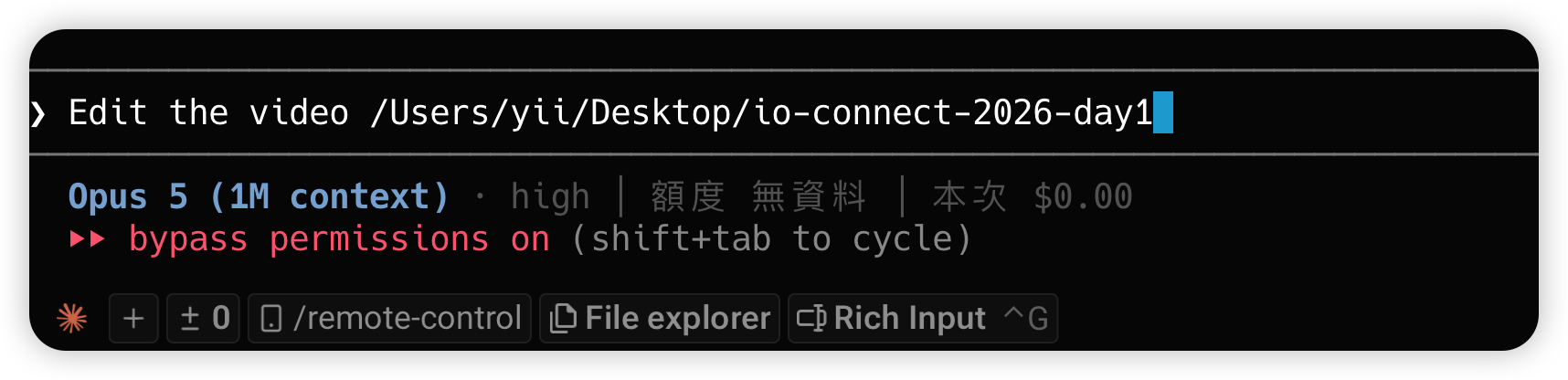

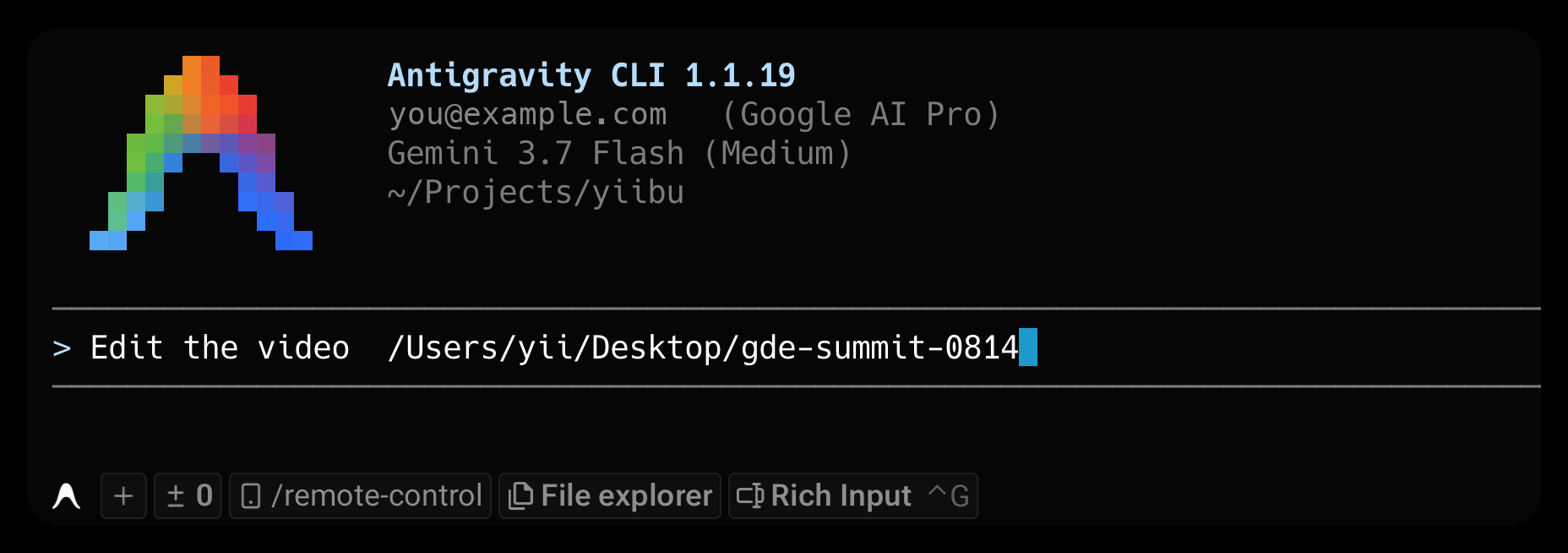
That is a complete request. The defaults fill in the rest and are announced
before the first cut.
Or just talk
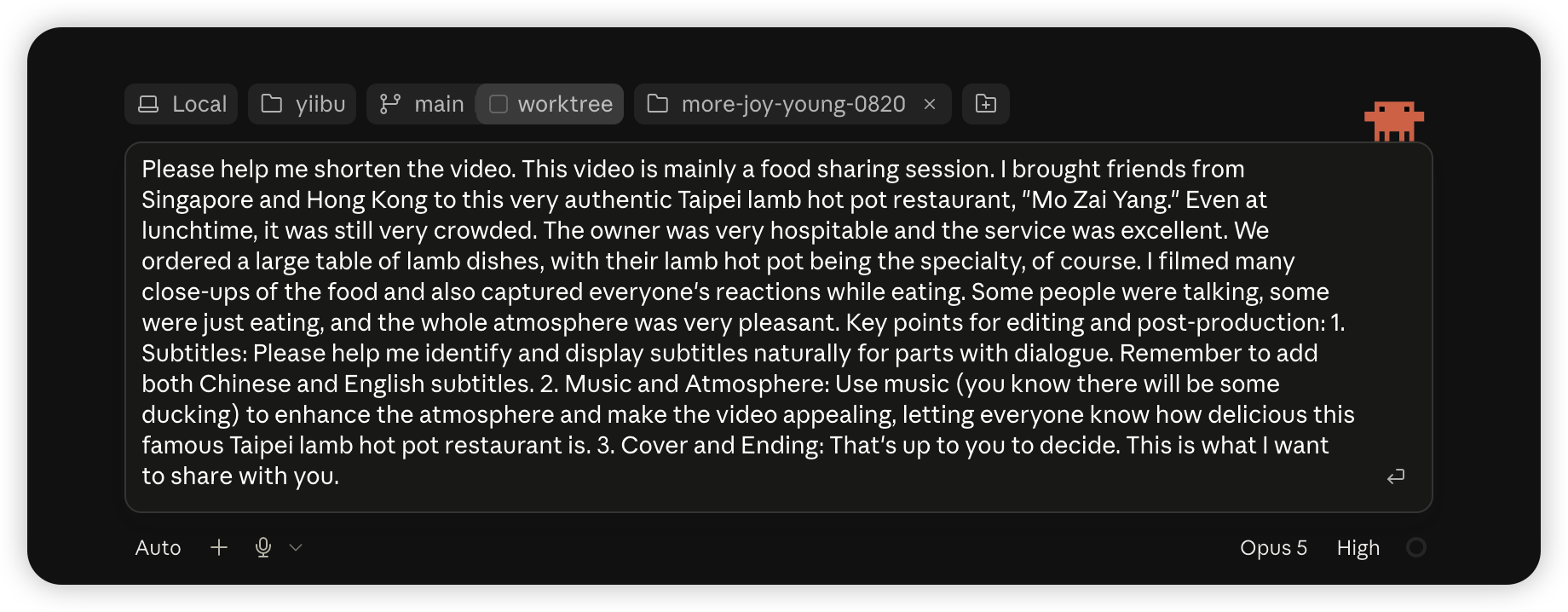
This is the brief behind the food vlog in the grid above — dictated rather
than typed, with the music dropped in as an attachment:
Please help me shorten the video. This video is mainly a food sharing
session. I brought friends from Singapore and Hong Kong to this very
authentic Taipei lamb hot pot restaurant, "Mo Zai Yang." Even at lunchtime,
it was still very crowded. […] I filmed many close-ups of the food and also
captured everyone's reactions while eating. […]1. Subtitles: identify and display subtitles naturally for parts with
dialogue. Remember to add both Chinese and English subtitles.2. Music and Atmosphere: use music (you know there will be some ducking)
to enhance the atmosphere […]3. Cover and Ending: that's up to you to decide.
Three things in there changed the edit — and all three are facts the footage
does not contain:
- the restaurant's name. Nothing on screen spells 莫宰羊 / Mo Zai Yang.
Without it the captions cannot name the place, and the agent will not invent
one. - where the friends are from. Singapore and Hong Kong is not in any pixel.
- the track — handed over as a file, not described.
The rest changed nothing, and that is fine. No length was given, soplan.py derived one. "Cover and ending, up to you" is already the default.
Ducking happens in duck_mix whether or not you mention it.
So the rule is not more context is better. It is: say what the footage
cannot say. Anything the pipeline can measure — length, template, music
selection — it measures better than a guess, and pinning the length in
particular pushes it to fill time rather than cut.
The structured middle
Somewhere between the two, if you like fields. Every line after the folder is
optional:
edit video ~/Downloads/0814_shanghai
event: Google GDE Summit Shanghai, one-day recap     ← what/where, for captions
platform: IG Reels, 60-90s                           ← length target
music: upbeat, chorus-first                          ← or a specific track / no music
note: don't zoom on unreleased roadmap slides;       ← boundaries only you know
      end on the group selfie
The last line is the highest-value one: privacy/NDA boundaries and "this shot
must be in it" are things no amount of footage analysis can discover. The full
intake contract (what the agent assumes vs what it will ask) is inSKILL.md; a complete worked edit is in docs/WALKTHROUGH.md.
Preparing the footage (the cheapest quality win)
Everything below is optional — the pipeline copes without it — but each line
saves a research round-trip, a re-render, or a wasted ASR pass:
- One folder per video, un-trimmed. Drop everything in; selection is the
skill's job. Hand-trimming clips beforehand helps nothing and risks cutting
off words the captions need. - Shoot vertical. Rotation metadata is read per clip, so mixed
orientations survive — but a native 9:16 shot always beats a cropped
landscape one. - Flubbed a take? Clap once, then say it again. A single clap deletes the
3 seconds before it in the silence step; the mistake never reaches the edit. - Shoot the hook and the ending on purpose. The first 2 seconds decide
the scroll and the last beat is the payoff shot. A folder that contains one
deliberately strange image and one deliberate closer gives the edit both. - Get the phone close when you speak. Speech sitting below about −25 dB
carries no captionable words; one sentence said near the mic beats three
distant retakes.
Quick start
python3 doctor.py                      # does this machine have what it needs?
python3 gates.py --preflight           # THE house style, as a build checklist
python3 plan.py  YOUR_FOOTAGE_DIR      # how long should this be, what's the payload?
#   ... cut ...
python3 verify.py WORK_DIR --output FINAL.mp4
python3 gates.py  FINAL.mp4 --work-dir WORK_DIR    # exits 1 = do not ship
Requirements are deliberately small: ffmpeg, Pillow, numpy. The caption font
is bundled. yt-dlp (B-roll/music) and a faster-whisper venv (speech captions)
are optional; both features skip cleanly when the tool is absent, they never
error. Full install (venv, API keys, fallback chains): SETUP.md.
Platform: the automated talking-head pipeline runs on macOS and Linux
(hardware encode on macOS, software elsewhere). Template-mode builds usemodules/buildkit.py, which is macOS-only today (videotoolbox) — see the
platform note in SETUP.md.
Division of labour
The user shoots. The editor selects. You are handed a folder; deciding which
shots earn a place, in what order, and how long the result runs is the edit.plan.py does the arithmetic for that decision: it does not shoot anything and
it does not pretend to know what is in a frame.
How length is decided
Not "footage ÷ shot length"; that makes the video as long as the material
allows, which is backwards. Length is additive from what is worth watching:
length = hook(2-3s) + Σ payload(8-14s each) + connective(~25%) + ending(4-6s)
- Hook: the opening 2 seconds show the strangest thing in the folder. Not a
sign, not walking in. If the best image is at 4:51 of a five-minute clip, that
is frame one. - Payload: one thing worth understanding, with room to land. Under three and
there is no reason to watch; over six and none of them breathe. - Connective tissue: cut this first when it feels long. Never cut payloads.
plan.py groups clips by the topic token in their filename, because a payload is
not the same as a long take: three 2s clips of one booth are one payload, and a
five-minute clip of a queue is none.
On the numbers: the shot bands are measured from one reviewed-and-accepted
edit. The platform ranges are conventions, not research; no retention
statistics were invented to justify them. Override them freely; just do not
quietly pad the output.
The gates
gates.py blocks the hand-over. Each row is a defect that actually shipped:
This is what that looks like — real gates.py output on a real project, with
the 2026-08-17 rebuild's actual defects re-seeded into it (captions moved to
50% height, Speech dropped to 62pt with a black outline, decisions.json
deleted). The same video passes all seventeen gates without them:
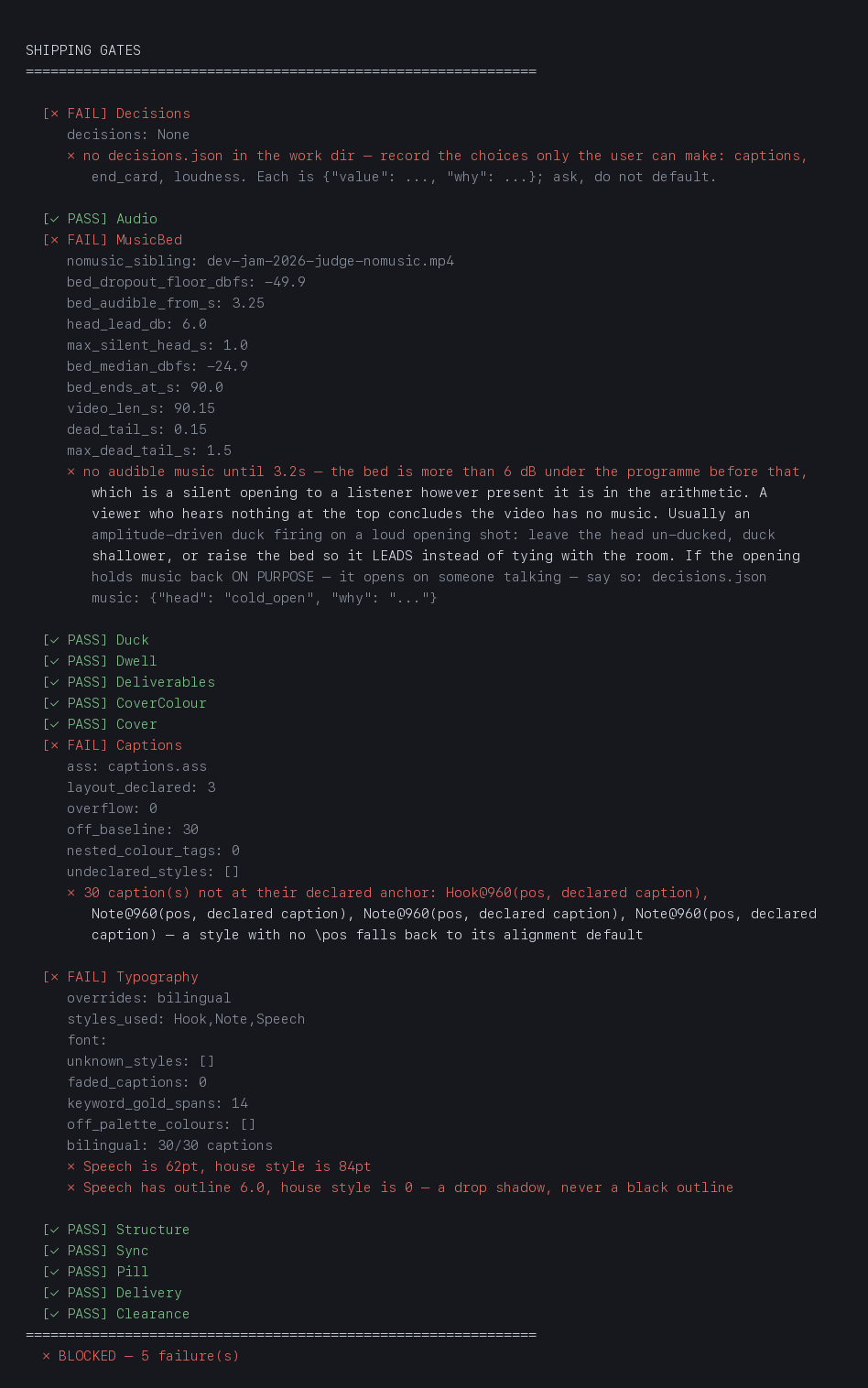
Note the second failure. Deleting the user's recorded decision did not just
fail Decisions — it un-licensed the cold open that decision was covering, andMusicBed fired too. The captured output is kept verbatim indocs/gallery/gates-blocked.txt.
| gate | blocks on |
|---|---|
| Decisions | no decisions.json — a choice that is the user's (loudness, captions, end card) silently defaulted, or departing from the default without a written why |
| Audio | dead air >0.8s, silent ending (<-32 dBFS), clipping |
| MusicBed | the music bed dying before the video does (measured by subtracting the no-music sibling), or no sibling pair to measure |
| Deliverables | the music / no-music pair or cover.jpg missing from the project root |
| CoverColour | cover subtitle not the house gold, measured off the rendered pixels |
| Cover | no cover, frame 1 isn't the cover, title too small for a feed, subtitle width not tracking the title, or a cover built from a LANDSCAPE source — the right shape with the picture on its side |
| Captions | overflow past the safe area, undeclared style, caption off its declared anchor, nested colour tags |
| Typography | wrong font or size, black outline instead of the house drop shadow, \fad where the house cut is hard, an all-white pass with no gold keyword spans (Speech-styled passes only), half-translated bilingual captions |
| Structure | no hook inside the first second, no end card, video not ending on it, or an end card that declares no text — a screenshot of the final clip passed every other check |
| Sync | a caption whose words are not in the audio under it: first word cut off, >1s late, wrong line over the shot, or a stale words.json |
| Pill | missing entirely, square corners (an ASS box, not the PIL capsule), edge-to-edge, off the 18% position, faded in |
| Duck | the bed never actually stepping out of the way of the speech under it — measured, like MusicBed, by subtracting the no-music sibling |
| Dwell | a caption on screen for less than the house floor — nobody finishes reading it |
| Clearance | session-looking footage with no clearance_scan.json, or an excluded clip still in the timeline. Silent on footage that does not look like session material |
| Timeline | timeline.json missing the keys the other checks read — a segment with no id, no source file, a duplicate id, or a total that disagrees with its own segments |
| AudioPolicy | a segment whose audio nobody decided about, a keep/mute call with no written why, or a render that ignores the policy it wrote — the muted spans are measured against the kept ones on the no-music file |
| Delivery | PTS≠0 black first frame, audio/video length mismatch |
The signature two-layer caption system, drawn by the code it documents
(python3 docs/make_diagrams.py re-renders it straight fromhouse_style.json and modules/title.py, so the picture cannot drift from
the spec):
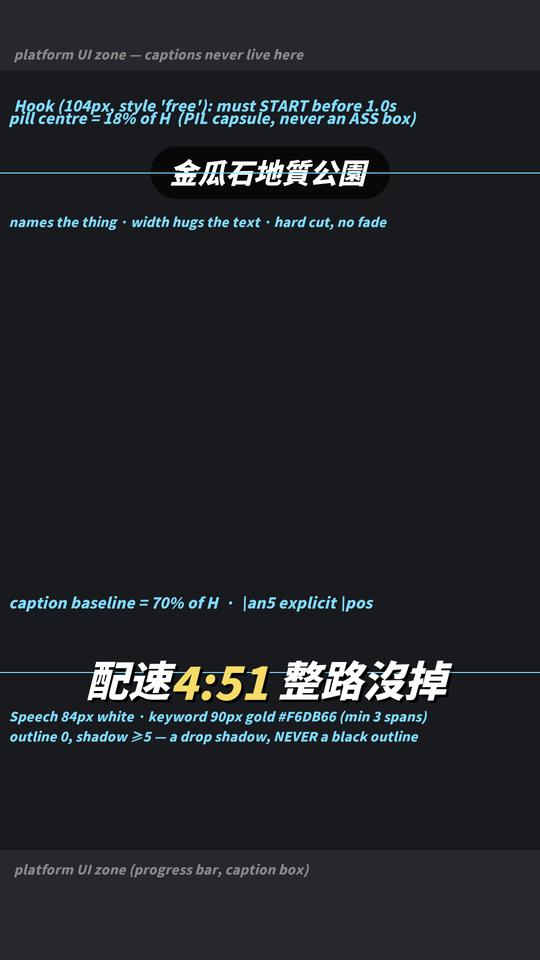
The style, structure and sync thresholds all come from one file,house_style.json, which gates.py --preflight prints as a checklist
before you build and the gates read after. The instruction and the judgement
are the same file, so they cannot drift apart, and an agent that never read the
docs is still caught.
Three design decisions worth copying if you build something similar:
- A missing artifact is a failure, not a skip. An earlier runner warned and
moved on when the cover or the subtitle file was absent — which is exactly how
a whole edit shipped with no cover. - Layout must be declared, not inferred. Every caption style is declared in
WORK_DIR/layout.jsonascaption(70% baseline),pill(18%) orfree.
The first version used a name allowlist and silently passed any style someone
named differently — the same class of bug it existed to catch.
{"Speech": "caption", "Note": "caption", "Hook": "free", "CardBig": "free"}
- Gates check position; a separate gate must check style. A rebuild once
shipped hand-drawn square pills and 62pt outlined captions with every gate
green, because nothing measured typography. If a reader can recognise it, a
gate has to be able to measure it.
tests/test_gates.py and tests/test_house_style.py reconstruct each shipped
defect and assert the gate catches it, so the gates cannot rot into always-pass.doctor.py runs both.
The rule behind all of it
Do not reason about whether a measurement is acceptable.
A number outside the threshold is a failure even when you can explain it.
A silent ending shipped twice in one session. Both times the level was measured,
seen, and talked away — "that's the song's own outro", "that's the tail fade".
Explaining a number is not checking it.
Templates
Read the one that matches the material before touching anything else. Each is a
locked recipe, not a suggestion.
| shape | file |
|---|---|
| conference / event recap | references/event-vlog-template.md |
| food / restaurant vlog | references/food-vlog-template.md |
| running / sport talking-head | references/running-vlog-template.md |
| ffmpeg + delivery traps | references/delivery-traps.md |
Layout
house_style.json   THE spec — read by --preflight and by the gates
plan.py            length + selection, before cutting
doctor.py          environment check + runs both test suites
verify.py          advisory quality report
gates.py           blocking shipping gates (17)
resolve_music.py   the music ladder — never stalls the build
build_lint.py      static lint for hand-written build scripts
modules/cover.py   cover recipe (max 2 lines, auto-sized, burned as frame 1)
modules/title.py   the rounded pill
modules/buildkit.py  proven ffmpeg primitives for template builds
tests/             gate + house-style regression suites
references/        locked templates + worked example build scripts
agents/            the four subagent definitions the workflow uses
Reading map
| you want | read |
|---|---|
| install, keys, fallback chains | SETUP.md |
| every effect it can put on screen, with its trigger | SKILL.md capability map |
| the four subagents the workflow uses | agents/ |
| cross-tool entry for non-Claude agents | AGENTS.md |
| how the system is designed, and why gates | ARCHITECTURE.md |
| every tunable knob | docs/CONFIGURATION.md |
| one edit, end to end, with the real gate failures | docs/WALKTHROUGH.md |
| how this was built — each defect and the check it became | docs/CHANGELOG.md |
| a deep dive on one hard bug (audio boundary fades) | docs/audio-boundary-fades.md |
| does the standard hold across drivers? the current evidence | docs/BENCHMARK-2026-08-23.md |
| the agent contract (what an LLM driving this must do) | SKILL.md |
| contributing a gate or a feature | CONTRIBUTING.md |
| licences for code and media | LICENSE · NOTICE.md |
Yorumlar (0)
Yorum birakmak icin giris yap.
Yorum birakSonuc bulunamadi