vitrine
Health Uyari
- License — License: Apache-2.0
- Description — Repository has a description
- Active repo — Last push 0 days ago
- Low visibility — Only 5 GitHub stars
Code Basarisiz
- rm -rf — Recursive force deletion command in Resources/bridge-helper.sh
- rm -rf — Recursive force deletion command in scripts/bench/browser-macos.sh
- rm -rf — Recursive force deletion command in scripts/build-agent.sh
- rm -rf — Recursive force deletion command in scripts/build-app.sh
Permissions Gecti
- Permissions — No dangerous permissions requested
Bu listing icin henuz AI raporu yok.
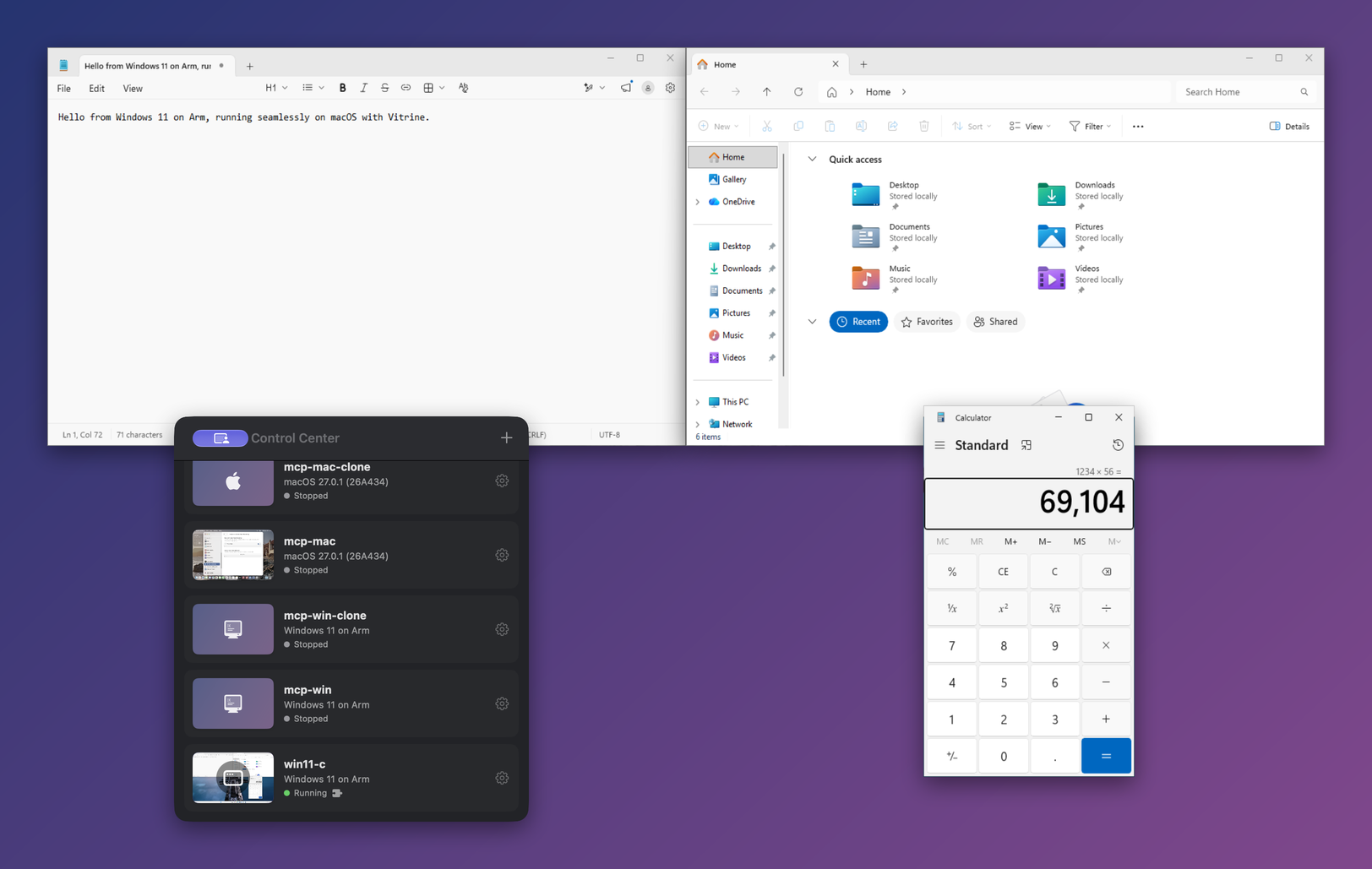
Virtual machines on Apple Silicon that you and your AI agents can both drive: macOS, Linux and Windows guests, seamless windows, MCP server
Vitrine

Free, open-source virtual machines for Apple Silicon that you and your AI agents can both drive —
macOS, Linux and Windows.
Vitrine runs VMs on Apple's Virtualization.framework at native speed (macOS and Linux guests), and on
QEMU when Apple's framework can't (Windows 11, x86_64 emulation). Apache-2.0 licensed.
- For AI agents:
vitrinectl mcpis a Model Context Protocol server. An agent can
create a Windows 11 or Debian VM with an unattended install (macOS too, on a macOS 27 host), then
watch its screen, click, type in any language, run commands and copy files over SSH, and snapshot
or clone it: a clean machine to test an app in, reproduce a bug on, or let an agent work in instead
of on your Mac. Everything runs locally; nothing goes to a cloud service. - For you: the integration features people pay for: guest apps as ordinary windows on your
desktop (seamless mode), shared clipboard, shared folders, instant snapshots, suspend/resume and
one-click installs.
Status: v0.1, under active development. See what works (with dated test
results in docs/verification.md) and the roadmap.
Download
Get Vitrine-<version>.zip from the latest release,
unzip it and move Vitrine.app to Applications. The app is ad-hoc signed and not notarized yet, so
macOS blocks its first launch, and on macOS 15 and later right-click ▸ Open no longer gets past
that: open Vitrine once, then go to System Settings ▸ Privacy & Security, scroll down and click
Open Anyway (or run xattr -dr com.apple.quarantine /Applications/Vitrine.app). The app's
command-line tool and MCP server is /Applications/Vitrine.app/Contents/MacOS/vitrinectl.
Let an agent drive it
./scripts/build-cli.sh                                        # → .build/release/vitrinectl
claude mcp add vitrine -- "$PWD/.build/release/vitrinectl" mcp  # or any MCP client, see docs/mcp.md
Then ask, for example: “Create a Windows 11 VM called win-test, wait until it's set up, install
7-Zip in it and take a screenshot of it open.” The agent uses create_vm, polls create_status,
and works the guest through exec, screenshot, click and type_text; no tool returns the
guest account's password (it stays in the VM bundle, which push_file can read like any other file
of yours: see the security note in docs/mcp.md).
Highlights
| Feature | Vitrine support and requirements |
|---|---|
| Price / license | Free, Apache-2.0 |
| AI agents (MCP) | Create (unattended Debian 13, Windows 11, macOS), clone, start/stop, screenshots, click, type (US keyboard, or any characters through the guest agent), SSH exec and file copy, snapshots — docs/mcp.md |
| Seamless guest windows | macOS, Linux/X11 and Windows guest agents |
| One-click macOS | macOS 27 provisioning + automatic agent installation |
| One-click Linux desktop | Debian 13 Xfce from cloud image + cloud-init |
| Windows 11 on Arm / x64 | QEMU + HVF / experimental TCG emulation |
| Snapshots | APFS clones of bundle-contained disks, optional memory state; see snapshot safety below |
| Suspend / resume | VZ and QEMU, including Windows on Arm |
| Quit behavior | Suspends running VMs by default; reports failures instead of silently discarding state |
| Clipboard | macOS: text, RTF, HTML, images; Linux/Windows: text and PNG |
| Drag files into the VM | macOS and Windows guests; Linux guest file receiving remains on the roadmap |
| Shared folders | virtiofs for VZ guests; Samba for Windows guests |
| GPU | Metal for macOS guests; Linux and Windows use 2D displays, with 3D still on the roadmap |
| USB passthrough | QEMU host USB; VZ host USB needs macOS 27 and Apple's restricted entitlement |
| Guest apps in the Mac Dock | Agent app catalogs and Dock proxy launchers |
| VM window status bar | Guest CPU, memory, disk, uptime and IP from the agent; switches for the network cable, clipboard, display resizing, camera, Bluetooth and USB (View ▸ Show Status Bar, ⌘/) |
| Mac camera in the guest | Linux guests: the agent turns the Mac's camera into a v4l2loopback webcam while the status-bar switch is on; macOS guests: the agent's Vitrine Camera extension, with a team-signed agent; Windows 11 guests: a Media Foundation virtual camera (docs/camera.md) |
| Mac Bluetooth in the guest (experimental) | Linux guests get an emulated Bluetooth LE controller (hci0) whose scans, connections and GATT traffic go through the Mac's Bluetooth (docs/bluetooth.md) |
| Networking | NAT, host-only, named VM-to-VM networks, bridged (root helper), TCP/UDP port forwards — docs/networking.md |
| Disk format | ASIF (macOS 26+) or sparse raw |
| CLI | vitrinectl |
What works today
Verified end-to-end on an M1 Max running macOS 27:
- macOS guests: IPSW download → install → first boot creates your account (no Setup Assistant),
enables SSH, Vitrine installs its agent automatically; seamless mode with crisp 1:1 Retina windows,
mouse, keyboard (incl. shortcuts and synthesized text), two-way clipboard; drag files from Finder onto
the VM (they land on the guest Desktop); suspend/resume; APFS snapshots. - Linux guests (VZ): UEFI + ISO installs, direct kernel boot (gzip and EFI-zboot kernels unpacked
automatically), one-click Debian 13 Xfce via cloud-init (user, SSH, desktop, autologin, virtiofs
mount), Rosetta for x86_64 binaries, serial console log. - QEMU backend: aarch64 on HVF and x86_64 emulation (TCG), UEFI, NVMe, USB installer media, TPM 2.0
(swtpm) for Windows 11, in-app VNC display with raw scancodes, QMP control, suspend/resume via
migration (USB audio is hot-unplugged around it so even Windows on Arm can suspend). - Windows 11 on Arm (QEMU + HVF): verified with the official 26H2 ISO (build 26300.9457) —
fully unattended install (account, autologon, virtio drivers, OpenSSH, Vitrine agent), agent
connects on first logon; keyboard incl. Unicode text, focus, window list, capture and two-way
clipboard passvitrinectl agent probe; suspend/resume (6 GB RAM image, ~50 s) and cold boot from
the installed disk. Setup runs on ramfb; afterwards Windows uses virtio-gpu (viogpudo) at
1920×1080, and Vitrine finishes setup by itself (ejects the media, deletes the password-bearing
seed, boots again). - Windows 11 x64 (TCG emulation) — experimental. The recorded 2026-10-18 acceptance run
completed unattended setup in 1 h 53 min on an M1 Max, including SSH and the agent. Offline setup
and seeded OpenSSH avoid the earlier OOBE/Windows Update stalls. Full x64 emulation remains much
slower than Windows on Arm; see the measured results. These are recorded
results for that configuration, not an acceptance test of every Windows ISO or host. - Verification: which features were tested on fresh Debian, Windows 11 Arm and macOS installs,
on which date and commit, with display latency and known issues — docs/verification.md. - Everyday VM features: disposable mode (every run starts from the same disk), APFS clones with
their own MAC and DHCP host name, NAT / host-only / named VM-to-VM networks with fixed addresses /
bridged (through a small root helper you install once) / no networking, with TCP and UDP port
forwards on both backends (docs/networking.md),
shared folders (virtiofs on VZ, 9p on QEMU Linux), serial consoles (vitrinectl console, scriptable),
a QEMU GDB stub, file push/pull over SSH, importing qcow2/VMDK/VHDX/VDI disks and UTM VMs,vitrine://start|show|suspend|stop?vm=NAMEURLs for automation, keeping the Mac awake while VMs
run, and Secure Boot with Microsoft's keys for x86_64 QEMU guests (Debian's signed shim → GRUB
verified; Windows with Secure Boot on not yet verified). - Languages: the app is in English, Traditional Chinese, Simplified Chinese and Japanese and
follows the language set in System Settings; adding one is described in
CONTRIBUTING.md. The CLI is English. - AI agents (MCP):
vitrinectl mcplets an MCP client create VMs with unattended Debian,
Windows 11 or macOS installs, clone them, start and stop them, see their screens, type
and click (as the VM's own keyboard and pointer, so also at login screens and in installers), run
commands and copy files over SSH, and take snapshots — see docs/mcp.md. Text a US
keyboard can't type (accents, CJK, emoji) goes through the guest agent. Created end to end through
MCP so far: headless Debian 13, Windows 11 Arm and macOS 27; Unicode typing checked byte for byte
in a Debian Xfce terminal, Windows PowerShell and macOS Terminal (pasted through the guest
clipboard while the agent may not type) (verification). - Guest agents: macOS (Swift), Linux/X11 and Windows (one Go code base). Windows uses GDI capture
andSendInput; its agent waits for virtio-serial by default. TCP is an explicit, weaker
compatibility transport, not an automatic guest-agent fallback.
Resuming needs an unlocked Mac. Virtualization.framework encrypts saved VM memory with a Secure
Enclave key that macOS only releases while you're logged in and unlocked. A resume attempted while
the screen is locked fails; Vitrine keeps the saved state and asks you to unlock and retry (or
discard it with Discard Suspended State /vitrinectl discard-state).
How seamless mode works
 guest (VM)                                           host (your Mac)
┌───────────────────────────┐  vsock (VZ) or     ┌──────────────────────────────────┐
│ Vitrine Agent              │  virtio-serial     │ AgentSession                     │
│  • one display stream     │ ─────────────────► │  • IOSurface framebuffer         │
│    (ScreenCaptureKit /    │  dirty rects       │ CoherenceController              │
│    X11 damage), no        │  window list       │  • one borderless NSWindow per   │
│    wallpaper/Dock/shadows │                    │    guest window, cropping the    │
│  • window geometry        │ ◄───────────────── │    shared surface (contentsRect) │
│  • input injection        │  pointer, keys,    │  • native host shadows & z-order │
│  • clipboard sync         │  focus, clipboard  │ DisplaySink keeps the guest at   │
└───────────────────────────┘                    │  host-screen resolution          │
                                                 └──────────────────────────────────┘
One capture stream feeds every window, so a frame update is one memcpy into a shared IOSurface no
matter how many guest windows are open. (The code calls this feature Coherence: CoherenceController,--coherence.) The design and code are clean-room — no proprietary code was inspected or used.
Requirements
- Apple Silicon Mac, macOS 14+ (macOS 27 recommended: automatic macOS account setup, ASIF disks)
- Xcode 16+ / Swift 6 to build
- For Windows / x86_64 guests:
brew install qemu swtpm - For Windows shared folders and host-to-guest file drops:
brew install samba - Linux seamless integration requires an X11 session; Wayland is not supported.
Build & run
git clone https://github.com/cioufong/vitrine && cd vitrine
./scripts/build-app.sh          # → dist/Vitrine.app (ad-hoc signed with the virtualization entitlement)
open dist/Vitrine.app
Ad-hoc builds need no Apple account. VZ's own bridged networking, VZ USB passthrough and the macOS
guest camera need entitlements Apple grants to developer teams. To enable them, sign the build with
your own team: see docs/signing.md.
Use File → New… (the Installation Assistant):
- Download macOS — newest version your Mac supports.
- Debian 13 (Xfce) — ready-made desktop, configured automatically.
- Linux — any arm64 installer ISO (Ubuntu, Fedora, Debian…).
- Windows 11 — pick a Microsoft ISO; choose Arm64 (recommended — x64 apps run through Prism) or
x64 (full emulation, experimental).
For seamless mode in a macOS VM, click Allow… in the bar at the top of the VM window (or choose
Actions ▸ Allow Vitrine Agent Control…) once and allow both prompts inside the VM (Screen Recording
and Accessibility), then press ⌃⌘C (or the toolbar button). A VM run by vitrinectl run asks
with vitrinectl agent permissions <vm>. The agent asks for nothing until you do, so a VM you only
drive from the host never shows them. Linux and Windows agents need no permission: press ⌃⌘C, and
Actions ▸ Exit Seamless Mode (or ⌃⌘C again) brings the VM window back.
Command line
./scripts/build-cli.sh                                   # .build/release/vitrinectl
vitrinectl create dev --user me --password '…'            # macOS VM
vitrinectl create-linux deb --distro debian-13 --user me --password '…'
vitrinectl create-linux alpine --iso alpine.iso           # any Linux ISO (VZ)
vitrinectl create-windows win --iso Win11_Arm64.iso --user me --password '…'   # unattended Windows 11
vitrinectl set win --eject                                # after install: detach installer + seed media
vitrinectl agent probe win --editor Notepad               # end-to-end agent check (QEMU guests)
vitrinectl run dev [--gui] [--console]                    # Ctrl-C shuts down
vitrinectl suspend dev                                    # resume with `run` (works for app-run VMs too)
vitrinectl discard-state dev                              # drop saved memory, boot from disk next time
vitrinectl snapshot create dev clean-install
vitrinectl share add dev ~/Projects
vitrinectl exec dev 'uname -a'                            # run a command in the guest over SSH
vitrinectl agent install dev
vitrinectl agent camera dev                               # install the guest's virtual camera (Linux, Windows 11)
vitrinectl agent bluetooth dev                            # Linux guest: install the Bluetooth bridge (BlueZ, hci_uart)
vitrinectl agent permissions mac                          # macOS guest: ask there for the agent's seamless-mode permissions
vitrinectl screenshot win shot.png                        # any running VM
vitrinectl keys deb --combo ctrl+alt+t; vitrinectl click deb 640 400
vitrinectl mcp                                            # MCP server for AI agents (docs/mcp.md)
vitrinectl set deb --disposable on                        # throw away each run's changes
vitrinectl port add deb 2222:22                           # forward host 127.0.0.1:2222 to guest SSH
vitrinectl network create lab; vitrinectl set deb --network network:lab   # VM-to-VM network
vitrinectl set deb --network bridged:en0                  # own address on the LAN (docs/networking.md)
vitrinectl push deb ./notes /home/me/notes                # copy in (pull copies out)
vitrinectl console deb                                    # serial console; Ctrl-] detaches
vitrinectl import old.utm                                 # or a .qcow2/.vmdk/.vhdx/.vdi disk
open 'vitrine://start?vm=deb'                             # start/show/suspend/stop from scripts
vitrinectl list
Snapshot safety
Writable disks must be regular files referenced by safe paths inside the VM bundle. Snapshots and
clones reject external writable disks, parent traversal and symbolic-link aliases before making
changes. Move those disks into the bundle or attach them read-only first. External read-only media
are referenced rather than captured; keep them available at their original location.
Restoring a snapshot checks its manifest, required disks and saved-memory metadata before replacing
VM state. Incomplete legacy snapshots are rejected. A saved state with writable hot-plug USB media
or a host USB device cannot be snapshotted safely; shut down or detach those devices before saving.
Shared host folders are outside the snapshot and are never rolled back.
If a restore and its rollback both fail, Vitrine retains the original backups, reports their recovery
directory, and blocks VM startup and another restore until that workspace has been recovered. Never
delete a retained .restore-* directory before recovering the files it contains.
Tests
swift test                     # unit tests (protocol, framebuffer, seamless-window pipeline, QEMU args, …),
                               # agent probe against scripted guests, macOS input injection recorded, not posted
python3 scripts/tests/lifecycle-integrity.py "$(swift build -c release --show-bin-path)/vitrinectl"
                               # disposable CLI bundles + synthetic QMP fault recovery; build release first
./scripts/smoke-linux.sh       # boots Alpine on Virtualization.framework
./scripts/smoke-qemu.sh        # boots Alpine on QEMU/HVF, suspends and resumes
ARCH=x86_64 ./scripts/smoke-qemu.sh   # same, with x86_64 emulation
./scripts/tests/ninep-share-e2e.sh     # QEMU Linux: serial-console login, 9p shared folder, GDB stub
./scripts/tests/network-qemu-e2e.sh    # QEMU Linux: port forward, internet under NAT, none in host-only
./scripts/tests/secureboot-e2e.sh      # x86_64 QEMU: unsigned loader refused, Debian's signed shim boots
./scripts/tests/automation-qemu-e2e.sh # QEMU: screenshot, typing and clicks over QMP
python3 scripts/tests/mcp-e2e.py "$(swift build --show-bin-path)/vitrinectl" <vm>  # MCP against a running desktop VM
python3 scripts/tests/mcp-create-e2e.py "$(swift build --show-bin-path)/vitrinectl" <new-vm>  # MCP create, clone, snapshots
python3 scripts/tests/mcp-unicode-e2e.py "$(swift build --show-bin-path)/vitrinectl" <vm> [linux|windows|macos]  # non-US typing
open dist/Vitrine.app --args --coherence-demo   # seamless mode against a synthetic guest
The cloud-init YAML test requires Python 3 and PyYAML (CI pins 6.0.3). GUI integration tests need an
active display and skip explicitly without one. Socket, Samba and ISO-mount integration tests need
the corresponding local permissions/tools; run them in a normal local shell if a sandbox blocks
those resources. The CLI lifecycle runner and the agent probe tests use only temporary fake-data VMs
and scripted agents; they never boot guests.
Project layout
| Path | What |
|---|---|
Sources/VitrineCore |
VM config, bundles, ASIF/raw disks, APFS snapshots & clones, kernel unpacking, guest network lookup |
Sources/VitrineVZ |
Virtualization.framework backend, macOS installer, cloud-image Linux installer, agent installer, VM controller |
Sources/VitrineQEMU |
QEMU backend: argument builder, QMP, VNC client + display view, swtpm, Windows creation |
Sources/VitrineAgentProtocol |
Host⇄guest wire protocol, channel, clipboard sync |
Sources/VitrineAgentHost |
Agent session, IOSurface framebuffer, seamless windows, camera capture, emulated Bluetooth LE controller |
Sources/VitrineNet |
vmnet interfaces and frame sockets shared by both backends and the bridge helper |
Sources/vitrine-bridged |
Root LaunchDaemon that serves bridged networking (installed on request) |
Sources/VitrineApp |
SwiftUI app (Control Center, Installation Assistant, Configuration); UI strings in Resources/Localizable.xcstrings |
Sources/vitrinectl |
CLI |
guest/macos-agent |
macOS guest agent (VitrineAgent.app) |
guest/macos-camera-extension |
Vitrine Camera CoreMediaIO extension for macOS guests (inside VitrineAgent.app) |
guest/linux-agent |
Linux (X11) and Windows (Win32) guest agent, Go; btbridge is the root Bluetooth bridge |
guest/windows-camera |
Vitrine Camera Media Foundation media source for Windows 11 guests (C++, built with zig) |
docs/ |
Research notes, benchmarks, verification matrix, networking, camera, Bluetooth, signing, MCP, Linux GPU roadmap |
Roadmap
- Windows x64 emulation: improve speed and repeat acceptance on more host/ISO configurations;
install-once templates and applying install.wim on the host remain possible future work. - Windows: resolution that follows the window or seamless screen — the stock viogpudo driver only
offers a fixed list of standard modes (640×480 … 5120×2160), so arbitrary sizes need a custom-mode
driver or agent-side closest-mode selection; faster installer
media than USB mass storage; Windows acceptance runs with Secure Boot on; drag-and-drop into
Linux guests. - Secure Boot on Arm guests (Homebrew's QEMU ships no Arm firmware with Secure Boot) and a populated
revocation list (dbx; currently empty). - Linux 3D acceleration: QEMU + virglrenderer/ANGLE child process or libkrun Venus —
docs/linux-gpu-roadmap.md. - Guest menu bar in seamless mode; dragging files from guest to host.
- Networking: a bridged run through the installed root helper on more Macs; a headless Linux agent
mode so servers without X report their address. - Broader USB passthrough acceptance testing; VZ physical USB and VZ's own bridged networking need
restricted entitlements, so they work only in builds signed by a team (docs/signing.md). - The Windows guest camera tested on Windows 11; the macOS guest camera tested end to end with a
team-signed agent. - Bluetooth: guest-side advertising and peripheral role, L2CAP channels, more devices tested.
License
Apache License 2.0. See LICENSE. QEMU (GPL) is used only as a separate program and is not
distributed with or linked into Vitrine. Bundled guest agents include third-party Go packages under BSD
licenses; see THIRD_PARTY_NOTICES.
Vitrine is an independent project. It is not affiliated with, endorsed by or sponsored by Apple,
Parallels, Microsoft or the UTM project; product names are trademarks of their owners and are used
only to describe compatibility.
Yorumlar (0)
Yorum birakmak icin giris yap.
Yorum birakSonuc bulunamadi