longhouse
Health Uyari
- License — License: Apache-2.0
- Description — Repository has a description
- Active repo — Last push 0 days ago
- Low visibility — Only 5 GitHub stars
Code Uyari
- process.env — Environment variable access in .github/actions/check-freshness/action.yml
- process.env — Environment variable access in .github/actions/wait-for-ci/action.yml
Permissions Gecti
- Permissions — No dangerous permissions requested
Bu listing icin henuz AI raporu yok.
Drive your *actual* coding agents, not another agent wrapper! Like codex/claude remote control but fully open source and compatible across ALL the good agents
Longhouse
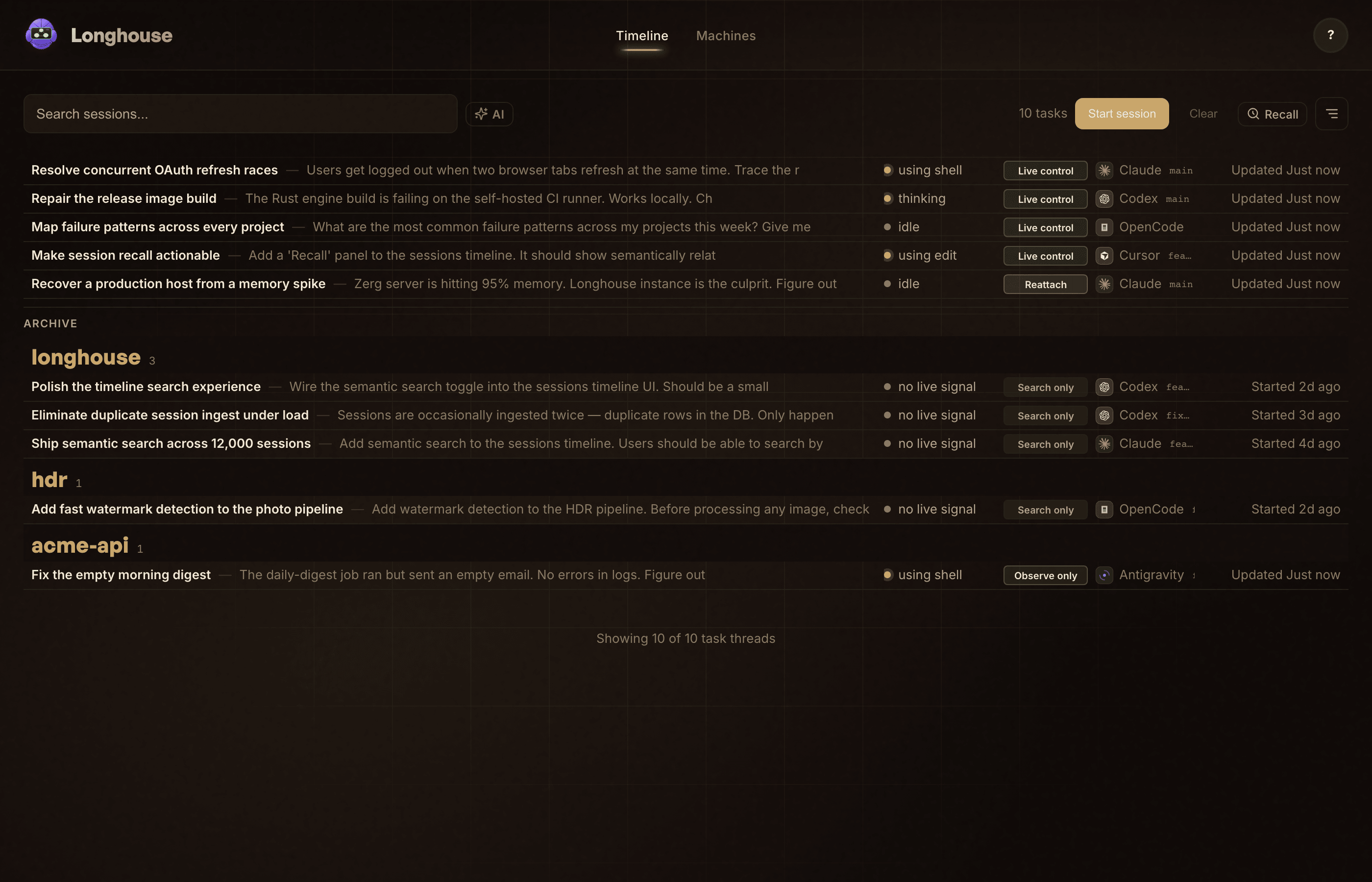
Install and continue to use your coding agents like normal. This tracks, controls, and intercepts all the best coding agent CLIs so that you can view and control the sessions remotely on web or ios. One searchable timeline for every Claude Code, Codex, Antigravity, OpenCode, and Cursor session across the machines you own with live remote control.
Loca rust daemon monitors and parses all the coding agent transcript and session logs into a unified database format by default, and then just launch your agents with longhouse in front like longhouse claude to get full remote control
Why
If you run coding agents often it gets messy quick across the terminal tabs and transcripts. Today that history is scattered across ~/.claude, terminal scrollback, or one local log dir per tool.
Longhouse fixes that:
- Find any past session in seconds — one timeline + full-text search across every provider and machine.
- Steer live work remotely — launch a session through Longhouse and send to it later from the web or your phone.
- Own your history — runs on machines you control, SQLite at the core, nothing uploaded to a vendor cloud.
To be clear, this is NOT like all the other agent wrappers that run their own internal management and force you into their UX/UI platform. You can literally just run 'claude' like normal and get the full observability stack. To go further just 'longhouse claude' (or anything else like Cursor, OpenCode, Codex, antigravity) and then with no change to your terminal experience you gain full remote control (like that claude remote feature they introcued) but this is fully open source and implemented across all the coding agents into one unified system.
Install
macOS (recommended): download Longhouse for macOS. Open the app to finish setup.
Shell installer (Linux, WSL, or Mac without the app):
curl -fsSL https://get.longhouse.ai/install.sh | bash
longhouse onboard            # Linux/WSL. On macOS, open Longhouse.app instead — it owns first-run setup.
Power users / agents:
uv tool install longhouse
longhouse onboard
All three install the same product. On macOS the shell installer also drops Longhouse.app into /Applications — open it to finish setup rather than running longhouse onboard.
First Session
longhouse claude       # managed session, steerable later
longhouse codex        # same, for Codex CLI
longhouse agy          # managed observe-only launch for Antigravity CLI
longhouse opencode     # managed live-control launch for OpenCode
Bare claude, codex, antigravity, and opencode still get ingested into the timeline — they just stay unmanaged (searchable, not steerable).
The web UI lives at http://localhost:8080. The same surface is scriptable:
longhouse wall --json
longhouse recall "that auth refresh bug from last week"
longhouse tail <session-id>
Durable Self-Host
A laptop runtime stops when the laptop sleeps. For real durability, run the Runtime Host on an always-on box (VPS, homelab, Mac mini) and point your dev machines at it.
On the always-on box — a public bind requires auth, so set it up first:
export LONGHOUSE_PASSWORD_HASH="$(longhouse hash-password)"   # prompts for a password
export JWT_SECRET=$(openssl rand -hex 32)
export INTERNAL_API_SECRET=$(openssl rand -hex 32)

longhouse serve --host 0.0.0.0 --domain longhouse.example.com
On each dev machine:
longhouse connect --domain longhouse.example.com --install
Binding beyond localhost without auth is refused by default — longhouse serve exits and tells you what to set. The three exports above are the whole requirement: a password hash plus two random secrets. (If a trusted reverse proxy already authenticates requests, pass --allow-public-no-auth to accept the risk.) For TLS, put Caddy in front — reverse_proxy 127.0.0.1:8080 is the whole config.
Or skip running the box — hosted (we run the Runtime Host for you) is available at https://control.longhouse.ai/signup.
Repair
longhouse doctor              # diagnose
longhouse upgrade             # update CLI
longhouse machine repair      # repair a configured machine
longhouse connect --install   # first install or force reinstall
longhouse --help lists every subcommand. Full docs: https://longhouse.ai/docs.
Architecture
- Machine Agent — Rust engine on each dev machine. Ships session events.
- Runtime Host — FastAPI + bundled web UI + SQLite. Lives where durability should live.
On a laptop both run together for trial use. But you will want a VPS you self host or just pay me $5 and i will do it. See VISION.md for the full product thesis.
How It Compares
There are great tools for spinning up sandboxed cloud agents, and the model labs now ship their own single-vendor dashboards. Longhouse sits in a different spot: the sessions you already run, on hardware you own, across every provider.
Self-host (free) vs Hosted (paid)
The Apache-2.0 core in this repo is fully usable on your own machines.
Hosted (https://control.longhouse.ai/signup) exists for people who don't want to run an always-on box. We run the Runtime Host for you: always-on durability, zero-setup multi-machine sync, and iOS push when a session needs you, the things a sleeping laptop can't do. Same product but we just operate the box.
Contributing
git clone https://github.com/cipher982/longhouse.git
cd longhouse
make dev        # backend + frontend with hot reload
make test       # unit tests
make test-e2e   # end-to-end
See CONTRIBUTING.md for dev setup, test tiers, and the codegen flow, and ARCHITECTURE.md for the system map and a glossary of the project's nouns (managed vs unmanaged, Machine Agent vs Runtime Host, wall, recall, …).
Issues: https://github.com/cipher982/longhouse/issues
Status
Alpha. Actively developed. Claude Code, Codex, Antigravity, and OpenCode sessions sync today. Managed launch is live for Claude, Codex, Antigravity, and OpenCode (Antigravity is observe-only; OpenCode supports managed send, interrupt, launch, and terminate, but not active-turn steer or pause-answer), and the native iOS companion can page on needs_user / blocked once APNs is configured.
Built by David Rose. Apache-2.0.
{
  "name": "longhouse-serve-health",
  "mode": "smoke",
  "workdir": ".",
  "timeout": 600,
  "env": {
    "AUTH_DISABLED": "1",
    "SKIP_DEMO_SEED": "1"
  },
  "steps": [
    "bun install --frozen-lockfile --silent",
    "(cd web && bun run build)",
    "python3 scripts/build/generate_build_identity.py",
    "uv venv .tmp-readme-serve-venv --python 3.12 -q",
    ". .tmp-readme-serve-venv/bin/activate",
    "uv pip install -e server -q",
    "scripts/qa/readme-serve-health-smoke.sh"
  ],
  "cleanup": [
    "rm -rf .tmp-readme-serve-venv"
  ]
}
{
  "workdir": "/tmp/longhouse-onboarding",
  "steps": [
    "cd {{WORKDIR}}/web && bun install --silent && bun run build",
    "cd {{WORKDIR}} && python3 scripts/build/generate_build_identity.py",
    "cd {{WORKDIR}}/server && uv sync",
    "cd {{WORKDIR}}/server && HOME={{WORKDIR}}/.qa-home LLM_DISABLED=1 uv run longhouse serve --host 127.0.0.1 --port 8080 --daemon",
    "sleep 5",
    "python3 -c 'import json,urllib.request; p=json.load(urllib.request.urlopen(\"http://127.0.0.1:8080/api/health\")); assert p.get(\"status\") == \"healthy\", p'",
    "cd {{WORKDIR}}/e2e && bun install --silent && PLAYWRIGHT_BASE_URL=http://127.0.0.1:8080 bunx playwright test --config playwright.onboarding.config.js --project onboarding-chromium"
  ],
  "cleanup": [
    "cd {{WORKDIR}}/server && HOME={{WORKDIR}}/.qa-home uv run longhouse serve --stop || true",
    "rm -rf {{WORKDIR}}/.qa-home"
  ],
  "primary_route": "/timeline",
  "cta_buttons": [
    {
      "label": "Machines",
      "selector": "button:has-text(\"Machines\")"
    }
  ]
}
Yorumlar (0)
Yorum birakmak icin giris yap.
Yorum birakSonuc bulunamadi