codeshell
Health Uyari
- License — License: MIT
- Description — Repository has a description
- Active repo — Last push 0 days ago
- Low visibility — Only 5 GitHub stars
Code Basarisiz
- execSync — Synchronous shell command execution in docs/archive/review-2026-05-30/confirmed.json
- rm -rf — Recursive force deletion command in docs/archive/review-2026-05-30/confirmed.json
- process.env — Environment variable access in docs/archive/review-2026-05-30/confirmed.json
- fs module — File system access in packages/cdp/package.json
Permissions Gecti
- Permissions — No dangerous permissions requested
Bu listing icin henuz AI raporu yok.
An open-source AI coding assistant for your terminal, inspired by Claude Code. Interact with your codebase directly from the command line.

CodeShell
A general-purpose AI agent orchestration framework — terminal, headless, and a full desktop app.
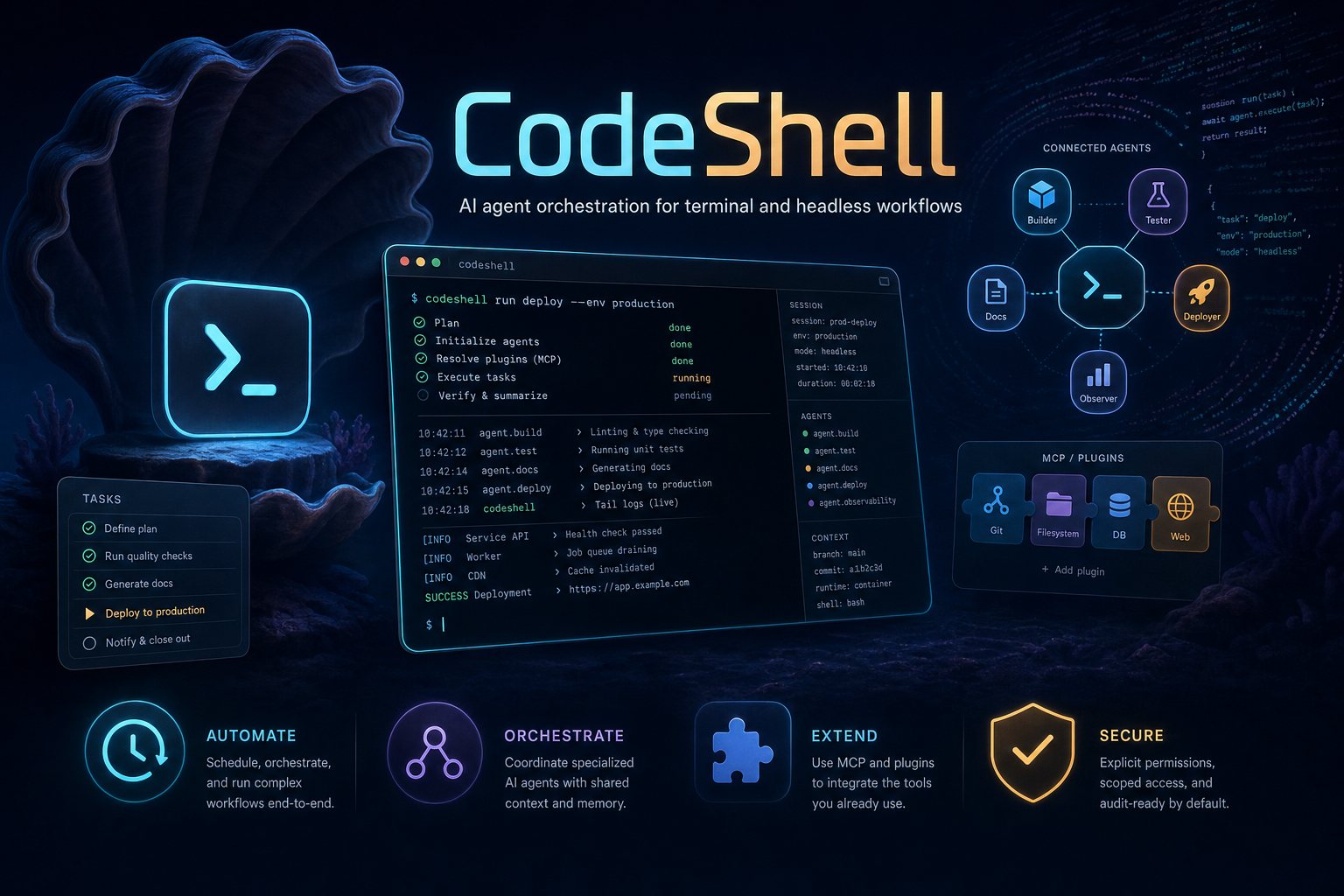
CodeShell is one orchestration engine wearing three faces:
- a terminal CLI (
code-shell) for interactive and headless agent runs, - an Electron desktop app with chat, file/browser/terminal/diff panels, model & credential management, an extensions marketplace, automation, and a phone remote, and
- a programmatic SDK (
import { Engine } from "@cjhyy/code-shell") for embedding the engine in your own product.
The core is deliberately domain-agnostic. The turn loop, context management, permissions, MCP integration, hooks, tasks, cron, sub-agents, sessions, and memory all stay generic; coding behavior is just a preset layered on top — not baked into the engine. (See packages/core/CONTRIBUTING.md: "core only carries mechanism, not policy.")
Status: 0.5.0-rc.2, preparing for beta. The desktop app is the headline product; the CLI and SDK share the same core engine.
Why CodeShell
- One engine, many products — the same runtime drives coding, research, automation, browser tasks, and long-running workflows. Behavior is expressed as presets and tools, not forked codebases.
- Terminal-first, headless-ready, desktop-complete — run interactively in the terminal, fire one-shot headless jobs, or use the full visual desktop client.
- Permission-aware by default — high-impact actions (writes, shell, git) sit behind explicit approval flows with session/project scoping and a
bypassmode for trusted contexts. - Extensible end-to-end — presets, built-in tools, MCP servers, hooks, skills, plugins (CC- and Codex-format), sub-agents, and cron jobs are all first-class, with a desktop UI for discovering and installing them.
- Local-first & private — sessions, transcripts, credentials, and memory live under
~/.code-shell/; credential files are written owner-only (0o600).
Quick start
CLI
# Default CLI preset: terminal coding assistant (interactive REPL)
npx @cjhyy/code-shell

# Run the same framework as a general orchestrator
npx @cjhyy/code-shell --preset general

# One-shot / headless execution
npx @cjhyy/code-shell run --preset general \
  "Create a long-running research plan and track it with tasks"
Requires Node.js >= 20.10.
Desktop app
The desktop app (packages/desktop) is an Electron client. To run it from source:
bun install
bun run dev          # launches the desktop app in dev mode
It gives you chat with streaming output, a side-by-side file / browser / terminal / diff panel dock, model & credential management, an extensions marketplace, automation/cron scheduling, persistent goals, memory, and a phone remote — all driving the same core engine via per-session agent worker processes.
Features
Core engine (@cjhyy/code-shell-core)
- Turn-based agent loop with streaming output and step-by-step lifecycle events
- Context compaction (tool-pair-preserving) and durable session persistence on disk
- Permission-gated tool execution with session/project rule caching and chained-command guards
- Hook pipeline (user + project + plugin hooks) and full MCP client integration
- First-class tasks, sub-agents, cron, and sleep for long-running and self-pacing workflows
- Persistent goals with a stop-hook judge and explicit
complete_goaldeclaration - Memory + Dream: per-turn memory injection plus an LLM consolidation pass
- Unified model catalog: text / image / video providers under one tag-based config, with per-model parameter definitions that drive both UI controls and tool descriptions
- Background shell jobs, cost tracking, and turn-level file undo/redo
Presets
| Preset | Purpose | Extra tools |
|---|---|---|
general |
General orchestration, research, automation, long-running work | Core orchestration tools only |
terminal-coding |
Terminal-native coding assistant | EnterWorktree, ExitWorktree, NotebookEdit, LSP, Brief, Arena |
Presets select the system prompt, the built-in tool set, and permission defaults. Configure via the SDK, the CLI --preset flag, or settings.
Terminal UX (@cjhyy/code-shell-tui)
- Interactive REPL (Ink-based) with fullscreen/flow modes, vim-mode input, and input history
- Headless
runmode for one-shot execution, plusrepl,sessions, andrunssubcommands - Slash commands,
@-mention file/skill search, command auto-complete, and in-REPL cron scheduling Shift+Tabpermission-mode cycling, transcript browsing, session resume, and cost/usage reporting
Desktop app (@cjhyy/code-shell-desktop)
- Chat with streaming, image attachments (upload/drag/paste), and a run-time steering/queue model (queue = non-interrupting step-gap insertion; "steer" = interrupt-and-resend)
- Panel dock alongside the conversation: read-only Files panel, Browser panel (CDP-driven, with selection-anchor sync), interactive Terminal (node-pty), and a Diff/Review panel
- Model catalog & connections: full CRUD over providers/models, credential reuse by company, and parameter docs surfaced into tool descriptions
- Credentials: API keys, browser-cookie login (with a dedicated login window for sites the embedded webview can't handle), multi-account cookie credentials, and permission token/link gates
- Extensions: plugin/skill/MCP management + a marketplace (installs CC- and Codex-format plugins, including from uploaded archives), a capability overview, and sub-agent (Agent role) management
- Automation: cron/scheduled tasks with read-only contract enforcement, per-task transcripts and memory, and a runs view for long tasks
- Persistent goals, memory management (pin/edit/clear, manual Dream), hooks configuration, and full i18n (Chinese / English)
- Phone remote: control a desktop session from a mobile web app over a local WebSocket
- Onboarding wizard, trust gate, app updater, command palette (⌘K), cross-project session search (⌘P), and in-transcript search (⌘F)
Built-in tools
A broad orchestration toolbox is available across presets:
- File:
Read,Write,Edit,Glob,Grep - Execution:
Bash,PowerShell,REPL - Coordination:
TaskCreate,TaskUpdate,TaskList,TaskGet,TaskOutput,Agent,SendMessage,Sleep - Planning / runtime:
EnterPlanMode,ExitPlanMode,CronCreate,CronDelete,CronList - Discovery / integration:
ToolSearch,Skill,MCPTool,ListMcpResources,ReadMcpResource - Generation:
GenerateImage,GenerateVideo(image/video providers via the unified catalog) - Coding preset extras:
EnterWorktree,ExitWorktree,NotebookEdit,LSP,Brief,Arena
Programmatic API
The meta package re-exports the core engine, so legacy SDK imports keep working:
import { Engine } from "@cjhyy/code-shell";

const generalEngine = new Engine({
  llm: {
    provider: "openai",
    model: "gpt-4.1",
    apiKey: process.env.OPENAI_API_KEY,
  },
  preset: "general",
});

const codingEngine = new Engine({
  llm: {
    provider: "openai",
    model: "gpt-4.1",
    apiKey: process.env.OPENAI_API_KEY,
  },
  preset: "terminal-coding",
});
Everything is exported from the package root — import { ... } from "@cjhyy/code-shell" (or directly from @cjhyy/code-shell-core). There are no /run, /arena, or /product subpath entry points.
Configuration
CLI preset selection:
npx @cjhyy/code-shell --preset general
npx @cjhyy/code-shell --preset terminal-coding
Settings-based configuration (~/.code-shell/settings.json, with project-level overrides):
{
  "agent": {
    "preset": "general",
    "enabledBuiltinTools": ["LSP"],
    "disabledBuiltinTools": ["WebSearch"],
    "appendSystemPrompt": "Prefer long-horizon planning and keep task state updated."
  }
}
Supported agent settings: preset, enabledBuiltinTools, disabledBuiltinTools, customSystemPrompt, appendSystemPrompt.
Fullscreen mode (TUI)
CodeShell's terminal UI defaults to fullscreen (alt-screen + ScrollBox) — the mode where window resize repaints cleanly. Flow mode can show duplicate content in scrollback after a resize because the terminal pushes the old viewport up before CodeShell can erase it.
Opt out at startup with CODESHELL_FULLSCREEN=0|false|off, or toggle at runtime with /fullscreen off. Flow mode lets the transcript flow into the terminal's native scrollback (useful if you prefer keeping shell history above CodeShell visible).
Stream idle watchdog (opt-in)
When CODESHELL_ENABLE_STREAM_WATCHDOG=1, the openai provider aborts any LLM stream idle for CODESHELL_STREAM_IDLE_TIMEOUT_MS ms (default 90000) without a chunk. The engine then retries via the existing withRetry policy, capped by CODESHELL_STREAM_WATCHDOG_RETRIES (default 2). This bounds upstream hangs at ~90 s instead of indefinitely. User-initiated aborts (Esc / Ctrl+C) are never retried. Disabled by default.
Architecture
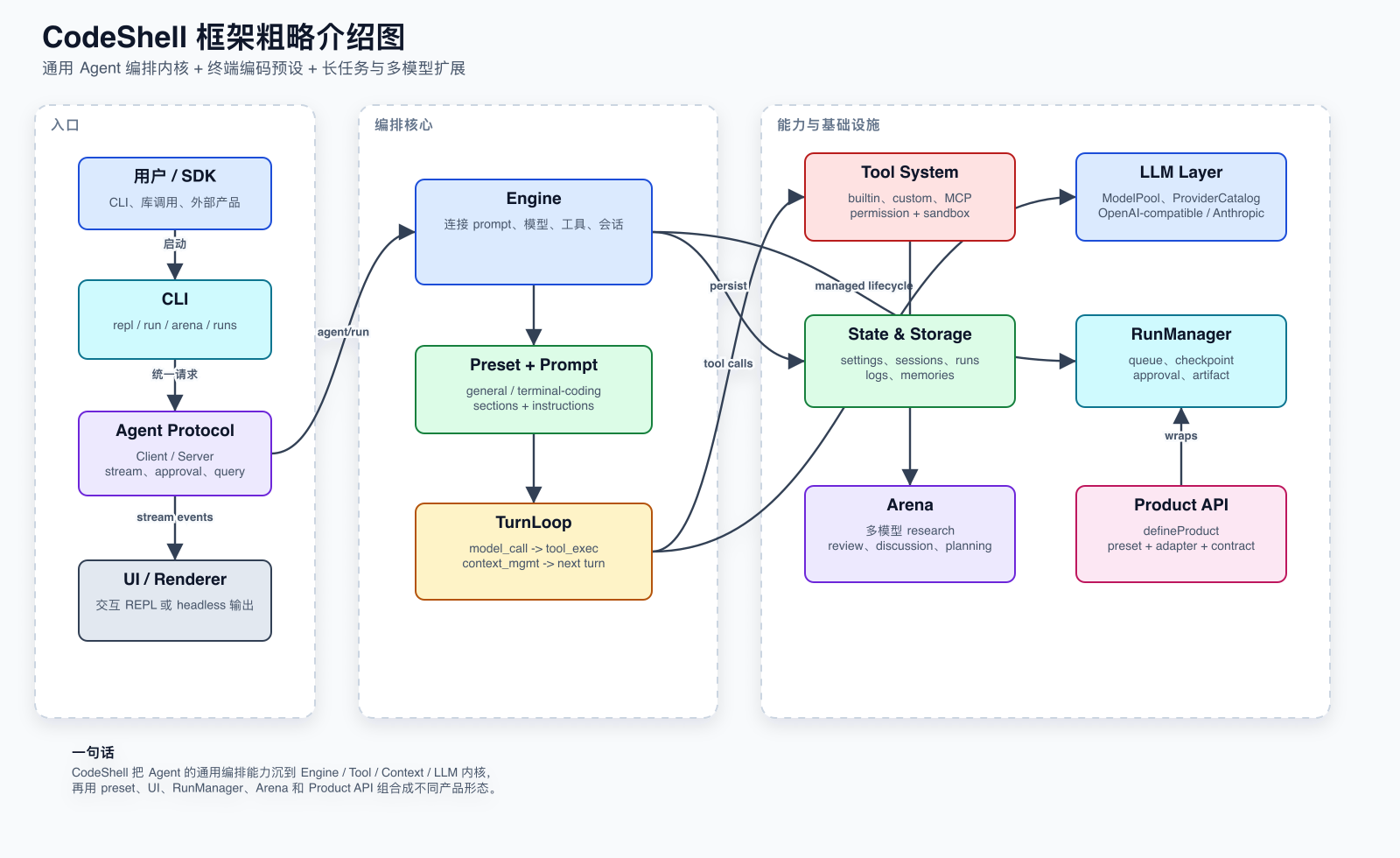
At a high level, CodeShell routes CLI, headless, SDK, and desktop clients through the same engine runtime:
- Preset resolution selects the system prompt, built-in tools, and permission defaults.
- TurnLoop coordinates model streaming, context assembly, tool execution, and lifecycle events.
- Tool system hosts built-ins, MCP tools, permissions, hooks, and cancellation.
- Session / run layers persist transcripts, state, tasks, automation runs, and memories.
In the desktop app, the Electron main process acts as an IPC service layer: it does not run the Engine itself but spawns a per-session core agent worker, streams its stdout back to the renderer, and provides system capabilities (files, terminal, credentials, plugins, browser automation host, memory). The renderer is a thin client that talks to main only through window.codeshell.*.
Design principles:
- Core first — the orchestration engine stays domain-agnostic.
- Presets over hardcoding — coding behavior lives in configuration.
- Secure by default — permission-gated actions and explicit approval flow; owner-only credential files.
- Long-running ready — tasks, cron, sleep, sub-agents, and persistent goals are first-class.
Project structure
packages/
├── core/      # Engine, context, tools, MCP, hooks, sessions, runs, presets, memory
├── tui/       # Terminal CLI, Ink-based UI, renderer, commands, approvals
├── desktop/   # Electron desktop client + agent worker bridge + mobile remote app
└── cdp/       # Environment-agnostic CDP browser-action layer (no Playwright)

assets/       # README / product images (mascot, hero)

docs/
├── todo/                # Roadmap + forward-looking design docs (see todo/README.md)
├── feature-inventory.md # Full inventory of desktop / tui capabilities (authority on current state)
└── archive/             # Superseded design docs, audits, and the prior architecture set

scripts/      # Build, release, and repo maintenance scripts
Development
bun install
bun run build          # build core + tui + meta package
bun run typecheck      # core + tui (tsc --noEmit)
bun test               # core / tui test suites

# Desktop has its OWN typecheck and build (the root checks do NOT cover it):
cd packages/desktop
bunx tsc --noEmit
bun run build:renderer
bun run dev launches the desktop app. For the TUI in dev: bun run dev:tui.
The desktop renderer uses shadcn/ui + Tailwind v4 (zinc theme) and imports no core code — it is a thin client over
window.codeshell.*. Seepackages/desktop/CLAUDE.mdfor renderer conventions.
Further reading
- Roadmap & TODO
- Feature inventory (desktop / tui)
- Prior architecture documentation set (archived, pending rewrite)
Acknowledgments
The ApplyPatch tool (packages/core/src/tool-system/builtin/apply-patch/) is adapted from
OpenAI Codex codex-rs/apply-patch,
licensed under the Apache License 2.0. See NOTICE.md and LICENSE-codex in that directory
for details, including the intentional behavioral divergence where our applier rolls back
partial writes on failure.
License
MIT — see LICENSE.
Yorumlar (0)
Yorum birakmak icin giris yap.
Yorum birakSonuc bulunamadi