paper-pal
Health Pass
- License — License: MIT
- Description — Repository has a description
- Active repo — Last push 0 days ago
- Community trust — 24 GitHub stars
Code Warn
- process.env — Environment variable access in agent-providers.mjs
- process.env — Environment variable access in api-adapter.mjs
- network request — Outbound network request in api-adapter.mjs
- process.env — Environment variable access in config.mjs
- process.env — Environment variable access in env.mjs
- process.env — Environment variable access in names.mjs
Permissions Pass
- Permissions — No dangerous permissions requested
No AI report is available for this listing yet.
Review every AI edit before it touches your LaTeX. A local web app: comment on a passage, get a word-level diff, accept or reject. Uses Claude Code, Codex, Ollama or any OpenAI-compatible API. 本地运行的 LaTeX 论文 AI 审阅工具:批注 → diff → 接受。

Review every AI edit before it touches your LaTeX.
A local web app for writing papers. Comment on a passage, get a proposed rewrite as a word-level diff,
and nothing is written to your .tex files until you click Accept.



English · 简体中文 | How it works · Quick start · Agent install · Backends · Privacy · FAQ
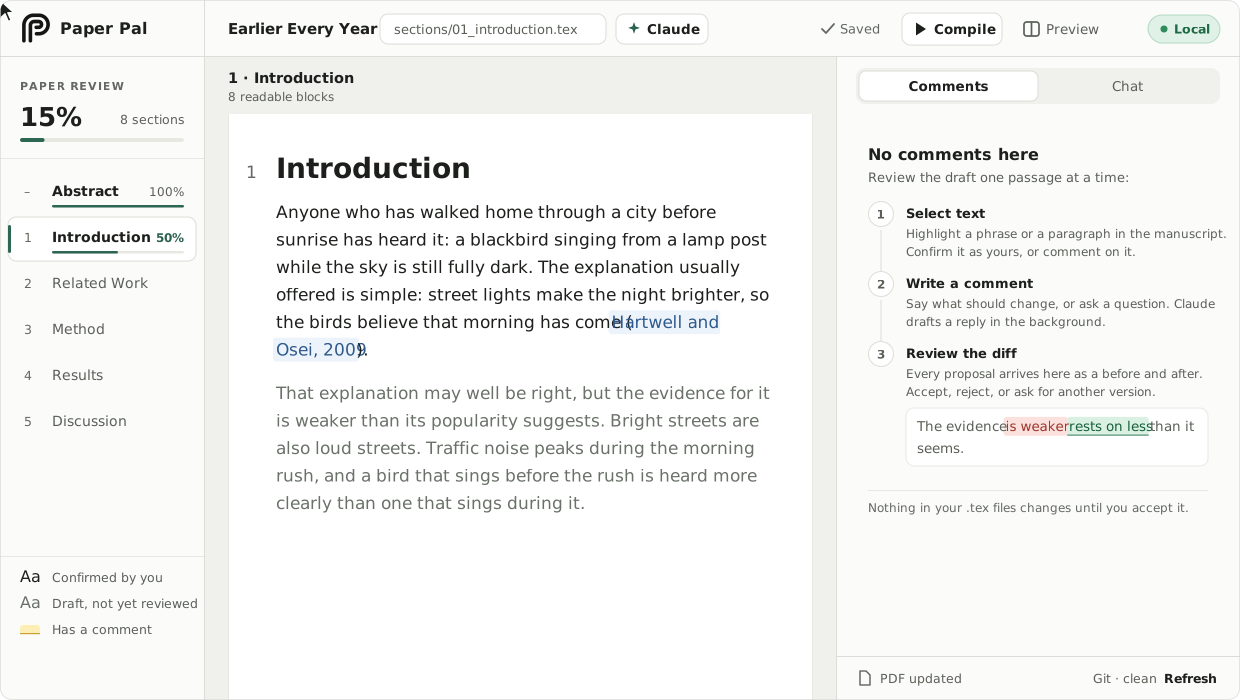
The animations are drawings of the app; the screenshots are the app itself. The manuscript in all of them is fictional. It ships in examples/sample-paper, and npm run demo opens it.
What it is
Paper Pal opens your LaTeX project in the browser and shows the source as readable prose, with math, citations and cross-references rendered. You select a passage and say what is wrong with it; the AI you already use answers with a rewrite, shown as a diff against your words. Every write to a .tex file is a click of yours.
| Pasting into a chat window, or letting an editor agent loose | Paper Pal |
|---|---|
|
|
How it works
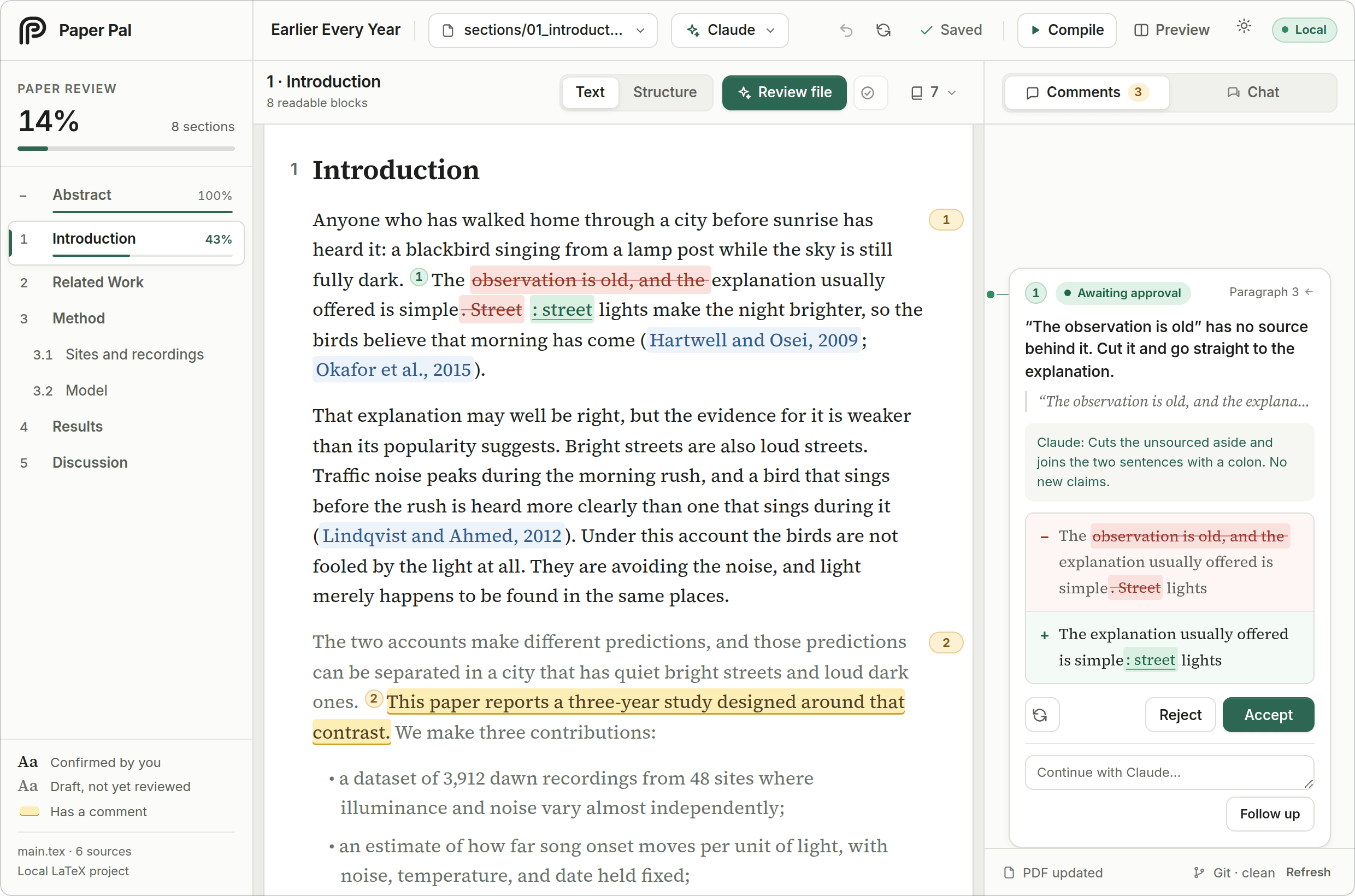
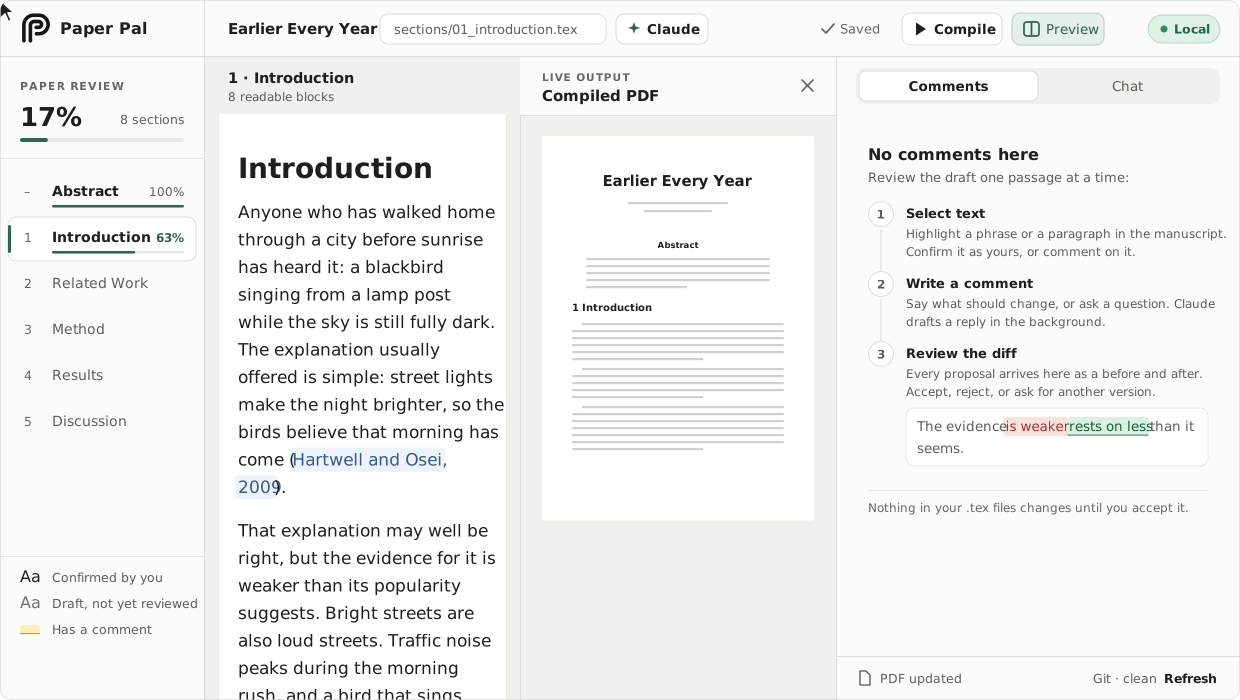
1. Select and comment. Pick anything from two words to several paragraphs and write what you want: tighten this, soften that claim, is this consistent with Section 4? The selection maps to exact source offsets, through math, citations and macros.
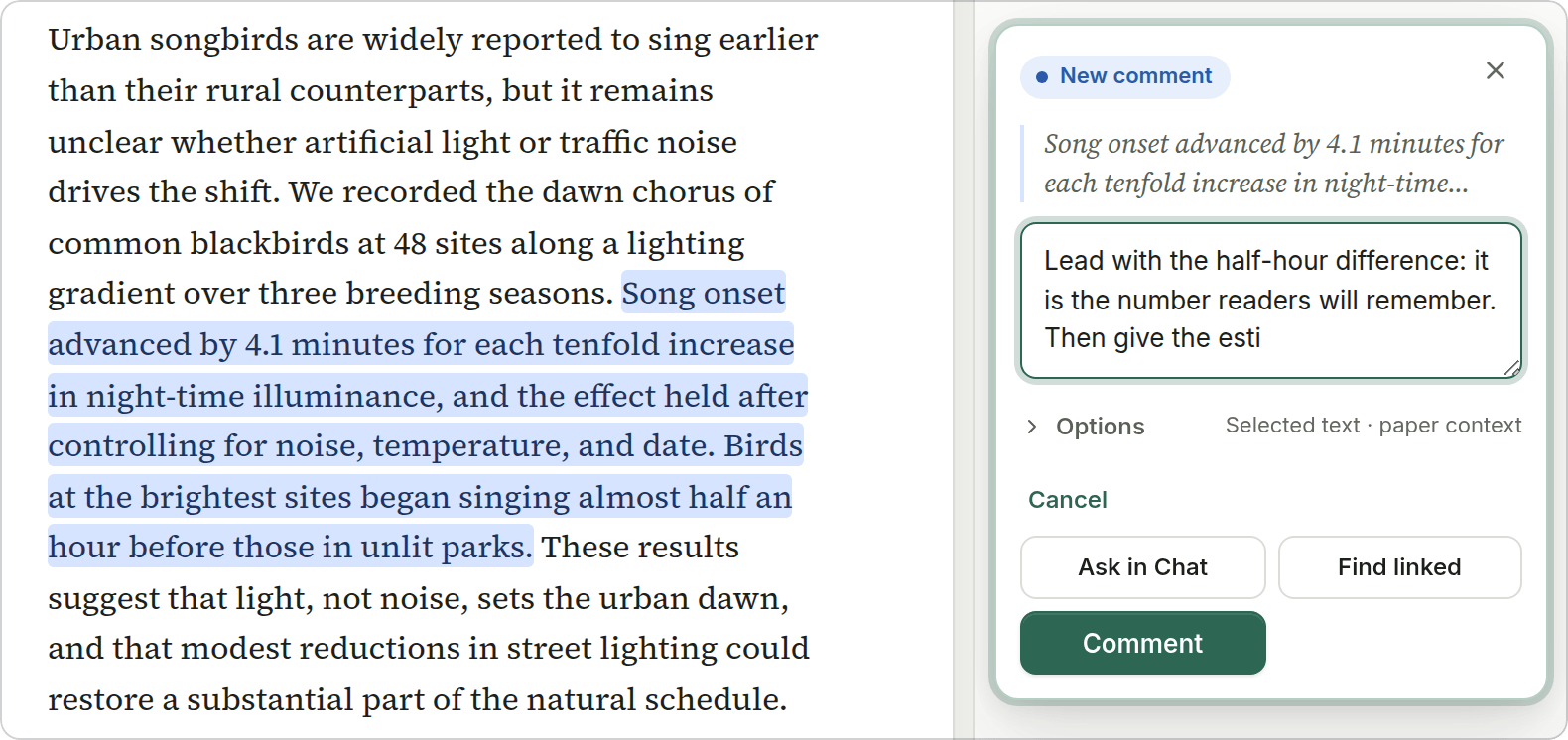
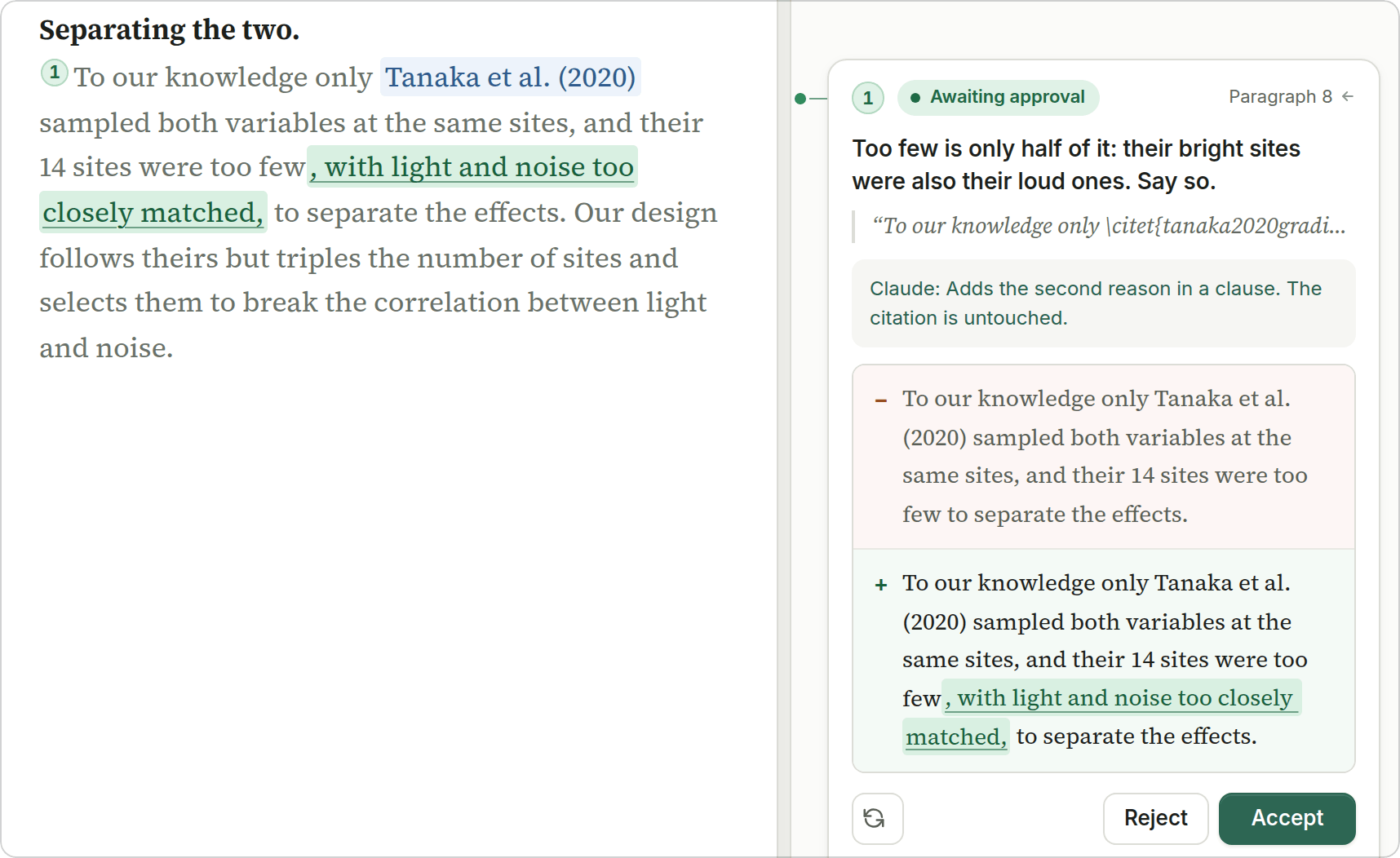
2. Review the diff. The proposal appears inline in the manuscript and in the comment card, with a one-line rationale. Accept it, reject it, regenerate it, or reply to steer it.
|
3. Ask for a review. Review file reads the file like a referee. You triage the findings; the ones you keep become ordinary comments. 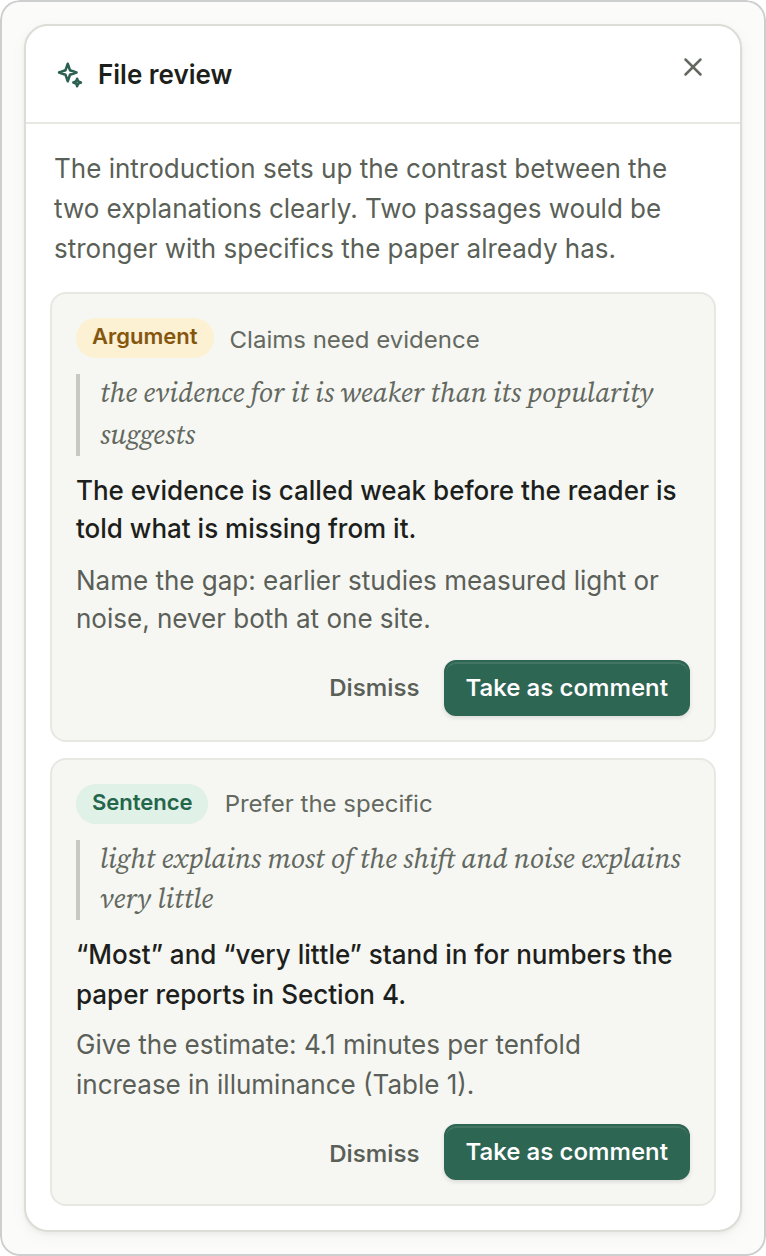
|
4. Ask about the paper. Chat answers questions about the project. A reply can become a proposal; chat itself never edits. 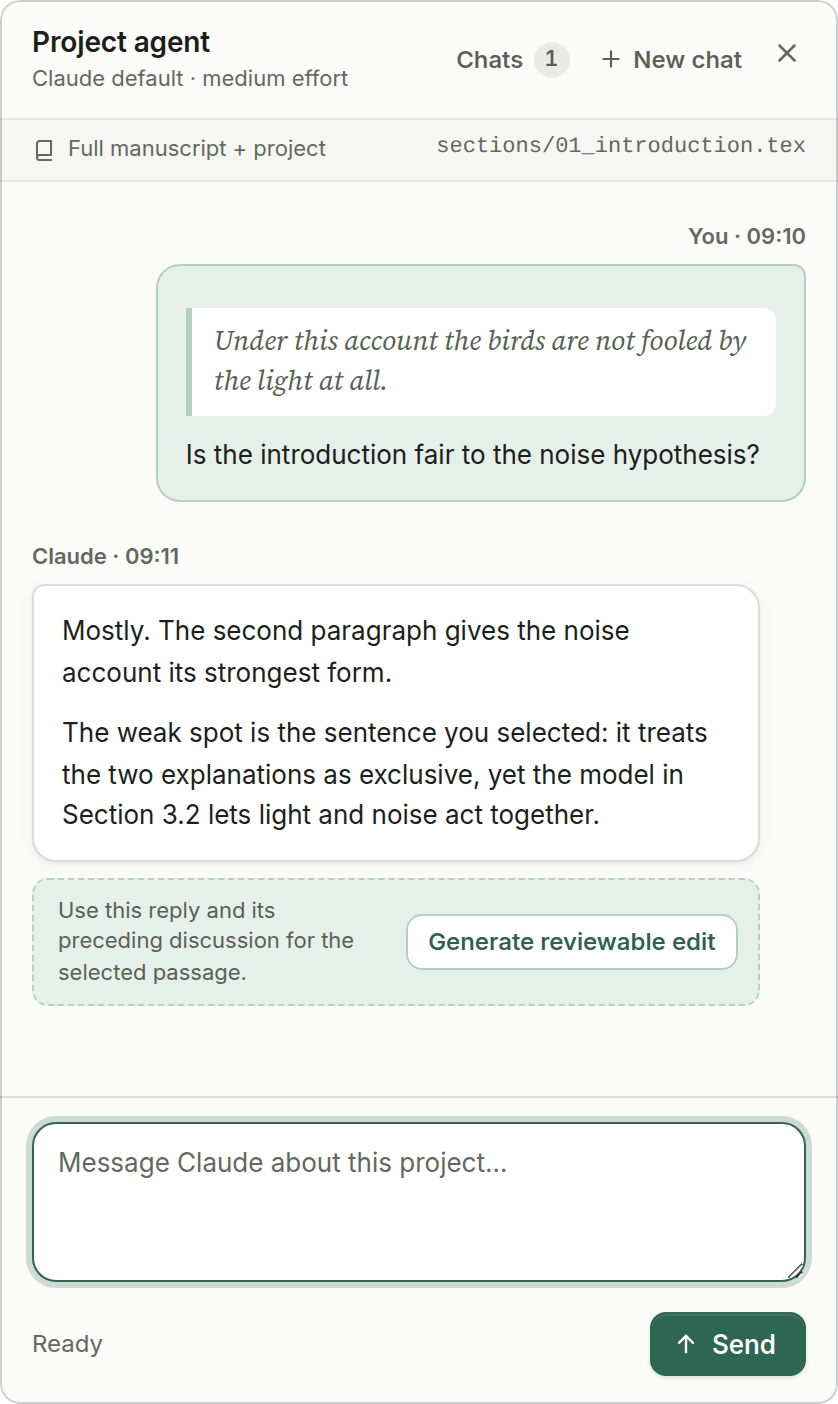
|
5. Confirm what you have read, and look at the PDF. Text you have not read yet is grey. Select a passage and click Confirm (or use Confirm section): it turns black, and the outline counts it. Text from an accepted proposal counts as read. Compile rebuilds the PDF with latexmk, which also happens by itself after every accepted change, and Preview opens the PDF beside the manuscript.
Quick start
Clone it anywhere outside your paper's repository. You need Node.js 20 or newer, a current desktop browser, and macOS or Linux (Windows: see the FAQ). latexmk is optional: it drives the PDF pane and supplies \ref numbers.
git clone https://github.com/claire1217/paper-pal.git ~/paper-pal && cd ~/paper-pal && npm install
npm run setup -- /path/to/your/paper      # finds your main .tex, writes .paper-pal.json
npm start                                 # then open http://127.0.0.1:4317
No paper at hand? npm run demo -- --open serves a throwaway copy of the sample paper at the same address and deletes it when you stop. It needs no LaTeX, no AI backend and no key.
npm run doctor lists what is ready and what is missing, with the fix for each item.
- Update:
git pull && npm installin the Paper Pal folder. - Another paper: run
npm run setup -- /path/to/other/paperonce, or start on it directly withnpm start -- --repo /path/to/other/paper. Another port:npm start -- --port 4400. - Uninstall: delete the Paper Pal folder. In each paper,
.paper-pal.json(settings, no secrets) and.paper-pal/(your comments and chats) can be deleted too. Nothing is installed elsewhere.
Let your AI agent install it
Prefer to delegate? Paste this into Claude Code, Codex, Cursor or any coding agent. Setup never prompts, prints JSON and uses documented exit codes, and the server has a health endpoint, so the agent can check its own work.
Install and set up Paper Pal for my LaTeX paper by following
https://raw.githubusercontent.com/claire1217/paper-pal/main/docs/INSTALL-FOR-AGENTS.md
My paper is at: <path to your paper folder>
Ask me before choosing an AI backend, and never ask me to paste an API key into this chat.
docs/INSTALL-FOR-AGENTS.md is a numbered procedure: what to ask the user first, prerequisites, clone and install, where the user puts an API key (.env; never the chat, never the project config), setup --json and the reaction to every exit code, doctor --json, starting the server, verifying with GET /api/health, and a report template. AGENTS.md covers working on the codebase. llms.txt indexes the docs.
Choose your AI backend
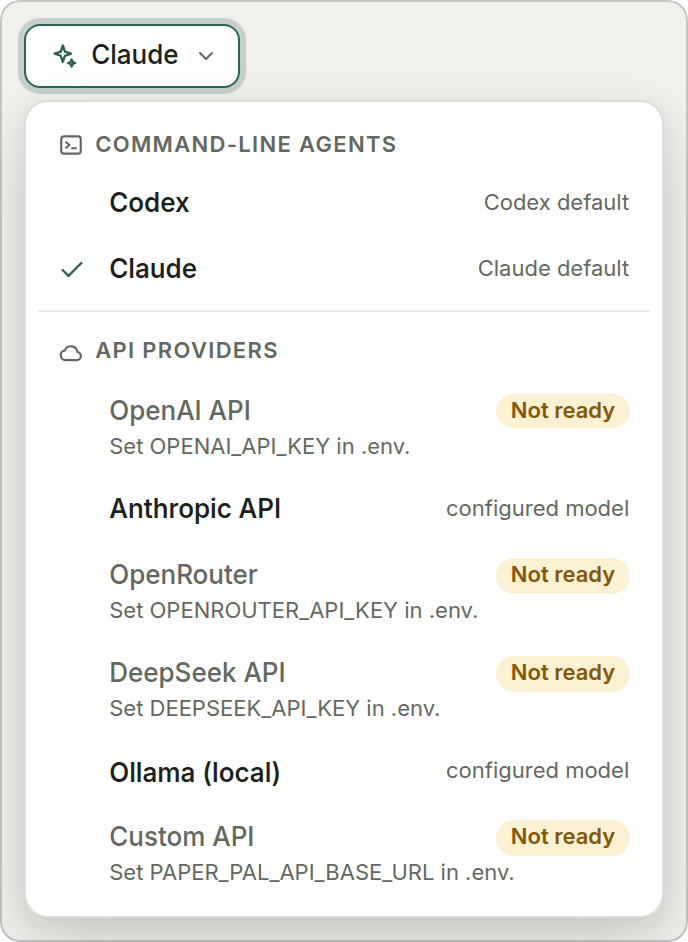
Use a command-line agent you are already signed in to (it comes with your Claude or ChatGPT plan, no key needed), or an API key. You can pick the backend per comment.
|
|
[!NOTE]
Status: 0.1, first public release. Paper Pal has been the author's daily writing tool on macOS with Claude Code, so that path is the well-trodden one. The other backends follow each vendor's documentation and pass the automated suite against mock servers; they have not been run against the live services yet, and reports are welcome.customcovers LM Studio, vLLM, Groq and similar gateways.
The two CLI agents run read-only inside your paper's folder and can look at your notes, data or code when a comment needs it. API providers cannot open files, so Paper Pal sends them the file you are editing, your guidance files, and the rest of the manuscript up to a size budget.
Keys live in one place, a git-ignored .env in the Paper Pal folder:
[ -f .env ] || cp .env.example .env   # then put your key after OPENAI_API_KEY=
npm run setup -- /path/to/paper --provider openai --model <model-id> --force
# --force replaces the existing .paper-pal.json
No default model ids ship with Paper Pal, because they go stale; take one from your provider's model list. Keys are never read from a project's config file, never passed to the CLI agents or to LaTeX, and are redacted from run traces and error messages. What exactly is sent to each backend: docs/backends.md.
Privacy and safety
- The server binds to
127.0.0.1, checks theHostheader against DNS rebinding, and refuses state-changing requests from any other origin. No accounts, no analytics. - The page loads its scripts, styles and fonts from your machine. The one exception is a cited paper's PDF, fetched from its own URL when you click Load PDF preview.
- Your text goes only to the backend you pick, under your own account and that provider's terms. With Ollama nothing leaves your machine.
- Agents run read-only. Source files change through your own edits, the proposals you accept, and Undo, and only inside the project's
sourceRoot. - Comments, chats and run traces live in
<paper>/.paper-pal/, which ignores itself in git..paper-pal.jsonholds no secrets and is safe to commit. - Other people's LaTeX can run code when compiled, with or without Paper Pal. Read SECURITY.md before opening a project you did not write.
Features
- Prose view of real LaTeX. Multi-file projects (
\input,\include,\subfile,\import), sections, lists, theorems, footnotes, KaTeX math with your own macros, natbib and biblatex citations with a.bibpreview,\refnumbers from the.auxfile. Figures, tables, code listings and TikZ are shown as read-only blocks. - Exact source mapping. Each block maps to a character range in a
.texfile. An accepted edit replaces that range and nothing else; CRLF line endings and a byte-order mark are kept as they are. Files must be UTF-8; anything else opens read-only. - Direct editing with autosave and undo. If the file also changed on disk (your editor, git, a co-author's sync), the two edits are merged, and you are asked when they overlap.
- Linked changes. When a rewrite would leave another passage inconsistent, the agent can propose those edits too, and you confirm them as a set.
- Review progress. Confirm paragraphs or whole sections as you read them; the outline shows how much of each section is done.
- Structure mode for reorganising a section: agree on a paragraph plan first, then rewrite paragraph by paragraph.
Screenshot
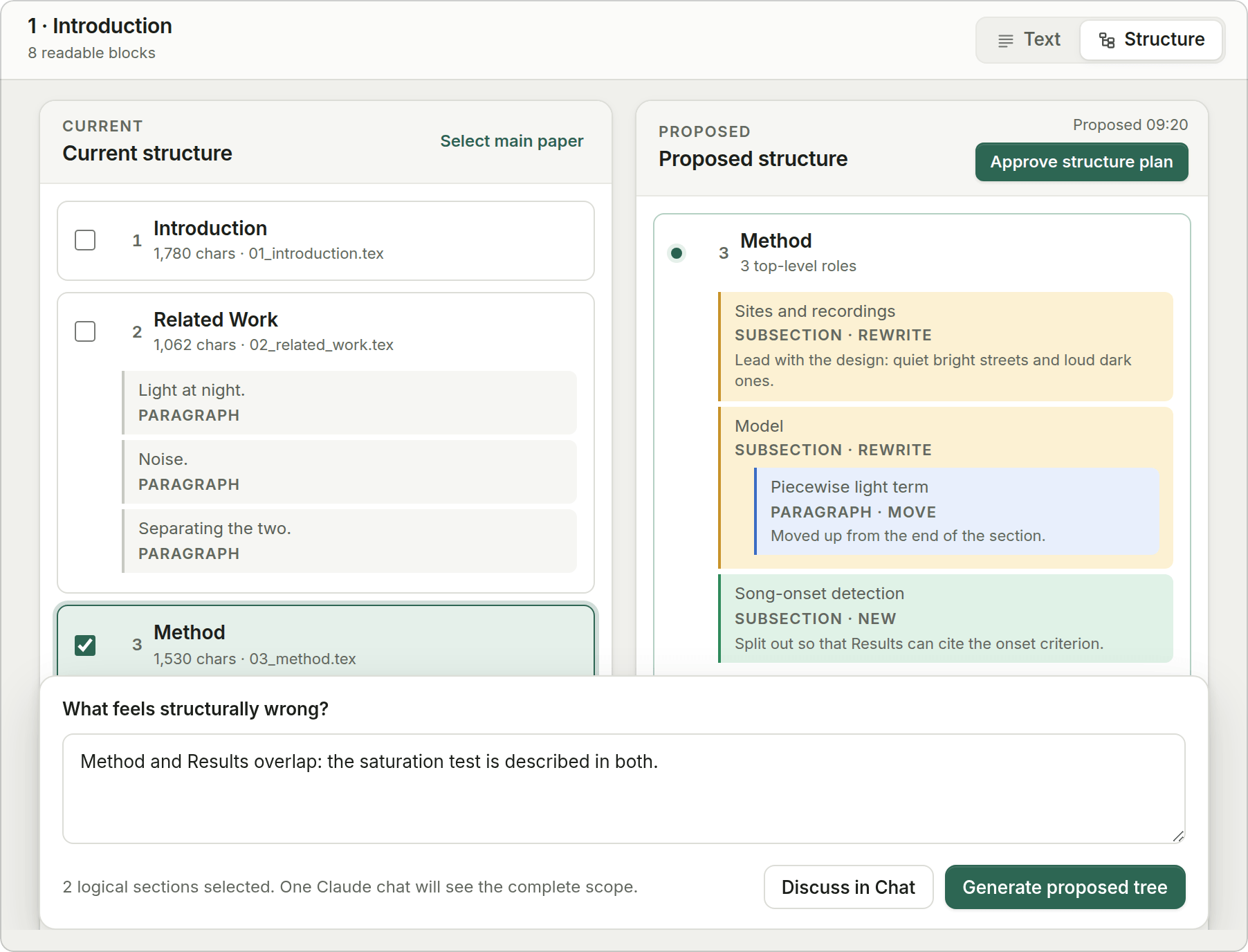
- PDF pane that recompiles with
latexmkafter accepted changes. Light and dark themes.
Reference: configuration · LaTeX support and limits · backends · local HTTP API · changelog
FAQ
Will it mangle my source?An accepted proposal replaces one mapped range and leaves everything else alone. The test suite edits every editable block of a multi-file test manuscript, more than 120 edits, and checks that nothing else changed; a fuzz test feeds the parser truncated and mutated files. Keep your paper in git anyway. Paper Pal never commits for you, so git diff always shows exactly what changed.
.tex file, Overleaf's AI features, or pasting into a chat?
An editor agent writes to the file first and shows you a line diff of markup afterwards. Hosted writing assistants run in someone else's cloud with their choice of model. A chat window knows nothing about your files. Paper Pal shows prose instead of markup, gives word-level diffs, writes nothing before you accept, runs locally with the model you choose, and remembers which passages you have read.
Can I use it on my thesis?With a caveat: \chapter and \part are shown as text and do not enter the outline yet, so navigation is per file rather than per chapter. Everything else works on book-length projects.
Paper Pal works on local files. With Overleaf's Git integration or GitHub sync you can keep a local clone, run Paper Pal on it, and push. Both are paid Overleaf features; on a free plan, download the project, work locally, and upload the changed files.
Do I need LaTeX installed?No. Reading, commenting, diffs and editing work without it. latexmk is needed for the PDF pane and for \ref numbers, which come from the .aux file.
Paper Pal is free. The backend is billed by its provider under your account. With an API provider, a comment sends the instructions, the file you are editing, and by default the rest of the manuscript up to agent.contextBudgetChars (120,000 characters). To spend less, choose Current paragraph only in the composer's options or lower the budget. Ollama costs nothing.
Files must be UTF-8. CJK manuscripts render, and agent.reviewLanguage sets the language the reviewer writes in ("en", "Chinese", "German", ...) independently of the manuscript's language.
Experimental and untested by the maintainer. CI runs the suite on Windows, but those jobs are allowed to fail without failing the build. WSL is the safer choice for now.
My template renders oddly.Unknown macros fall back to their argument text and unusual environments to read-only blocks, so the worst case should look plain, not broken. If something is hidden or shown as junk, please open an issue with a minimal snippet, not your unpublished text.
Is this the same as Paperpal, or one of the other "PaperPal" projects?No. Paper Pal (two words, repository claire1217/paper-pal) is an independent open-source tool for reviewing AI edits to LaTeX on your own machine. Paperpal (paperpal.com) is an unrelated commercial writing service, and several unrelated GitHub repositories share the name. To find this one, search GitHub for claire1217/paper-pal or paper pal latex.
Roadmap
Splitting the two large source files into modules, \chapter support, an editable title block, footnote numbering, a settings screen for backends, and a packaged release so installing does not need git.
Contributing
Issues and pull requests are welcome. CONTRIBUTING.md has the development setup, and AGENTS.md lists the invariants a change must not break, whether a person or an agent writes it. Please never paste unpublished manuscript text or API keys into an issue.
Credits and citation
Math is typeset by KaTeX. The interface uses Inter and Source Serif 4 under the SIL Open Font License; see THIRD_PARTY.md. If Paper Pal helped with a paper, a mention is appreciated: CITATION.cff feeds GitHub's "Cite this repository" button.
License
Reviews (0)
Sign in to leave a review.
Leave a reviewNo results found