agent-deck
Health Uyari
- License — License: MIT
- Description — Repository has a description
- Active repo — Last push 0 days ago
- Low visibility — Only 5 GitHub stars
Code Uyari
- process.env — Environment variable access in bin/agent-deck.js
- network request — Outbound network request in cli/client.ts
Permissions Gecti
- Permissions — No dangerous permissions requested
Bu listing icin henuz AI raporu yok.
Web-based command center for orchestrating multiple AI coding agents. AI task decomposition, DAG execution, real-time streaming, and git finalize.
Agent Deck


Web-based command center for orchestrating multiple AI coding agents.
Describe a task in plain English. The AI architect decomposes it into a multi-agent execution plan (DAG). Agents run in parallel where dependencies allow, with real-time streaming, cost tracking, and git finalize — all in your browser.
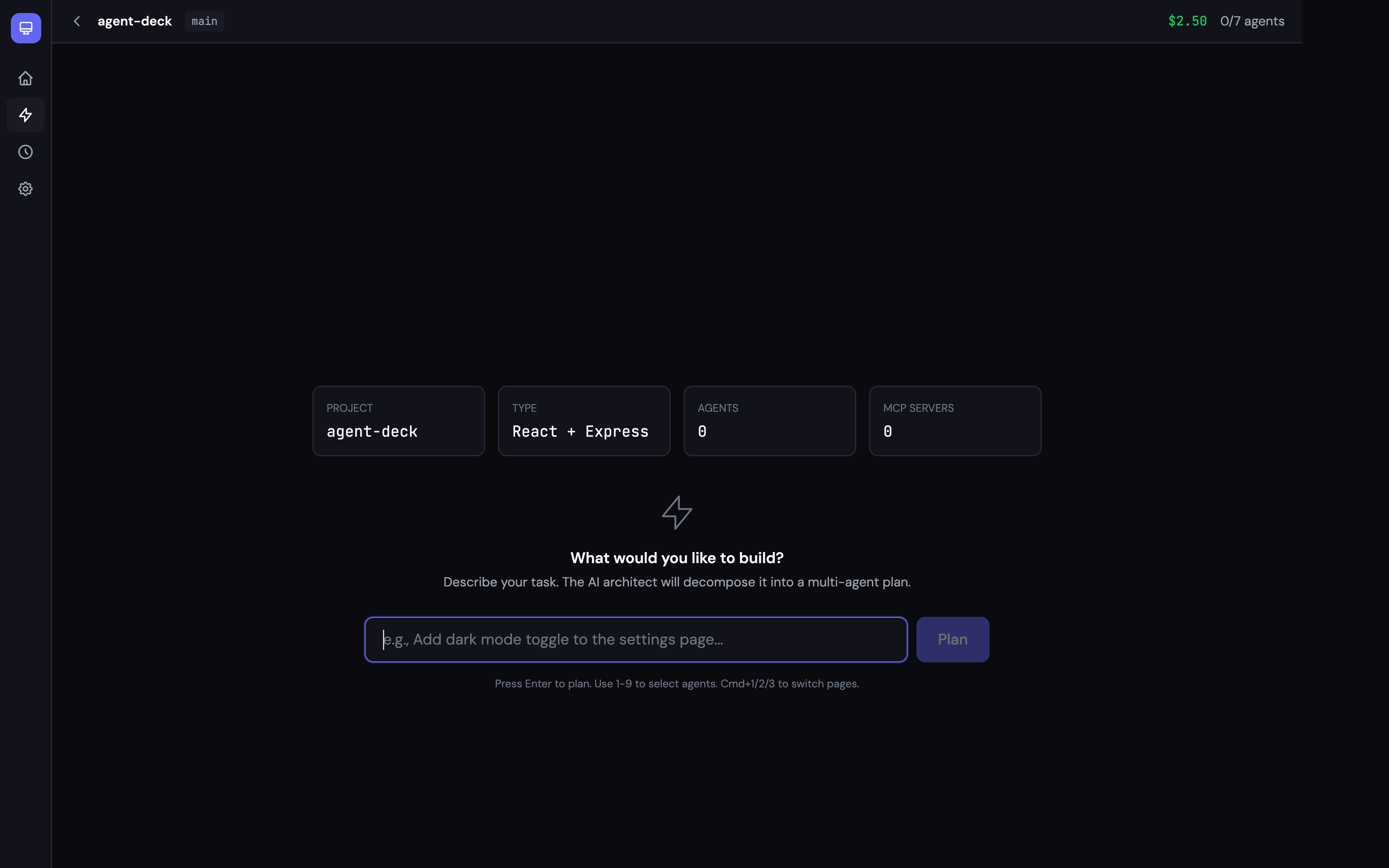
Features
- AI Task Decomposition — Describe what you want; the architect plans a multi-agent DAG automatically
- DAG Execution Engine — Kahn's algorithm with parallel scheduling, dependency resolution, and configurable failure strategies
- Multi-Project Workspaces — Manage multiple projects from a single dashboard; auto-detects framework, language, and git branch
- Real-Time Streaming — Watch agent output as it happens (text, thinking, tool calls) via WebSocket
- Finalize System — Review changed files, AI-generated commit message, one-click git commit + push
- Cost Tracking — Per-agent and total cost with real-time estimates
- History — Browse past missions by project, expand agent breakdowns, view commit info
- Team Configs — Pre-define agent teams in YAML and launch with one click
- Multi-Runtime — Claude Code CLI, or any model via a LiteLLM proxy (Codex and Gemini CLI adapters are placeholders)
- Current Claude Models — Haiku 5.5, Sonnet 5.5, Opus 5.5 and Fable 5.1, with up-to-date pricing for cost estimates
- Session Recovery — SQLite-backed persistence with crash recovery
- Local-Only by Design — Binds to
127.0.0.1and rejects requests from other origins and hosts
Quick Start
npx @claude-world/agent-deck
Open http://localhost:3002 — add your project, describe a task, and launch.
Requirements
- Node.js 22.12+ (tested on Node.js 22, 24 and 26)
- Claude Code CLI installed and signed in (
claudein PATH)
From source
git clone https://github.com/claude-world/agent-deck.git
cd agent-deck
pnpm install
pnpm dev           # Dev mode with hot reload (localhost:5200)
How It Works
┌─ Home ────────────────────────────────────────────────┐
│  Select a project  →  Command Center  →  Finalize     │
│                                                       │
│  1. Describe task     "Add auth middleware"            │
│  2. AI plans DAG      [researcher] → [implementer]    │
│                       [implementer] → [tester]        │
│  3. Review & launch   Agents run in parallel          │
│  4. Monitor           Real-time streaming + cost      │
│  5. Finalize          Review diff → commit → push     │
│  6. History           Browse by project + date        │
└───────────────────────────────────────────────────────┘
Architecture
Browser (:5200)               Server (:3002)
┌────────────────┐            ┌──────────────────────────┐
│  React +       │◄──WS/REST──│  Express + WebSocket      │
│  Tailwind +    │            │                          │
│  React Flow    │            │  WorkspaceManager         │
│                │            │  Architect (Claude CLI)   │
│  Home          │            │  WorkflowExecutor (DAG)   │
│  CommandCenter │            │  DeckManager              │
│  History       │            │  ├─ ClaudeAdapter         │
│  Settings      │            │  ├─ LiteLLMAdapter        │
│                │            │  └─ CodexAdapter          │
│  FinalizePanel │            │  FinalizeModule (git ops) │
│  DiffViewer    │            │                          │
└────────────────┘            │  SQLite (better-sqlite3)  │
                              └──────────────────────────┘
Usage
Workflow
- Home — Add project directories. Each card shows framework, language, git branch, and mission stats.
- Command Center — Enter a task description. The AI architect decomposes it into 2-6 specialized agents.
- Planning Canvas — Review the DAG. Adjust if needed. Click Launch.
- Running Canvas — Watch agents execute in real-time. React Flow DAG shows live status per node.
- Finalize — After all agents complete, review changed files, edit the AI-generated commit message, then Commit or Commit & Push.
- History — Browse past missions filtered by project. Expand to see agent breakdown and commit info.
Team Configs
Pre-define agent teams and launch them with one click.
Drop YAML files in team-configs/:
# team-configs/fullstack-squad.yaml
name: "Squad: Plan + Build + Test"
description: Full development squad
settings:
  max_budget_usd: 5.0
agents:
  - name: planner
    model: sonnet
    prompt: Create a detailed implementation plan.
  - name: implementer
    model: sonnet
    prompt: Implement the feature according to the plan.
  - name: tester
    model: haiku
    prompt: Write comprehensive tests for the implementation.
Models
Agents use Claude Code's model aliases, which always resolve to the newest model in each family:
| Alias | Model | Model ID | Best for |
|---|---|---|---|
haiku |
Claude Haiku 5.5 | claude-haiku-5-5 |
Fast, cheap tasks (search, lint, commit messages) |
sonnet |
Claude Sonnet 5.5 | claude-sonnet-5-5 |
Default for most agents |
opus |
Claude Opus 5.5 | claude-opus-5-5 |
Complex architecture and critical reviews |
fable |
Claude Fable 5.1 | claude-fable-5-1 |
Opt-in per agent; priced above Opus ($10 / $50 per MTok) |
Pick a model per agent in team configs (model: sonnet) or set the default in Settings. A full model ID also works anywhere an alias does.
LiteLLM Proxy
Run any model supported by LiteLLM:
litellm --model gpt-4o                                                  # Start proxy
LITELLM_PROXY_URL=http://localhost:4000 npx @claude-world/agent-deck     # Connect
The LiteLLM adapter sends the aliases above as their full model IDs (for example sonnet → claude-sonnet-5-5); other model names pass through unchanged.
Keyboard Shortcuts
| Key | Action |
|---|---|
Cmd/Ctrl + 1 |
Command Center |
Cmd/Ctrl + 2 |
History |
Cmd/Ctrl + 3 |
Settings |
1-9 |
Select agent by index |
Escape |
Deselect / close panel |
Configuration
| Variable | Default | Description |
|---|---|---|
PORT |
3002 |
Server port |
DECK_MAX_AGENTS |
10 |
Max concurrent agents |
DECK_IDLE_THRESHOLD_SECONDS |
300 |
Idle detection threshold |
LITELLM_PROXY_URL |
— | LiteLLM proxy URL |
AGENT_STATE_DB |
~/.claude/agent-state.db |
Agent-state bridge (read-only) |
The server has no authentication, so it only listens on 127.0.0.1 and answers 403 to requests whose Host or Origin is not a local address. Do not expose it through a public proxy. See SECURITY.md.
API
REST — http://localhost:3002/api/deck
| Method | Path | Description |
|---|---|---|
GET |
/workspaces |
List workspaces |
POST |
/workspaces |
Add workspace {path, name?} |
PATCH |
/workspaces/:id |
Rename workspace |
DELETE |
/workspaces/:id |
Remove workspace |
POST |
/mission/plan |
AI task decomposition {task, workspaceId?} |
POST |
/workflow/launch |
Launch DAG workflow {plan, name, workspaceId?} |
GET |
/history |
List workflows ?workspaceId= |
GET |
/history/:id |
Workflow detail with nodes |
DELETE |
/history/:id |
Delete workflow |
GET |
/finalize/changes |
Changed files ?workspaceId= |
POST |
/finalize/message |
AI commit message {workspaceId?, task?} |
POST |
/finalize/execute |
Git commit+push {selectedFiles, commitMessage, push?} |
GET |
/agents |
List all agents |
POST |
/agents |
Spawn agent |
DELETE |
/agents/:id |
Kill agent |
GET |
/cost |
Cost summary + estimates |
GET |
/teams |
List team configs |
POST |
/teams/:id/launch |
Launch team |
WebSocket — ws://localhost:3002/ws
Subscribe with {"type": "deck:subscribe"}. Receives:
deck:agent:status— Agent status changesdeck:agent:output— Streaming output (text, tool calls, thinking)deck:agent:cost— Cost estimate updatesdeck:agent:context— Context window usagedeck:workflow:status— Workflow status (running/finalizing/completed/failed)deck:workflow:node— Individual node status updates
Development
pnpm dev              # Server (:3002) + Client (:5200) with hot reload
pnpm dev:server       # Server only (tsx watch)
pnpm dev:client       # Client only (Vite)
pnpm build            # Production build of the web app
pnpm build:cli        # Bundle the CLI (dist-cli/)
pnpm build:electron   # Bundle the Electron app (dist-electron/)
pnpm typecheck        # TypeScript check
pnpm test             # Unit + server integration tests (node:test)
pnpm start            # Production server
Project Structure
agent-deck/
├── client/                    # React frontend
│   ├── pages/                 # Home, CommandCenter, History, Settings
│   ├── components/
│   │   ├── command-center/    # PlanningCanvas, RunningCanvas, FinalizePanel, DiffViewer
│   │   ├── home/              # ProjectCard, AddProjectModal
│   │   ├── layout/            # Shell, Sidebar, TopBar
│   │   └── shared/            # StatusDot, CostBadge, Toast
│   ├── hooks/                 # useWorkspaces, useProject, useWebSocket, useKeyboard
│   └── stores/                # Zustand store (deck-store.ts)
├── server/
│   ├── core/                  # types, db, architect, finalize, workspace-manager
│   ├── deck/                  # DeckManager, WorkflowExecutor, adapters, cost/context estimators
│   └── routes/                # REST API (workspaces, mission, history, finalize, agents, settings)
├── cli/                       # agent-deck CLI commands
├── electron/                  # Electron main + preload
├── test/                      # node:test suites
├── team-configs/              # YAML team definitions
├── data/                      # SQLite database (auto-created)
└── dist/                      # Built frontend (auto-generated)
Tech Stack
- Server: Express 5 + WebSocket (
ws) + better-sqlite3 13 + tsx - Client: React 19 + Tailwind CSS 4 + Vite 8 + Zustand + React Flow 12
- Desktop: Electron 44
- DAG Engine: Kahn's topological sort with parallel scheduling
- Adapters: Claude Code CLI, LiteLLM HTTP/SSE (Codex CLI stub)
- Zero external AI SDK dependencies — talks directly to CLIs and HTTP APIs
License
MIT
Yorumlar (0)
Yorum birakmak icin giris yap.
Yorum birakSonuc bulunamadi