claude-world-studio
Health Uyari
- No license — Repository has no license file
- Description — Repository has a description
- Active repo — Last push 0 days ago
- Community trust — 57 GitHub stars
Code Basarisiz
- spawnSync — Synchronous process spawning in bin/cli.js
- process.env — Environment variable access in bin/cli.js
- network request — Outbound network request in bin/cli.js
Permissions Gecti
- Permissions — No dangerous permissions requested
This MCP server acts as an AI-powered content pipeline. It automates the workflow from trend discovery and research directly to social media publishing, integrating multiple external tools for web scraping and trend analysis.
Security Assessment
The tool carries a Medium overall security risk. It actively accesses environment variables to handle configuration and makes outbound network requests to perform web scraping, fetch real-time trends, and publish content directly to social platforms like Threads and Instagram. A significant code flag is the use of synchronous process execution (spawnSync), which can cause the application to block and may pose a security risk if user-controlled inputs are passed to the system shell. No hardcoded secrets were detected, and the server does not request dangerous system permissions.
Quality Assessment
The project appears to be actively maintained, with repository activity reported as recent as today. It has gathered a respectable 57 GitHub stars, indicating a fair level of community interest and trust. However, the repository critically lacks a designated open-source license. This means that technically, all rights are reserved by the creator, and you are using it at your own legal risk without formal permission to modify or distribute the code.
Verdict
Use with caution due to the missing software license and synchronous shell execution capabilities.
AI-powered content pipeline: trend discovery → research → social publishing. Built with Claude Agent SDK + MCP.
Claude World Studio
AI-powered content pipeline: from trend discovery to social publishing.
Built with Claude Agent SDK + MCP (Model Context Protocol), featuring 3 integrated MCP servers for real-time trends, web scraping, and research automation.
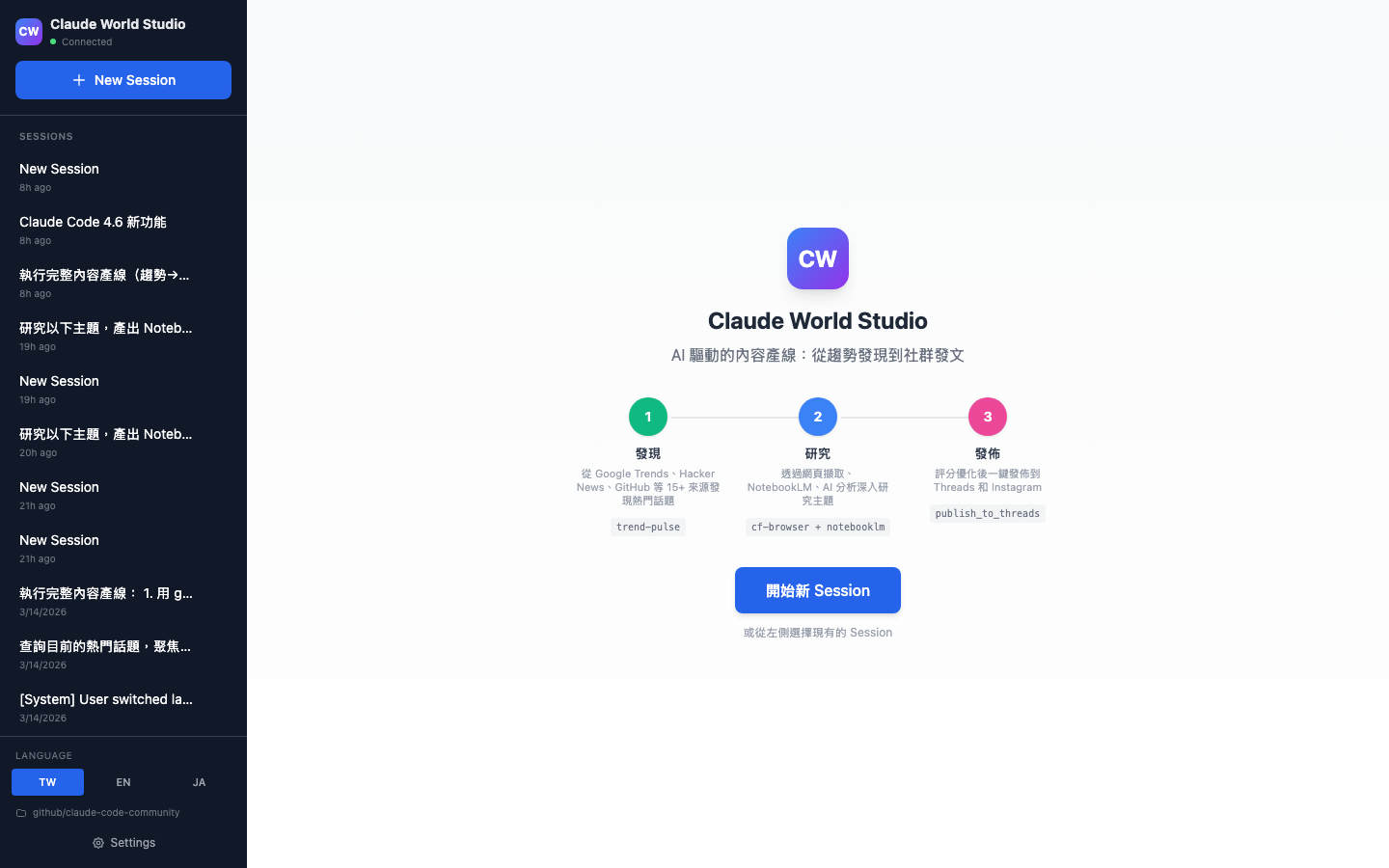
Features
One-Stop Pipeline
Three clear entry points — no complex menus, just pick and go:
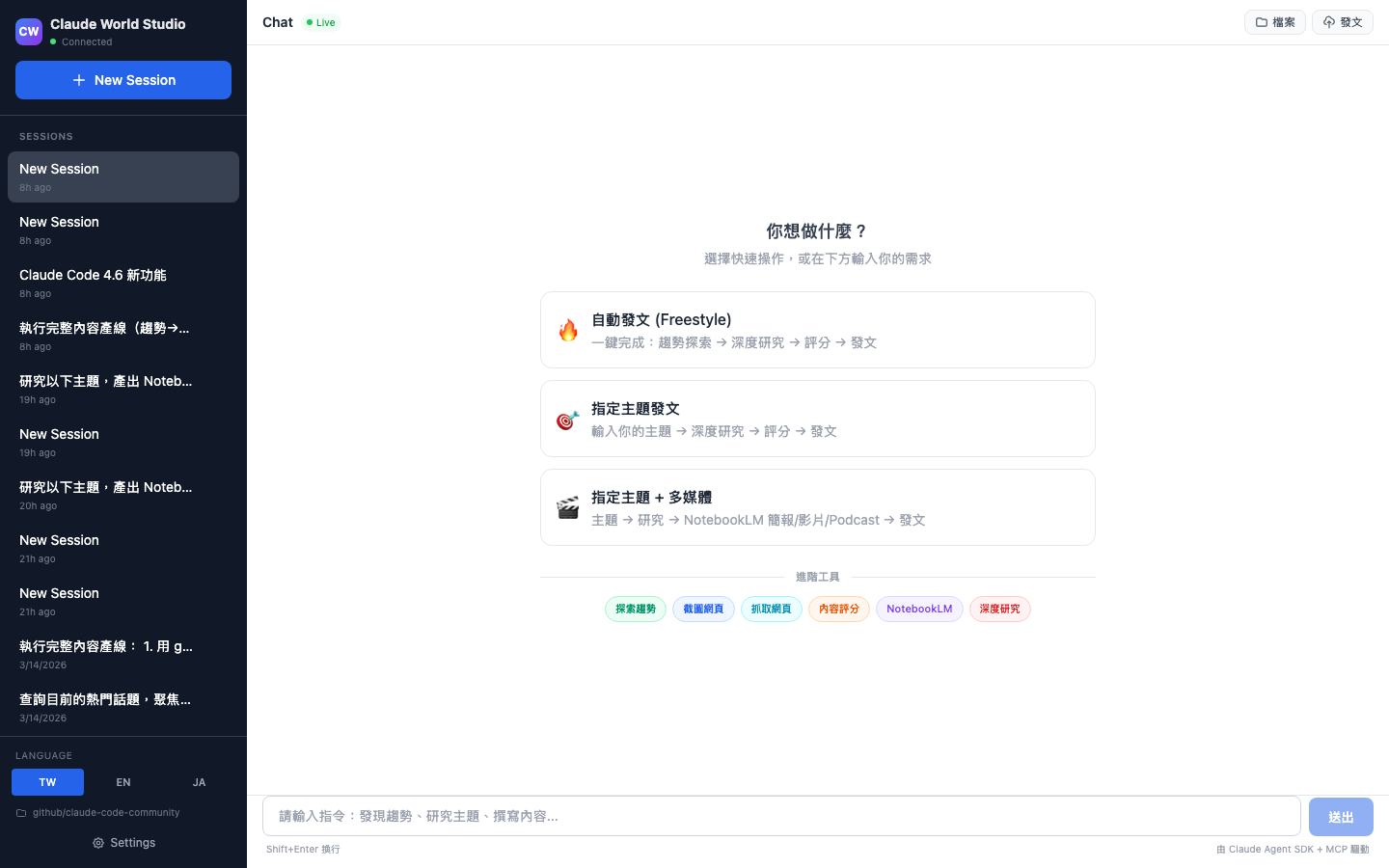
| Card | Action | What happens |
|---|---|---|
| Freestyle | One click, zero input | Auto: trends → read source → verify timeline → patent score → visual → publish |
| Custom Topic | Type your topic | Deep research → score → visual → publish |
| Custom + Media | Type your topic | Research → NotebookLM slides/video/podcast → publish |
Live Agent Execution
Watch Claude work in real-time — tool calls shown as collapsible blocks with MCP server badges:
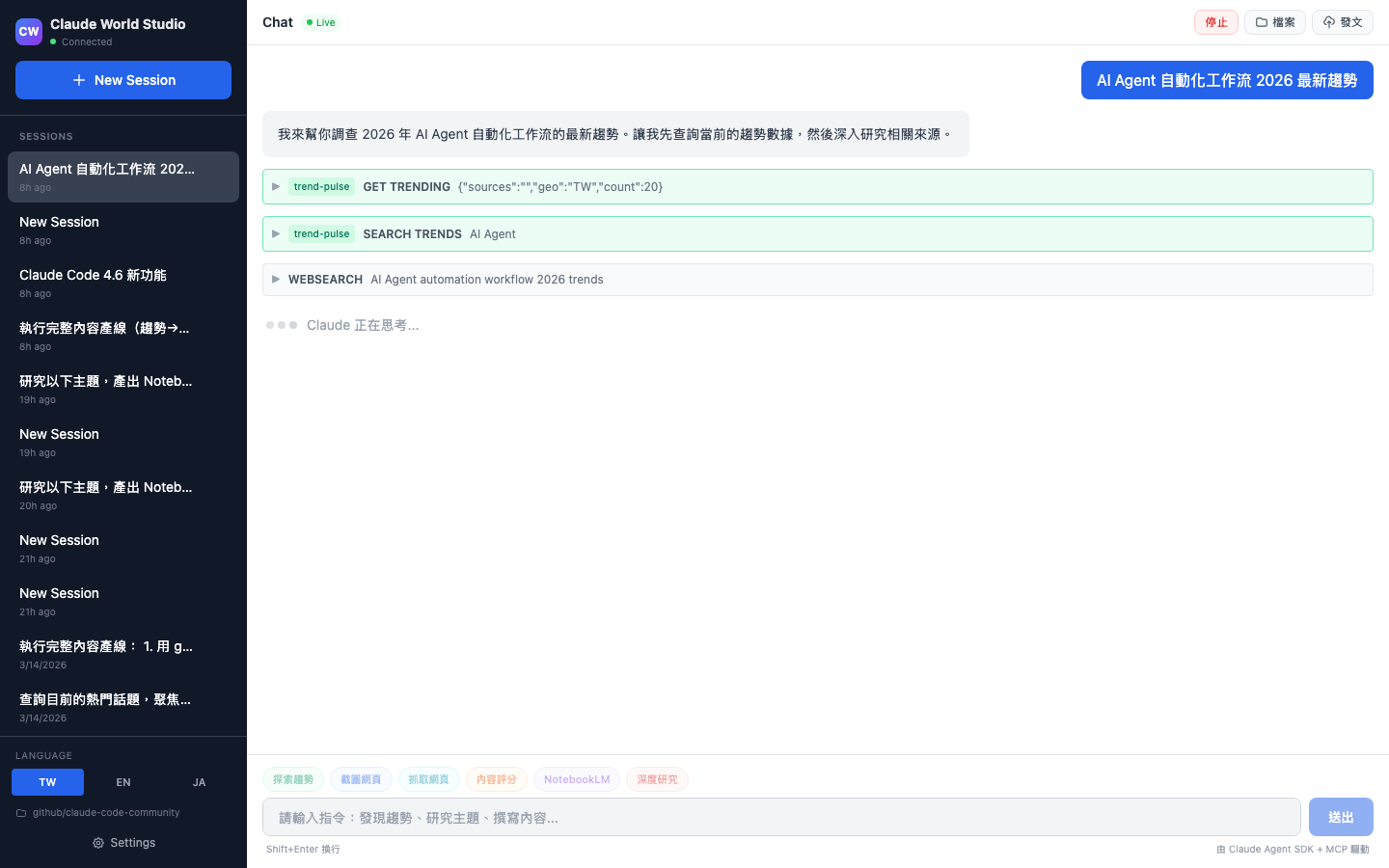
- trend-pulse (green) — 20 real-time trend sources, zero auth
- cf-browser (blue) — Cloudflare Browser Rendering for JS pages
- notebooklm (purple) — Research + artifact generation (podcast/slides/video)
- studio — Built-in publishing + history tools
Rich Markdown Responses
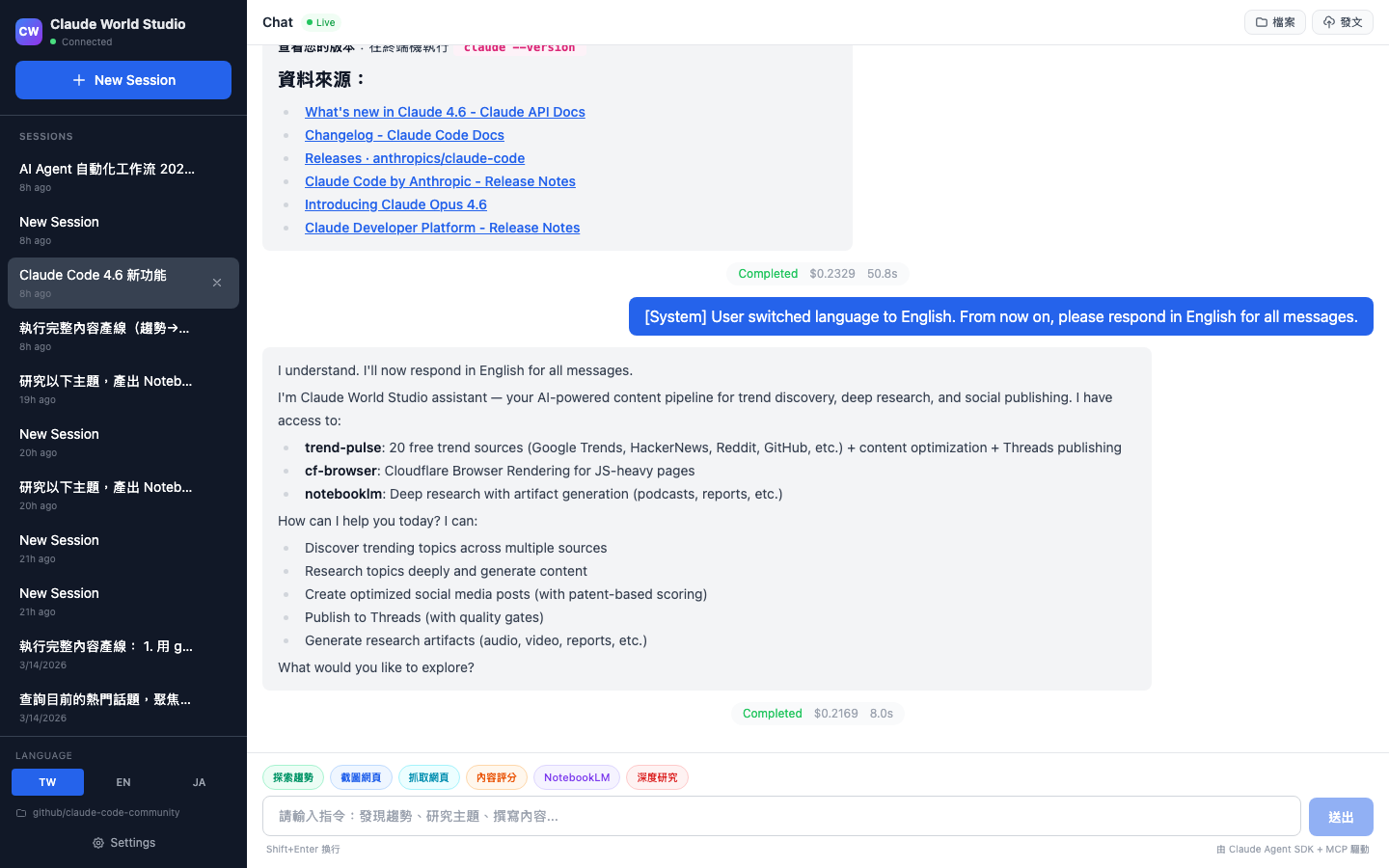
Full markdown rendering with syntax highlighting, clickable file path previews, cost/duration tracking, and inline images:
Multi-Language (i18n)
Full support for Traditional Chinese, English, and Japanese — all UI, system prompts, and pipeline cards adapt:
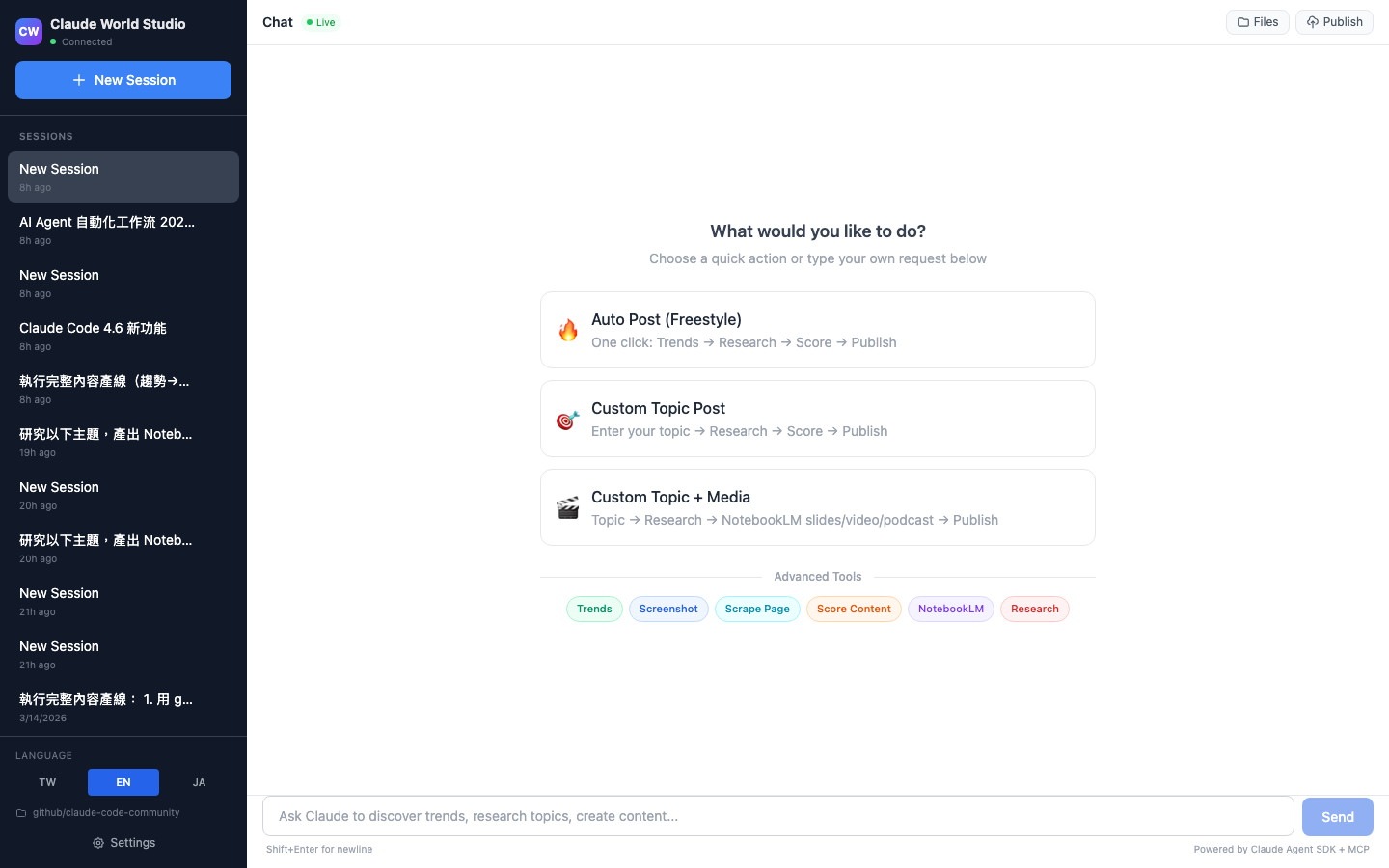 |
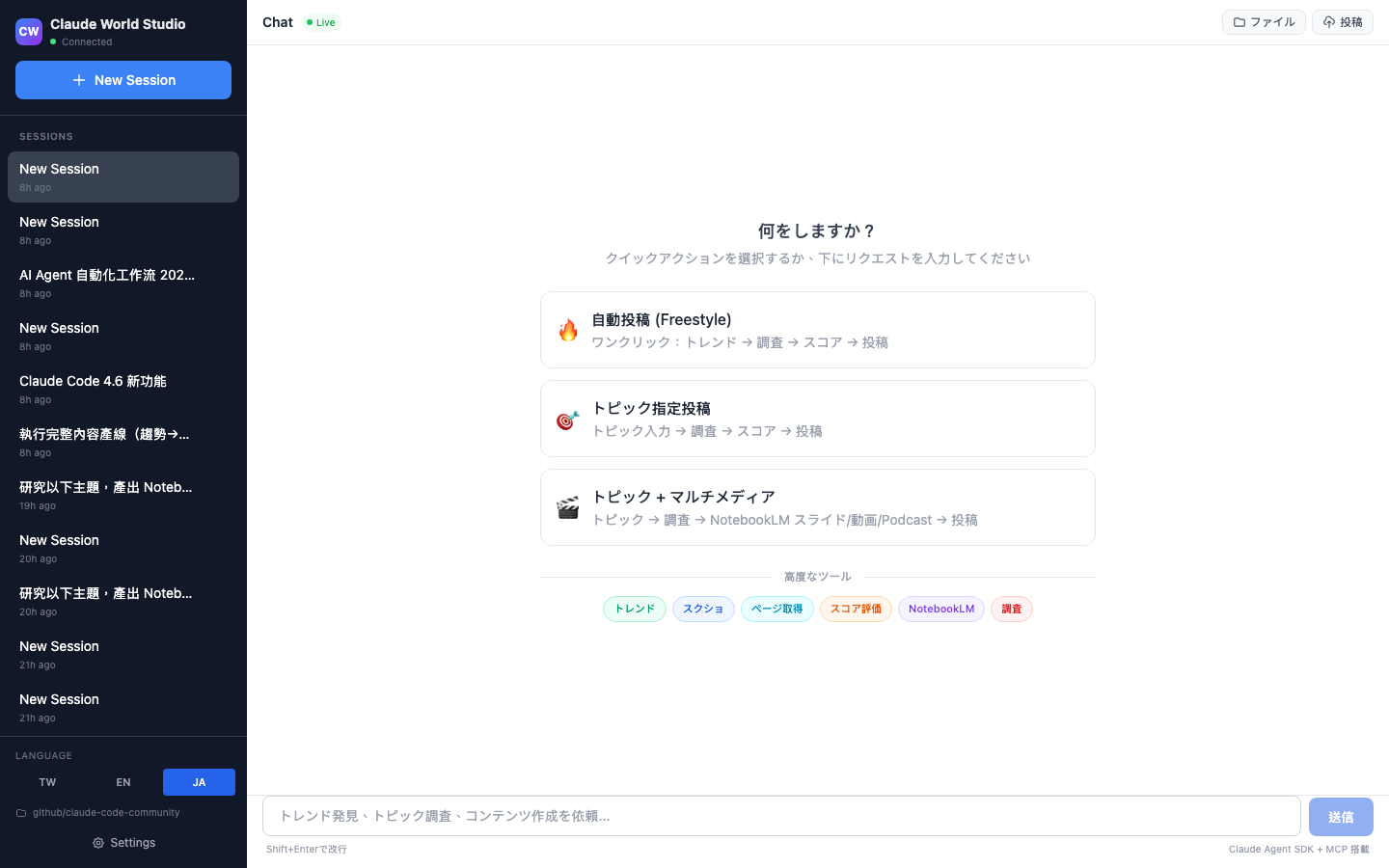 |
| English | Japanese |
Social Publishing (Native TypeScript)
Built-in Threads/Instagram publishing via native fetch() — no Python dependency. Every post is checked against Meta's patent-based 5-dimension scoring:
| Dimension | Patent | What it checks |
|---|---|---|
| Hook Power | EdgeRank | First line has number or contrast? (10-45 chars) |
| Engagement Trigger | Dear Algo | CTA anyone can answer? |
| Conversation Durability | 72hr window | Has both sides / contrast? |
| Velocity Potential | Andromeda | Short enough? Timely? |
| Format Score | Multi-modal | Mobile-scannable? |
Quality gates: Overall >= 70, Conversation Durability >= 55.
Supported post types: text, image, video, carousel (2-20 items), poll, GIF, link preview, text attachment, spoiler (media blur + text), ghost (24hr ephemeral), quote post, reply control, topic tag, alt text, link-comment auto-reply.
Multi-Account & Persona
- Multiple Threads/Instagram accounts with independent personas
- Per-account style (e.g., "tech-educator", "futurist")
- Per-account persona prompt for tone adaptation
- Matrix publishing: same topic → unique content per account
Scheduled Tasks
Cron-based task scheduling with per-account targeting:
- Define prompt templates with cron schedules
- Target specific social accounts
- Quality gate enforcement (min score threshold)
- Auto-publish or manual review mode
- Execution history with cost/duration tracking
- Reduced tool set for unattended safety (no Bash/Read/Write)
Visual Content Generation
NotebookLM integration for auto-generating visuals:
- Image cards — slides PDF as single-page visual cards
- Carousel — multi-page slides split into carousel images
- Podcast — AI-generated audio discussion
- Video — slides + podcast combined via ffmpeg
- Mind maps, reports, flashcards, study guides
All downloads stay within the workspace directory.
Workspace File Browser
Browse and preview workspace files directly in the UI:
- Directory tree with depth control
- Text file preview (syntax-highlighted)
- Binary file preview (images, PDFs, audio, video)
- Clickable file paths in chat responses
- Workspace-contained — no access outside project folder
Source Verification & Timeline Rules
Content integrity enforced at the system level:
- Read original sources — Never write from titles/metadata alone. 1+ primary source per topic, 2+ for controversial.
- Timeline verification — Every fact gets a verified timestamp. Time words mapped by age.
- No AI filler — System prompt blocks generic phrases ("in today's world" / "it's worth noting").
Session Management
- Multiple concurrent sessions with independent workspaces
- Session resume on app restart (conversation history preserved)
- Idle session eviction (30min TTL)
- Query cancellation via interrupt button or CLI
Dark Mode
System/light/dark theme with persistent preference across sessions.
IME Support
Full CJK input method support — Enter during Chinese/Japanese character composition does not trigger send. Shift+Enter for newline.
Workspace Security
- AI agent operates within session workspace only
- No access to ~/Downloads, ~/Desktop, ~/Documents, or system paths
- Credentials stored in local SQLite — never searched from filesystem
- Publishing via built-in MCP tool only (no external scripts)
- Session workspace validated at creation (blocks system paths)
- File API restricted to workspace root (symlink-safe realpath check)
Architecture
┌─────────────┐     ┌──────────────────┐     ┌─────────────────┐
│  React UI   │────▶│  Express + WS    │────▶│  Claude Agent   │
│  (Vite)     │◀────│  Server          │◀────│  SDK            │
└─────────────┘     └──────────────────┘     └────────┬────────┘
                                                      │
                           ┌──────────────────────────┤
                           │            │             │
                    ┌──────▼──┐  ┌──────▼───┐  ┌─────▼──────┐
                    │ trend-  │  │ cf-      │  │ notebooklm │
                    │ pulse   │  │ browser  │  │            │
                    │ (MCP)   │  │ (MCP)    │  │ (MCP)      │
                    └─────────┘  └──────────┘  └────────────┘
                    20 sources    Cloudflare    Podcast/Slides
                    zero auth     Browser       /Video/Report
Tech Stack
| Layer | Tech |
|---|---|
| Frontend | React 18 + Vite + Tailwind CSS |
| Backend | Express + WebSocket + Claude Agent SDK |
| AI Model | Claude Sonnet 4.6 / Opus 4.6 |
| MCP Servers | trend-pulse, cf-browser, notebooklm |
| Publishing | Native TypeScript fetch() → Threads Graph API |
| Database | SQLite (better-sqlite3, WAL mode) |
| Desktop | Electron 41 |
| Markdown | react-markdown + rehype-sanitize |
Prerequisites
- Node.js >= 18
- Claude Code CLI installed and authenticated (
npm install -g @anthropic-ai/claude-code) - Python 3.10+ (for MCP servers — or use
uvxfor zero-config setup)
Installation
Five ways to install — pick the one that fits your workflow:
| Method | Best for | MCP Servers | Web UI | Desktop App | CLI |
|---|---|---|---|---|---|
| A. Mac Desktop | Quickest start | via uvx | Built-in | Yes | Yes |
| B. npm | Most users | via uvx | Yes | — | Yes |
| C. Source | Contributors | venv or uvx | Yes | — | Yes |
| D. Build Desktop | Custom builds | via uvx | Built-in | Yes | Yes |
| E. MCP-only | Claude Code users | via uvx | — | — | — |
Option A: Mac Desktop App (Download)
Download the latest .dmg from GitHub Releases, open it, and drag to Applications.
- Double-click to launch — server starts automatically
- No terminal, no Node.js install needed
- MCP servers auto-detected via uvx (install uv first)
- All features included: Web UI + CLI + MCP + Publishing
Requires: macOS (Apple Silicon). Intel Mac build available on request.
Option B: npm global
npm install -g @claude-world/studio

# Set up MCP servers (one-time, auto-cached via uvx)
npx @claude-world/studio setup-mcp

# Start
studio serve
# Web UI: http://localhost:5173
# API:    http://127.0.0.1:3001
After install, both studio and claude-world-studio commands are available globally.
Option C: From source
git clone https://github.com/claude-world/claude-world-studio.git
cd claude-world-studio
npm install
cp .env.example .env

# Set up MCP servers
# Option 1: uvx (preferred — no clone, no path config)
npx @claude-world/studio setup-mcp

# Option 2: venv (legacy — clones repos, requires path config)
npx @claude-world/studio setup-mcp --venv

# Start development
npm run dev
# Frontend: http://localhost:5173
# Backend:  http://127.0.0.1:3001
Use node bin/cli.js <command> or npm link to register the studio command.
Option D: Build Desktop from source
Build the native macOS app yourself:
git clone https://github.com/claude-world/claude-world-studio.git
cd claude-world-studio
npm install

# Development mode (quick test)
npm run electron:dev

# Production build (creates .app + .dmg)
npm run electron:build
# Output: dist/mac-arm64/Claude World Studio.app
The Electron app:
- Spawns the Express server automatically on launch
- Loads your login shell PATH (nvm/homebrew compatible)
- Rebuilds native modules (better-sqlite3) for system Node ABI
- Supports all MCP servers (auto-detected via uvx or .env)
Option E: MCP-only (for Claude Code CLI)
If you already use Claude Code CLI and just want the MCP tools (trend-pulse, cf-browser, notebooklm) without the Studio UI:
# Install MCP servers via uvx (one-time)
uvx --from 'trend-pulse[mcp]' trend-pulse-server --help
uvx --from cf-browser-mcp cf-browser-mcp --help
uvx --from notebooklm-skill notebooklm-mcp --help
Add to your project's .mcp.json:
{
  "mcpServers": {
    "trend-pulse": {
      "type": "stdio",
      "command": "uvx",
      "args": ["--from", "trend-pulse[mcp]", "trend-pulse-server"]
    },
    "cf-browser": {
      "type": "stdio",
      "command": "uvx",
      "args": ["--from", "cf-browser-mcp", "cf-browser-mcp"]
    },
    "notebooklm": {
      "type": "stdio",
      "command": "uvx",
      "args": ["--from", "notebooklm-skill", "notebooklm-mcp"]
    }
  }
}
Or add to Claude Desktop App config (~/Library/Application Support/Claude/claude_desktop_config.json) with the same format.
MCP Server Setup
The app uses 3 MCP servers — all optional, the app works with any combination.
Quick Setup (uvx — recommended)
npx @claude-world/studio setup-mcp
This pre-caches all 3 servers via uvx. No cloning, no path config. Studio auto-detects uvx at runtime.
To update: npx @claude-world/studio setup-mcp --update
Manual Setup (venv)
See detailed MCP setup guide for per-server installation with local venvs.
MCP Auto-Detection
Studio resolves MCP servers in this order:
- Settings UI — paths configured via Settings page (stored in SQLite)
- Environment variables —
.envfile or exported vars - uvx fallback — if
uvxis on PATH, uses cached packages automatically
Use studio settings detect (CLI) or Settings > Scan System (UI) to check what's available.
Production Pipeline: End-to-End
Step 1: Install & Configure
npm install -g @claude-world/studio
npx @claude-world/studio setup-mcp
studio serve
Step 2: Add Social Accounts
Via UI: Settings > Social Accounts
Via CLI:
studio account create \
  --name "My Brand" --handle "@mybrand" \
  --platform threads --token YOUR_TOKEN
Step 3: Run the Pipeline
Web UI: Click a pipeline card (Freestyle / Custom Topic / Custom + Media)
CLI (headless):
studio chat --message "Find trending topics, research the best, write and publish" --json
Scheduled: Settings > Scheduled Tasks — cron + per-account targeting + quality gates
Step 4: Monitor
studio status                     # Server health
studio session list --json        # Sessions
studio history --limit 20 --json  # Publish history
CLI
Full CLI with 23 commands. All commands support --json for programmatic use.
# Server
studio serve                    # Start web UI
studio status                   # Check if running

# Sessions
studio session list
studio session create --title "Research" --workspace /path
studio session get <ID>
studio session rename <ID> --title "New"
studio session delete <ID>
studio session messages <ID> --limit 20

# Chat (WebSocket streaming)
studio chat --message "Find trends" --json
studio chat --session <ID> --message "Publish the best"
echo "What's trending?" | studio chat --json
studio interrupt <ID>

# Accounts
studio account list
studio account create --name "Main" --handle "@me" --platform threads --token TOKEN
studio account update <ID> --token NEW_TOKEN
studio account delete <ID>

# Settings
studio settings get
studio settings detect          # Auto-detect MCP tools
studio settings apply           # Apply detected values
studio settings set --language en

# Publishing (all Threads post types)
studio publish --account <ID> --text "Hello!" --score 85
studio publish --account <ID> --text "Vote!" --poll "A|B|C"
studio publish --account <ID> --text "Look!" --image URL
studio publish --account <ID> --text "Watch" --video URL
studio publish --account <ID> --text "Slides" --carousel URL1 URL2 URL3
studio publish --account <ID> --text "Post" --link-comment URL
studio history --limit 10

# Files
studio file list <SESSION_ID> --depth 2
studio file read <SESSION_ID> src/index.ts
Global flags: --json, --port N (env: STUDIO_PORT), --host H (env: STUDIO_HOST)
MCP setup wizard: npx @claude-world/studio setup-mcp
Security
This is a local-only development tool. It runs Claude with full tool access on your machine.
- Binds to
127.0.0.1only (not exposed to network) - WebSocket origin verification (exact port whitelist)
- CORS restricted to localhost dev ports
- Workspace containment: AI agent restricted to session workspace
- File API: realpath + workspace-only containment (symlink-safe)
- Path traversal rejected on both client and server
- Session workspace validated at creation (system paths blocked)
- Publishing via native fetch — no Python/shell dependency
- XSS protection via
rehype-sanitize - Session isolation: WS messages filtered by sessionId
- Idle session eviction (30min TTL)
- Credentials stored in local SQLite only
Warning: Do NOT expose this server to the internet. The AI agent has
Bash,Read,Write, andEditaccess within the workspace.
Contributing
Issues and PRs welcome. Please open an issue first to discuss major changes.
License
MIT
Yorumlar (0)
Yorum birakmak icin giris yap.
Yorum birakSonuc bulunamadi