loom
Health Uyari
- License — License: Apache-2.0
- Description — Repository has a description
- Active repo — Last push 0 days ago
- Low visibility — Only 5 GitHub stars
Code Gecti
- Code scan — Scanned 12 files during light audit, no dangerous patterns found
Permissions Gecti
- Permissions — No dangerous permissions requested
Bu listing icin henuz AI raporu yok.
Data plane for AI agents with Shared memory, document search and code intelligence. Plugins for Claude Code and Codex, an MCP server and SDKs.
Loom
Shared memory, document search and code intelligence for AI agents.
For Claude Code, Codex, Cursor and your own agents.
What Loom is for · Benchmarks · Get started · Capabilities · Integrations · Documentation
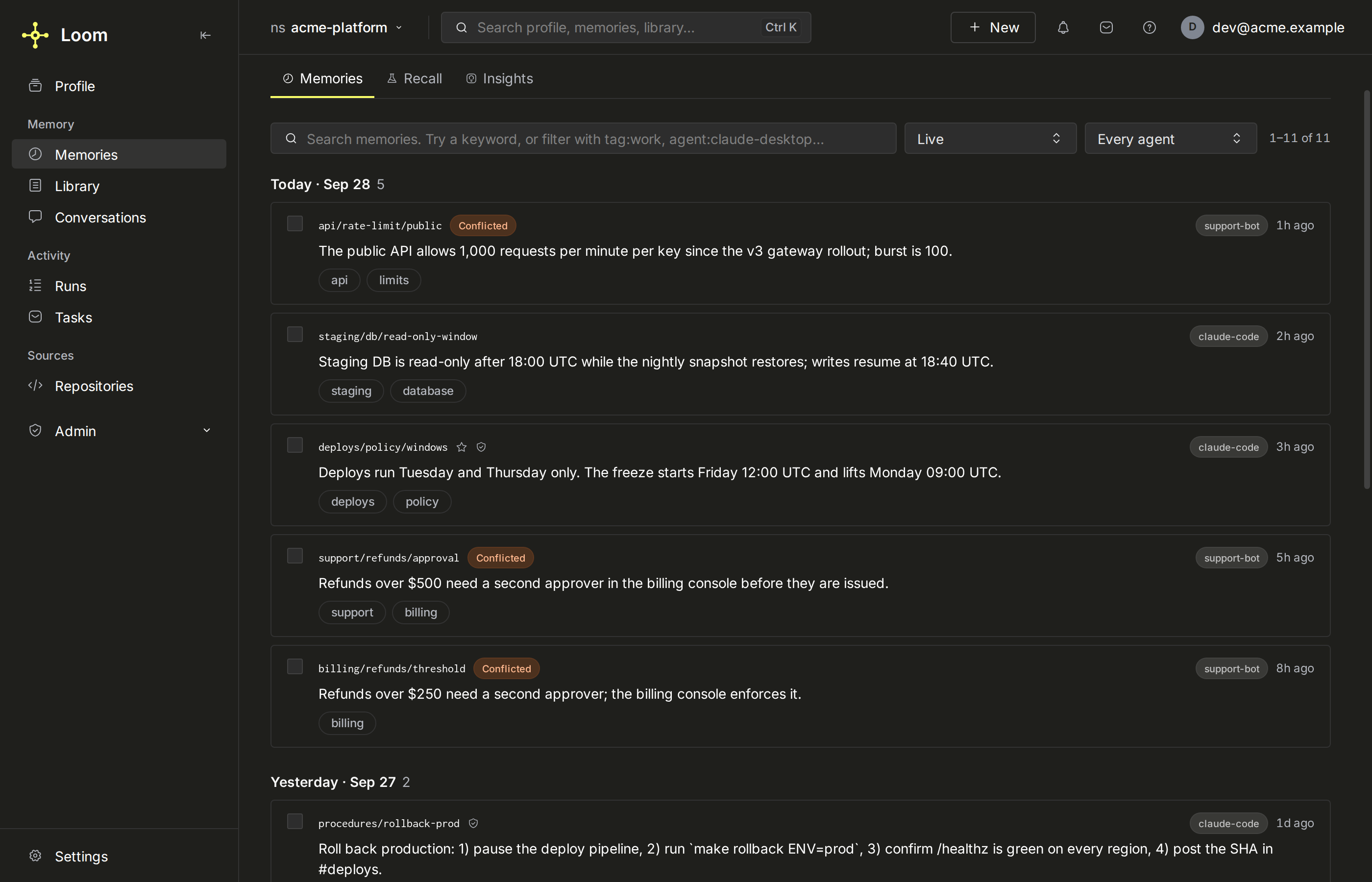
Loom is an open-source, self-hosted MCP server that gives your agents long-term, shared
memory: what one agent learns in a session, the next agent or tool can find.
Agents connect through MCP, HTTP, Python or TypeScript. Self-host with Docker or
on Kubernetes with the Helm chart; agent context and
index data live in ClickHouse, and a deployment can choose
Postgres at first boot for live memory and knowledge
state. The dashboard brings memories, repositories, tasks and runs into one place.
What Loom is for
- Memory shared across your coding agents, with plugins that load context at session
start and capture the session as it runs.
Connect a coding agent - Long-term memory for an agent application, per user, from the Python or TypeScript
SDK. Your first agent - A multi-user MCP memory server with namespaces, roles and tokens.
Multi-user mode ·
Namespaces and sharing - A code index of your repositories that coding agents query.
Code index - Document search with citations, including PDF,
.docxand.pptxfiles the
extractor service converts. Knowledge documents - A record of agent work, with searchable conversations (when recording is on),
session briefs to resume from, and runs with their goals, outcomes and model costs
when supplied. Conversations ·
Runs
Loom is not an in-process library for one agent's short-lived memory, nor an agent
framework. When Loom does not fit
Measured results
| Evaluation | With Loom | Without Loom | Efficiency gain | Scope |
|---|---|---|---|---|
| Coding-agent answer quality | 0.84 | 0.78 | 20% lower model cost | 24 questions × 3 paired runs |
| Coding-agent file localization | 96.4% | 91.4% | 21% lower model cost | 36 questions × 10 paired runs |
| Memory vs full-history answers | 94% | 90% | 91% fewer reader prompt tokens | 100 paired LongMemEval-S questions |
Both coding setups use Claude Code (claude-sonnet-5) on the ClickHouse codebase;
cost is the whole session's model bill, excluding Loom's server-side model calls, hosting
and indexing. Answer quality
measures coverage of a verified answer's key points, with a contradiction penalty.
File localization counts the right file among three named files.
The memory row compares retrieved memories with full conversation history using
the same gpt-5 reader. Token savings exclude memory construction; the 94% vs 90%
accuracy difference is descriptive, not statistically established.
Separately, Loom's memory.ask configuration scored 96.6% answer accuracy on all
500 LongMemEval-S questions. This is a product evaluation with its own configured
answer models, not the fixed-reader comparison above.
Results are specific to the tested workloads.
Protocols and reproducible artifacts ·
detailed results ·
evaluate on your workload
Get started
1. Choose your Docker setup
- Personal use—the default: no login, localhost-only access and a
dev/local
namespace. One person can connect multiple agents. - Team use: authenticated accounts and namespace access controls.
Start in multi-user mode from the first boot.
Both modes support the same Loom features, including configured LLMs and embeddings.
Single-user is not a reduced-feature edition. You can also
switch an existing installation without deleting its data;
grant new accounts access to the existing namespaces.
For the default personal installation, with Docker installed:
curl -fsSL https://github.com/ClickHouse/loom/releases/latest/download/install.sh -o loom-install.sh && sh loom-install.sh && rm loom-install.sh
Run it from your home directory, or another
directory only you can write to.
The installer starts Loom and ClickHouse, applies migrations and prints the dashboard URL:
http://localhost:7777/. The image includes the server, workers, dashboard and
Python, TypeScript and Go compiler indexers; TypeScript dependencies are prepared
automatically. Quickstart and pinned releases
The installation lives in ~/.loom (LOOM_INSTALL_DIR chooses another directory): the
Compose file and the startup settings in ~/.loom/.env. Running the install command again
upgrades in place and keeps your .env settings.
Keep single-user mode localhost-only. For shared access, follow the
team deployment guide, including TLS.
2. Configure models and API keys
The stock installation boots without keys or network. Storage, the dashboard,
structural code indexing and semantic search work, on a small local embedding model the
image carries; the fake LLM gives no AI-generated answers.
| Component | Configure for real use | Without configuration |
|---|---|---|
| Embeddings | Provider, embedding model, dimensions and API key. | local (bge-small on CPU): semantic retrieval, weaker than a hosted model. |
| LLM | Provider, model and API key. | fake-echo-1: no meaningful extraction, summaries or answers. |
Open Settings → Models & keys, choose both providers and models, enter their
keys, then click Test & apply. No Docker restart is needed; changing the embedding
space rebuilds the existing index. The dashboard's embedding choices are hosted
providers: to keep local and add an LLM, set the LLM lines in ~/.loom/.env instead
(Models and keys).
One OpenAI API key can serve both roles. Claude needs a separate embedding provider.
OpenAI, Gemini and OpenAI-compatible embedding endpoints are supported. Your agent's
CLI login or subscription does not supply Loom's provider keys.
Prefer environment configuration? Edit ~/.loom/.env, then recreate the server:
docker compose --project-directory "$HOME/.loom" up -d --force-recreate loom
A key alone does not change the pinned models (the local embedder and the fake LLM); set
the provider and model too.
Saved dashboard settings take precedence over .env. Follow
models and API keys for provider recipes
and health checks.
Everything else is in one file. loom.example.yaml lists
every setting with its default and what it does, by area: the ClickHouse connection,
timeouts and budgets, rate limits, workers, and the *_enabled switches that turn
features on and off. Set any of them as LOOM_<NAME> in ~/.loom/.env and recreate the
server; a deployment that mounts a config file can set them in a copy of this file
instead (how settings are read). One markedlive also changes while Loom runs: loom settings set <name> <value>, or Admin → Deployment
settings. loom settings list --changed shows what differs from the defaults and
where each value came from (runtime settings).
3. Connect your agents
On the machine running a personal installation, the plugins need no token:
# Claude Code
claude plugin marketplace add ClickHouse/loom
claude plugin install loom@loom

# Codex
codex plugin marketplace add ClickHouse/loom
codex plugin add loom@loom
Start a new session; the first one connects to http://localhost:7777. In Codex, runcodex interactively once and approve the plugin's hooks; until then only the tools
work. Tell the agent something worth keeping, then ask about it in the next session.
For a team server, pass --config server_url=… --config token=… to Claude Code, or
point Codex at it as described in
connect a coding agent. Create
tokens in Settings → Tokens. Cursor and other MCP clients, and
the SDK, are covered there too.
Why Loom
- Memory that carries forward. Share decisions and findings across agents and
sessions. Each fact records who wrote it, version history and conflict review make
corrections traceable, and a namespace can be rolled back to any point in time.
Memory - Code intelligence with evidence. Find definitions, callers, change impact and
relevant tests; connect code to commits, pull requests and issues. Results identify
their revision, source location and completeness. Code index - Grounded retrieval. Search permitted memories, documents, conversations and
tracker records. Answers cite their sources; low-confidence retrieval can abstain.
Retrieval - Multi-agent handoffs. Assign work through durable task inboxes with leases,
retries, review rules and outcomes. Your agents execute the workflow; Loom
preserves the handoffs. Task queues - Control over agent data. Manage namespace access, provenance, retention, audit
records and verified erasure. Context remains queryable in ClickHouse.
Security
Integrations
| Integration | What it connects |
|---|---|
| Claude Code, Codex, Cursor and other MCP clients | Memory and code intelligence in your existing agent workflow. |
| Python, TypeScript and HTTP | Your own agents and applications. |
| Langfuse | Request traces, model costs, retrieval scores and prompt-version attribution. |
| ClickStack / HyperDX | OpenTelemetry traces, logs and metrics in ClickHouse. |
Langfuse and ClickStack are optional integrations, not bundled services in the Docker stack.
Benchmark details
Detailed retrieval, reader and code-search results
| Evaluation | Result |
|---|---|
| LongMemEval-S evidence retrieval (500 questions) | 98.6% of questions with at least one supporting session in the first 30 memories. |
LongMemEval-S fixed gpt-5 reader (500 questions) |
92.0% answer accuracy from the top 200 memories. |
| LoCoMo (all 10 conversations) | 89.6% answer accuracy; 90.8% correct abstentions on adversarial questions. |
| MemoryAgentBench fact-question sample (500 questions) | 99.0% SubEM; 95.7% token-overlap F1 on generated answers. |
| Conceptual code search (36 questions) | Gold-file recall 91.2% at 5 / 97.2% at 10; MRR 0.91. |
| SWE-bench Verified file localization (200 issues) | Issues with a changed file in the first 10: 82% vs 57% for BM25; 76.5% in the first 5. |
| Tracker duplicate detection (104 pairs) | Recorded older duplicate ranked first 87.5% of the time. |
These measure different tasks, not one aggregate score. SWE-bench measures
file localization, not issue resolution. The results ledger
includes scoring definitions, small-sample evaluations, weaker and negative findings,
and the full protocols, models and artifacts.
Methodology ·
coverage and known gaps ·
run the benchmarks
Documentation and contributing
For shared agent context, code intelligence and permissioned retrieval, start with the
documentation. For deployment requirements, see the
prerequisites.
Deployment · FAQ ·
Contributing · Security reporting ·llms.txt
Yorumlar (0)
Yorum birakmak icin giris yap.
Yorum birakSonuc bulunamadi