html-anything
Health Pass
- License — License: NOASSERTION
- Description — Repository has a description
- Active repo — Last push 0 days ago
- Community trust — 13 GitHub stars
Code Warn
- process.env — Environment variable access in examples/chatgpt-export/input.json
Permissions Pass
- Permissions — No dangerous permissions requested
No AI report is available for this listing yet.
Turn any file into a beautiful, interactive, shareable HTML — WhatsApp logs, PDFs, transcripts, code, anything.
html-anything
Turn an idea, file, folder, or URL into a polished live HTML page.
html-anything is a Codex / Claude Code skill. Give it a prompt like
"create an interactive teaching site about the solar system", or give it
an export like Amazon orders, WhatsApp chat, a CSV, a transcript, a repo,
or a folder of notes. The skill figures out the source, chooses the page
style automatically, builds the HTML, checks it in a browser, and gives
you something you can open, share, or publish.
Preview
→ Open the curated gallery — 22 demos, organized by use case and style.
Featured
Interactive teaching site →
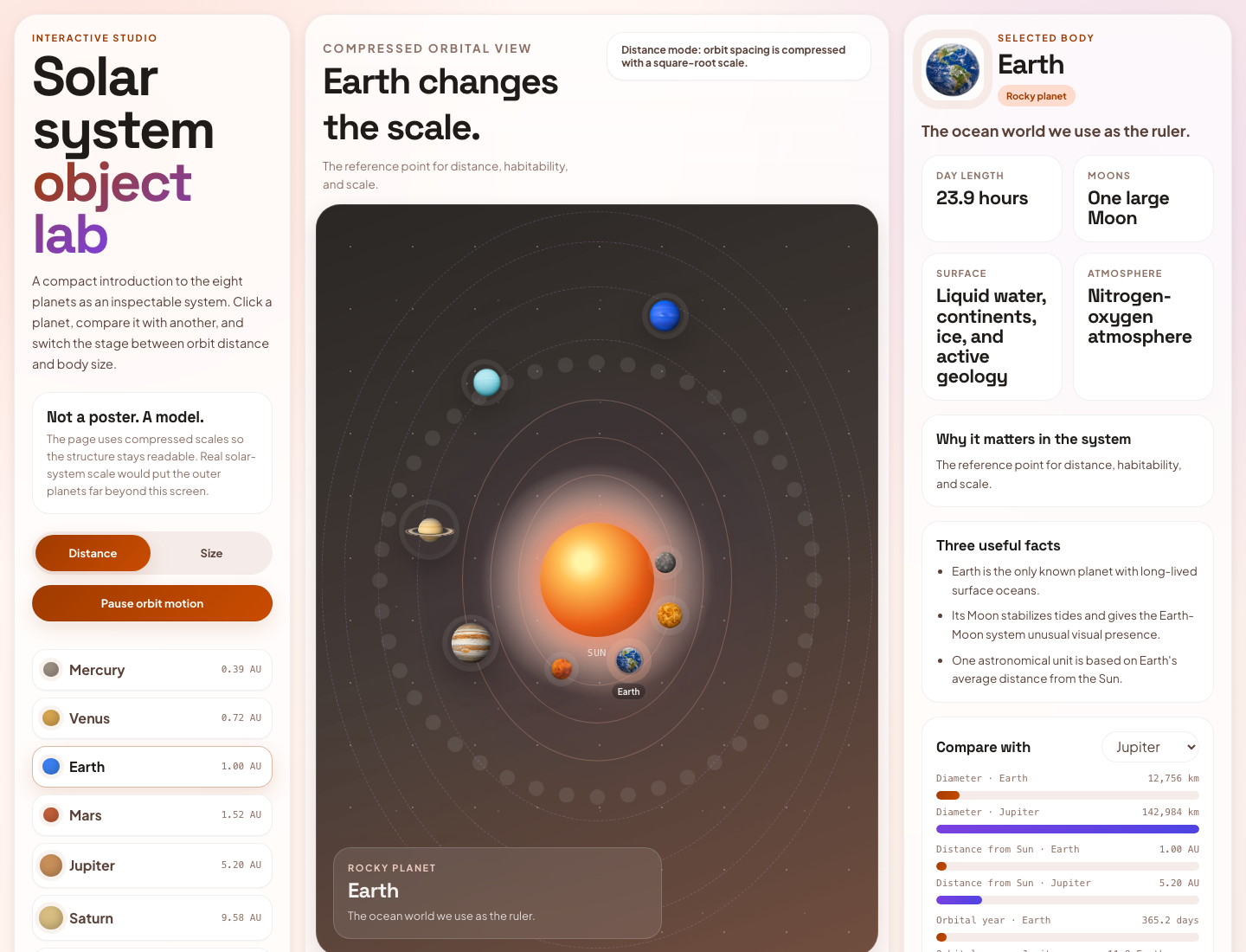
A self-contained interactive lesson built from a single teaching brief — "create an interactive teaching site about the solar system". Each planet has its own stage with orbit controls, comparison tools, and a try-it quiz. No tutoring software, no slides, no setup. Style: teaching.
Couple chat relationship report →
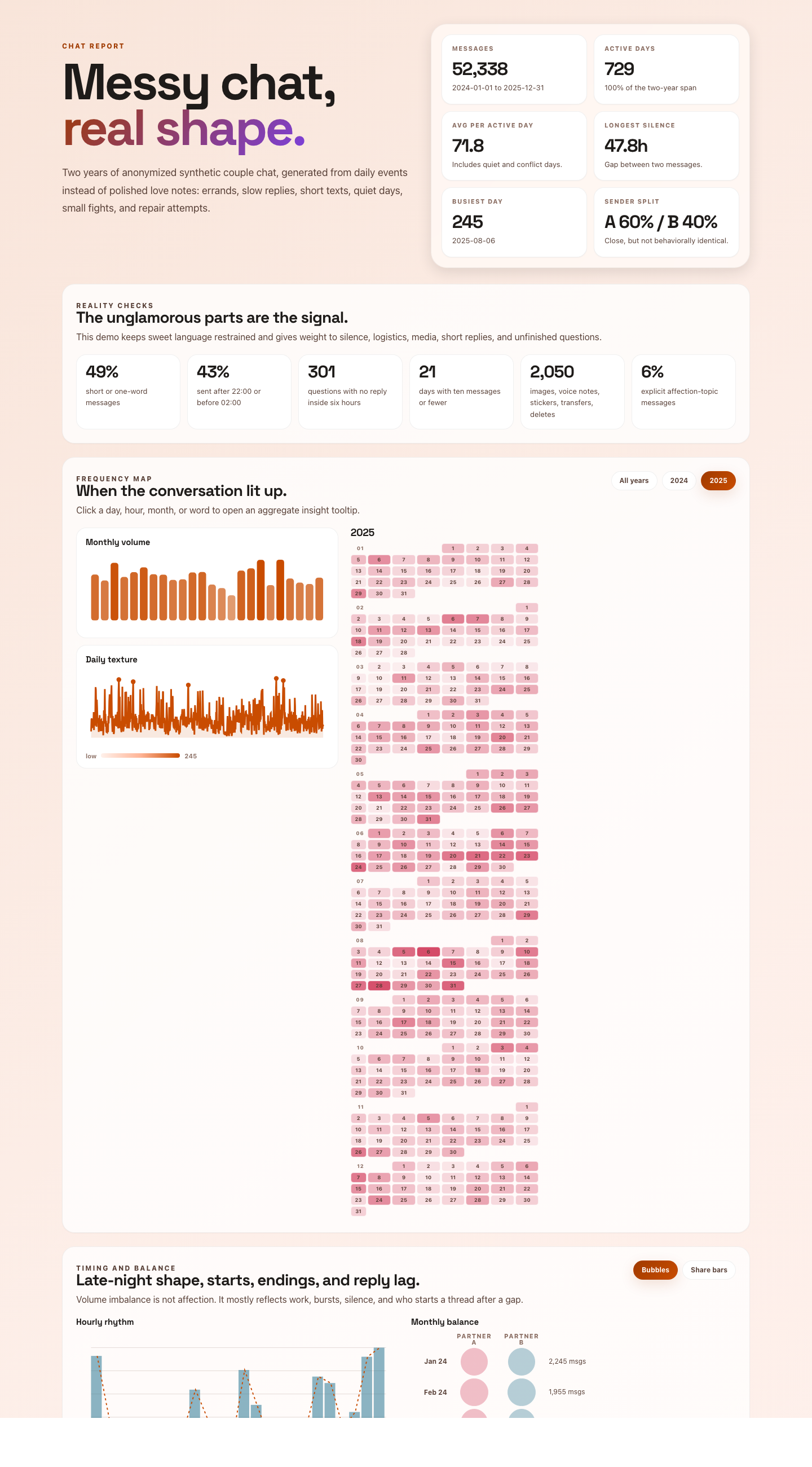
A WhatsApp / WeChat export reduced to its rhythm story — who initiates, response times, peak-hour patterns, mood cadence — without ever exposing private text. Aggregate-first, anonymized evidence. Style: relationship.
Saved places atlas →
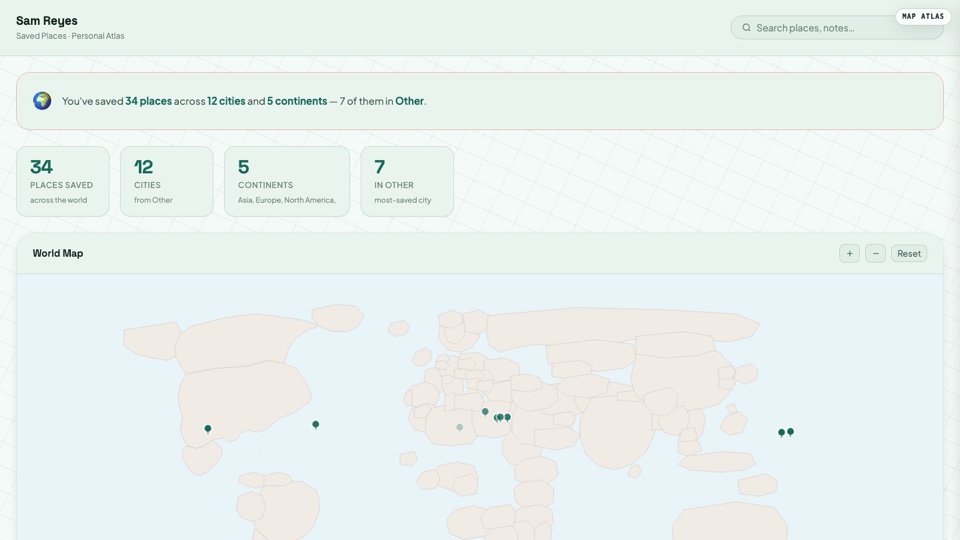
Your Google Maps starred places on a personal world atlas. Hover for the note you wrote at the time, click to expand. Built from a Takeout CSV in seconds. Style: map-atlas.
More demos
A small selection across the rest of the style catalog. Each links to the live page.
| Demo | One-line | Style |
|---|---|---|
| Amazon order history → | 3 years of orders → personal commerce memory with cadence, returns, gifting. | timeline-story |
| Kindle highlights → | Highlights become a mycelium writing field with a living margin question. | living-essay |
| Apple Health → | Activity, sleep, and workouts become a personal rhythm story. | timeline-story |
| Slack championship → | Team activity becomes ranked kinetic lanes with decisions, topics, and linked evidence. | kinetic-scoreboard |
| LinkedIn connections → | 12 years of connections clustered by company, role, and era. | network-map |
| PDF e-guide → | A sector report becomes a two-page guide preview with TOC, lesson spread, and source drawer. | digital-eguide |
| Brand positioning carousel → | A strategy essay becomes a 5-spread magazine carousel with source evidence. | editorial-carousel |
| Email support console → | A mailbox archive becomes a soft SaaS console for thread health, open loops, and handoffs. | soft-saas |
| Google Photos atlas → | Takeout EXIF metadata becomes a place-driven memory map. | map-atlas |
| PR review → | A patch becomes a risk-annotated review brief with evidence. | developer |
→ See the curated gallery (22 demos) →
Install
Recommended — Agent Skills CLI
One command, works across Claude Code, Codex, Cursor, Cline, Windsurf
and any other agent that follows the open agent skills
spec:
npx skills add clockless-org/html-anything
The CLI also pings the public skills directory, so installs feed the
skills.sh leaderboard.
Manual install (Claude Code)
mkdir -p ~/.claude/skills
git clone https://github.com/clockless-org/html-anything ~/.claude/skills/html-anything
Restart Claude Code so it loads SKILL.md.
Manual install (Codex)
mkdir -p "${CODEX_HOME:-$HOME/.codex}/skills"
git clone https://github.com/clockless-org/html-anything "${CODEX_HOME:-$HOME/.codex}/skills/html-anything"
Restart Codex so it loads the skill.
To update a manual install later:
git -C ~/.claude/skills/html-anything pull
Use
Ask in plain language:
Use html-anything to create an interactive teaching site about the solar system.
Use html-anything on my Amazon order history. Walk me through the export first.
Use html-anything to turn ~/Downloads/_chat.txt into a relationship report.
Use html-anything to make this CSV into a shareable dashboard.
Use html-anything on this GitHub repo URL.
If you already have the file, folder, or URL, give it to the agent. If
you only know the source type, such as "Amazon orders", "Spotify history",
"WhatsApp chat", or "Google Photos Takeout", the skill first explains how
to export the data, then converts it after you provide the export.
Input And Output
| Input | What you give | What you get |
|---|---|---|
| Idea | A short brief, e.g. "make a solar system teaching site" | A generated educational / interactive HTML page |
| File | CSV, JSON, Markdown, PDF, DOCX, chat export, log, transcript, statement | A live page designed for that file |
| Folder | Notes vault, Google Photos Takeout, Notion export, repo, exported archive | A browsable atlas / dashboard / audit page |
| URL | Article, GitHub repo, public webpage | A shareable HTML reading or exploration page |
| Export request | "My Amazon orders", "my Spotify history", "my WhatsApp chat" | Export instructions first, then a live HTML page |
The output is a browser page, not markdown. Most outputs are a singleoutput.html. When the page needs generated images or other local
assets, the skill returns output.html + assets/. Ask for "single-file"
if you need everything in one HTML file.
Automatic Styles
You do not need to choose a style. The default is auto.
Styles are design systems + layout systems, not CSS skins. The skill picks
the system from the content, then builds the page inside that system. A few
styles, such as paper-trail, are explicit overrides for a requested visual
system rather than default auto routes:
Style fidelity is part of the contract: when a style is based on a reference
HTML or screenshot, the generated page should reproduce the reference's first
viewport, component vocabulary, interaction model, motion grammar, and visual
absence rules. Source modules are translated into the style instead of forcing
every output into the same dashboard/report shape.
| Content | Style |
|---|---|
| Unknown or mixed inputs | default (Insight Brief) |
| Tutorials, lessons, explainers, "teach me" prompts | teaching (Lesson Lab) |
| App-like object/system/spec explorers, anatomy/architecture/product studios | interactive-learning (Learning Studio) |
| 1:1 chats and intimate message exports | relationship (Rhythm Report) |
| Reflective essays, Kindle highlights, idea notes, concept-heavy reading archives | living-essay (Mycelium Writing Environment) |
| Multi-participant activity streams, team chats, ranked contributors, owner/reps/players by workload | kinetic-scoreboard (Kinetic Championship) |
| Personal histories — chronological (orders, history, listening, health) and topical (Notion / Obsidian vaults) | timeline-story (Timeline Story) |
| Places, trips, routes, rideshare, geotagged photos | map-atlas (Map Atlas) |
| Tactile trip folders, hotel folios, receipts, tickets, reservation bundles | paper-trail (Paper Trail, explicit override) |
| Contacts, LinkedIn, communities, social payments | network-map (Network Map) |
| Support mailboxes, email campaigns, onboarding, customer-success queues | soft-saas (Soft SaaS Console) |
| Finance, spreadsheets, logs, backlog, operational data | dashboard (Ops Console) |
| Essays, articles, reading lists, bookmarks, PDFs, DOCX, legal/medical/lab records | document (Document Review) |
| E-guides, PDF guides, creator guides, playbooks, lead magnets | digital-eguide (Digital E-Guide Spread) |
| Brand strategy essays, founder letters, article takeaways, lightweight reports meant to be shared as a sequence | editorial-carousel (Editorial Carousel) |
| Logs, diffs, stack traces, CI failures, repos | developer (Terminal Evidence Workbench) |
You can still steer it naturally: "make it more tutorial-like", "more
app-like", "less academic", "make it a carousel", "more dashboard-like",
or "more playful".
Reusable style prompts live in prompts/styles/.
The shared structural contract isprompts/styles/_system.md. The internal
style catalog lives in prompts/styles/catalog.json:
it records the six use cases plus each style's triggers, best sources,
example, preview, required primitives, and avoid rules so generation can stay
style-faithful without asking users to pick options. There is a fallbackdefault style plus 13
auto-selected styles (teaching,interactive-learning, relationship, living-essay, dashboard, soft-saas,kinetic-scoreboard, timeline-story, map-atlas, network-map,document, editorial-carousel, and developer), plus explicit overrides
such as paper-trail and digital-eguide.
Example explicit style override:
npx tsx src/cli.ts examples/itinerary-trip/input.csv \
  --style paper-trail \
  --out /tmp/paper-trail-itinerary.html \
  --title "Tokyo + Kyoto - 8-day itinerary"

npx tsx src/cli.ts examples/pdf/input.pdf \
  --style digital-eguide \
  --out /tmp/battery-storage-guide.html \
  --title "Mid-Market Battery Storage Field Guide"
Use Cases And Sources
Sources can be endless, but the skill routes them into six stable use cases.
Each use case can use one or more style systems.
| Use case | Example sources | Likely styles |
|---|---|---|
| Teaching Studios | A short teaching brief, article, lesson outline, concept note, URL | teaching, interactive-learning |
| Files & Work Data | CSV / TSV, spreadsheet-style exports, JSON, JSONL, logs, email/support archives, bank transactions, invoices, QuickBooks, calendars, issue trackers, Markdown, PDF, DOCX, bookmarks, URL lists, bibliographies, research records, slide-style carousel outputs | dashboard, soft-saas, document, digital-eguide, editorial-carousel, paper-trail |
| Conversation Analysis | WeChat, WhatsApp, iMessage-style CSV, Slack, Discord, Telegram, email-style threads | relationship, kinetic-scoreboard, network-map |
| Personal Data Recaps | Amazon orders, Apple Health, browser history, YouTube, Spotify, Twitch, Kindle highlights, LinkedIn, Venmo / PayPal, AI chat exports, notes vaults | timeline-story, living-essay, network-map |
| Places & Trips | Google Photos Takeout, Google Maps saved places, rideshare history, GPX, KML, itinerary CSV, location history | map-atlas, paper-trail |
| Developer Evidence | Git diff, PR patch, CI log, stack trace, GitHub repo URL | developer |
Use case is user-facing; style is internal. A user can simply say "make this
CSV prettier" or "turn this into a teaching site" and the skill picks the
right system automatically.
The detailed source-specific instructions live in prompts/sources/.
Defaults
- The skill chooses the style automatically.
- The skill samples large sources, but renders the full data where practical.
- The skill checks the page in a browser before handing it back.
- Generated pages are local-first and static. They can be opened directly or hosted anywhere static HTML works.
- Generated HTML can embed private source data client-side. Treat the output as sensitive as the original export.
- Sensitive-record outputs are for organization and review only, not medical, legal, tax, accounting, immigration, insurance, or investment advice.
Developer Note
This repo also contains a standalone parser / CLI framework used by some
examples, but the primary product surface is the agent skill. Users should
not need to understand the internal implementation to use html-anything.
git clone https://github.com/clockless-org/html-anything
cd html-anything
npm install
export ANTHROPIC_API_KEY=sk-ant-...   # or OPENAI_API_KEY=sk-...
npx tsx src/cli.ts examples/csv/input.csv --out /tmp/customers.html
License
Reviews (0)
Sign in to leave a review.
Leave a reviewNo results found