glasshouse
Health Uyari
- No license — Repository has no license file
- Description — Repository has a description
- Active repo — Last push 0 days ago
- Low visibility — Only 6 GitHub stars
Code Basarisiz
- rm -rf — Recursive force deletion command in image/build-mac.sh
- rm -rf — Recursive force deletion command in image/build.sh
- rm -rf — Recursive force deletion command in image/provision-guest.sh
Permissions Gecti
- Permissions — No dangerous permissions requested
Bu listing icin henuz AI raporu yok.
Run AI agents in a hardware-virtualized Ubuntu VM (QEMU/KVM)
Glasshouse
English | 简体中文
Run AI agents inside a hardware-virtualized Ubuntu 26.04 LTS virtual machine, so they cannot reach your host's files, credentials or internal network. QEMU/KVM on Linux, Virtualization.framework on macOS.
Full usage manual: USAGE.md (English) · USAGE.zh-CN.md (中文): starting, changing the configuration, adding CPU and memory, persistence, troubleshooting. Release notes: CHANGELOG.md (English) · CHANGELOG.zh-CN.md (中文).
Glasshouse AI SandBox for Vibe-coding
Vibe coding means handing the keyboard to an AI agent and letting it run commands, install packages and edit files for hours. That is productive, and it is also exactly when you least want the agent standing on your real machine. Glasshouse gives that workflow a disposable room with glass walls: the agent works freely inside, and you can see everything it does.
- Let it run without babysitting. Claude Code is preinstalled (newest release at build time) in an Ubuntu VM. A bad
rm -rf, a hostilepostinstallscript or a prompt-injected tool call can only damage the VM, not your home directory, SSH keys or browser profile. - Your code goes in, reviewed changes come out.
glasshouse run --shell ./projcopies the project into/workspace(secrets such as.env*and*.pemare skipped). When you are happy,glasshouse pullshows a diff and writes only what you approve. - Sign in with your own subscription. Run
claudein the VM and log in with your Claude account; no API key has to be copied in. The default network policy allows only the login and API domains. - Watch what it does. CC-Monitor hooks are baked into the image through Claude Code's system-wide managed settings, which the
agentuser cannot edit, and the host keeps a hash-chained audit log. - Pick the weight you need.
--shellis a light terminal-only VM that boots fast;--guiis a full GNOME desktop for agents that drive a browser or an app. - Clean slate every time. A session lives in its own disk overlay, separate from the read-only base image. When the session stops (
glasshouse stop, a timeout, or a shutdown inside the VM) the overlay is deleted, so the nextglasshouse runstarts clean;glasshouse rmthen removes the leftover log and record. Nothing is restored on restart, so runglasshouse pullfirst. With--keepthe disk stays after stop andglasshouse start <session>boots it again.
Typical loop: glasshouse run --shell ./proj → run claude and describe what you want → glasshouse pull to review and bring the result home.
Demo
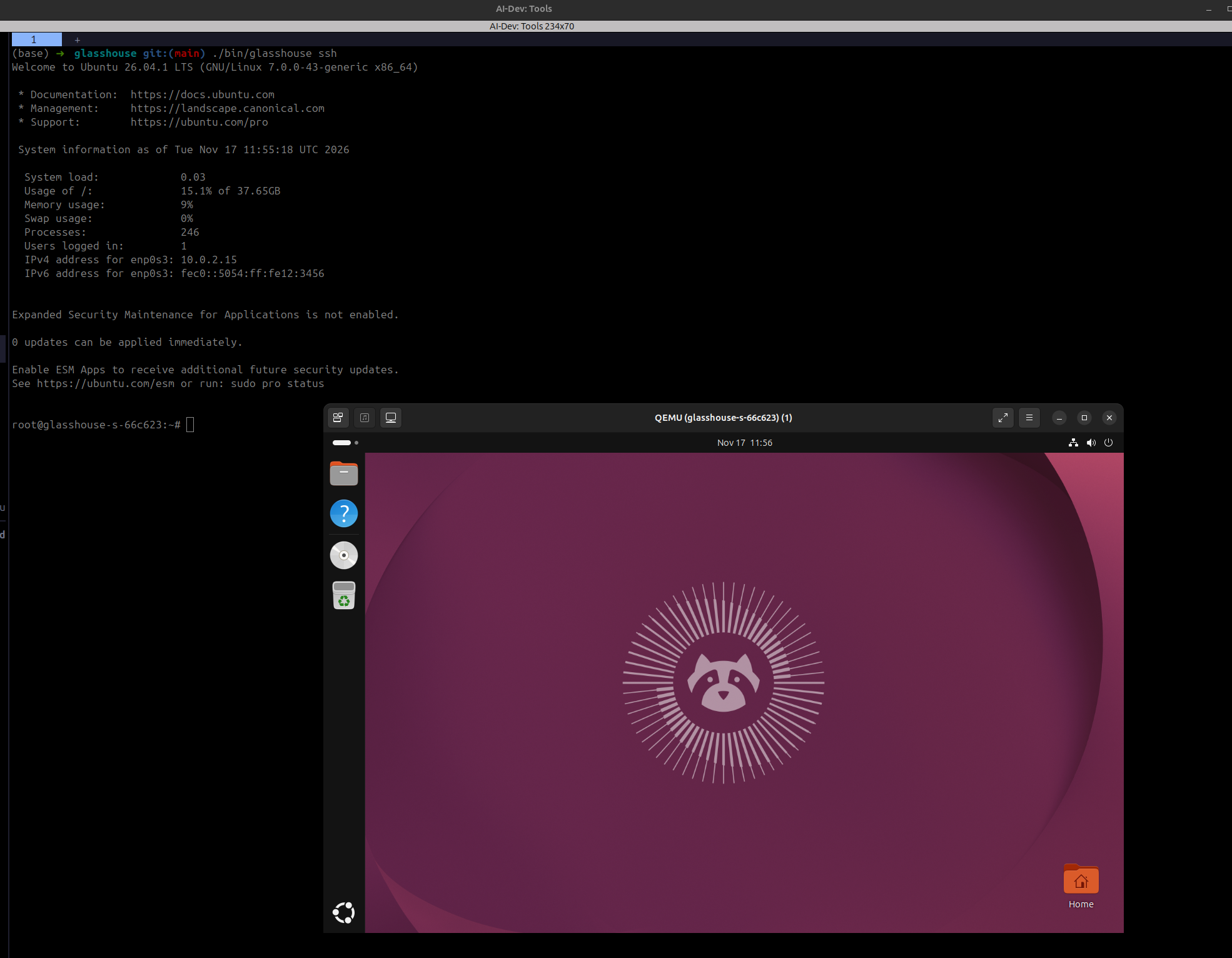
glasshouse ssh gives a root shell in the Ubuntu 26.04.1 VM (left); the same VM's GNOME desktop runs in a QEMU window (right).
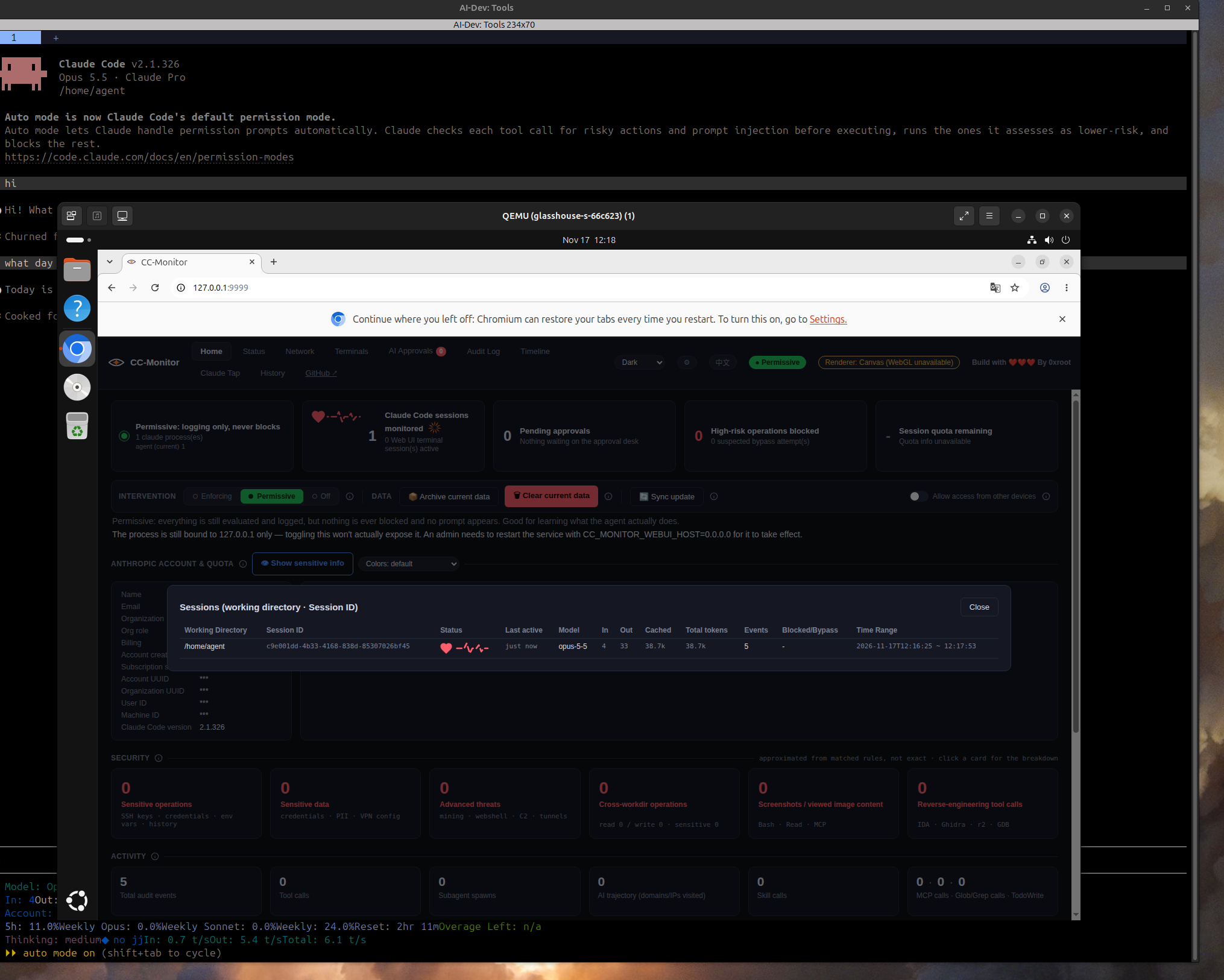
Claude Code 2.1.326 runs inside the VM on a Claude Pro subscription login (as the agent user, in /home/agent). The VM's browser shows the CC-Monitor web UI at 127.0.0.1:9999: the Claude Code session is monitored and its events appear in the audit log. The mode is Permissive, which only logs.
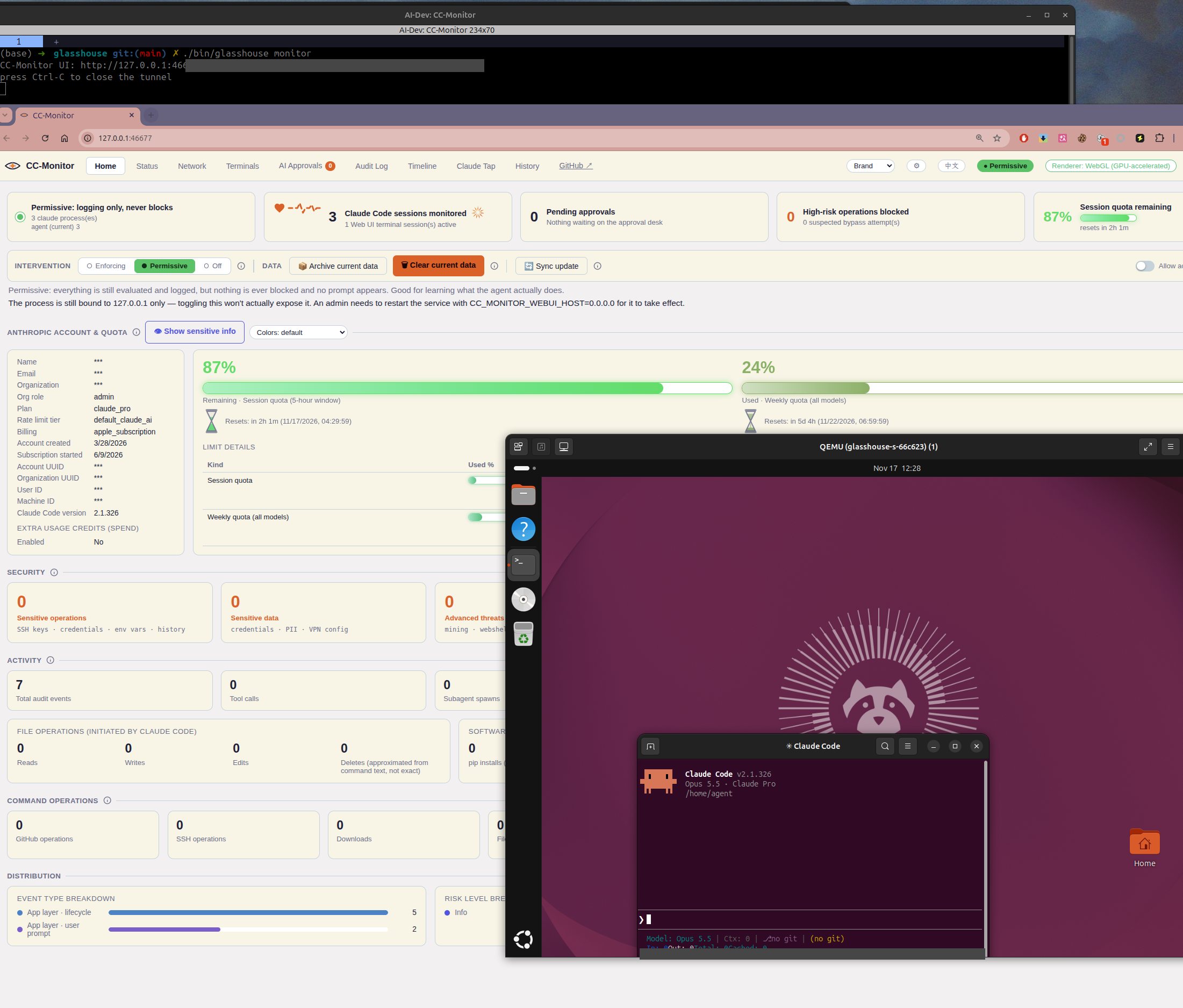
glasshouse monitor opens the CC-Monitor UI of the VM in the host's browser, through an SSH tunnel and a token-protected local proxy (the token in the printed URL is hidden in this picture). It shows the Claude Pro plan and quota, and the audit events of the Claude Code session running in the VM desktop (right). The account name, email and IDs are masked by CC-Monitor's "sensitive info" switch.
Contents
- Glasshouse AI SandBox for Vibe-coding
- Demo
- Features
- Status (read first)
- How isolation works
- Installation
- Usage
- Entering the VM and detailed usage
- Network modes and Claude login
- Policy configuration
- Command reference
- CC-Monitor integration
- Project layout
- First real-machine checklist
- Troubleshooting
Features
- VM-level isolation: the agent runs in its own Ubuntu 26.04 VM. The boundary is the hypervisor, not a container or file permissions.
- No shared host directories: no 9p, virtiofs or shared folders. The host packs your project into
/workspace, and changes come back only after review. - Controlled networking: the guest has no real NIC. Outbound HTTP(S) goes through a host-side proxy with a domain allowlist; private, loopback, link-local and cloud-metadata addresses are blocked, with DNS-rebinding protection.
- Two ways to use Claude: either an API key that stays on the host (the guest holds only a session token that the LLM gateway swaps for the real key), or a subscription account logged in inside the guest (no API key needed).
- Tamper-evident audit log:
audit.jsonlis hash-chained and verified withglasshouse logs --verify. If the log cannot be written, the operation is refused (fail closed). - Policies can only tighten: a project-level
.glasshouse.yamlcan make the policy stricter, never looser. - Resource limits: vCPU, memory, disk, session timeout and egress byte caps, plus cgroups on Linux.
- Two launch modes:
--guistarts a GNOME desktop VM and opens the desktop window;--shellstarts a lightweight VM without a desktop and drops you into an agent shell in/workspace. - Claude Code preinstalled, newest release: the image is built with the latest Claude Code (installed system-wide so the agent user cannot alter it). Rebuild the image to pick up a newer one.
- Optional in-guest auditing: integrates CC-Monitor to watch Claude Code inside the guest.
Status (read first)
| Part | Status |
|---|---|
| Policy parsing and tighten-only merge, audit hash chain, network gate (allowlist, DNS-rebinding protection, private/metadata address blocking, traffic cap), HTTP proxy, LLM gateway, safe file import/export | Implemented, unit-tested; go test -race ./... passes |
| Session supervisor (audit socket, gateway/proxy listeners, cleanup, refuses to start on a corrupted audit log) | Implemented, tested end to end with a fake hypervisor |
| QEMU backend, cloud-init, CLI | Implemented. Booted for real on Linux/KVM (amd64) with both headless and desktop (GNOME) images: SSH, file import, offline mode, pull review, audit chain and CC-Monitor were checked. Not yet checked: glasshouse gui, an LLM round trip, the tamper test on audit.jsonl, and anything on arm64 |
image/build.sh |
Runs end to end on Ubuntu (both profiles); see the notes under "Step 8: Build the images" |
macOS backend (vz-helper/, Swift) |
Runs on Apple silicon (macOS 27, Swift 6.4, arm64). image/build-mac.sh builds and verifies images: each one boots from a fresh EFI variable store and passes dpkg --verify before it is written. Real glasshouse run --shell sessions worked end to end: vsock SSH, file import, the allowlist proxy (guest without a NIC), network.mode: host (NAT NIC, the Mac's network), the model gateway bridge, CC-Monitor and the audit chain. A glasshouse run --gui session opened the GNOME desktop (GDM auto-login on virtio-gpu) in the helper's window |
| CC-Monitor integration | Hooks are baked into the image. Verified on a real machine: the service runs and its web UI shows the monitored Claude Code session with its audit events (see Demo). The upstream code has not been reviewed line by line |
On a real machine, go in this order: glasshouse doctor → build an image → glasshouse run. When something deviates, look at glasshouse logs --console first.
How isolation works
- Files: no host directory is mounted.
glasshouse run ./projmakes the host pack the project (skipping.env*,*.pem,id_*,.git/config, and dropping symlinks that point outside the project) into/workspace.glasshouse pullfetches/workspaceback and the host parses the tar itself: it rejects absolute paths,.., hard links and device files, strips setuid bits, never writes through symlinks, and shows a diff before writing (files.export: review). - Network: the guest has no real NIC. On Linux, QEMU user-mode networking with
restrict=onleaves exactly three forwards: SSH in, proxy out, model gateway out. On macOS the VM has no NIC at all; everything goes over vsock (onlynetwork.mode: hostadds a NAT NIC). Outbound HTTP(S) goes only through the host proxy and is allowlisted by domain. Any resolved IP that is private, loopback, link-local (including cloud metadata) or the host itself is refused, and the connection is pinned to the checked IP. The proxy authenticates with a random per-session token. - Credentials: the real model API key stays on the host (sources:
env:,file:,keychain:,secret-service:).ANTHROPIC_API_KEYin the guest is just a session token; the gateway validates it, swaps in the real key, and forwards only/v1/paths. - SSH and root: each session generates a throwaway ed25519 key kept only in the host session directory (0600) and deleted when the session ends. sshd accepts public keys only.
glasshouse sshopens a root shell by default; root inside the guest is not a security boundary, the VM is. - Audit:
audit.jsonllives on the host and every record carries the previous record's hash;glasshouse logs --verifychecks it. If the log cannot be written, network connections and file exports are refused (fail closed). - Resources: vCPU/memory/disk caps; on Linux also cgroups (
systemd-run --user --scope); session timeout; egress byte cap.
Installation
Follow the steps in order; each step ends with a check that tells you whether to go on. Steps 1 to 10 are for Linux (QEMU/KVM), the platform that was verified on a real machine. Apple silicon Macs have their own steps in Installation on macOS.
| Step | What you do | Roughly |
|---|---|---|
| 1 | Check the machine (CPU, KVM, disk, memory, network) | 2 min |
| 2 | Install the packages | 5 min |
| 3 | Let your user open /dev/kvm |
1 min |
| 4 | Get the source and check the Go version | 2 min |
| 5 | Build and test the glasshouse binary |
2 to 5 min |
| 6 | Run glasshouse doctor |
1 min |
| 7 | Pick the CC-Monitor commit | 5 min (to review it) |
| 8 | Build the images (headless, and desktop if you want a GUI) |
depends mostly on your network; not timed |
| 9 | Write the policy file (model key or subscription login) | 2 min |
| 10 | Start a first session and run the smoke test | 5 min |
Step 1: Check the machine
| Item | What is needed | How to check |
|---|---|---|
| OS and CPU | Linux on x86-64 (amd64) or arm64. The image architecture must match the host (no emulation); the x86-64 path is the one verified on a real machine |
uname -sm prints Linux x86_64 |
| KVM | Hardware virtualization on, /dev/kvm present. Without it you need --allow-tcg (software emulation), which is very slow |
ls -l /dev/kvm |
| Disk | Images are about 2.2 GB (headless) and 3.6 GB (desktop), plus about 0.9 GB for the cached base image, plus working space while building. Keep at least 15 GB free (an estimate, not measured) |
df -h ~/.local/share |
| Memory and CPUs | A session defaults to the values in vm.cpus and vm.memory of the policy, and builds need some memory for libguestfs. 8 GB of host RAM is a sensible minimum (an estimate) |
free -g, nproc |
| Network | The build downloads about 800 MB of base image plus apt, npm and git data. In mainland China see the mirror options in step 8 |
Check: /dev/kvm exists. If it does not, turn on VT-x/AMD-V in the BIOS (and in the hypervisor, if this machine is itself a VM: nested virtualization).
Step 2: Install the packages
What each part is for:
| Package | Used for |
|---|---|
qemu-system-x86 (or qemu-system-arm on arm64), qemu-utils |
running the VM, qemu-img |
genisoimage (or xorriso) |
building the cloud-init seed disk of every session |
openssh-client |
glasshouse ssh, file transfer, the monitor tunnel |
virt-viewer |
remote-viewer, to see the desktop (only needed for --gui) |
libguestfs-tools, isc-dhcp-client |
building images (virt-customize; its helper VM needs a DHCP client for networking) |
gpgv, ubuntu-cloudimage-keyring |
checking Canonical's signature on the base image |
git, curl |
fetching CC-Monitor and the base image |
Go (see go.mod; currently 1.24.7 or newer) |
compiling glasshouse |
On Debian/Ubuntu:
sudo apt update
sudo apt install qemu-system-x86 qemu-utils genisoimage openssh-client virt-viewer \
                 libguestfs-tools isc-dhcp-client gpgv git curl ubuntu-cloudimage-keyring
Go: take the version from https://go.dev/dl/ if your distribution's package is older than go.mod asks for (sudo apt install golang-go is enough only when it is new enough).
Other distributions: install the equivalent packages. Only Ubuntu was tested.
Check:
qemu-system-x86_64 --version | head -1 && qemu-img --version | head -1 && virt-customize --version && gpgv --version | head -1
command -v dhclient ssh remote-viewer
command -v genisoimage || command -v xorriso      # either one is enough
go version
Output on the test machine (your versions will differ):
QEMU emulator version 8.2.2 (Debian 1:8.2.2+ds-0ubuntu1.18)
qemu-img version 8.2.2 (Debian 1:8.2.2+ds-0ubuntu1.18)
virt-customize 1.52.0
gpgv (GnuPG) ...
/usr/sbin/dhclient
/usr/bin/ssh
/usr/bin/remote-viewer
/usr/bin/xorriso
go version go1.26.4 linux/amd64
Every command must print something. dhclient is the one people forget; without it every apt call in the image build fails with "Temporary failure resolving".
Step 3: Let your user open /dev/kvm
sudo usermod -aG kvm "$USER"
Log out and in again (or reboot) so the group applies. If you work as root there is nothing to do.
Check:
id -nG | tr ' ' '\n' | grep -x kvm            # prints kvm (root is not in this group; skip this line as root)
test -r /dev/kvm -a -w /dev/kvm && echo ok     # prints ok
ls -l /dev/kvm                                  # crw-rw----+ 1 root kvm 10, 232 ... /dev/kvm
The second line printing ok is what counts.
Step 4: Get the source
git clone https://github.com/cn0xroot/glasshouse.git glasshouse
cd glasshouse
go version        # must satisfy the `go` line in go.mod
Check: ls shows Makefile, cmd/, image/, internal/, go.mod.
Step 5: Build and test
make test        # go vet + go test -race ./... (all packages must say ok)
make build       # produces bin/glasshouse
./bin/glasshouse --help
The end of make test should look like this (timings and (cached) vary); any FAIL line means it did not pass:
go vet ./...
go test -race ./...
ok  	glasshouse/cmd/glasshouse	5.607s
ok  	glasshouse/internal/audit	(cached)
?   	glasshouse/internal/backend	[no test files]
ok  	glasshouse/internal/backend/qemu	1.361s
... (11 packages report ok)
make build prints only go build -o bin/glasshouse ./cmd/glasshouse; the binary is about 11 MB.
Optional: put the binary on your PATH (sudo install -m 0755 bin/glasshouse /usr/local/bin/); the rest of this document uses ./bin/glasshouse or just glasshouse.
Check: bin/glasshouse exists and --help lists run, ssh, gui, monitor, pull, ls, logs, start, stop, rm, policy, doctor. If make test fails, stop here and do not build images: something in your toolchain differs.
Step 6: Run doctor
./bin/glasshouse doctor
doctor checks ssh, ssh-keygen, the ISO tool, the socket path length, whether the policy file loads, the hypervisor, and the images. On a first run the two image checks fail; that is expected and looks like this:
  ok    ssh
  ok    ssh-keygen
  ok    ISO tool (cloud-init seed)
  ok    socket path length
  ok    policy loads
  ok    hypervisor (qemu)
  FAIL  image ubuntu-26.04-amd64-headless.qcow2 missing checksum file ... (images must be built with image/build.sh)
  FAIL  image ubuntu-26.04-amd64-desktop.qcow2 missing checksum file ...
  note  credentials.llm_gateway.key_ref is not set: the model gateway will refuse requests
Check: every line except the image ... ones is ok or note. A FAIL on hypervisor, ssh or the ISO tool means step 2 or 3 is incomplete. The note is fine when you log in with a subscription account (step 9).
Step 7: Pick the CC-Monitor commit
The image bakes in CC-Monitor, which watches Claude Code inside the guest. It is third-party code that runs in your VM, so the build refuses a branch name and wants an exact 40-character commit hash, which you should look at before you trust it:
git ls-remote https://github.com/cn0xroot/CC-Monitor.git HEAD     # prints the current commit
git clone https://github.com/cn0xroot/CC-Monitor.git /tmp/cc-monitor-review
git -C /tmp/cc-monitor-review log --oneline -5                     # and read what changed
export CC_MONITOR_REF=<the 40-hex commit you reviewed>
The commit used on the test machine was 1b3516f5b5152f882daad6e6d5c2506bf166a35a. The upstream code has not been reviewed line by line by this project; reviewing it is your decision.
Check: echo "$CC_MONITOR_REF" | grep -Eq '^[0-9a-f]{40}$' && echo ok prints ok.
Step 8: Build the images
image/build.sh starts from Canonical's official cloud image (GPG-verified and SHA256-checked), installs developer tools, Claude Code (newest release), ccstatusline and the pinned CC-Monitor, and writes the image plus its .sha256. Run it with bash (it is not marked executable):
# 8a. Lightweight image for --shell (build this one first; it is the smaller one)
bash ./image/build.sh --profile headless

# 8b. Desktop image for --gui (GNOME), only if you want the desktop
bash ./image/build.sh --profile desktop
CC_MONITOR_REF is read from the environment you exported in step 7. In mainland China add --mirror tuna (or ustc, or leave auto); see the mirror notes below. To pin Claude Code: CLAUDE_CODE_VERSION=stable bash ./image/build.sh --profile headless (or an exact x.y.z).
What you will see, in order: the mirror choice, the Canonical signature check, the base image download (about 800 MB, cached afterwards), the CC-Monitor clone and hash check, growing the root partition, the virt-customize phase (apt, Node, Claude Code, CC-Monitor), cleanup, and finally the compressed image being written. The build has not been timed; the download and the apt/npm steps dominate. It is safe to run again: the image is written to a temporary file first and renamed into place only when complete, so a failed build never leaves a broken image behind.
Options: --arch amd64|arm64 (must match the host), --profile headless|desktop, --format qcow2|raw, --mirror auto|official|tuna|ustc, --keep-mirror. Images are written to $GLASSHOUSE_HOME/images/ (default ~/.local/share/glasshouse/images/).
Check:
ls -lh ~/.local/share/glasshouse/images/
(cd ~/.local/share/glasshouse/images && sha256sum -c ubuntu-26.04-amd64-headless.qcow2.sha256)
./bin/glasshouse doctor      # now the image lines say ok
On the test machine the files were ubuntu-26.04-amd64-headless.qcow2 (2.2 GB) and ubuntu-26.04-amd64-desktop.qcow2 (3.6 GB).
Notes on building
Claude Code is installed from npm (
@anthropic-ai/claude-code, Node 22 or newer is required and the image's nodejs satisfies it). The build installs the newest release (latest) and fails ifclaude --versiondoes not run; the installed version is recorded in/etc/glasshouse-claude-code-versioninside the image.CC-Monitor's npm dependencies live in the
webui/subdirectory of its repo. The script handles that (npm ci --omit=dev) and fails the build if it breaks. Override withCC_MONITOR_SETUP_CMD.The build needs internet access. The base image is about 800 MB and is cached in
$GLASSHOUSE_HOME/cache/.Mirrors for mainland China.
--mirror auto|official|tuna|ustc(orGLASSHOUSE_MIRROR) picks where the cloud image and the build guest's APT packages come from:bash ./image/build.sh --profile headless # auto: probes the official servers, Tsinghua (tuna) and USTC bash ./image/build.sh --profile headless --mirror tuna # force Tsinghua bash ./image/build.sh --profile headless --mirror ustc # force USTCautostays on Canonical's servers unless they are unreachable or a mirror is at least twice as fast, prints what it measured, and falls back to the next source if a download fails. The image is always verified against Canonical's GPG-signedSHA256SUMS, and apt verifies its own signatures, so a mirror does not have to be trusted. The guest's APT source is switched to the mirror only for the build and put back to the official one at the end, sonetwork.allow(which listsarchive.ubuntu.com) keeps working;--keep-mirrorleaves the mirror in the image, in which case add its host tonetwork.allow(or usenetwork.mode: host). Notes: USTC refused the image download from some networks (HTTP 403), which is whyautofalls back; the mirrors serveresolute/current, the same image as the officialreleases/26.04/release(identical checksum when this was checked).
Other optional environment variables:APT_MIRROR=https://host/ubuntu(any APT mirror),NPM_REGISTRY=https://registry.npmmirror.com(npm registry for CC-Monitor's dependencies and Claude Code),CC_MONITOR_REPO=<https git URL>(a GitHub mirror; the pinned commit hash is still verified). In China GitHub and npm are often the slow steps, and the script prints a tip when a mirror was selected.
Build flow
flowchart TD
  A["image/build.sh<br/>--profile / --arch / --format / --mirror"] --> B["Check arguments and tools<br/>CC_MONITOR_REF is a 40-hex commit<br/>Linux host, same CPU architecture<br/>qemu-img, gpgv, git, curl, virt-customize ...<br/>Canonical keyring present"]
  B --> C{"--mirror"}
  C -- auto --> D["Probe official / tuna / ustc in parallel<br/>time the first 512 KiB of the image"]
  C -- "official / tuna / ustc" --> E["Chosen source, official as fallback"]
  D --> F["Candidate order: picked source first, then the rest"]
  E --> F
  F --> G["For one candidate:<br/>fetch SHA256SUMS and SHA256SUMS.gpg"]
  G --> H{"Canonical GPG signature valid?"}
  H -- no --> N{"Another candidate left?"}
  H -- yes --> I{"Cached image matches the signed hash?"}
  I -- yes --> K
  I -- no --> J["Download the image, check the hash"]
  J -- failed --> N
  J -- ok --> K["Verified cloud image<br/>APT source = same mirror, or APT_MIRROR"]
  N -- yes --> G
  N -- no --> X["Abort: no verified image"]
  K --> L["Clone CC-Monitor (CC_MONITOR_REPO)<br/>check out the pinned commit, verify the hash, drop .git"]
  L --> M["Copy the image to a work file<br/>write the systemd unit and cloud-init config"]
  M --> O["Grow the root partition in place<br/>headless 8 GB / desktop 20 GB<br/>keeps the BIOS boot record intact"]
  O --> P["Resolve Claude Code version (default latest)<br/>check dhclient for libguestfs networking"]
  P --> Q1

  subgraph VC ["virt-customize: runs inside the guest, in this order"]
    Q1["1. If a mirror is used: point APT at it"] --> Q2["2. apt update/upgrade, install base packages"]
    Q2 --> Q3{"desktop profile?"}
    Q3 -- yes --> Q4["3. Install GNOME<br/>ubuntu-desktop-minimal, gdm3"]
    Q3 -- no --> Q5
    Q4 --> Q5["4. Copy the cloud-init config"]
    Q5 --> Q6["5. Install Claude Code first<br/>Node >= 22 check, npm install -g,<br/>claude --version into the version file"]
    Q6 --> Q7["6. Install CC-Monitor<br/>copy files, npm ci, ownership and permissions"]
    Q7 --> Q8["7. While installing CC-Monitor, hook Claude Code<br/>install.py --target /etc/claude-code/managed-settings.json<br/>requires the Claude Code version file to exist"]
    Q8 --> Q9["8. Mask auto-updates, enable ssh, cloud-init clean"]
    Q9 --> Q10["9. Restore the official APT source<br/>unless --keep-mirror"]
    Q10 --> Q11{"desktop profile?"}
    Q11 -- yes --> Q12["graphical.target, remove gnome-initial-setup, enable gdm3"]
    Q11 -- no --> Q13["multi-user.target"]
  end

  Q12 --> R
  Q13 --> R["virt-sysprep cleanup<br/>qemu-img convert (qcow2 compressed, or raw)<br/>write the .sha256 file"]
  R --> S["images/ubuntu-26.04-arch-profile.qcow2<br/>and its .sha256"]
At session start the hooks are already in the image; a session with monitor.cc_monitor: false removes /etc/claude-code/managed-settings.json, and an image built without the hooks gets them installed as a fallback (see internal/cloudinit).
If the build fails
| Symptom | Cause and fix |
|---|---|
missing tool: virt-customize or similar |
step 2 is incomplete |
every apt call says "Temporary failure resolving" |
isc-dhcp-client is missing: libguestfs needs a DHCP client to give the build guest a network (the script checks dhclient up front) |
supermin: failed to read kernel / cannot read /boot/vmlinuz-* |
a known libguestfs issue on Ubuntu, where kernels are root-only: sudo chmod +r /boot/vmlinuz-* (not met on the test machine, which builds as root) |
CC_MONITOR_REF must be a full 40-character commit hash |
step 7: a branch name or a short hash was given |
| the base image download is slow, stalls or returns 403 | use --mirror tuna or --mirror ustc; the signature check stays on whatever the source |
| npm or GitHub steps are slow | NPM_REGISTRY=https://registry.npmmirror.com, CC_MONITOR_REPO=<a GitHub mirror> |
the host uses a proxy and apt says Unable to connect to 127.0.0.1:... |
libguestfs forwards proxy variables into the guest, where 127.0.0.1 is the guest itself. The script clears them around virt-customize; the base image download still uses your proxy |
| the new image hangs at "Booting from Hard Disk..." | virt-resize renumbers and moves partitions, which breaks GRUB's BIOS boot record. build.sh grows the root partition in place; do not switch to virt-resize |
Step 9: Write the policy file
Without a policy file the built-in defaults apply (allowlist network, no model key). Pick one way for Claude Code to authenticate.
A. Subscription login (no API key). Do nothing, or write a policy without key_ref. The default allowlist already contains claude.ai, platform.claude.com and api.anthropic.com. You log in inside the guest the first time you run claude (see Network modes and Claude login). doctor prints a note about key_ref; that is expected.
B. API key through the model gateway (the real key stays on the host):
mkdir -p ~/.config/glasshouse && cat > ~/.config/glasshouse/policy.yaml <<'YAML'
version: 1
credentials:
  llm_gateway:
    key_ref: keychain:glasshouse-anthropic     # or env:ANTHROPIC_API_KEY / secret-service:glasshouse / file:/path
YAML
./bin/glasshouse policy check
key_ref forms: env:NAME (an environment variable, easiest on Linux), secret-service:NAME (the desktop keyring), keychain:NAME (macOS), file:/path (a file only you can read).
Check: ./bin/glasshouse policy check prints no error. More on every setting: Policy configuration.
Step 10: First session and smoke test
mkdir -p ~/glasshouse-demo && echo "hello from the host" > ~/glasshouse-demo/hello.txt
./bin/glasshouse run --shell ~/glasshouse-demo
The first boot takes a minute or two (run waits up to 6 minutes). You land in a shell as the agent user in /workspace. Inside the guest:
pwd                  # /workspace
whoami               # agent
cat hello.txt        # hello from the host   (the project was copied in)
claude --version     # the Claude Code in the image
echo "made in the guest" > result.txt
exit                 # leaving the shell does NOT stop the VM
Back on the host:
./bin/glasshouse ls                     # the session is `ready`
./bin/glasshouse pull                   # shows result.txt as `added`; answer y to write it into ~/glasshouse-demo
cat ~/glasshouse-demo/result.txt
./bin/glasshouse logs --verify          # the audit hash chain must verify
./bin/glasshouse stop                   # the session disk is deleted unless you started with --keep
Two quick isolation checks, if you want them: ./bin/glasshouse run --shell --offline and curl -sS -m 8 https://example.com inside the guest must fail; in the default allowlist mode curl -sS -m 8 http://169.254.169.254 must be refused (glasshouse logs shows net.deny).
Expected output (the session ID differs each time; pull --yes stands in for answering y):
session s-9c9e2d starting (first boot can take a minute or two)...
imported 1 files (20B) into /workspace
session s-9c9e2d ready
/workspace
agent
hello from the host
2.1.326 (Claude Code)
...
1 change(s) from the guest (2 files received, 0 skipped):
  added     result.txt
applied
audit log OK: 5 records, chain intact
session s-9c9e2d stopped
With network.mode: host a warning: network.mode=host ... line is printed before the start; that is normal.
Check: result.txt arrived on the host only after you answered y to the pull review, and logs --verify passed. That is the whole loop: run, work, pull, logs --verify, stop.
Optional: the desktop. Needs the desktop image from step 8b and remote-viewer:
./bin/glasshouse run --gui ~/glasshouse-demo      # opens the desktop window when ready
./bin/glasshouse gui                              # reopen the window later
If the desktop asks for a password, see Usage troubleshooting. To keep the desktop's data across restarts use start.sh (see start.sh).
Updating and removing
- Update the program:
git pull && make test && make build. - Update the images (for example to get a newer Claude Code): run step 8 again. Running sessions are not affected, but a session kept with
--keepis layered on the old image and refuses to start after a rebuild; pull what you need, thenglasshouse rmit. - Remove a session:
glasshouse rm <session>. Remove everything: stop all sessions, then delete$GLASSHOUSE_HOME(default~/.local/share/glasshouse; it holds images, the download cache, sessions and audit logs, so copy the audit logs first if you need them) and~/.config/glasshouse.
Installation on macOS (Apple silicon)
Macs with Apple silicon (M1 to M5) run arm64 guests only: Virtualization.framework does not emulate other CPUs, so the x86-64 images of the Linux steps cannot be used. The image is built from Canonical's Ubuntu 26.04 arm64 cloud image (ubuntu-26.04-server-cloudimg-arm64.img), not the live-server ISO, because the cloud image is already an installed Ubuntu that cloud-init can configure. This path was verified by the project owner on an Apple silicon Mac; it cannot be re-checked on the repository's Linux machine.
Mac step 1: Check the Mac. macOS 13 or newer, Apple silicon (uname -m prints arm64). Open a native terminal, not one running under Rosetta (sysctl -n sysctl.proc_translated must print 0). The data directory must be on APFS, and 15 GB free is a sensible minimum (an estimate).
Mac step 2: Install the tools.
xcode-select --install             # Swift and codesign (skip if already installed)
brew install go qemu gnupg         # Go; qemu-img (qcow2 -> raw); gpg/gpgv (Canonical's signature)
Check: swift --version, go version, qemu-img --version, gpgv --version | head -1, command -v codesign all print something, and go version says darwin/arm64.
Mac step 3: Get the source and build.
git clone https://github.com/cn0xroot/glasshouse.git glasshouse && cd glasshouse
make                               # on a Mac this builds bin/glasshouse and the signed bin/glasshouse-vz together, both native arm64
Do not build the two with separate commands: make keeps the pair matching, and it refuses to run under Rosetta. At the end it runs bin/glasshouse-vz check. Check: bin/glasshouse and bin/glasshouse-vz exist; file bin/glasshouse says arm64.
Mac step 4: Pick the CC-Monitor commit. Same as Linux step 7: review a commit of CC-Monitor and export CC_MONITOR_REF=<40-hex commit>.
Mac step 5: Build the image.
./image/build-mac.sh --profile headless # and/or --profile desktop
The script downloads the arm64 cloud image and checks it against Canonical's key, then boots it once in a build VM (the same helper plus a NAT network device that only image builds get). Inside the guest it installs the same software as build.sh (image/provision-guest.sh), cleans the guest and powers it off. Finally it boots the result once more without network and runs dpkg --verify and a check of the EFI boot files; an image that fails is not written. The build gives up after 5400 seconds (BUILD_TIMEOUT), and --cpus and --memory size the build VM. The mirror options and the optional variables are the same as on Linux.
The result is ~/.local/share/glasshouse/images/ubuntu-26.04-arm64-<profile>.raw plus its .sha256. You can also build the raw image on an arm64 Linux machine with ./image/build.sh --format raw and copy both files over.
Mac step 6: Check with doctor.
./bin/glasshouse doctor
On a Mac it also checks that the helper is native, starts, and is signed with the com.apple.security.virtualization entitlement; that glasshouse is not under Rosetta; that vm.cpus and vm.memory are within what this Mac allows; that the data directory is on APFS; and that the session's unix-socket paths fit macOS's 104-byte limit (a long GLASSHOUSE_HOME fails here).
Mac step 7: Policy, then the first session. Write the policy as in Linux step 9 (on a Mac keychain:NAME is the natural key_ref), then run the smoke test of Linux step 10. On macOS network.mode: host uses a NAT network device instead of QEMU's user-mode network; the host is then reachable at the NAT gateway, usually 192.168.64.1.
Usage
Launch modes
| Mode | Command | What you get |
|---|---|---|
| GUI desktop | glasshouse run --gui ./proj |
GNOME desktop VM (desktop image); the desktop window opens when the session is ready (needs remote-viewer, otherwise the VNC socket path is printed) |
| Lightweight SSH shell | glasshouse run --shell ./proj |
VM without a desktop (headless image, smaller and faster to boot); you land in an agent shell in /workspace |
| Policy default | glasshouse run ./proj |
whatever vm.profile in the policy says (desktop by default) |
--headless is an alias of --shell, and --mode gui|shell is the long form. Mode flags never loosen the policy: --gui is refused if the user policy or the project's .glasshouse.yaml already forces headless. Shell mode keeps the session running after you leave the shell; use glasshouse ssh to get back in and glasshouse stop to shut it down. Add --offline to either mode to cut all outbound network.
Commands
./bin/glasshouse run --shell ./myproject       # lightweight shell mode
./bin/glasshouse run --gui ./myproject         # desktop mode
./bin/glasshouse run ./myproject -- claude     # copy the project into /workspace, run claude as the agent user
./bin/glasshouse ssh                           # root shell in the guest
./bin/glasshouse gui                           # open the desktop (desktop profile)
./bin/glasshouse monitor                       # open the CC-Monitor UI
./bin/glasshouse pull                          # review the diff and bring changes back
./bin/glasshouse logs --verify                 # verify the audit hash chain
./bin/glasshouse stop                          # stop the session
./bin/glasshouse ui                            # local control panel in the browser
Typical flow: run → let the agent work in the guest → pull to review and fetch changes → logs --verify → stop.
To keep the agent fully offline (model gateway only): glasshouse run --headless --offline ./proj -- claude.
Session data lives in $GLASSHOUSE_HOME (default ~/.local/share/glasshouse). Unix socket paths have a length limit; if the path is too long, set a shorter GLASSHOUSE_HOME.
Entering the VM and detailed usage
Entering the VM
| I want to… | Command |
|---|---|
| Start a VM and land in a shell | glasshouse run --shell ./myproject |
| Start a VM with a desktop | glasshouse run --gui ./myproject |
| Get back into a running VM (root shell) | glasshouse ssh |
| Get back in as the unprivileged user | glasshouse ssh --user agent |
| Run one command in the VM | glasshouse ssh -- bash -c 'cd /workspace && ls -la' |
| Run Claude Code straight away | glasshouse run --shell ./myproject -- claude |
| Reopen the desktop window | glasshouse gui |
Picking the session. Every command that takes [session] accepts a session ID (see glasshouse ls). If you leave it out it works only when exactly one session is running; with several running it refuses and lists their IDs, so name one: glasshouse ssh s-1a2b3c.
Session states (glasshouse ls): starting → ready (usable) → stopping → stopped; failed means boot or setup failed (see glasshouse logs --console); dead means the supervisor process died (clean up with glasshouse rm <session>).
glasshouse run
glasshouse run [flags] [dir] [-- command...]
dir(optional) is copied into/workspacein the guest, minus the files infiles.deny_patternsand symlinks that point outside it. Without adirthe guest starts with an empty/workspace.-- command...runs that command as theagentuser in/workspaceafter the VM is ready (for example-- claude,-- bash -l). With--shelland no command you get an interactiveagentshell; with--guithe desktop window opens.- The first boot of a session takes a minute or two.
glasshouse runwaits up to 6 minutes for the VM. - Flags:
--shell/--headless,--gui,--mode gui|shell,--offline,--policy FILE,--keep,--allow-tcg. See the table under "Launch modes". - Leaving the shell does not stop the VM. The session keeps running until
glasshouse stop.
glasshouse ssh
glasshouse ssh [--user root|agent] [session] [-- command...]
--user root(default) opens a root shell in the guest. It is refused if the policy setsssh.root: false; use--user agentthen. Root inside the guest is not a security boundary, the VM is.--user agentis the unprivileged user that owns/workspace. It starts in/home/agent;cd /workspaceto get to the project.- Everything after
--is passed as separate arguments, so wrap a compound command inbash -c '...'. - Each login is recorded in the audit log (
ssh.login). Access uses a throwaway key kept in the session directory, so you cannot ssh into the VM from another tool.
glasshouse gui
glasshouse gui [session] opens the desktop of a --gui (desktop profile) session. It needs remote-viewer and socat (apt install virt-viewer socat). The VM's display is a VNC unix socket that virt-viewer 11 cannot open directly, so glasshouse starts a one-shot socat bridge on 127.0.0.1 (a random port, one connection, closed after a minute if nobody connects) and points remote-viewer at it. The display has no password, so while that port is open any local user could connect. A --shell session has no desktop and gui refuses to open it. The desktop logs in automatically as agent.
glasshouse monitor
glasshouse monitor [session] [--no-open] opens the CC-Monitor web UI of the guest through a token-protected loopback proxy on the host (--no-open only prints the address). It is available when monitor.cc_monitor is on, and it is a convenience view, not a root of trust: use glasshouse logs for the authoritative record.
glasshouse pull: bring changes back
glasshouse pull [--yes] [--delete] [session] [dir]
- Fetches
/workspacefrom the guest and shows what would change (modified,added, and so on) before writing anything. Answeryto apply, anything else to cancel. dirdefaults to the project the session was started with. For a session started without a project you must give an existing directory.- The host parses the archive itself and skips unsafe entries (absolute paths,
.., hard links, device files, symlinks that point outside, setuid bits are dropped); the summary says how many were skipped. --yesapplies without asking (only whenfiles.exportisreview).--deletealso deletes project files that no longer exist in the guest.files.export: denyrefuses all exports;autoapplies them without review.
glasshouse logs
glasshouse logs [--follow|--verify|--console] [session]
- default: the audit log (session start/stop,
ssh.login,exec,files.import/files.export,net.deny, …) --followkeeps printing new events;--verifychecks the hash chain and exits non-zero if it was tampered with;--consoleprints the guest's serial console, the first thing to read when a VM does not come up.
glasshouse stop and glasshouse rm
glasshouse stop [session]shuts the VM down and deletes its disk: everything that was only inside the guest is gone.pullfirst. The audit log and the session record stay.glasshouse run --keepkeeps the disk after stop;glasshouse start <session>boots it again.glasshouse rm <session>removes a stopped, failed or dead session's directory, including the audit log.
glasshouse ui: the control panel
glasshouse ui [--port N] [--no-open] opens a local control panel in your browser, for people who prefer buttons to commands. It is one page served by the glasshouse binary itself (no extra install, no native GUI toolkit), so it works the same on Linux and macOS.
./bin/glasshouse ui            # prints http://127.0.0.1:<port>/?t=<token> and opens it
./bin/glasshouse ui --no-open  # only print the URL (for example over a remote desktop)
What the page does:
| Area | What you can do |
|---|---|
| New session | Shell or desktop, offline, keep data after stop, an optional project directory (same as run --shell/--gui [--offline] [--keep] [dir]) |
| Sessions | Live list (refreshes every 3 seconds) with state, profile, age, egress and project. Per session: Shell (opens a terminal running glasshouse ssh), Desktop (glasshouse gui), Pull, Logs, Stop, Start (kept sessions), Remove |
| Pull | Shows the change list first, like glasshouse pull; nothing is written until you click Apply changes |
| Logs | The audit log, Verify audit chain (logs --verify) and the console log |
| Environment check | The output of glasshouse doctor |
| Local virtual machines | Everything glasshouse can find on this machine, with source, state, CPU and memory, disk space used and location, refreshed every 10 seconds (and by Scan again). It reads the data directory the panel manages, the other glasshouse data directories it can see (the default one, other users' defaults that are readable, and the ones running VMs point at), and the running QEMU and Virtualization.framework processes. So it also shows VMs glasshouse did not start and broken records (a session directory without a readable session.json). Sessions of another data directory are listed with the command to manage them (GLASSHOUSE_HOME=<dir> glasshouse ui) |
| Settings (⚙) | Language (follow the browser, 中文 or English), color theme (System, CC-Monitor, Light, Dark, Dracula, Nord, Midnight, Ocean, Forest, Sunset, Rose; the palettes are CC-Monitor's own, so the two UIs match), font (system, monospace, serif, rounded, Kaiti, Heiti, Songti) and font size (12 to 18 px). Saved in the browser's local storage, with a reset button |
| Recent operations | Output of the commands the page started (start, stop, remove) |
By default the page follows your browser's language and its light or dark theme; the settings above override both. Closing the page or stopping glasshouse ui does not stop any session.
How it is kept safe:
- It listens on 127.0.0.1 only and needs a random token: the URL printed at start carries it, the page then keeps it in an
HttpOnly,SameSite=Strictcookie. Anyone without that URL gets401. - Requests whose
Hostis not127.0.0.1:<port>orlocalhost:<port>are refused (DNS rebinding), and every write needs a custom header and a matchingOrigin, which another website cannot send. - The page can run only
glasshouse's own subcommands (run,start,stop,rm,gui,pull,logs,doctor,sshthrough a terminal) with validated arguments: session IDs must look likes-xxxxxx, the mode isshellorgui, and a project path may not start with-. There is no way to type an arbitrary command. The policy is the normal one (~/.config/glasshouse/policy.yaml), so everything the policy forbids stays forbidden. - Anyone who can open the URL on your machine can start and stop sessions as you. Do not forward the port to other machines.
Checked on Linux x86 against the real machine: starting a shell session with a project, listing it, pull preview (nothing written) then apply, the audit verification, stop and remove, the environment check, every refusal above (no cookie, wrong token, bad Host, missing header, bad Origin, bad session ID, unknown action), and the page itself rendered in headless Chrome at desktop and phone width. 6 unit tests cover the guard, the argument builder and the job runner. Not checked: the Shell button (opening a terminal emulator: x-terminal-emulator, gnome-terminal, konsole, xfce4-terminal or xterm on Linux, Terminal.app on macOS), the Desktop button from the page, the Start button of a kept session from the page, and everything on macOS.
Typical workflows
# Lightweight shell, work, bring the result back
glasshouse run --shell ./myproject          # you are now in an agent shell in /workspace
#   ...work inside the guest, exit with `exit`...
glasshouse pull                             # review the diff and apply
glasshouse logs --verify                    # check the audit chain
glasshouse stop

# Desktop session
glasshouse run --gui ./myproject            # desktop window opens
glasshouse ssh --user agent                 # a terminal next to it
glasshouse pull && glasshouse stop

# Several sessions at once
glasshouse ls
glasshouse ssh s-1a2b3c
glasshouse stop s-1a2b3c
Sending files to the VM (host to guest)
Besides the project directory that glasshouse run <dir> packs into /workspace, you can hand over single files later (a dataset, an installer, a model) by serving them from the host with Python and downloading them inside the guest. The guest reaches the host at 10.0.2.2 (QEMU's address for the host; the Linux/QEMU backend).
# 1. On the host: serve a directory (only that directory is exposed)
cd ~/share && python3 -m http.server 8000 --bind 127.0.0.1

# 2. In the guest (glasshouse ssh, or the desktop terminal)
curl -fO http://10.0.2.2:8000/data.zip        # or: wget http://10.0.2.2:8000/data.zip
- This only works with
network.mode: host(see Network modes).allowlistandofflinerefuse the host on purpose (private addresses are blocked and QEMU runs withrestrict=on), so the request fails: this was tried, the proxy answers403and a direct connection gets no answer. - Binding to
127.0.0.1is enough, because QEMU forwards10.0.2.2to the host's loopback. Do not bind to0.0.0.0unless you want other machines on your LAN to download the files as well. - In
hostmode the guest can reach everything the host can, so serve only a dedicated directory, never$HOME, and stop the server (Ctrl+C) when the transfer is done. - Checked on Linux x86 (host mode:
curlandwgetfrom a--shellsession downloaded a file from the host server). Not checked on macOS: there the host is the NAT gateway, usually192.168.64.1(see the table above), so usehttp://192.168.64.1:8000/...and bind the server to0.0.0.0or that address. - The other direction (guest to host) is
glasshouse pull, which reviews changes before writing them.
Usage troubleshooting
no running session; start one with glasshouse run: nothing is running;glasshouse lsshows what exists.several sessions are running (...); name one: add the session ID.session ... is not running (state: ...): it stopped, failed or died; seeglasshouse logs --console <session>, thenglasshouse rm <session>.policy ssh.root is false for this session: use--user agent.remote-viewer not found: installvirt-viewerandsocat, then runglasshouse gui <session>. Ifremote-viewerfails withvnc_display_open_host: assertion 'host != NULL' failed, you ran it on thevnc+unix://address by hand; useglasshouse guiinstead.- The desktop window is black ("Display output is not active.") or asks for a password: the screen was blanked and then locked after 5 idle minutes. The guest users have no password, so it cannot be unlocked by typing one. Get in from the host:
glasshouse ssh <session> -- loginctl unlock-sessions, then move the mouse. New sessions no longer lock, blank or suspend (cloud-init sets the GNOME defaults). A session created earlier keeps its old settings, so turn them off once inside it:glasshouse ssh --user agent <session> -- bash -c 'export XDG_RUNTIME_DIR=/run/user/$(id -u) DBUS_SESSION_BUS_ADDRESS=unix:path=/run/user/$(id -u)/bus; gsettings set org.gnome.desktop.screensaver lock-enabled false; gsettings set org.gnome.desktop.session idle-delay 0; gsettings set org.gnome.settings-daemon.plugins.power sleep-inactive-ac-type nothing'. Or giveagenta password withsudo passwd agent(as root:passwd agent). this session was started without a GUI: start it with--gui.sshsays the command is not found: you passed a compound command as one argument; use-- bash -c '...'.
Network modes and Claude login
network.mode in your policy picks how the guest reaches the network:
| Mode | What the guest can reach | Trade-off |
|---|---|---|
allowlist (default) |
Only the listed host:port entries, through the host proxy (private/loopback/metadata addresses refused, egress capped) |
Strongest; HTTP(S) only |
offline |
Nothing except the model gateway | Strongest; no subscription login possible |
host |
The host's network directly (Linux: QEMU user-mode NAT; macOS: a virtio NIC on Virtualization.framework's NAT network, 192.168.64.0/24. Either way the guest uses the host's routing, DNS, proxy/TUN and VPN) |
The allowlist, private-address blocking and egress cap do not apply. The guest can reach anything the host can, including the host LAN and the host itself (10.0.2.2 on Linux, the NAT gateway, usually 192.168.64.1, on macOS). A project's .glasshouse.yaml can never select it, and glasshouse prints a warning and records it in the audit log. SSH and the model gateway still go over the private channel (vsock on macOS) |
# ~/.config/glasshouse/policy.yaml
version: 1
network:
  mode: host
Logging in to Claude Code with a subscription account (inside the guest, no API key):
- Do not set
credentials.llm_gateway.key_ref. Without it,glasshousedoes not injectANTHROPIC_BASE_URL/ANTHROPIC_API_KEY, which would otherwise override the login. - Make the login domains reachable:
network.mode: host, or keepallowlist(the defaults includeclaude.ai,platform.claude.comandapi.anthropic.com). glasshouse run --shell ./proj, then runclaudein the guest shell and choose the subscription login. Open the printed URL in a browser on your own machine and paste the code back into the terminal.
The login token is stored in the guest (~/.claude/.credentials.json), so a compromised guest can use your subscription. In allowlist mode it can at most talk to the allowlisted domains; in host mode it can send it anywhere. Prefer allowlist unless you need the host network. With an API key (key_ref set) the real key stays on the host instead.
Policy configuration
The policy file defaults to ~/.config/glasshouse/policy.yaml (or $GLASSHOUSE_POLICY, or --policy). A .glasshouse.yaml in the project root can only tighten it. See docs/policy.example.yaml for a full example. Main fields:
| Field | Values / meaning |
|---|---|
vm.profile |
headless / desktop |
vm.cpus vm.memory vm.disk vm.timeout |
resource and session-length limits; timeout: 0 means unlimited |
ssh.root |
whether glasshouse ssh may open a root shell |
files.mode |
copy (pack and import) / none |
files.export |
review (show diff first) / auto / deny |
files.deny_patterns files.max_import |
patterns skipped on import, and the total size cap |
network.mode |
allowlist (default) / offline / host (the guest uses the host network directly, see below) |
network.allow |
allowed host:port entries |
network.max_egress |
outbound byte cap |
monitor.cc_monitor |
enable CC-Monitor inside the guest |
credentials.llm_gateway |
provider and key_ref (env:, file:, keychain:, secret-service:) |
policy.yaml uses a built-in YAML subset parser. Anything outside the subset is an error, not silently ignored.
Command reference
Session arguments are session IDs such as s-abc123. When omitted, ssh, gui, monitor, pull, logs and stop pick the only running session and fail if several are running.
| Command | What it does |
|---|---|
glasshouse doctor |
check the host (hypervisor, tools, policy, images) |
glasshouse run [flags] [dir] [-- command...] |
create and start a session |
glasshouse start <session> [-- command...] |
boot a stopped session again (needs run --keep) |
glasshouse ssh [--user root|agent] [session] [-- command...] |
open a shell in the VM (default user root) |
glasshouse gui [session] |
open the desktop window |
glasshouse monitor [session] |
open the CC-Monitor web UI |
glasshouse pull [--yes] [--delete] [session] [dir] |
bring guest changes back, with a diff first |
glasshouse ls |
list sessions |
glasshouse logs [--follow|--verify|--console] [session] |
audit log, hash-chain check, or guest console |
glasshouse stop [session] |
stop a session |
glasshouse rm <session> |
delete a stopped session's record |
glasshouse policy check [file] |
validate a policy file |
run
| Flag | Meaning |
|---|---|
--shell (alias --headless) |
lightweight mode: headless image, no desktop, lands in an agent shell in /workspace |
--gui |
desktop mode: GNOME, opens the desktop window when ready (needs remote-viewer, otherwise the VNC socket path is printed) |
--mode gui|shell |
same as the two flags above |
--offline |
no outbound network except the model gateway |
--keep |
keep the session disk after stop, so glasshouse start can boot it again |
--policy FILE |
user policy (default ~/.config/glasshouse/policy.yaml or $GLASSHOUSE_POLICY) |
--allow-tcg |
allow very slow software emulation when /dev/kvm is missing |
Without a mode flag, vm.profile in the policy decides (desktop by default). A mode flag never loosens the policy: --gui is refused if the policy forces headless. The project directory is copied into /workspace (without .env*, *.pem, id_*, .git/config or symlinks pointing outside it). A command after -- runs as agent in /workspace. In shell mode, leaving the shell does not stop the VM; glasshouse stop does.
glasshouse run --shell ./myproject            # lightweight shell; run claude inside
glasshouse run --gui ./myproject              # desktop
glasshouse run ./myproject -- claude          # run claude directly
glasshouse run --keep --shell ./myproject     # keep the disk after stop
glasshouse run --offline --shell ./myproject  # no network
start
glasshouse start <session> [-- command...] boots a session that was created with run --keep and has stopped. What was installed or changed inside the VM is still there, and the project is not copied again. The session keeps the policy it was created with. It is refused when the base image has been rebuilt since, because the kept disk is layered on the old image. A fresh SSH key and token are installed on every start. A session whose supervisor vanished (host reboot, kill -9; shown as dead in ls) can be started too. Verified on a real machine: files in /workspace and the home directory survive stop → start and a killed supervisor.
start.sh: the desktop VM that keeps its data
./start.sh in the repository root wraps the commands above for the GNOME desktop:
./start.sh [project-dir]   # first run: create a desktop session with --keep; later runs: boot it again
./start.sh stop            # shut the VM down; the disk is kept
./start.sh status          # show the saved session and its state
./start.sh reset           # delete the saved session and everything inside it (asks for the session id)
The session id is saved in ~/.local/share/glasshouse/desktop-session. Installed software, files and the Claude login survive stop, restart and a reboot of the host. A rebuilt base image (image/build.sh) makes the saved disk unusable, so glasshouse pull your work before rebuilding; start.sh then refuses with an explanation and never deletes anything on its own.
ssh, pull, and the rest
glasshouse ssh                            # root shell in the only running session
glasshouse ssh --user agent s-abc123      # as the agent user
glasshouse ssh --user agent -- ls /workspace

glasshouse pull                           # show a diff, write only after you confirm
glasshouse pull --yes                     # no prompt (only when files.export is review)
glasshouse pull --delete                  # also delete project files that no longer exist in the guest
glasshouse pull s-abc123 ./out            # a given session and target directory

glasshouse logs --verify                  # check the audit hash chain
glasshouse logs --console                 # guest serial console (look here first when boot fails)
glasshouse stop                           # stop; the disk is deleted unless the session was run with --keep
glasshouse ls states: starting → ready (usable) → stopping → stopped; failed means boot or setup failed; dead means the supervisor process died (clean up with rm).
CC-Monitor integration
CC-Monitor is an audit and guard tool for Claude Code (hooks that block or ask; a local web UI on 127.0.0.1:9999 with no authentication). How it is wired in:
image/build.shinstalls Claude Code first, then CC-Monitor at a pinned commit (CC_MONITOR_REF=<40-hex commit>, never a branch), and hooks Claude Code while installing CC-Monitor:install.py --target /etc/claude-code/managed-settings.jsonwrites the hooks into Claude Code's system-wide managed settings. That file is root-owned (0644), so theagentuser cannot edit it, and it works for any user, which matters because theagentuser does not exist yet when the image is built. The script refuses to hook unless Claude Code is already installed.- At session start cloud-init only starts the
glasshouse-cc-monitorservice; the hooks are already in the image. Setmonitor.cc_monitor: falseto turn the monitor off: such a session deletes/etc/claude-code/managed-settings.jsonagain. A project's.glasshouse.yamlcannot turn it off. An image built before the hooks were baked in gets them installed as a guarded fallback, so a session never runs unmonitored without saying so. glasshouse monitorreaches the guest UI over an SSH unix-socket forward, then exposes it through a token-protected loopback proxy on the host (it checks the Host header against DNS rebinding and does not forward cookies to the guest app). The UI is never exposed on a TCP port directly.- It is a convenience layer, not a root of trust: it runs inside the untrusted guest, its logs can be edited by guest root, and its rules are regexes that can be bypassed. The host's
audit.jsonlis the record of truth. - It reads
~/.claude/.credentials.jsonto check quota. In API-key mode that file does not exist in the guest (and the gateway only passes/v1/), so the quota page does not work. With a subscription login inside the guest the file exists and the page can work.
Project layout
cmd/glasshouse/      CLI entry point and session supervisor
internal/policy/     policy parsing and tighten-only merge
internal/miniyaml/   YAML subset parser
internal/audit/      hash-chained audit log
internal/netd/       network gate, HTTP proxy, LLM gateway
internal/secrets/    key sources (env/file/keychain/secret-service)
internal/fsbridge/   safe file import/export
internal/cloudinit/  cloud-init data generation
internal/session/    session directory and lifecycle
internal/backend/    hypervisor abstraction; qemu/ and vz/ backends
image/build.sh       image build script (Linux, libguestfs)
image/build-mac.sh   image build script for Apple silicon Macs (arm64 cloud image, built in a VZ VM; runs image/provision-guest.sh)
vz-helper/           Swift helper for macOS
docs/                policy example; PROGRESS.md (development progress) and CHANGELOG.md (code change log) are local notes listed in .gitignore
First real-machine checklist
glasshouse doctoris all green;glasshouse policy checkshows no unexpected warnings.glasshouse run --headless --offline, thenglasshouse sshopens a root shell;curl https://example.commust fail inside the guest.- Without
--offline:apt updateworks through the proxy;curl http://192.168.x.xandcurl http://169.254.169.254must be refused;glasshouse logsshowsnet.deny. env | grep ANTHROPICin the guest shows only the session token, not the real key.- Put a symlink to
/etcand a file with a../path in the guest's/workspace;glasshouse pullmust reject or skip them. glasshouse logs --verifypasses; after hand-editing one line ofaudit.jsonlit must fail.desktop:glasshouse guishows the desktop;glasshouse monitoropens the UI, andss -ltnon the host shows exactly one extra 127.0.0.1 port.- After
kill -9on the supervisor,glasshouse lsshowsdeadandglasshouse rmcleans up.
Troubleshooting
doctorsays an image is missing its.sha256: images must be built withimage/build.sh(Linux) orimage/build-mac.sh(Mac), which also write the checksum file.- The model gateway refuses requests: you are in API-key mode without a key. Set
credentials.llm_gateway.key_ref, or leave it unset and log in with a subscription inside the guest (see "Network modes and Claude login"). - Image build is very slow or times out downloading: use a mirror,
./image/build.sh --mirror tuna(see "Step 8: Build the images"), and setNPM_REGISTRY/CC_MONITOR_REPOif the npm or GitHub steps are the slow ones. - apt fails with
Unable to connect to 127.0.0.1:...during an image build: the host proxy leaked into the guest; see the notes under "Step 8: Build the images". - Allowlisted domains are denied with
private-or-host-address: your DNS returns fake IPs (e.g.198.18.0.xfrom a Clash/TUN fake-ip setup), which the network gate treats as non-public and refuses. Add the allowlisted domains to the proxy'sfake-ip-filter(or use a resolver that returns real addresses on the host), or setnetwork.mode: hostso the guest uses the host network, and its proxy/TUN, directly (no allowlist then). - macOS: an image built with an older version hangs at boot (no console output, one vCPU at 100%), or
apt-getdies withIllegal instruction: the helper attached the sparse raw disk with Virtualization.framework's.automaticcaching mode, which under memory pressure can hand the guest stale zeros for blocks it just wrote, so files (kernel, shim, libraries) got whole pages of zeros. The helper now uses.cached(the same fix as UTM, Lima and apple/container). Rebuild the helper (make vz-helper) and the image;build-mac.shalso verifies every image with a second, network-less boot (dpkg --verifyplus the EFI boot files) before writing it. - No
/dev/kvm: add your user to thekvmgroup; use--allow-tcgonly if KVM truly is unavailable, and expect it to be very slow. - Unix socket path too long: set a shorter
GLASSHOUSE_HOME. git clone [email protected]:...fails in the guest: raw SSH egress is unsupported; use HTTPS.
Yorumlar (0)
Yorum birakmak icin giris yap.
Yorum birakSonuc bulunamadi