llm-wiki
Health Warn
- License — License: MIT
- Description — Repository has a description
- Active repo — Last push 0 days ago
- Low visibility — Only 6 GitHub stars
Code Pass
- Code scan — Scanned 12 files during light audit, no dangerous patterns found
Permissions Pass
- Permissions — No dangerous permissions requested
No AI report is available for this listing yet.
A compounding knowledge base maintained by LLM agents — inspired by Karpathy's LLM Wiki pattern
LLM Wiki



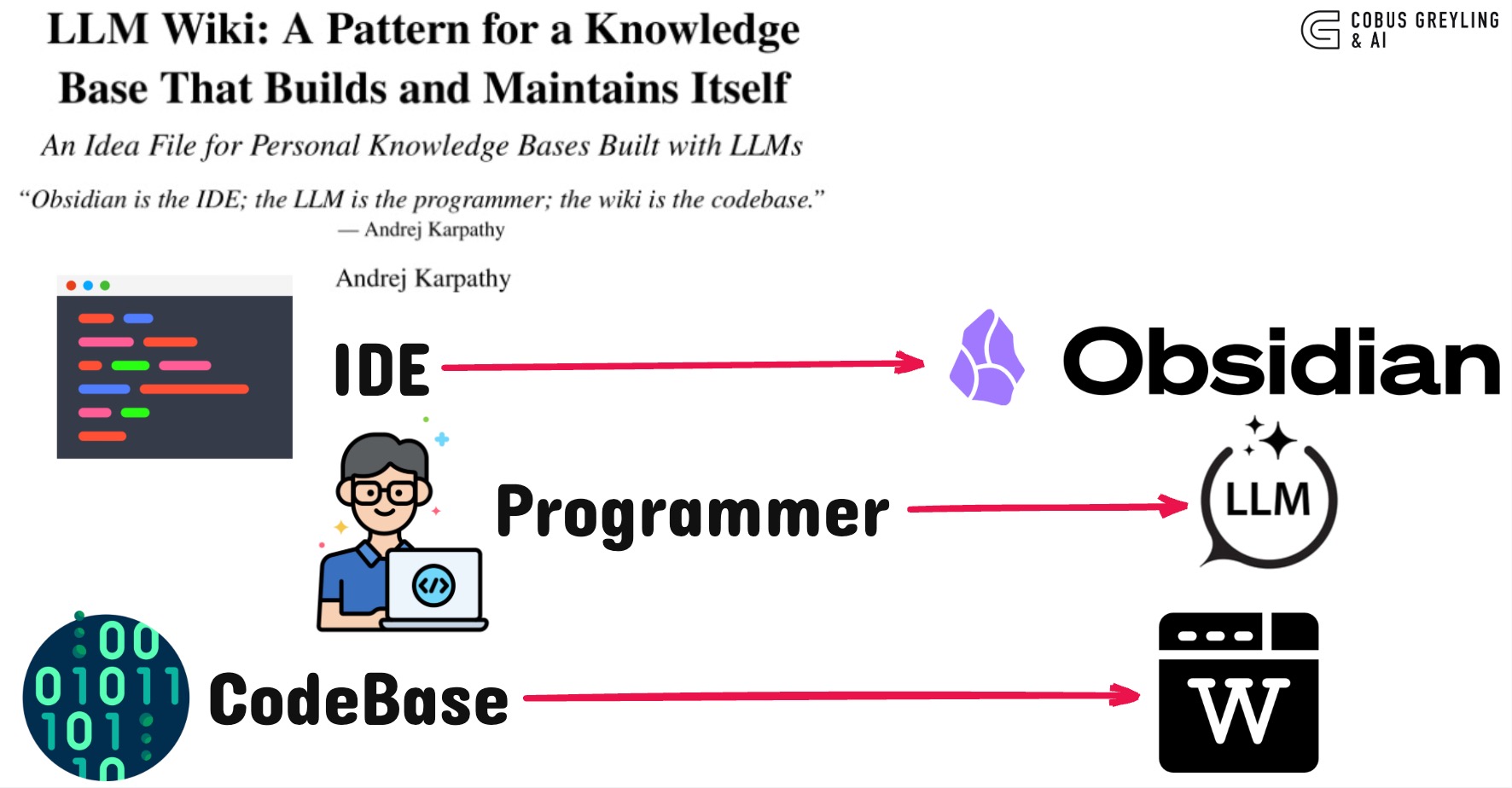
A reference implementation of Andrej Karpathy's LLM Wiki pattern — a compounding personal knowledge base where the LLM maintains structured, interlinked markdown instead of re-deriving everything from raw chunks on every question.
"Obsidian is the IDE; the LLM is the programmer; the wiki is the codebase."
Use this template
This repo is a GitHub template. Click Use this template → create your repo → then:
pip install llm-wiki
wiki init my-wiki --git
cd my-wiki
wiki init-check
Or install the toolkit only and scaffold locally:
pip install llm-wiki
wiki init my-wiki --git
Why not RAG?
Classic RAG retrieves fragments at query time. Nothing accumulates. Ask a question that synthesizes five documents and the LLM rediscovers the pieces every time.
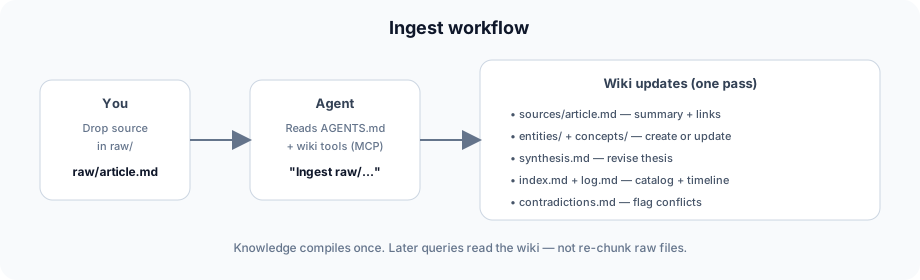
LLM Wiki is different. When you add a source, the agent reads it, extracts key information, and integrates it into a persistent wiki — updating entity pages, revising synthesis, flagging contradictions. Knowledge is compiled once and kept current.
| RAG | Notes app | LLM Wiki | |
|---|---|---|---|
| Knowledge accumulates | No — re-retrieve each query | Manual linking | Yes — agent integrates on ingest |
| Cross-document synthesis | Fragment assembly at query time | You connect the dots | Pre-built in synthesis + entity pages |
| Citations | Chunk references | None by default | Wikilinks to source pages |
| Agent role | Retrieve + answer | None | Maintain the wiki (ingest, lint, update) |
| Human role | Curate corpus | Write everything | Curate raw/ + ask questions |
See it in action
Ingest flow — one source update touches the whole wiki:
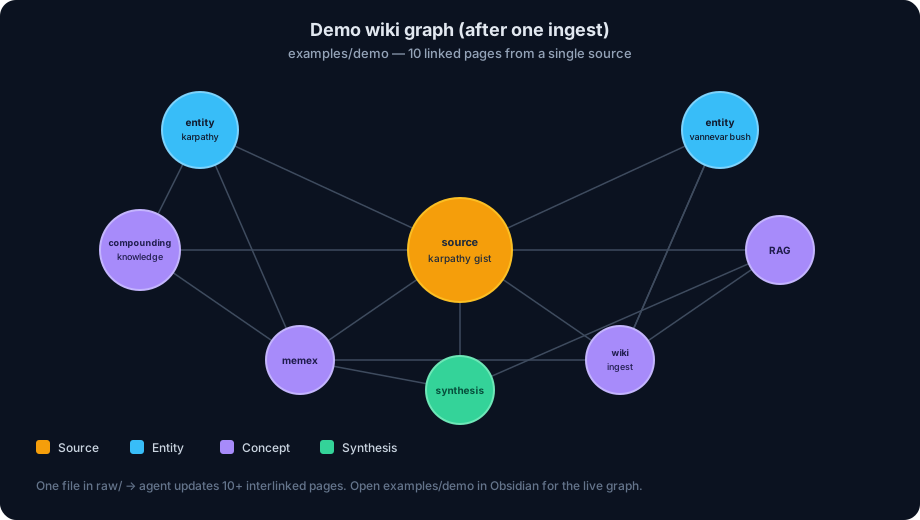
Demo graph — two sources link to 15+ pages (examples/demo/):
From a repo clone
Note: This repository is the toolkit, not a wiki root. Example wikis live under
examples/. Always pass--rootor usemakeshortcuts:
git clone https://github.com/cobusgreyling/llm-wiki.git
cd llm-wiki
pip install -e ".[dev,mcp]"

make demo-search          # wiki --root examples/demo search "memex"
make demo-ingest          # ingest status
./scripts/demo-walkthrough.sh   # full terminal tour
Open examples/demo/ as an Obsidian vault to explore the live graph.
Quick start
1. Install
pip install llm-wiki
pip install "llm-wiki[mcp]"   # optional: MCP server for agents
2. Scaffold a new wiki
wiki init my-wiki --git
cd my-wiki
wiki init-check
This creates agent configs (.cursor/mcp.json, .mcp.json, CLAUDE.md) with paths already set.
3. Open in your agent
Point Claude Code, Cursor, Codex, or any agent at the wiki folder. The agent reads AGENTS.md and becomes your wiki maintainer.
Cursor
MCP is pre-configured at .cursor/mcp.json after wiki init. Reload MCP servers in Cursor settings, then try:
"Lint the wiki" or "Search the wiki for transformer architecture"
Claude Code
CLAUDE.md points to AGENTS.md. MCP is in .mcp.json:
cd my-wiki
claude   # or your Claude Code entrypoint
4. Add a source and ingest
cp ~/Downloads/some-article.md raw/
wiki ingest-status    # confirm pending raw files
Then tell your agent:
"Ingest the new source in raw/"
5. Browse in Obsidian
Open the wiki folder as an Obsidian vault. Watch the graph grow as your agent maintains cross-references in real time.
Architecture
my-wiki/                  # your project (from wiki init)
├── raw/                  # Immutable sources (you curate)
├── wiki/                 # LLM-maintained markdown (agent writes)
│   ├── index.md          # Content catalog — read first on queries
│   ├── log.md            # Append-only operation timeline
│   ├── synthesis.md      # Evolving thesis
│   ├── entities/         # People, orgs, products…
│   ├── concepts/         # Ideas, frameworks…
│   ├── sources/          # Per-document summaries
│   └── answers/          # Filed query responses
├── templates/            # Page templates
├── AGENTS.md             # Agent instructions (the schema)
└── (CLI via pip install llm-wiki)
This repo ships the toolkit under src/llm_wiki/. Populated examples:
| Example | Domain |
|---|---|
examples/demo/ |
Karpathy gist + qmd (with contradiction) |
examples/research/ |
NLP paper notes |
examples/reading/ |
Book chapter notes |
Operations
| Operation | Who triggers | What happens |
|---|---|---|
| Ingest | You drop a file in raw/ |
Agent creates source page, updates 10–15 linked pages, revises synthesis |
| Query | You ask a question | Agent searches index, reads pages, synthesizes with citations |
| Lint | You or agent, periodically | Broken links, orphans, contradictions, index gaps |
| Ingest status | You or agent, before ingest | Lists raw files missing source pages |
CLI
wiki init my-wiki --git                    # scaffold a new project
wiki ingest-status                         # raw ↔ source coverage
wiki search "transformer architecture"       # BM25 (default)
wiki search "auth flow" --backend qmd        # optional: requires qmd collection
wiki list --type concept                   # browse pages by type
wiki lint                                  # health check (exits 1 on errors)
wiki lint --json                           # machine-readable lint output
wiki stats                                 # page counts
wiki log                                   # recent operations
wiki expand synthesis                      # read a page + TOC
Set LLM_WIKI_ROOT when running the MCP server or CLI from outside the project directory.
Scale: qmd integration
When BM25 search misses paraphrased queries, add qmd as a retrieval layer:
npm install -g @tobilu/qmd
qmd collection add ./wiki --name wiki
qmd embed
wiki search "your query" --backend qmd
The wiki pages remain the source of truth; qmd improves recall.
MCP server
Tools: wiki_search, wiki_expand, wiki_list, wiki_lint, wiki_stats, wiki_ingest_status, wiki_recent_log
pip install "llm-wiki[mcp]"
python -m llm_wiki.mcp_server
Example use cases
- Research — papers and articles over weeks, building an evolving thesis → see
examples/research/ - Reading — chapter-by-chapter book notes with character/theme pages → see
examples/reading/ - Business — meeting transcripts, Slack threads, project docs
- Personal — health, goals, journal entries, podcast notes
- Due diligence — competitive analysis that compounds
Obsidian tips
- Web Clipper — clip articles directly to
raw/ - Graph view — see hub pages, orphans, and connections
- Dataview — query YAML frontmatter for dynamic tables
- Marp — generate slide decks from wiki content
Related work
- Karpathy's LLM Wiki gist — the original pattern
- qmd — local hybrid search when the wiki outgrows the index
- trip2g — hosted wiki + MCP federation
Contributing
See CONTRIBUTING.md. Good first issues welcome — check the issue templates.
Maintainers: see MAINTAINERS.md for release and PyPI publishing.
Launch
Ready-to-post announcement copy (gist comment, social, HN): LAUNCH.md.
Record a terminal demo: docs/DEMO.md.
License
MIT — see LICENSE.
Reviews (0)
Sign in to leave a review.
Leave a reviewNo results found