codealong
Health Warn
- License — License: Apache-2.0
- Description — Repository has a description
- Active repo — Last push 0 days ago
- Low visibility — Only 8 GitHub stars
Code Fail
- rm -rf — Recursive force deletion command in .github/workflows/release.yml
- rm -rf — Recursive force deletion command in scripts/check-release.sh
- fs module — File system access in scripts/check-release.sh
Permissions Pass
- Permissions — No dangerous permissions requested
No AI report is available for this listing yet.
Every coding agent you run, in one window: a free, open-source app for macOS and Linux for Claude Code, Codex, OpenCode, Antigravity and Cursor, across your accounts and machines.

Codealong
Every coding agent you run, in one window.
A free, open-source macOS and Linux app for people who run more than one coding agent at a time:
Claude Code, Codex, OpenCode, Antigravity and Cursor, on every account you have.
codealong.com · Download for macOS · Build for Linux · Get started · Tour · Supported agents · FAQ · Full guide

What it is
Running coding agents in parallel gets messy fast: a dozen terminal tabs, the Claude and Codex
apps, two or three accounts, and no way to tell which agent is waiting on you without clicking
through all of them.
Codealong finds every agent session on your machine, wherever it started, and puts them all on one
board, organized the way your work is: project → repo → worktree → branch → pull request. It
shows what each agent is doing, brings the ones that need you to the front, lets you answer them
without switching apps, and opens any session right where it lives.
Your agents keep running exactly as their makers ship them. Codealong reads the records each one
already writes. It doesn't wrap, proxy or replace anything, and it needs no account, no API key
and no server.
- See everything at once. Every session from every agent and account, sorted into Needs
you, Your turn, Working, In review and Idle. Questions, approvals, stuck agents and
errors stand out. - Answer without switching apps. Allow a command, answer a question or send a reply from a
floating bar, your MacBook's notch, a session pinned to your desktop, or a Waiting on you
window that walks you through everything, one agent at a time. - Start work in the right place. Press ⌥⌘/ in any app, say what you want, and start it in the
right worktree on the account with room, or send it to the agent that's already on it. - Read any conversation. The whole transcript of any session, with its tool calls, images and
links, searchable, and a box to reply. - Pull requests and todos beside the agents doing them. Every PR is joined to the worktree
and sessions behind it; review, approve and merge in place. Keep a todo list your agents can
read and work through. - Schedules. Start a session, or message one, every weekday at 9, every two hours, whenever a
command you give it prints something new (a deploy went out), when a PR merges or a todo is
ready, or when a script fires it. Nothing is spent watching: an agent runs only when something
happens. - Know where your plan limits stand. Each account's limits (5-hour and weekly, or monthly
where the plan counts by the month), always in view, and new work goes to the account with room. - All your machines on one board. Link them and see, and if you allow it act on, the sessions
running on any of them. An iPhone app is on the way.
Agents and systems
Agents: Claude Code (in a terminal, as background jobs and in the Claude app), Codex (the CLI
and the app), OpenCode, Antigravity and Cursor (new). What works with each
agent says what Codealong can do with every one.
Systems: macOS 13 or later, on Apple silicon or Intel. Linux too, under X11, built from
source for now: sessions run in tmux, shown in your terminal emulator, and a few things are
macOS's alone, the notch and the Claude and Codex apps among them (what
differs). Windows isn't supported yet.
Contributions are welcome, most of all another harness (Gemini CLI, Copilot CLI, Amp, Pi, or
whichever one you run) and Windows support. A harness is one module behind the Adapter andReader in src-tauri/src/harness.rs, and adding a harness
says what one needs. Everything Codealong asks of the OS is in src-tauri/src/os/: each area that
makes the OS's own calls has a macos.rs and a linux.rs giving the same functions, and what
merely differs, a path or a program to run, goes by os::current(). Windows starts with awindows.rs beside each and a third case there. Building from source and
docs/development.md have the rest, and
CONTRIBUTING.md what a pull request needs: an issue first for anything bigger
than a fix, and screenshots of any changed UI.
Get started
Install
On macOS
- Download
Codealong.dmgfrom the latest release. - Open it and drag Codealong into Applications.
- Open Codealong.
Or with Homebrew, which also puts the codealong command on your PATH:
brew install --cask codealong/tap/codealong
It runs on Apple silicon and Intel Macs, is signed and notarized by Apple, and keeps itself up to
date: when a new version is ready, Restart to update shows at the foot of the sidebar. Prefer to
build it yourself? See Building from source.
On Linux
There's no installer yet: build it from source, under X11. With Rust, Node and the packages Tauri
needs on Linux (WebKitGTK 4.1 and GTK 3 among them; scripts/linux/lima.yaml lists every one for
Ubuntu):
git clone https://github.com/codealong/codealong.git
cd codealong
npm install
npm run tauri build -- --bundles deb   # the binary and a .deb, in ../codealong-target/release
Each session Codealong starts runs in tmux, shown in your terminal emulator: Ghostty, kitty,
WezTerm, Alacritty, foot, Konsole, GNOME Terminal, Ptyxis, Xfce Terminal or xterm ($TERMINAL
picks one). Keys are Linux's: ⌘ is Ctrl, and ⌥ and ⌃ are Alt. A few things are macOS's alone,
the notch, the Claude and Codex apps, and Antigravity's and Cursor's usage among them;
the development notes say what else differs.
You'll need:
- macOS 13 or later, or Linux under X11
- At least one coding agent: Claude Code, the
Codex CLI or app, OpenCode,
Antigravity or Cursor - A terminal: on macOS, Ghostty 1.3 or later (the best supported), iTerm2 or
Terminal, and tmux (brew install tmux) to start sessions while
the screen is locked; on Linux, tmux and a terminal emulator - For pull requests, the GitHub CLI signed in:
gh auth login
Your first five minutes
- Open Codealong. It finds your agents' accounts by the files they keep: Claude Code's
~/.claudeand any sibling folders like~/.claude-work, Codex's~/.codex, OpenCode,
Antigravity and Cursor, including accounts your shell's aliases point at. It looks for git
repos in the folders your agents worked in, and makes a project for each GitHub owner your
recent sessions worked in. Your sessions show up straight away, wherever you started them. - Go through Set up Codealong, which opens over the window the first time: tick the
accounts to show, the folders your code lives in, and your terminal and editor. Its last step
installs the agent tools: thecodealongcommand on your PATH, Codealong's plugin in each
Claude Code account (so you can answer its permission prompts and questions from Codealong),
and a skill in every other agent that tells it how to use the board. The app menu's Set up
Codealong… opens it again, and Settings (⌘,) changes any of it. Group your repos into projects
under Settings › Projects. - On macOS, say yes when it asks. The first time Codealong opens or focuses a terminal tab,
macOS asks whether it may control Ghostty, iTerm2 or Terminal. Allow it, so Codealong can bring
the right tab forward and type your replies into it. - Keep working the way you do. Start agents in your terminal or their apps as usual. When
you want something done, press ⌥⌘/ from any app. When agents are waiting on you, press
⌥⌘. to work through them.
A tour
The board

Five views of your work, each in a window of its own if you like (⇧⌘N):
| View | What it shows |
|---|---|
| Sessions | Every agent session in one list, the ones that need you first, or grouped under each worktree (its branch, its PR, how far it is from main) or each repo. Pin the ones you're watching. |
| PRs | Every pull request in your repos, with its review, checks and the sessions that worked on it. Reviews asked of you come first. Group them by worktree or repo too. |
| Todo | Work you mean to hand an agent, with notes, screenshots, labels and what each todo waits on, grouped by worktree or repo if you like. |
| Board (experimental) | Your work as a board, the whole project's or one you make for a release or a fix: as Kanban, todos and sessions as cards in To do, In progress, In review and Done (or columns of your own), what needs you first in each; as Canvas, laid out in space, a frame per repo, a column per worktree, cards you arrange. |
Select anything to see it in the panel on the right; right-click anything for its menu. The
sidebar, a rail of the views until you open it, narrows every view to the machines, time span and
statuses you pick, and saved views bring a setup back. Plan usage for every account runs across the top.
Every session and worktree has a status:
| Status | What it means |
|---|---|
| Needs you | The agent asked you something, wants to run something, hit an error, or has been busy and silent for 30 minutes (stuck). |
| Your turn | It finished a turn you haven't looked at yet. |
| Working | It's mid-turn, or a command it left running is still doing something. |
| In review | The worktree's pull request is open. |
| Idle | Nothing new. |
The Codealong mark shows the most urgent of them all at a glance: red for an error, amber when
you're needed (a review request too), blue for finished work you haven't seen, green while agents
work, and gray when all is quiet.
Across the top, each account's plan limits. Click one for the Usage window: what your sessions
used and what that would have cost at API prices, against what your plans and any extra usage
actually cost, day by day and by account, model, project and session. An account whose provider
may train its models on what you send (Help improve Claude, ChatGPT's Improve the model for
everyone, Cursor's Share Data, Antigravity's telemetry) has its chip in amber, and its card on hover
turns that off.
Answer agents without switching apps
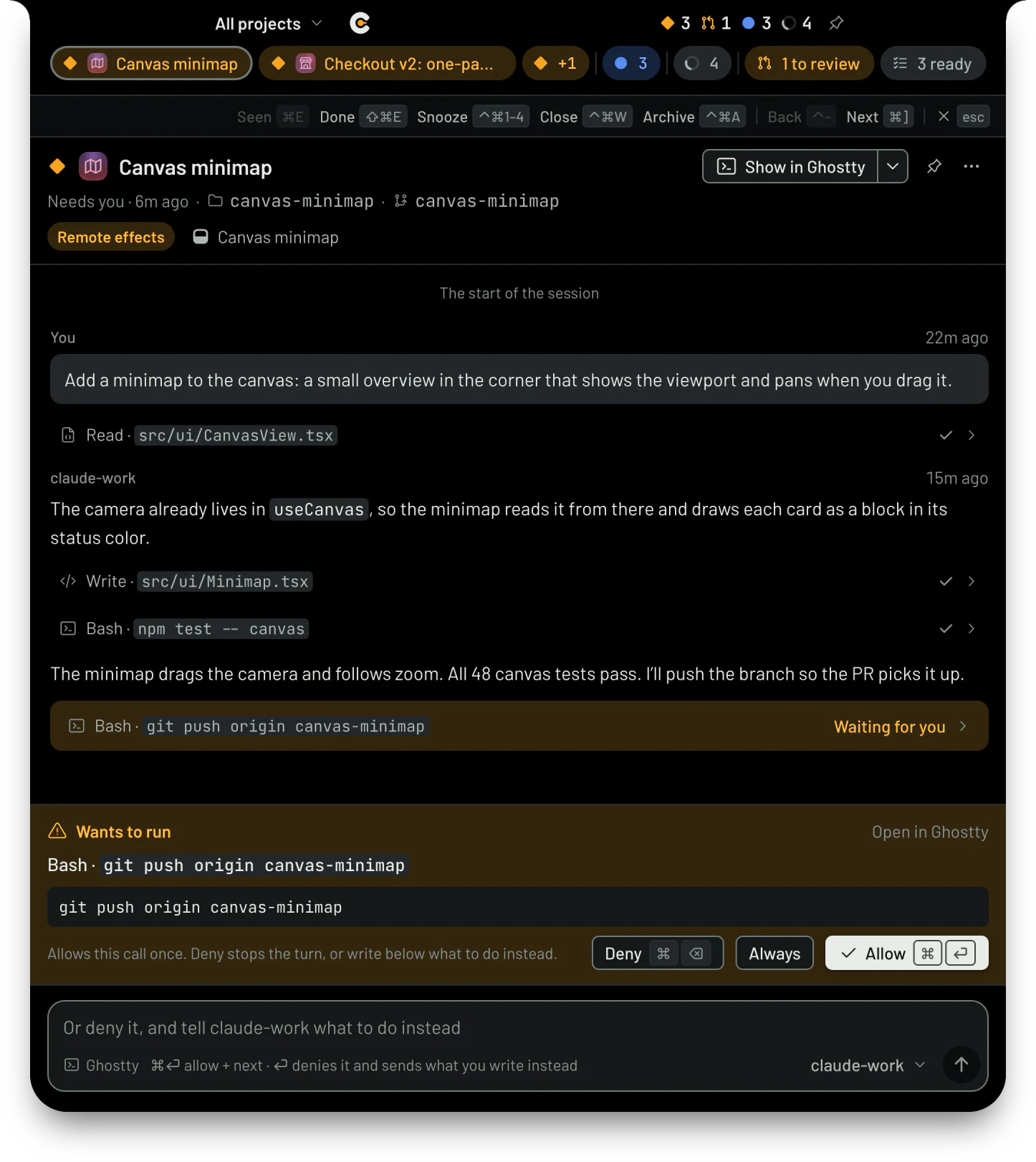
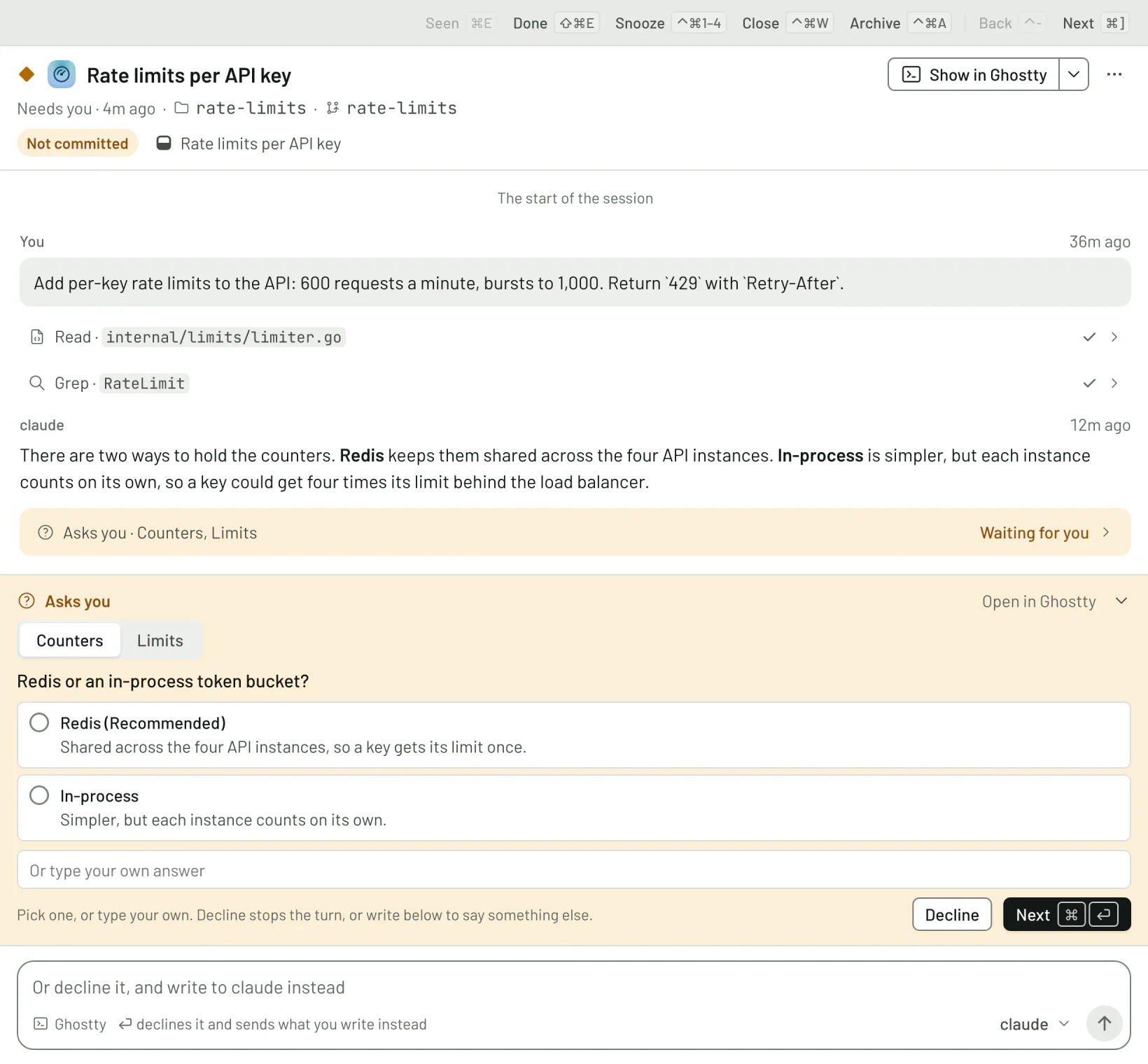
When an agent wants to run a command, Codealong shows the call with Allow, Always and
Deny. When it asks you a question, you get its choices as buttons and a box for your own
answer. You can deny a call and say what to do instead in the same keystroke. The agent's own
prompt stays up too, and whichever you answer first counts.
You can answer from wherever suits you:
- The floating bar sits over every app, on every Space, even over full-screen apps, with
pills for the agents that need you, have just finished or are working, one for PRs waiting on
your review and one for todos ready to start. Hover a pill to read the conversation and reply.
It never takes your keyboard until you click. - The notch. Dock the bar into your MacBook's notch (an external display gets one drawn for
it). Closed, it shows the most urgent count; click it and it opens on the agent that has waited
longest. - Waiting on you (⌥⌘. from any app) lists every agent that needs you, then the PRs waiting on
your review, then finished turns, oldest first. Answer one and the next slides in: inbox zero,
for agents. - Pinned to your desktop. Keep a session floating over your other windows, or pin a session,
worktree, todo or PR there as a small card.
A short sound tells you when an agent starts to need you or finishes its turn, so you hear it from
another app: not for the session you just answered, and one at most every few seconds. Pick the
sounds, or turn them off, in Settings › Sounds.

The keys are the same everywhere: ⌘⏎ sends your reply (or allows the call) and moves on to the
next agent waiting, ⌘⌫ denies, ⌘E marks a finished turn seen, ⌘] skips, and
⌃⌘1 to ⌃⌘4 snooze a session for 15 minutes, an hour, three hours or until tomorrow morning.
Approvals and questions can be answered for Claude Code (in a terminal, as a background job or in
the Claude app), OpenCode, Antigravity's command line in a terminal that takes keypresses (Allow
and Deny), and any agent you run inside Codealong. Codex, the Cursor app and the Antigravity app
show what they're waiting on, and open where they ask.
The quick panel: say what you want done
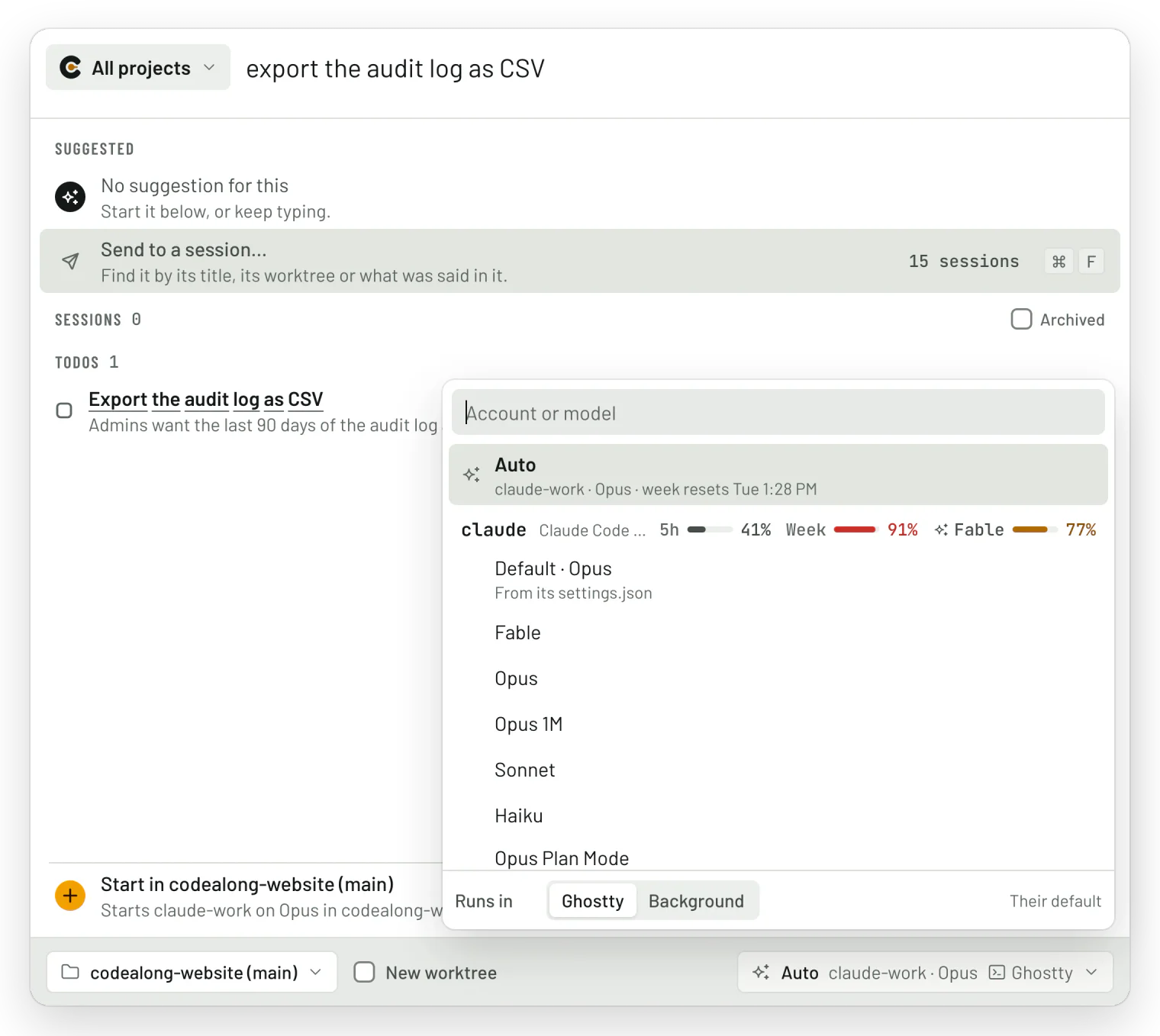
Press ⌥⌘/ in any app. With nothing typed, it lists what needs you. Start typing and it finds
sessions (by title, branch or PR, or by what was said in them), todos and pull requests. Or keep
typing a prompt and start it, choosing:
- the worktree (⌘T), or tick New worktree for a fresh one;
- the account, model and effort (⌘L), or leave it on Auto;
- where it runs (⌘O, in the same menu): a terminal tab, in the background, the Claude or Codex
app, or inside Codealong itself. Each account starts where Settings › Accounts says unless you
pick another for that start; Make default there changes it; - and, with other machines linked, which machine (⌘D).
Auto picks the account with room (or from your routing group in Settings › Routing): an
account at its usage cap (90% by default) has none, and among those with room it picks the one
whose week resets soonest, so no week's allowance goes unused, until it's within 5% of its cap
([routing] buffer) and what's left is for the sessions already on it. A
question that isn't about any of your repos can go to a chat of its own. Type / to find your
repos' skills by name.
Improve Codealong. The button beside New session, or ⌥⌘, in any app, opens the panel on
Codealong's own source with a picture of every Codealong window as it is: describe what to change,
and the session improves Codealong itself. With Codealong's source in none of your projects, the
panel offers to add one.
Optional suggestions. Turn on Jev (Settings › Jev, with your own TypeSafe
key) and the panel suggests where your prompt belongs: the agent already working on it, a free
worktree, a new chat, or a todo for later, each with how likely it is. It warns you when a running
agent may already be doing the same work, so two agents don't quietly race each other. Everything
else works without it.
Every conversation, readable and answerable
Select a session to read its whole conversation, straight from the agent's own records: your
prompts, the replies as formatted text, and every tool call, which opens to show what went in and
what came out. Images you sent show in place, links to pull requests show their status, and
⌘F finds words anywhere in the conversation.
The box at the bottom replies the way that agent takes a prompt: typed into its terminal tab, sent
through Claude Code's background service, started as a new turn in the Codex app, or through
OpenCode's service. Paste screenshots or files into it. From there you can also:
- stop a turn (Esc or ⌘.), or send now to slip a message into the running turn (⌃⏎);
- switch a session's model or effort without starting over (a running Claude Code session, a
Codex app thread, or any session run in Codealong); - ask on the side:
/side <question>asks a throwaway copy of a Claude Code or Codex session,
which never hears of it; - fork a session into a copy that carries on alongside (
/fork); - copy any code block, or run a shell block in a new terminal where the session works;
- rename, pin, snooze, quiet, archive or mark as done (which closes its terminal and
archives it), or move a Claude Code session to another account or worktree.
Out of room mid-task? A Claude Code session stopped by its usage limit offers to move to an
account with room and carry on, or moves by itself if you let it. Lid closed and the network
dropped? Codealong tells the session to carry on once the connection is back. Terminal quit
partway through a turn? The session says it was cut off, and Carry on picks it up; one running in
Codealong itself is told to carry on as Codealong comes back from a restart.
Pull requests, with their agents
Every pull request in your repos is joined to the worktree and sessions behind it, including the
agent that opened it, pushed to it or commented on it. Colored pills show its review, checks and
conflicts, and rows that are your move are marked. Select one for its description, reviews,
checks, comments and diffs.
- Review, approve and merge without opening GitHub: merge commit, squash or rebase,
auto-merge, the merge queue, updating the branch. A merge shows everywhere as you confirm it,
and comes back with why if GitHub refuses it. - Snooze a review request until later.
- Nudge a PR's agent (the session that opened it or pushed to it most, or one you pick), and
it's told when someone reviews, asks for changes or comments, or when checks fail, so it takes
it from there; it's never told to merge. - Ask about a PR: put questions to an agent that has read its whole diff.
- Automatic reviews (optional): an agent on the account, model and effort you pick reviews each PR
that asks for your review, told what to look for by instructions you can edit (which can have it
start subagents of its own), and leaves a draft review on your account with its comments on the
lines they're about, for you to finish and submit. The agent says whether it would approve or ask
for changes, which the PR's box suggests, and it can approve for you when it finds nothing that
needs fixing. The PR waits on you only once it's done, and new commits get reviewed again. - A second opinion on your agents' PRs (optional): each PR a session of yours opens is
reviewed by an agent on another model or provider (Codex reviews what Claude Code wrote, say),
kept in Codealong and handed back to the session that opened it to act on. Nothing goes on
GitHub. - Settings per repo, and shared with your team: pick a repo in Settings › Automation to set how
its PRs are reviewed and nudged. A.codealong/config.tomlcommitted to the repo shares words
for every review, which verdicts an agent may never submit, and what to suggest turning on, with
everyone on the team; each person takes the suggestions or doesn't.
Todos your agents can work
A todo list for work you mean to hand an agent, with notes, screenshots and files, labels, and the
todos each one waits on. Start a session from a todo (⌘N) and the two stay linked: the todo moves
to In progress, and the first session on it owns it, so a second agent started on the same todo
is told to send its findings to the first instead of redoing the work. Agents can read and update
the list themselves with the codealong command.
Schedules
Work that comes round by itself: a session started, or a message sent to one you keep going, at
times you write in a few words (weekdays 9:00, every 2h, monthly 1 9:00), when a command it
runs every few minutes prints something new (a deploy, a failing build, a new message), when a PR
merges or a todo is ready, or when a script fires it (codealong schedule fire). Each run goes on
the account, routing group or Auto you pick, picked again each time, and what it was for goes to
the agent as a file to read, not as words of yours. The Schedules view (⇧⌘L) lists them with
every run and how it went; a run missed while the Mac slept goes once it's back.
Boards and the canvas
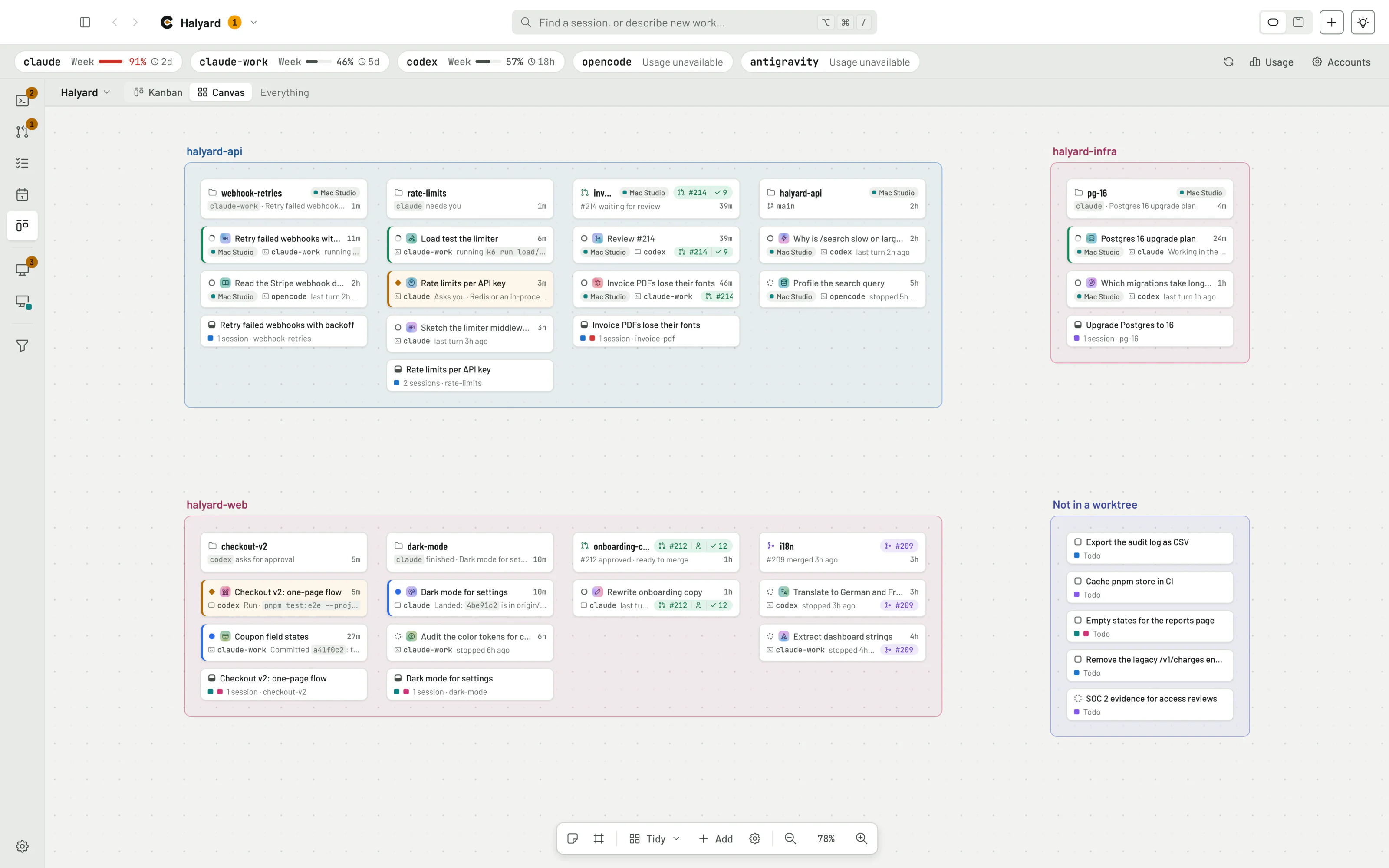
Your project laid out in space, to remember work by where it is. Tidy lays it out in a frame per
repo and a column per worktree, and new work comes in by itself beside what it belongs to. Add
notes and frames, pan and zoom as in Figma, and zoomed out, every card becomes a block in its
status color. The canvas and the Kanban are two ways of showing a board: the whole project's, or
one you make for a release, a fix or an investigation, holding what its rule takes in (a label, a
stage, a repo, what needs you) and what you add from any row's menu. A board's Kanban can have
columns of your own, and agents can put their work on a board with codealong board add. Boards
are an experiment, off until you turn them on in Settings › Experimental.
Open anything where it lives
Double-click a session to bring forward its exact terminal tab in Ghostty, iTerm2 or Terminal,
its Claude app session or its Codex thread, or to resume it in a new terminal. Open a worktree in
your editor: VS Code, Cursor, Windsurf, Kiro, Zed, Sublime Text, Nova, BBEdit, Xcode, the JetBrains
IDEs or Android Studio. ⌃` opens a terminal in the folder of whatever you're looking at. A worktree
whose dev server is running shows a green globe: click it to open the app, in the Chrome profile
you choose.
All your machines on one board
Turn on Settings › Devices on each machine and link them once: on your
Tailscale network both show the same six digits and you say yes; anywhere
else, you enter a link code. Each machine then shows the others' worktrees and sessions beside its
own, with a badge saying which machine each one is on. Read any conversation from any machine. Turn
on remote control at a machine, and your other machines can send its sessions messages, answer their
approvals and start work there. Machines talk to each other encrypted end to end, through Tailscale
or iroh: directly where they can, otherwise through iroh's public relays,
which pass along packets they can't read. There's no Codealong server in between.
On your iPhone, Codealong for iPhone links with
your machines the same way and lists every session, most urgent first, to read, and where a machine
has remote control on, to reply to, approve and start. It's early, and for now you build and install
it yourself.
A board your agents can read too
The codealong command (installed from Settings › Agents) and its skill let your agents see what
other agents are doing in the same repo, pick up and finish todos, check which account has room,
message another session, or start one. It answers in JSON when an agent runs it, and in tables
in your terminal.
codealong whoami                     # which session am I, who else works here, my todos
codealong sessions find "rate limits"
codealong todo list --ready
codealong accounts --usage
codealong start --todo <id>
codealong --help lists everything, and so does
the skill's reference.
An agent can also keep watch over all your sessions for you on a loop:codealong start --account <a Claude Code account> --prompt "/codealong:orchestrate" starts an
orchestrator, which asks what you'd
like it to do, then tags what waits on you, suggests replies, and flags agents getting in each
other's way, without messaging any of them (its skill).
What works with each agent
Codealong reads what every agent already writes, so it sees all of them. What it can do from
there depends on what each one lets another program do. Where it can't act, it opens the
session where it lives.
| Agent | Sees it | Sends prompts | Answers approvals | Starts sessions | Several accounts | Usage limits |
|---|---|---|---|---|---|---|
| Claude Code in a terminal | ✓ | Types into its tab | ✓ | ✓ | ✓ | 5-hour, weekly, per model |
| Claude Code background jobs | ✓ | Its background service | ✓ | ✓ | ✓ | 5-hour, weekly, per model |
| Claude app | ✓ | As a message from another session | ✓ (with the plugin) | Opens it with the prompt | Its signed-in account | Shared with Claude Code |
| Codex CLI | ✓ | Types into its tab | In its terminal | ✓ | ✓ | 5-hour, weekly |
| Codex app | ✓ | Starts a new turn | In the app | ✓ | Its signed-in account | 5-hour, weekly |
| OpenCode | ✓ | Its own service | ✓ | ✓ | — | You bring the provider |
| Antigravity | ✓ | Types into agy's tab; the app opens with the prompt on the clipboard |
agy in a terminal; the app in the app |
agy in a terminal; the app in its own window |
— | Weekly, per model group (with agy) |
| Cursor (new) | ✓ | cursor-agent in a terminal; app chats open with the prompt on the clipboard |
In Cursor | cursor-agent |
— | Monthly, Cursor's models and the others |
| In Codealong (Claude Code, Codex or OpenCode) | ✓ | ✓ | ✓ | ✓ | ✓ | Per account |
Terminals: Ghostty (the exact tab, keypresses, new tabs beside their worktree), iTerm2 and tmux
(typing and keypresses), and Terminal (typing). Approvals for Claude Code go through Codealong's
plugin, which Settings › Agents installs into each account. In Codealong means the agent runs in
Codealong's own panel, over the Agent Client Protocol.
Keyboard shortcuts
From any app (change them in Settings › General):
| Keys | What they do |
|---|---|
| ⌥⌘/ | The quick panel: find anything, start a session |
| ⌥⌘' | The quick panel set to start a chat of its own, in no project |
| ⌥⌘. | Work through what waits on you, in the notch or the Waiting on you window |
| ⌥⌘, | Improve Codealong: the quick panel on Codealong's own project, with pictures of its windows |
| ⌥⌘; | Codealong's window, the one you were in last; pressed there, it hides Codealong |
In Codealong:
| Keys | What they do |
|---|---|
| ⇧⌘S · ⇧⌘P · ⇧⌘T · ⇧⌘L · ⇧⌘K · ⇧⌘B | Sessions, PRs, Todo, Schedules, the board as Kanban, as Canvas (with boards turned on); from the notch, the quick panel or the waiting window, Codealong's window on that view |
| ⌘P | Switch project (⌥⌘1 – ⌥⌘9 jump to one, ⌥⌘0 shows them all) |
| ⌘K | The quick panel, in this window's project |
| ⌘N / ⇧⌘N | New session / new window |
| ⏎ | Open the selected session, worktree or PR where it lives |
| ⌘1 – ⌘5 | Open the selected worktree in its terminal, editor, the Claude app, the Codex app or its preview |
| ⌘O | Open the selected PR on GitHub |
| ⌘⏎ | Send your reply (or allow the call) and go on to the next agent waiting |
| ⌘⌫ | Deny the call (with nothing typed in the box) |
| ⌃⏎ | Send now, into the running turn |
| ⌘1 – ⌘6 | Send a suggested reply, from the reply box (from anywhere in the notch and the waiting window) |
| Esc or ⌘. | Stop the turn |
| ⌘E / ⇧⌘E | Mark seen / mark as done |
| ⌘] / ⌘[ | Next / previous of what waits on you (in Sessions, the notch and the waiting window) |
| ⌃⌘1 – ⌃⌘4 | Snooze: 15 minutes, 1 hour, 3 hours, tomorrow morning |
| ⌃⌘P · ⌃⌘A · ⌃⌘R · ⌃⌘U | Pin, archive, rename, mark as unread |
| ⌃⌘W | Close the session's terminal (the conversation stays, to resume) |
| ⌘F | Find where you are: in a session's conversation, a PR's files, or the view's list |
| ⌥⌘F | Find in the view's list, from anywhere |
| ⌃- / ⌃⇧- | Back / forward through the sessions you looked at |
| ⌃` | A new terminal in the folder of what's shown |
| ⌘C / ⌥⌘C | Copy the selected worktree's branch / path |
| ⇧⌘F | Expand the session panel (in Sessions) or the PR panel (in PRs) to the whole window |
| ⌃⌘S | Open or fold the sidebar |
| ⌘= · ⌘- · ⌘0 | Zoom in, out, actual size |
| ⇧⌘U | Usage: what sessions used and cost, at API prices and paid |
| ⌘, | Settings |
In the quick panel: ⏎ does the selected row, ⌘⏎ always starts a session, ⌥⏎ opens a
session where it lives, ⇥ answers a session in the Waiting on you window, ⌘1 – ⌘9 pick
a row, and ⌘P, ⌘T, ⌘L, ⌘O, ⌘D choose the project, worktree, agent, place and
machine. On a PR waiting on your review, in the notch or the waiting window, ⌘⏎ approves it,
⌥⌘⏎ comments, ⌃⌘R has an agent review it and ⌃⌘G opens it on GitHub. Right-click menus
show every action's keys. On Linux, ⌘ is Ctrl, and ⌥ and ⌃ are Alt.
Settings
Everything is in Settings (⌘,), as a form and as the text of~/Library/Application Support/Codealong/config.toml (on Linux, ~/.config/codealong/config.toml).
Codealong writes that file on first run from what it finds on your machine, and watches it, so you
can edit either. The form saves each change in its place, keeping your comments and order, andcodealong config check checks a file you edited by hand.
A repo can share settings with everyone who works on it in .codealong/config.toml, read from the
branch its pull requests merge into (so a change goes for the team once it's merged), andcodealong config check --repo <folder> checks one before you push it:
[reviews]
instructions_file = "review.md"  # .codealong/review.md, added after each person's own instructions; or `instructions = "…"`
never_submit = ["approve"]       # verdicts never submitted as anyone's review, whatever their `submit` says
auto = true                      # suggested: each person takes it in Settings or a PR's Reviews tab, or doesn't
post = "comment"                 # suggested

[reviews.own]
instructions = "Check the tests cover what changed."
auto = true                      # suggested
send = true                      # suggested

[pull_requests]
nudge_about = "feedback-and-checks"  # for everyone
nudge_by_default = true          # suggested
rerequest_after_fixes = true     # suggested
Accounts, models, a person's own prompt and what's submitted as them stay each person's: a file
that sets one goes unused, with a notice saying why.
config.toml
scan = ["~/projects"]          # where repos are found, three levels deep

[apps]
terminal = "ghostty"           # or "iterm2", "terminal"
editor = "cursor"              # or "vscode", "zed", "xcode"… (Settings lists those installed), or an app's name
new_terminal = "project"       # a tab beside the same worktree, repo or project; or "tab", "window"
move_pointer = false           # move the pointer to a terminal brought forward on another screen
close_command_tabs_after = 10   # minutes after a command Codealong runs in your terminal ends that its tab closes; 0 keeps it (Settings › General)
tmux = "when-locked"           # sessions Codealong starts run in tmux, shown in your terminal: "always"; "when-locked", only while the screen is locked, when Ghostty can't start one; "never" (Settings › General)

[appearance]
theme = "system"               # follows the system; or "light", "dark"
zoom = 100                     # the windows and the cards in the notch and peek, in percent, 50 to 200 (⌘= ⌘- ⌘0)

[shortcuts]
quick_panel = "Option+Cmd+/"        # works in every app; "" turns it off (Settings › General)
chat = "Option+Cmd+'"               # the quick panel set to start a chat of its own, in no project
waiting = "Option+Cmd+."            # the first session that waits on you: the notch, or the waiting window
improve = "Option+Cmd+,"            # the quick panel to improve Codealong itself, with pictures of its windows
main_window = "Option+Cmd+;"        # Codealong's window you were in last; pressed there, hides Codealong

[jev]                          # TypeSafe's Jev, each feature off until turned on (Settings › Jev)
model = "jev-preview"          # TypeSafe's newest release; jev-latest its newest stable one, or a version (jev-1.14.0)
quick_panel = false            # suggestions as you type in the quick panel
sessions = false               # how each turn ended: asks you, stuck, landed, finished, risk
todos = false                  # links sessions to todos, done hints, new todos' labels
pull_requests = false          # review comments that ask for a change
emblems = false                # an icon beside each session's title, for what it works on

[search]
days = 14                      # prompts and replies searched this far back; 0 is titles only (Settings › General)

[devices]                      # your other devices (Settings › Devices)
enabled = false
name = ""                      # this machine's name on your other devices; "" is the computer's name
tailscale = true               # find them on your tailnet
iroh = true                    # reach linked devices anywhere
remote_control = false         # let linked devices act on sessions here

[limits]
when_hit = "suggest"           # a session stopped at its usage limit offers a move; "move" moves it (Settings › Automation)
continue_when_lifted = true    # tell a session still stopped at its limit to carry on once it lifts (Settings › Automation)

[sessions]
block_flagged_sessions = true # block automatic messages, resumes and account moves after a recorded provider flag (Settings › Automation)
continue_after_network_error = true  # tell a session a lost connection stopped to carry on once it's back (Settings › Automation)
continue_after_restart = true  # tell a session Codealong runs to carry on when Codealong quitting cut off its turn (Settings › Automation)
resume_for_sessions_it_started = true  # resume a session that isn't running, out of sight, when one it started, or the one that started it, sends it a message (Settings › Automation)
resume_for_any_session = true  # the same for any session's message, telling it it had stopped; the line above is part of it while it's on (Settings › Automation)
resume_for_pr_news = true      # resume a PR's primary session that isn't running, out of sight, when its nudge has news that asks for work, unless another of the PR's sessions runs (Settings › Automation)
live_replies = false           # Claude Code sessions hand Codealong a reply as their terminal shows it, so Codealong shows it as it's written; their terminals then show a reply a paragraph at a time; new sessions only (Settings › Agents)

[routing]                      # Settings › Routing
auto = ""                      # the routing group Auto uses for new sessions and reviews; "" picks among accounts of the first harness with room
prompt = ""                    # instructions for Jev in the quick panel to suggest an agent, model or routing group for what you type
buffer = 5                     # percent below each account's usage_cap left for the sessions already running there: Auto stops favoring its soonest reset, and a fallback group moves on, once it's this close (0 to 50)

[[routing.groups]]
name = "reviewers"             # offered in the quick panel, `codealong start --account`, and as the reviewer for PRs
strategy = "alternate-harness" # "usage" (most room / soonest reset), "alternate-harness" (rotates across harnesses), "round-robin", or "fallback" (the members in order, each until it's within `buffer` of its cap)
members = [{ account = "claude-work", model = "opus", effort = "high" }, { account = "codex" }]  # each an account on a model (none: Auto's) at an effort (none: the account's own), added in order; [] includes every enabled account that can start

[reviews]
auto = false                   # an agent reviews each PR that waits on your review, and again on new commits (Settings › Automation)
account = ""                   # the account or routing group it runs on; "" for the one Auto would start
model = ""                     # the model it starts on; "" for the account's or group member's own
effort = ""                    # the effort it starts at, with an account named; "" for the account's or group member's own
other_harness = true           # prefer a harness other than the PR author's (from its session here or Co-Authored-By / Generated with trailers)
prompt = ""                    # what it's told to do (what to look for, subagents to start); "" for Codealong's own
start = "no-terminal"          # where its session runs, yours too: "no-terminal" (Claude Code's background service, else Codealong); "codealong"; "background" (a terminal behind your windows where the account has neither); "terminal" (in front, as new_terminal says)
post = "draft"                 # "draft": a draft review of yours to finish; "comment": a comment; "none": stays in the session
submit = "never"               # submit the agent's verdict as your review once posted: "approve", "approve-or-request-changes", "approve-or-comment"; "request-changes" or "comment" never approve

[reviews.own]
auto = false                   # an agent reviews each PR a session of yours opened here, and again on new commits (Settings › Automation)
account = ""                   # the account or routing group it runs on; "" for Auto's
model = ""                     # the model it starts on; "" for the account's or group member's own
effort = ""                    # the effort it starts at, with an account named; "" for the account's or group member's own
other_harness = true           # prefer a harness other than the PR's session or trailers
prompt = ""                    # what it's told to do; "" for Codealong's own
send = true                    # hand each review to the session that opened the PR; nothing goes on GitHub
drafts = false                 # review your draft PRs too; others' drafts are never reviewed

[pull_requests]
nudge_by_default = false       # every open PR of yours tells the session that opened it what happens on it (Settings › Automation)
nudge_about = "everything"     # what a nudge tells of: "feedback" only comments and changes asked for; "feedback-and-checks" adds failing checks and conflicts; "feedback-and-merges" and "feedback-checks-and-merges" add a merge to those
rerequest_after_fixes = false  # ask a reviewer who asked for changes to look again, as you, once fixes are pushed and nobody said so (Settings › Automation)

[sounds]                       # a short sound when something starts to wait on you (Settings › Sounds)
needs_you = "Pop"              # a session asks you something, waits on a call to allow, or stops with an error
your_turn = "Tink"             # a session's turn ended
review_requested = ""          # a PR asks for your review; "" is no sound
volume = 60                    # in percent of the system's own; any sound in /System/Library/Sounds or ~/Library/Sounds, or on Linux ~/.local/share/sounds

[repos."github.com/acme/web".reviews]  # yours for one repo, over the above and its team's file (Settings › Automation, the repo picked)
account = "claude-work"        # any of [reviews] but start, [reviews.own] (as reviews.own) and [pull_requests]; what's left out is as they say
post = "none"

[updates]
check = true                   # look for a new version by itself (Settings › General)

[experimental]                 # features still being tried out, each off until it's turned on (Settings › Experimental)
boards = false                 # the Board view, as Kanban and as Canvas, Add to board in the menus, and `codealong board`

[debug]
perf_log = false               # true logs timings to ~/Library/Logs/Codealong/perf.log (Settings › Advanced)

[prices."some-new-model"]      # API prices for a model Codealong has none for yet, dollars per million tokens (the Usage window)
input = 3
output = 15

[[accounts]]                   # in the usage bar's order: dragging a chip there moves its table
name = "claude-work"           # what the board shows
harness = "claude"             # claude, codex, opencode, antigravity or cursor
home = "~/.claude-work"
command = "claude-work"        # used for `claude-work --resume <id>`
start = "background"           # where new sessions start: terminal, background, claude-app (~/.claude only), codex-app (~/.codex only), codealong; a start from the quick panel sets it
# acp = "my-adapter --stdio"   # the Agent Client Protocol adapter Codealong runs its sessions through, in place of the installed one
usage_cap = 90                 # Auto, routing groups and reviews pass over it once a meter reaches this percent (default 90)
monthly = 200                  # what its plan costs you a month, in dollars: Paid in the Usage window
# per_token = true             # it pays by the token (an API key): what its work cost at API prices was paid
# disabled = true              # turned off: Codealong starts nothing on it and leaves it out of the usage bar; its sessions still show

[[accounts]]
name = "codex"
harness = "codex"
home = "~/.codex"
command = "codex"              # used for `codex resume <id>`

[[accounts]]
name = "opencode"
harness = "opencode"
home = "~/.local/share/opencode"  # OpenCode's data folder, with opencode.db
command = "opencode"           # used for `opencode --session <id>`

[[accounts]]
name = "antigravity"
harness = "antigravity"
home = "~/.gemini/antigravity" # the app's data folder; its command line's, ~/.gemini/antigravity-cli, is read with it

[[accounts]]
name = "cursor"
harness = "cursor"
home = "~/.cursor"             # the command line's folder; the Cursor app's chats are read with this one

[[projects]]
name = "Acme"
repos = ["github.com/acme/*"]
folders = []
chrome_profile = "Work"        # its worktrees' previews, and links into them, open in this Chrome profile; without it, the default browser
Codealong finds each agent by the files it keeps: Claude Code's ~/.claude and sibling folders,~/.codex and its siblings, OpenCode's and Antigravity's databases, Cursor's ~/.cursor, and the
folders your shell's wrappers and aliases point CLAUDE_CONFIG_DIR, CODEX_HOME,CURSOR_CONFIG_DIR or XDG_DATA_HOME at, which also name the account and start it. On first run,
the ones in use or signed in go into config.toml; the rest, and any found later, wait under
Settings › Accounts › Found on this Mac. What else Codealong keeps beside config.toml is listed
in the guide's Files Codealong keeps.
Privacy and safety
- Nothing of your work leaves your machine unless you turn it on. Transcripts stay on the
machine that ran them, and Codealong keeps only titles, statuses and short excerpts in memory.
There's no sign-up and no Codealong server. Codealong talks only to your agents' providers, with
their own sign-ins, for plan usage and training settings; to GitHub through your ownghsign-in;
and to this repo's releases to check for updates ([updates] check = falseturns that off). - Jev is opt-in. Each Jev feature is off until you add your own TypeSafe key and switch it on,
and Settings › Jev says what each one sends (what you type, and your sessions' titles, branches
and latest lines). The key stays in your login keychain (on Linux, the desktop's Secret Service). - Linked devices talk to each other, encrypted end to end (directly, or through relays that
can't read what they pass along), and read a conversation or search what was said only by
asking the machine it's on. Remote control is off until you turn it on at that machine;
then your linked devices can send prompts, answer approvals, start sessions and end them there,
and each request is written to~/Library/Logs/Codealong/devices.log(on Linux,~/.local/state/codealong/devices.log). - Git is read-only, but for cleaning up. Codealong never commits, checks out, fetches or
resets, and never creates a worktree: when you ask for a new worktree, the agent (Claude Code,
orcursor-agent) makes it. It removes one, and deletes its branch, only when you clean it up
(Clean up worktree…, or Mark as done on a background job that made its own) and nothing in it
would be lost: no uncommitted file, no commit that isn't on a remote, nothing running in it. A repo whose worktrees a hook makes has them taken down by its
ownWorktreeRemovehook. Git runs withGIT_OPTIONAL_LOCKS=0, so it never holds a lock your
agents need. A pull request is merged only when you press Merge. - Only you allow what an agent does. Agents can see what another agent is waiting on, and deny
it, but never allow it. With Codealong closed, your agents ask you the usual way. - It acts only when you ask. Codealong types into a session only what you send it, or what
a schedule you made sends when its time comes. Mark as done and Close idle sessions end only the
sessions you pick, and their conversations stay, to resume. - Sessions you start open in a new terminal running the account's own command, with your
prompt passed in the window's environment (CODEALONG_PROMPT), so nothing in it is typed or
needs quoting. A session run In Codealong is a child of the app, allowed what the agent's own
permission settings allow, and asks only you; it ends when Codealong quits.
macOS will ask you about two things. The first time Codealong opens or focuses a terminal tab, it
asks whether Codealong may control Ghostty, iTerm2 or Terminal (Automation); without that,
Codealong can still open plain Ghostty windows. And a repo in Documents, Desktop or Downloads, or
on a removable drive, makes macOS ask whether Codealong may open that folder, again after each
update. Until you answer, those worktrees show without git, and after ten seconds or so the board
names the folders it's waiting on.
FAQ
Is Codealong really free?
Yes. It's free and open source under the Apache License 2.0, with no account, no trial and no paid
tier. You pay only for what you already pay for: your agents' subscriptions, and a TypeSafe key if
you turn on Jev.
Do I have to start my agents from Codealong?
No. Codealong finds every session on your machine, wherever it started: your terminal tabs, Claude
Code's background jobs, the Claude and Codex apps. Keep starting agents the way you do now, and use
the quick panel when it's quicker.
Does it wrap or proxy my agents?
No. Codealong reads the files each agent already writes, and starts new work in the official tool,
in your terminal or the maker's own app. Nothing sits between your agent and its model, and no API
keys are involved. The optional plugin adds the codealong command, its skills and two hooks to
Claude Code: one so you can answer its permission prompts from Codealong, and one that tells a new
session its todo and worktree. If you choose to run an agent inside Codealong instead, it talks
to the agent over the Agent Client Protocol.
Can I use several Claude Code accounts?
Yes. Each account runs the official Claude Code with its own config folder (CLAUDE_CONFIG_DIR),
and Codealong finds them on its own, even from an alias in your shell. Follow each provider's terms
for how you use your accounts.
Does it change my git repos?
Only to remove a worktree you clean up, with its branch, and only when nothing in it would be lost:
no uncommitted file and no commit that isn't on a remote. Otherwise it runs git read-only. When work
needs a new worktree, the agent makes it, and a pull request is merged only when you press Merge.
Which systems, terminals and editors does it support?
macOS 13 or later, on Apple silicon or Intel, and Linux under X11. On macOS, Ghostty is the best
supported terminal; iTerm2, Terminal and tmux work too, and sessions Codealong starts can run in
tmux shown in your terminal, always or only while the screen is locked. On Linux, sessions run in
tmux, shown in your terminal emulator. It opens worktrees in VS Code, Cursor, Windsurf, Kiro, Zed, Sublime Text,
Nova, BBEdit, Xcode, the JetBrains IDEs and Android Studio, or any editor you name.
Does it run on Linux?
Yes, under X11, built from source for now (On Linux says how; there's no installer
yet): sessions in tmux, shown in your terminal emulator's windows, and editors found by their
commands. Some of what macOS gives it has no counterpart there, the notch among them;
the development notes say what, and how to try it in a VM.
And Windows?
Not yet, and help is welcome: Agents and systems says where Windows support
starts.
Can I answer my agents from my phone?
Soon: Codealong for iPhone is early, and for now you
build and install it yourself. Today you can answer an agent from any of your machines: link them,
and turn on remote control on the machine the agent runs on.
How is it different from apps that run agents in their own window?
Those apps see only the agents they launched. Codealong reads the agents you already run, across
harnesses, accounts and machines, and sends new work to the right one.
If something's missing
- An agent's sessions don't show. Look under Settings › Accounts › Found on this Mac, or add
the account there by hand. - A repo's worktrees don't show. Add the folder it's in to Settings › General (Codealong looks
three levels deep). Sessions outside your folders are listed under Elsewhere. - No pull requests. Sign in to the GitHub CLI with
gh auth login. A chip at the end of the
accounts bar says when GitHub is signed out or out of requests. - Codealong can't bring a terminal tab forward or type into it. On macOS, allow it under
System Settings › Privacy & Security › Automation. - Ghostty answers only once you bring it forward. macOS naps it while it's behind other
windows. Rundefaults write com.mitchellh.ghostty NSAppSleepDisabled -bool YES, then quit and
reopen Ghostty. - Something stopped working in the background. Codealong says so in a chip at the end of the
accounts bar; click it for what happened and what to open to fix it.
Building from source
git clone https://github.com/codealong/codealong.git
cd codealong
npm install
npm run tauri dev
You'll need Rust 1.91 or later (rustup) and Node 22.13 or later, with Xcode's command line tools
on macOS, or on Linux the packages On Linux names. Builds go to codealong-target, a
folder beside the clone, which every checkout and worktree of it shares. A development build uses
the same settings and todos as an installed Codealong, and quits it while it runs.
docs/development.md has the rest: building an app bundle, running the tests
and the UI checks, and a map of the code. CLAUDE.md has the notes every change follows.
Learn more
- codealong.com: the website, with what Codealong does, how it
compares with the other tools, and what it costs. - The guide: every feature in detail, view by view and window by window.
- Developing Codealong: building, testing and the code map.
- Codealong for iPhone: your sessions on your
phone. - Third-party notices: the icons, fonts and libraries Codealong
includes, and their licenses.
License
Copyright 2026 Gordon L. Hempton. The code is under the Apache License 2.0; copies
carry the NOTICE. What it includes from others is under their own licenses, listed in
THIRD_PARTY_NOTICES.md. The Codealong name and logo are trademarks, and
the license doesn't grant rights to them: a fork should go by its own name.
Reviews (0)
Sign in to leave a review.
Leave a reviewNo results found