amiga-game-kit
Health Gecti
- License — License: MIT
- Description — Repository has a description
- Active repo — Last push 0 days ago
- Community trust — 26 GitHub stars
Code Gecti
- Code scan — Scanned 12 files during light audit, no dangerous patterns found
Permissions Gecti
- Permissions — No dangerous permissions requested
Bu listing icin henuz AI raporu yok.
Build real Commodore Amiga games with AI agents: C toolchain, headless emulator tests, and art, sound and video pipelines.
Amiga Game Kit (AGK)





Play the demos · Make your first game · Native recompilation · Roadmap
A kit for building Commodore Amiga games with AI coding agents (Claude Code,
Codex, Cursor, ...). Agents are only as good as their feedback loop, so AGK
gives them a deterministic, headless build → run → observe → test cycle:
screenshots, frame-exact joystick input, serial debug output, memory and
register dumps, and golden-image tests. It's built on proven Amiga tooling:
ACE, bebbo's GCC and
vAmiga.
AGK also includes experimental native recompilation: translate
68000 game code from your own disk images into C, run it on modern systems, and
use that as a starting point for improvements. Compatibility is still limited;
see the guide for what's working and what's next.
$ agk test examples/hello
PASS boot [a500] 0.3s, boot 1.5s (cached next time)
PASS clamp [a500] 0.8s
PASS move [a500] 0.4s
...
9/9 passed
Quick start
tools/setup                    # fetch pinned ACE + vAmiga, apply patches, build emulator, pull toolchain
export PATH="$PWD/tools:$PATH"
agk doctor                     # check Docker, emulator, ROMs, profiles

agk new ~/games/mygame         # start a game from the template (AGENTS.md, tests, .mcp.json included)
cd ~/games/mygame
agk unit                       # game rules compiled for the host: milliseconds
agk build                      # C + ACE -> build/mygame.adf (bootable floppy), compiled in Docker
agk test --update              # record the first golden screenshots
agk run -s "press right 20" -s "screenshot moved"   # try things; prints the PNG paths
agk play                       # play it yourself in FS-UAE: arrow keys + Space
agk play needs FS-UAE (brew install --cask fs-uae-emulator on macOS). It
writes an FS-UAE config for the game's profile (ROM, memory, the game disk,
keyboard as the joystick in port 2) and opens it.
Then open the project in Claude Code (or any agent). It picks up AGENTS.md
and the amiga MCP server from .mcp.json, whose tools return screenshots as
images.
Requirements: Docker, git, cmake, Python 3.11+, a host C compiler, and a C++20
compiler for vAmiga (on macOS: brew install llvm, because Apple's clang 15 is
too old).
What's in the box
| Build and run | agk new, build, run, test (golden screenshots on Kickstart 1.3, 3.1, AROS and A1200), unit (the rules on the host, in milliseconds), play (FS-UAE) |
| See what's wrong | agk profile (where the frame goes: functions, blitter, DMA), lint (slow 68000 maths the compiler hid), expect-scroll and checkpoints in tests, a chip-RAM meter |
| Art, sound, levels | text art and PNGs to sprites and BOBs (agk art), Retro Diffusion in (art-gen, art-export fits it), MML and samples to ProTracker (agk sound), Tiled maps (agk map), packed files on the disk |
| A runtime | agk/ headers for what every game ends up writing: a blit queue, a copper writer, text lines with a font, a sprite starfield, a loader, the frame meter |
| Ship it | agk record (an MP4 and a GIF for a README), agk release (a zip and an Aminet readme) |
| Read other games | agk inspect and agk rip boot any disk, sample its code by address and pull the graphics out (docs/reading-games.md) |
| For agents | every project's AGENTS.md, an MCP server whose tools return screenshots, and techniques/: seven small tested games, one trick each, with the measured cost |
Four games were built with it, by an agent, start to finish: a shoot-'em-up,
a racer, a platformer and an AGA mech demo, below.
Just want to play? Download the ready-to-boot game disks.
No build tools needed. IRON WRAITH needs an A1200 / AGA configuration; the other
three run on an A500.
A1200 / AGA demo: IRON WRAITH
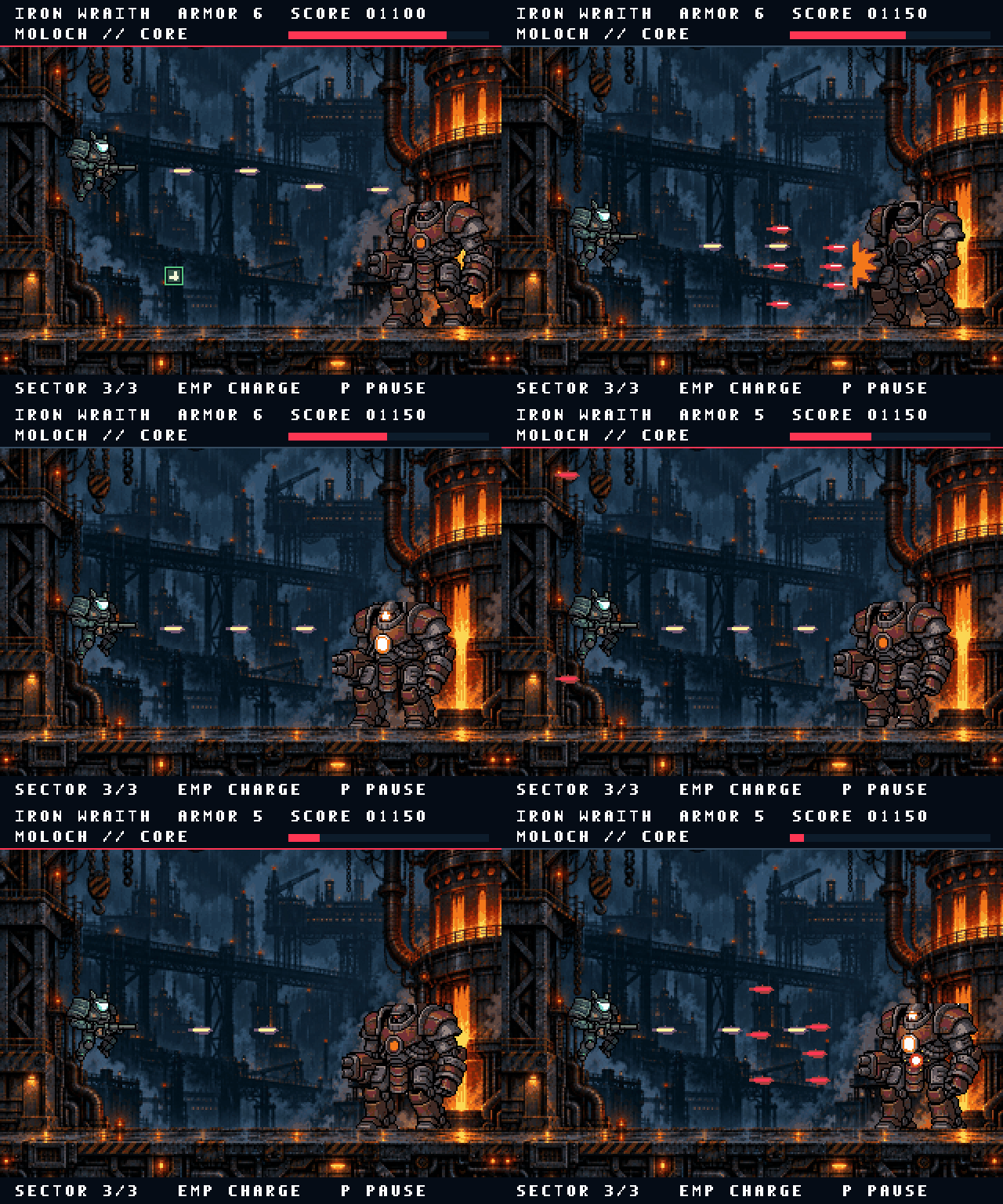
Watch the complete demo with sound.
IRON WRAITH is a mech-assault demo for the Amiga 1200
with AGA graphics and 2 MB chip RAM, running at 50 fps. It features an
eight-plane industrial battlefield, attached mech sprites, an animated armored
boss, EMP attacks, repairs, and a sampled industrial-metal soundtrack. Its selected mech
and boss art were generated with Retro Diffusion and compiled for the Amiga.
Run tools/agk play examples/ironwraith. See AGA setup for the
RGB24 art pipeline and exact-color scenario checks.
Example: examples/sidescroller
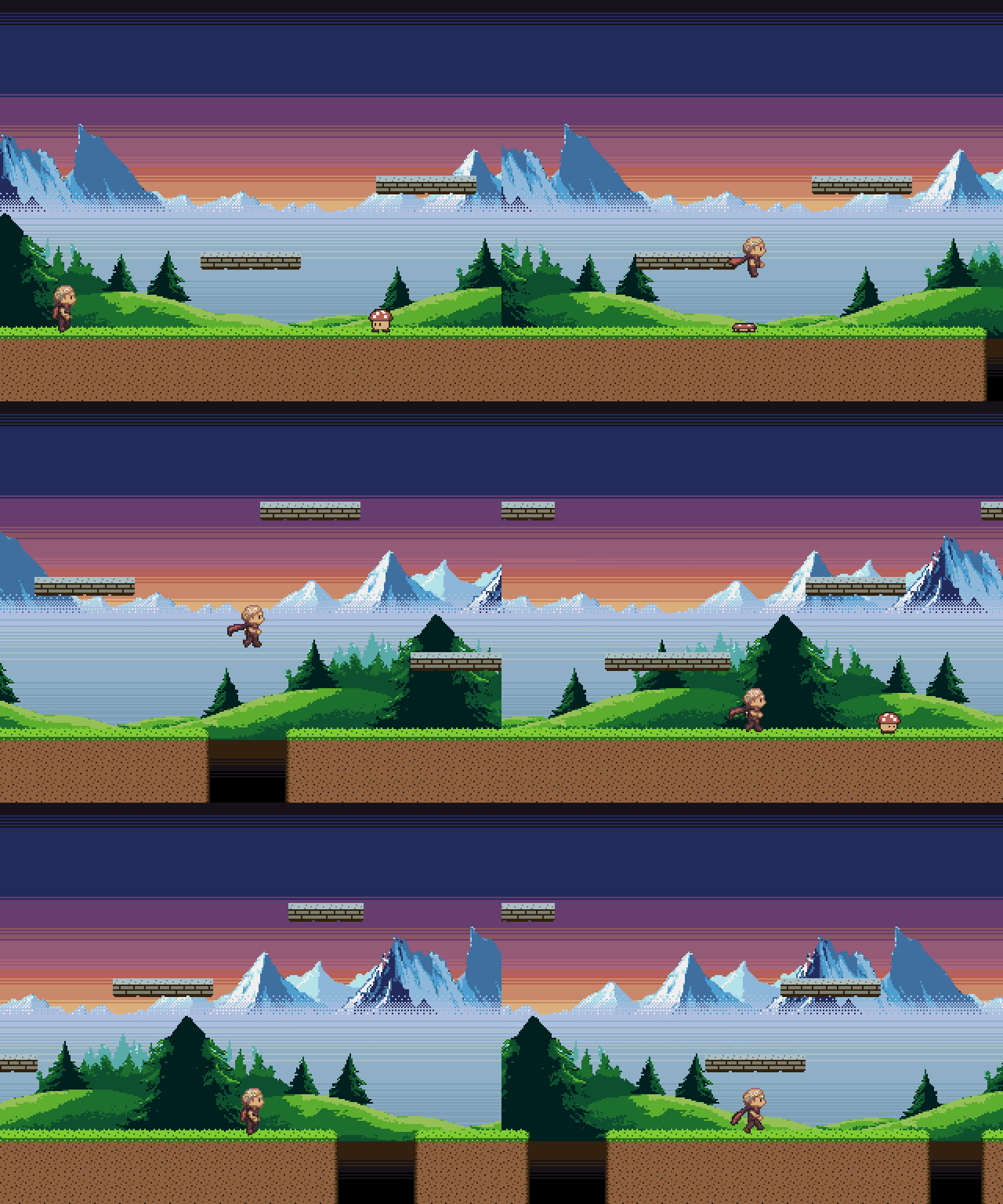
▶ Watch it with sound: 25 s, recorded straight from the
emulator with agk record (the GIF above is silent).
A dual-playfield parallax platformer, built by an AI agent with the kit:
- The mountains and hills are AI-generated with
agk art-gen(Retro Diffusion, about $0.08 in total), then tidied withagk art-clean. - They scroll at ¼ and ½ speed behind the level, over a per-line copper sky gradient.
- Run, jump, platforms and pits, and mushrooms to stomp.
- Sound: a looping chiptune written in MML and four synthesized effects, all generated from text by
agk sound(press M in the game to turn the music off).
It's tested pixel-exact on Kickstart 1.3, 3.1 and AROS, including a test that
proves the parallax speeds, and it runs at 50 fps using about 21% of the
frame. See its README for the register-level setup.
Example: examples/racer
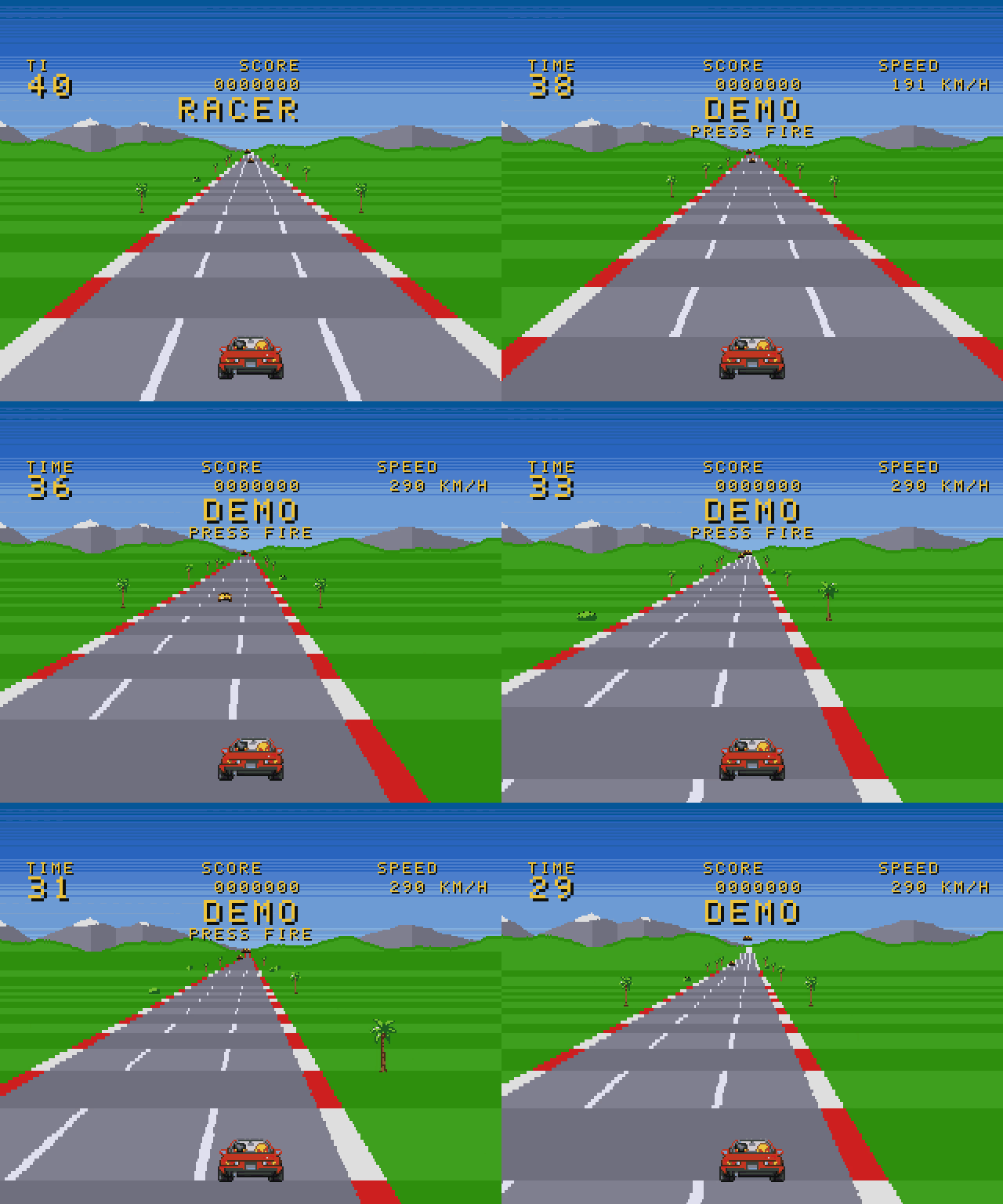
▶ Watch it with sound: a minute of its attract-mode demo, recorded with agk record.
An arcade-style road racer for a stock A500, also built by an AI agent with the kit:
- A copper raster road with hills and curves: every line of the road picks its row and scroll through the copper, and the CPU draws nothing.
- Palm trees and 32 rival cars are drawn by the blitter in 10 pre-scaled sizes. The player's car is 6 attached hardware sprites.
- A clock with checkpoints, a title and TIME UP, and a HUD in an original arcade font.
- An original tune, an engine note on its own Paula channel that follows the speed, and sound effects.
It runs at 25 fps using about 74% of the time on a 7 MHz 68000. Its README
covers the raster road and what it took to fit it all in: GCC's hidden
library multiplies, bus contention, and bitplanes switched off in the sky.
Example: examples/voidrunner
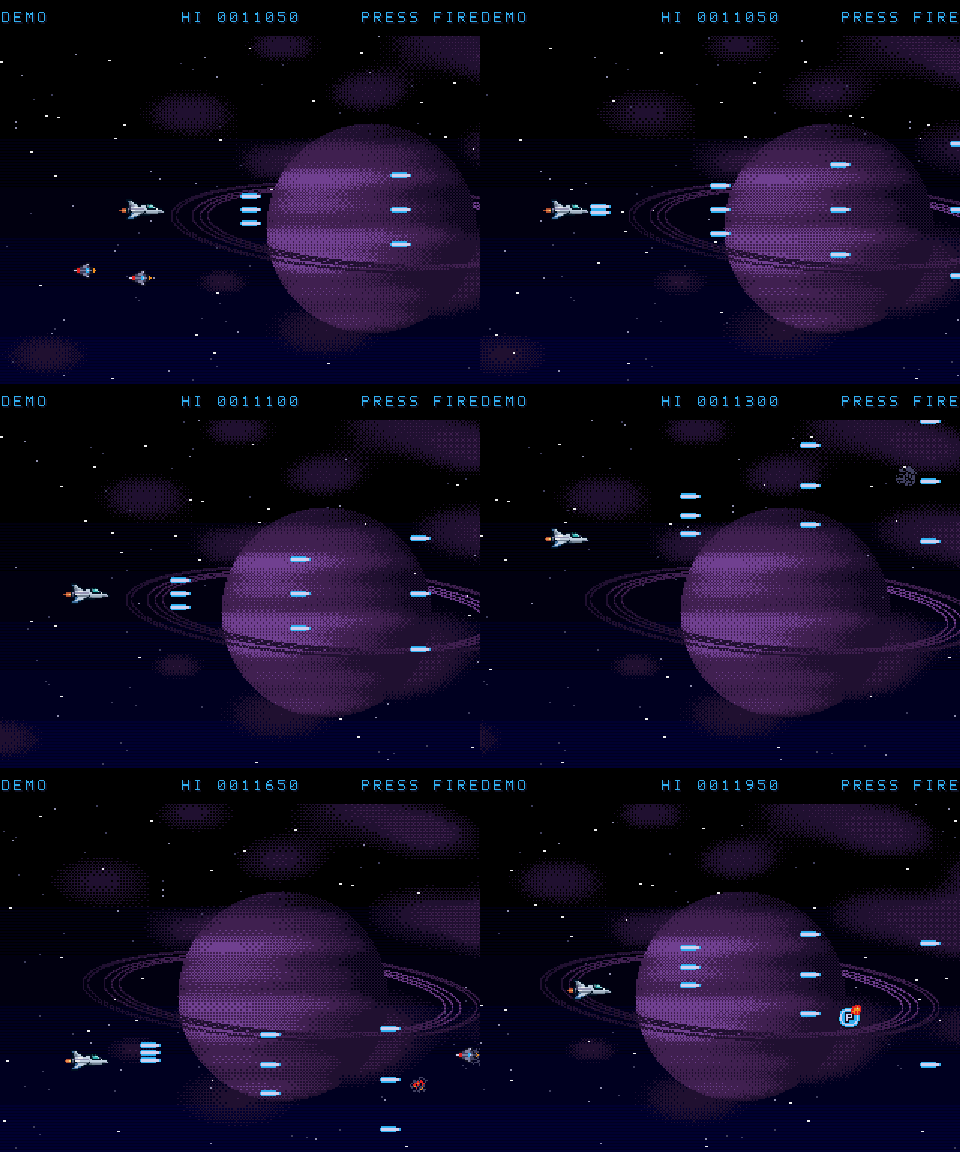
▶ Watch level 1 with sound: 104 s of its attract mode, recorded with agk record.
A horizontal shoot-'em-up at 50 fps: level 1 of VOIDRUNNER, built by an AI agent that made most of its art itself (text art and drawing code), with the ship and the boss generated by Retro Diffusion and fitted to the Amiga's colours:
- A starfield from a single hardware sprite that the copper re-uses on every line, over a drifting gas giant.
- Waves of darts, mines, asteroids and gunships, three guns, and the Warden: a boss you can only hurt at its core.
- A sampled synth soundtrack and effects, and an attract mode that plays the whole level.
Its README covers the tricks and what it took to hold 50 fps on a 7 MHz 68000.
How a run works
- Boot once. AGK powers on the emulated machine, inserts the ADF and runs
until the game prints its ready text (AGK ready) on the serial port. It
saves a snapshot on the next frame boundary. Snapshots are cached per build
and profile, so later runs skip the floppy boot and start in about 0.3 s. - Play the scenario. Every step (
press right 20,wait 5,screenshot moved, ...) is timed in game frames (eachagkPerfBegin()
marks one: a video frame for a 50 fps game, two for a 25 fps one) and lands
on a frame boundary. The same scenario gives byte-identical results on every run,
whether it started from the cached snapshot or from a fresh boot. - Collect results. You get PNG screenshots, the full serial log, memory
dumps and register views inbuild/agk/<profile>/<scenario>/.agk test
also compares screenshots againsttests/golden/and writes a*.diff.pngthat highlights changed pixels in red.
The scenario language is documented in agk help-scenario.
Games talk to the harness over serial
Games link the AGK runtime (runtime/) and report what they're doing through#include <agk/debug.h>:
agkReady()printsAGK ready: call it once the first real frame is on screen. The harness waits for it.agkState("score", 10); agkEnd();printsAGK score=10, which tests match withexpect-serial.agkDebugAsync(1)(aftersystemUnuse()) makes output interrupt-driven, so it costs almost no frame time.
Art pipeline
Draw graphics as text files or PNGs (hand-made, from a pixel-art tool or from
an AI generator) in art/:
agk artconverts them to Amiga hardware sprites and BOBs.- It enforces the hardware's rules, e.g. a sprite is 16 px wide with 3 colours, sprites on a channel pair share colours, and BOB colours must be in the palette. Problems come back as clear errors or warnings.
- It writes zoomed previews of exactly what the Amiga will show.
- Games call generated functions (
artPlayerCreate(frame), …). Seeagk help-artandtechniques/sprites. agk art-gencreates art with Retro Diffusion (pixel-art models, constrained to the game's palette): about $0.02 and 12 s per image. It needs your own API key inRD_API_KEYor~/.config/agk/credentials.agk art-cleanfixes typical AI-art damage:--fill-holes(see-through gaps in trees and snow),--despeckle N(floating fragments),--crop Y0:Y1, and--fade-bottom ROWS:0xRGB(dithers a hard bottom edge into mist).
Sound and music
Sound lives in sound/ as text; agk sound (and agk build) turns it into
data linked into the game, played by ACE's ptplayer (ProTracker replay +
prioritised sound effects on the channels music doesn't reserve):
- Sound effects are recipes in
sound/sound.toml: a waveform, a pitch sweep
or sequence of notes, a length and an envelope (wave = "square",freq = [260, 620],length = 0.13,decay = 8). No audio files needed. - Music is MML (Music Macro Language) text, one line per Paula channel,
compiled to a real ProTracker.mod(also written tobuild/sound/, for any
tracker). Instruments are tiny synthesized waveforms (square, pulse, saw,
triangle, sine: 8-256 bytes each) and synthesized drums. - Previews:
build/sound/preview/NAME.wavto listen to, andNAME.png, a
spectrogram with the waveform under it, so an agent can look at a sound. - Tests: every scenario run records Paula's output to
audio.wav.mark NAME,expect-sound FROM TOandexpect-silence FROM TOcheck it, and
games printAGK sfx jump/AGK music themeforexpect-serial. The
recording is bit-identical between runs.
agk help-sound has the formats.
Videos: agk record demo/showcase.agk -o game.mp4 --gif game.gif plays a
scenario in the emulator, captures every frame and Paula's output, and encodes
an MP4 with sound (4x, square pixels) and a silent GIF with ffmpeg. The video
above is examples/sidescroller/demo/showcase.agk.
Levels: maps/*.tmj made in Tiled become C
tables with agk map: tiles for ACE's tile buffer, property bits for the
rules, and objects for spawns and triggers (examples/sidescroller).
Reading other people's games: agk inspect GAME.adf boots any disk image,
scripts the way in, samples where the CPU spends its time (by address: no
symbols needed), snapshots and dumps memory; agk rip pulls the screen and
bitmaps out of a dump. docs/reading-games.md walks
through Ocean's RoboCop with it: the groundwork for a port.
Shipping: agk release zips the ADF, the executable, a README and a
screenshot into build/release/NAME-VERSION.zip, with an Aminet .readme
beside it, from agk.toml's [release] section.
Project structure
agk new produces a game split so agents can test it quickly:
src/logic.cholds the rules in portable C and is unit-tested on the host byagk unit.src/main.cis the Amiga side (ACE display, sprites, blitter, joystick).tests/*.agkare emulator scenarios with golden screenshots.
MCP server
tools/agk-mcp is a stdio MCP server with agk_build, agk_run, agk_test,agk_unit, agk_doctor and agk_scenario_help. New projects already include
it in .mcp.json. To add it elsewhere:claude mcp add amiga -- /path/to/amiga-game-kit/tools/agk-mcp.
Profiles
| profile | machine | ROM |
|---|---|---|
a500 (default) |
A500, OCS, 512K chip + 512K slow | Kickstart 1.3 |
a500-ks31 |
A500, ECS, 1MB | Kickstart 3.1 |
a500-aros |
A500, OCS, 1MB + 2MB fast | AROS (free, no Kickstart needed) |
a1200 |
A1200, AGA, 2MB (experimental: logic matches, AGA colour output differs slightly so it gets its own goldens) | Kickstart 3.1 |
Kickstart ROMs are copyrighted and are never committed, bundled or downloaded
by AGK. Put your own licensed ROMs in roms/ (gitignored), or pointAGK_ROMS at another directory. Files are matched by SHA-1, so any file name
works. The a500-aros profile needs no Kickstart, which makes it a good fit
for CI.
Layout
tools/        setup, build, selftest, agk (CLI), agk-mcp (MCP server)
harness/agk/  the agk CLI: scenarios, emulator driver, images, profiles, MCP
runtime/      C library games link (serial debug channel)
templates/    project templates for agk new
techniques/   small tested games, one technique each, with TECHNIQUE.md (bobs,
              scrolling, copper, sprites/art) - measured costs and gotchas
patches/      local patches to vAmiga and ACE (all intended for upstream)
examples/     example games; each has agk.toml, src/, tests/*.agk, tests/golden/
docs/         design notes and results
roms/         your Kickstart ROMs (gitignored)
third_party/  pinned ACE + vAmiga checkouts (gitignored, created by tools/setup)
License
MIT. Third-party components keep their own licences:
- ACE: MPL-2.0.
- vAmiga core (
Core/, including VAHeadless): MPL-2.0. - Moira CPU core: MIT.
Only vAmiga's macOS GUI app is GPL-3.0, and we don't use it.
Yorumlar (0)
Yorum birakmak icin giris yap.
Yorum birakSonuc bulunamadi