SubFrame
Health Uyari
- License — License: MIT
- Description — Repository has a description
- Active repo — Last push 0 days ago
- Low visibility — Only 5 GitHub stars
Code Basarisiz
- exec() — Shell command execution in .githooks/update-structure.js
- process.env — Environment variable access in .githooks/update-structure.js
- fs module — File system access in .githooks/update-structure.js
Permissions Gecti
- Permissions — No dangerous permissions requested
This tool is a terminal-centric desktop IDE designed to enhance AI-powered command-line coding assistants like Claude Code, Codex CLI, and Gemini CLI. It provides a structured workspace featuring persistent context, task tracking, and a multi-terminal environment.
Security Assessment
The overall security risk is rated as Medium. A scan failure was triggered by shell command execution found within a git hook script (`update-structure.js`). This same file reads environment variables and accesses the file system. While this behavior is relatively standard for development scripts that update local repository structures, users should still inspect the script's contents before running local git hooks. No hardcoded secrets were detected, and the application does not request any inherently dangerous system permissions.
Quality Assessment
This project is an early-stage, actively developed application. It uses the permissive MIT license and its repository was updated very recently. The codebase is built with modern technologies including TypeScript, React, and Electron. However, community trust and visibility are currently very low, as it only has 5 GitHub stars. Users should expect a "beta" experience with potential bugs, as explicitly noted by the developer.
Verdict
Use with caution. The project is legitimate and actively maintained, but you should review the development scripts for shell execution before fully trusting this early-stage tool.
SubFrame - A terminal first project management IDE for Claude Code, Codex CLI, and Gemini CLI
SubFrame
Terminal-centric IDE for AI-assisted development
Enhances your AI coding tools — never replaces them










Install · Features · Development · Website · Docs
This project is under active development and in public beta. We're looking for early adopters to test, break things, and help shape the direction of SubFrame. If you run into issues or have ideas, open an issue — every report helps.
https://github.com/user-attachments/assets/37aee249-7ec8-4915-80aa-b0b3baf9e8df
A lightweight desktop IDE for Claude Code, Codex CLI, and Gemini CLI — terminal-based AI coding assistants that let you chat with AI in your terminal while it writes, edits, and reviews code for you. SubFrame wraps these tools in a structured workspace — persistent context, task tracking, codebase mapping, and a multi-terminal environment — so nothing gets lost between sessions.
Platform support: Windows (stable) · macOS & Linux (beta — testers wanted). See Installation for platform-specific prerequisites.
Screenshots
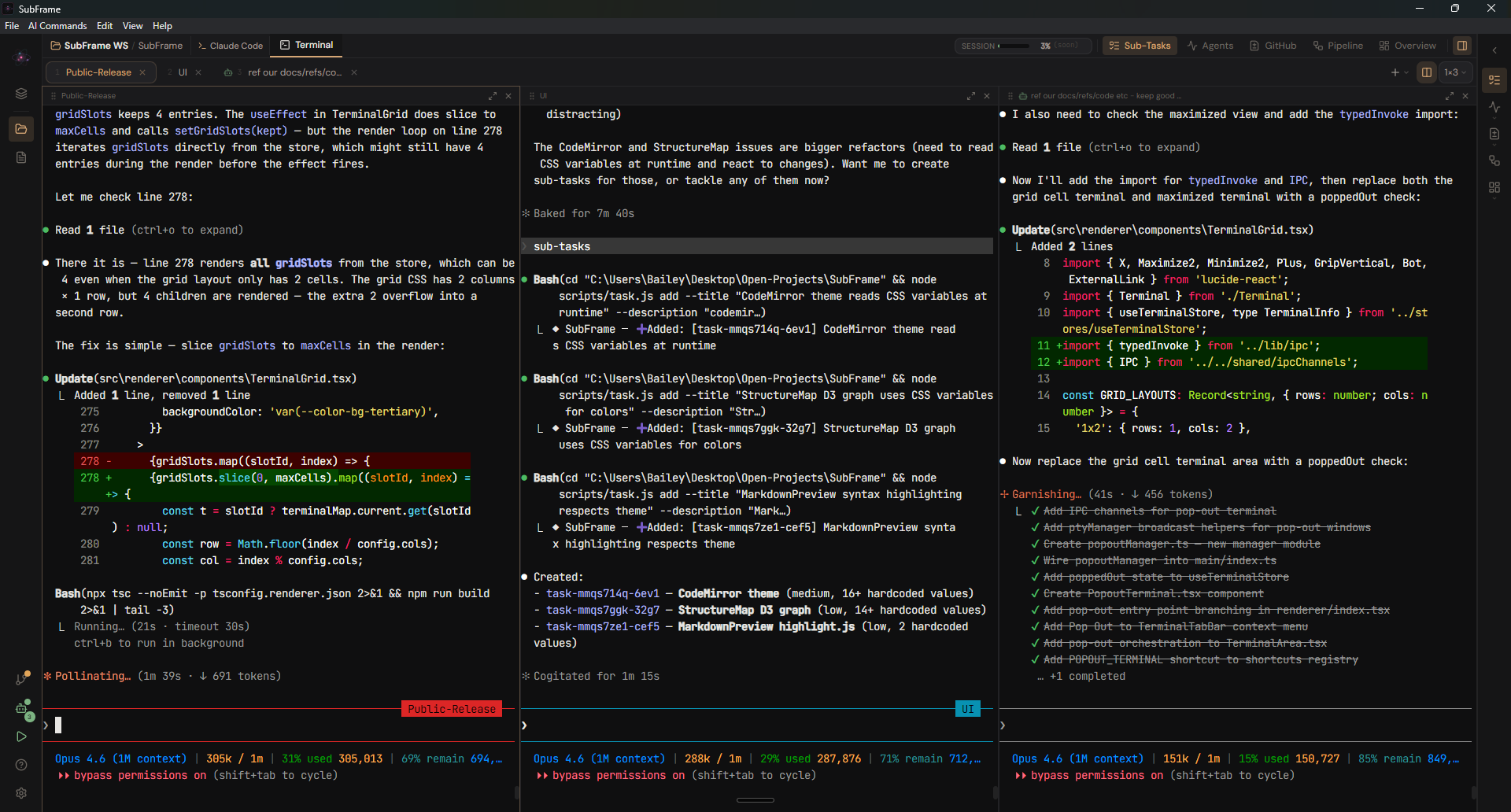
Multi-terminal workspace with Claude Code — full PTY, syntax highlighting, and status bar
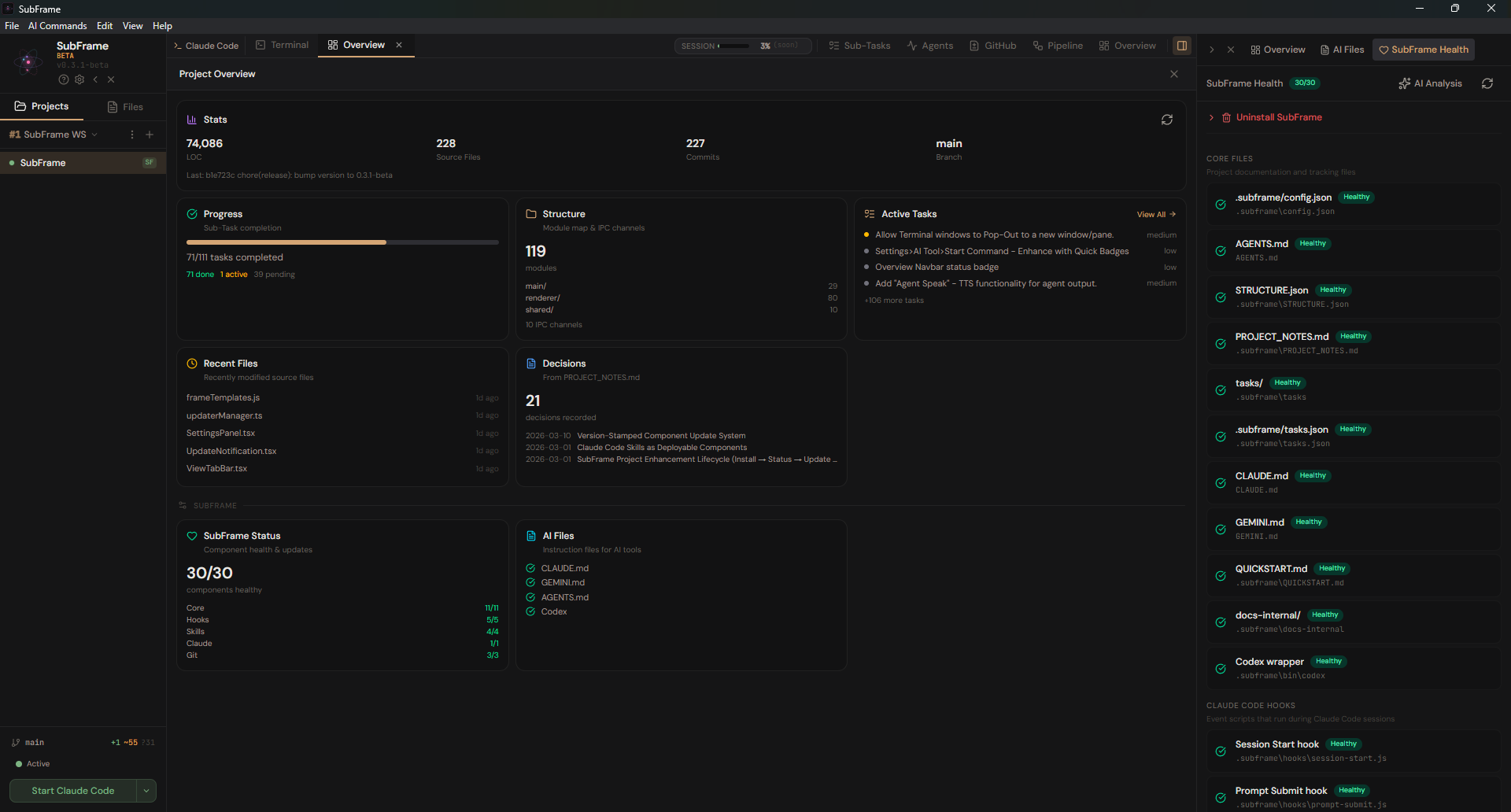
Project overview — stats, structure, active tasks, recent files, and health status at a glance
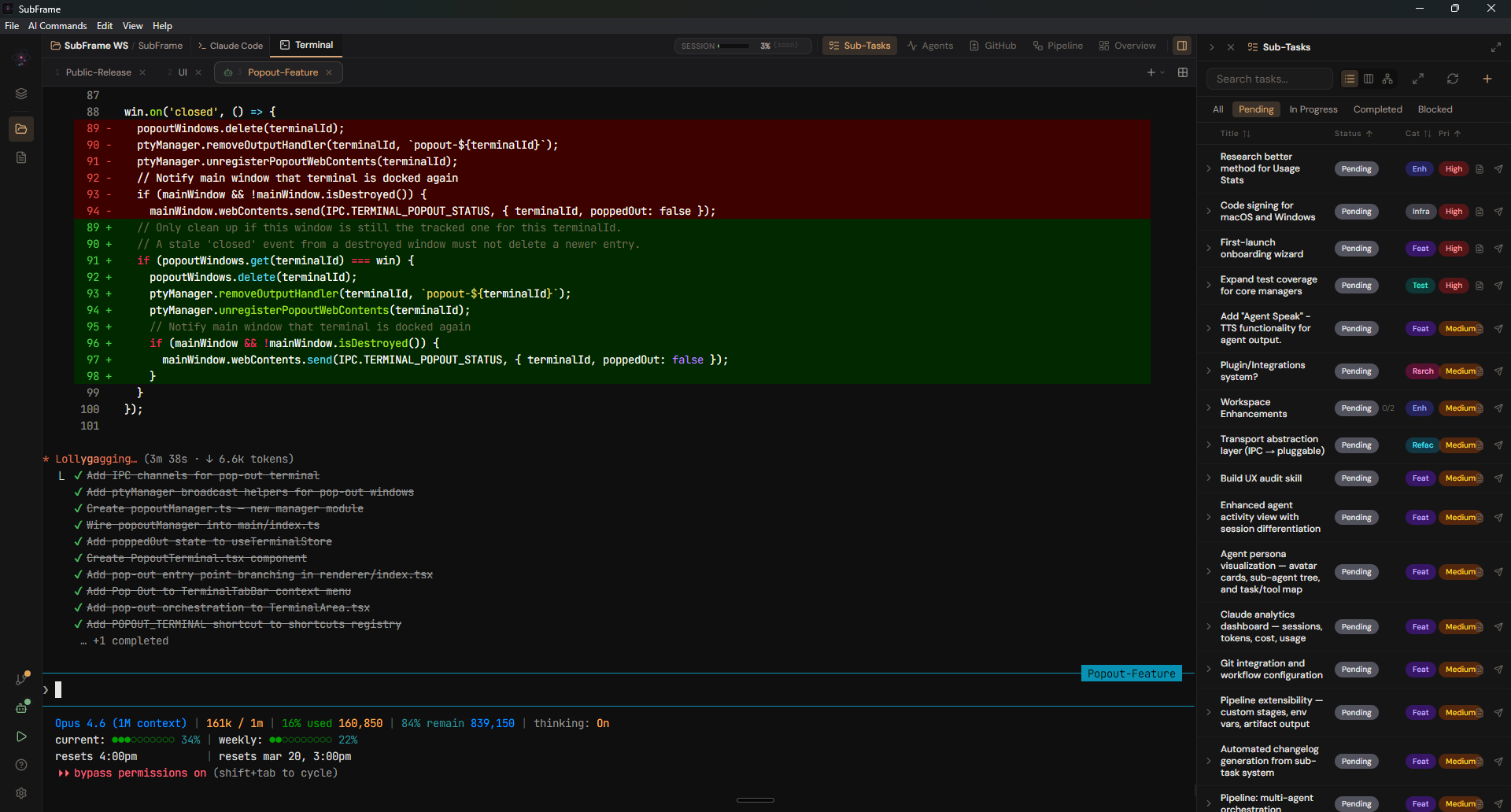
Task panel with agent activity — manage sub-tasks while coding in the terminal
SubFrame builds upon Frame by @kaanozhan, extended with React 19, TypeScript, and a modernized architecture.
Why SubFrame?
| VS Code | Cursor | Warp | SubFrame | |
|---|---|---|---|---|
| Terminal-first | No | No | Yes | Yes |
| AI tool agnostic | No | No | No | Yes (Claude, Codex, Gemini) |
| Project context | Extensions | Built-in | Limited | Built-in (tasks, sessions, overview) |
| Open source | Partial | No | No | MIT |
As AI-assisted projects grow, context gets lost between sessions. Decisions are forgotten, tasks slip through the cracks, and you re-explain the same things over and over.
SubFrame solves this with a standardized project layer that your AI tools read automatically at session start — tasks, codebase structure, session notes, and architecture decisions all carry forward. A single Initialize Workspace command sets up everything your AI tools need, so every session starts with full context instead of a blank slate.
The core principle: augment, don't replace. Claude Code, Gemini CLI, and Codex CLI work exactly as they normally would. SubFrame layers structure on top — persistent context, task management, and a unified workspace — making each tool more effective without changing how any of them behaves.
Features
Initialize Workspace
The entry point to SubFrame. Run subframe init from the CLI or click the Initialize button in the GUI. One command creates a standardized project layer that AI tools pick up automatically:
.subframe/
  config.json               # Project configuration
  STRUCTURE.json             # Codebase module map (auto-updates on commit)
  PROJECT_NOTES.md           # Session notes and decisions
  tasks.json                 # Sub-Task index (auto-generated)
  tasks/                     # Individual task markdown files
  QUICKSTART.md              # Getting started guide
  docs-internal/             # ADRs, architecture, changelog, IPC reference
  bin/codex                  # Codex CLI wrapper script
AGENTS.md                    # AI instructions (tool-agnostic)
CLAUDE.md                    # Backlink to AGENTS.md (Claude Code reads natively)
GEMINI.md                    # Backlink to AGENTS.md (Gemini CLI reads natively)
.githooks/pre-commit         # Auto-updates STRUCTURE.json on commit
.claude/
  settings.json              # Hook wiring configuration
  skills/                    # Slash command skills
Existing user content in CLAUDE.md and GEMINI.md is preserved — SubFrame only adds a small backlink reference.
Hooks and Automation
SubFrame installs hooks that automate context awareness throughout your workflow:
- SessionStart — Injects pending/in-progress sub-tasks into context at startup, resume, and after compaction
- UserPromptSubmit — Fuzzy-matches user prompts against pending sub-task titles and suggests starting them
- Stop — Reminds about in-progress sub-tasks when Claude finishes responding
- PreToolUse / PostToolUse — Monitor agent tool usage for the Agent Timeline
- Git pre-commit — Auto-updates STRUCTURE.json before each commit
Skills (Slash Commands)
SubFrame installs Claude Code skills as slash commands:
| Command | Description |
|---|---|
/sub-tasks |
View and manage sub-tasks (list, start, complete, add, archive) |
/sub-audit |
Run code review and documentation audit on recent changes |
/sub-docs |
Sync all SubFrame documentation after feature work |
/sub-ipc |
Regenerate IPC channel reference documentation |
/release |
Version bump, changelog, release notes, commit, and tag |
Sub-Task System
Markdown-based task tracking stored in .subframe/tasks/ with YAML frontmatter. Each task captures the original user request, acceptance criteria, and session context.
- CLI management —
node scripts/task.js list|start|complete|add|update|archive - Visual task panel — Table view with status filters, priority sorting, inline expand
- Multiple views — Table, dependency graph, and kanban board
- Lifecycle —
pending→in_progress→completed - Auto-detected — Hooks recognize task-like requests from conversation and suggest creating them
IDE Workspace
- 3-Panel Layout — File explorer, multi-terminal center, contextual side panels
- Multi-Terminal — Up to 9 terminals with tabs or grid view (2x1 through 3x3), resizable cells, pop-out windows for multi-monitor workflows
- File Editor — CodeMirror 6 with syntax highlighting for 15+ languages, find/replace, go-to-line, code folding, overlay or tab mode
- Real PTY — Full pseudo-terminal via node-pty, not subprocess pipes
- File Previews — Inline preview for Markdown, HTML, and images
- Activity Streams — VS Code-style bottom bar showing real-time progress of background operations (analysis, pipelines, tasks)
Context Preservation
Every session starts informed instead of cold:
- PROJECT_NOTES.md — Captures architecture decisions, technology choices, and approach changes as they happen
- STRUCTURE.json — Maps modules, exports, dependencies, and function locations across the codebase
- tasks.json — Tracks work with original user requests and acceptance criteria preserved
- Auto-loaded — AI reads all three at the start of each session, surviving context compaction
Health and Audit Panel
Per-component health status for the entire SubFrame installation, grouped by category (Core, Hooks, Skills, Claude Integration, Git):
- Status badges — Healthy, Outdated, or Missing for each component
- One-click updates — "Update All" to fix outdated components, or update individually
- Granular uninstall — Checkboxes to selectively remove hooks, skills, backlinks, AGENTS.md, or the .subframe/ directory
- Dry run preview — See what would change before committing to an uninstall
Agent Activity Monitor
Real-time visibility into Claude Code agent sessions:
- Session status — Active, busy, idle, or completed with live status badges
- Tool tracking — Displays the current tool being used and total step count
- Timeline view — Chronological view of all agent steps with tool usage details
- Session list — Browse and review past agent sessions in full-view mode
AI Tool Integration
- Multi-Tool Support — Switch between Claude Code, Codex CLI, and Gemini CLI from the toolbar
- Native Context Injection — Claude reads CLAUDE.md, Gemini reads GEMINI.md, Codex uses a wrapper script that injects AGENTS.md
- Sessions Panel — Browse past Claude Code sessions with conversation history
- Usage Tracking — Monitor Claude Code session counts and weekly usage statistics
- AI Files Panel — View and manage context files (AGENTS.md, CLAUDE.md, GEMINI.md) from the UI
Git and GitHub
- Branch Management — View, switch, create, and delete branches
- Sync Status — Ahead/behind counts, working tree state, auto-fetch with configurable interval
- GitHub Issues — Browse repository issues directly from the sidebar
CLI Integration
subframe init— Initialize a SubFrame workspace in the current directorysubframe edit <file>— Open a file in the editor from the command linesubframe open <dir>— Open a directory as a project- Single-instance — CLI commands forward to the running instance instead of opening a new window
Other
- Overview Dashboard — Project metrics, module counts, task summaries, health status, and recent file activity at a glance
- Plugin System — Extend SubFrame with plugins
- Structure Map — Interactive D3.js force-directed graph of module dependencies, color-coded by process layer
- Theme System — 4 built-in presets (Classic Amber, Synthwave Traces, Midnight Purple, Terminal Green) with custom theme support, color pickers, and feature toggles (neon traces, scanlines, logo glow)
- Settings Panel — Configure appearance, terminal, editor, AI tools, and updater preferences
- Keyboard Shortcuts — Full keyboard navigation:
| Shortcut | Action |
|---|---|
Ctrl+B |
Toggle sidebar |
Ctrl+Shift+T |
New terminal |
Ctrl+Shift+W |
Close terminal |
Ctrl+1-9 |
Jump to terminal |
Ctrl+Shift+G |
Toggle grid view |
Ctrl+Shift+S |
Sub-Tasks panel |
Ctrl+Shift+A |
Agent Activity panel |
Ctrl+, |
Settings |
Ctrl+? |
Show all shortcuts |
SubFrame Project System
Initializing a workspace creates a standard set of files your AI tools read automatically:
| File | Purpose |
|---|---|
AGENTS.md |
AI-agnostic instructions — native tool files (CLAUDE.md, GEMINI.md) backlink here |
.subframe/STRUCTURE.json |
Machine-readable module map (exports, dependencies, function locations) |
.subframe/tasks/ |
Individual task markdown files with YAML frontmatter |
.subframe/tasks.json |
Auto-generated task index for backward-compatible access |
.subframe/PROJECT_NOTES.md |
Session notes and decisions preserved verbatim |
.subframe/config.json |
Project-level configuration |
.subframe/docs-internal/ |
ADRs, architecture overview, changelog, IPC channel reference |
.subframe/QUICKSTART.md |
Getting started guide |
.claude/settings.json |
Hook wiring configuration |
.claude/skills/ |
Slash command skills (sub-tasks, sub-audit, sub-docs, sub-ipc, release) |
.githooks/pre-commit |
Auto-updates STRUCTURE.json before each commit |
Tech Stack
| Component | Technology |
|---|---|
| Framework | Electron 28 |
| Renderer | React 19 · TypeScript (strict) |
| State | Zustand · TanStack Query |
| UI | shadcn/ui · Tailwind CSS v4 |
| Animations | Framer Motion |
| Editor | CodeMirror 6 |
| Terminal | xterm.js 5.3 |
| PTY | node-pty 1.0 |
| Bundler | esbuild |
Installation
Note: Windows builds are stable. macOS and Linux builds are produced by CI and in beta — if you try them, please report any issues. Testers wanted!
Prerequisites
- Node.js 18+ and npm
- Python + C++ Build Tools (for
node-ptynative compilation):- Windows — VS 2022 Build Tools with "Desktop development with C++"
- macOS —
xcode-select --install - Linux —
sudo apt install build-essential
Download
Grab the latest installer from GitHub Releases.
| Platform | Format |
|---|---|
| Windows | .exe installer |
| macOS | .dmg disk image |
| Linux | .AppImage |
Build from Source
git clone https://github.com/Codename-11/SubFrame.git
cd SubFrame
npm install
npm run dev     # Watch mode + Electron
Windows: Run
DEV_SETUP.batfor automated prerequisite installation.
Installing AI Tools
npm install -g @anthropic-ai/claude-code # Claude Code
See Codex CLI and Gemini CLI for their respective install instructions.
Development
Commands
npm run dev          # Watch mode (main TS + React) + Electron
npm run build        # Build main TS + React renderer
npm run typecheck    # TypeScript strict-mode check (main + renderer)
npm test             # Vitest test suite
npm run lint         # ESLint (TS/TSX)
npm run check        # typecheck + lint + test + verify:hooks + build (all quality gates)
npm run structure    # Update .subframe/STRUCTURE.json
node scripts/subframe-cli.js <command>  # SubFrame CLI (init, edit, open)
Architecture
Electron app with two processes communicating over typed IPC channels (src/shared/ipcChannels.ts):
| Layer | Path | Stack |
|---|---|---|
| Main | src/main/*.ts |
Node.js · TypeScript · Manager modules (init() + setupIPC()) |
| Renderer | src/renderer/ |
React 19 · TSX · Zustand stores · TanStack Query hooks · shadcn/ui |
| Shared | src/shared/*.ts |
Typed IPC channels · Constants · Templates |
Detailed architecture docs live in .subframe/docs-internal/.
Production Builds
npm run dist          # Current platform (unpacked)
npm run dist:win      # Windows installer (NSIS)
npm run dist:mac      # macOS (signed DMG)
Contributing
SubFrame is in early beta and we'd love your help — bug reports, feature ideas, docs, code, or testing on macOS/Linux.
See CONTRIBUTING.md for the full guide, including setup instructions, code conventions, and what makes a good PR.
License
MIT License — free to use, modify, and distribute. See LICENSE.
Acknowledgments
SubFrame is built upon Frame by @kaanozhan, whose original project provided the foundation — multi-terminal PTY management, file explorer, and the vision for a terminal-centric AI coding IDE.
- Terminal powered by xterm.js and node-pty
- UI components from shadcn/ui
- Built with Claude Code
v0.15.0-beta · Public beta — feedback welcome · sub-frame.dev
Yorumlar (0)
Yorum birakmak icin giris yap.
Yorum birakSonuc bulunamadi