AutoCAD-MCP
Health Uyari
- License — License: MIT
- Description — Repository has a description
- Active repo — Last push 0 days ago
- Low visibility — Only 9 GitHub stars
Code Gecti
- Code scan — Scanned 12 files during light audit, no dangerous patterns found
Permissions Gecti
- Permissions — No dangerous permissions requested
Bu listing icin henuz AI raporu yok.
Seamlessly connect AI assistants (Claude, ChatGPT, etc.) to AutoCAD through the Model Context Protocol (MCP). Enable natural language control of AutoCAD operations — from drawing creation and entity manipulation to layer management and file I/O.
English · 简体中文




Connect MCP-compatible AI clients to AutoCAD. Create geometry, inspect and edit entities, manage layers and blocks, and work with drawings through structured tools. Use Claude Desktop, Cursor, or the included Web UI with your own model provider.
Quick start · Web UI · Backends · Development · Documentation
A tool workflow, at a glance
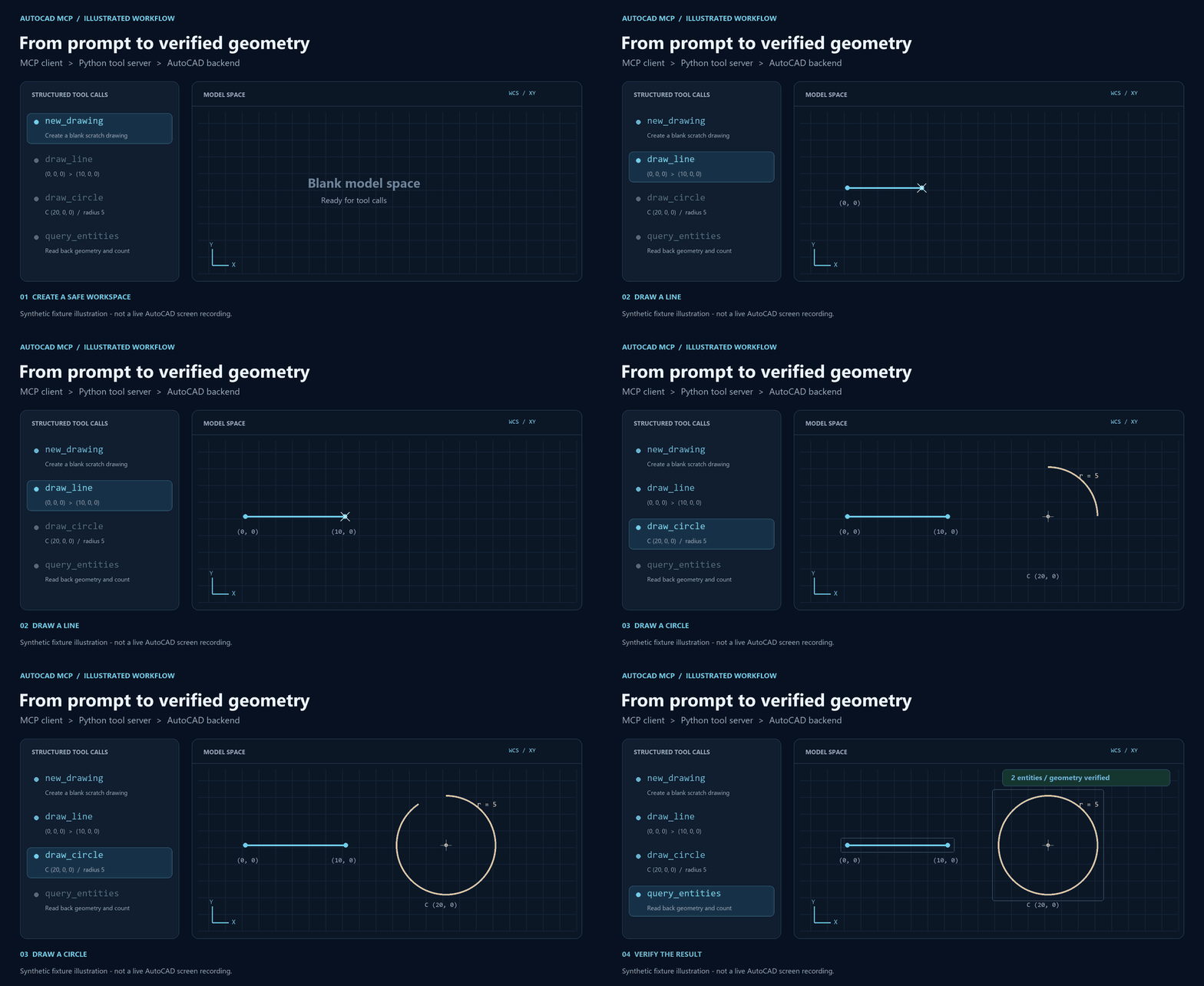
Synthetic fixture illustration — not a live AutoCAD screen recording. Actual end-to-end evidence: Bridge validation report.
What you can do
| Capability | Examples |
|---|---|
| Create | Lines, circles, arcs, polylines, rectangles, text, hatches and dimensions |
| Inspect & edit | Entity details, region queries, move/rotate/copy/scale/mirror/delete |
| Organize | Layers, block insertion, block attributes and bulk attribute checks |
| Use references | Local symbol catalogs and read-only layout extraction from reference drawings |
| Choose a model | Streaming Web UI: Anthropic, OpenAI, OpenAI-compatible endpoints and Doubao |
| Extend understanding | Optional local drawing VQA service |
36 registered MCP tools. Default COM provides the existing CAD tool surface. Experimental HTTP supports a smaller, documented subset. See the tool migration matrix.
Quick start
1. Prepare the environment
- Windows with AutoCAD installed; development and native validation use AutoCAD 2026.
- Python 3.11+. The commands below use conda.
- A compatible AI client, or a model endpoint for the optional Web UI.
git clone https://github.com/codesknight/AutoCAD-MCP.git
cd AutoCAD-MCP
conda create -n autocad-mcp python=3.11 -y
conda activate autocad-mcp
python -m pip install -e .
py -3.11 -m venv .venv
.\.venv\Scripts\Activate.ps1
python -m pip install -e .
2. Open AutoCAD normally
Check the ProgID in config.json; the development machine uses AutoCAD.Application.25.1. Use one COM write-serving process per AutoCAD instance.
Before experimenting with write tools, ask the client to run new_drawing so test geometry goes into a fresh drawing.
3. Connect an MCP client
Find the absolute Python path in the environment where you installed the project:
python -c "import sys; print(sys.executable)"
Add this entry to your client's MCP configuration. For Claude Desktop on Windows, the file is usually %APPDATA%\Claude\claude_desktop_config.json.
{
  "mcpServers": {
    "autocad-mcp": {
      "command": "C:\\Users\\<you>\\.conda\\envs\\autocad-mcp\\python.exe",
      "args": ["-m", "autocad_mcp.server"]
    }
  }
}
Use the environment's python.exe directly. Tool discovery is lazy and does not require connecting to AutoCAD.
For development with MCP Inspector:
mcp dev src/autocad_mcp/server.py
4. Try a small task
Create a new blank drawing. Add a layer named DEMO, draw a line from (0, 0, 0) to (10, 0, 0), and add a circle centered at (20, 0, 0) with radius 5. Query the drawing and check the result.
Web UI
The Web UI connects through a real MCP client, with streamed replies and individual tool-call updates.
python -m pip install -e ".[web]"
From the project root, use two terminals in the same Python environment:
# Terminal 1 — MCP Streamable HTTP, loopback port 8931
python -m autocad_mcp.server --http
# Terminal 2 — Web UI backend, loopback port 8000
python -m uvicorn web.backend.app:app --host 127.0.0.1 --port 8000
Open 127.0.0.1:8000, select a provider/model, and supply your API credentials.
This UI is for local, single-user use: no authentication, in-memory history, and no conversation persistence across restarts.
Credentials for scripted developmentKeep test credentials in an untracked .env and have your script read it. The Web UI does not automatically load these values.
doubao_base_url=https://ark.cn-beijing.volces.com/api/v3
doubao_model_name=ep-xxxxxxxx-xxxxx
doubao_api_key=YOUR_KEY
Call POST /api/chat/stream or POST /api/chat from the script. Never commit real credentials or paste them into documentation.
Backends
| COM — default | .NET HTTP Bridge — experimental | |
|---|---|---|
| CAD execution | Python COM adapter on one STA worker | AutoCAD plugin, main-thread queue and transactions |
| Current scope | Existing CAD tools | Seven CAD tools: new drawing, line/circle, create/list layers, query/get entity |
| Atomic batch | Not supported | Internal Python API for transactional layer/line/circle operations |
| Setup | Python + running AutoCAD | Matching .NET SDK, plugin build/NETLOAD, local token |
| Write behavior | Existing COM workflow; one write entry point | Bridge-created documents only; explicit document binding |
| Details | COM foundation | Install, configure & validate |
Both paths keep the MCP tool layer. Unsupported HTTP operations return an explicit error; writes never fall back to COM.
MCP HTTP and the CAD Bridge are separate interfaces. --http selects MCP Streamable HTTP on port 8931. backend: "http" selects the CAD Bridge on port 8765. The default remains COM.
flowchart LR
    Client["MCP clients"] -->|"stdio / Streamable HTTP"| MCP["Python MCP server & tools"]
    Web["Web UI · model providers"] -->|"MCP Streamable HTTP"| MCP
    MCP --> Factory["Backend factory"]
    Factory -->|"default"| COM["COM · serial STA worker"]
    Factory -->|"experimental HTTP"| Bridge[".NET Bridge · CAD queue / transactions"]
    COM --> CAD["AutoCAD"]
    Bridge --> CAD
    MCP --> Optional["Local resources · optional VQA"]
Development
python -m pip install -e ".[dev]"
python -m pytest -q
Default tests run without AutoCAD. Real CAD tests require explicit opt-in:
# Open AutoCAD normally first; tests create scratch drawings.
python -m pytest tests/test_backend_integration.py --cad-integration -q -s

# Export actual MCP stdio tools/list without connecting to CAD.
python scripts/export_mcp_contract.py --output tools.json
The latest native verification record documents 77 Python tests passed, 33 CAD tests skipped by default, 23 C# assertions, and real MCP stdio/Streamable HTTP checks. See CI runs for current branch results.
Native verification uses normal AutoCAD startup, then attachment; automatic startup compatibility remains under investigation. The harness closes its test drawings and stops its listener. Helpers must clean up CAD processes they create while preserving user-owned instances.
Documentation
| Start here | Details |
|---|---|
| Architecture | Layers, integrations and project structure |
| HTTP Bridge guide | Build, authentication, protocol, validation and known issues |
| Tool matrix | Per-tool migration and verification status |
| Roadmap | Planned work and acceptance criteria |
| Development log | Changes, experiments and incident records |
| Project conventions | Development and drawing-safety rules |
src/autocad_mcp/    MCP server, tools, configuration and CAD backends
plugin/            Native Bridge and C# contract/hosting checks
web/               Web client, agent loop and model providers
tests/             Python regressions, MCP contracts and opt-in CAD tests
schemas/           Versioned Bridge JSON schemas
scripts/           Build, verification, asset and data utilities
docs/              Design, validation evidence, artwork and development log
Reference drawings, symbol DWGs and the optional VQA model/service are external resources, not bundled with this repository. The VQA proxy defaults to loopback port 8933; the other tools work without it.
Contributing & license
Report a bug or propose a feature. Include your AutoCAD build, backend, reproduction steps and redacted logs. Keep PRs focused and append the development log for substantive changes.
Released under the MIT license. Inspired by daobataotie/CAD-MCP; see the reference analysis.
Yorumlar (0)
Yorum birakmak icin giris yap.
Yorum birakSonuc bulunamadi