blockend
Health Uyari
- License — License: MIT
- Description — Repository has a description
- Active repo — Last push 0 days ago
- Low visibility — Only 9 GitHub stars
Code Uyari
- process.env — Environment variable access in apps/web/app/global-error.tsx
Permissions Gecti
- Permissions — No dangerous permissions requested
Bu listing icin henuz AI raporu yok.
shadcn/ui for your backend — a CLI that generates production-ready TypeScript blocks (rate limiting, validation, logging) into your codebase. You own the code
██████╗ ██╗      ██████╗  ██████╗██╗  ██╗███████╗███╗   ██╗██████╗
██╔══██╗██║     ██╔═══██╗██╔════╝██║ ██╔╝██╔════╝████╗  ██║██╔══██╗
██████╔╝██║     ██║   ██║██║     █████╔╝ █████╗  ██╔██╗ ██║██║  ██║
██╔══██╗██║     ██║   ██║██║     ██╔═██╗ ██╔══╝  ██║╚██╗██║██║  ██║
██████╔╝███████╗╚██████╔╝╚██████╗██║  ██╗███████╗██║ ╚████║██████╔╝
╚═════╝ ╚══════╝ ╚═════╝  ╚═════╝╚═╝  ╚═╝╚══════╝╚═╝  ╚═══╝╚═════╝
production backend blocks. generated into your project. owned by you.




What is Blockend?
Blockend generates production backend infrastructure as source files inside your project.
It helps you add common backend blocks like:
- rate limiting,
- logging,
- validation,
- error handling,
- response formatting.
- much more ...
Unlike a typical package, Blockend does not put the core logic behind a runtime dependency. It copies readable code into your repository so you can inspect it, edit it, and commit it like any other part of your app.
Why Blockend exists
Most backend apps keep rebuilding the same infrastructure:
- request validation,
- structured errors,
- logging,
- rate limits,
- health checks,
- graceful shutdown.
Those patterns are necessary, but they are rarely fun to rewrite. Blockend turns them into reusable blocks so you can move faster without losing ownership of your code.
Quick start
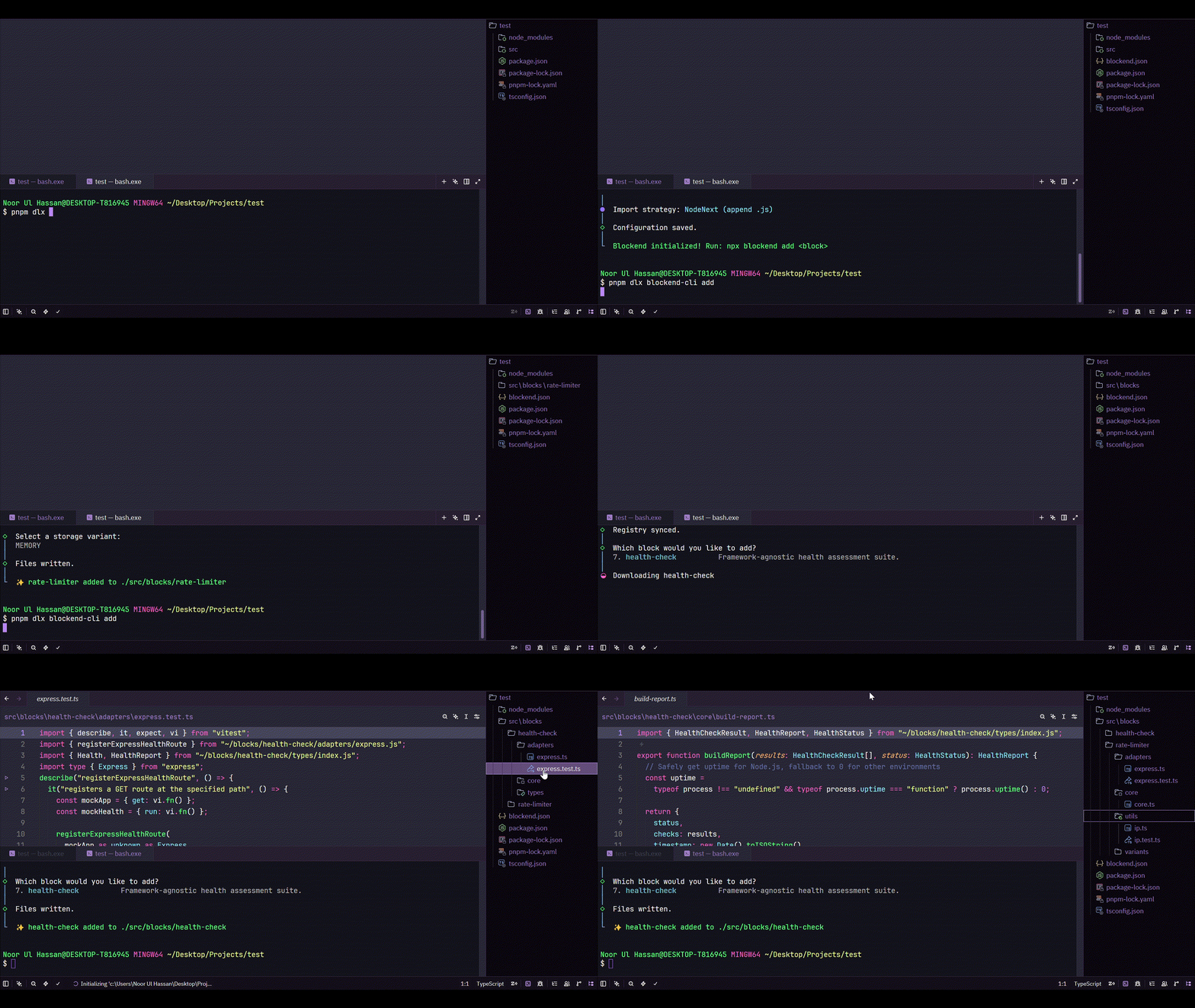
npx blockend-cli init
npx blockend-cli add request-validator
init sets up your blocks/ directory. add copies the selected block into your project.
import express from "express";
import { z } from "zod";
import { expressValidator } from "./blocks/request-validator/express.js";

const app = express();

const validate = expressValidator({
  body: z.object({
    name: z.string().min(1),
    email: z.string().email()
  })
});

app.post("/users", validate, (req, res) => {
  res.status(201).json({ user: req.body });
});

app.listen(3000);
The import resolves to a file in your own repository. You can open it, read it, and change it whenever you want.
Why this approach
- No runtime package lock-in.
- No black box inside
node_modules. - No hidden behavior you cannot inspect.
- No dependency boundary between the block and your app code.
Blockend keeps backend infrastructure close to the code that uses it.
Available blocks
| Block | Description |
|---|---|
rate-limiter |
Token bucket rate limiting with storage adapters. |
error-handler |
Centralized error pipeline with typed errors and logging hooks. |
logger |
Structured request logging with async context propagation. |
request-validator |
Zod-based input validation with framework adapters. |
response-formatter |
Standard API response shapes for success and error payloads. |
Browse All Blocks |
Explore the complete collection of available blocks and their documentation. |
Installing
# add a block to your project
npx blockend-cli add <block-name>

# list all available blocks
npx blockend-cli list

# initialize Blockend in an existing project
npx blockend-cli init
Blockend detects your package manager automatically and generates TypeScript by default.
Note: JavaScript output is on the roadmap.
MCP support
Blockend includes an MCP server so AI tools can add and configure blocks through natural language.
npx blockend-cli mcp init
Once connected, your AI assistant can:
- add blocks,
- explain what each block generates,
- scaffold middleware stacks,
- and help plan production-ready backend setups.
Docs
🗺️ Roadmap & Vision
Blockend is being built incrementally with a focus on producing clean, source-first backend code that developers fully own.
| Status | Focus | Description |
|---|---|---|
| ✅ Now | Core Blocks | Validation, error handling, logging, health checks, graceful shutdown, and response formatting. |
| ✅ Now | Framework Coverage | Refine and expand adapters for Express, Fastify, and Hono. |
| ✅ Now | Security Blocks | JWT authentication, password hashing, CORS, security headers, idempotency, and environment configuration. |
| 🔮 Later | Starter Kits | Opinionated SaaS and API starter templates built entirely from Blockend blocks. |
Vision
Blockend generates source-first backend code directly into your repository, so you own, inspect, modify, and extend every generated block—without vendor lock-in.
Contributing
Want to contribute a block? Read the contribution guidelines.
A new block should:
- solve a common backend problem,
- work without deep runtime coupling,
- produce readable source code,
- and feel comfortable in a production codebase.
If you have a utility that has proven itself across multiple projects and want to add it here, open an issue first and describe:
- what it solves,
- what dependencies it needs,
- what files it generates,
- and what its public API looks like.
Local development
Prerequisites
Setup
# Clone the repository
git clone https://github.com/codewithnuh/blockend.git
cd blockend

# Install dependencies
pnpm install

# Build all packages
pnpm build

# Start development (watches all packages)
pnpm dev
Command Reference
| Command | Description |
|---|---|
blockend init |
Detect your framework and create blockend.json |
blockend add <block> |
Generate a specific block |
blockend add |
Browse and select blocks interactively |
blockend add --multi |
Select and generate multiple blocks |
blockend list |
List available blocks |
blockend detect |
Detect framework and project environment |
blockend diff <block> |
Preview generated files |
blockend doctor |
Diagnose configuration and project issues |
blockend update |
Check installed blocks for updates |
blockend update --apply |
Select and apply block updates |
blockend mcp |
Start the MCP server |
blockend mcp init |
Configure MCP for an AI assistant |
Architecture
Blockend is a pnpm monorepo orchestrated by Turborepo.
blockend/
├── apps/              # Frontend applications
│   └── web/           # Documentation site (Next.js)
├── blocks/            # Source of truth for all backend blocks
│   ├── env-config/          # Type-safe env validation (Zod)
│   ├── error-handler/       # Centralized error pipeline
│   ├── health-check/        # System health monitoring
│   ├── logger/              # Structured request logging (Pino)
│   ├── rate-limiter/        # Token bucket rate limiting
│   ├── request-validator/   # Zod-based input validation
│   └── response-formatter/  # Standard API response shapes
├── packages/           # Shared packages
│   └── cli/            # CLI tool that copies blocks into user projects
├── registry/           # Block metadata & file mappings
│   ├── index.json           # Registry of all blocks & their files
│   └── registry-schema.json # JSON schema for the registry
├── scripts/            # Utility scripts
├── benchmarks/         # Performance benchmarks (mitata)
└── turbo.json          # Turborepo task configuration
How it works
Each block in blocks/ contains:
core/– framework-agnostic logicadapters/– framework-specific integrations (Express, Fastify, Hono)variants/– alternative implementations (e.g. memory vs Redis storage)
The registry/index.json maps each block's source files to their target paths when copied into a user project. The CLI reads this registry to know which files to generate.
When a user runs npx blockend-cli add <block-name>, the CLI:
- Reads the block definition from the registry
- Copies the relevant source files from
blocks/into the user's project - Installs any required dependencies
Open Source Security
Blockend is committed to maintaining a secure and trustworthy open-source codebase. We use Snyk to help identify and address security vulnerabilities in our dependencies and source code as part of our development and CI workflow.
Learn more about Snyk Open Source Security.
Support
If Blockend helps you, a star on the repository helps others discover it.
Yorumlar (0)
Yorum birakmak icin giris yap.
Yorum birakSonuc bulunamadi