autoseo
Health Pass
- License — License: NOASSERTION
- Description — Repository has a description
- Active repo — Last push 0 days ago
- Community trust — 12 GitHub stars
Code Fail
- fs.rmSync — Destructive file system operation in agent/agent.mjs
- os.homedir — User home directory access in agent/agent.mjs
- process.env — Environment variable access in agent/agent.mjs
- network request — Outbound network request in agent/agent.mjs
- rm -rf — Recursive force deletion command in agent/install.sh
- fs module — File system access in agent/install.sh
- network request — Outbound network request in agent/install.sh
Permissions Pass
- Permissions — No dangerous permissions requested
No AI report is available for this listing yet.
Open-source AI SEO & GEO platform. Track your brand in ChatGPT, Perplexity, Gemini, Claude & Google AI Overviews, plus keyword research, rank tracking, site audits, backlinks & AI agents. Self-host free or use AutoSEO Cloud.

AutoSEO
The open-source AI SEO & GEO platform
See how ChatGPT, Perplexity, Gemini, Claude, Google AI Overviews and other AI engines talk about your brand, then fix
it, next to a complete SEO suite: keyword research, rank tracking, site audits, backlinks, Search Console, GA4 and
white-label reports. Self-host it for free, or get your own managed instance.




Website · AutoSEO Cloud ($50/mo) ·
Self-hosting guide · Discussions
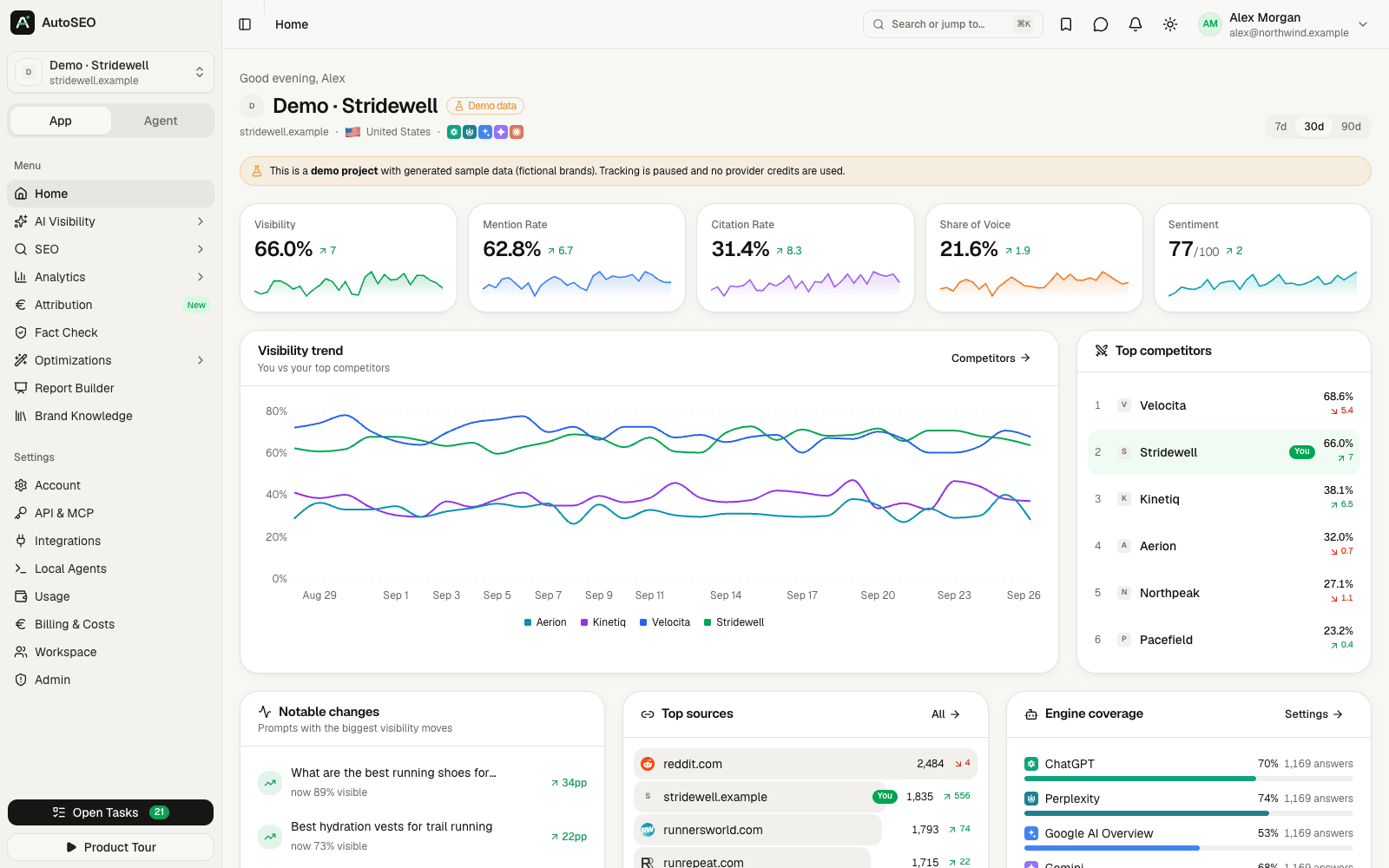
Why AutoSEO?
Search is moving into AI answers. When someone asks ChatGPT "what's the best tool for …", you either get
recommended or you don't, and classic SEO tools can't tell you which. The AI-visibility tools that can are closed
source, priced per seat and per prompt, and keep your data.
AutoSEO is different:
- Everything in one place. AI visibility (GEO/AEO) and classic SEO, analytics, attribution, content and
reporting. No stitching five subscriptions together. - Open source and yours. MIT licensed. Run it on your own server with one command, keep all data, extend it.
- Uses the AI subscription you already have. All AI work runs through your local Claude Code or Codex CLI
via a lightweight agent, with API keys (Anthropic, OpenAI, OpenRouter, Perplexity, Gemini, …) as a fallback. - Built for teams and agencies. Workspaces, roles and per-project permissions, invite-only magic-link login,
white-label reports, client access, REST API and an MCP server with 100+ tools.
Get started
| Option | Time | |
|---|---|---|
| ☁️ | AutoSEO Cloud: your own workspace in our fully managed AutoSEO at app.autoseo.codext.de, hosted in Germany. AI providers, SEO data and email preconfigured, $10/month of usage included. $50/month, cancel anytime. |
2 min |
| 🐧 | One-line installer on any Linux server with a domain: curl -fsSL https://autoseo.codext.de/install | bash |
5 min |
| 🐳 | Docker Compose with the prebuilt image ghcr.io/codextde/autoseo (deploy/) |
5 min |
| 🚀 | Coolify: Docker Compose build pack pointed at this repository | 5 min |
Every self-hosted option is free and includes every feature. See the self-hosting guide
for requirements, updates, backups and reverse-proxy setups.
Feature tour
|
AI visibility tracker Visibility, mention rate, citation rate and position per prompt across 16 AI engines and every market you track, with trends, breakdowns, prompt flow, locations and query fan-outs. 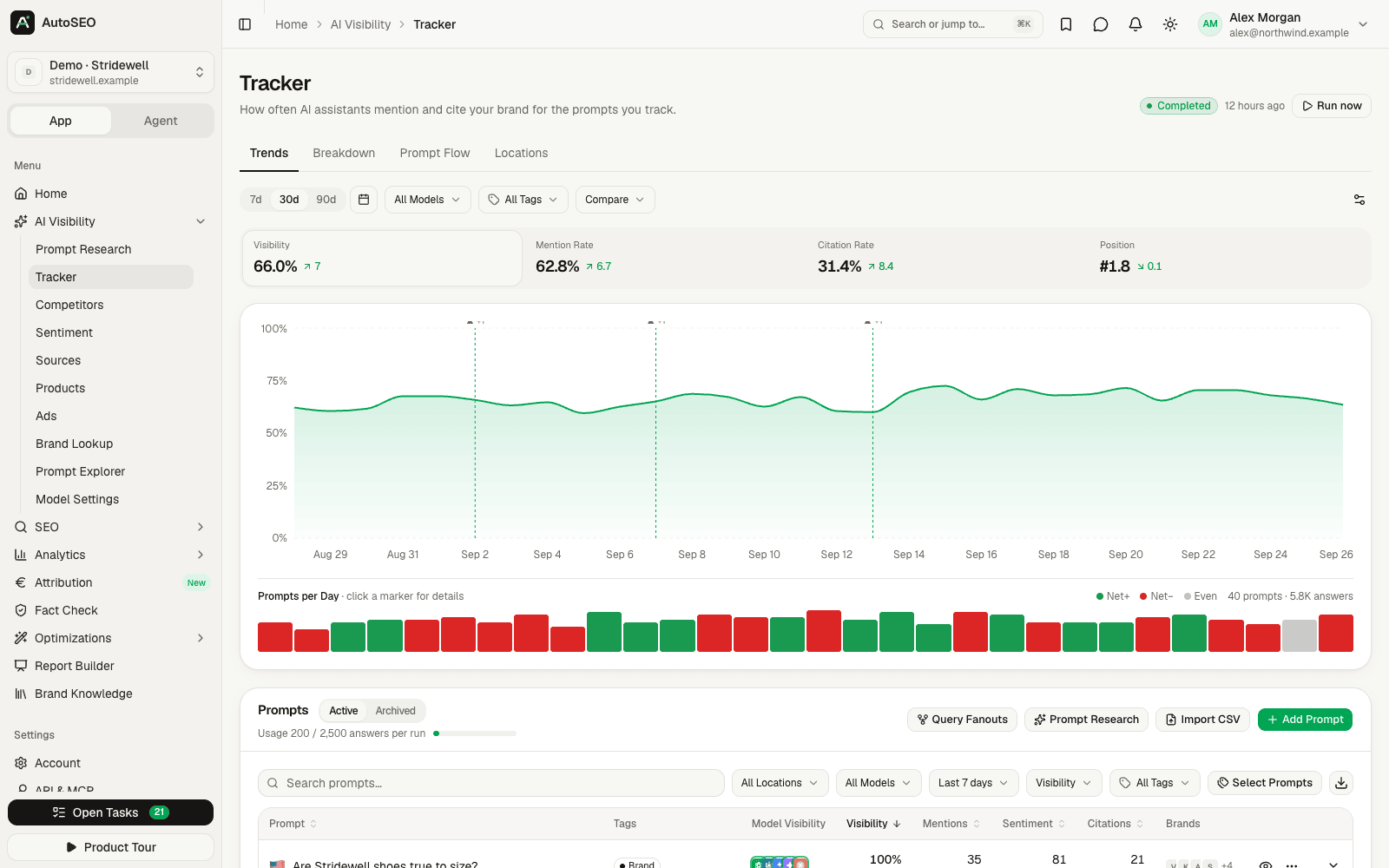
|
Competitors Share of voice, mention depth, sentiment and ranking against every brand AI engines mention next to yours. 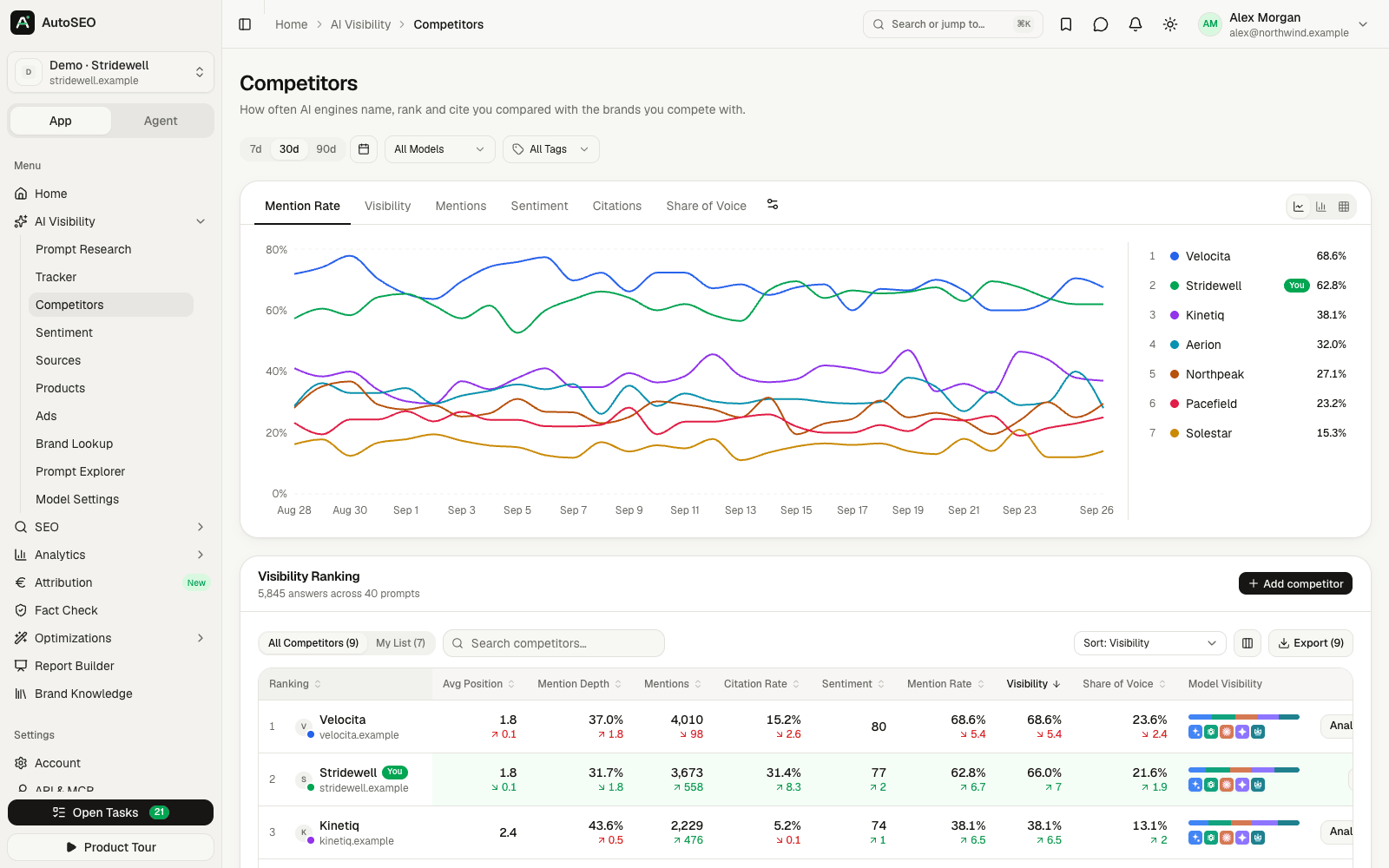
|
|
Sources & citations Which pages and domains AI engines cite for your prompts, by content type, and where you need to be listed. 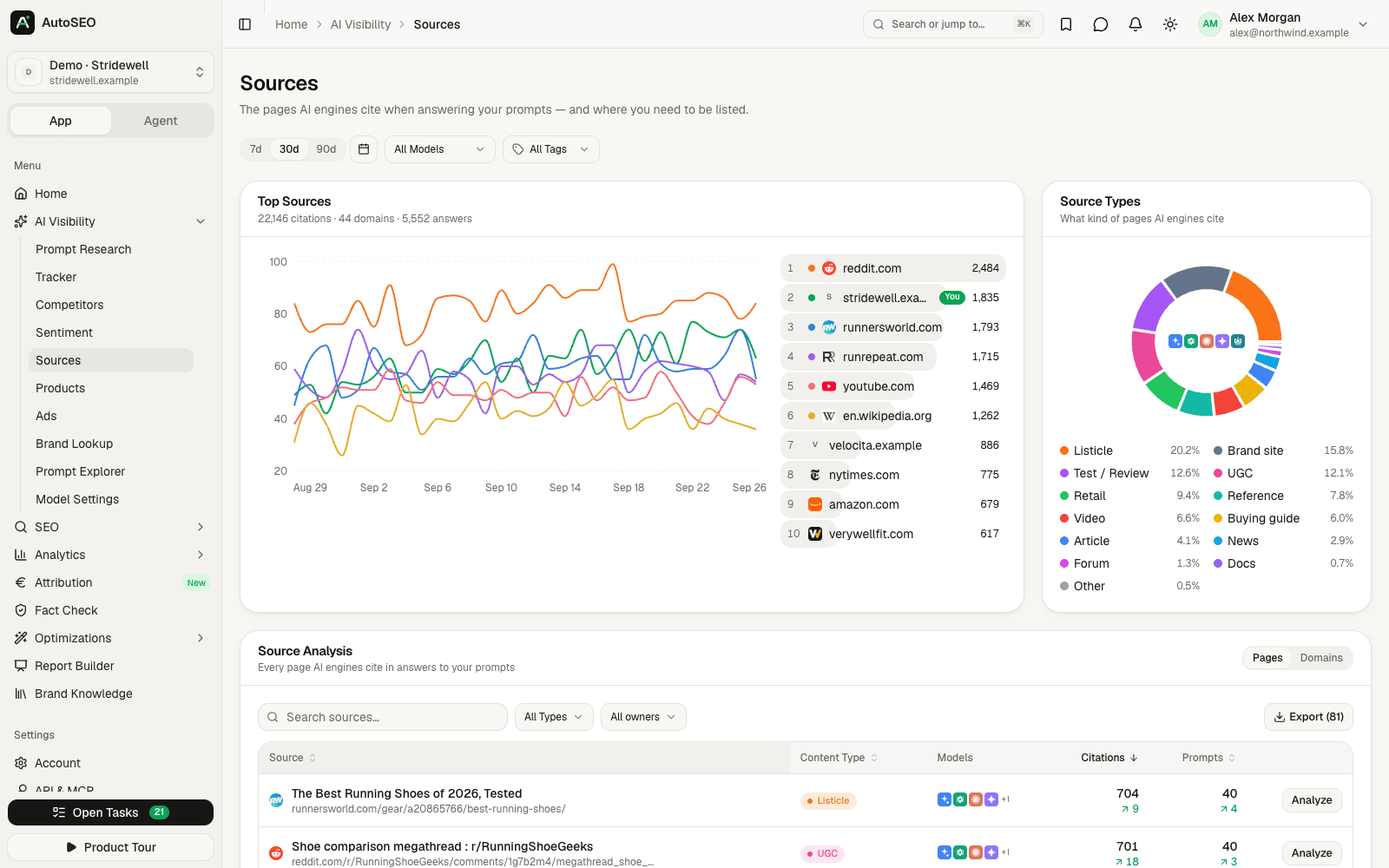
|
Sentiment What AI praises and criticises about you and your competitors, and whom it recommends. 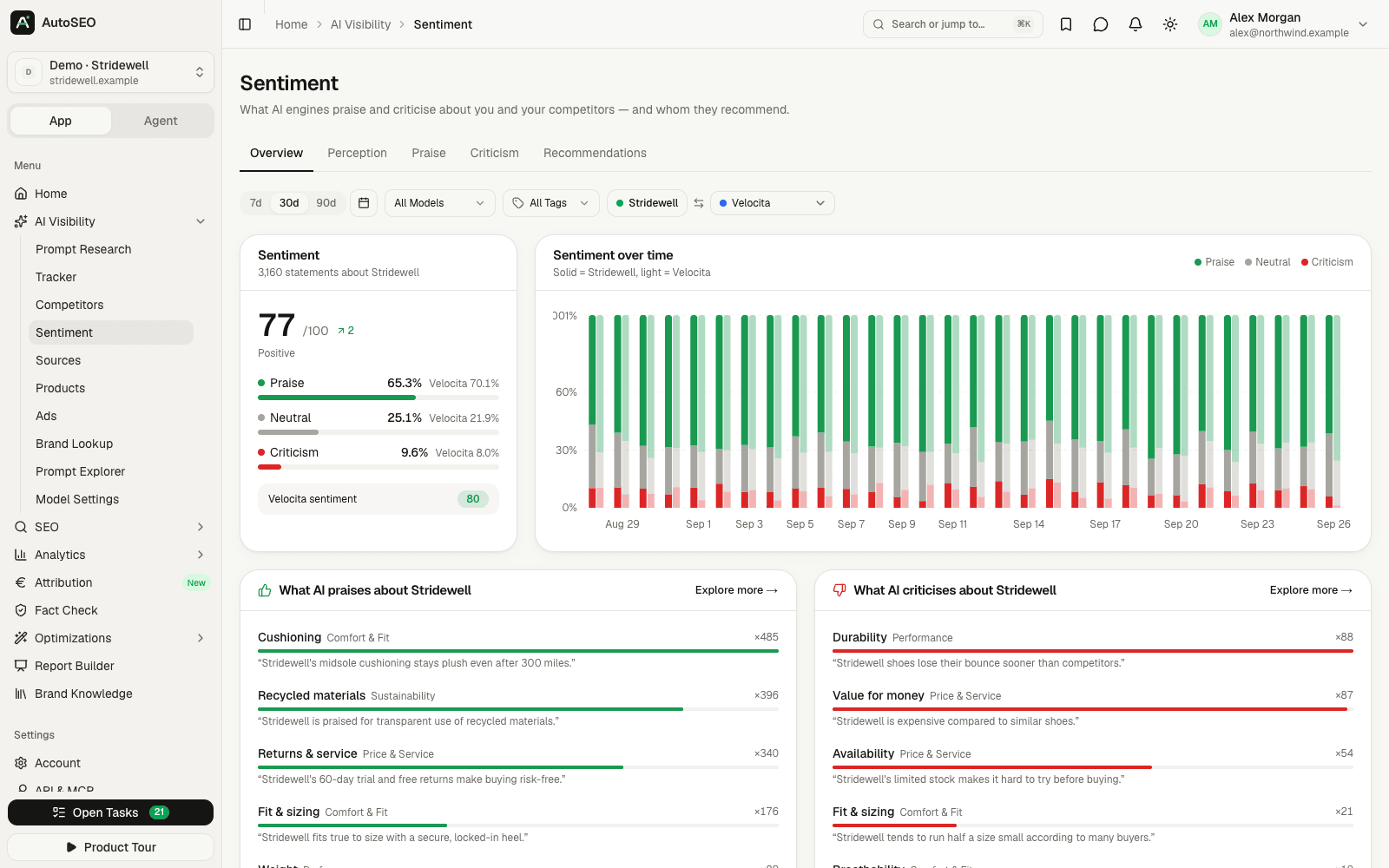
|
|
Keyword research Volumes, CPC, difficulty and intent (DataForSEO), saved lists with tags, export to CSV and Google Sheets. 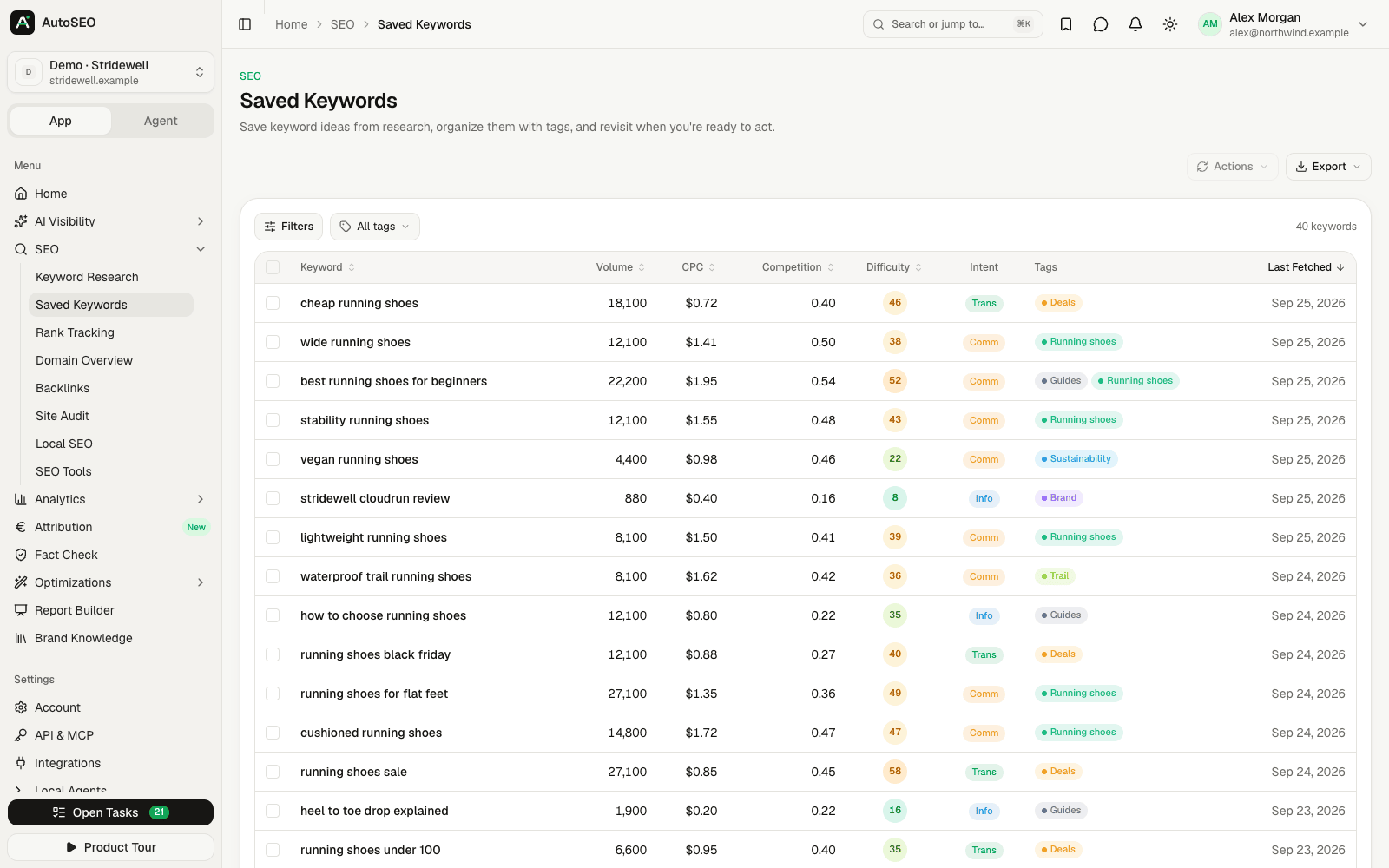
|
Rank tracking Desktop and mobile positions, position distribution, SERP features and movers for every tracked domain. 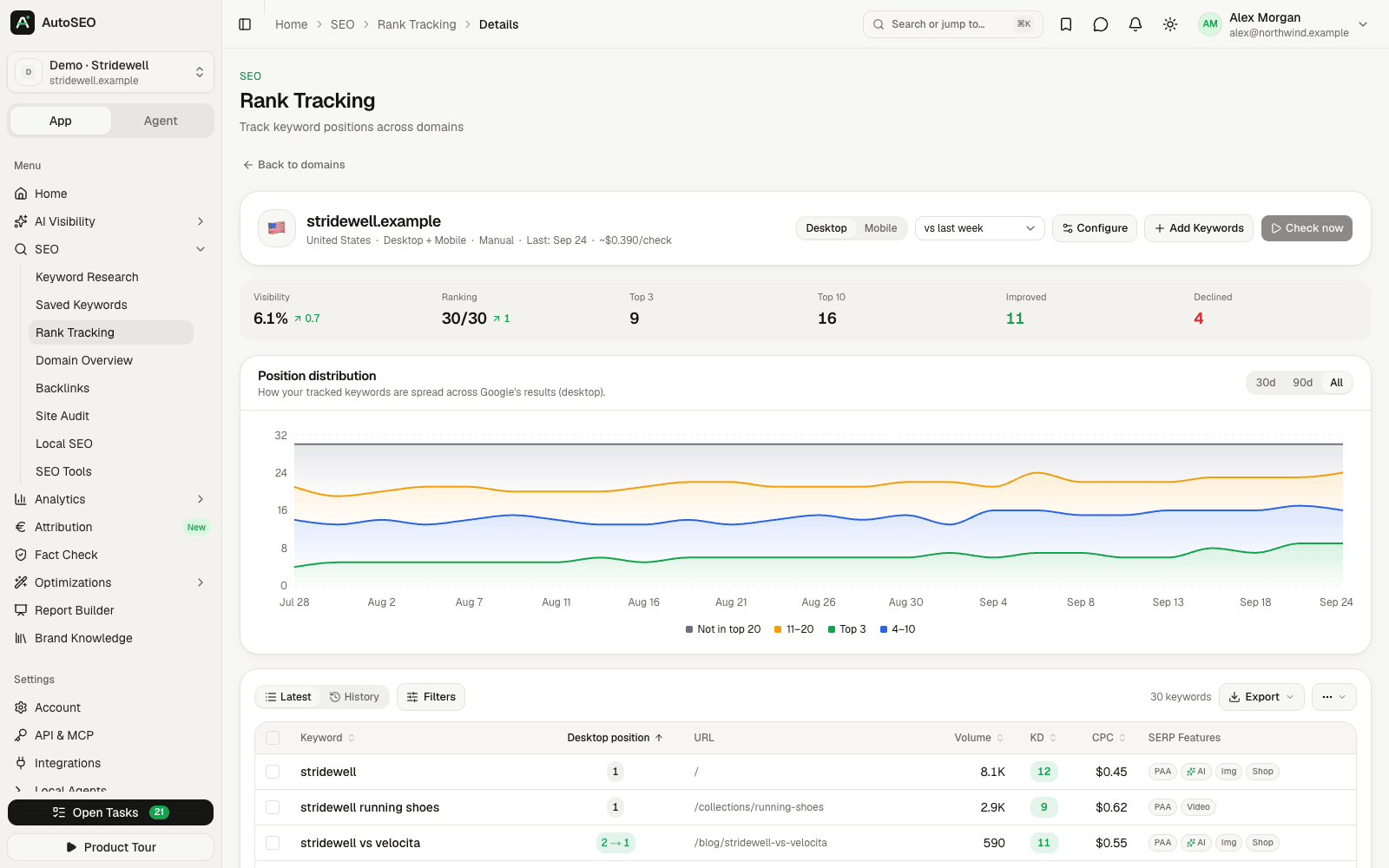
|
|
Site audit Built-in crawler with 29 technical checks, Lighthouse, health score history and run comparisons. 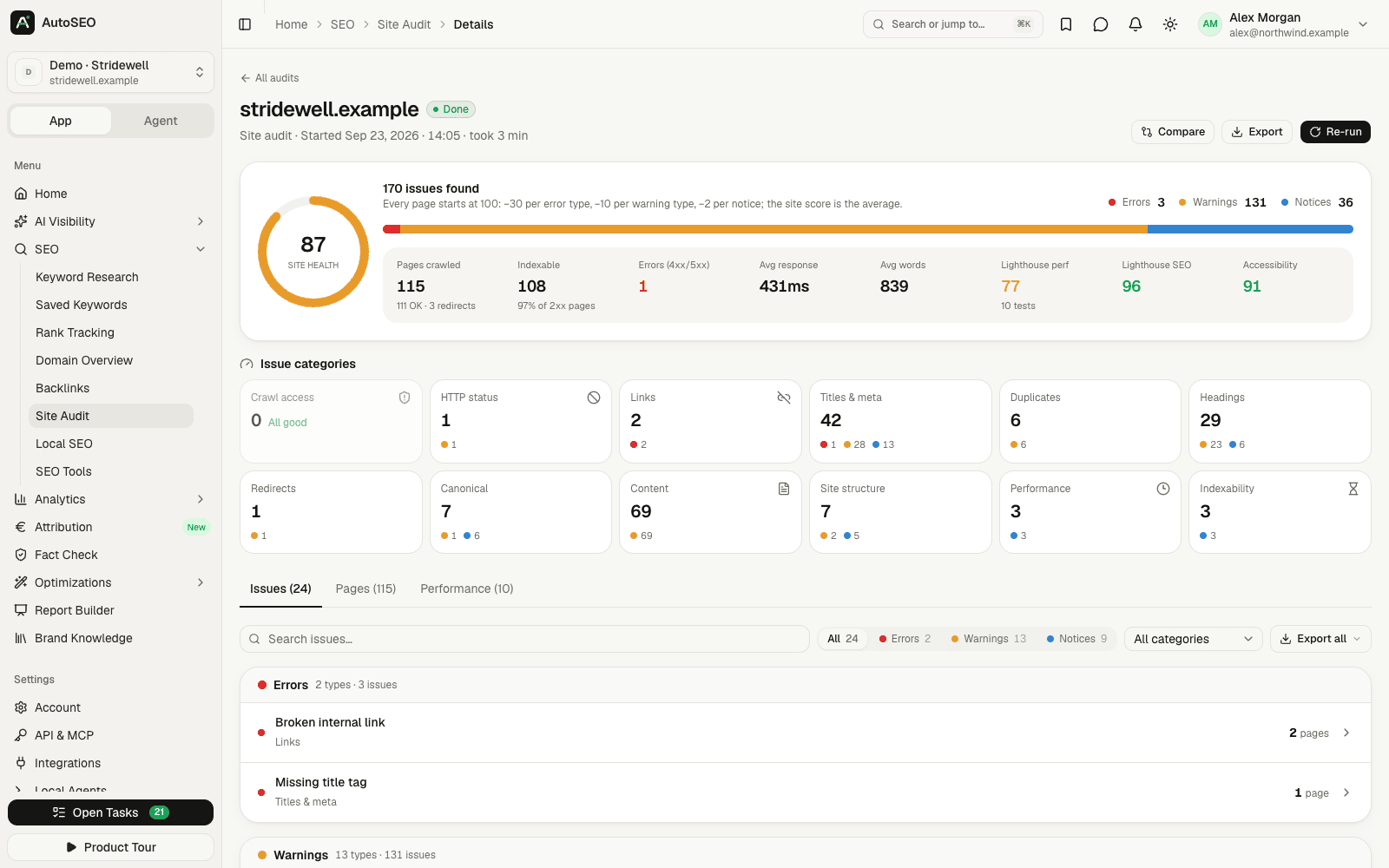
|
Report builder Drag-and-drop slides with live data, brand kits, PPTX/PDF export and password-protected share links. 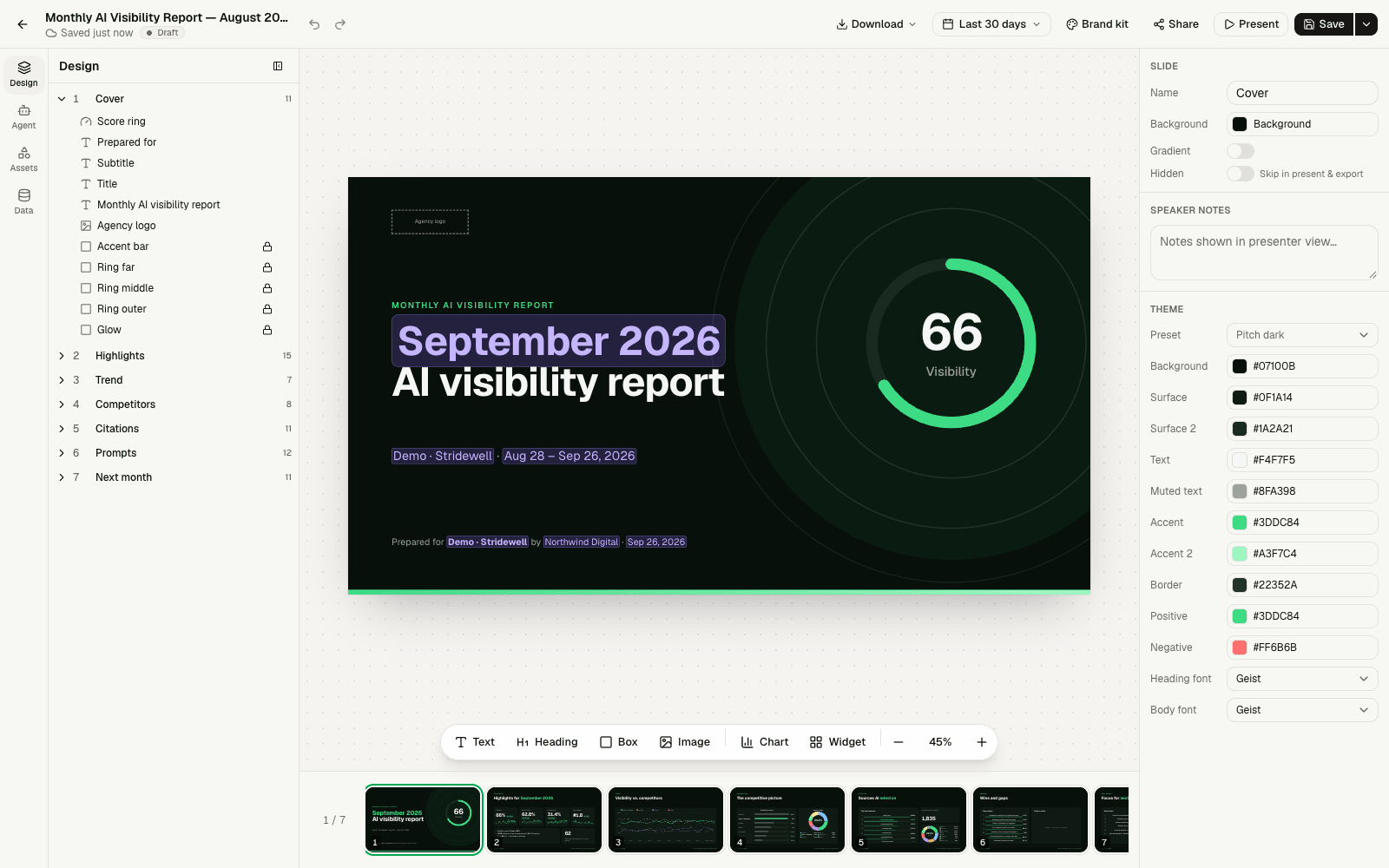
|
|
AI bot traffic Which AI crawlers (GPTBot, ClaudeBot, PerplexityBot, Google-Extended, …) read your site, from logs or CDN connectors. 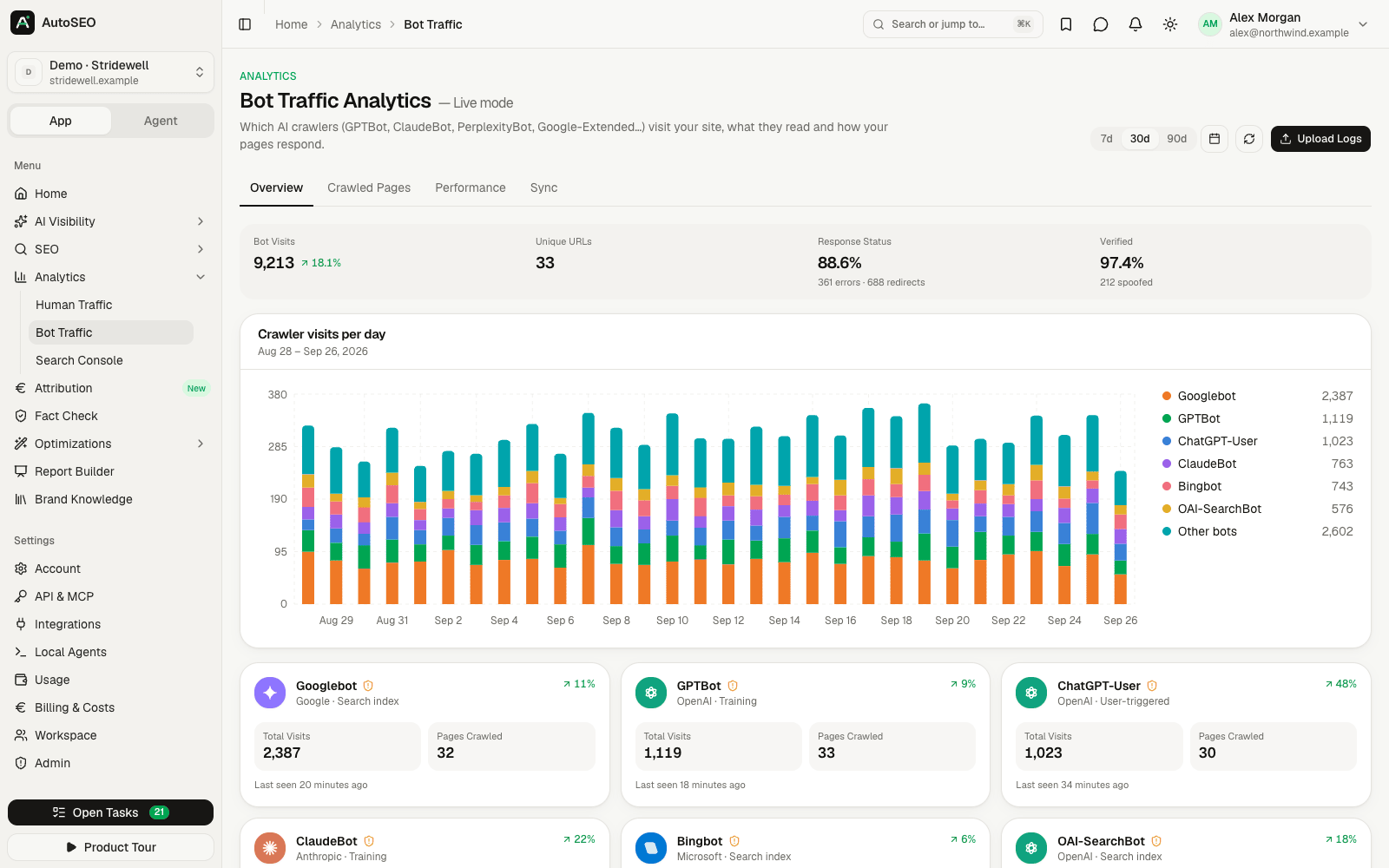
|
Attribution "How did you hear about us?" meets orders and deals: see how much revenue AI search really drives. 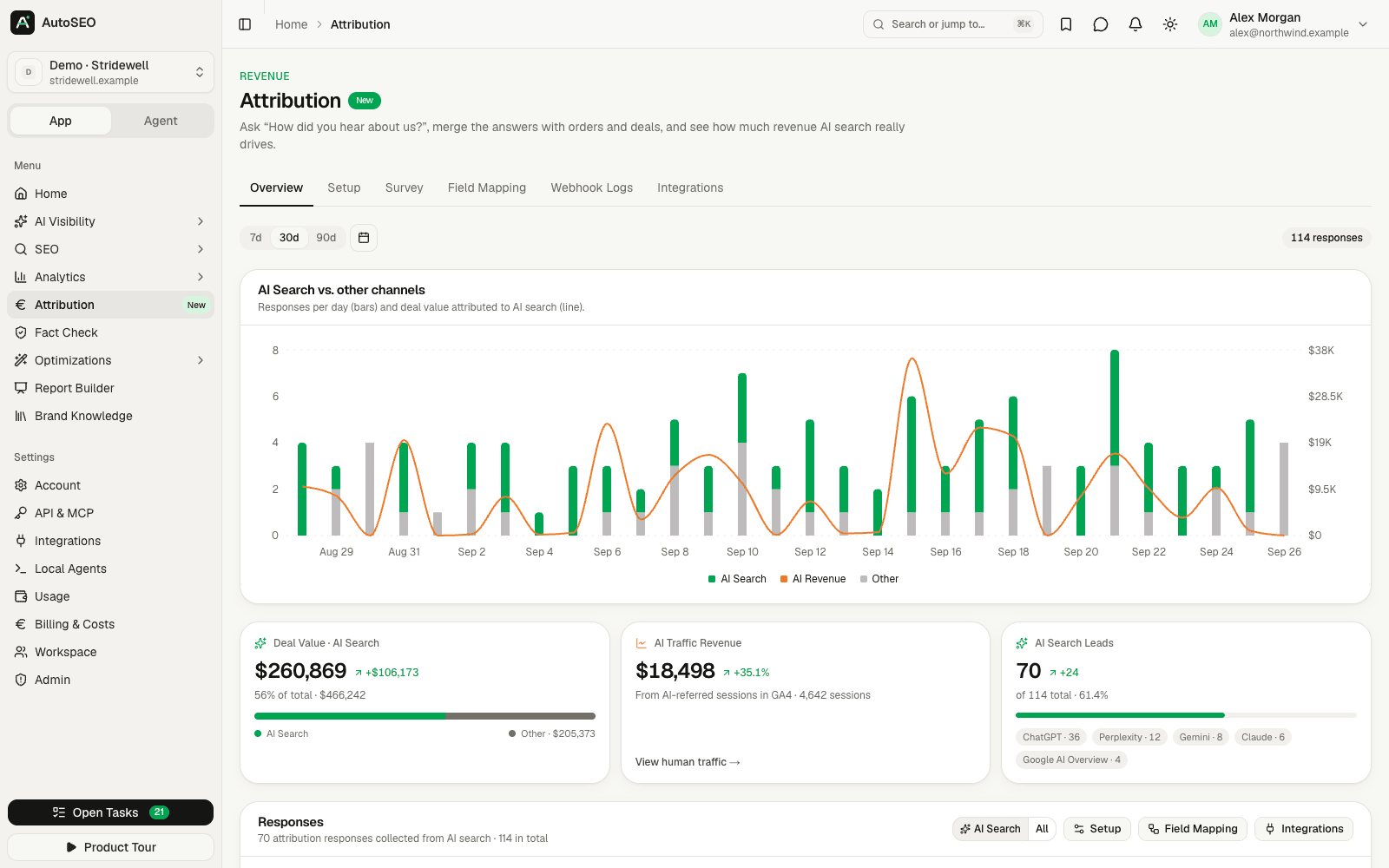
|
|
Prioritised tasks Evidence-backed actions generated from all datasets, pushed to Jira, Linear, Asana and more. 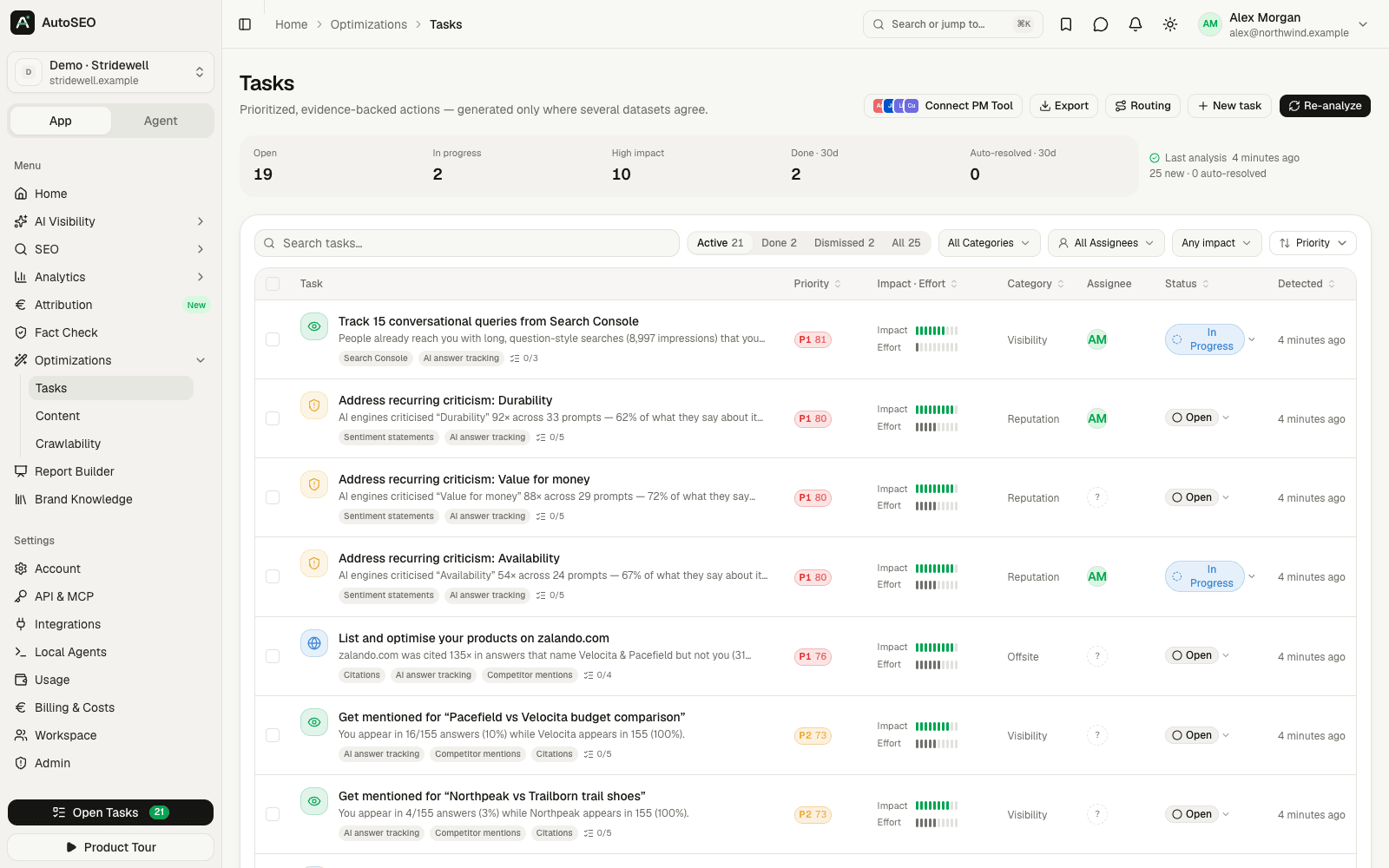
|
Admin, roles & permissions Everything is configured in the admin panel: users, invitations, roles, email, AI and data providers, limits. 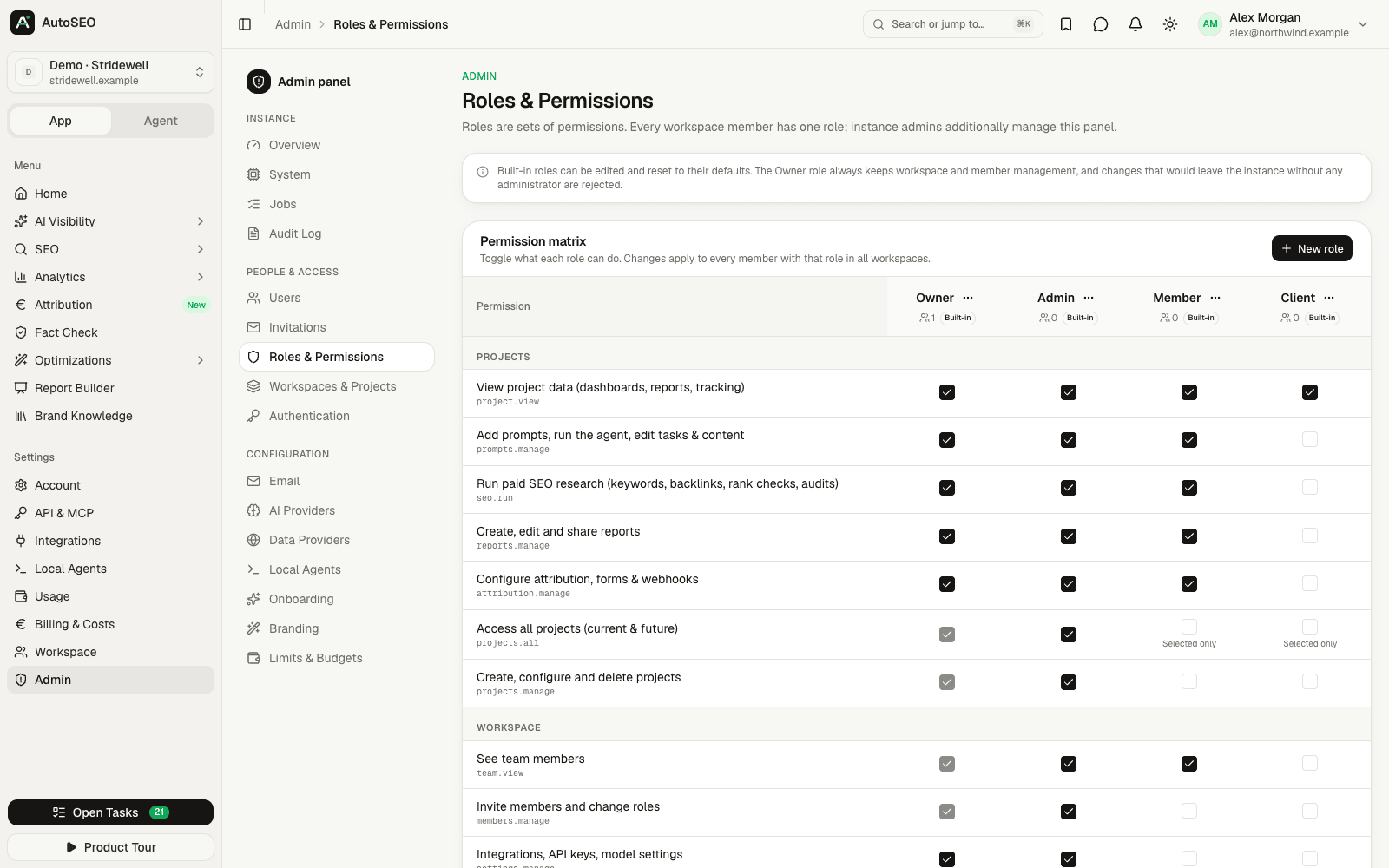
|
|
Agent mode Chat with your data through your own Claude Code / Codex (with every AutoSEO tool) or the API fallback. 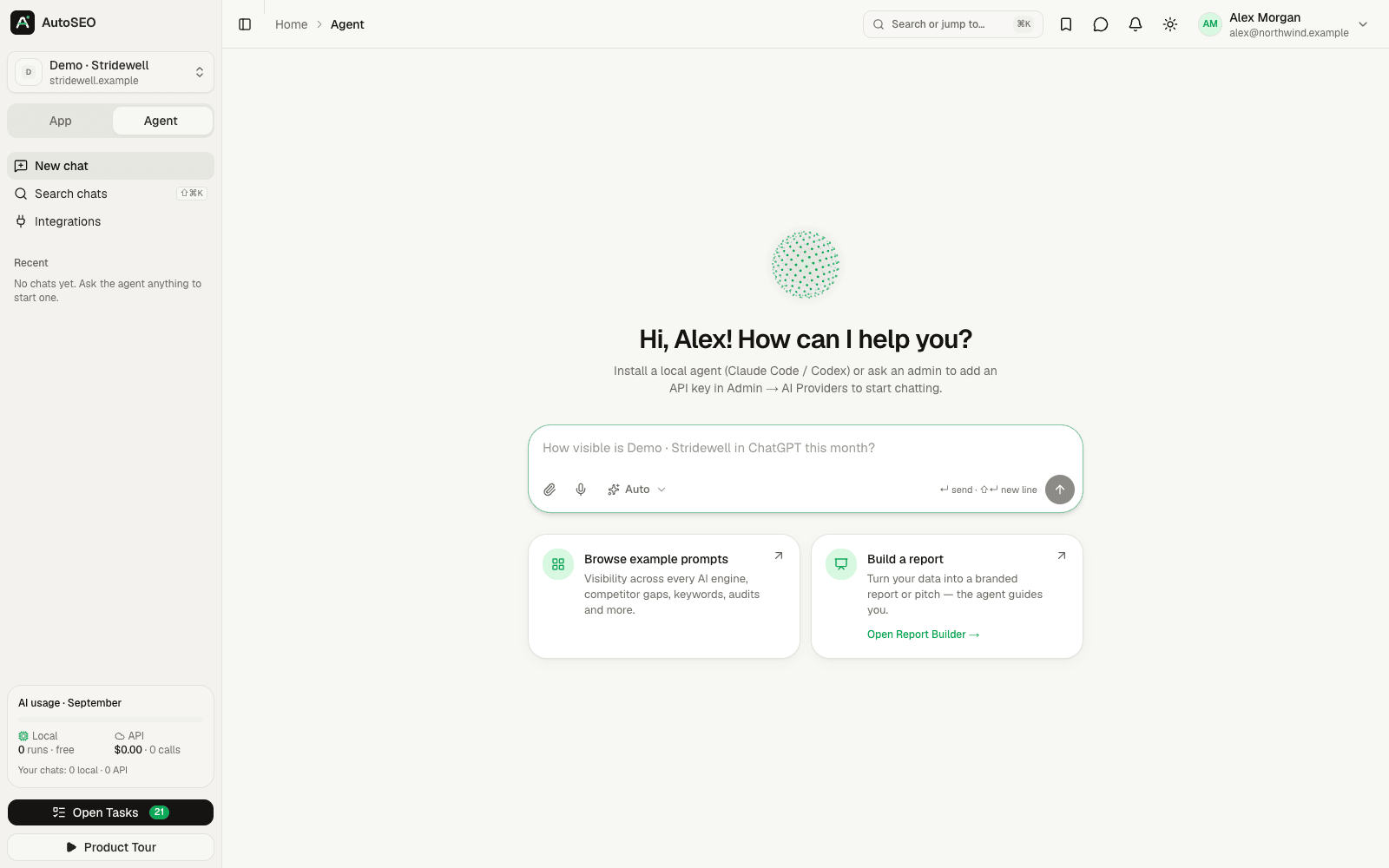
|
Fully mobile optimized Every page works on a phone, in light and dark mode. 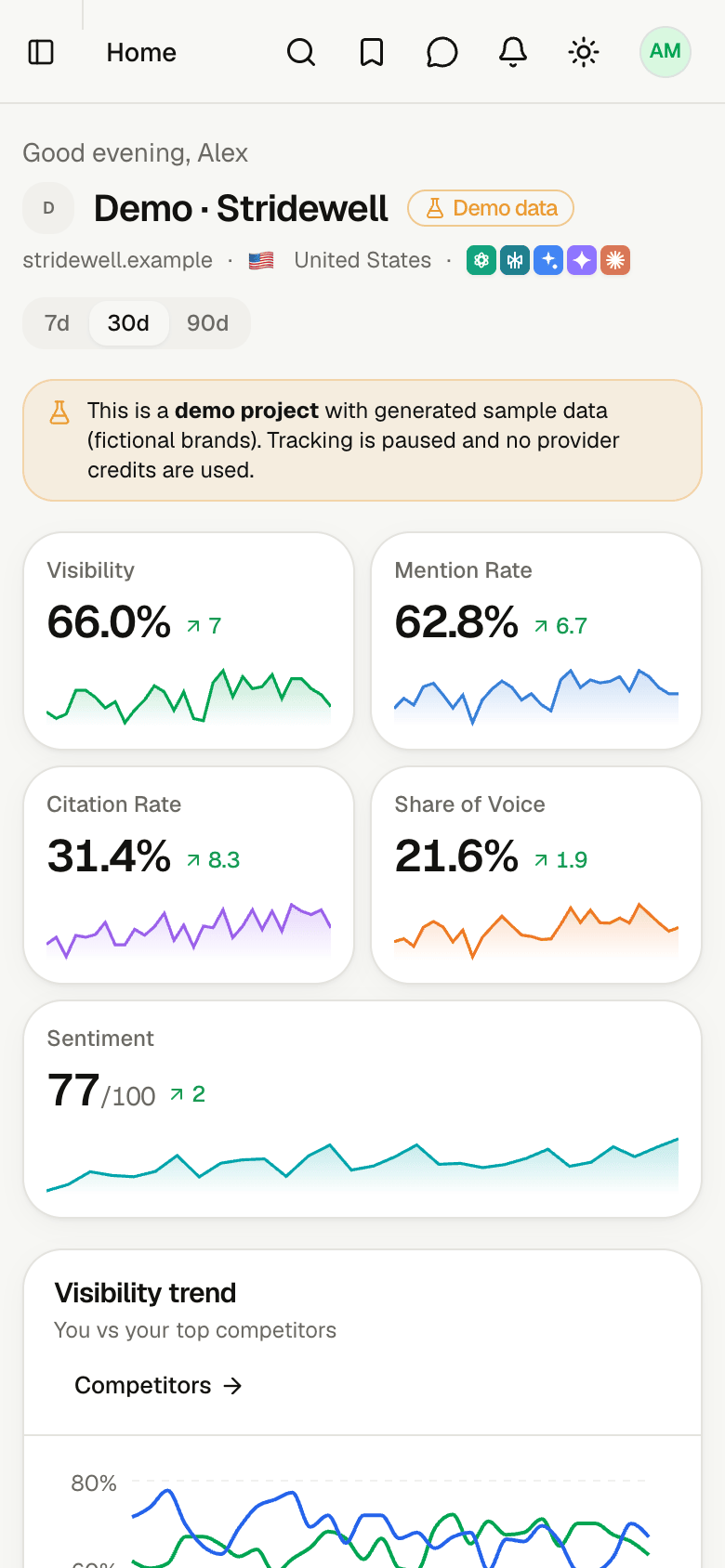
|
Everything that's included
| Area | What's inside |
|---|---|
| AI Visibility | Prompt research, tracker (trends, breakdown, prompt flow, locations, AI Overviews vs AI Mode, model versions, multi-market prompts), query fan-outs with intent, coverage and follow-up questions, competitors (tracked set or all brands, #1/top-3 share, head-to-head), sentiment with an 11-aspect scorecard, sources, products with catalog coverage and feed health, ads, brand lookup, prompt explorer, alerts, model settings, free AI visibility check |
| AI engines | ChatGPT (API and app), Perplexity, Gemini, Claude, Google AI Overviews, Google AI Mode, Microsoft Copilot, Grok, Mistral, DeepSeek, Meta AI, Qwen, Kimi, Sabiá, Solar, each via DataForSEO, the vendor API or your local agent; engines without a configured provider can be simulated by an AI model with web search (clearly labelled) |
| SEO | Keyword research, saved keywords, rank tracking, domain overview, backlinks, site audit (issues, pages, Lighthouse, compare), local SEO, free SEO tools, export to CSV / Google Sheets. Data comes from your own DataForSEO account, or from labelled AI estimates when none is connected |
| Analytics | Human traffic (GA4 & others), bot traffic (log uploads, CDN connectors, server-log webhook), Search Console (performance, opportunities, URL inspection) |
| Attribution | 7-step setup, snippet + webhooks, channel & revenue attribution, hidden AI revenue and response-rate insights |
| Optimizations | Tasks (push to Jira/Linear/… with routing rules and outcome tracking), content grounded in your own knowledge (Notion, Google Drive, Slack, uploads, URLs) with claim checks, JSON-LD schema generator, CMS site edits with approval and undo (WordPress, Shopify, Webflow), crawlability, fact check with rules |
| Reports | Drag & drop report builder, 11 templates, brand kits, PPTX/PDF export, password-protected share links, scheduled email delivery, AI crawler / attribution / AI visitor blocks, AI HTML reports, agency portfolio overview |
| Agent mode | Chat with your data through your own Claude Code / Codex (with every AutoSEO tool) or the API fallback |
| API | REST v1 (OpenAPI), MCP server (100+ tools), OAuth 2.1 incl. client ID metadata documents, API keys with read / write / spend / export scopes, signed outbound webhooks (Zapier, Make, n8n), Looker Studio connector, 17 agent skills, Claude Code / Codex / Cursor plugins |
| Admin | Users, invitations, roles & permissions, project groups with inherited roles (brands, regions, teams, clients), workspaces & projects, authentication incl. OIDC single sign-on, email, AI & data providers, onboarding, branding, limits & budgets, billing & costs, free tools, local agents, jobs, audit log, system health |
| Security | Invite-only magic links + one-time codes, OIDC SSO (Entra ID, Okta, Google Workspace, Keycloak, …) per instance or per workspace with DNS-verified domains, email-domain allow-list, 1-year multi-device sessions, export and share permissions, AES-256-GCM encrypted secrets, hashed tokens, SSRF protection, audit log, GDPR export & erasure |
Stack: Next.js 16 · React 19 · Tailwind v4 · shadcn/ui · PostgreSQL 17 · Drizzle. One DOMAIN variable;
everything else (email via SMTP / Amazon SES, AI providers, DataForSEO, Google OAuth, onboarding, branding, roles,
limits, security) is configured in the admin panel.
AutoSEO Cloud vs. self-hosted
| Self-hosted | AutoSEO Cloud | |
|---|---|---|
| Price | Free forever (MIT) | $50 / month per workspace |
| Features | All | All |
| Where it runs | Your own instance and database, on your server | Your own workspace in our shared, managed instance at app.autoseo.codext.de (Germany); data logically separated per workspace |
| Users | Unlimited | Unlimited (invited into your workspace) |
| Projects | Unlimited | Up to 10 |
| Updates, SSL, email delivery | You | Managed for you |
| AI & SEO data | Your Claude Code / Codex, or your own API keys and DataForSEO account | Preconfigured, $10/month of usage included (fair use); unlimited AI via your own Claude Code / Codex |
| Full control over your data | ✓ | Export reports and tables (CSV, Sheets, PPTX, PDF); self-host any time for full control |
AutoSEO Cloud runs exactly this repository, operated for you (how it works). Buying it funds
development of the open-source project. Start at autoseo.codext.de →
Deploy with Coolify
Create a new resource → Docker Compose → point it at this repository (build pack: Docker Compose,
filedocker-compose.yml).Set the domain of the
appservice (e.g.https://seo.example.com) and add the environment variableDOMAIN=seo.example.com. Coolify generates the Postgres password automatically (SERVICE_PASSWORD_POSTGRES).Deploy. On first boot the app runs its database migrations and prints a setup code to the logs
(a new code on every restart until setup is done):╔════════════════════════════════════════╗ ║ AutoSEO first-run setup ║ ║ Open https://seo.example.com/setup ║ ║ Setup code: 1234-5678 ║ ╚════════════════════════════════════════╝Open
/setup, enter the code, name your workspace, create the owner account and (optionally) restrict sign-ins
to your company domains. You're signed in immediately; configure email delivery next (Admin → Email).
Data lives in two volumes — back up both:
autoseo-pg— PostgreSQLautoseo-data— uploads, caches, the auto-generated encryption key for stored secrets (secret.key) and the
agent release signing key (agent-release-key.pem). Losingsecret.keymakes stored provider credentials
unreadable; losing the signing key means installed agents stop auto-updating until they are reinstalled.
Updating is a redeploy: migrations run automatically at boot and connected local agents update themselves to the
new build.
Prefer to skip the setup code, e.g. for scripted installs? Set AUTOSEO_OWNER_EMAIL (and optionallyAUTOSEO_SMTP_URL / AUTOSEO_MAIL_FROM); see optional bootstrap variables.
Reverse proxy & security settings
- The app trusts
X-Real-IP/ the right-mostX-Forwarded-Forhop set by Coolify's Traefik for rate limits.
If all traffic comes through Cloudflare, enable Admin → Authentication → Behind Cloudflare soCF-Connecting-IPis used (never enable it otherwise — the header could be spoofed). - Outbound requests to private/LAN addresses are blocked (SSRF protection). Allow specific intranet hosts for
integrations (e.g. an internal WordPress) under Admin → Authentication → Internal hosts allowed for integrations. - Sessions use
__Host-cookies (Secure, HttpOnly, SameSite=Lax). Stored secrets are encrypted with AES-256-GCM;
API keys, OAuth and agent tokens are stored as SHA-256 hashes only.
Run locally with Docker
cp .env.example .env          # DOMAIN=localhost:3000
docker compose up --build     # http://localhost:3000 (setup code in `docker compose logs app`)
Want to look around first? After setup, click Explore the demo on the first onboarding step (or Explore with
demo data on any project's home page) to open a demo project with 90 days of generated sample data: fictional
brands, no provider credits used. All screenshots above show that demo project.
Configuration (admin panel)
| Area | What you configure |
|---|---|
| Authentication | Allowed email domains, invite-only mode, domain self-signup, session length (default 365 days), max devices, magic-link lifetime, OIDC single sign-on (JIT provisioning, group → role mapping, require SSO per domain, workspace SSO), Cloudflare, internal hosts |
| SMTP or Amazon SES (region preset), sender, test email | |
| AI providers | Prefer local agents, fallback order, Anthropic / OpenAI / OpenRouter / Perplexity / Gemini / xAI / Mistral / DeepSeek / Meta / Qwen / Moonshot (Kimi) / Maritaca (Sabiá) / Upstage (Solar) keys, per-engine provider mapping, AI simulation for engines without a provider |
| Data providers | DataForSEO (keywords, SERPs, backlinks, AI engines) with an enrichment mode (Auto / DataForSEO only / AI only) and per-capability AI estimates; workspace owners can also connect their own DataForSEO account (Settings → Workspace); Google OAuth (Search Console, GA4, Sheets, Drive), PageSpeed, Bing, Cloudflare |
| Onboarding | Wizard steps, default market/engines/frequency, suggested prompt & competitor counts |
| Branding | App name, logo, colors, docs & demo links |
| Roles & permissions | Owner / Admin / Member / Client + custom roles, per-project access, project groups with inherited or overridden roles, data.export and reports.share permissions |
| Limits & budgets | Projects, prompts, daily/monthly spend caps, audit size, job concurrency, agency markup |
| Free SEO tools | Publish the free tools at /free-tools (off by default), daily budget, rate limits, Turnstile |
| Local agents | Check-in interval, work dir, cleanup, auto-update |
Local agents (Claude Code / Codex)
Open Settings → Local Agents → Install agent, copy the one-liner for macOS/Linux (bash) or Windows (PowerShell)
and run it on a machine that has claude and/or codex installed:
curl -fsSL https://seo.example.com/install.sh | AUTOSEO_AGENT_TOKEN=… bash -s -- --host https://seo.example.com
- Outbound HTTPS only, no open ports. Starts automatically (launchd / systemd user unit / Scheduled Task).
- Tokens never expire, are stored as SHA-256 only and are shown once. Reinstalling issues a new token.
- Every job runs in a fresh CLI session in its own folder (default: temp dir), jobs run in parallel.
- Updates itself on every deploy (releases are signed; the agent verifies the signature).
- Lean mode (default for shared/team work) runs the CLI without your personal settings, MCP servers or shell.
Full mode (your own MCP servers, web fetch) only ever runs for jobs you started, and only if you allowed it
locally with--allow-full. Other flags:--runtime claude|codex,--workdir,--max-parallel,--mcp-servers,--allow-codex-shell,--allow-remote-workdir,--no-auto-update,--no-autostart,--uninstall.
API, MCP & agent plugins
- REST:
https://seo.example.com/api/v1(OpenAPI at/api/v1/openapi.json, docs under Settings → API & MCP) - MCP (streamable HTTP):
https://seo.example.com/api/mcp— OAuth 2.1 or API key - Claude Code plugin marketplace:
/plugin marketplace add https://seo.example.com/api/plugin/marketplace.json
(bundles for Codex and Cursor and a skills zip are under Settings → API & MCP → Skills)
Development
docker run -d --name autoseo-pg -e POSTGRES_USER=autoseo -e POSTGRES_PASSWORD=autoseo -e POSTGRES_DB=autoseo \
  -p 54329:5432 postgres:17-alpine
pnpm install
pnpm db:push      # sync schema to the dev database
pnpm dev          # http://localhost:3000
pnpm typecheck && pnpm lint && pnpm test
pnpm db:generate  # create a SQL migration after schema changes (applied automatically in production)
See docs/ARCHITECTURE.md for the code layout and conventions. The website, signup and
billing for AutoSEO Cloud live in cloud/ (a separate Next.js app).
Contributing
Contributions of all sizes are welcome: bug reports, new AI engines, integrations, translations, docs. Read
CONTRIBUTING.md, open an issue or start a thread in
Discussions. Please report security issues privately as described
in SECURITY.md.
If AutoSEO is useful to you, a ⭐ on GitHub helps a lot. It's how other people find the project.
License
MIT © Codext GmbH and AutoSEO contributors. Parts of the SEO feature set and agent skills are adapted
from open-seo (MIT) — see plugins/autoseo/NOTICE.md.
Reviews (0)
Sign in to leave a review.
Leave a reviewNo results found