ai-agent-session-center
Health Uyari
- No license — Repository has no license file
- Description — Repository has a description
- Active repo — Last push 0 days ago
- Community trust — 54 GitHub stars
Code Uyari
- process.env — Environment variable access in electron/ipc/appHandlers.ts
Permissions Gecti
- Permissions — No dangerous permissions requested
This tool is a real-time, web-based dashboard for monitoring and controlling multiple AI coding agent sessions (Claude Code, Gemini CLI, Codex) from a single interface. It features interactive SSH terminals, prompt logs, and 3D animated characters that reflect the real-time status of your agents.
Security Assessment
Overall Risk: Low. The application does not request explicitly dangerous permissions and no hardcoded secrets were found. It relies on environment variables to handle application logic (specifically within its Electron IPC handlers), which is a standard and generally safe practice, provided you configure them securely. Because the tool acts as a centralized hub for your local AI agents, it inherently handles sensitive session data and requires live SSH shell access to manage your terminals. However, it processes this locally and does not exhibit malicious data-exfiltration behaviors.
Quality Assessment
The project appears to be actively maintained, with its most recent code push occurring today. It has garnered 54 GitHub stars, indicating a fair level of early community trust and adoption. While the README explicitly claims an MIT license, the automated scanner flagged the repository for missing a formal license file. You should verify that the license file exists before heavily integrating the tool to avoid potential intellectual property ambiguities.
Verdict
Use with caution due to the missing license file, though the tool itself appears safe to run locally.
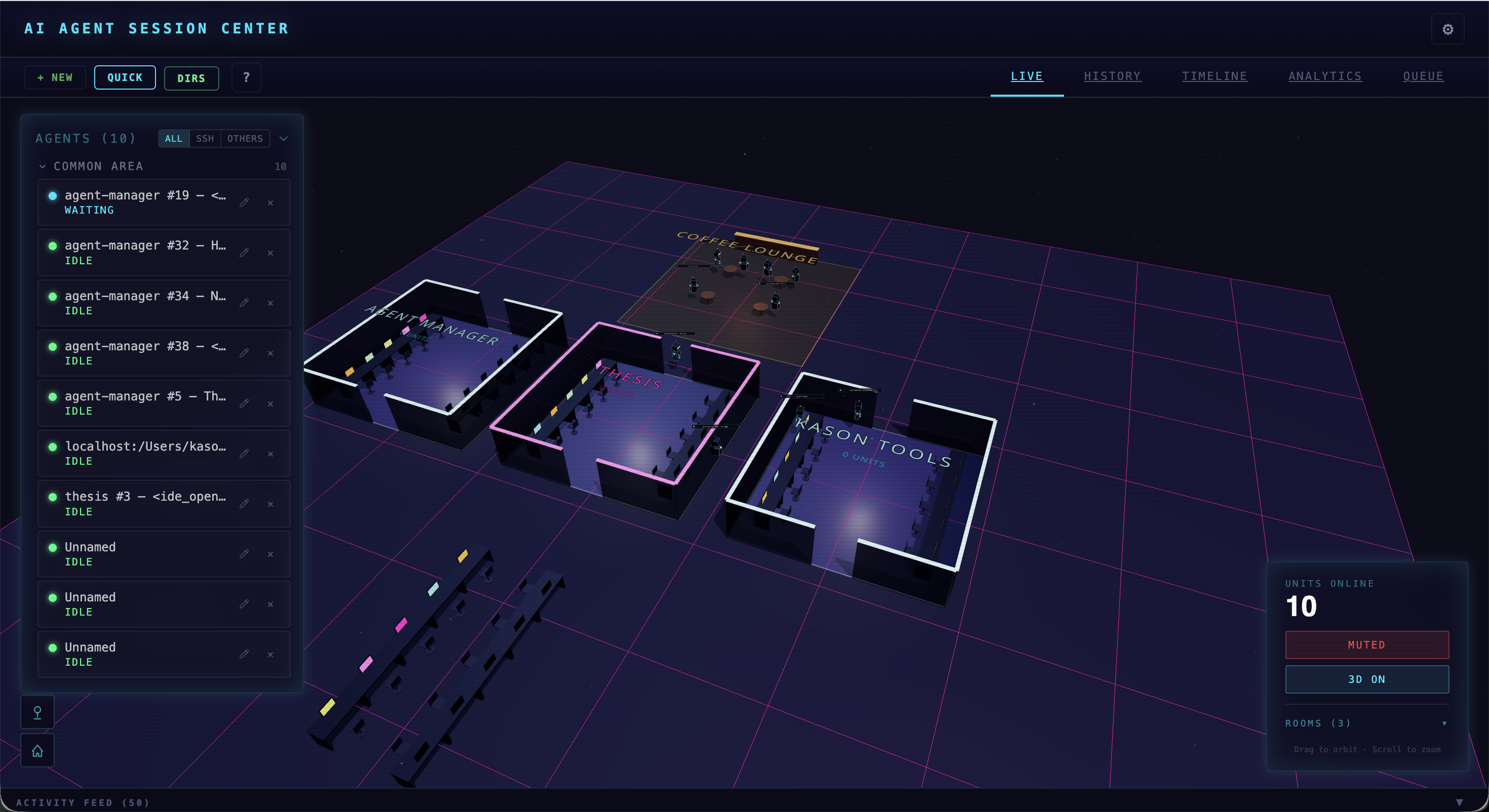
Real-time dashboard that turns AI coding agent sessions (Claude Code, Gemini CLI, Codex) into animated 3D robots — with live terminals, prompt history, tool logs, and queuing. Runs on any device.
AI Agent Session Center
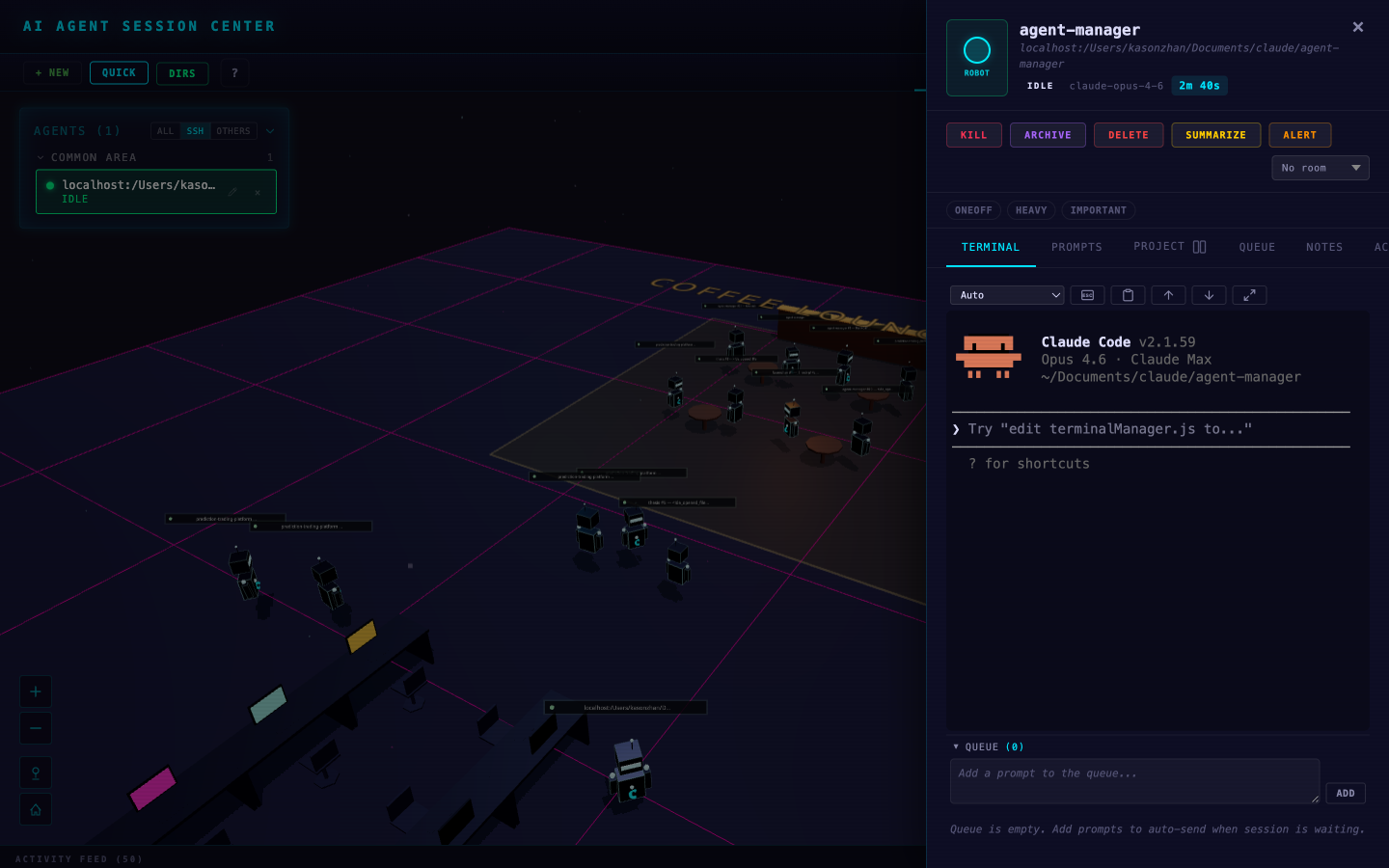
A lightweight, real-time dashboard that replaces heavy IDEs like VS Code and JetBrains for AI agent workflows. Monitor and control all your Claude Code, Gemini CLI, and Codex sessions from one place — with live SSH terminals, prompt history, tool logs, and queuing. Every session spawns an animated 3D robot in an interactive cyberdrome that visually reflects what the agent is doing. Runs on any device, anywhere.




Demo
Desktop
 |
 |
 |
 |
Mobile
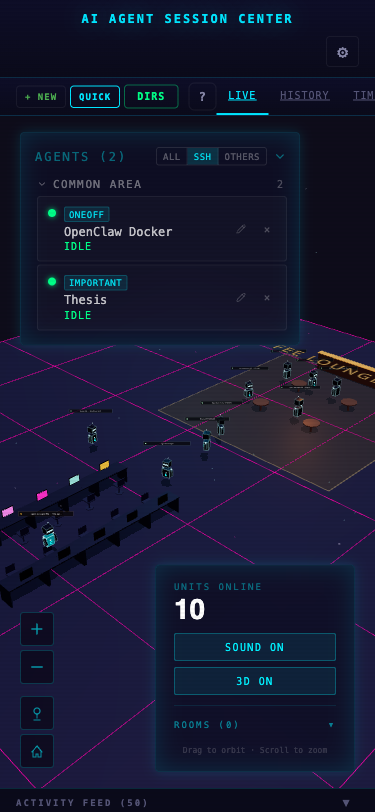 |
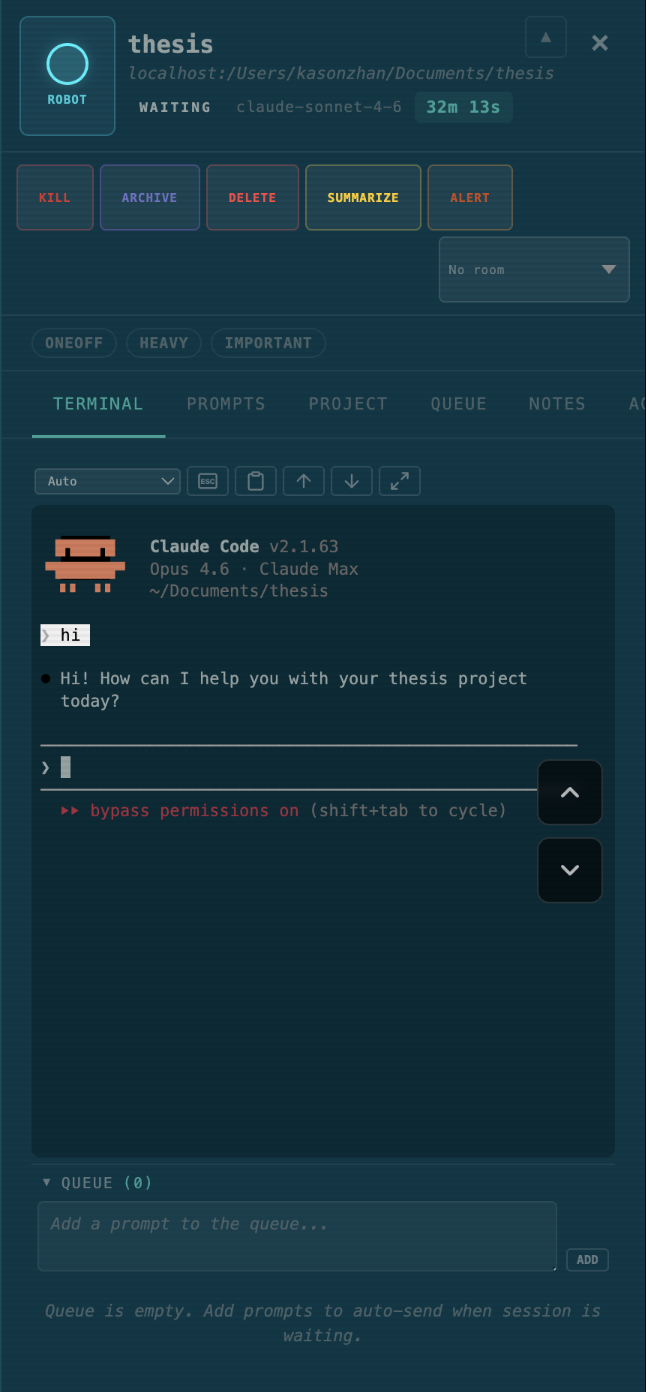 |
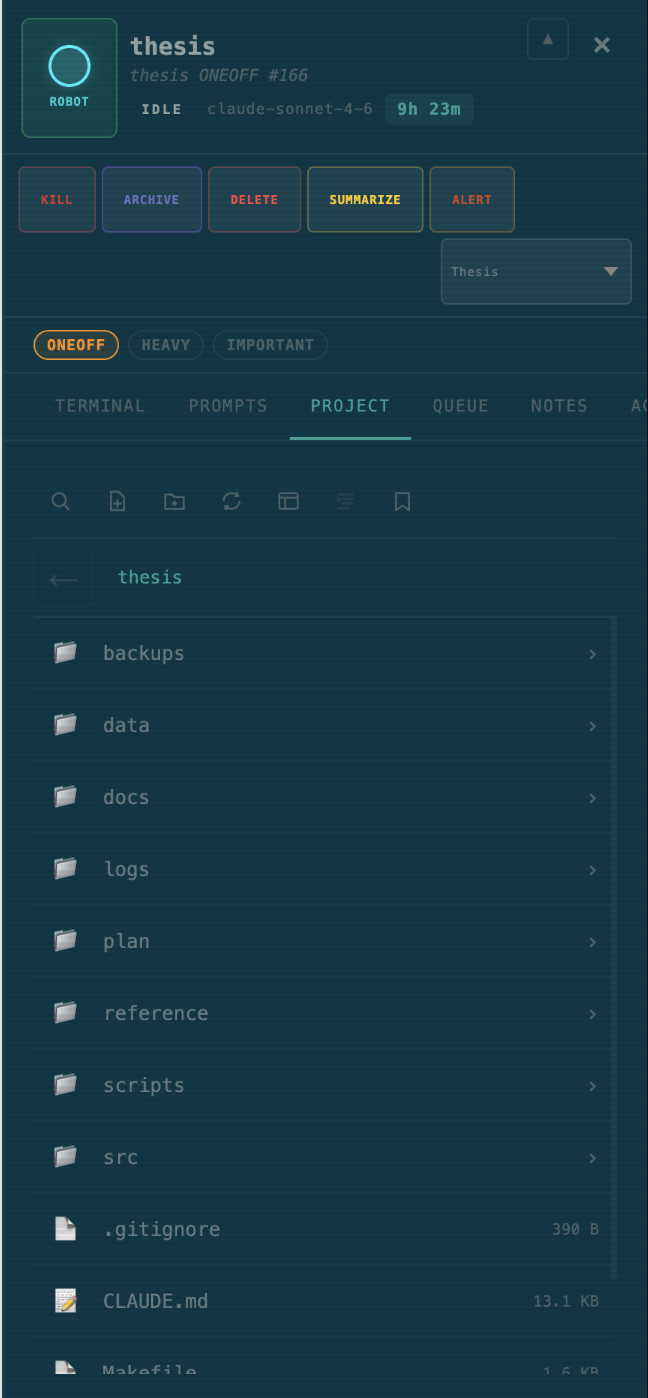 |
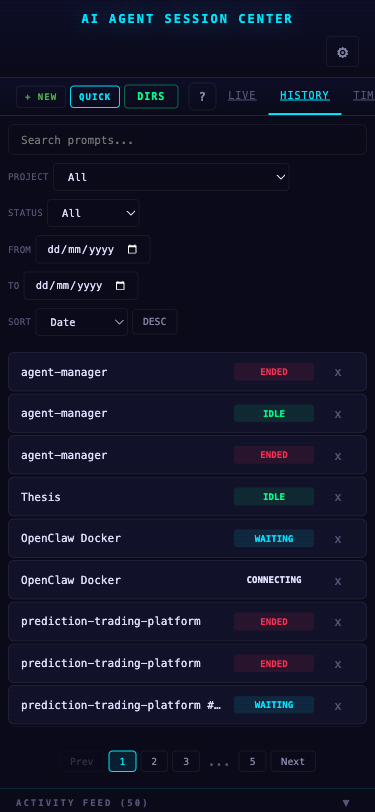 |
Video
https://github.com/user-attachments/assets/004ee6f9-942c-44c2-a4c5-d971fa0e824b
Why?
When you're running multiple AI coding agents across different terminals — Claude Code in one, Gemini in another, Codex in a third — it's impossible to keep track of what each one is doing. Which agent is stuck waiting for approval? Which one finished and needs your next prompt? Which one is burning tokens on a runaway loop? Agent Session Center gives you a single view across all your AI coding sessions so you can stay in control without constantly switching terminals.
Features
3D Cyberdrome Scene
- One agent, one robot — every AI coding session gets its own animated 3D character in an interactive cyberdrome
- 8 animation states — robots idle, walk, run, wait, dance, wave, or go offline based on real-time session status
- 6 procedural robot models — robot, mech, drone, spider, orb, and tank variants with auto-assigned neon colors
- Dynamic room system — four-quadrant office layout with desks, coffee lounge, gym, corridor rooms, and spatial navigation AI
- Subagent connections — parent-child agent teams render as connected robots with animated laser-line beams
- Speech bubbles & particles — floating dialogue shows current tool/prompt, burst particles on state transitions
- Camera fly-to — smooth animated camera focuses on the selected robot; OrbitControls for manual pan/zoom/rotate
- Flat list fallback — 2D sidebar list auto-activates if 3D crashes or for low-resource environments
Session Detail Panel
- Resizable detail panel — slides in from the right (320px–95vw) with 7 tabs: Terminal, Prompts, Project, Queue, Notes, Activity, Summary
- Session switcher — horizontal tab strip shows all active sessions with sequence numbers, pin/unpin, compact/detailed display modes
- Editable metadata — inline-edit title, label, accent color (customizes robot glow), and pin state; all persisted to SQLite + IndexedDB
- Session controls — Resume, Kill, Archive, Delete, Summarize, Alert, room assignment, and label chips (ONEOFF, HEAVY, IMPORTANT)
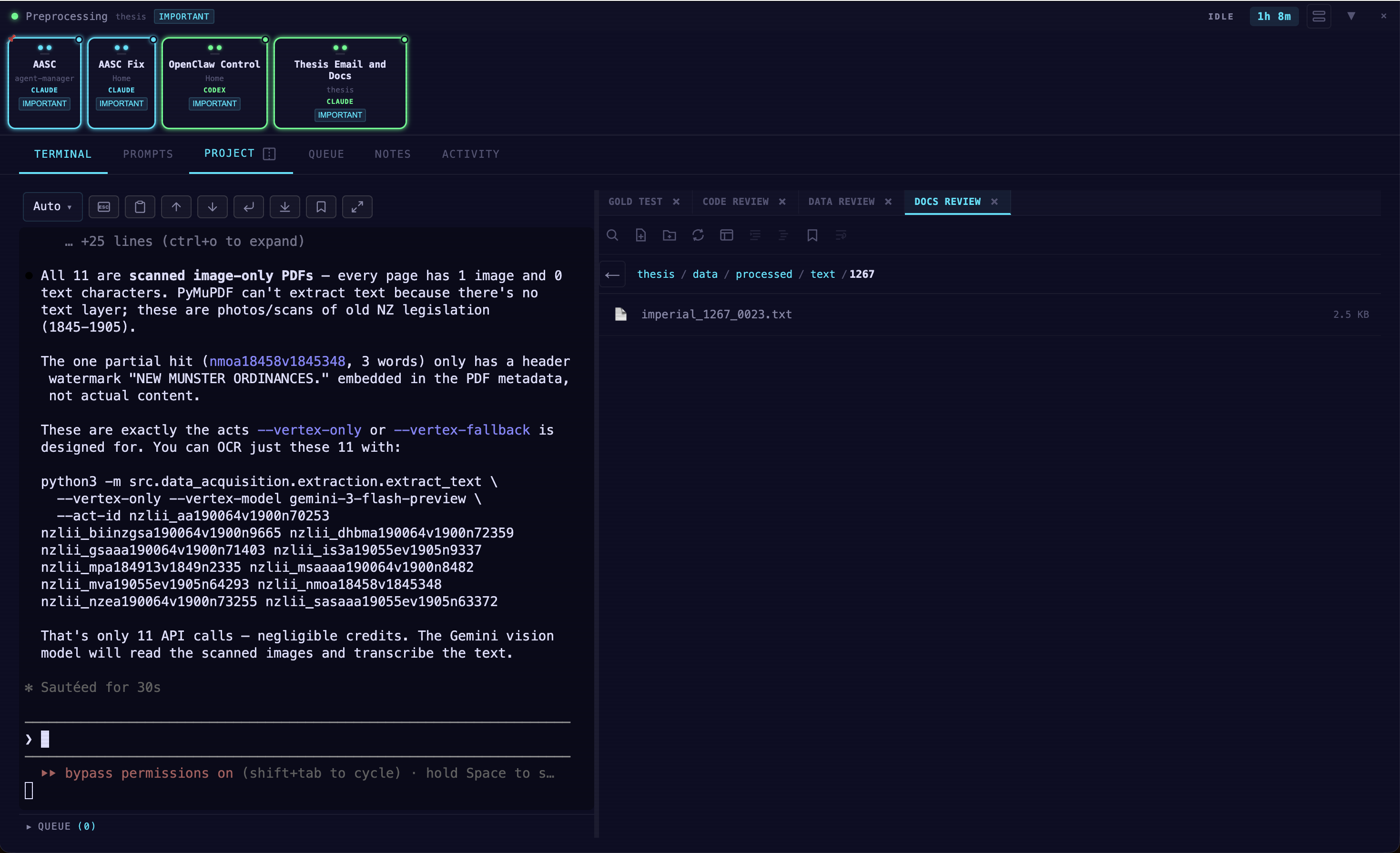
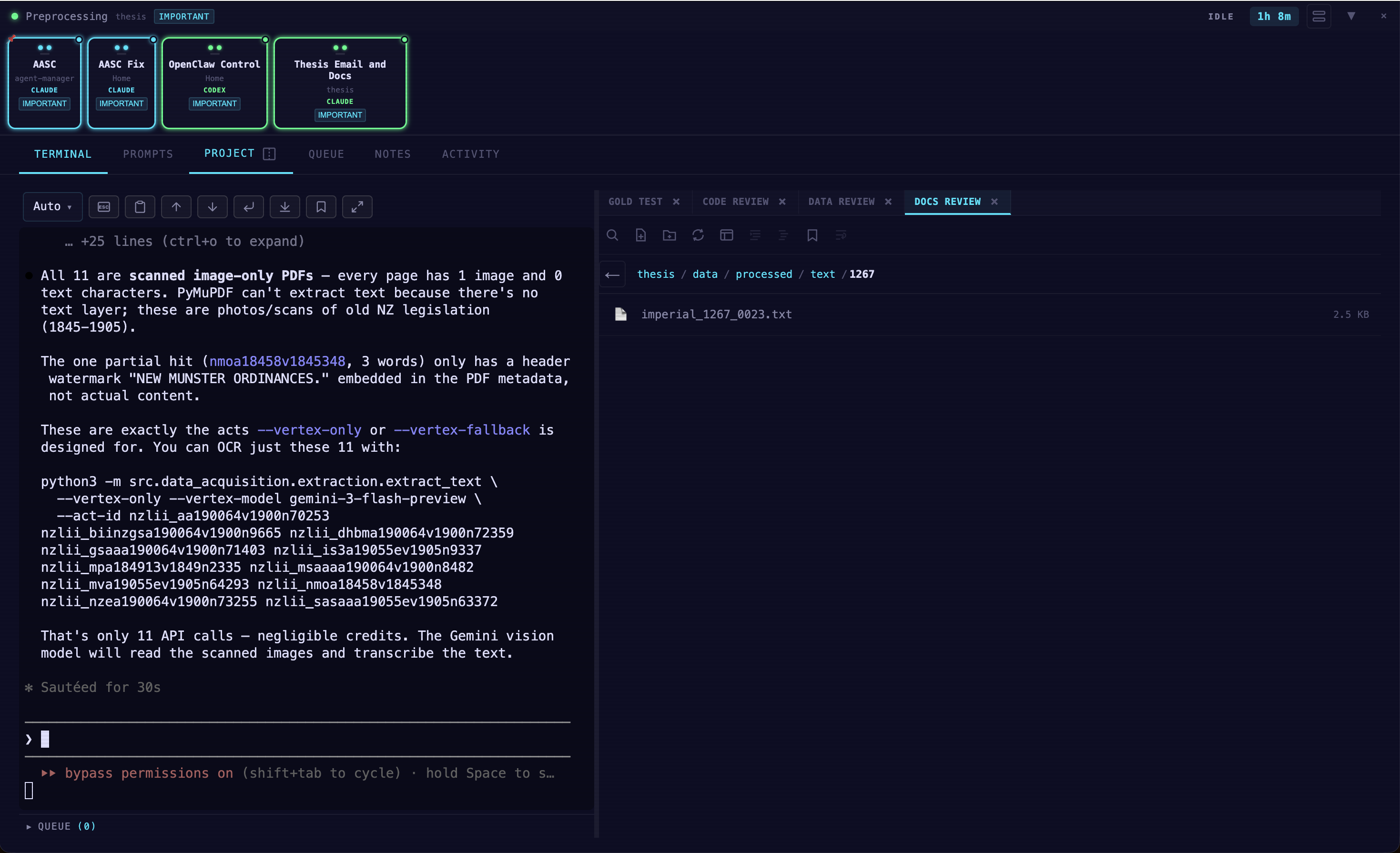
- Split view — Terminal and Project side-by-side with a draggable divider (ratio persisted per session)
- Approval alerts — yellow card, visor flash, and 3-burst alarm when tools need user approval
Terminal & SSH
- Full terminal emulation — xterm.js 5 with 256 colors, Unicode 11, WebLinks, and FitAddon
- Local & SSH sessions — create terminals with working directory, command, SSH host/key/password, tmux wrap/attach
- Session resume — reconnect to disconnected Claude sessions via
claude --resumewith one click - Terminal bookmarks — save scroll positions with notes, jump back to any bookmarked line
- Terminal toolbar — fullscreen, clear, copy, paste, theme selector (auto, light, dark, Solarized, Dracula, custom)
- Bidirectional WebSocket relay — real-time I/O, 50ms debounced resize, Escape forwards
\x1bto SSH
Project File Browser
- Browse & search — navigate project directories, full-text file search with cached results
- Syntax highlighting — code viewer with line numbers, word wrap toggle, and markdown outline panel
- Sub-tab system — open multiple directories/files in tabs within the Project panel
- File bookmarks — save line references with notes; bookmarked lines highlighted in the code viewer; cross-file navigation
- Sort & filter — sort by name or date, toggle date/time display, file size shown per entry
- File editing — inline editor with save support for quick edits
Multi-CLI Monitoring
- Three AI CLIs — Claude Code (up to 14 events), Gemini CLI (4 events), and Codex (1 event)
- 3 hook density levels — High (full monitoring), Medium (default, 12 events), Low (5 events, minimal overhead)
- File-based message queue — hooks append to JSONL queue file via atomic POSIX append (~0.1ms); HTTP POST fallback
- 3–17ms end-to-end latency — from hook fired to browser updated
- 5-priority session matching — pending resume, terminal ID, working directory, path scan, PID parent check
- Approval detection — tool-category timeouts with child-process check;
PermissionRequestevent for reliable signal - CLI badge detection — auto-detects CLAUDE, GEMINI, CODEX, or AIDER from launch command
Prompt Queue
- Global queue view — see all pending prompts across every session in one place
- Per-session queue — compose, reorder (drag-and-drop), send, and move prompts between sessions
- Auto-send mode — queued prompts auto-dispatch when the target session becomes idle
Analytics & History
- History search — full-text search across titles, projects, and labels with date range, status, and sort filters
- Analytics dashboard — summary cards, 7-day activity heatmap, tool usage breakdown, active projects ranking
- Timeline view — time-series visualization (hourly, daily, weekly) of sessions, prompts, and tool calls
Theming & Sound
- 9 scene themes — Command Center, Cyberpunk, Dracula, Nord, Monokai, Solarized, Light, Warm, Blonde
- 16 synthesized sounds — per-CLI profiles with per-event sound mapping (chime, ping, alarm, fanfare, etc.)
- 6 ambient presets — rain, lo-fi, server room, deep space, coffee shop, or off
- Visual effects — glowing card borders, pulsing animations, scanline CRT overlay, status particles, fog depth by theme
Notes & Summaries
- Session notes — plain-text notes with full CRUD, stored in both SQLite and IndexedDB
- AI-powered summaries — generate session summaries via configured LLM API with customizable prompt templates
Authentication & Security
- Password protection — optional login with HttpOnly cookie (1-hour TTL), rate-limited (5 attempts/15min)
- Security headers — X-Frame-Options, CSP, CORS, localhost-only hook endpoint, shell metacharacter injection prevention
- Directory traversal protection —
resolveProjectPath()validates all file browser paths
Keyboard Shortcuts
- Full keyboard navigation —
/search,Tnew terminal,Kkill,Aarchive,Mmute,Ssettings,?shortcuts panel - Rebindable shortcuts — customize every shortcut from Settings with conflict detection
- Session switching —
Alt+Cmd+1–9to select Nth session by status priority
Data Persistence
- Dual storage — SQLite on server (sessions, prompts, tools, events, notes) + IndexedDB via Dexie in browser (12 tables)
- Auto-snapshots — server saves full state every 10 seconds; SSH terminals auto-respawn on restart
- Session ID migration — seamless re-keying when sessions resume with new IDs
See docs/feature/README.md for the complete features reference with architecture details and API documentation.
Requirements
- Node.js 18+ with npm
- jq (recommended) for hook enrichment — hooks still work without it but with less metadata
- One or more supported AI CLIs:
Getting Started
Using npx (Recommended)
npx ai-agent-session-center
The dashboard starts at http://localhost:3333 (default port, configurable during setup) and automatically configures hooks.
Global Install (if npx is not available)
npm install -g ai-agent-session-center
ai-agent-session-center
Uninstall
# Remove hooks from all CLI configs
npx ai-agent-session-center --uninstall

# If installed globally
npm uninstall -g ai-agent-session-center
From Source
git clone https://github.com/coding-by-feng/ai-agent-session-center.git
cd ai-agent-session-center
npm install
npm run dev
Usage
- Start the dashboard — robots appear automatically as you use AI CLIs in any terminal
- Click + New to create SSH terminal sessions directly from the dashboard
- Click a robot to view full session details (prompts, tools, activity, terminal, notes, queue)
- Assign sessions to rooms to organize your workspace in the 3D scene
- Open Settings to customize themes, sounds, and hook density
CLI Options
ai-agent-session-center [options]

Options:
  --port <number>    Server port (default: 3333)
  --no-open          Don't auto-open browser
  --debug            Enable verbose logging
  --setup            Re-run the interactive setup wizard
  --uninstall        Remove all hooks from CLI configs and exit
How It Works
Agent Session Center uses lightweight bash hooks that append JSON events to a file-based message queue (/tmp/claude-session-center/queue.jsonl). The server watches this file and broadcasts updates to connected browsers via WebSocket.
No modifications to any CLI are needed. The hooks are purely observational and add negligible overhead (~2-5ms per event). End-to-end latency: 3-17ms from hook fired to browser updated.
AI CLI (Claude / Gemini / Codex)
         |
    Hook Script (bash)                    ~2-5ms
    - Enriches with PID, TTY, terminal env
         |
  /tmp/.../queue.jsonl                    ~0.1ms
  - Atomic POSIX append
         |
  Server (Express + WebSocket)            ~0.5ms
  - Validate, process, broadcast
         |
  React Frontend
  - 3D scene + detail panels update
Session Matching
When a hook event arrives, a 5-priority fallback system links it to the correct terminal session: pending resume match, terminal ID env var, working directory match, path scan, and PID parent check. If no match is found, a display-only card is created with the detected source (VS Code, iTerm, Warp, Ghostty, etc.).
Hook Density Levels
| Level | Events | Use Case |
|---|---|---|
| high | All 14 Claude events | Full monitoring, approval detection |
| medium | 12 events | Default, good balance |
| low | 5 events | Minimal overhead |
Tech Stack
- Backend: Node.js 18+ (ESM), Express 5, WebSocket (ws), tsx
- Frontend: React 19, TypeScript, Vite
- 3D Visualization: Three.js, React Three Fiber, drei
- State Management: Zustand, React Query
- Terminal: xterm.js, node-pty
- Database: SQLite (server, WAL mode) + IndexedDB via Dexie (browser)
- Hooks: Bash scripts (file-based MQ primary, HTTP fallback)
- Testing: Vitest (400+ tests) + Playwright (E2E)
- Charts: Recharts
- Drag & Drop: @dnd-kit
Session States
| Status | What it means | Visual |
|---|---|---|
| Idle | No activity | Green, robot seeks coffee lounge |
| Prompting | You just sent a prompt | Cyan, robot walks to desk |
| Working | Agent is calling tools | Orange, charging effect |
| Waiting | Agent finished, your turn | Cyan, robot goes to gym |
| Approval | Tool blocked, needs yes/no | Yellow, visor flash, alarm |
| Input | Waiting for your answer | Purple, arm raised |
| Ended | Session closed | Red, offline animation |
Keyboard Shortcuts
| Key | Action |
|---|---|
/ |
Focus search |
Escape |
Close modal / deselect session |
? |
Toggle shortcuts panel |
S |
Toggle settings |
K |
Kill selected session |
A |
Archive selected session |
T |
New terminal session |
M |
Mute/unmute all |
Known Limitations
- Session matching heuristic — linking hook events to SSH terminals uses a multi-priority fallback system. Two sessions in the same working directory may occasionally cross-link.
- Approval detection timing — auto-approved long-running commands (npm install, builds) will briefly show as "waiting for approval" for ~8 seconds until the post-tool event clears it.
- macOS/Linux focused — primary development is on macOS. Linux should work identically. Windows support via PowerShell hook variant is less tested.
- 3D scene performance — with many concurrent sessions (20+), the Three.js scene may impact performance on lower-end hardware.
Roadmap
Contributions and ideas are welcome in these areas:
- More CLI integrations — support for OpenCode, Cursor, Windsurf, or any agentic framework
- Remote monitoring — dashboard accessible from other machines on the network
- Agent creation templates — define agents with custom system prompts, tools, and configurations before launching
- Collaboration — multi-user dashboards where teams can see each other's agent sessions
- Mobile companion — responsive PWA for monitoring on the go
- Plugin system — extensible hooks for custom visualizations and integrations
- Community themes — user-contributed 3D scene themes and robot models
If any of these interest you, feel free to open an issue or submit a PR.
Commands
npm run dev              # Development (Vite HMR + backend)
npm run build            # Build frontend for production
npm start                # Start production server
npm run setup            # Interactive setup wizard
npm run install-hooks    # Install hooks into CLI configs
npm run uninstall-hooks  # Remove all dashboard hooks
npm run reset            # Reset everything (hooks, config, backup)
npm test                 # Run tests (400+ Vitest tests)
npm run test:watch       # Watch mode
npm run test:e2e         # E2E tests (Playwright)
npm run debug            # Start with verbose logging
Troubleshooting
Hooks Not Firing
# Verify hooks are registered
cat ~/.claude/settings.json | grep dashboard-hook

# Test manually
echo '{"session_id":"test","hook_event_name":"SessionStart"}' | ~/.claude/hooks/dashboard-hook.sh

# Re-install
npm run install-hooks
Port 3333 in Use
The server auto-resolves port conflicts. To use a different port:
npx ai-agent-session-center --port 4444
PORT=4444 npm start
jq Not Installed
# macOS
brew install jq

# Ubuntu/Debian
sudo apt-get install jq
Contributing
Contributions are welcome! See CONTRIBUTING.md for guidelines on how to get started.
Changelog
See CHANGELOG.md for a detailed list of changes in each release.
License
This project is licensed under the MIT License.
Yorumlar (0)
Yorum birakmak icin giris yap.
Yorum birakSonuc bulunamadi