opik-claude-code-plugin
Health Gecti
- License — License: Apache-2.0
- Description — Repository has a description
- Active repo — Last push 0 days ago
- Community trust — 20 GitHub stars
Code Basarisiz
- rm -rf — Recursive force deletion command in test/benchmark.sh
- rm -rf — Recursive force deletion command in test/e2e-test.sh
- rm -rf — Recursive force deletion command in test/integration-test.sh
Permissions Gecti
- Permissions — No dangerous permissions requested
Bu listing icin henuz AI raporu yok.
Log Claude Code sessions to Opik, the open-source LLM observability and evaluation platform, built by Comet. Tracing, evaluation, and skills for observable AI applications.
Opik Claude Code Plugin
Log Claude Code sessions to Opik for LLM observability, plus skills and agents for building observable AI applications.
Opik is the open-source LLM observability and evaluation platform, built by Comet.
Features
- Session Tracing: Automatically log Claude Code sessions as Opik traces
- Span Tracking: Each tool call becomes a span within the trace
- Subagent Support: Nested agent calls are tracked with parent-child relationships
- Skills: Built-in knowledge for LLM observability, tracing, and evaluation
- Agents: Code review agent for agent architecture best practices
How Tracing Works
We trigger tracing for everything done in Claude Code, but don't slow you down.
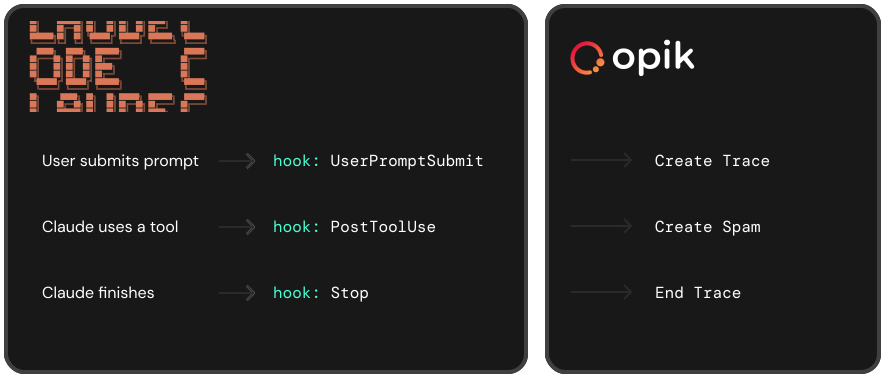
Each conversation turn becomes an Opik trace. Tool calls, thoughts, and responses become spans. Subagent invocations are nested under their parent Task span.
Installation
From within Claude Code:
/plugin marketplace add comet-ml/opik-claude-code-plugin
Then install the plugin:
/plugin install opik
Local Install (for contributors)
If you've cloned the repo locally, add it as a marketplace and install from there:
/plugin marketplace add /path/to/opik-claude-code-plugin
/plugin install opik
Important: Restart any running Claude Code sessions after installation. Hooks only load when a session starts.
Configuration
Run the Opik CLI to configure your connection:
pip install opik
opik configure
This creates ~/.opik.config with your API URL, key, and workspace.
Optional Environment Variables
export OPIK_CC_PROJECT="my-project"         # Project name (default: claude-code)
export OPIK_CC_WORKSPACE="my-workspace"     # Workspace override (default: OPIK_WORKSPACE / ~/.opik.config)
export OPIK_CC_TRUNCATE_FIELDS="false"      # Don't truncate large fields
All plugin env vars use the OPIK_CC_ prefix to avoid conflicts with standard Opik SDK variables.
OPIK_CC_WORKSPACE and OPIK_CC_PROJECT let you send Claude Code traces to a different
workspace/project than the rest of your Opik setup, without touching the globalOPIK_WORKSPACE / project_name in ~/.opik.config used by the Opik SDK. Both can also be
set in ~/.opik.config via the plugin-scoped cc_workspace and cc_project keys:
[opik]
workspace = my-sdk-workspace      # used by the Opik SDK
project_name = my-sdk-project     # used by the Opik SDK
cc_workspace = my-cc-workspace        # used only by the Claude Code plugin
cc_project_name = my-cc-project       # used only by the Claude Code plugin
Note: for backward compatibility, if
cc_project_nameis not set the plugin still falls back
to the sharedproject_namekey.
External Trace Linking
Link Claude Code sessions to existing Opik traces (useful for embedding Claude Code in larger workflows):
export OPIK_CC_PARENT_TRACE_ID="your-trace-id"  # Attach to existing trace
export OPIK_CC_ROOT_SPAN_ID="your-span-id"      # Set parent span for all Claude Code spans
MCP Server Setup
The Opik MCP server provides Claude with tools to interact with your Opik data - query traces, analyze experiments, and access evaluation results directly in conversation.
For Opik Cloud
Add to your ~/.claude.json:
{
  "mcpServers": {
    "opik": {
      "command": "npx",
      "args": ["-y", "opik-mcp", "--apiKey", "YOUR_OPIK_API_KEY"]
    }
  }
}
Replace YOUR_OPIK_API_KEY with your API key from comet.com.
For Self-Hosted Opik
{
  "mcpServers": {
    "opik": {
      "command": "npx",
      "args": ["-y", "opik-mcp", "--apiBaseUrl", "http://localhost:5173/api"]
    }
  }
}
Adjust the apiBaseUrl to match your Opik instance.
Pre-configured Templates
Copy-ready configurations are available in mcp-configs/mcp-servers.json.
Commands
/opik:trace-claude-code - Claude Code Session Tracing
Enable/disable automatic tracing of your Claude Code sessions to Opik.
/opik:trace-claude-code start                 # Enable tracing for this project
/opik:trace-claude-code start --debug         # Enable tracing + debug logging
/opik:trace-claude-code stop                  # Disable tracing for this project
/opik:trace-claude-code status                # Check project + global + effective state

/opik:trace-claude-code start --global        # Enable tracing for all projects
/opik:trace-claude-code stop --global         # Disable tracing globally
Tracing state is stored in .claude/.opik-tracing-enabled (project) or ~/.claude/.opik-tracing-enabled (global). Resolution order (first match wins):
- Project file containing
off/disabled→ disabled (opt a single project out of a global enable) - Project file present → enabled (
debugcontent also enables debug logging) - Global file present → enabled (same content rules)
- Neither → disabled
So the project setting always takes precedence over the global one. Running stop in a project while global tracing is on writes the off opt-out for that project rather than removing the global enable.
Note: Changes take effect immediately for new conversation turns (no restart needed).
/opik:instrument - Add Observability to Your Code
Automatically detect frameworks in your code and add the correct Opik integration.
/opik:instrument my_agent.py        # Add tracing to a specific file
/opik:instrument                    # Analyze current context and add tracing
Supports automatic detection and integration for:
- Python: OpenAI, Anthropic, LangChain, LlamaIndex, CrewAI, Bedrock, Groq, LiteLLM
- TypeScript: OpenAI, LangChain, Vercel AI SDK
- Custom code: Adds
@opik.trackdecorators orOpikclient usage
The command ensures tracing starts at your entry point (critical for replay capability) and uses the correct span types.
Skills
/opik:agent-ops - LLM Observability Knowledge
Comprehensive guidance on:
- Opik setup and configuration
- Tracing with Python/TypeScript SDKs
- 80+ framework integrations (LangChain, CrewAI, OpenAI, Anthropic, etc.)
- Evaluation with 41 built-in metrics
- Production monitoring, guardrails, and debugging
Agents
agent-reviewer
Reviews agent code for:
- Idempotence and retry safety
- Security vulnerabilities
- Architecture patterns
- State management
- Observability hooks
Directory Structure
opik-claude-code-plugin/
├── .claude-plugin/
│   ├── plugin.json         # Plugin manifest
│   └── marketplace.json    # Marketplace definition
├── hooks/
│   └── hooks.json          # Hook configuration
├── scripts/
│   └── opik-logger         # Platform selector script
├── bin/
│   └── opik-logger-*       # Compiled binaries (darwin/linux, amd64/arm64)
├── src/
│   └── *.go                # Go source code
├── skills/
│   └── agent-ops/          # Observability skill + references
├── agents/
│   └── agent-reviewer.md   # Agent review agent
├── commands/
│   ├── trace-claude-code.md  # /opik:trace-claude-code command
│   └── instrument.md         # /opik:instrument command
└── mcp-configs/
    └── mcp-servers.json    # MCP server configurations
Building from Source
make build        # Build for all platforms
make build-local  # Build for current platform only
Opik for Claude Code
This repo is part of a set of tools for observing Claude Code and other coding agents with Opik:
- opik-claude-code-plugin: log Claude Code sessions as Opik traces, with skills and agents included (this repo)
- ccsync: export Claude Code conversation history to Opik
- cost-intelligence-proxy: meter Claude Code token spend and cost per call
- opik-skills: agent skills for instrumenting your code with Opik
Yorumlar (0)
Yorum birakmak icin giris yap.
Yorum birakSonuc bulunamadi