compdf-mcp
Health Pass
- License — License: Apache-2.0
- Description — Repository has a description
- Active repo — Last push 0 days ago
- Community trust — 98 GitHub stars
Code Pass
- Code scan — Scanned 11 files during light audit, no dangerous patterns found
Permissions Pass
- Permissions — No dangerous permissions requested
No AI report is available for this listing yet.
A lightweight MCP (Model Context Protocol) server for integrating ComPDF AI with Claude Desktop, enabling AI-powered intelligent document processing and data extraction from PDFs via natural language.

ComPDF MCP
ComPDF MCP is built for MCP clients and AI agent platforms. It provides PDF/image parsing and data extraction, PDF conversion, PDF editing, and image conversion capabilities. It helps users process raw documents first, then pass lighter, cleaner, and more structured results into AI, reducing token usage, lowering AI costs, and improving overall processing efficiency.
- If you find ComPDF MCP useful, please consider giving us a ⭐ Star on GitHub. It helps us grow and improve.
- Got questions or ideas? Join the conversation in our Discussions.



Why Choose ComPDF MCP • Capabilities • Technical Architecture • Quick Start • Deployment and Operations • License and Free Access • Use Cases and Example Prompts • Support
Why Choose ComPDF MCP
The core reason users choose ComPDF MCP is not simply to let AI work with PDFs. It is to process complex, lengthy, and noisy source documents into inputs that are easier for models to understand before handing them off to AI for analysis, summarization, Q&A, or automation.
Raw PDFs, scanned files, and image files are often larger, noisier, and less stable in structure. By using ComPDF MCP for conversion, extraction, and page-level processing first, then sending the results into AI, users can:
- Reduce AI token usage
- Lower AI costs
- Shorten response time
- Improve the quality of structured outputs
- Avoid wasting model budget on noisy raw files
- Handle both PDF and image processing through one MCP service
- Fit document-heavy workflows and multi-platform agent scenarios
This approach is especially valuable when processing reports, contracts, invoices, tables, scanned files, and similar documents in bulk. In these cases, a "process documents first, then call AI" workflow is usually more cost-efficient and better suited for downstream automation than sending original files directly to the model.
Capabilities
ComPDF MCP focuses on three major capability groups: document conversion, PDF operations, and intelligent parsing and data extraction.
1. PDF and Image Conversion
| Capability | Description |
|---|---|
| PDF to Word | Convert PDF files into editable Word documents while preserving the original layout, text, images, and formatting as much as possible. |
| PDF to Excel | Convert PDF files into Excel workbooks with support for tables, numbers, and structured business data. |
| PDF to Slide | Convert PDF pages into editable PowerPoint slides while preserving the original layout and visual structure as much as possible. |
| PDF to HTML | Convert PDF files into HTML for web display and content reuse while retaining text, images, tables, and layout. |
| PDF to RTF | Convert PDF files into RTF documents with support for text and image content. |
| PDF to Image | Convert PDF pages into PNG or JPG images with configurable resolution and DPI. |
| PDF to CSV | Extract tables from PDF files and export them as CSV, either table by table or as merged output. |
| PDF to TXT | Extract text from PDF or scanned PDF files and save it as plain text. |
| PDF to JSON | Extract text, tables, and images from PDF files and save them as structured JSON. |
| PDF to Markdown | Convert PDF files into Markdown for easier reuse in knowledge bases, developer docs, blog systems, and AI workflows. |
| PDF to Searchable PDF | Run OCR on scanned PDFs and output searchable PDFs with selectable, copyable, and highlightable text for retrieval, archiving, and downstream processing. |
| PDF to OFD | Convert PDF files into OFD files for OFD archiving, document circulation, and localized office scenarios. |
| Word to PDF | Convert Word documents into PDF while preserving layout, fonts, images, and page structure as much as possible for sharing, archiving, and printing. |
| PNG to PDF | Convert PNG images into PDF for easier packaging, sharing, printing, and archiving of screenshots, design files, or supporting image materials. |
| RTF to PDF | Convert RTF documents into PDF while preserving core text styling and layout for consistent cross-device viewing and formal output. |
| Excel to PDF | Convert Excel workbooks or spreadsheets into PDF for report sharing, printing, archiving, and preventing accidental formula edits. |
| TXT to PDF | Convert plain TXT files into PDF, making logs, notes, and text instructions easier to organize as fixed-layout documents. |
| CSV to PDF | Convert CSV table data into PDF for snapshot sharing, review, printing, and business archiving. |
| Slide to PDF | Convert PowerPoint presentations into PDF for presentation distribution, cross-device viewing, and formal record keeping. |
| HTML to PDF | Convert HTML pages or content fragments into PDF for webpage preservation, report export, email archiving, and printable output. |
| Image to Word | Convert JPG, JPEG, PNG, and BMP image files into editable Word documents. |
| Image to Excel | Convert image files into Excel workbooks with support for tables, text, and numeric content. |
| Image to PPT | Convert image files into editable PowerPoint slides while preserving visible layout and content structure as much as possible. |
| Image to PDF | Convert JPG, JPEG, PNG, BMP, and similar image files into PDF for consolidating, sharing, printing, and archiving one or multiple images. |
| Image to HTML | Convert image files into HTML while preserving text, layout, tables, and major visual elements as much as possible. |
| Image to RTF | Convert image files into RTF documents with support for extracted text and images. |
| Image to CSV | Extract tables from image files and export them as CSV. |
| Image to TXT | Extract text from image files and save it as plain text. |
| Image to JSON | Extract text, tables, and images from image files and save them as structured JSON. |
2. PDF Editing, Protection, and Comparison
| Capability | Description |
|---|---|
| Merge PDF Files | Combine multiple PDF files into a single PDF document. |
| Split PDF Files | Split one PDF file into multiple smaller PDF files. |
| Rotate PDF Pages | Rotate selected PDF pages by 90, 180, or 270 degrees. |
| Delete PDF Pages | Remove one or more pages from a PDF file. |
| Insert PDF Pages | Insert pages from another PDF into an existing PDF. |
| Extract PDF Pages | Extract selected pages or page ranges and save them as a new file. |
| Convert PDF Standard | Convert a PDF conformance or archival standard. |
| Add Watermark | Add text or image watermarks to PDF files for branding or usage control. |
| Remove Watermark | Remove text or image watermarks from supported PDF files. |
| Compress PDF | Reduce PDF file size for easier storage, upload, and sharing. |
| Encrypt PDF | Protect PDF files with AES encryption and permission controls. |
| Decrypt PDF | Remove passwords from authorized PDF files for internal processing or reuse. |
| Compare PDFs | Compare the content differences between two PDF files. |
3. Intelligent Parsing and Data Extraction
| Capability | Description |
|---|---|
| Intelligent Document Parsing | Parse PDFs and images into structured document output for agents, automation workflows, and downstream systems. |
| Intelligent Data Extraction from PDFs and Images | Extract valuable business data such as text, tables, and content fields from PDFs and images. |
Technical Architecture
This project is an MCP Streamable HTTP service built with Python, FastMCP, and Starlette. Tool parameter schemas are generated from the bundled official OpenAPI parameter snapshot, and the service rejects unknown parameters.
Clients can access every tool through the aggregate endpoint:
http://127.0.0.1:8000/mcp
If you only need part of ComPDF MCP, use the module endpoints below:
| Module | MCP Endpoint | Business Tools | Representative Tools |
|---|---|---|---|
| PDF and Image Conversion | /mcp/conversion/mcp |
28 | pdf_to_word, pdf_to_markdown, image_to_json, word_to_pdf, and more |
| Intelligent Parsing and Data Extraction | /mcp/ai/mcp |
2 | document_parse, document_extract |
| PDF Editing, Protection, and Comparison | /mcp/pdf/mcp |
13 | merge_pdf, add_watermark, encrypt_pdf, compare_pdf, and more |
| All capabilities | /mcp |
44 | All tools above |
All business tools use a shared file-input shape. Keys in options must use the camelCase parameter names from the ComPDF API documentation. Only htmlFile, templateFile, dataFile, imageFile, and iccFile may be uploaded through special_files.
{
  "files": [
    {
      "filename": "report.pdf",
      "content_base64": "JVBERi0xLjc...",
      "content_type": "application/pdf"
    }
  ],
  "options": {
    "pageRanges": "1-3,6",
    "enableOcr": 1
  },
  "special_files": {
    "imageFile": {
      "filename": "watermark.png",
      "content_base64": "iVBORw0..."
    }
  }
}
The decoded size of an individual Base64 file is limited to 100 MB. Synchronous tool responses include the ComPDF result, the relevant official documentation URL, and a statement that download URLs expire after 24 hours.
Quick Start
1. Install and Run the Service
Prerequisite: Python 3.10+. From the repository root, create a virtual environment and install the package in editable mode.
Windows:
python -m venv .venv
.venv\Scripts\Activate.ps1
pip install -e .
Copy-Item .env.example .env
compdf-streaming-mcp
Linux / macOS:
python3 -m venv .venv
source .venv/bin/activate
pip install -e .
cp .env.example .env
compdf-streaming-mcp
The service listens on 0.0.0.0:8000 by default. Use these endpoints to check its status:
GET /healthz: service status and mounted MCP routes.GET /readyz: readiness status without calling the upstream ComPDF API.GET /metrics: request counters in Prometheus text format.
2. Configure the Service
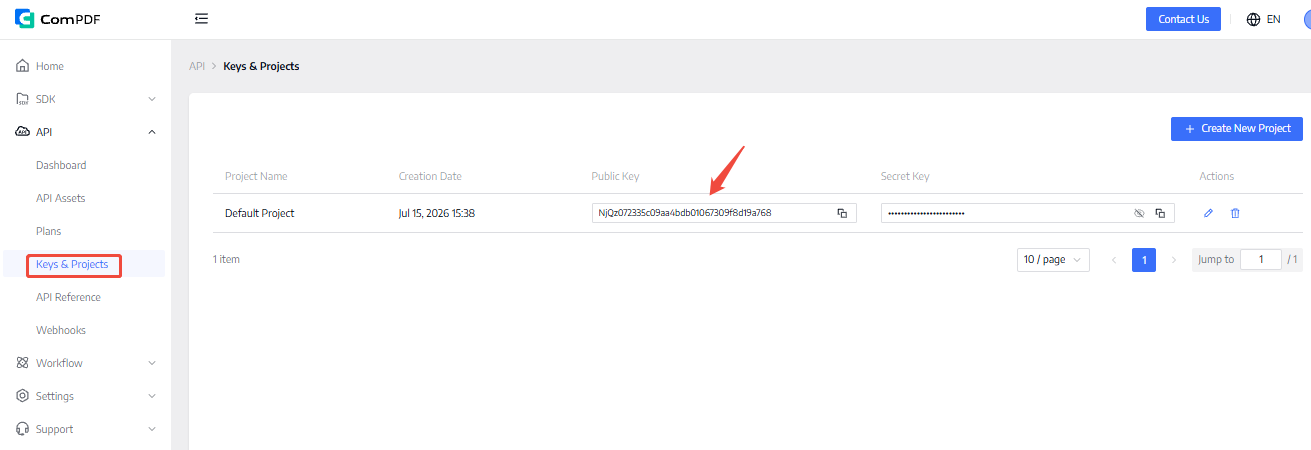
Copy .env.example to .env, then adjust settings for the deployment environment. The server does not store or configure a user's ComPDF API key. Each MCP request supplies that user's key through the X-ComPDF-API-Key header. You can sign up for ComPDF Portal and copy your free API key from the location shown below.
COMPDF_API_BASE_URL=https://api-server.compdf.com/server
COMPDF_API_TIMEOUT_SECONDS=180
MCP_HOST=0.0.0.0
MCP_PORT=8000
MCP_ALLOWED_HOSTS=localhost,localhost:*,127.0.0.1,127.0.0.1:*,mcp.example.com
MCP_RATE_LIMIT_PER_MINUTE=120
For mainland China accounts, use COMPDF_API_BASE_URL=https://api-server.compdf.cn/server. In production, add the reverse-proxy domain to MCP_ALLOWED_HOSTS; include a non-default port or use mcp.example.com:* when appropriate.
3. Configure an MCP Client
The examples below use the unified MCP URL http://127.0.0.1:8000/mcp. For a remote deployment, replace it with the public HTTPS address, for example https://your-domain.example/mcp.
First obtain a personal ComPDF API key (sign up to get your free API key). For clients that use environment variables, set it on the client machine first:
$env:COMPDF_API_KEY = "your-own-compdf-api-key"
Codex
Add the remote MCP service to ~/.codex/config.toml:
[mcp_servers.compdf]
url = "http://127.0.0.1:8000/mcp"
env_http_headers = { "X-ComPDF-API-Key" = "COMPDF_API_KEY" }
tool_timeout_sec = 180
Claude (Claude Code)
Add the following MCP server to the user-level configuration file ~/.claude.json. COMPDF_API_KEY must be available in the terminal session used to start Claude Code:
{
  "mcpServers": {
    "compdf": {
      "type": "http",
      "url": "http://127.0.0.1:8000/mcp",
      "headers": {
        "X-ComPDF-API-Key": "${COMPDF_API_KEY}"
      }
    }
  }
}
If ~/.claude.json already has configuration, merge compdf into the existing mcpServers object instead of overwriting the file.
GitHub Copilot (VS Code)
Run MCP: Open User Configuration from the VS Code Command Palette, or create .vscode/mcp.json in the workspace, then add the following configuration. VS Code prompts for the API key in a password field on first use:
{
  "inputs": [
    {
      "type": "promptString",
      "id": "compdf-api-key",
      "description": "ComPDF API Key",
      "password": true
    }
  ],
  "servers": {
    "compdf": {
      "type": "http",
      "url": "http://127.0.0.1:8000/mcp",
      "headers": {
        "X-ComPDF-API-Key": "${input:compdf-api-key}"
      }
    }
  }
}
Cursor
Open Cursor Settings > Tools & MCP, select New MCP Server, or edit ~/.cursor/mcp.json, then add:
{
  "mcpServers": {
    "compdf": {
      "url": "http://127.0.0.1:8000/mcp",
      "headers": {
        "X-ComPDF-API-Key": "your-own-compdf-api-key"
      }
    }
  }
}
This Cursor configuration stores the key in a local configuration file. Do not commit ~/.cursor/mcp.json or a project-level configuration file that contains the key.
All clients must send X-ComPDF-API-Key with every MCP request. Do not pass the key as a tool argument, URL parameter, or chat message.
4. Asynchronous and Presigned Uploads
In addition to the 44 synchronous business tools, each module provides list_operations and these task tools:
start_async_operation: invokes the matching/v2/processAsync/...endpoint for long-running or multi-file work.get_task_status: queries task status from/v2/task/taskInfo.create_presigned_upload,upload_presigned_file, andstart_presigned_operation: create a presigned task, upload the file, and start the task in sequence.
Presigned uploads support only operations with one standard file. Use asynchronous mode for PDF merging, comparison, page inserting, and more. The presigned URL remains only in the creating module server's memory and is never exposed as a tool argument or response field.
Deployment and Operations
Build and run the service with Docker Compose:
docker compose up --build
In production, expose the aggregate endpoint as https://your-domain.example/mcp behind an HTTPS reverse proxy, and configure MCP_ENV=production, MCP_PUBLIC_URL, MCP_OAUTH_ISSUER_URL, and MCP_STATIC_TOKENS_JSON. When enabled, clients must also send Authorization: Bearer <token>; this service token is separate from each user's ComPDF API key. See DEPLOYMENT.md for image transfer, HTTPS proxy, update, and rollback instructions.
License and Free Access
ComPDF MCP can be used for free, without purchasing or contacting sales.
Sign up to get your free API key and configure it
Suitable for individual trials, feature validation, and workflow testing
If you need higher API assets, enterprise deployment, or commercial cooperation, please contact the sales
This lowers the barrier to adoption and makes it easier to test real AI document workflows before deciding whether to move into deeper business use.
Use Cases and Example Prompts
Upload a PDF, image, or other source file. Enter a task instruction such as extracting tables, converting formats, merging PDFs, or adding watermarks. The agent calls the corresponding ComPDF Server tool and returns the result. If deeper analysis is needed, pass the processed output to AI afterward.
Example scenarios:
- In Claude, Cursor, Cline, and similar MCP clients, users upload reports, manuals, or proposal PDFs, convert them to Markdown or Word first, and then ask AI for summaries, knowledge Q&A, or content restructuring
- In MCP workflows for invoices, statements, scanned tables, and image attachments, users extract tables and structured data first, then move into finance review, data entry, or automated routing
- When organizing contracts, bids, quotations, or archived files in agent workflows, users first merge, split, watermark, and convert PDFs, then hand them off to AI for organization, naming, or outbound preparation
- In multi-step automation workflows, users first turn PDF or image files into lightweight CSV, JSON, or TXT outputs, then let downstream agents handle field normalization, approval flows, knowledge base ingestion, or script orchestration
Example prompts:
- Convert this PDF into Word and preserve the layout as much as possible.
- Extract all tables from this PDF and export them as CSV.
- Convert this image into JSON and return structured content.
- Merge these PDFs, add a watermark, and return the final file.
- Convert this report into Markdown first, then summarize the key points.
Built by the ComPDF team.
Website ·
Contact Sales ·
Tech Support
Reviews (0)
Sign in to leave a review.
Leave a reviewNo results found