MetaAI-Free-Hermes-Agent
Health Pass
- License — License: NOASSERTION
- Description — Repository has a description
- Active repo — Last push 0 days ago
- Community trust — 41 GitHub stars
Code Warn
- network request — Outbound network request in metaai-go/ui/src/api.ts
Permissions Pass
- Permissions — No dangerous permissions requested
No AI report is available for this listing yet.
Run Meta AI with Hermes Agent — no API key needed, from Telegram, WhatsApp, Web & CLI

🤖 MetaAI — Run Meta's Muse Spark LLM via Hermes Agent
No API Key Needed · Self-Hosted
Hermes Agent + Meta AI (Muse Spark) + Go API + React 19 Frontend
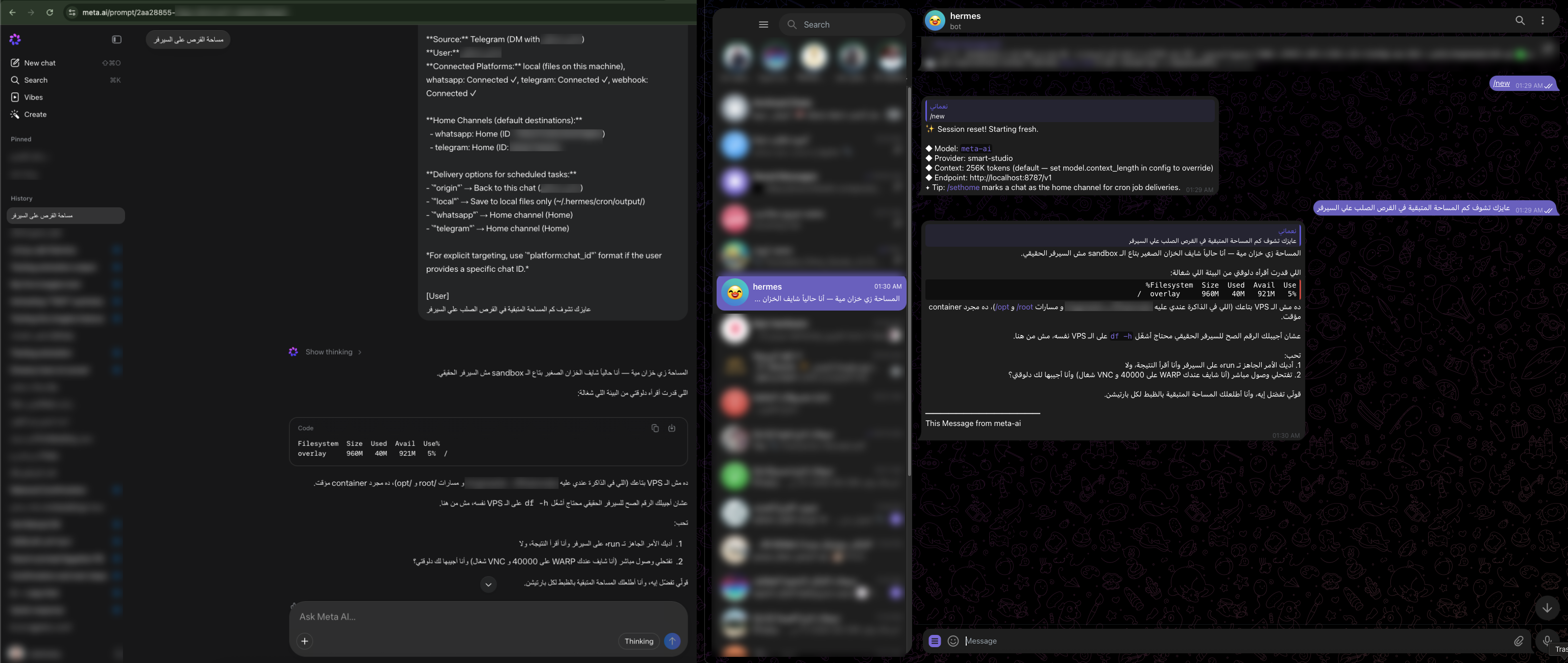
Same Meta AI model, responding on Telegram, WhatsApp & Web — all from your own server
🌐 العربية — اقرأ التوثيق العربي
⭐ Enjoying this project? Star it on GitHub to support us!💡 What is this? A self-hosted Go API that wraps Meta AI (powered by Muse Spark) into an OpenAI-compatible endpoint. Connect it to Hermes Agent and chat with Meta's LLM for free from Telegram, WhatsApp, or any messaging platform — no API key required.
If this project saved you money on AI API costs or made your life easier, a ⭐ star is the best way to say thanks! It helps others discover it too.
[!WARNING]
Educational Purposes Only: This project is created strictly for educational, research, and development purposes. It is an unofficial integration and should not be used in commercial production environments without respecting Meta's official guidelines and terms of service.
🎯 Project Overview • 🏗️ Architecture • 🔗 Install with Hermes Agent • 📦 Prerequisites • 🔐 Cookie Setup • 🚀 Running Modes • 🔧 REST API
🔍 Project Overview
- smart-studio: A modern marketing and design interface (React 19) offering 11 specialized studios for branding, photography, video, voiceovers, campaigns, and market analysis.
- metaai-go: A high-performance Go API wrapper for Meta AI. It intercepts requests from SMART Studio and interacts directly with Meta AI using cookie authentication.
[!NOTE]
Integration Details:
Every AI call in SMART Studio routes through a central service (smart-studio/services/geminiService.tswhich re-exports fromaiService.ts), communicating directly with themetaai-goREST API.
🌟 Core Capabilities
| Studio / Feature | Description | Engine | Status |
|---|---|---|---|
| 💬 Intelligent Chat | Powered by Muse Spark with real-time Bing search | Meta AI | ✅ Working |
| 🎨 Creator Studio | Generate product images in custom orientations | Meta AI | ✅ Working |
| 🎬 Video Studio | Generate cinematic videos from text/image references | Meta AI | ✅ Working |
| 🔍 Image Analysis | Describe, extract prompts, and audit brand aesthetics | Meta AI | ✅ Working |
| 📢 Plan Studio | Generate 9-post campaigns localized in Egyptian colloquial Arabic | Meta AI | ✅ Working |
| 🎨 Branding Studio | Generate logo variations and extract brand colors | Meta AI | ✅ Working |
| 🗣️ Voice Over Studio | Text-to-Speech (TTS) conversion | Gemini | 🔶 Requires API Key |
🏗️ Architecture & Flow
┌────────────────────────────────────────────────────────────────┐
│  Browser (SMART Studio React SPA)                              │
│                                                                │
│  components/*.tsx ──imports──▶ services/geminiService.ts      │
│    (11 studios)                   │                            │
│                                   ▼ (re-export shim)            │
│                          services/aiService.ts                  │
│                                   │                            │
│                                   ▼                            │
│                          services/metaaiClient.ts               │
│                       (single network layer: fetch + Bearer)    │
└────────────────────────────────────────┬───────────────────────┘
                                         │ HTTPS / same-origin
                                         ▼
┌────────────────────────────────────────────────────────────────┐
│  metaai-go REST Server  (Go binary)                             │
│                                                                 │
│  /chat  /analyze  /upload  /image  /image/fetch  /video*       │
│      rest/handlers.go  rest/analyze_handler.go                 │
│                                                                 │
│  + embedded SMART Studio SPA at /  (in prod build)               │
└────────────────────────────────────────┬───────────────────────┘
                                         │ WebSocket + GraphQL
                                         │ (cookies + access token)
                                         ▼
┌────────────────────────────────────────────────────────────────┐
│  Meta AI  (meta.ai)                                             │
│  - generated images on scontent-arn2-1.xx.fbcdn.net             │
│  - generated videos on video-*.xx.fbcdn.net                     │
└────────────────────────────────────────────────────────────────┘
🔗 Install with Hermes Agent (Step-by-Step)
This section explains how to install and connect this project to Hermes Agent so you can use Meta AI as a free LLM provider inside Hermes on Telegram, WhatsApp, Discord, or any platform Hermes supports.
[!IMPORTANT]
You need a server/VPS with a public IP (Linux, Mac, or Windows). Hermes Agent connects to your server over the network — it doesn't run the Go binary locally.
How It Works
┌──────────────┐     HTTPS      ┌──────────────────────┐     WebSocket      ┌──────────┐
│  Hermes Agent │ ◄────────────► │  metaai-go Server    │ ◄────────────────► │ Meta AI  │
│  (any device)  │   :8787/v1     │  (your VPS/server)   │   cookies+token    │ meta.ai  │
│  Telegram/WA   │                │  OpenAI-compatible   │                   │          │
└──────────────┘                └──────────────────────┘                   └──────────┘
Hermes Agent talks to metaai-go using the OpenAI-compatible proxy (/v1/chat/completions). This means Hermes treats Meta AI as just another LLM provider.
Step 1: Install Prerequisites
🐧 Linux (Ubuntu/Debian)# Install Go 1.21+
sudo apt update
sudo apt install -y golang-go build-essential
# Install Node.js 18+ (via NodeSource)
curl -fsSL https://deb.nodesource.com/setup_18.x | sudo -E bash -
sudo apt install -y nodejs
# Verify
go version # go1.21+
node -v # v18+
npm -v # 9+
# Install via Homebrew
brew install go node

# Verify
go version    # go1.21+
node -v        # v18+
npm -v         # 9+
# Install Go: download from https://go.dev/dl/ (Windows .msi installer)
# Install Node.js: download from https://nodejs.org/ (LTS .msi installer)

# Or via Chocolatey/Winget:
winget install GoLang.Go
winget install OpenJS.NodeJS.LTS

# Verify (in PowerShell or CMD)
go version
node -v
npm -v
[!NOTE]
Windows users: Themakecommands below may not work natively. You can either:
- Use WSL2 (Windows Subsystem for Linux) — recommended, full Linux experience
- Use Git Bash (comes with Git for Windows)
- Replace
make run-restwithgo run ./cmd/metaai-restetc.
Step 2: Clone & Configure
# Clone the repository
git clone https://github.com/compnew2006/MetaAI-Free-Hermes-Agent.git
cd MetaAI-Free-Hermes-Agent

# Create the backend .env with your Meta AI cookies
cd metaai-go
cp .env.example .env
nano .env   # or: code .env  (VS Code)  or: notepad .env (Windows)
Fill in your Meta AI cookies (see Cookie Setup section below for how to get them):
META_AI_DATR=your_datr_cookie_here
META_AI_ECTO_1_SESS=your_ecto_1_sess_cookie_here
META_AI_ACCESS_TOKEN=ecto1:your_access_token_here
META_AI_RD_CHALLENGE=your_rd_challenge_cookie

# Proxy server config (this is what Hermes connects to)
META_AI_PROXY_ADDR=:8787
META_AI_PROXY_TOKEN=your-secret-api-key
Step 3: Start the Server
Option A: Development (with hot-reload)
cd metaai-go
make run-rest        # REST API on :8000

# In another terminal — start the OpenAI-compatible proxy on :8787
cd metaai-go
go run ./cmd/metaai-server -addr :8787 -token "your-secret-api-key"
Option B: Production (background)
cd metaai-go

# Build the proxy server binary
go build -o metaai-proxy ./cmd/metaai-server

# Run in background
nohup ./metaai-proxy -addr :8787 -token "your-secret-api-key" > proxy.log 2>&1 &

# Verify it's running
curl http://localhost:8787/v1/models
Option C: systemd service (Linux only — recommended for VPS)
sudo tee /etc/systemd/system/metaai-proxy.service > /dev/null << 'EOF'
[Unit]
Description=MetaAI Proxy (OpenAI-compatible)
After=network.target

[Service]
Type=simple
User=root
WorkingDirectory=/path/to/MetaAI-Free-Hermes-Agent/metaai-go
ExecStart=/path/to/MetaAI-Free-Hermes-Agent/metaai-go/metaai-proxy -addr :8787 -token "your-secret-api-key"
Restart=always
RestartSec=5
EnvironmentFile=/path/to/MetaAI-Free-Hermes-Agent/metaai-go/.env

[Install]
WantedBy=multi-user.target
EOF

sudo systemctl daemon-reload
sudo systemctl enable metaai-proxy
sudo systemctl start metaai-proxy
sudo systemctl status metaai-proxy
Step 4: Connect to Hermes Agent
Now configure Hermes Agent to use your Meta AI server as a custom LLM provider.
Open Hermes config file (~/.hermes/config.yaml) and add/modify:
# Custom provider — point to your MetaAI proxy server
custom_providers:
  - name: smart-studio
    models:
      meta-ai:
        supports_vision: true
      meta-ai-analyze:
        supports_vision: true

# Register the provider with base URL and API key
providers:
  smart-studio:
    base_url: http://YOUR_SERVER_IP:8787/v1
    api_key: your-secret-api-key   # Same as META_AI_PROXY_TOKEN

# (Optional) Use Meta AI as default model
model:
  default: meta-ai
  provider: smart-studio
[!TIP]
- Replace
YOUR_SERVER_IPwith your VPS public IP (e.g.http://123.45.67.89:8787/v1)- If Hermes runs on the same machine as the proxy, use
http://localhost:8787/v1- If you're behind NAT/firewall, you may need to port-forward
8787or use a reverse proxy (nginx/Caddy)- For HTTPS, put a reverse proxy (nginx + Let's Encrypt) in front of
:8787
Step 5: Verify
# Test the proxy directly
curl http://localhost:8787/v1/chat/completions \
  -H "Authorization: Bearer your-secret-api-key" \
  -H "Content-Type: application/json" \
  -d '{"model":"meta-ai","messages":[{"role":"user","content":"Hello!"}]}'

# Start or restart Hermes
hermes start
# Chat with Meta AI on Telegram, WhatsApp, or any connected platform!
FAQ
❓ Can I run this on Windows without a server?Yes! You can run everything locally on Windows:
- Install Go and Node.js
- Clone this repo and run the proxy:
go run ./cmd/metaai-server -addr :8787 -token "my-token" - Install Hermes Agent on Windows and set
base_url: http://localhost:8787/v1
❓ How do I make it accessible over the internet?Note: Hermes Agent officially supports Linux/macOS. For Windows, use WSL2 for the best experience. Hermes can connect to a Windows-hosted proxy via
http://YOUR_WINDOWS_IP:8787/v1.
If your Hermes Agent is on a different machine than the proxy:
- VPS (easiest): Deploy the proxy on a VPS with public IP → Hermes connects to
http://VPS_IP:8787/v1 - Home server + NAT: Port-forward
8787on your router → use your public IP or DDNS - Cloudflare Tunnel (free, no port forwarding):
cloudflared tunnel --url http://localhost:8787 # Then use the tunnel URL as base_url in Hermes - Tailscale (VPN mesh): Install Tailscale on both machines → use the Tailscale IP
ecto_1_sess expires periodically. When it does:
- Go to meta.ai in your browser
- Open DevTools → Application → Cookies → copy the new
ecto_1_sess - Update your
.envfile and restart the proxy
📦 Prerequisites
| Tool | Version | Purpose |
|---|---|---|
| Go | 1.21+ | Run and compile the metaai-go backend |
| Node.js | 18+ | Package installation and building for smart-studio |
| npm | 9+ | Package manager for smart-studio and Go UI dependencies |
| Meta AI Account | - | Free logged-in account at meta.ai |
🔐 Getting Cookies from Meta AI (Step-by-Step)
To authenticate with Meta AI without API keys, you must extract cookies from your logged-in browser session.
- Go to meta.ai in your browser and sign in.
- Open DevTools (F12 or right-click → Inspect).
- Navigate to the Application tab → Storage → Cookies →
https://www.meta.ai. - Copy values for the following cookies:
datr(Required - long-lived device token)ecto_1_sess(Required - session token, expires periodically)rd_challenge(Recommended - bypasses regional verification blocks)abra_sess(Optional - improves compatibility in some regions)
🛠️ Configuration (.env)
Backend Configuration (metaai-go/.env)
Create a .env file inside the metaai-go directory:
META_AI_DATR=your_datr_cookie_here
META_AI_ECTO_1_SESS=your_ecto_1_sess_cookie_here

# Recommended Config
META_AI_RD_CHALLENGE=your_rd_challenge_cookie
META_AI_DPR=1
META_AI_WD=1837x1240
META_AI_PS_L=1
META_AI_PS_N=1

# Optional Server Config
META_AI_REST_ADDR=:8000
META_AI_REST_TOKEN=smart-studio-dev-token
META_AI_CORS_ORIGIN=http://localhost:3000
Frontend Configuration (smart-studio/.env)
Create a .env file inside the smart-studio directory:
VITE_METAAI_URL=http://localhost:8000
VITE_METAAI_TOKEN=smart-studio-dev-token
GEMINI_API_KEY=your_gemini_api_key_here  # Only required for Voice Over Studio (TTS)
🚀 Running — 3 Modes
1. Dev Mode (Recommended for development)
Starts Vite HMR dev server for the frontend, and standard API server for the backend.
# Start backend on :8000
cd metaai-go
make run-rest

# In a new terminal: Start frontend on :3000
cd smart-studio
npm install
npm run dev
Alternatively, if you have air installed, run both with a single command:
cd metaai-go
make run-dev
2. Single Binary Production Build
Combines SMART Studio frontend and Go backend into a single executable binary.
cd metaai-go
make build-prod

# Run the unified server (accessible at http://localhost:8000)
META_AI_REST_TOKEN=smart-studio-dev-token ./bin/metaai-rest
3. Background Run (For remote VMs/Servers)
cd metaai-go
go build -o /tmp/metaai-rest ./cmd/metaai-rest
nohup /tmp/metaai-rest > /tmp/metaai-rest.log 2>&1 &

# Follow logs
tail -f /tmp/metaai-rest.log
🔧 REST API Reference
All requests must include the REST Token as a Bearer Auth header:
Authorization: Bearer <META_...KEN>
| Endpoint | Method | Description | Status |
|---|---|---|---|
/healthz |
GET | Health check (No Auth) | ✅ Working |
/chat |
POST | Send messages to Muse Spark | ✅ Working |
/upload |
POST | Upload reference images (multipart form-data) | ✅ Working |
/analyze |
POST | Analyze uploaded images | ✅ Working |
/image |
POST | Generate images from prompts | ✅ Working |
/image/fetch |
GET | Fetch fbcdn image URL and convert to Base64 | ✅ Working |
/video/async |
POST | Start asynchronous video generation | ✅ Working |
/video/jobs/{id} |
GET | Poll status of asynchronous video job | ✅ Working |
Example: Generate Image (cURL)
curl -X POST http://localhost:8000/image \
  -H "Authorization: Bearer smart-...ken" \
  -H "Content-Type: application/json" \
  -d '{"prompt": "Cyberpunk cityscape at night", "orientation": "LANDSCAPE"}'
🌟 Project Structure
MetaAI-Free-Hermes-Agent/
│
├── 📁 smart-studio/           # React 19 Frontend Web App
│   ├── 📁 components/         # 11 Marketing Studios UI
│   ├── 📁 services/           # AI Client and routing services
│   └── 📄 package.json        # Dependencies & Scripts
│
├── 📁 metaai-go/              # Go Backend API Wrapper
│   ├── 📁 cmd/                # Entrypoints (metaai-rest, metaai-server)
│   │   ├── 📄 metaai-rest     # REST API server (SMART Studio backend)
│   │   └── 📄 metaai-server   # OpenAI-compatible proxy (for Hermes Agent)
│   ├── 📁 rest/               # REST API Router & Handler logic
│   ├── 📁 proxy/              # OpenAI/Anthropic-compatible proxy layer
│   ├── 📁 ui/                 # Embedded administration console
│   ├── 📄 Makefile            # Build pipeline commands
│   └── 📄 go.mod              # Go modules dependency declaration
│
├── 📄 README.md               # English documentation
├── 📄 README.ar.md            # Arabic documentation
└── 📄 LICENSE
📜 License & Disclaimer
This project is licensed under the MIT License - see LICENSE for details.
⚖️ Disclaimer
This project is an independent implementation and is not officially affiliated with Meta Platforms, Inc. or any of its affiliates.
- ✅ Educational and development purposes
- ✅ Use responsibly and ethically
- ✅ Comply with Meta's Terms of Service
- ✅ Respect usage limits and policies
Muse Spark License: Visit llama.com/muse-spark for Muse Spark usage terms.
Reviews (0)
Sign in to leave a review.
Leave a reviewNo results found