dense
Health Gecti
- License — License: MIT
- Description — Repository has a description
- Active repo — Last push 0 days ago
- Community trust — 14 GitHub stars
Code Uyari
- process.env — Environment variable access in assets/opencode/condense-codex-reroute.js
Permissions Gecti
- Permissions — No dangerous permissions requested
Bu listing icin henuz AI raporu yok.
Open-source CLI for running Claude Code, Codex, and OpenCode through Condense. Compress repeated context and see token savings per session.

Use fewer tokens in Claude Code, Codex, and OpenCode. A long debugging session can send the same file reads, diffs, and test logs to the model dozens of times. The open-source dense CLI launches your coding agent and routes its model requests through Condense’s hosted compression proxy.
63.8% lower estimated model cost across 64 recorded coding sessions. Replaying all 11,712 turns at Claude Opus 4.8 rates put the baseline at $861.28 and condense at $312.20. See the benchmark replay.
Install · Try one session · Privacy · CLI docs · Plans
Install
Start with Claude Code, Codex, or OpenCode installed and working on your machine.
macOS and Linux
curl -fsSL https://cli.condense.chat/unix | sh
Windows PowerShell
irm https://cli.condense.chat/nt | iex
The installer opens setup and signs you in to Condense through your browser. Setup preselects the agents it finds. For a one-session trial, press Space to uncheck each selected agent, then Enter. View the install scripts.
Try one session
From your project directory, launch the agent you already use. Pass it the same flags and arguments as usual.
| Claude Code | Codex | OpenCode |
|---|---|---|
dense claude |
dense codex |
dense opencode |
Try a task you can verify. For example, open a project with a failing test and ask the agent to find the cause, fix it, and rerun the test. Once it finishes, type /dense:info inside the agent to see the input tokens and model cost before and after compression.
Run dense info from a separate terminal for lifetime totals. On a Claude subscription, dense usage also shows how much of your plan Anthropic says you’ve used and estimates what the same work would have used without compression. How the estimate works.
Use your usual launch command
If you selected Claude Code during setup, just type claude. You can change that choice later for any supported agent.
dense persist claude     # route future claude sessions through Condense
dense unpersist claude   # return to launching with dense claude on demand
Reproduce the benchmark
This accelerated benchmark replay compares the same coding sessions with and without condense. It runs offline, simulates prompt-cache reads and writes, and prices the resulting token counts at Claude Opus 4.8 rates. The right side shows cumulative estimated cost and tokens.
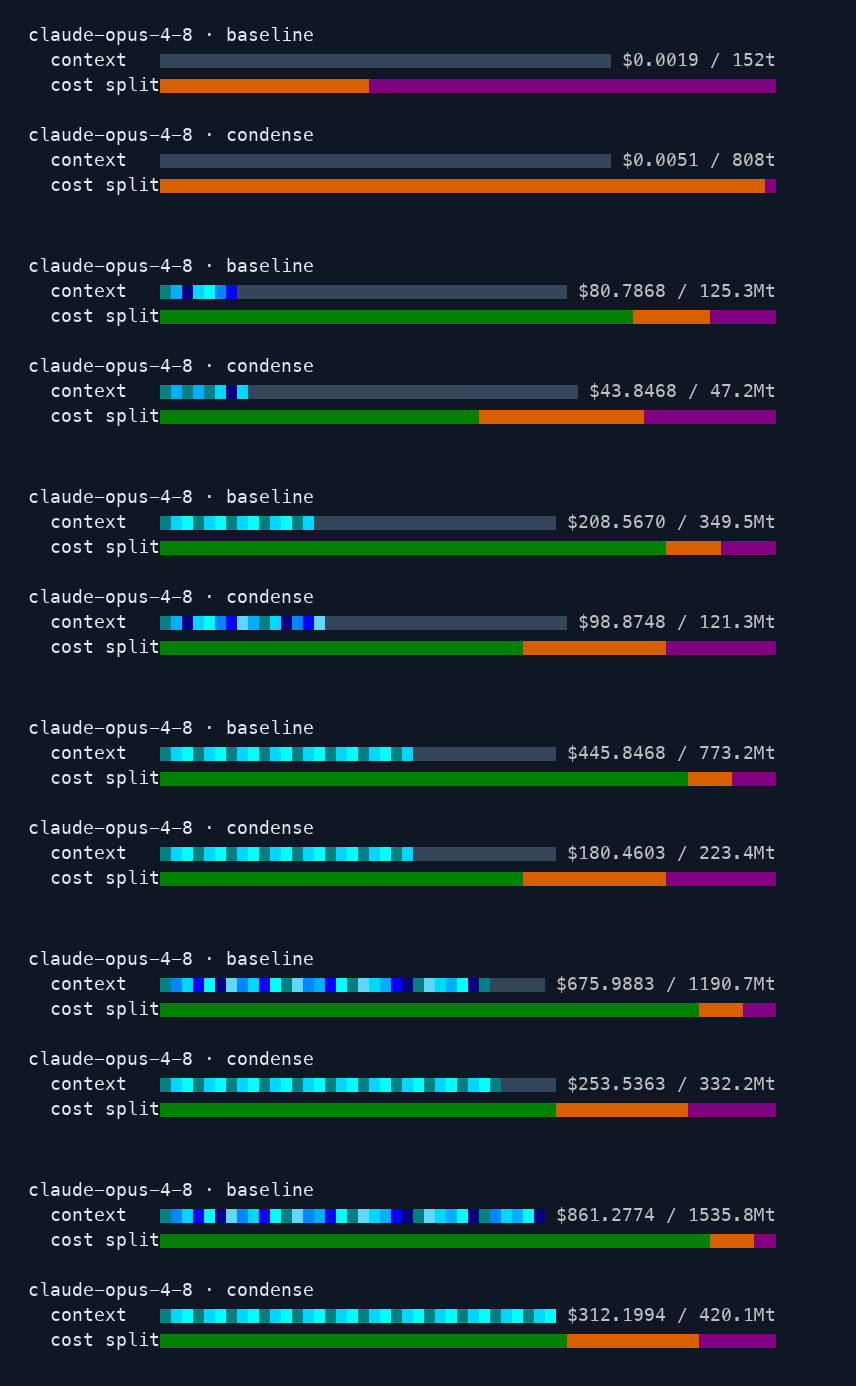
Across all 11,712 turns, condense removed 72.7% of input tokens and reduced estimated model cost by $549.08. Estimated cost fell 9.2% on turns under 16k input tokens and 73.1% in the 400k–800k range. These figures exclude Condense fees.
With uv installed, reproduce the report from the saved measurements. No model calls or API key are needed.
git clone https://github.com/condense-chat/minmax-bench
cd minmax-bench
uv run minmax-bench report 5c61ab52-8eea-4fee-97a4-5c64ee5344af
This replay measures the cost of the recorded workload. To see how compression affects the agent’s work, read how we compare the agent’s next action and full task runs.
My agent starts, but I don’t see savingsRun dense status to check your login and dense doctor to check the installation. If the session shows pricing pending, wait a few minutes and check again. To start a fresh session, launch the agent explicitly, for example with dense claude, send a request, and check /dense:info in that session. Agent setup guide.
| Command | What it does |
|---|---|
dense login / dense logout |
Sign this machine in or out. |
dense setup |
Change which agents use Condense. |
dense info [SESSION] |
See account totals or inspect a session. Use --bar, --matrix, or --json for the output format. |
dense usage claude |
Check Claude limits and estimated gain. Use --json for usage data or --attributed-only to exclude untagged requests. |
dense status |
Check the active login and endpoint. |
dense doctor |
Check the CLI installation. |
dense self update |
Update the CLI. |
dense self uninstall |
Remove the CLI and its shell integration. |
cargo build --release
cargo clippy --all-targets -- -D warnings
cargo test
For a static Linux binary, build with --target x86_64-unknown-linux-musl.
Privacy
Your agent’s requests pass through the Condense proxy. By default, conversation content is deleted after seven days of inactivity. Zero data retention is available on request. Read the retention policy.
Yorumlar (0)
Yorum birakmak icin giris yap.
Yorum birakSonuc bulunamadi