condr
Health Warn
- License — License: Apache-2.0
- Description — Repository has a description
- Active repo — Last push 0 days ago
- Low visibility — Only 5 GitHub stars
Code Pass
- Code scan — Scanned 12 files during light audit, no dangerous patterns found
Permissions Pass
- Permissions — No dangerous permissions requested
No AI report is available for this listing yet.
Keep your agents running — One window for all your agents. Local or remote, step away and pick up where you left off.
Condr

Agents that never hang up
One window for every agent, local and remote. Disconnect anytime, pick up where you left off.
English · 简体中文


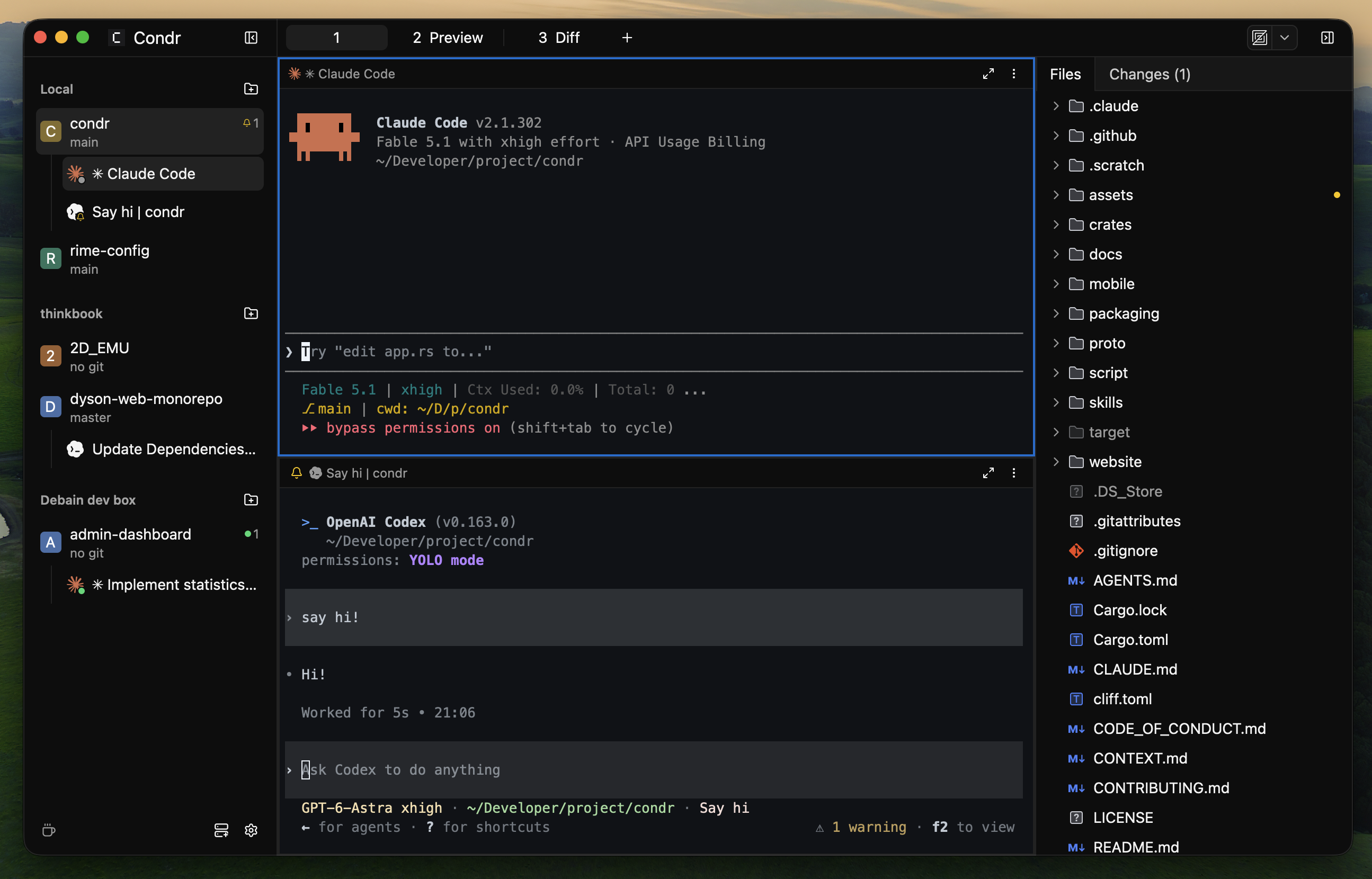
Condr is a lightweight app built for running many agents together and managing their terminals. Run Claude Code, Codex and any command-line program side by side in one window, on your own machine or on a remote server.
Condr has two parts:
- Server: a service that stays running in the background. It hosts every terminal process and every agent's state, so background work never hangs up, even when you close the window or the network drops.
- Client: a fast, native desktop app. It's a view you can attach at any time, and it connects to and manages several Servers from one place.
A mobile app is also in development.
Features
- Stays running — Close your laptop or lose the connection, and your agents and long-running tasks carry on. Reconnect any time and pick up right where you left off.
- Remote access — No more switching windows: see every local and remote agent in one place. SSH, TCP and zero-config P2P with NAT traversal are built in.
- Agent status — The sidebar shows what each agent is doing. Condr notifies you when an agent finishes a task.
- Agent driven — Agents can drive Condr in turn: create panes on their own, hand out tasks across panes, and talk to other agents.
- Real terminals — Real terminals built on the
alacrittycore keep the whole native shell ecosystem, and paste a screenshot across devices in one step. - Smooth — Pure Rust from end to end, with no Electron. Small and responsive, even while agents are busy.
Install
Pick what to install for where you'll use it:
- Your everyday dev machine: install the Desktop App (Server included, works out of the box).
- A remote server or cloud host: install the Headless Server (command line only, no graphical interface).
[!WARNING]
Condr 0.1 is a public preview; features and the protocol may change between versions. Keep the Client and the Server on the same version. For the latest features, download the Nightly build, published automatically every day.
Desktop App
Install it on the computer you work at (Server included, nothing else to set up).
Download the installer for your platform from the latest release:
| Platform | Package |
|---|---|
| Linux x86_64 / arm64 | AppImage |
| macOS Apple Silicon | .dmg |
| Windows x86_64 | .exe |
Headless Server
Install it on the device where you want to run agents remotely (only the condr command-line tool, no graphical interface).
Run the install command in a terminal:
| Platform | Install command |
|---|---|
| Linux x86_64 / arm64 | curl -fsSL https://condr.dev/install.sh | sh |
| macOS Apple Silicon | curl -fsSL https://condr.dev/install.sh | sh |
| Windows x86_64 | irm https://condr.dev/install.ps1 | iex |
Quick Start
Try Condr's core workflow in 30 seconds:
- Create a Workspace: open Condr, click New Workspace in the sidebar and choose your project folder.
- Start an agent: in a terminal pane, run the command-line agent you usually use (such as
claudeorcodex). - Turn on agent status: install the agent integration in Settings, and the sidebar shows live whether each agent is thinking, done, or waiting on a question or a permission.
More guides: see the Condr docs for remote connections, agent automation, keyboard shortcuts and everything else.
Connect to a Remote Device
Condr manages every agent task, local and remote, across machines from a single window. Running the work on a remote server frees your agents from the limits of your local workstation, so they keep going through reboots and network drops.
- SSH: for remote servers or cloud hosts you already reach with OpenSSH. Reuses your existing configuration as is.
- P2P: for networks where both sides sit behind NAT or a firewall with no public IP. Connects directly through hole punching when it can, or through an encrypted relay when it can't.
- TCP: for servers with a fixed IP or reachable directly on the LAN. All traffic is end-to-end encrypted with
Noise_IKpsk2.
See Remote connections in the docs for the setup steps.
Development
git clone https://github.com/condrdev/condr
cd condr
cargo build
cargo run -p condr-gui

cargo fmt --all -- --check
cargo clippy --workspace --all-targets --features condr-gui/test-support -- -D warnings
cargo test --workspace --features condr-gui/test-support
Acknowledgements
Condr stands on these projects:
- GPUI: the UI framework from the Zed team.
- GPUI Kit: the component library Condr builds on.
- Alacritty: its
alacritty_terminalcrate is the terminal emulation core.
License
Reviews (0)
Sign in to leave a review.
Leave a reviewNo results found