coneshare
Health Pass
- License — License: MIT
- Description — Repository has a description
- Active repo — Last push 0 days ago
- Community trust — 49 GitHub stars
Code Fail
- Hardcoded secret — Potential hardcoded credential in .github/workflows/build-ci.yml
Permissions Pass
- Permissions — No dangerous permissions requested
No AI report is available for this listing yet.
Self-Hosted Virtual Data Room (VDR) & Document Tracking. Open-Source DocSend alternative with Built-in MCP Server.
English | 中文



Coneshare
Coneshare is an open-source, self-hosted alternative to DocSend that works on top of your existing storage (Nextcloud, Google Drive, or Dropbox). Files stay on your own servers instead of moving to third-party cloud providers.
Use Coneshare to share documents and videos securely: apply dynamic watermarks, track viewer engagement page by page in real time, and trigger automations from viewer activity.
Quick start · Docs · Live demo · Roadmap · Forum
If you find this project useful, please consider starring the repository.
▶ Click here to watch the 2-minute product walkthrough video
How it works
Coneshare runs directly on top of your storage:
- Files remain in your storage provider (Nextcloud, Google Drive, or Dropbox).
- Coneshare adds:
- Virtual datarooms and media previews
- Access controls and link permissions
- Document engagement tracking
- Webhooks and workflow automation
Keep your existing storage workflows while gaining access controls, datarooms, and engagement analytics.
Features
Virtual datarooms and media previews
- Organize documents and rich media into structured rooms.
- PDF rendering and secure video streaming.
- Inline viewers to navigate between related items.
Access control
- Password protection, link expiration dates, and email verification.
- Download restrictions and dynamic watermarks.
Analytics and engagement tracking
- Track views, revisits, and downloads in real time.
- View page-by-page reading duration and video playback metrics.
Automation and webhooks
- Slack and webhook notifications for link events.
- Trigger actions based on viewer activity.
Infrastructure, privacy, and internationalization
- Self-hosted on your own servers or private cloud.
- Available in English, Simplified Chinese, Russian, German, French, and Dutch (
en,zh-hans,ru,de,fr,nl).
AI agents and remote MCP
You can connect web AI assistants (ChatGPT, Gemini, Claude.ai, and Grok) and CLI or desktop coding agents (Claude Code, Claude Desktop, Cursor, VS Code, Codex, and Antigravity agy) to your Coneshare workspace over the remote Model Context Protocol (MCP) endpoint (/mcp/sse). The server provides MCP tools for saving AI conversations, organizing datarooms, creating protected or watermarked share links, and checking viewer engagement.
- Web AI clients sign in with OAuth 2.1 and PKCE (
readorwritescopes). Destructive deletes, admin routes, and viewer PII remain blocked. - CLI and desktop agents authenticate with scoped API keys (
read_only,read_write, orfull_access).
See mcp-server/README.md for setup steps, the walkthrough video, and the tool list, or check Coneshare AI & MCP and MCP Docs.
Integrations
Coneshare connects with:
- Nextcloud (self-hosted)
- Google Drive
- Dropbox
More storage connectors are in development.
Deployment (self-hosted)
For production deployments, use the coneshare-compose repository. It provides Docker Compose configurations with automated Let's Encrypt SSL, reverse proxy setups, and preconfigured containers.
Local development
To run the codebase locally for development and contributions:
Source build
git clone [email protected]:coneshare/coneshare.git
cd coneshare
cp .env.template .env
make build
make up
make migrate
First-run verification checklist
After make up and make migrate, verify the local services before configuring storage integrations:
- Frontend is reachable at http://localhost:5173
- API responds at http://localhost:8000/api/v1/
- Core services are up (
backend,frontend,core,redis,celery) - Local files persist under the project data and storage volumes defined in
docker-compose.yml - Smoke test:
- Upload one document
- Create a share link
- Open the link in a private browser window to confirm view access works
Troubleshooting first install
.envandSITE_DOMAINmismatch:- Confirm
.envexists (copied from.env.template) andSITE_DOMAINmatches how you access the app locally.
- Confirm
- Backend cannot reach
coreservice:- Check service names and ports in
docker-compose.yml, then inspect backend and core logs for connection errors.
- Check service names and ports in
- Redis or Celery issues (background jobs not running):
- Confirm both
redisandcelerycontainers are running, then check Celery worker logs.
- Confirm both
- Storage permissions:
- Verify mounted storage directories exist and are writable by container processes.
- Where to look first:
- Run
make logsfrom the repository root, checkingbackend,core, andceleryerror output.
- Run
Architecture
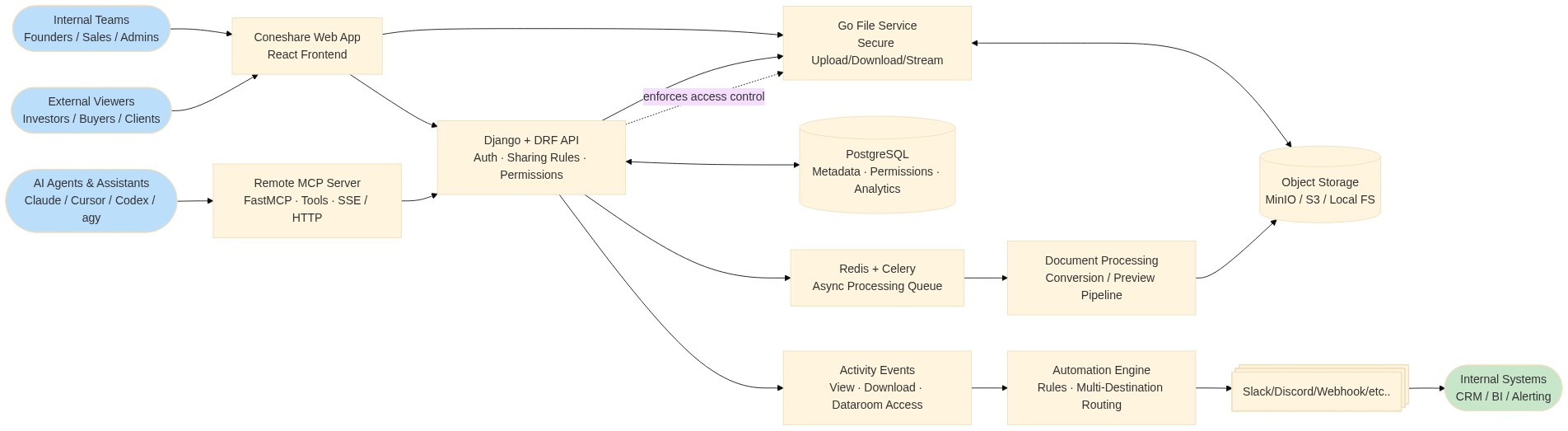
Coneshare consists of four primary services:
backend/: Django and DRF API, Celery, and Redis for background taskscore/: Go service for file delivery and media streamingfrontend/: React and Vite web applicationmcp-server/: FastMCP remote server for AI agent and assistant integrations
Technical reference:
Contributing
Contributions are welcome. Please read CONTRIBUTING.md for our code of conduct and pull request process.
Contributors
 Justin Zheng 💻 🚇 📖 🎨 |
 James Ramsay 💻 ⚠️ 🐛 |
 Matthias Friedewald 💻 ⚠️ 🐛 |
 KeizerDev 💻 🌍 ⚠️ |
 Tom Elliot 💻 ⚠️ 🐛 |
 Agatino Platania 💻 ⚠️ 🐛 |
 Industry 💻 ⚠️ 🐛 |
Community
- Docs: https://docs.coneshare.com/en/
- Discussions: https://github.com/orgs/coneshare/discussions
- Email: [email protected]
License
MIT License. See LICENSE.
Security
For security issues, contact [email protected].
Reviews (0)
Sign in to leave a review.
Leave a reviewNo results found