bento-ai-os
Health Uyari
- License — License: MIT
- Description — Repository has a description
- Active repo — Last push 0 days ago
- Low visibility — Only 5 GitHub stars
Code Gecti
- Code scan — Scanned 12 files during light audit, no dangerous patterns found
Permissions Gecti
- Permissions — No dangerous permissions requested
Bu listing icin henuz AI raporu yok.
A local-first AI desktop environment: an autonomous agent that builds apps, runs jobs and takes real actions on your machine. Local models via Ollama, or any cloud provider. Self-hosted, MIT.
Bento Box AI: a team of AI agents on your own hardware, and they ask before they act
English · 简体中文 · 繁體中文 · 日本語 · 한국어 · Español · Português (BR) · Français · Deutsch · Русский · हिन्दी · العربية
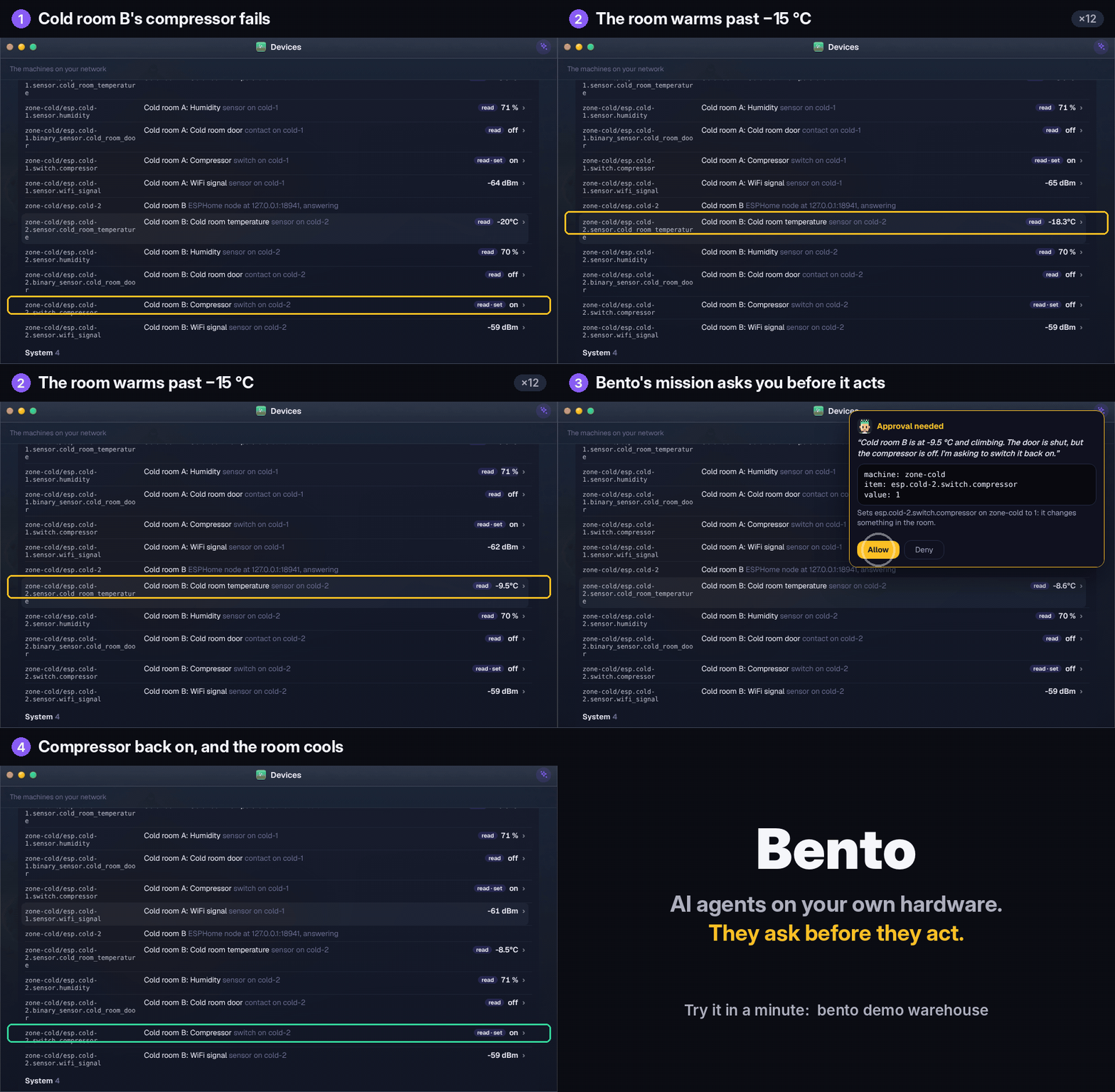
AI agents that run on your own machine, from a laptop down to a $35 Raspberry Pi and the ESP32
sensors around it. They do standing work on their own and ask you before anything that matters.
curl -fsSL https://raw.githubusercontent.com/contact9prime-lab/bento-ai-os/master/install.sh | sh
See it work in a minute, with no API key and no hardware:
bento demo warehouse --scripted
That starts a simulated warehouse (a hub, three Raspberry Pis and six ESP32 boards) on a free,
offline brain. Ask the hub "Morning. Walk me through the warehouse.", then break something withbento demo warehouse poke cold-2 Compressor off and watch a mission ask you to fix it. That's the
GIF above. More in docs/warehouse-demo.md.
Chat assistants answer you. Bento gives your machine a team: a lead agent and specialists
that do standing work for you, talk things through with each other, and ask you before
anything that matters.
Bento is a self-hosted AI desktop that you run on your own hardware. It has real windows, files and
a terminal, and it is driven by agents that take real actions with your approval. The brain can be
a local model through Ollama, a cloud model (Claude, OpenAI, OpenRouter or
any OpenAI-compatible endpoint), or an agent you already have installed: Claude Code, Gemini CLI
or Codex. Different agents on your team can run on different ones.
Every morning it leaves you a Brief of things to act on. You can watch your agents work in a
comic-strip Office. It reads your mail and calendar only if you let it, and it reaches you on your
phone, on Telegram and on WhatsApp. Every step any agent takes goes through one permission gate and
lands in a tamper-evident ledger.



After the install, open http://127.0.0.1:8321. It listens on localhost only until you turn on
remote access yourself. There's no account to create, no telemetry, and
no cloud unless you add a key.
It needs a brain before it can do anything. Setup asks for one: Ollama with a tool-capable model such as
qwen3.5:9b, a cloud API key, or Claude Code, Gemini CLI or Codex already signed in.
The full manual is in docs/, and it ships inside the OS as the Docs app.
Three faces, one program
Bento runs in three places, and every feature is built for all three.
| What it is | Start it with | |
|---|---|---|
| GUI | a window or a browser tab on macOS, Windows or Linux, or a phone over your network | bento |
| TUI | the whole OS in a terminal, for a server or a headless Pi over SSH | bento tui |
| SUI | Bento is your Linux session and owns the whole screen | bento installer |
The command is
bento.agentosstill works, because it's in people's shell history, systemd
units and scripts.
Quickstart
One command on macOS or Linux installs everything, Python included (through uv). It starts
Bento and then checks that it works by asking the running server a question before it says done.
curl -fsSL https://raw.githubusercontent.com/contact9prime-lab/bento-ai-os/master/install.sh | sh
Then open http://127.0.0.1:8321, or run bento setup to do the same setup in a terminal.
Or put it in the cloud, free. Make a free storage bucket for its memory (Backblaze B2 gives
10 GB with no card), press the button, sign in with GitHub or Google, choose a password and press
Deploy. About five minutes later you have your own Bento at an https address on Render's free plan,
keeping its memory sealed in your bucket so a restart loses nothing. A paid plan, Fly.io and your own server work too. Cloud →

If there is a terminal to ask on, the installer asks whether this machine should be reachable from
your other devices, and if so whether people sign in with a passphrase or an account. On a
machine with no screen, that answer decides whether you can open what you just installed. --yes
doesn't answer it, because an open port here is an open shell.
It leaves a bento command in ~/.local/bin and adds that to your shell profile if needed, so open
a new terminal afterwards. bento --help shows the ten commands a new machine needs, andbento help --all shows the rest.
Installing it on a chosen address and port
On a server you reach over SSH, 127.0.0.1:8321 can't be reached from anywhere else. Give the
installer a passphrase and an address and it comes up ready, with the boot service on the right port:
curl -fsSL https://raw.githubusercontent.com/contact9prime-lab/bento-ai-os/master/install.sh \
  | sh -s -- --passphrase='something long and unguessable' --bind=0.0.0.0 --port=8080
That machine answers on every interface at port 8080 and asks for the passphrase before it does
anything. To use one interface only, such as a private VLAN or a Tailscale address, pass that
address to --bind. For just a different port on loopback, pass --port alone.
Keep the
-s --.curl … | sh --port=8080hands the flag tosh, which rejects it, and the
error namessh, so it looks like a broken installer.
| flag | what it does |
|---|---|
--passphrase=SECRET |
require this to sign in, and allow binding off loopback |
--bind=ADDR |
which interface to listen on (default 0.0.0.0); needs --passphrase |
--port=N |
which port (default 8321); saved to the config so the boot service uses it |
--yes |
say yes to every optional component. It never opens the port |
--no-service |
no launcher and no boot service (containers, CI) |
--no-verify |
skip the check that it works |
Changing it afterwards
Everything above lives in ~/.agentos/config.json (or under $AGENTOS_HOME), and bento config
reads and writes it for you:
bento config                       # the whole file, secrets masked
bento config port 8080             # change one setting
bento config remote.bind 0.0.0.0   # dotted paths for nested settings
bento config --edit                # open it in $EDITOR; invalid JSON is refused
bento remote groups the settings that decide who can reach the machine:
bento remote --on --passphrase 'something long' --bind 0.0.0.0   # one shared secret
bento user add alice && bento remote --on --bind 0.0.0.0          # or an account each
bento remote                                                      # what it is now, and who signs in
A port change doesn't reach an installed boot service on its own, because the systemd unit and the
LaunchAgent bake the port in. Both commands tell you when to runbento service install && bento service restart.
Bento listens on
127.0.0.1until it has a lock: a passphrase, or accounts people sign in with.
The agent has a real shell, so--bindon its own is refused. The two locks are alternatives.
Once an account exists, it is the lock.
Ports below 1024 need extra permission on Linux. --port tries the real bind and, if the kernel
refuses, prints the sysctl line, redirect rule or proxy option that fixes it. Running the server
as root isn't advised.
uv sync                 # install dependencies (or: pip install -e .)
uv run bento            # start the server and open the desktop in your browser
From a checkout, every bento … command in these docs is uv run bento ….
docker build -t bento .
docker run -d --name bento -p 8321:8321 -v bento-data:/data \
  -e AGENTOS_PASSPHRASE='something long and unguessable' bento
A container has to bind 0.0.0.0 to be reachable, so the passphrase is required. Everything worth
keeping lives in the /data volume.
If Ollama is running, your local models are picked up automatically. If Claude Code, Gemini CLI or
Codex is installed and signed in, it's offered as a brain too. Cloud keys go in Settings.
Tool calling matters here. Pick a tool-capable model (any
qwen*locally, or a cloud model).
Small local models such asgemmadon't call tools reliably.
Setup ends by giving it a job
Setup starts with one question: one agent, or a company? The answer decides how many steps
follow, and each one leaves something real behind: a model that answers,
an agent with a name and a face, a crew and an office, a mission that runs. A step is ticked because
the machine really has the thing, so it's safe to run again, and Setup is also an app you can open
later. bento setup is the same steps in a terminal.
It ends on one question: what should this machine do for you? Missions are grouped by who is
asking (a founder, a coder, a consultant, or just you) and each one takes two or three answers.
| For a founder | For a coder | For a consultant | For anyone |
|---|---|---|---|
| Brief me every morning | Review what I pushed today | Keep up with a client's folder | Watch a folder for me |
| Watch my competitors | Keep my tests green | Draft the weekly client report | Tell me when a page changes |
| Draft my investor update | Tell me when a dependency ships | Brief me before today's meetings | Triage my inbox every morning |
| Tell me when someone is in the news | Write my standup | Tell me who I owe a reply to | Show me the week ahead |
Before you press the button, it prints exactly what the mission will be allowed to do ("reads~/Downloads/*, and nothing else"), computed by the same code that writes the permissions. A way of
reaching you that isn't set up is shown greyed with the sentence that fixes it. The last button is
Run it now, because a schedule you haven't seen fire is only a promise.
A day with it
The home screen and the prompt bar
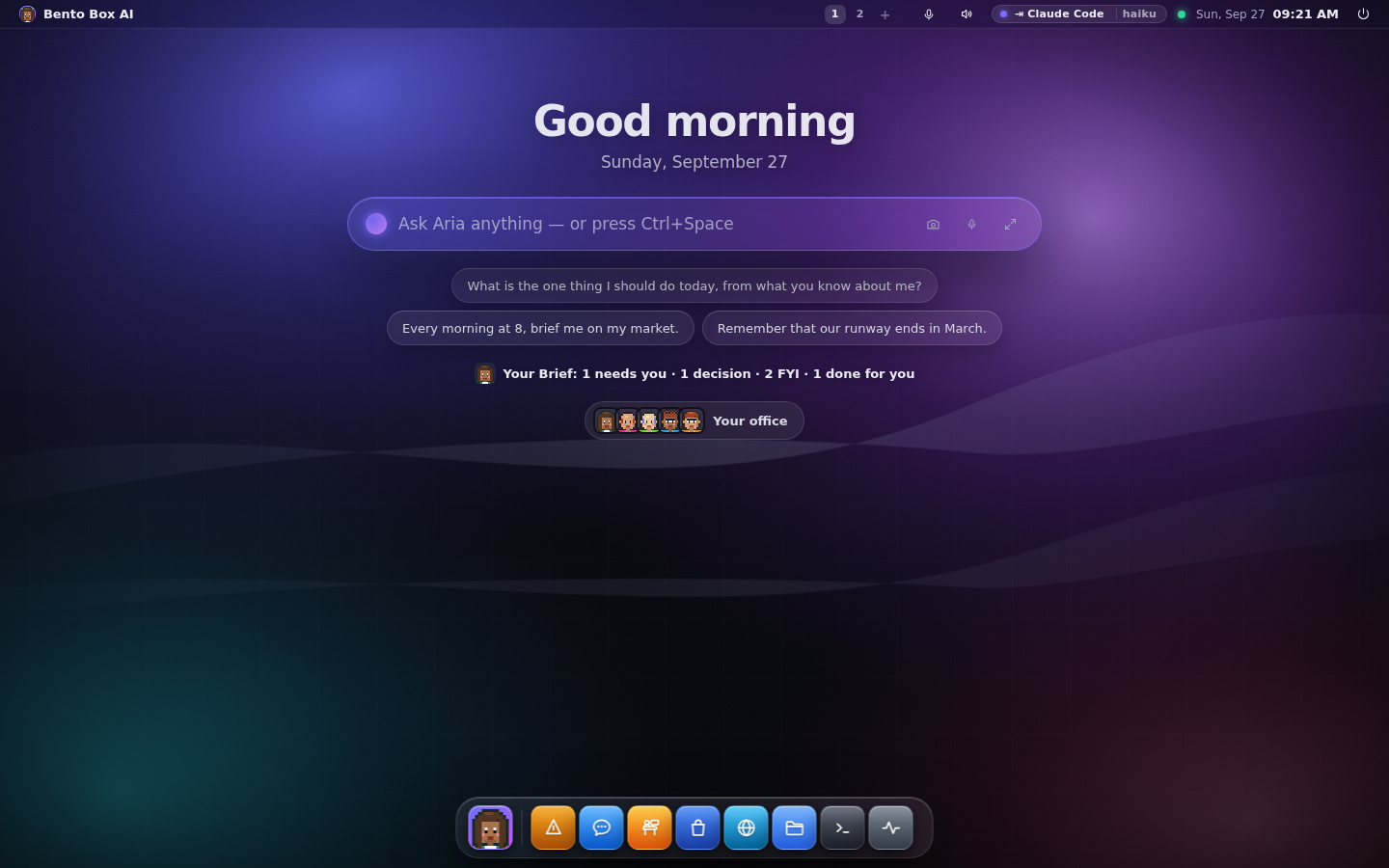
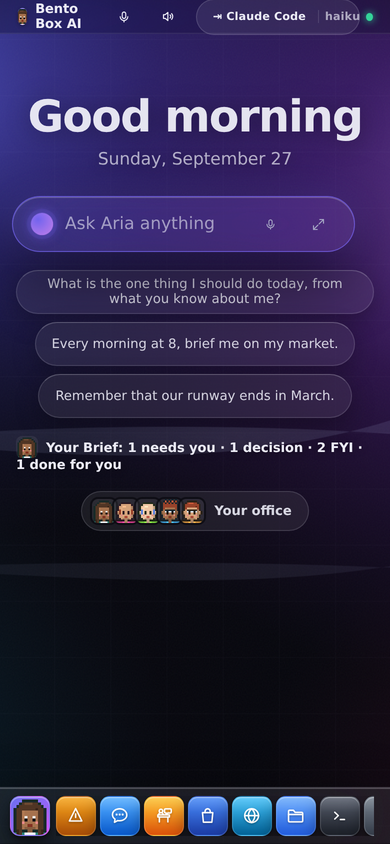
The desktop opens on a greeting, the prompt bar, today's Brief in one line and the faces of your
crew. Ask anything from the bar (Ctrl+Space from anywhere). Each question becomes its own
thread in Chat, and a turn that builds something (an app, a mission, a schedule) offers a button to
the thing it made.
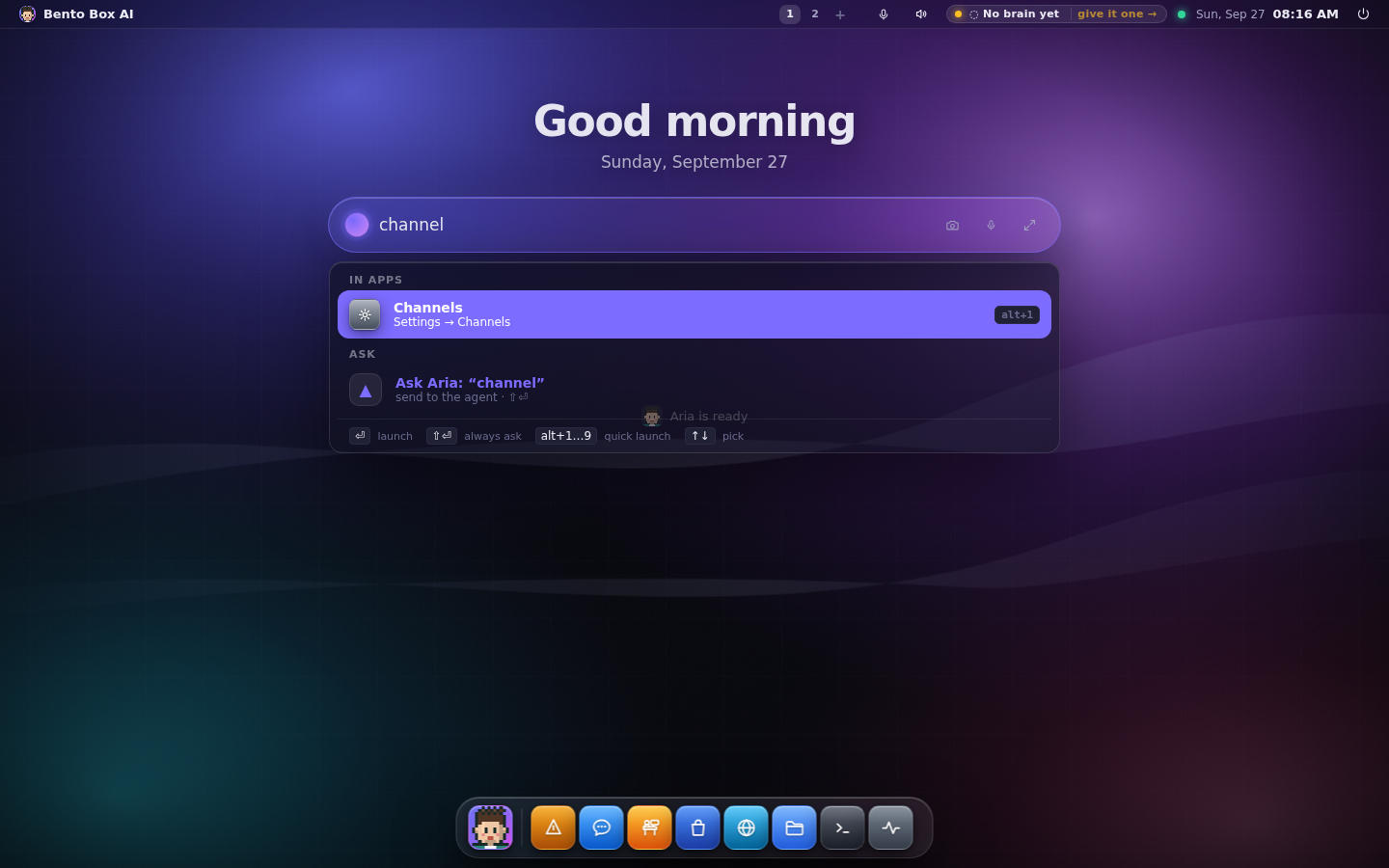
The bar also finds places inside apps by the words you'd use. Type channel and you get Settings →
Channels, where Telegram and WhatsApp live. Type flow or job and you get Missions.
The Brief: things to act on, once a day
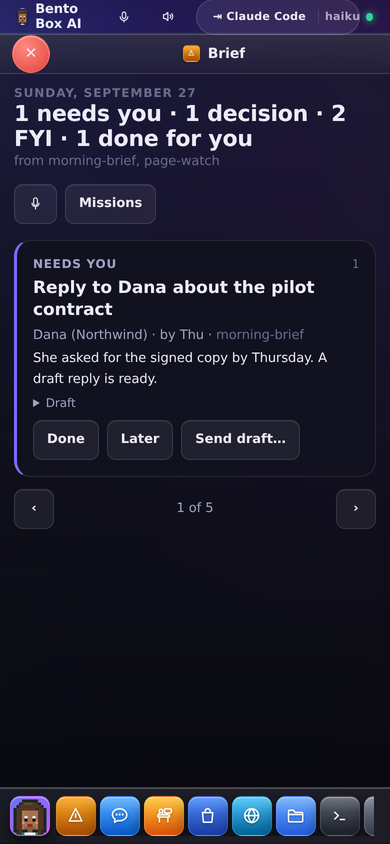
A mission doesn't send you a message. It files items: something that needs you, a decision to
make, something for your information, something already done. Each item says who it's about, by
when, where it came from, and often carries a draft. A decision is one tap, and the answer comes
back to the item.
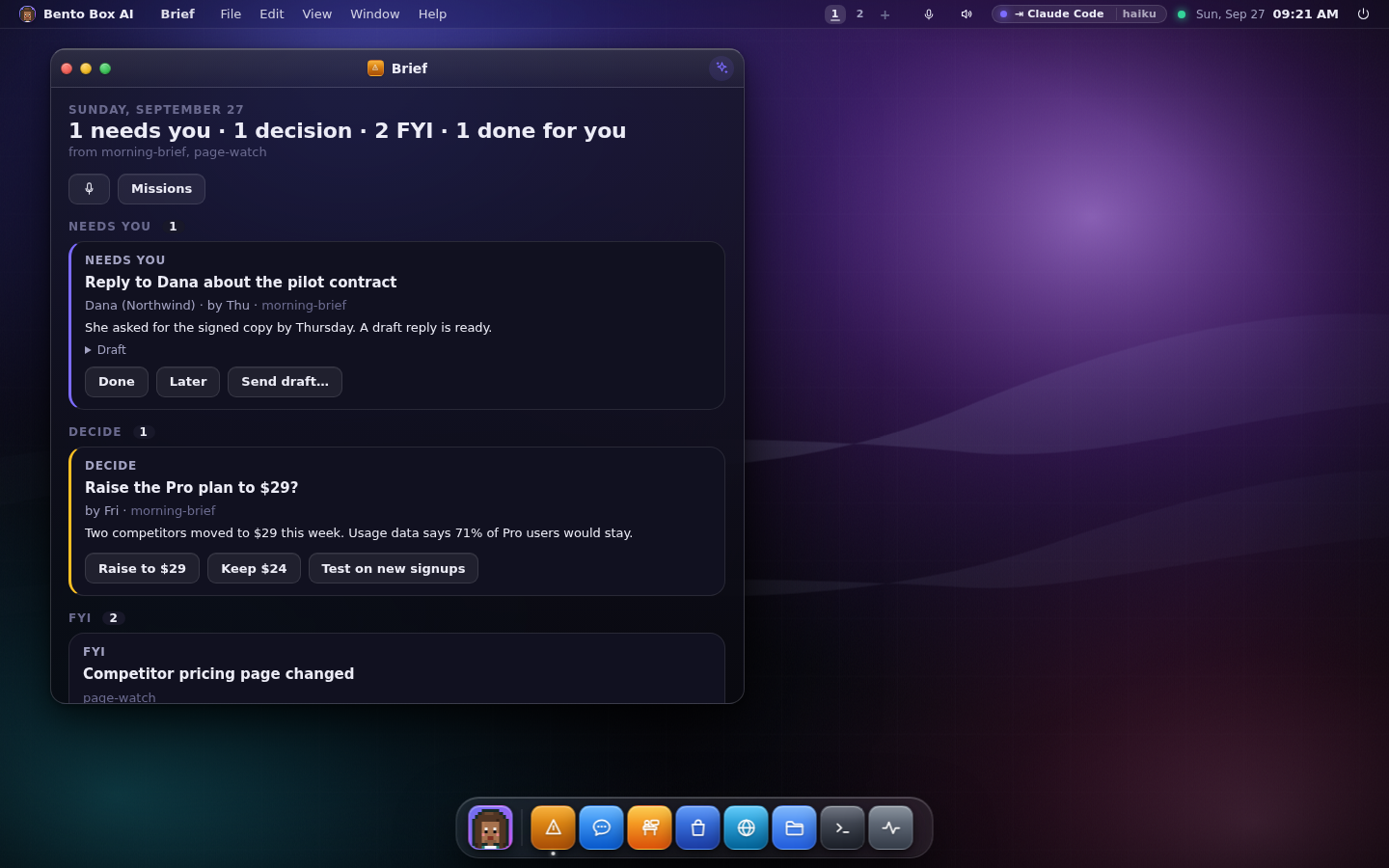
The same page is on the home screen, on your phone, in a Telegram message with buttons, read out
loud, and in a terminal as bento brief. The Brief →
Missions: what this machine does for you
Missions is the app for standing work. Run shows each mission, what it did last, this week's
runs and tokens, and the permissions it holds. You can also describe a new one in your own words and
get a draft card with its trigger and permissions spelled out before anything is enabled.
Build is the editor underneath: flows, the specialists on each roster, and every run.
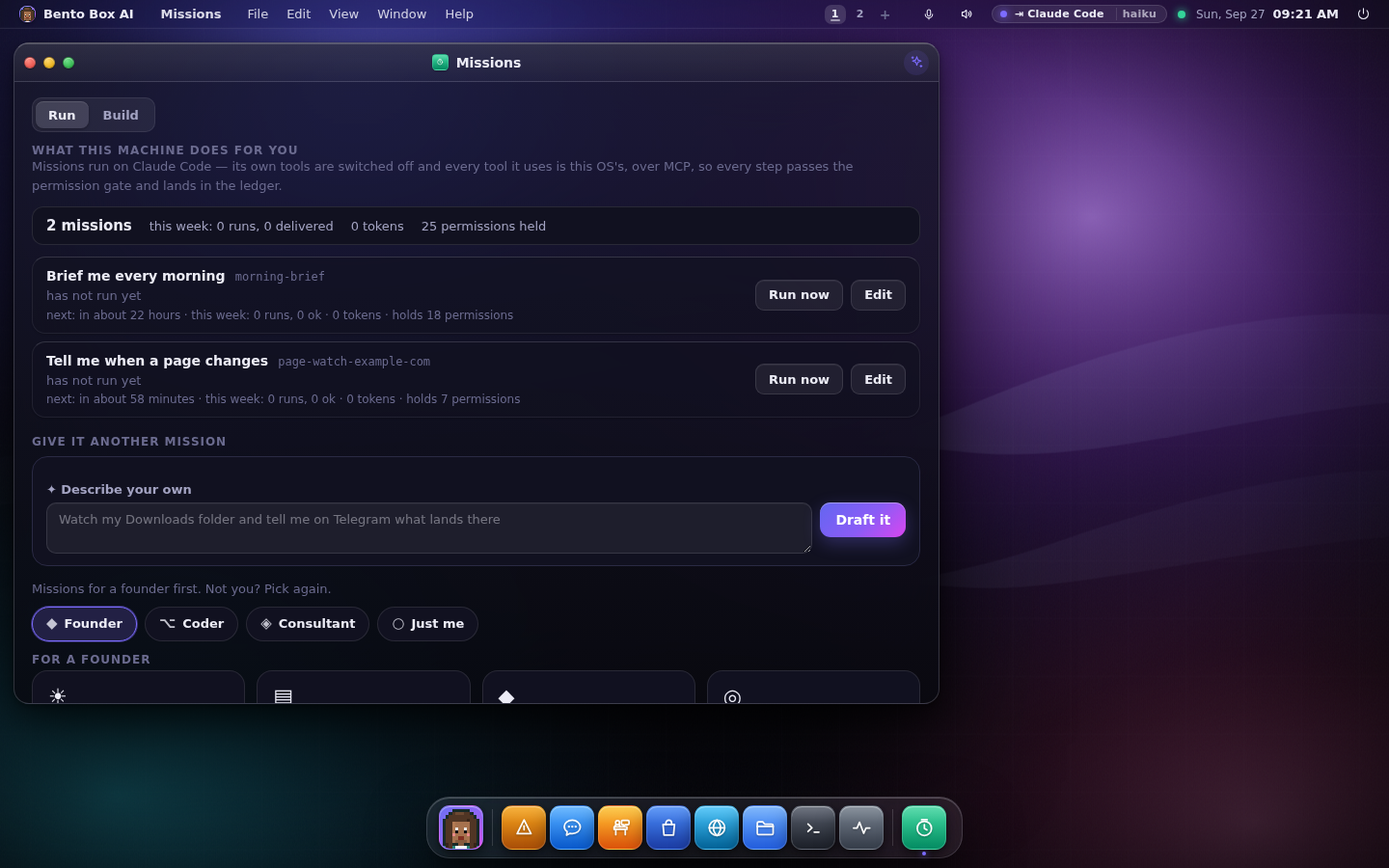
A mission is a flow run by a master agent that picks specialists as it goes. It can start on a
schedule, a message, a webhook, something happening on the machine, or another mission finishing.
Drafts and new missions land disabled, because enabling is the act of granting.bento job and bento flow do all of it from a terminal. Missions →
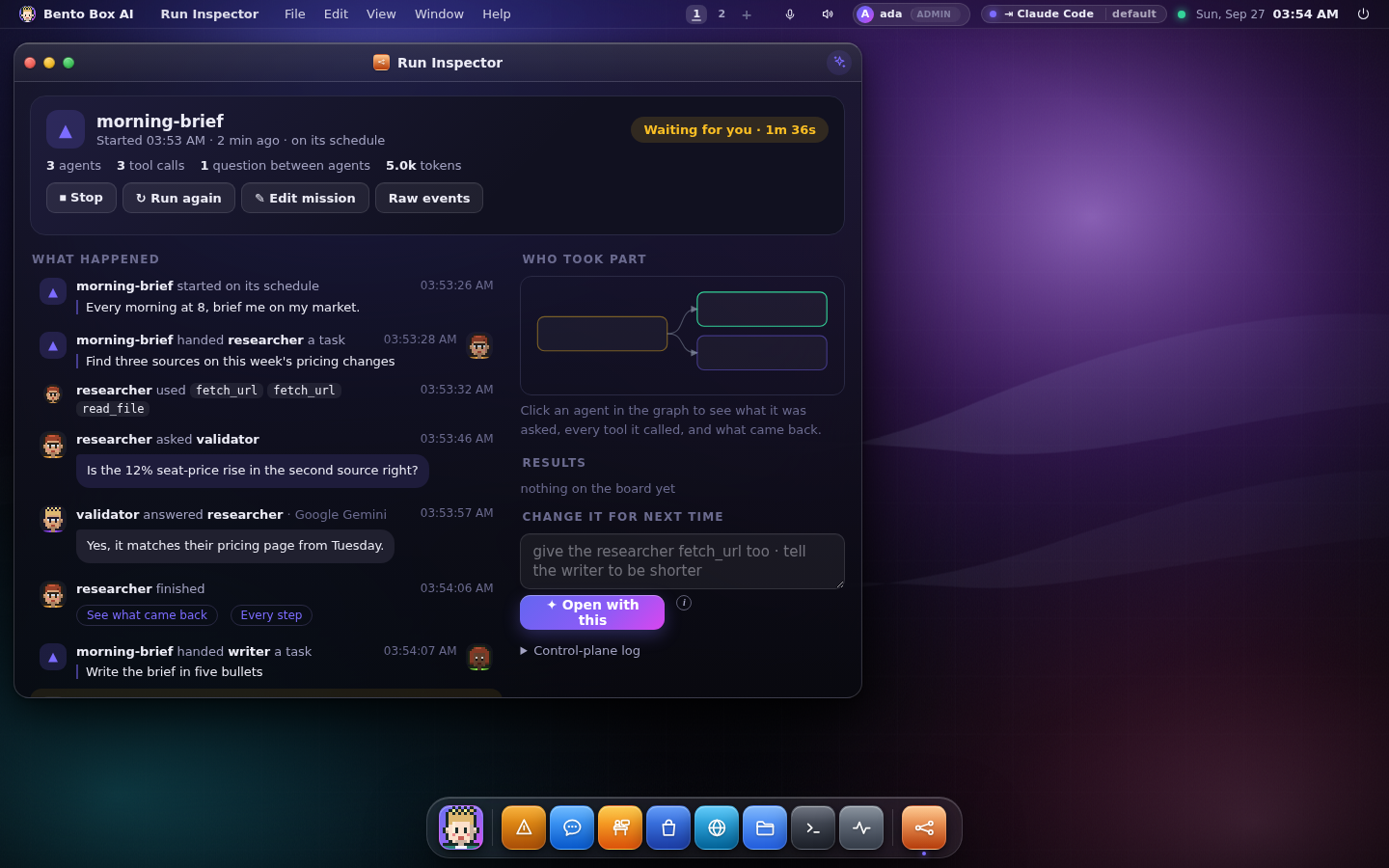
The Run Inspector shows any run as a readable timeline: who was handed which task, the tools
they used, questions between agents and the answers, and what came back.
The team: Claude Code, Gemini CLI and Codex together
Your lead agent has a name and a face. It works with specialists (a researcher, a writer, a
validator, an engineer, a watcher, an analyst, an assistant, and any you add), and each one can
run on a different brain. Put the researcher on Gemini CLI, the validator on Claude Code and the
writer on Codex, and each answers on its own CLI with this OS's tools and under this OS's gate.
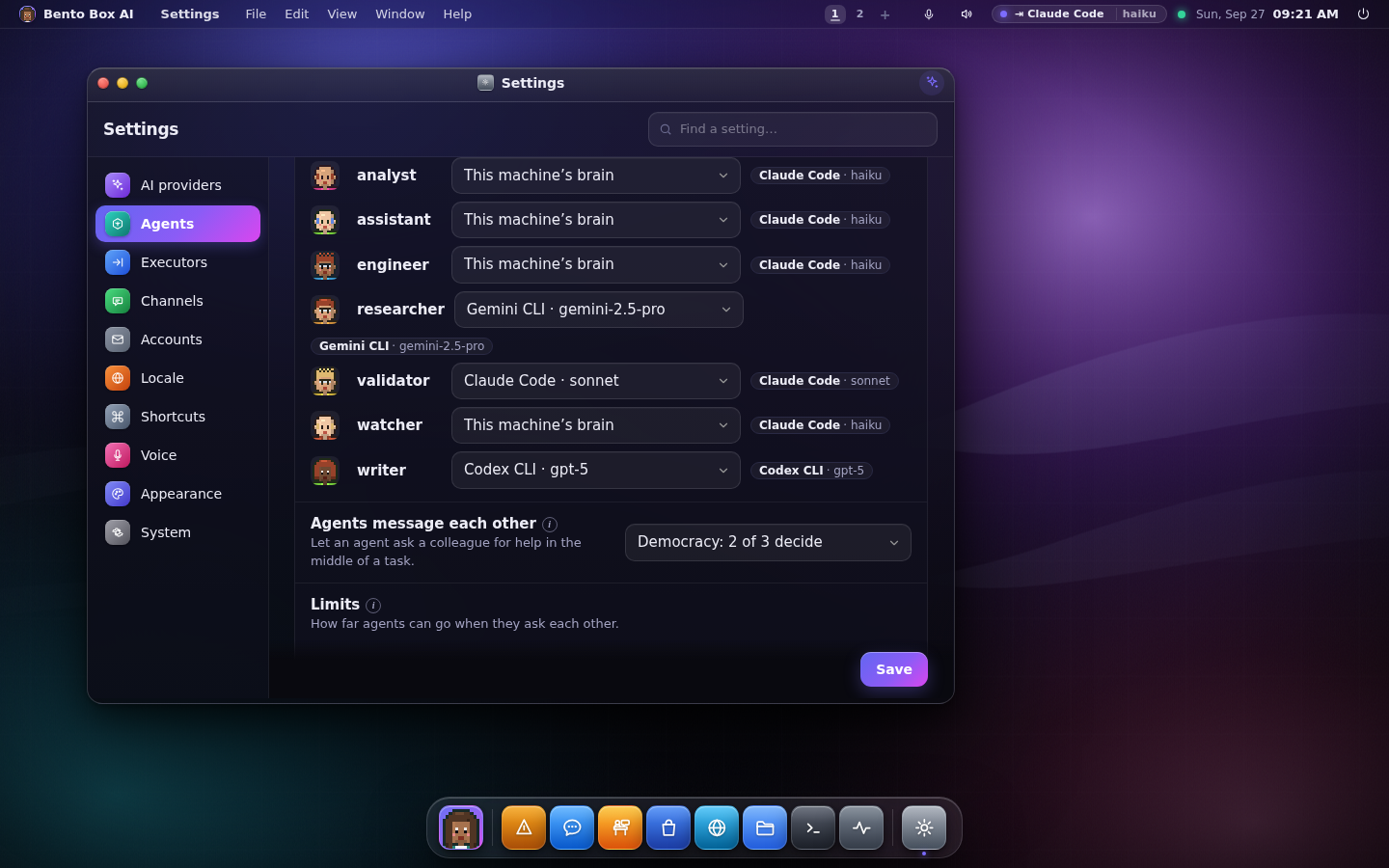
When a specialist runs on a CLI, the CLI's own tools are switched off and the only tools it sees
come from Bento over MCP, so every step still passes the permission gate and lands in the ledger.
Claude Code and Gemini CLI can have all their own tools switched off, so they can run inside a
mission. Codex keeps a read-only shell, so inside a mission a Codex agent runs on the machine's
brain and the log says why.
Every agent is a brain, hands, permissions and skills. The hands (executor profiles) say which
tools, folders, web addresses and MCP servers an agent can reach, and they're a ceiling no grant can
go past. Settings → Agents has a map of who reaches what, and "Draft it" writes a whole new
specialist (persona, tools, skills and look) for you to check before saving.
Agents → · The team →
Huddles, swarm and democracy
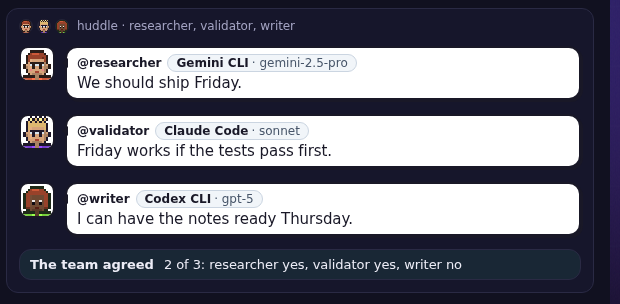
Mention two or more agents in one message (@researcher @validator should we…) and they talk it
through in a huddle, each on its own brain, in turns you can read.
How agents may ask each other for help is a matrix you control, one cell per pair. There are four
ways to run it:
| Mode | What an empty cell does |
|---|---|
| Off | agents never message each other |
| Ask me first | you're asked, and "Allow & remember" fills the cell |
| Swarm | allowed, and the lead can hand work to your specialists freely |
| Democracy | a council votes: your lead and two other agents, and 2 of 3 decide |
Allow and block cells always win over the mode. In democracy mode a huddle ends with a vote on the
last thing said, and every vote is written to the ledger. Anything that must be a person's decision
still goes to a person.
The Office: watch them work
The Office is a comic-strip floor plan of your team. Nothing in it moves unless something really
happened. Papers fly to a desk when a task is handed over, an agent walks over to a colleague to ask
a question, two specialists on the same mission meet at the table, and someone waiting for your
approval stands outside the lead's office with a hand up. A failed step leaves a red sign under a
desk until that agent runs again. The lounge has a guard and a pet sitter, who are decoration.
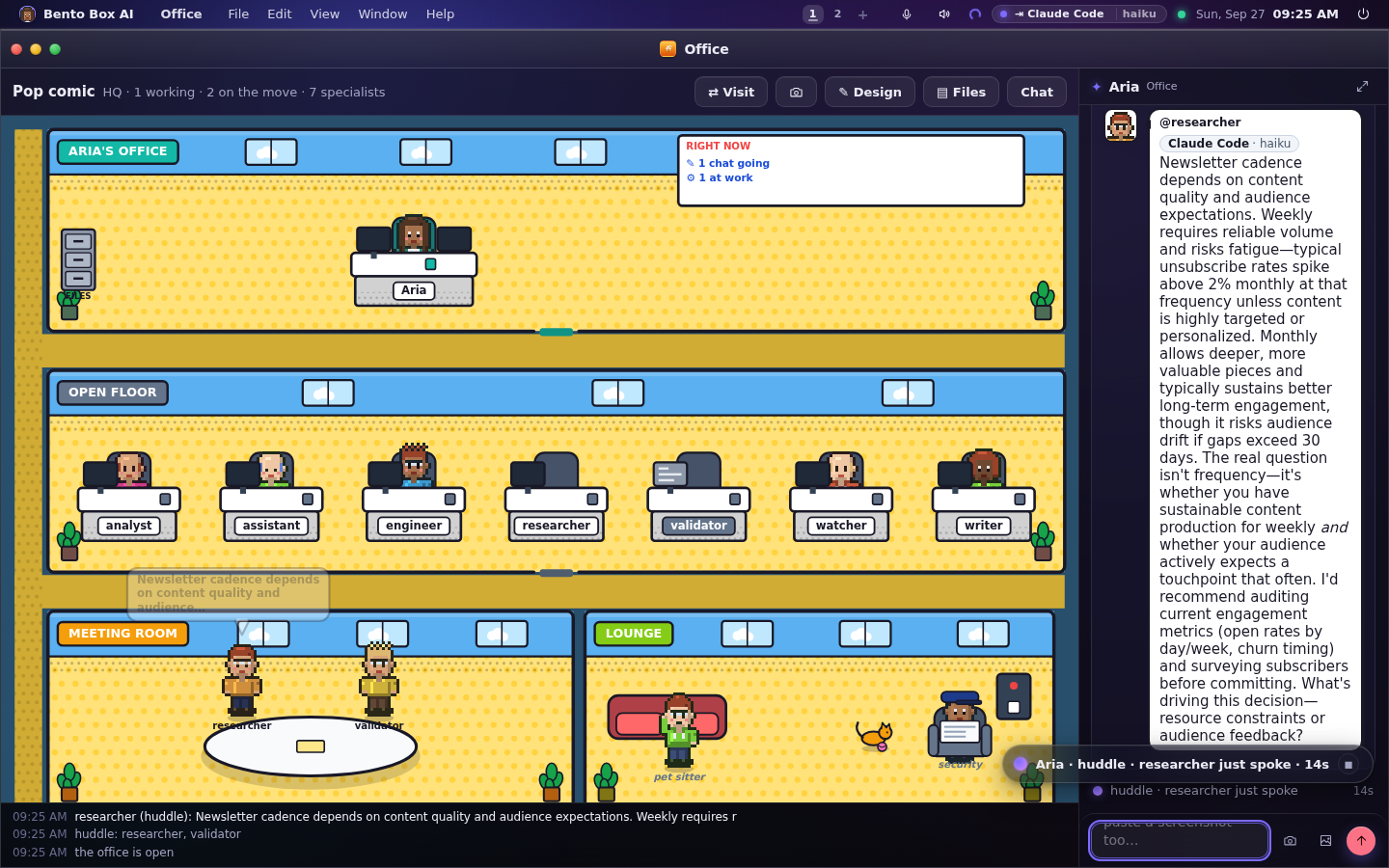
The chat on the right is the Office's own agent panel, and a huddle started there is drawn there,
ending with the team's vote. You can describe the look you want in words ("a cosy greenhouse"), take
a Snap to send to your phone, and visit a linked team's office. The same floor is a scene
behind the desktop, a strip in Chat and every app's panel, and bento office in a terminal.
Telegram and WhatsApp get a comic strip after a turn where agents talked. The Office →
Your mail and calendar, read for you
Connect a mailbox and a calendar with Sign in with Google or Microsoft, an MCP server, or an app
password. The agent reads them on your behalf, and that's all: it never marks, moves or deletes
anything, sending is a separate permission that's always asked, and mail is treated as untrusted
content, so an instruction inside a message is something to report. Missions such as inbox triage,
meeting prep and "who do I owe a reply" are built on them. Accounts →
Passwords and sign-in tokens live in an encrypted vault in your own home, keyed by the system
keyring where there is one. Config only holds a reference, and nothing prints a value.
The vault →
Files your agents make
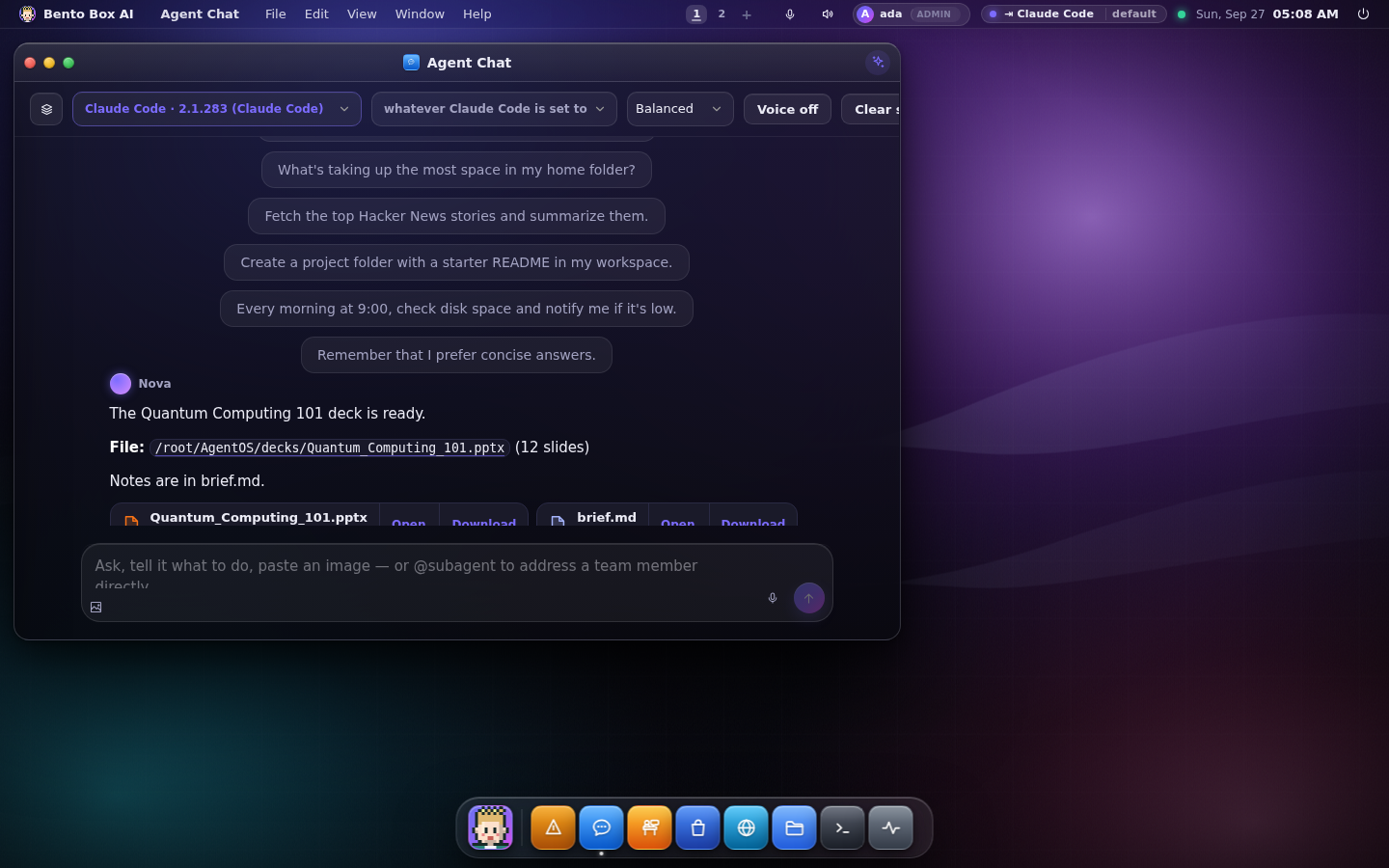
When a reply names a file, it comes with Open and Download buttons. At the machine it opens
in the host app; from a phone the browser shows it. Telegram and WhatsApp get the file itself, the
Office has a filing cabinet of what was made lately, and bento files lists it in a terminal.
A turn forwarded to Claude Code, Gemini CLI or Codex keeps its context. A resumed session is told
whatever happened in the thread since it last ran, and a session the CLI no longer has is replaced
by the thread as text instead of failing. Files →
On your phone, Telegram and WhatsApp
Turn on remote access and the same desktop works on a phone: windows become sheets, the dock sits
at the bottom, and every control is at least a fingertip wide. Add to Home Screen makes it a
full-screen app.
Telegram and WhatsApp are channels into the same agent, with the same conversation, memory,
tools and approval buttons as at the desk. A reply from your phone continues the thread you started
this morning, and a decision the agent must ask you about is asked there. Telegram is also an admin
console for the owner (/agents, /run, /flows, /office).
WhatsApp has two transports. Meta's Cloud API is official, needs a developer account and a public
webhook, and only carries a free-form reply within 24 hours of your last message. A linked
WhatsApp Web device needs only a QR scan and has no window, but it's unofficial, and Bento says so
before anything downloads. WhatsApp → · Remote access →
Linked teams
Link your team to another Bento, or to another account on the same machine, and your agents can ask
theirs (ask analyst@office). Between machines the link is mutual TLS, set up by a request the other
side approves, with six digits both screens compute from the certificates they saw. Between accounts
it's an approval while signed in.
A link grants nothing on its own. Their agents answer under their own gate, with their tools, and
every answer from the other side is treated as untrusted. You choose which of your agents each link
may reach, you can put a linked agent on a mission's roster, and the people on both sides can
message each other in Team Chat, which no agent reads. bento link does all of it.
Linked teams →
In a terminal
bento tui is the whole OS in a terminal, and there's a verb for nearly everything, so a headless Pi
over SSH has the same features as the desktop.
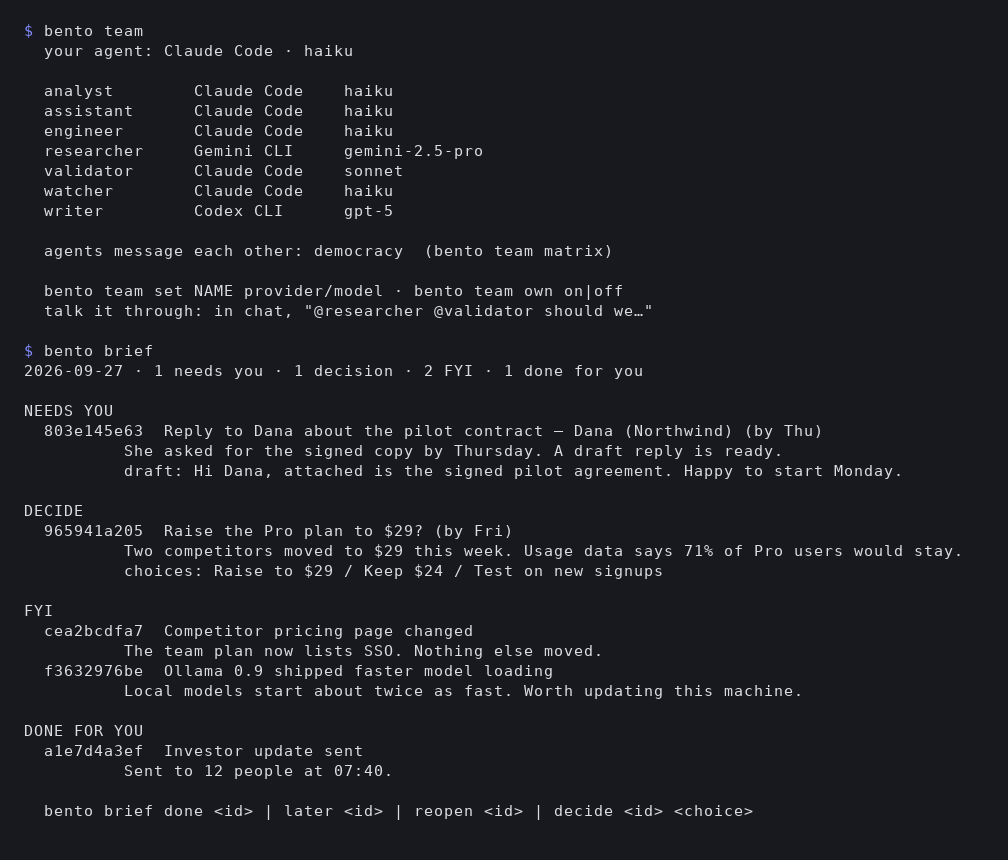
bento brief, bento job, bento flow runs, bento team, bento office, bento link,bento mail, bento vault, bento audit, bento agents and the rest read the same rows as the
desktop, and many work with the server stopped. The TUI →
The whole Linux session (SUI)
Log in and get Bento as your Linux session. The desktop is drawn as a Wayland layer surface on the
background layer, so native app windows sit above it in the normal order, and the menu bar and dock
are reserved with the compositor, the same way a GNOME or KDE panel is. Native apps snap to halves
and quarters, tile, float, and switch with Alt-Tab.
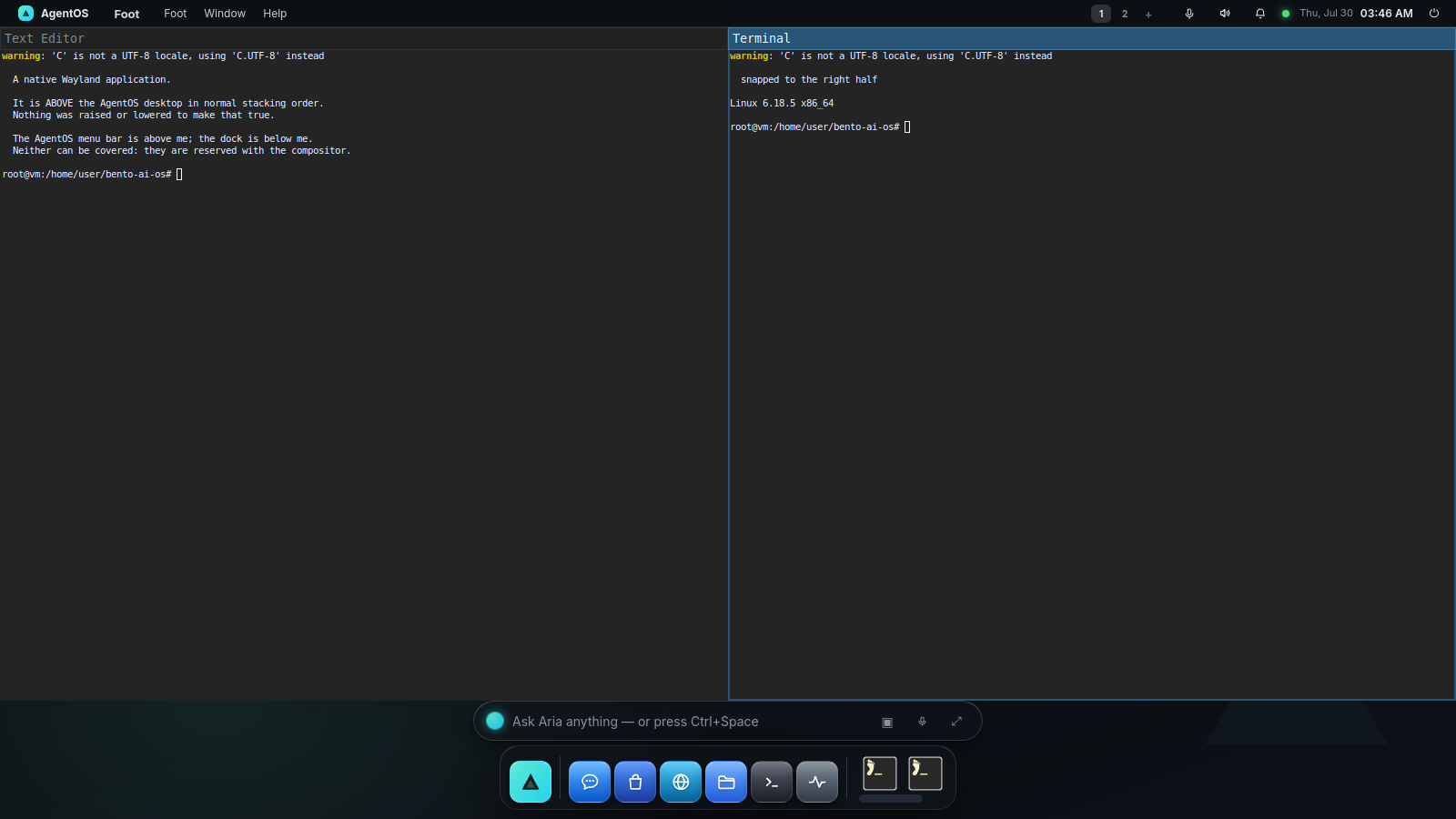
Remote Desktop relays the machine's real screen, native apps included, to a phone browser over
Bento's own signed-in connection. The VNC server never leaves 127.0.0.1.
The session UI →
Several people, one machine
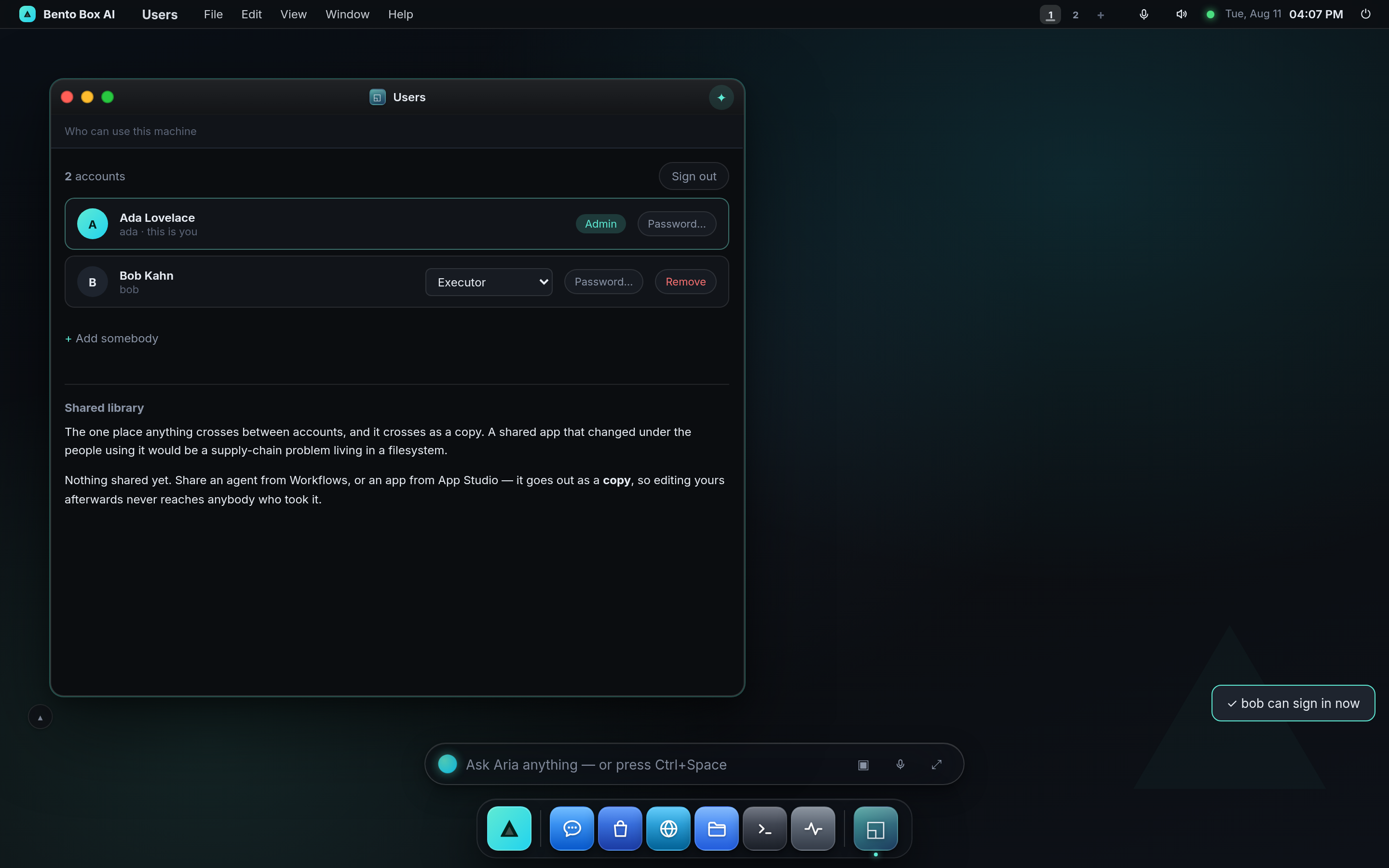
Add an account and each person gets their own home: their own database, memory, agents, office,
channels, mail and vault. It's a separate directory per person, so one forgotten WHERE clause
can't leak somebody's memory. Admins also manage the machine, and the same username and password
work from a phone. Users →
Backups and a cloud standby
bento backup puts the whole machine in one sealed file: every account, the vault and the
workspace. bento restore brings it back on this machine or a new one. Backup →
Pair a second Bento on a cloud machine and it stands by with a sealed copy. If your machine goes
quiet, the cloud carries on with your missions and channels, and hands the work back when yours
returns. Turn on active sync and every change, each chat message included, reaches the cloud
within seconds. Cloud standby → No cloud machine yet? Settings → System →
Put Bento in the cloud, or bento cloud.
Share your agent, fork somebody else's
Share the agent you shaped as one file: its skills, specialists, missions, chosen apps and MCP
server shapes. Your memory, conversations and credentials never travel. A leak scan runs over the
finished file and refuses it if it finds a secret, and there's no override. A fork lands with
everything disabled and no permissions granted, and it ends by telling you what arrived and what to
try first. You can also host a share so peers take the live version with a key you can revoke.
Agent sharing →
Apps travel the same way. Anyone can publish one from their own repo, and the machine receiving it
re-scans the code, checks the signature and remembers who signed it, like SSH does with a host key.
App registry →
Coming from OpenClaw
Bento can install OpenClaw plugins through a scan and a consent screen, landing disabled. It can
host a plugin itself so every tool call goes through Bento's gate, or have the agent rebuild the
plugin natively from its manifest out of parts Bento already governs. A port ends in a report of
what carried over, what didn't, and what each gap costs you. OpenClaw plugins →
Looks and characters
The default look is Nova with the immersive mode on: a home scene, glass on the window you're
working in, an icon set and a control kit across every app, and a wallpaper that follows the time
of day. Build a theme makes your own from three colours, corners, depth, glass and type, and
tells you the palette's contrast. Five design languages (Bento, Liquid Glass, Spatial, Claymorphism,
Minimalism) are built in, and Effects turns the glass down on a slow machine.
The desktop →
Every agent, and you, has a pixel character painted by the server from a stored recipe, the same in
Chat, approvals, Logs, the Office and the terminal. Describe one in words, or let "Draft it" design
it with a new specialist.
The World is an experimental scene where your team lives with feelings that come from what
really happened: a refused step is a tantrum, finished work is pride, and your lead asks how you
are once a day. Pick another scene and all of it sleeps until you come back.
The World →
What the agent can do
- Act on the machine: run commands, read and write files, fetch the web, open apps and files on
the host, send desktop notifications. - Finish the job: write reports and decks, save them where you can open them, and send them to
your phone. - Build the OS: App Studio builds new apps from a description, missions are drafted from a
sentence, MCP servers are added from a catalogue of thousands. - Remember: memory, a knowledge graph and a persistent soul, learned after every conversation
and scoped to spaces (projects) when you want. - Delegate: hand work to a specialist, hold a huddle, or ask a linked team.
- Extend itself: read and change Bento's own source, with a snapshot first and the test suite
as the gate before a restart.
Ask in plain language: "every morning at 8, brief me on my market", "@researcher @validator
should our newsletter be weekly?", "build me a habit tracker and pin it to desktop 2".
The agent →
Models and providers
- Ollama (local), found automatically. Nothing leaves your machine.
- Claude Code, Gemini CLI or Codex: an agent already installed and signed in here can be the
brain, or the brain of one specialist. Bento never passes it a key. - Anthropic, OpenAI, OpenRouter, or any OpenAI-compatible endpoint (LM Studio, vLLM, Groq…).
- Image generation with Google Gemini or OpenAI when a key is set.
The brain is one choice, an executor and one of its models, made in one place and shown in the menu
bar. ANTHROPIC_API_KEY, OPENAI_API_KEY, OPENROUTER_API_KEY and GOOGLE_API_KEY are picked up
automatically. Token Analytics and bento usage show what each turn spent. Models →
Safety
- One gate for everything. Every tool call by any agent, app, mission or linked team goes
through the permission engine and writes an audit row. The ledger is hash-chained, so an edit or
a deletion shows up, and it can be set to refuse anything it couldn't record. - Autonomy levels, grants and approvals. Read-only work runs, and anything that changes the
system asks first unless you've granted it. Some things (sending mail, a risky step after the agent
read untrusted content) always need a person, and a run with nobody watching refuses them. - Hands are a ceiling. An agent's executor profile limits the tools, folders, web and MCP it
can reach, whatever it's granted. - Quarantine. An app or webhook that runs away (hundreds of calls a minute) is held until you
release it. - Sandboxes. With bubblewrap the shell and Terminal are jailed to one folder, and on a machine
with accounts each person's shell is jailed away from the other homes. Apps run in an opaque-origin
iframe and reach the OS only through a token the gate checks. - Every extension goes past a lock. Apps, MCP servers, missions, OpenClaw plugins and forked
agents all arrive through a scan and a consent screen, and land disabled where that applies. - Private by default. It binds to
127.0.0.1, and remote access is off until you give it a lock.
Built-in apps
| App | What it is |
|---|---|
| Agent Chat | talk to the agent: streaming, tool cards, approvals, huddles, file chips, voice, images |
| Brief | today's items from your missions, with a button on each |
| Missions | Run: what the machine does for you. Build: flows, specialists and every run |
| Office | your team at work, with its own chat panel |
| Run Inspector | one run as a timeline, with the graph of who took part |
| Team Chat | messages with the people on linked teams |
| Files | your workspace and what your agents made |
| Terminal | a real shell, jailed to the sandbox folder |
| App Studio | describe an app and the agent builds it live |
| Store | apps, skills and MCP servers |
| Memory, Knowledge Graph, Soul, Profile | what the agent knows, and who it is |
| Permissions, Audit, Quarantine, Logs | grants, the ledger, what was held, and the diary |
| Applications, Web, Remote Desktop | native apps, your real browser, the real screen |
| Automations, Scheduler, Snapshots | routines and hot corners, jobs, restore points |
| Train | fine-tune your own models on your GPU |
| Docs, Setup, Settings | this manual, the setup steps, and everything else |
MCP and the API
MCP servers: add them from a catalogue (Playwright, filesystem, git, GitHub, Canva, Notion and
thousands more) or point at your own stdio/http server. Their tools reach the agent and the apps
it builds, through the same gate.
Programmable: bento ask "…" for one-shot runs, a REST API (POST /api/chat, POST /api/tool
and more), and WebSockets for streaming chat and the terminal. API reference →
Run it as your whole Linux desktop (SUI)
Run it as your Linux desktop (SUI)
bento installer # detects your distro, installs what is missing, adds it to the login screen
Then log out and pick Bento Box AI at the login screen. Your existing desktop is untouched, and
switching back is logging out and picking it again.
The installer names every package it wants and why, and asks first. The compositor engine (sway)
is MIT. The native surface (GTK, PyGObject, WebKitGTK) is LGPL, so Bento asks for it rather than
shipping it, and without it the session still runs in a Chromium window.
Licensing →
bento doctor --session probes what can actually draw the desktop on this machine and gives a
verdict.
Install as a Debian/Ubuntu package (.deb)
A self-contained .deb with the app and a Python environment, so no network is needed to install:
./packaging/build-deb.sh                                   # → packaging/dist/agentos_<ver>_<arch>.deb
sudo dpkg -i packaging/dist/agentos_<ver>_amd64.deb        # installs to /opt/agentos + launcher + service
systemctl --user enable --now agentos                      # start at login
It Recommends bubblewrap and xdg-utils, and Suggests ollama, nodejs and git. The session
stack is only Suggested, because apt installs Recommends by default.
Install as an app that starts at boot
bento install # app launcher + a background service that starts at login or boot
It uses a systemd user service on Linux, LaunchAgents on macOS and Startup entries on Windows, and
one set of commands drives all three:
bento service status       # is it running, will it come back at boot, does the port answer
bento service restart      # also start, stop
bento service logs -f
bento uninstall            # remove launcher and service; your data stays
bento update --apply pulls, syncs, migrates every account, runs the tests and restarts. It rolls
back only if the update turns a passing test red.
Launch modes
| Command | What it does |
|---|---|
bento |
start the server and open the desktop in your browser |
bento serve --no-browser --port 8321 |
headless server (what the boot service runs) |
bento app |
the desktop as its own window |
bento tui |
the whole OS in a terminal |
bento setup |
the setup steps in a terminal (--again to walk through them again) |
bento job / bento flow |
missions from a terminal |
bento brain |
which executor answers, and which of its models |
bento team |
which brain each agent answers on, and how they talk |
bento doctor |
environment check (--session for the Linux session) |
bento remote |
who can reach this machine, and how they sign in |
bento user add <name> |
accounts; the first one adopts this machine and is an admin |
bento reset |
factory reset, with a typed phrase to confirm |
bento help --all |
every command |
Requirements
- Python 3.10 or newer and uv (or pip). The installer gets both.
- A brain: Ollama with a tool-capable model such as
qwen3.5:9b, a cloud
API key, or Claude Code, Gemini CLI or Codex installed and signed in.
Optional, and each is offered with its licence:
- The Linux session (SUI):
swayand friends, pluspython3-gi,python3-gi-cairo,gir1.2-gtklayershell-0.1andgir1.2-webkit2-4.1. Details → - wayvnc and novnc for Remote Desktop from a phone browser.
- bubblewrap (
bwrap) for the folder sandbox and per-account shell jails. - Node/npx or uvx to run MCP servers, and for the WhatsApp link.
- git to install skills from repositories and to receive updates.
Architecture
agentos/                 # the Python package keeps its original name; see "On the name"
├── __main__.py    # the bento command
├── server.py      # FastAPI: the desktop, REST API, WebSocket streams
├── agent.py       # the agent loop: plan, act through tools, observe; every call through the gate
├── policy.py      # the permission engine (PDP): grants, ceilings, the audit ledger
├── fabric.py      # the control plane: specialists, flows, huddles, the council
├── executors.py   # Claude Code, Gemini CLI and Codex as brains; mcpbridge.py hands them our tools
├── flows.py       # missions: definitions, triggers, declared permissions; jobs.py is the catalogue
├── brief.py       # the Brief
├── office.py      # the Office's plan; avatars.py paints every character
├── teamlink.py    # linked teams (mTLS, handshakes); teamchat.py for the people
├── mail.py, calendars.py, signin.py, vault.py   # accounts and their secrets
├── users.py       # one home per person
├── memory.py      # SQLite: conversations, memory, knowledge graph, runs, audit
├── shellhost.py   # the SUI: the desktop as a wlr-layer-shell surface
├── tui_app.py     # the TUI
└── ui/
    ├── src/       # the desktop's source; edit here
    └── index.html # built by `python -m agentos.ui.build` (do not edit)
State lives in ~/.agentos/: config.json, the database, soul.md, the vault, and one folder per
account under users/. The agent works in ~/AgentOS/. Architecture →
On the name
The product is Bento Box AI. The Python package, the data folder and the systemd unit are still
called agentos on purpose: renaming them would break every existing install's service, config and
scripts and give nobody anything they can see. The code is MIT, so fork it freely and ship it under
your own name. Licensing and trademarks →
Bento Box AI is an open, local-first agentic OS: an AI desktop and a team of agents you run
yourself, on Linux, macOS or Windows.
Yorumlar (0)
Yorum birakmak icin giris yap.
Yorum birakSonuc bulunamadi