claude-grep
Health Gecti
- License — License: MIT
- Description — Repository has a description
- Active repo — Last push 0 days ago
- Community trust — 10 GitHub stars
Code Gecti
- Code scan — Scanned 1 files during light audit, no dangerous patterns found
Permissions Gecti
- Permissions — No dangerous permissions requested
Bu listing icin henuz AI raporu yok.
Search your Claude Code conversation history by content (not just titles), then resume any session. grep + fzf, no index.
claude-grep
Search your Claude Code conversation history — find any past session by what was said, then jump straight back into it.
grep+fzffor everything Claude Code has ever told you.
claude-grep is a tiny CLI (run with the ccfind command) that searches the text of every Claude Code conversation stored under ~/.claude/projects/, and lets you resume any of them with a single keypress.
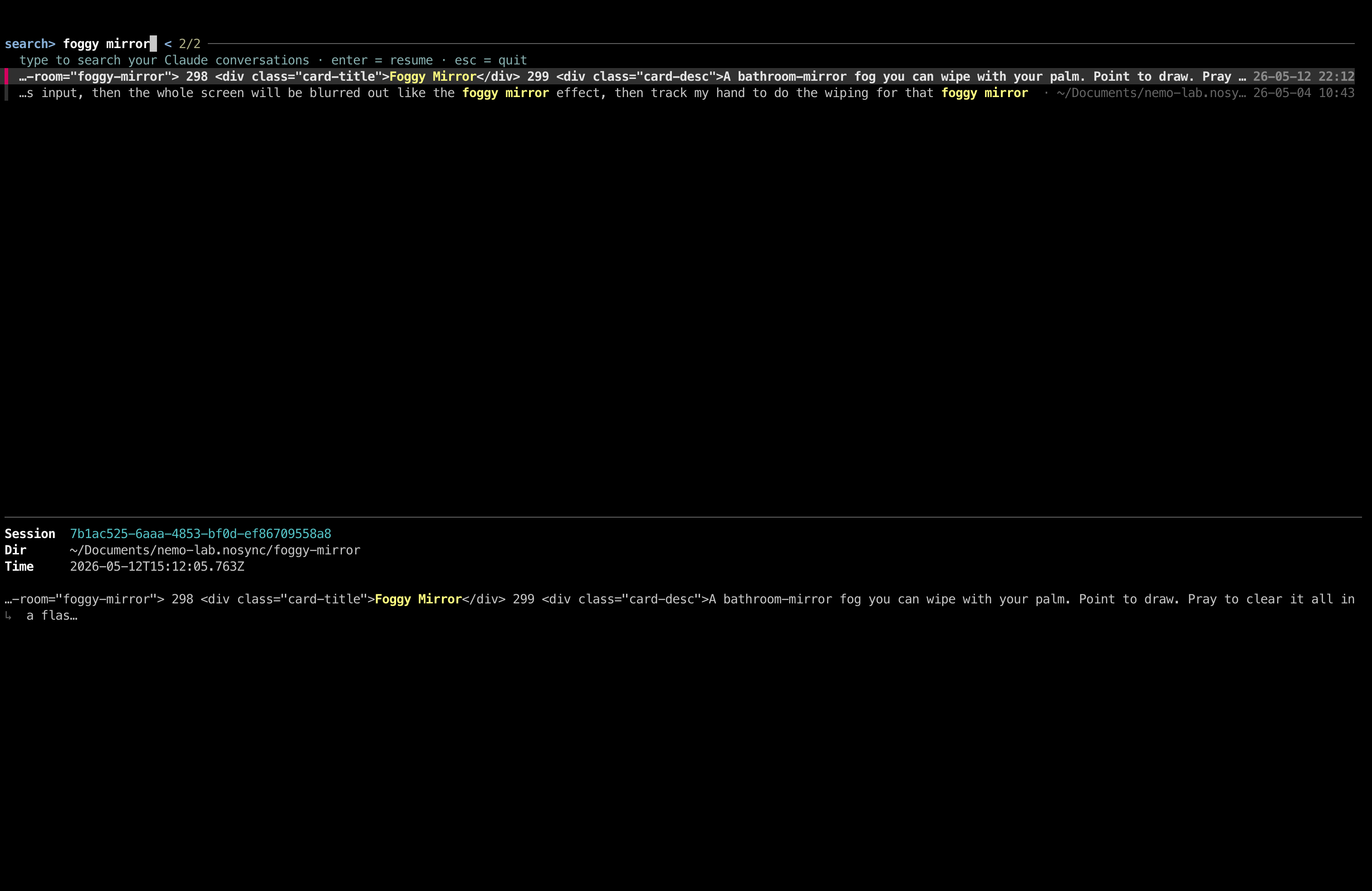
Demo
Why
claude --resumeonly matches a session's title (its first prompt) — not what was actually discussed inside it.- Your history is also fragmented per working directory, so each
pwdshows a different partial list and older work is hard to find and continue.
claude-grep searches the full transcript body across every project, so you can find a conversation by something that came up halfway through it — and drop right back into it.
Install
Homebrew (recommended)
brew install coolcorexix/tap/claude-grep
Then run ccfind. (You'll also need Anthropic's claude CLI on your PATH.)
Nix
nix run github:coolcorexix/claude-grep
Or nix profile install github:coolcorexix/claude-grep, or add it to your flake. (fzf, ripgrep, and Python are bundled in.)
Manual
Requirements: fzf ≥ 0.38, ripgrep, Python 3.8+, and the claude CLI on your PATH.
# macOS dependencies
brew install fzf ripgrep

git clone https://github.com/coolcorexix/claude-grep
ln -sf "$PWD/claude-grep/ccfind" ~/.local/bin/ccfind   # ensure ~/.local/bin is on PATH
Then run ccfind. (Or just copy the ccfind script anywhere on your PATH.)
Usage
ccfind
- Type a phrase — results refresh live as you type.
- ↑/↓ move · Enter resumes the selected conversation · Esc quits.
- Each row shows the matched snippet (phrase highlighted), the conversation's working directory (dimmed), and the message timestamp (right-aligned). The preview pane shows the session id, directory, and time.
How it works
- Fast:
ripgrepnarrows thousands of transcripts to candidates in milliseconds; only those files are parsed in Python for clean, highlighted snippets. No index, nothing running in the background. - Searches real content: your prompts, Claude's replies, and tool results — matches inside a tool call (e.g. a shell command) still surface via a raw fallback.
- Sub-agent aware: sub-agent transcripts (
<project>/<PARENT-UUID>/subagents/agent-*.jsonl) can't be resumed directly, soclaude-grepresolves them to their parent session and resumes that — using the parent's working directory, so it works even if the sub-agent ran in a now-deleted git worktree. - Deduped: one row per resumable conversation, newest first.
Multi-agent: Claude Code · OpenCode · Hermes
If you also use OpenCode or Hermes, ccfind searches their conversation history alongside Claude Code's — from the same UI. It auto-detects which agents are installed and tags each row by source:
[c]Claude Code — JSONL transcripts under~/.claude/projects/[h]Hermes — sessions under~/.hermes/sessions/and~/.hermes/profiles/<name>/sessions/[o]OpenCode — the SQLite db at~/.local/share/opencode/opencode.db
Press Enter on any row and ccfind routes to the right agent's resume command (claude --resume / hermes --resume / opencode --session). Sub-agent sessions (Claude or OpenCode) auto-resolve to their resumable parent.
ccfind --sources               # see which agents are detected
ccfind --source claude         # search only one
ccfind --source claude,hermes  # or a subset
Branch any session at any message (prompt tree)
Like git checkout from a commit — but for AI conversations. In the search UI, hit Ctrl-B instead of Enter on any row to:
- open a picker of all user messages in that session,
- pick one as your checkpoint,
ccfindcreates a new Claude Code session with the conversation rewound to that point — and resumes you into it.
The forked session is a first-class Claude session (works with claude --resume, appears in your history) and is tagged with the same forkedFrom: {sessionId, messageUuid} metadata that Claude's own /btw command writes — fully compatible with Claude's native fork format.
Useful when:
- you went down a wrong rabbit hole and want to try a different direction from a specific message,
- a session covered multiple tickets and you want each one as its own clean thread,
- you want to keep the original session intact while exploring an alternative path.
MVP supports Claude Code only; OpenCode and Hermes branching coming next.
FAQ
How do I search my Claude Code conversation history?
Run claude-grep (the ccfind command) and type any phrase. It searches across every transcript in ~/.claude/projects/ and lets you resume the matching session.
Can I search past Claude Code sessions by content instead of just the title?
Yes — that's the whole point. claude --resume only matches the session title / first prompt; claude-grep searches the entire transcript body.
How do I find and reopen an old Claude Code conversation?
Search for something you remember discussing, select the result, and press Enter. claude-grep cds into that project and runs claude --resume on the correct session.
Where does Claude Code store its conversations?
As JSONL transcripts under ~/.claude/projects/<project>/<session-id>.jsonl (sub-agent sessions live in a subagents/ subfolder). claude-grep reads these directly — no export or setup needed.
Does it work with sub-agent sessions?
Yes. Sub-agent transcripts aren't resumable on their own, so claude-grep automatically resolves them to the resumable parent session.
claude-grep vs. claude --resume
claude --resume |
claude-grep | |
|---|---|---|
| Matches on | session title / first prompt | full transcript content |
| Scope | current project only | all projects at once |
| Find by something said mid-conversation | ✗ | ✓ |
| Resumes sub-agent sessions | ✗ | ✓ (via parent) |
| Live, as-you-type search | ✗ | ✓ |
Limitations
- The right-aligned timestamp is sized to the terminal width at search time; resizing the terminal corrects on the next keystroke.
- Results are capped at the 80 most-recent matches per search to stay responsive.
License
MIT — see LICENSE.
Yorumlar (0)
Yorum birakmak icin giris yap.
Yorum birakSonuc bulunamadi