linkedin-mcp
Health Uyari
- License — License: MIT
- Description — Repository has a description
- Active repo — Last push 0 days ago
- Low visibility — Only 7 GitHub stars
Code Gecti
- Code scan — Scanned 5 files during light audit, no dangerous patterns found
Permissions Gecti
- Permissions — No dangerous permissions requested
Bu listing icin henuz AI raporu yok.
Safe LinkedIn MCP server for Claude, ChatGPT, Cursor & Codex. Your Agents read LinkedIn DMs, search your network, enrich profiles and draft messages you send.
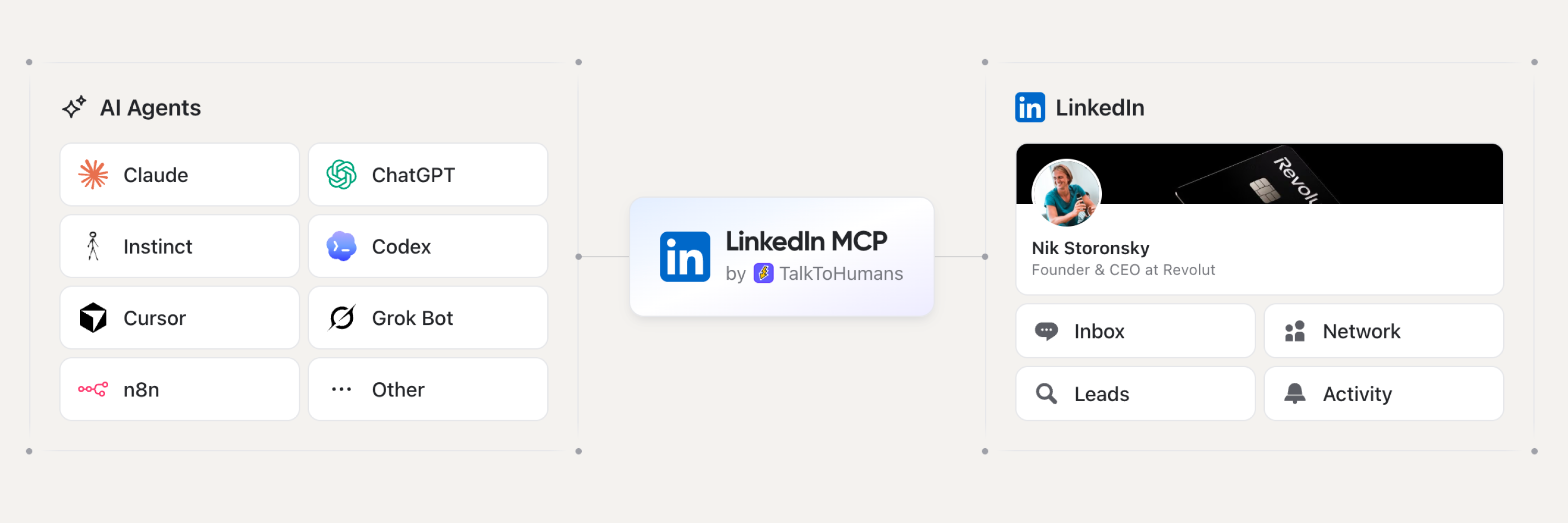
LinkedIn MCP Server
The safest LinkedIn MCP for your Agents.
Connect Claude, ChatGPT, Codex, Cursor, VS Code or any remote MCP client to your own LinkedIn account.
Your agent reads your LinkedIn conversations, searches your network, enriches profiles with email and phone, and drafts the messages. You review them and hit send.





https://api.talktohumans.app/mcp
Why this LinkedIn MCP is safer
LinkedIn has no official MCP server, and its public API doesn't give access to your private messages. Every LinkedIn MCP is third-party, and most fall into one of three groups:
| Open-source scrapers | Cloud LinkedIn tools | TalkToHumans | |
|---|---|---|---|
| Pace | Whatever pace your agent sets | Campaign volume | Conservative daily limits and human-paced delays, per action and per account |
| What 100 agent calls do | 100 trips to LinkedIn | 100 trips to LinkedIn, from their servers | Read a synced cache, so no more LinkedIn activity than one call |
| Where LinkedIn actions run | A script driving a browser on your machine | Their servers, often behind proxy IPs | The browser you already use. No cloud automation, no proxy IP |
| Where you work | In your agent's chat | In your agent's chat | Wherever suits the task: your agent's chat, the TalkToHumans app, or right inside LinkedIn and Sales Navigator |
| Who presses send | Usually the agent | The agent or a campaign | You. The MCP only drafts |
No LinkedIn tool is completely risk-free. Here is how TalkToHumans keeps the risk down:
- Human pace, built in. Every action type has a conservative daily limit and a delay between actions, set per LinkedIn account and shared by everyone who uses it. Hit a limit and that action pauses until the next day. Your agent can't override it.
- Cache-based sync. Your agent reads a synced copy of your LinkedIn data, not LinkedIn itself. Ask it 100 questions about your inbox and your account sees the same activity as one, with no hopping from profile to profile.
- Runs in your browser. LinkedIn actions go through the browser you already use. No cloud automation, no proxy IPs and no virtual browsers acting on your behalf.
- Work in the chat, the app or LinkedIn. Everything your agent does also lands in the TalkToHumans app and in panels embedded in LinkedIn's own pages. Check conversations, see what's scheduled and take over by hand wherever you are.
- Drafts only. The MCP can write a reply or stage a full follow-up sequence. Nothing goes out until you hit send.
What your agent can do on LinkedIn
Founders, consultants, sales teams and agencies use it for the same handful of jobs. Each one has a ready-to-paste prompt further down.
- Find leads in your network. Describe your ideal customer, and your agent scores your connections. They're already connected to you, so you can message them today.
- Find the replies you owe. Scan hundreds of LinkedIn, Sales Navigator and Recruiter threads for the ones where someone is waiting on you, every morning if you like.
- Draft messages in your voice. Your agent researches each person and writes a first message that sounds like you. You review every draft and send it yourself.
- See what gets replies. Analyze acceptance rates, reply rates and templates, from connection request to booked meeting.
- Stage follow-up sequences. Follow-ups that stop when the lead replies, written for each person, waiting for you to launch them.
- Import new leads. Find people showing intent online, or bring in a list from an event or Sales Navigator, and get a ready-to-work view.
- Score and tag contacts. Fill an ICP score for every contact, or backfill tags on hundreds of conversations the way your team already uses them.
- Keep your CRM in sync. Combine it with your CRM's MCP to log LinkedIn conversations, or use the native HubSpot integration.
Your agent also gets work email and mobile phone for the people you talk to, from 20+ providers in a waterfall.
Connect your AI client to LinkedIn
You need a TalkToHumans account on the Pro plan, with the TalkToHumans browser extension connected to LinkedIn. Try it free.
Connect Claude to LinkedIn (web and desktop)
- In Claude, open Customize > Connectors (or Settings > Connectors).
- Click Add custom connector, name it
TalkToHumansand pastehttps://api.talktohumans.app/mcp. - Click Connect and sign in to TalkToHumans.
Start a new chat and the LinkedIn tools appear in the tools menu. Setup takes about two minutes.
Claude Code
claude mcp add --transport http talktohumans https://api.talktohumans.app/mcp
Then run /mcp inside Claude Code and follow the sign-in flow.
Connect ChatGPT to LinkedIn
- In ChatGPT, go to Settings > Apps > Create.
- Name it
TalkToHumansand pastehttps://api.talktohumans.app/mcp. - Click Create and complete the OAuth sign-in.
Codex
codex mcp add talktohumans --url https://api.talktohumans.app/mcp
codex mcp login talktohumans
Cursor
Add this to your Cursor MCP config, then complete the sign-in:
{
  "mcpServers": {
    "talktohumans": {
      "url": "https://api.talktohumans.app/mcp"
    }
  }
}
VS Code
{
  "servers": {
    "talktohumans": {
      "type": "http",
      "url": "https://api.talktohumans.app/mcp"
    }
  }
}
n8n and other MCP clients
Any client that supports remote MCP servers over Streamable HTTP with OAuth can use the same URL. The MCP docs have the steps for each client.
LinkedIn MCP use cases and prompts
Replace the parts in [brackets]. Each prompt works in Claude, ChatGPT, Codex or Cursor once TalkToHumans is connected. They're ordered from the ones people run most.
Find leads in your LinkedIn network
At least 10–20 people in your network probably already fit your ICP, and you can message them without a connection request.
Use TalkToHumans MCP to find up to 20 leads in my LinkedIn network
I should reach out to today for [BUSINESS NAME].

My ICP is: [DESCRIBE YOUR ICP]

Then create a view in TalkToHumans with those 20 leads so I can work through them today.
To find intro paths instead, ask for people who could introduce you to your ICP, why each one is relevant, and a draft of the intro ask.
Find the LinkedIn replies you owe
Leads rarely go cold because they said no. They go cold because nobody answered.
Use TalkToHumans MCP to go through my LinkedIn conversations.
List every thread where the other person wrote last and I haven't answered,
most important first. Draft a reply for each one. Don't send anything.
Save it as a scheduled task in your AI client for a LinkedIn inbox brief every morning. Your agent reads the inbox synced by the TalkToHumans extension, so keep LinkedIn open in your browser for the latest messages.
Draft LinkedIn messages in your voice
A good first message is the hardest part. Your agent gets you past the blank page, and every draft waits in TalkToHumans until you review and send it.
Use TalkToHumans MCP and open the contacts in this view:
[LINK TO THE CONTACT VIEW IN TALKTOHUMANS]

Draft a first message for each of them.

Rules:
- Max 3 sentences.
- No pitch in the first message. Open a real conversation.
- Use their profile or our past conversation to show you know something
  true and specific about their world. No fake flattery.
- Match their tone, based on how they write or how their profile reads.
- Ask yourself: "Would I reply to this if I were them?" If not, rewrite it.
- Review your output with https://github.com/hardikpandya/stop-slop/blob/main/SKILL.md

I'll review each message before sending.
Analyze your LinkedIn outbound performance
Use TalkToHumans MCP to analyze my LinkedIn outbound performance over the past 2 weeks.
Work out what tends to work and what doesn't, from accepted connection request
to booked meeting. Then tell me what to change, improve or stop doing for the next 2 weeks.

Add charts where they make the analysis easier to read.
Stage LinkedIn follow-up sequences
Most replies come from the follow-up, and writing three of them for every lead is where most people give up. Your agent stages each sequence as a draft. It stops as soon as the lead replies, and nothing starts until you launch it.
Use TalkToHumans MCP to find the contacts who accepted my connection request
in the last 30 days but never replied.

For each one, stage a 2-step follow-up sequence as a draft:
- Day 3: a short follow-up that adds one useful, specific thing for them
- Day 10: a light last nudge

Same rules as a first message: short, no pitch, specific to them.
I'll review and launch each sequence myself.
Find new leads online and import them
Pair TalkToHumans with a web search MCP such as Parallel to find fresh leads every day.
Use Parallel Search MCP to find 20 high-quality leads I should reach out to today
for [BUSINESS NAME].

My ICP is: [DESCRIBE YOUR ICP]

Prioritize people who recently showed direct or indirect buying intent online:
engaging with relevant topics, discussing a problem we solve, or interacting with competitors.

Then:
1. Remove duplicates and anyone already in TalkToHumans.
2. Import the new leads with TalkToHumans MCP.
3. Create a view for them so I can start working through them.
Import a LinkedIn lead list you already have
Got a list from an event, a webinar, a Sales Navigator search or another tool? Your agent imports up to 500 LinkedIn profiles at a time.
Use TalkToHumans MCP to import the people from this list:
[PASTE LINKEDIN PROFILE URLS, OR ATTACH A CSV WITH A LINKEDIN URL COLUMN]

Skip anyone already in TalkToHumans, tag them "[TAG NAME]", and create a view for them.
Then draft a first message for each one that mentions [WHERE THEY COME FROM, E.G. THE EVENT].
Score contacts against your ICP
Your agent stores the score in an "ICP score" custom field, so you can sort and filter your contacts by it.
Use TalkToHumans MCP and open the contacts in this view:
[LINK TO THE CONTACT VIEW IN TALKTOHUMANS]

If a contact custom field named "ICP score" doesn't exist yet, create it.
Then analyze each contact one by one and fill in their ICP score.

Our ICP is: [DESCRIBE YOUR ICP]

Use web search and their company website to be more accurate.
Tag LinkedIn contacts and conversations automatically
Tags work well when you're working through new conversations. To backfill hundreds of old ones, hand it to your agent. Keep tags few and simple, like "Hot lead", "Friend", "Candidate", "Investor" or "Spam": a contact with no tag is better than a wrong one.
Use TalkToHumans MCP. First, look at our existing tags and how we use them.
Then tag every lead that has no tags, using those existing tags,
based on our conversations and what you know about the contact and their company.

Rules:
- Reuse existing tags. Only create a new one if none fits, and keep the list short.
- Tags are 1-2 words in plain English, like "Hot lead", "Friend", "Candidate", "Investor", "Spam".
- One tag per contact is usually enough.
- If you're unsure, don't tag the contact.
Log LinkedIn conversations in your CRM
Using HubSpot? The native integration on the Pro plan already syncs it. For any other CRM with an MCP server, such as Attio or Twenty, your agent can do it:
Use TalkToHumans MCP and my CRM's MCP.
For every LinkedIn conversation with a new message in the last 7 days:
1. Find the matching person in my CRM, or create them if they're missing.
2. Add a two-line summary of the conversation as a note.
3. If their work email is missing in my CRM, find it with TalkToHumans MCP.
LinkedIn MCP tools
| Area | Tools |
|---|---|
| Accounts | linkedin_list_accounts |
| Conversations | linkedin_list_conversations, linkedin_list_messages, linkedin_write_message_draft |
| Contacts | linkedin_list_contacts, linkedin_import_contacts, linkedin_get_import_progress, linkedin_update_contact, linkedin_list_field_definitions, linkedin_create_field_definition |
| Companies | linkedin_list_companies |
| Enrichment | linkedin_enrich_profile, linkedin_find_email, linkedin_find_phone |
| Views | linkedin_list_views, linkedin_create_view, linkedin_update_view |
| Templates & sequences | linkedin_list_templates, linkedin_create_template, linkedin_update_template, linkedin_update_sequence, linkedin_delete_sequence |
| Reporting | activity_list, activity_summary |
linkedin_write_message_draft saves a draft or stages a sequence for you to review. It never sends. Imports and enrichment use TalkToHumans credits.
FAQ
What is a LinkedIn MCP server?
MCP (Model Context Protocol) is the open standard that lets AI assistants like Claude, ChatGPT and Cursor use outside tools. A LinkedIn MCP server connects your agent to your LinkedIn data. It can read your conversations, search your network and prepare messages, instead of you copying everything into a chat.
Is there an official LinkedIn MCP?
No. LinkedIn doesn't offer an MCP server, and its public API doesn't cover private messages. Every LinkedIn MCP is third-party.
Can my agent send LinkedIn messages on its own?
No, and that's on purpose. Your agent can read, sort and draft, down to a full follow-up sequence. Every message that carries your name still gets your approval.
Do I have to give you my LinkedIn password?
No. TalkToHumans works through your logged-in browser session. Your AI client signs in to TalkToHumans, not to LinkedIn.
How fresh is the data?
Your workspace syncs while your browser is open with the TalkToHumans extension on, newest conversations first. Older message history loads when you open a conversation in TalkToHumans.
Is there a LinkedIn API too?
Yes. The Pro plan also includes a REST API for contacts, companies, conversations, drafts, views and activity. See the developer docs.
Which plan includes the MCP?
MCP and API access come with the Pro plan, alongside sequences, analytics and CRM integrations.
About this repository
This repo holds the MCP Registry entry (server.json) and setup docs for the hosted TalkToHumans server. The server runs at https://api.talktohumans.app/mcp, and its code isn't in this repo.
Found a bug or a missing tool? Open an issue.
Built by TalkToHumans.
Yorumlar (0)
Yorum birakmak icin giris yap.
Yorum birakSonuc bulunamadi