scraper-mcp
Health Uyari
- License — License: MIT
- Description — Repository has a description
- Active repo — Last push 0 days ago
- Low visibility — Only 6 GitHub stars
Code Gecti
- Code scan — Scanned 12 files during light audit, no dangerous patterns found
Permissions Gecti
- Permissions — No dangerous permissions requested
This is a web scraping server that fetches web pages, filters out unnecessary elements like CSS, and converts the content into markdown. It is specifically designed to integrate with AI models to significantly reduce token usage.
Security Assessment
Overall Risk: Medium. The tool's primary function is to make outbound network requests to fetch external web content, which is standard for its purpose but requires awareness. A light code scan found no hardcoded secrets, malicious execution patterns, or dangerous shell commands. It does not request any dangerous system permissions. However, it optionally requires a `PERPLEXITY_API_KEY` environment variable for AI web search features, and offers JavaScript rendering via Playwright. Developers should be careful to run this in an isolated environment, as it is designed to process arbitrary external HTML which could potentially be used to exploit rendering dependencies.
Quality Assessment
The project is actively maintained, with its most recent code push being today. It has CI/CD pipelines and published Docker images, indicating good developer hygiene. It uses a standard MIT license, meaning it is safe for commercial and private use. However, community trust and visibility are currently very low. With only 6 stars on GitHub, the project has not been widely peer-reviewed or battle-tested by a large user base.
Verdict
Use with caution. The code is clean and actively maintained, but low community adoption means potential security flaws might be undiscovered; always run the provided Docker container in an isolated network environment.
Context-optimized MCP server for web scraping. Reduces LLM token usage by 70-90% through server-side CSS filtering and HTML-to-markdown conversion.
Scraper MCP



A context-optimized MCP server for web scraping. Reduces LLM token usage by 70-90% through server-side HTML filtering, markdown conversion, and CSS selector targeting.
Quick Start
# Run with Docker (GitHub Container Registry)
docker run -d -p 8000:8000 --name scraper-mcp ghcr.io/cotdp/scraper-mcp:latest

# Add to Claude Code
claude mcp add --transport http scraper http://localhost:8000/mcp --scope user
Try it:
> scrape https://example.com
> scrape and filter .article-content from https://blog.example.com/post
Endpoints:
- MCP:
http://localhost:8000/mcp - Dashboard:
http://localhost:8000/
Features
Web Scraping
- 4 scraping modes: Raw HTML, markdown, plain text, link extraction
- JavaScript rendering: Optional Playwright-based rendering for SPAs and dynamic content
- CSS selector filtering: Extract only relevant content server-side
- Batch operations: Process multiple URLs concurrently
- Smart caching: Three-tier cache system (realtime/default/static)
- Retry logic: Exponential backoff for transient failures
Perplexity AI Integration
- Web search: AI-powered search with citations (
perplexitytool) - Reasoning: Complex analysis with step-by-step reasoning (
perplexity_reasontool) - Requires
PERPLEXITY_API_KEYenvironment variable
Monitoring Dashboard
- Real-time request statistics and cache metrics
- Interactive API playground for testing tools
- Runtime configuration without restarts
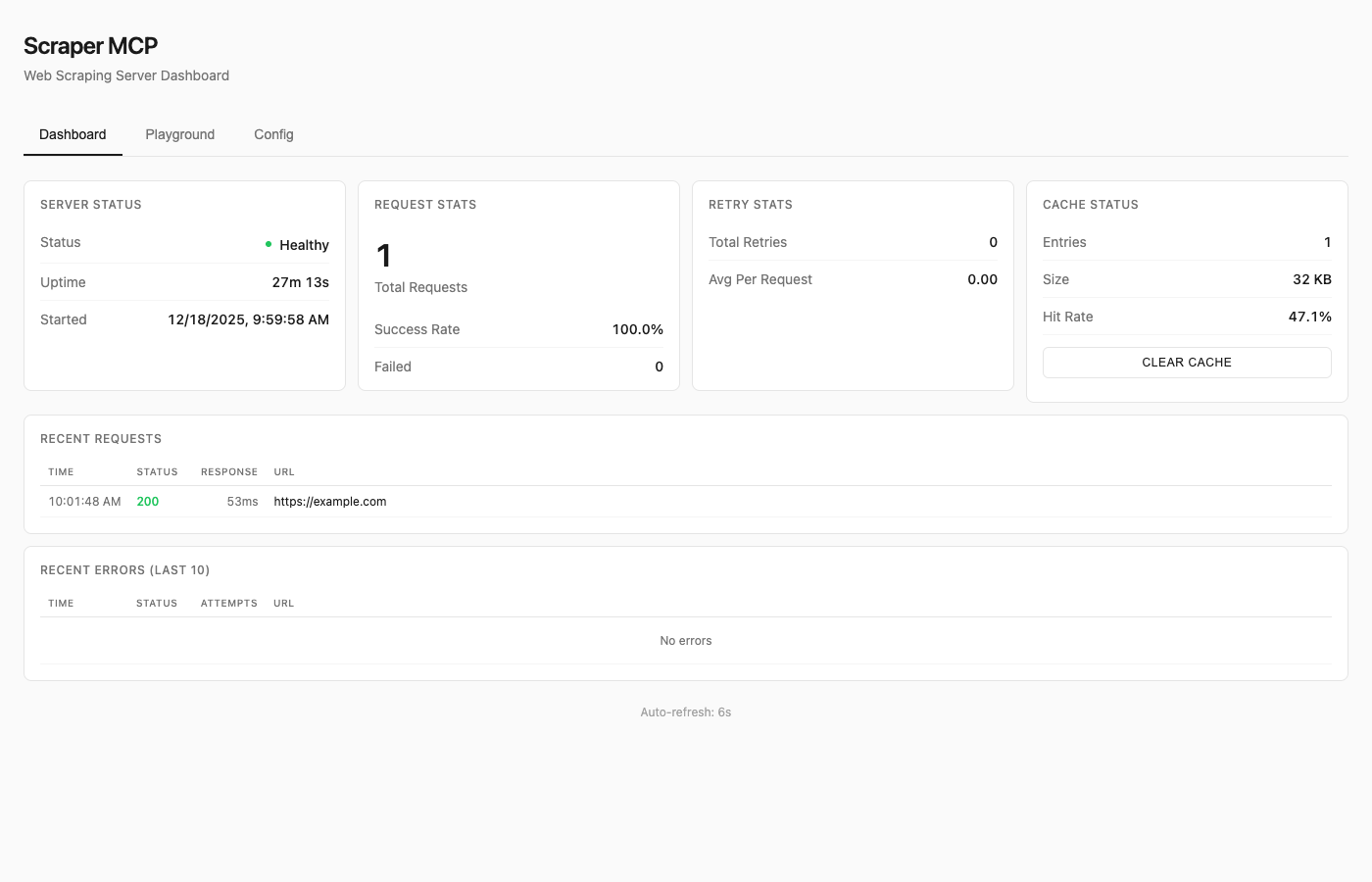
See Dashboard Guide for details.
Available Tools
| Tool | Description |
|---|---|
scrape_url |
HTML converted to markdown (best for LLMs) |
scrape_url_html |
Raw HTML content |
scrape_url_text |
Plain text extraction |
scrape_extract_links |
Extract all links with metadata |
perplexity |
AI web search with citations |
perplexity_reason |
Complex reasoning tasks |
All tools support:
- Single URL or batch operations (pass array)
timeoutandmax_retriesparameterscss_selectorfor targeted extractionrender_jsfor JavaScript rendering (SPAs, dynamic content)
Resources
Note: Resources are disabled by default to reduce context overhead. Enable with
--enable-resourcesflag orENABLE_RESOURCES=trueenvironment variable.
MCP resources provide read-only data access via URI-based addressing:
| URI | Description |
|---|---|
cache://stats |
Cache hit rate, size, entry counts |
cache://requests |
List of recent request IDs |
cache://request/{id} |
Retrieve cached result by ID |
config://current |
Current runtime configuration |
config://scraping |
Timeout, retries, concurrency |
server://info |
Version, uptime, capabilities |
server://metrics |
Request counts, success rates |
Prompts
Note: Prompts are disabled by default to reduce context overhead. Enable with
--enable-promptsflag orENABLE_PROMPTS=trueenvironment variable.
MCP prompts provide reusable workflow templates:
| Prompt | Description |
|---|---|
analyze_webpage |
Structured webpage analysis |
summarize_content |
Generate content summaries |
extract_data |
Extract specific data types |
seo_audit |
Comprehensive SEO check |
link_audit |
Analyze internal/external links |
research_topic |
Multi-source research |
fact_check |
Verify claims across sources |
See API Reference for complete documentation.
JavaScript Rendering
For SPAs (React, Vue, Angular) and pages with dynamic content, enable JavaScript rendering:
# Enable JS rendering with render_js=True
scrape_url(["https://spa-example.com"], render_js=True)

# Combine with CSS selector for targeted extraction
scrape_url(["https://react-app.com"], render_js=True, css_selector=".main-content")
When to use render_js=True:
- Single-page applications (SPAs) - React, Vue, Angular, etc.
- Sites with lazy-loaded content
- Pages requiring JavaScript execution
- Dynamic content loaded via AJAX/fetch
When NOT needed:
- Static HTML pages (most blogs, news sites, documentation)
- Server-rendered content
- Simple websites without JavaScript dependencies
How it works:
- Uses Playwright with headless Chromium
- Single browser instance with pooled contexts (~300MB base + 10-20MB per context)
- Lazy initialization (browser only starts when first JS render is requested)
- Semaphore-controlled concurrency (default: 5 concurrent contexts)
Memory considerations:
- Base requests provider: ~50MB
- With Playwright active: ~300-500MB depending on concurrent contexts
- Recommend minimum 1GB container memory when using JS rendering
Testing JS rendering:
Use the dashboard playground at http://localhost:8000/ to test JavaScript rendering interactively with the toggle switch.
Docker Deployment
Quick Run
# Using GitHub Container Registry (recommended)
docker run -d -p 8000:8000 --name scraper-mcp ghcr.io/cotdp/scraper-mcp:latest

# With JavaScript rendering (requires more memory)
docker run -d -p 8000:8000 --memory=1g --name scraper-mcp ghcr.io/cotdp/scraper-mcp:latest

# With Perplexity AI
docker run -d -p 8000:8000 -e PERPLEXITY_API_KEY=your_key ghcr.io/cotdp/scraper-mcp:latest
Docker Compose
For persistent storage and custom configuration:
# docker-compose.yml
services:
  scraper-mcp:
    image: ghcr.io/cotdp/scraper-mcp:latest
    ports:
      - "8000:8000"
    volumes:
      - cache:/app/cache
    environment:
      - PERPLEXITY_API_KEY=${PERPLEXITY_API_KEY:-}
      - PLAYWRIGHT_MAX_CONTEXTS=5
    deploy:
      resources:
        limits:
          memory: 1G  # Recommended for JS rendering
    restart: unless-stopped

volumes:
  cache:
docker-compose up -d
Production deployment (pre-built image from GHCR):
docker-compose -f docker-compose.prod.yml up -d
Upgrading
To upgrade an existing deployment to the latest version:
# Pull the latest image
docker pull ghcr.io/cotdp/scraper-mcp:latest

# Restart with new image (docker-compose)
docker-compose down && docker-compose up -d

# Or for production deployments
docker-compose -f docker-compose.prod.yml pull
docker-compose -f docker-compose.prod.yml up -d

# Or restart a standalone container
docker stop scraper-mcp && docker rm scraper-mcp
docker run -d -p 8000:8000 --name scraper-mcp ghcr.io/cotdp/scraper-mcp:latest
Your cache data persists in the named volume across upgrades.
Available Tags
| Tag | Description |
|---|---|
latest |
Latest stable release |
main |
Latest build from main branch |
v0.4.0 |
Specific version |
Configuration
Create a .env file for custom settings:
# Perplexity AI (optional)
PERPLEXITY_API_KEY=your_key_here

# JavaScript rendering (optional, requires Playwright)
PLAYWRIGHT_MAX_CONTEXTS=5       # Max concurrent browser contexts
PLAYWRIGHT_TIMEOUT=30000        # Page load timeout in ms
PLAYWRIGHT_DISABLE_GPU=true     # Reduce memory in containers

# MCP features (disabled by default to reduce context overhead)
ENABLE_RESOURCES=true           # Enable MCP resources
ENABLE_PROMPTS=true             # Enable MCP prompts

# Proxy (optional)
HTTP_PROXY=http://proxy.example.com:8080
HTTPS_PROXY=http://proxy.example.com:8080

# ScrapeOps proxy service (optional)
SCRAPEOPS_API_KEY=your_key_here
SCRAPEOPS_RENDER_JS=true
See Configuration Guide for all options.
Claude Desktop
Add to your MCP settings:
{
  "mcpServers": {
    "scraper": {
      "url": "http://localhost:8000/mcp"
    }
  }
}
Claude Code Skills
This project includes Agent Skills that provide Claude Code with specialized knowledge for using the scraper tools effectively.
| Skill | Description |
|---|---|
| web-scraping | CSS selectors, batch operations, retry configuration |
| perplexity | AI search, reasoning tasks, conversation patterns |
Install Skills
Copy the skills to your Claude Code skills directory:
# Clone or download this repo, then:
cp -r .claude/skills/web-scraping ~/.claude/skills/
cp -r .claude/skills/perplexity ~/.claude/skills/
Or install directly:
# web-scraping skill
mkdir -p ~/.claude/skills/web-scraping
curl -o ~/.claude/skills/web-scraping/SKILL.md \
  https://raw.githubusercontent.com/cotdp/scraper-mcp/main/.claude/skills/web-scraping/SKILL.md

# perplexity skill
mkdir -p ~/.claude/skills/perplexity
curl -o ~/.claude/skills/perplexity/SKILL.md \
  https://raw.githubusercontent.com/cotdp/scraper-mcp/main/.claude/skills/perplexity/SKILL.md
Once installed, Claude Code will automatically use these skills when performing web scraping or Perplexity AI tasks.
Documentation
| Document | Description |
|---|---|
| API Reference | Complete tool documentation, parameters, CSS selectors |
| Configuration | Environment variables, proxy setup, ScrapeOps |
| Dashboard | Monitoring UI, playground, runtime config |
| Development | Local setup, architecture, contributing |
| Testing | Test suite, coverage, adding tests |
Local Development
# Install
uv pip install -e ".[dev]"

# Run
python -m scraper_mcp

# Test
pytest

# Lint
ruff check . && mypy src/
See Development Guide for details.
License
MIT License
Last updated: December 23, 2025
Yorumlar (0)
Yorum birakmak icin giris yap.
Yorum birakSonuc bulunamadi