mcpr
Health Gecti
- License — License: Apache-2.0
- Description — Repository has a description
- Active repo — Last push 0 days ago
- Community trust — 26 GitHub stars
Code Gecti
- Code scan — Scanned 12 files during light audit, no dangerous patterns found
Permissions Gecti
- Permissions — No dangerous permissions requested
This tool is an observability-focused proxy that sits in front of MCP applications to log JSON-RPC calls, track per-tool metrics, and record session data into a local SQLite database.
Security Assessment
Risk Rating: Medium. The automated code scan found no hardcoded secrets, malware, or dangerous patterns. However, there are two significant security considerations. First, the primary installation method relies on piping a remote shell script directly into the system shell (`curl | sh`), which is a common attack vector if the host server is compromised. Second, as a proxy designed to intercept and record traffic, it inherently handles highly sensitive data. It logs all incoming request and response payloads (sizes and metadata) to a local SQLite store. If misconfigured, this could expose sensitive user queries or tool outputs. It also makes network requests to route and rewrite traffic to upstream servers.
Quality Assessment
The project is in active development with a repository push occurring just today. It carries a standard, permissive Apache-2.0 license. The codebase is written in Rust, which provides strong memory safety guarantees. The project claims impressive test coverage, backed by a Codecov badge, and low latency benchmarks. With 26 GitHub stars, it is a relatively new project with a growing community, so it should not yet be considered heavily battle-tested.
Verdict
Use with caution: the underlying code is clean and actively maintained, but evaluate the risks of the `curl | sh` installation method and ensure that the locally stored SQLite logs are properly secured to prevent unauthorized access to intercepted traffic.
Observability-first proxy for MCP servers

mcpr



Observability-first proxy for MCP servers. Per-tool metrics, session capture, and schema tracking in a single Rust binary — with ~1ms p99 overhead. Sits in front of your MCP app and records every JSON-RPC call to a local SQLite store.

Quickstart
Install and run:
# Install
curl -fsSL https://mcpr.app/install.sh | sh

# Onboarding - help you to setup
mcpr proxy setup
Docker is in beta — see docs/DOCKER.md for volumes, health probes, and compose/Kubernetes examples.
What mcpr does
mcpr sits in front of your MCP app and does three things, in order of how much work each one saves you:
- Observe — records every
tools/call,resources/*, andprompts/*request to a local SQLite store. Per-tool p50/p95/max latency, error rates, session traces, client breakdowns, and schema diffs over time. No instrumentation in your app. - Route — one upstream per proxy today. JSON-RPC classification, and CSP rewriting that emits the shape each AI client (ChatGPT, Claude, Copilot) expects.
- Authenticate (in progress) — OAuth 2.1 and API key handling at the proxy layer. Your app receives a verified
x-user-idheader instead of implementing auth flows itself.
Running in front of mcp.usestudykit.com/mcp today.
Observe
mcpr writes every request to a local SQLite database — tool name, latency, status, error code, request/response size, session ID. All mcpr proxy commands read from this store and work whether or not the daemon is running.
Per-tool metrics
$ mcpr proxy status
STATUS — localhost-9000 — last 1h

  Total requests:    1,284
  Error rate:        2.3%
  Sessions:          12 total   3 active

  TOOL                  CALLS      AVG      P95      MAX   ERRORS   BYTES IN  BYTES OUT
  get_weather             412    45ms    120ms    340ms      0%     48.2 KB    196.8 KB
  search_docs             389    82ms    210ms    890ms     1.5%    92.1 KB    1.2 MB
  run_query               156   240ms    890ms   2.40s      8.3%   128.4 KB    2.8 MB
Request logs
mcpr proxy logs --tool search_docs --status error    # failed calls to search_docs
mcpr proxy logs --follow                             # live tail (polls every 500ms)
mcpr proxy logs --session abc123                     # filter by session (prefix match)
mcpr proxy logs --method tools/call                  # filter by MCP method
mcpr proxy logs --since 30m --tail 100               # last 30 minutes, 100 rows
Slow calls
$ mcpr proxy slow --threshold 500ms
  TOOL              LATENCY    TIME                   STATUS
  run_query          2.40s     2025-04-10 14:20:12    ok
  run_query          1.80s     2025-04-10 14:18:45    ok
  search_docs         890ms    2025-04-10 14:15:33    error
Schema capture
mcpr intercepts tools/list, resources/list, and prompts/list responses as they pass through. It stores the server's schema and records each change.
$ mcpr proxy schema
Server: my-mcp-server v1.2.0 (MCP 2025-03-26)
Capabilities: tools, resources
Schema: complete
Last captured: 2026-04-12 14:30:00

── tools/list ──
  Tools (3):
    search_products  —  Search the product catalog by keyword
    get_product      —  Get product details by ID
    create_order     —  Create a new order
$ mcpr proxy schema --changes
  TIME                  METHOD        CHANGE           ITEM
  2026-04-12 14:30:00   tools/list    tool_added       send_email
  2026-04-10 09:15:00   tools/list    tool_modified    search_products
mcpr proxy schema --unused compares listed tools against actual call logs to find tools that are registered but never called.
Sessions and clients
$ mcpr proxy sessions
  SESSION    CLIENT                 STARTED         CALLS   ERRS
  a1b2c3d4   claude-desktop 1.2.0   Apr 10 14:20      45      2
  e5f6g7h8   cursor 0.48.0          Apr 10 14:15      23      0

$ mcpr proxy clients
  CLIENT              VERSION    PLATFORM   SESSIONS    CALLS   ERRORS
  claude-desktop      1.2.0      claude           12    4,201        8
  cursor              0.44.1     cursor            3      891        0
Route
Each proxy instance fronts one upstream MCP app. mcpr classifies requests by JSON-RPC shape: MCP methods go to the backend; anything else is forwarded upstream as-is.
mcp = "http://localhost:9000"
Multi-upstream routing from a single port is not supported yet. Run one mcpr proxy per upstream.
Widget CSP
MCP Apps (ChatGPT Apps, Claude connectors) render widgets in sandboxed iframes with CSP rules. ChatGPT reads openai/widgetCSP, Claude reads ui.csp. Each platform interprets domain lists differently.
mcpr rewrites CSP domain arrays in tools/list, tools/call, resources/list, resources/templates/list, and resources/read responses. It replaces localhost URLs with the proxy's public domain, merges configured domains, and emits the shape each client expects.
CSP has three independent directives — connectDomains (fetch / WebSocket), resourceDomains (scripts, styles, images), and frameDomains (iframes) — each with its own mode (extend or replace). Widget entries layer glob-matched overrides on top of the global policy.
[csp]
# Apply to openai widgetDomain and default csp domain
domain = "widgets.example.com"

[csp.connectDomains]
domains = ["api.example.com"]
mode    = "extend"

[csp.resourceDomains]
domains = ["cdn.example.com"]
mode    = "extend"

[csp.frameDomains]
domains = []
mode    = "replace"

[[csp.widget]]
match              = "ui://widget/payment*"
connectDomains     = ["api.stripe.com"]
connectDomainsMode = "extend"
Authenticate
In progress. mcpr will handle MCP OAuth 2.1 and API key auth at the proxy layer, so your MCP app receives a verified x-user-id header instead of implementing auth flows itself. Planned config:
[auth]
mode = "oauth2.1"           # or "api_key"
provider = "google"         # google, github, bring-your-own
Track progress in the Auth roadmap below. Open an issue if your provider isn't covered.
mcpr cloud (optional hosted dashboard)
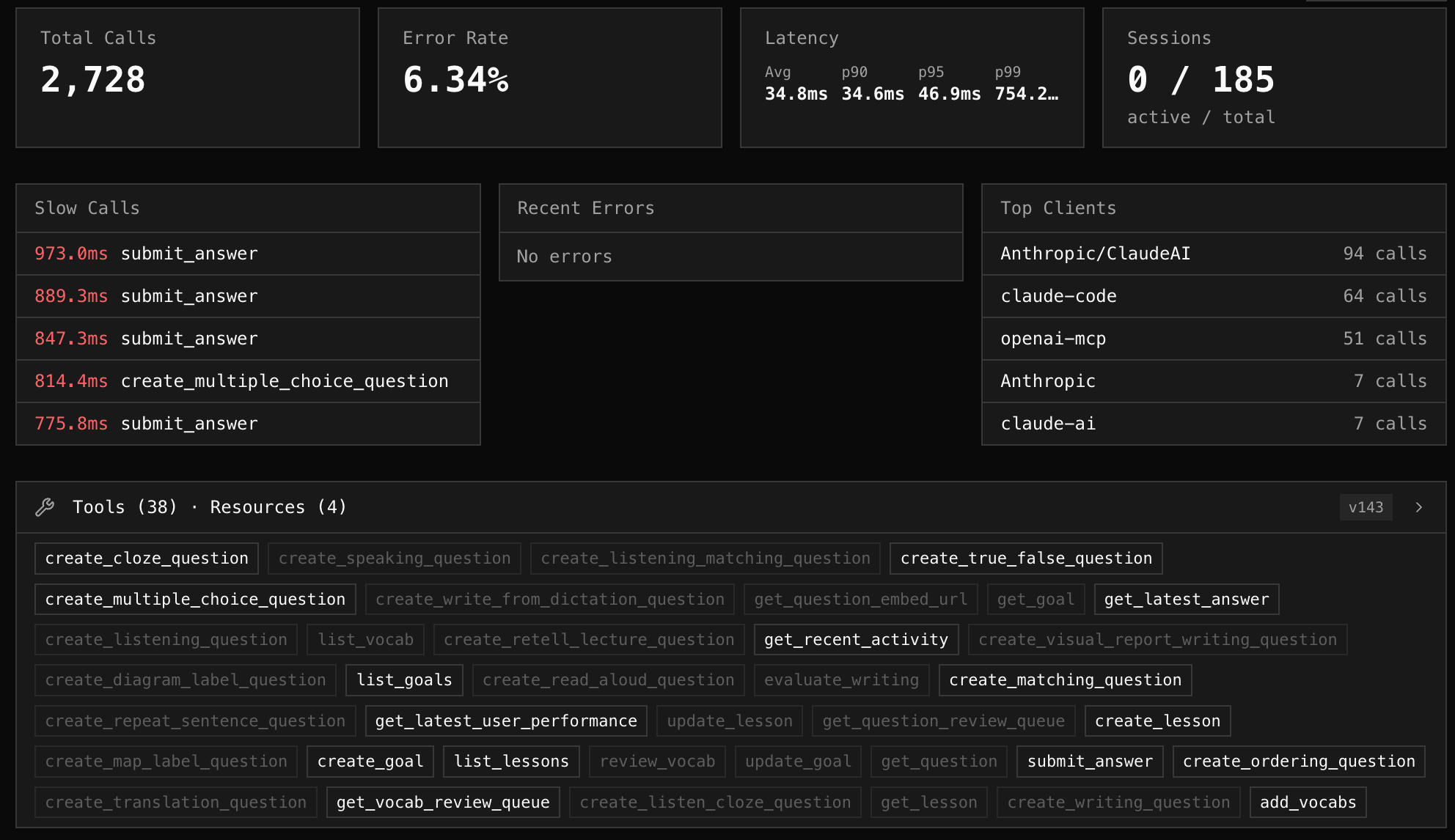
Self-hosting the CLI is enough for local development and single-machine deployments. For teams, cloud.mcpr.app is a managed dashboard that ingests events from your mcpr proxies and renders them as a web UI — analytics, log search, schema views, slow-call drill-downs, per-client breakdowns.
Data flows one way: proxy → cloud, pushed via a project token from mcpr proxy setup. Your local SQLite remains the source of truth.
Reference
- Configuration — docs/proxy/PROXY_CONFIGURATION.md (upstream URL, port, tunnel, CSP, cloud sync, logging, limits)
- CLI — docs/CLI.md (daemon, proxies, relay, and SQLite queries)
- Docker — docs/DOCKER.md (volumes, health probes, compose/Kubernetes)
Roadmap
Observability
- Per-tool metrics (calls, error%, p50, p95, max, request/response size)
- Request logs, session tracking, AI client tracking
- Schema capture with change tracking
- Cloud dashboard sync (cloud.mcpr.app)
Routing & Network
- JSON-RPC routing (single upstream per proxy)
- CSP rewriting
- Multi-upstream routing from one port
Auth
- OAuth 2.1 for standard providers
- OAuth 2.1 for legacy (non-standard) auth
- API token auth
- Multiple auth modes per server
Security
- Per-tool access control
- Rate limiting and circuit breaker
- IP whitelist
Tunnel/Relay
- Built-in tunnel client and self-hosted relay server
- Standalone
mcpr relayCLI with daemon lifecycle - Graceful shutdown
License
Apache 2.0
Yorumlar (0)
Yorum birakmak icin giris yap.
Yorum birakSonuc bulunamadi