compass
Health Gecti
- License — License: NOASSERTION
- Description — Repository has a description
- Active repo — Last push 0 days ago
- Community trust — 89 GitHub stars
Code Basarisiz
- rm -rf — Recursive force deletion command in .github/workflows/compass-publish.yml
Permissions Gecti
- Permissions — No dangerous permissions requested
Bu listing icin henuz AI raporu yok.
Native, local-first knowledge graph engine for code and project artifacts—inspired by Graphify, built in Rust, and evolving beyond it.
Compass
A fast, local-first knowledge graph for understanding codebases.
Compass turns source code and project artifacts into a graph you can search,
query, visualize, compare across Git history, and share with development tools.
large codebase
     |
     v
  Compass  ----->  architecture map
     |           \-> dependency and impact answers
     |            \-> exact CompassQL results
     |             \-> historical graph diffs
     |              \-> focused context for assistants
     v
less searching, smaller context, traceable evidence
Get started ·
Read the documentation ·
Explore the roadmap ·
View releases
Use Compass inside your editor with the first-party
Compass Codegraph extension for VS Code.
See the VS Code extension guide for current graphs,
cursor-rooted call graphs, architecture flow, queries, and exact Git evolution.
What Compass gives you
| Need | Compass capability |
|---|---|
| Understand an unfamiliar repository | Communities, architecture reports, god-node detection, and interactive HTML |
| Find implementation paths | Natural-language graph discovery, symbol explanations, and directed paths |
| Estimate change impact | Reverse dependency traversal and version-to-version topology diffs |
| Automate structural checks | Deterministic, read-only CompassQL with JSON and JSONL output |
| Ask questions about old revisions | Immutable graph realizations for exact Git commits |
| Give assistants focused context | Native skills, hooks, MCP serving, and compact graph queries |
| Connect other tools | Graph JSON, GraphML, SVG, Wiki, Obsidian, Neo4j, FalkorDB, and other exports |
Structural extraction and graph queries run locally. They do not require
Python, embeddings, a vector database, model credentials, or runtime parser
downloads.
How it works
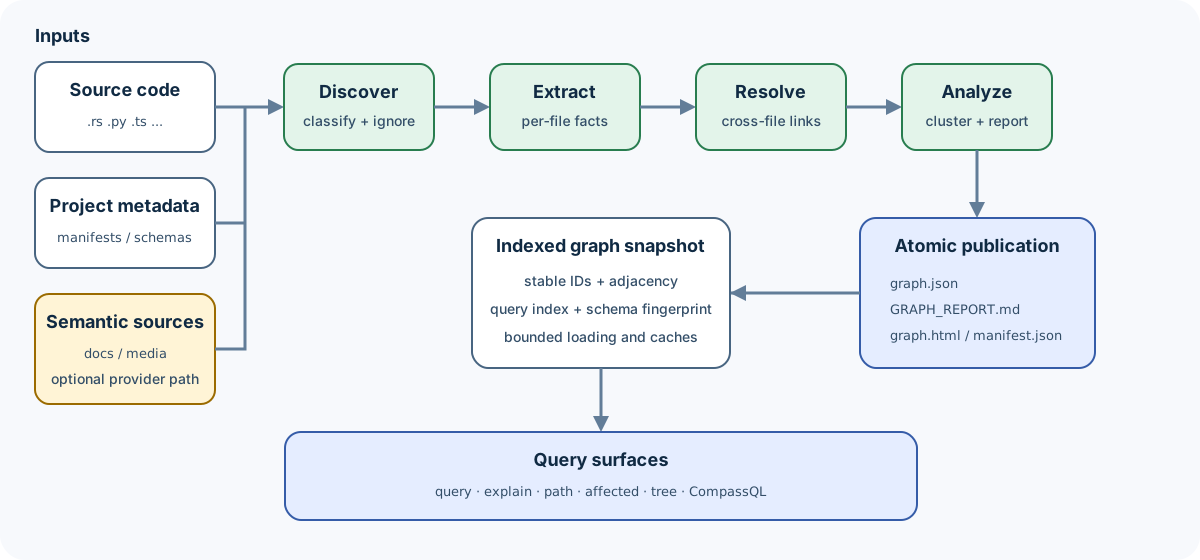
Compass discovers project files, extracts entities and relationships, resolves
cross-file references, analyzes the resulting graph, and publishes one
consistent snapshot.
function / class / file / document / schema object       node
CALLS / IMPORTS_FROM / USES / CONTAINS                   relationship
dense group of related nodes                             community
direct / resolved / uncertain evidence                   provenance
Relationships retain their direction, source location, and provenance:
CheckoutHandler
    |
    +-- CALLS [EXTRACTED] --> authorizePayment()
    |                              |
    |                              +-- USES --> PaymentGateway
    |
    +-- CALLS [INFERRED]  --> reserveInventory()
Read How Compass works for the complete
pipeline and Graph model for the data model.
Project lineage
Compass is inspired by and modeled after
Graphify. Graphify established the
core workflow: extract a codebase into a knowledge graph, analyze its
communities, and use focused graph queries to navigate complex projects.
Compass gives explicit credit to that foundation, but it is now an independent
product with its own implementation, commands, configuration, artifacts, and
test suite. Compass does not execute or depend on Graphify.
Compass capabilities
| Area | Compass extension |
|---|---|
| Runtime | One native Rust executable with no Python or Graphify dependency |
| Exact queries | CompassQL, a deterministic and bounded read-only openCypher subset |
| Versioned graphs | Immutable realizations for exact commits, historical queries, exports, and diffs |
| Incremental operation | Reuses compatible unchanged extraction work and atomically publishes graph plus manifest |
| Query safety | Explicit row, path, expansion, memory, and time limits |
| Native distribution | Linked parsers and native implementations for supported graph, media, database, and service boundaries |
See Compatibility for Compass-owned contracts and
Migration from Graphify for the one-time hard cutover.
Performance
Compass performance is qualified against Compass-owned baselines while
preserving graph correctness and deterministic output. Read
Performance qualification for the evidence policy and
benchmark commands.
Quick start
1. Install
On macOS or Linux (Apple Silicon/ARM64 or Intel/AMD64):
curl --proto '=https' --tlsv1.2 -LsSf \
  https://github.com/crabbuild/compass/releases/latest/download/install.sh | sh
On Windows x64 or ARM64, run the checksum-verifying PowerShell installer:
irm https://github.com/crabbuild/compass/releases/latest/download/install.ps1 | iex
For an offline install, download the matching archive and .sha256 file from
the latest release,
verify the checksum, extract it, and add the directory containing compass.exe
to PATH.
Or build from source with the pinned Rust 1.97.1+ toolchain:
git clone https://github.com/crabbuild/compass.git
cd compass
make install
make install uses an existing ~/.cargo/bin, otherwise it creates and uses~/.local/bin. To choose another location, runmake install BINDIR="$HOME/bin".
You can also install directly through Cargo:
cargo install --locked --path crates/compass-cli --bin compass
Upgrade any installed Compass executable to the latest stable release with:
compass upgrade
Compass verifies the official release checksum before replacing the executable.
If no newer release is available, it exits successfully and reports that the
installed version is already the latest.
2. Install the VS Code extension (optional)
After installing the Compass CLI, install
Compass Codegraph from the VS Code Marketplace
by selecting Install on its Marketplace page. You can also install it from
a terminal:
code --install-extension crabbuild.crabbuild-compass-vscode
Open your repository in VS Code. The extension detects the installed Compass
CLI and guides you to initialize the repository from the Compass sidebar.
3. Initialize and build a local graph
cd your-project
compass init
compass init previews the eligible corpus, saves project scope in.compass/config.toml, and performs the first structural build. For automation
or a focused monorepo scope:
compass init . --include src --include 'services/*/src' --exclude '**/generated/**' --yes
After setup, compass update and compass watch automatically reuse the
saved scope.
Compass writes:
compass-out/
├── graph.json        machine-readable graph
├── GRAPH_REPORT.md   architecture and community summary
├── graph.html        interactive visualization when size permits
└── manifest.json     incremental build state
4. Ask useful questions
compass query "where is authentication enforced?"
compass explain TokenVerifier
compass path ApiHandler TokenVerifier
compass affected TokenVerifier --depth 3
These commands read the saved graph and do not call a model.
Compass-specific workflows
Query exact graph patterns with CompassQL
compass query --cql \
  "MATCH (caller)-[:CALLS]->(target)
   WHERE target.label = 'authorizePayment()'
   RETURN caller.id, target.id
   LIMIT 20" \
  --format json
CompassQL is deterministic, read-only, parameterized, and resource-bounded.
See the language contract and
support matrix.
Travel through graph history
compass history enable --code-only
compass history build main
compass history build HEAD --profile-from main
compass query "authentication" --at HEAD~20
compass diff main HEAD
compass diff main HEAD --format html --output semantic-diff.html
Historical builds use exact Git commits and immutable extraction
fingerprints. Current and historical graphs can be queried, compared, and
exported without putting generated graph data into Git. Semantic diff leads
with likely breaks, behavior changes, affected callers/modules, and test
evidence; use --all to expand routine symbol churn.
Default text output reports any findings beyond its display budget; use--limit N to raise that budget or --all for exhaustive output.
HTML output is a self-contained interactive reviewer report with semantic
findings, an enhanced unified/split source diff, and a changed-subgraph view
with exhaustive node/edge delta lists. The source view is rendered by the
pinned @pierre/diffs library and retains the exact Git patch as an offline
fallback. HTML output requires an explicit --output path.
Read the versioned history guide and
storage design.
Connect a coding assistant
compass install
Inside a Git repository, Compass detects installed coding agents and configures
them at the repository root. Codex, Gemini CLI, OpenCode, Copilot, and generic
Agent Skills clients share one portable .agents/skills/compass package;
Claude Code, Kiro, and Cline use their native skill roots. Use repeatable--platform flags when you want explicit selection:
compass install --platform codex --platform claude
compass install --all --dry-run
compass install --user --format json
The skill teaches assistants to use an existing Compass graph as the first
navigation layer, request a focused subgraph, and open only the source files
needed to verify an answer. Installation does not build a graph; on the first
repository-wide architecture, dependency, history, or impact question, the
assistant can run the local deterministic build and continue automatically.
architecture question
        |
        v
read GRAPH_REPORT.md
        |
        v
run a focused Compass query
        |
        v
inspect the smallest useful source set
See Assistant setup for supported platforms,
scope, strict mode, upgrades, and uninstall.
Inspect program behavior with evidence
Native init, update, extract, and watch builds publish the structural graph by
default. Pass --program when a scenario needs program.json, the optional
language-neutral Program IR containing functions, conservative basic blocks,
operations, call candidates, capability coverage, provenance, and derived
summaries; --program-artifact also enables it. The offline-first pipeline
combines Tree-sitter syntax evidence for Rust and TypeScript-family languages
with any SCIP indexes already on disk. Compass does not invoke an indexer,
compiler, language server, model, or network service to build this artifact.
Schema http://crab.build/compass/v1 reports each capability as complete,partial, indeterminate, or failed, with machine-readable reasons for
every non-complete state. Unresolved calls are retained as uncertainty and are
never treated as proof that no downstream target exists.
Inspect or query the current artifact without custom JSON scripts:
compass program summary
compass program coverage
compass program functions --language rust --name build
compass program show <symbol-id>
compass program callers <symbol-id>
compass program explain-call src/lib.rs:240
compass program query \
  "MATCH (f) WHERE f.kind = 'program_function' RETURN f LIMIT 20"
Supply additional offline evidence with repeatable--program-artifact path/to/index.scip options. Decoded indexes are cached by
artifact digest, while freshness and normalization are invalidated per indexed
document.
Structural and semantic modes
Choose the smallest mode that answers your question:
| Command | Network behavior | Best for |
|---|---|---|
compass update . |
Local only | Normal source-code graph updates |
compass extract . --code-only |
Local only | Explicit no-model extraction |
compass extract . --code-only --cargo |
Local only | Code plus Cargo dependency edges |
compass extract docs --backend … |
Uses the configured provider | Semantic facts from supported documents and media |
Semantic extraction is optional. Compass contacts a model provider only when
you select a provider-backed workflow. Read
Security and privacy before processing
sensitive repositories.
Find the right document
| You are… | Start here |
|---|---|
| Evaluating Compass | Getting started → How it works |
| Using or integrating Compass | Guides → Cookbook |
| Extending the Rust workspace | Architecture → Workspace tour |
| Looking up an interface | Commands → Outputs |
| Tracking future direction | Available, planned, and aspirational roadmap |
The documentation hub links every concept, guide, design,
implementation note, recipe, and reference.
Community and contributing
| Need | Destination |
|---|---|
| Usage question or idea | GitHub Discussions |
| Bug or actionable feature request | GitHub Issues |
| Security vulnerability | Private vulnerability reporting |
| Code or documentation contribution | Contributing guide |
Development checks, architecture boundaries, and contribution expectations are
documented in CONTRIBUTING.md. Support and disclosure
boundaries live in SUPPORT.md and SECURITY.md.
License
Compass's original work is dual-licensed under
MIT or Apache-2.0.
Third-party components retain their original licenses; see
THIRD_PARTY_NOTICES.md.
Yorumlar (0)
Yorum birakmak icin giris yap.
Yorum birakSonuc bulunamadi