tmux-claude-session-manager
Health Gecti
- License — License: MIT
- Description — Repository has a description
- Active repo — Last push 0 days ago
- Community trust — 104 GitHub stars
Code Gecti
- Code scan — Scanned 5 files during light audit, no dangerous patterns found
Permissions Gecti
- Permissions — No dangerous permissions requested
Bu listing icin henuz AI raporu yok.
Run many Claude Code sessions across your projects, each in its own tmux session — then list them, see which are done vs. still working, and jump to one from a single popup.
tmux-claude-session-manager
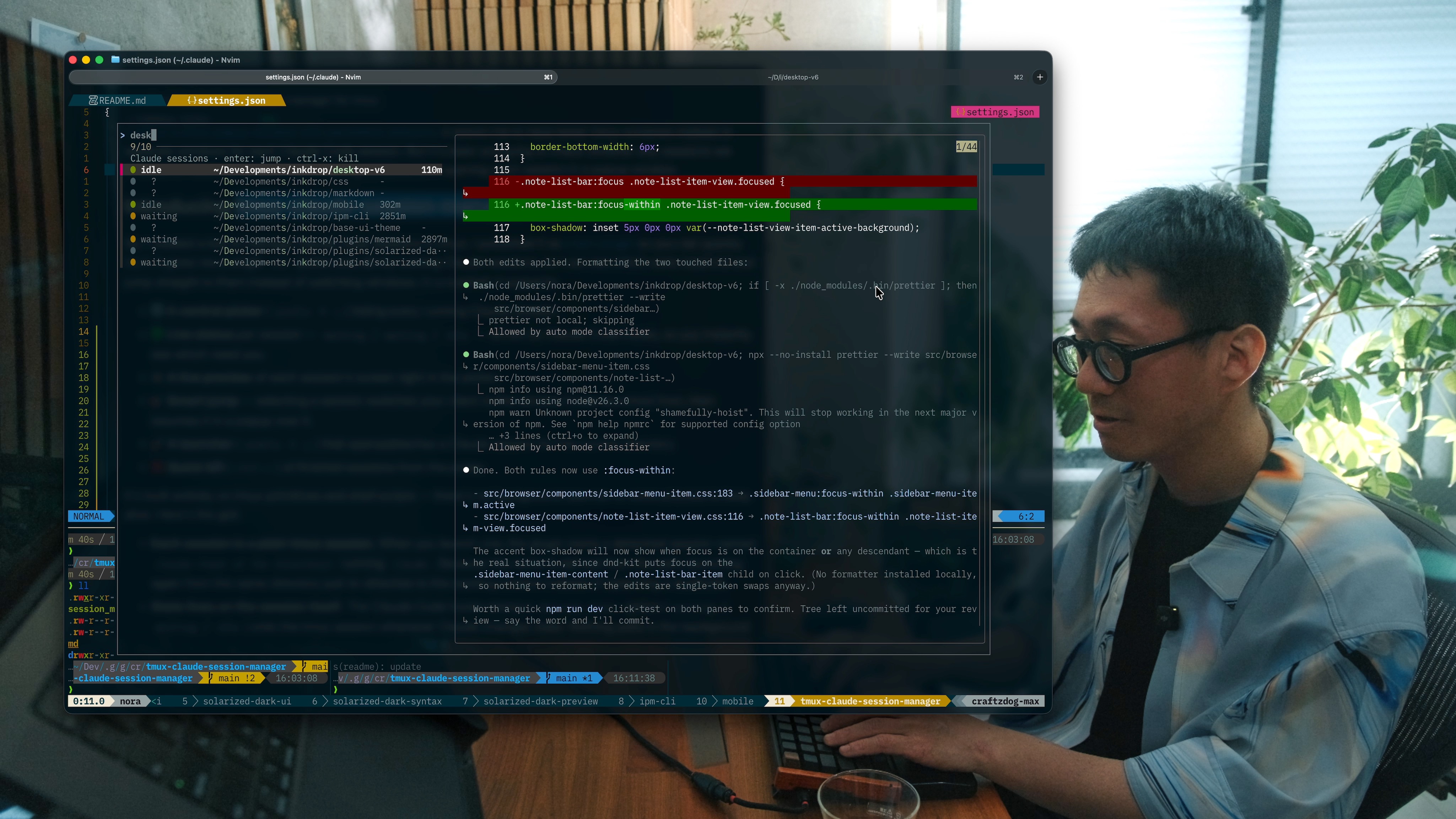
Run many Claude Code sessions across your
projects, each in its own tmux session — then list them, see which are done
vs. still working, and jump to one from a single popup.
If you launch Claude per-directory (one nested session per project), you quickly
end up with a dozen of them and no way to tell which are finished without opening
each one. This plugin gives you:
- 🔢 A central picker (
prefix+u) listing every running Claude session. - 🟢 Live status per session —
working/waiting/idle— driven by
Claude Code hooks, so you instantly see which need you. - 👁️ A live preview of each session's screen right in the picker.
- 🎯 Smart jump — selecting a session switches your client to the window it
was launched from, then resumes it in a popup over it. - 🚀 A launcher (
prefix+y) that opens/attaches a Claude session for the
current directory. - ❌ Quick kill (
ctrl-x) of finished sessions from the picker.
Status is optional: without the hooks the picker still lists, previews, jumps,
and kills — sessions just show ? instead of a color.
Prerequisites
- tmux ≥ 3.2 (for
display-popup) - fzf — the picker UI
- Claude Code CLI (the
claudecommand) - bash; macOS or Linux
Install (tpm)
Add to ~/.tmux.conf (or ~/.config/tmux/tmux.conf):
set -g @plugin 'craftzdog/tmux-claude-session-manager'
Then hit prefix + I to install.
Keybinding note: by default the plugin binds
prefix+y(launch) andprefix+u(list). If your config binds those elsewhere, either change the
options below, or make sure the plugin loads after your own bindings (putrun '~/.tmux/plugins/tpm/tpm'after them) so the one you want wins.
Manual install
git clone https://github.com/craftzdog/tmux-claude-session-manager ~/clone/path
Add to ~/.tmux.conf, then reload (prefix + r or tmux source ~/.tmux.conf):
run-shell ~/clone/path/claude_session_manager.tmux
Usage
| Key | Action |
|---|---|
prefix + y |
Launch (or re-attach to) a Claude session for the current directory, in a popup |
prefix + u |
Open the session picker |
Inside the picker:
| Key | Action |
|---|---|
enter |
Jump to the session (switches to its origin window, resumes in the popup) |
ctrl-x |
Kill the highlighted session |
↑ / ↓, type to filter |
fzf navigation |
Sessions needing your attention (waiting, idle) sort to the top.
Status setup (optional, recommended)
Status comes from Claude Code hooks
that stamp each session's state onto its tmux session. Add the following to your
Claude Code settings (~/.claude/settings.json), merging into any existinghooks block. Adjust the path if your plugins live elsewhere (e.g.~/.tmux/plugins/...):
{
  "hooks": {
    "UserPromptSubmit": [
      {
        "matcher": "",
        "hooks": [
          {
            "type": "command",
            "command": "$HOME/.config/tmux/plugins/tmux-claude-session-manager/scripts/state.sh working"
          }
        ]
      }
    ],
    "Notification": [
      {
        "matcher": "permission_prompt",
        "hooks": [
          {
            "type": "command",
            "command": "$HOME/.config/tmux/plugins/tmux-claude-session-manager/scripts/state.sh waiting"
          }
        ]
      }
    ],
    "PreToolUse": [
      {
        "matcher": "AskUserQuestion",
        "hooks": [
          {
            "type": "command",
            "command": "$HOME/.config/tmux/plugins/tmux-claude-session-manager/scripts/state.sh waiting"
          }
        ]
      }
    ],
    "Stop": [
      {
        "matcher": "",
        "hooks": [
          {
            "type": "command",
            "command": "$HOME/.config/tmux/plugins/tmux-claude-session-manager/scripts/state.sh idle"
          }
        ]
      }
    ]
  }
}
The state machine:
| Event | State | Meaning |
|---|---|---|
UserPromptSubmit |
🔴 working |
Busy — leave it |
Notification (permission) |
🟡 waiting |
Needs permission |
PreToolUse (AskUserQuestion) |
🟡 waiting |
Asking you a question |
Stop |
🟢 idle |
Turn finished — your move |
Claude Code reloads
hooksdynamically — no restart needed. Sessions that are
already running start reporting status on their next event once the hooks are
added.
Options
Set any of these before the plugin loads (defaults shown):
set -g @claude_launch_key     'y'        # prefix key: launch/open for current dir
set -g @claude_list_key       'u'        # prefix key: open the picker
set -g @claude_command        'claude'   # command run in new sessions
set -g @claude_session_prefix 'claude-'  # tmux session name prefix
set -g @claude_popup_width     '90%'     # popup width
set -g @claude_popup_height    '90%'     # popup height
How it works
- The launcher creates a detached
claude-<hash-of-dir>tmux session runningclaude, records the window it came from in@claude_origin, and attaches to
it in a popup. - The hooks set
@claude_state/@claude_state_aton each session as Claude
works. - The picker lists sessions matching the prefix, reads their state and a live
capture-panepreview, and on selection moves your client to the session's
origin window before resuming it in the popup. - Pressing
prefix+ufrom inside a session popup detaches that popup
first (closing it), then reopens the picker full-size on the outer host client —
so you never end up with a cramped popup-in-popup.
License
MIT © Takuya Matsuyama
Yorumlar (0)
Yorum birakmak icin giris yap.
Yorum birakSonuc bulunamadi