claude-statusline
Health Uyari
- License — License: MIT
- Description — Repository has a description
- Active repo — Last push 0 days ago
- Low visibility — Only 5 GitHub stars
Code Gecti
- Code scan — Scanned 4 files during light audit, no dangerous patterns found
Permissions Gecti
- Permissions — No dangerous permissions requested
This is a smart status line tool for Claude Code that displays session metrics like model, cost, context window usage, and VPS health. It is written entirely in pure Bash with `jq`, intentionally avoiding Node.js dependencies.
Security Assessment
Overall risk: Low. The tool reads local Claude session files and makes outbound SSH connections to user-configured VPS servers to poll health metrics like RAM, load, and disk usage. Because it uses Bash, it inherently executes shell commands (like `free`, `df`, and `uptime`). However, the automated light code scan of 4 files found no dangerous patterns, no hardcoded secrets, and no unexpected network requests to unknown third-party servers. The permissions required are standard for a monitoring utility of this nature.
Quality Assessment
The project is under the permissive and standard MIT license. It was very recently updated (pushed to 0 days ago), indicating active development. The README is highly detailed, well-structured, and features a clear architecture diagram. However, community visibility is currently very low, with only 5 GitHub stars. Despite the small current user base, it has established some external credibility by being featured in a tech article on Habr with over 9,300 reads.
Verdict
Safe to use.
Smart status line for Claude Code — model, cost, context, usage limits, VPS health with auto-focus. Pure bash + jq, no Node.js. Featured on Habr (9.3K reads).
claude-statusline






🇬🇧 English · 🇷🇺 Русский
Smart status line for Claude Code — model, cost, context, usage limits, VPS health — all at a glance while you code. Pure bash + jq, no Node.js. Featured on Habr (9.3K reads) — describes the design and the auto-focus VPS feature.

Above: live capture of a 100-hour Opus session — 8320 lines of code written, $40 of API cost saved by the Max subscription, RAM/disk health of three VPS at a glance. From the Habr article.
What every segment tells you
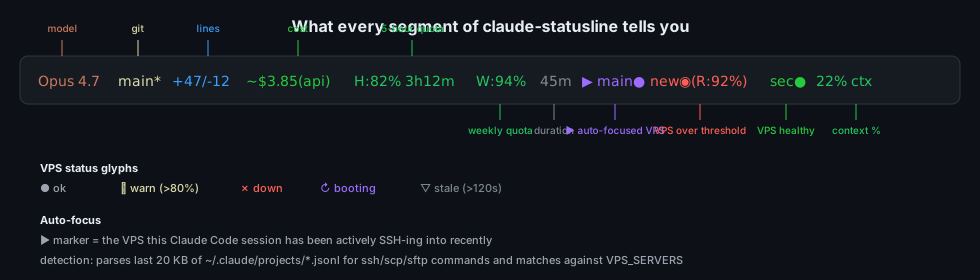
| Segment | Example | What it means |
|---|---|---|
| Model | Opus 4.7 |
Current model |
| Git | main* |
Branch + dirty indicator |
| Lines | +47/-12 |
Lines added/removed this session |
| Cost | ~$3.85(api) |
Theoretical API cost (subscribers) or real cost (API users) |
| 5-hour quota | H:82% 3h12m |
Remaining 5-hour quota and time-to-reset |
| Weekly quota | W:94% |
Remaining 7-day quota |
| Duration | 45m |
Session time |
| VPS | ▶ main● new◉(R:92%) sec● |
Server health with auto-focus on the VPS you are working with |
| Context | 22% ctx |
Context window — green → yellow (50%) → red (70%, time for /compact) |
Architecture
The design is one decision: decouple slow SSH polling from instant statusline rendering through a /tmp cache. The statusline runs on every Claude Code prompt — it cannot afford to block on a 5-second SSH timeout.
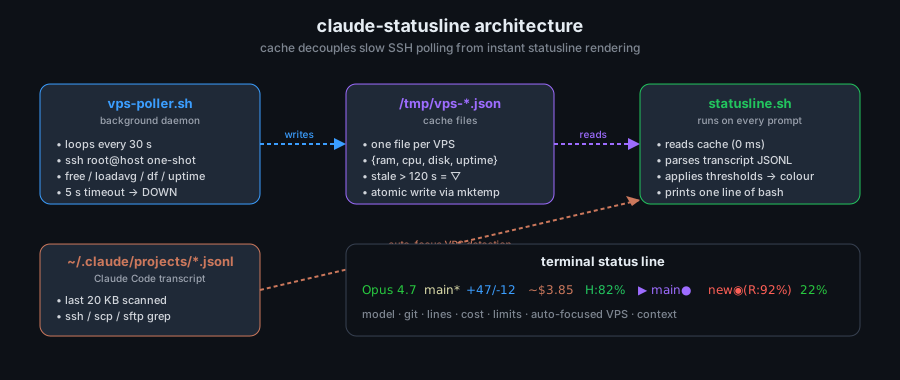
| Component | Role |
|---|---|
vps-poller.sh |
Background daemon. Loops every 30 s, opens one SSH per VPS, runs free / loadavg / df / uptime, atomically writes /tmp/vps-<name>.json. 5 s SSH timeout → DOWN status. |
/tmp/vps-*.json |
Cache. One file per VPS. Stale-after-120 s marker. |
statusline.sh |
Runs on every Claude Code prompt. Reads cache files (~0 ms), parses the last 20 KB of ~/.claude/projects/*.jsonl for ssh/scp/sftp commands to detect the active VPS, applies colour thresholds, prints one line of bash. |
~/.claude/projects/*.jsonl |
Claude Code transcript. Used for auto-focus: whichever VPS the agent has SSH'd into most recently gets the ▶ marker with expanded RAM/Disk metrics. |
Installation
Open Claude Code (claude in your terminal) and say:
Clone https://github.com/CreatmanCEO/claude-statusline and install via install.sh
Or run directly:
git clone https://github.com/CreatmanCEO/claude-statusline.git ~/claude-statusline && bash ~/claude-statusline/install.sh
Restart Claude Code. The status line appears automatically.
Windows: Run from inside Claude Code, not from PowerShell/cmd directly (
.shfiles need bash). See Troubleshooting below.
Install options
bash ~/claude-statusline/install.sh            # basic — model, cost, context, lines, duration, git
bash ~/claude-statusline/install.sh --vps      # + VPS monitoring
bash ~/claude-statusline/install.sh --ru       # Russian labels (стр, контекст, мин)
bash ~/claude-statusline/install.sh --tmux     # tmux integration (Prefix+y popup)
bash ~/claude-statusline/install.sh --minimal  # just model + context
bash ~/claude-statusline/install.sh --uninstall
VPS Monitoring
For developers working with remote servers via Bash SSH or MCP SSH — see VPS health without switching context.
Step 1 — Add servers
Tell Claude Code:
Open ~/.claude/statusline.conf and add:

SHOW_VPS=remote
VPS_SERVERS=(
  "prod|1.2.3.4|22|root|~/.ssh/my_key"
  "staging|5.6.7.8|22|root|~/.ssh/my_key"
)
Step 2 — Start the poller
Run ~/claude-statusline/vps-poller.sh start
The poller runs in background, polling servers every 30 s via SSH. Logs to /tmp/vps-poller.log.
Step 3 — Auto-focus active server
The statusline automatically detects which VPS you are working on by parsing the Claude Code transcript for ssh / scp / sftp commands and matching IPs against your VPS_SERVERS. Active VPS gets the ▶ marker with expanded RAM/Disk metrics:
main● ▶ new●(R:58% D:68%) sec●
This works with both Bash SSH (ssh [email protected]) and MCP SSH (when MCP servers reuse the same IPs). For MCP-only setups where IPs are not visible in the transcript, add an explicit mapping:
VPS_FOCUS=auto
VPS_MCP_MAP=(
  "prod|my-mcp-prod"
  "staging|my-mcp-staging"
)
Status glyphs: 🟢 ● OK · 🟠 ◉ WARN (>80%) · 🔴 ✗ DOWN · 🟣 ↻ BOOT · ⚪ ▽ STALE (cache > 120 s)
Usage Limits (H/W)
H:82% 3h12m shows remaining 5-hour quota; W:94% shows weekly quota. For Max / Pro / Team subscribers. Color-coded: green > 50%, yellow 20–50%, red < 20%.
Reads OAuth token from ~/.claude/.credentials.json after claude login. Cached for 2 minutes.
Inspired by @AndyShaman/claude-statusline — thanks for documenting the OAuth API. If you only need quota tracking without VPS monitoring, his version is leaner.
Configuration
All settings in ~/.claude/statusline.conf. Changes apply on the next Claude Code response — no restart needed.
| Parameter | Values | Description |
|---|---|---|
SHOW_MODEL |
true / false | Model name |
SHOW_COST |
true / false | API cost |
SHOW_LIMITS |
true / false | H/W quotas |
SHOW_CONTEXT |
true / false | Context % |
SHOW_LINES |
true / false | Lines changed |
SHOW_DURATION |
true / false | Session time |
SHOW_GIT |
true / false | Git branch |
SHOW_TOKENS |
true / false | Raw token counts |
SHOW_VPS |
false / remote / local | VPS monitoring mode |
VPS_FOCUS |
auto / none / <server-name> |
Auto-detect active VPS from transcript |
LANG_RU |
true / false | Russian labels |
CONTEXT_WARN |
50 | % context → yellow |
CONTEXT_CRIT |
70 | % context → red |
VPS_POLL_INTERVAL |
30 | Poller interval (s) |
VPS_SSH_TIMEOUT |
5 | SSH timeout — DOWN if exceeded |
VPS_STALE_SEC |
120 | Cache older than this = stale ▽ |
COST_MODEL |
auto / opus / sonnet / haiku | Cost calc model selector |
TMUX_BRIDGE |
auto / on / off | tmux integration |
Full list with defaults — see statusline.conf.
Useful Claude Code commands
/cost— session cost and tokens/context— detailed context window breakdown/compact— compress context (when status line turns red)/model sonnet— switch model
Platforms
| Status | Metrics | tmux | |
|---|---|---|---|
| Linux | ✅ | ✅ | ✅ |
| macOS | ✅ | ✅ | ✅ |
| Windows (via Claude Code in Git Bash / WSL) | ✅ | ✅ | — |
Troubleshooting
Status line disappeared after install (Windows)
.sh files do not execute from cmd / PowerShell. Tell Claude Code:
In ~/.claude/settings.json set statusLine.command to: bash /c/Users/YOUR_NAME/.claude/statusline.sh
H/W limits not showing
- Run
claude loginif not authenticated - Check that
~/.claude/.credentials.jsonexists - If not — limits are silently skipped, the rest of the statusline keeps working
VPS shows DOWN but the server is fine
- SSH timeout (5 s by default) too aggressive on slow networks → raise
VPS_SSH_TIMEOUT - SSH key not loaded →
ssh-add ~/.ssh/my_key - Firewall / ufw blocking outbound from your machine → check
/tmp/vps-poller.log
Auto-focus picks the wrong VPS
- Transcript parser only scans the last 20 KB. After many tool calls, the relevant
sshinvocation can scroll out → manually pin viaVPS_FOCUS=<server-name>until the next session - For MCP-only SSH where IPs are hidden, configure
VPS_MCP_MAP
Limitations
This is a personal-tool, not a managed service. Honest constraints:
- Transcript parsing is heuristic. The auto-focus reads the last 20 KB of the Claude Code transcript JSONL. In long sessions with heavy MCP traffic, the relevant
sshinvocation can scroll out of that window. Workaround: pin manually viaVPS_FOCUS=<server-name>. - OS credential storage assumption. Usage limits are read from
~/.claude/.credentials.json. If Anthropic changes the credential storage format, limits will silently fail to render until the script is updated. - Bash + jq required. The script will not run on systems without
bash(4+) andjq. PowerShell / fish / dash are not supported. WSL is fine. - SSH timeout is global. A single slow VPS does not slow down the statusline (poller is async), but a uniformly slow network can cause all VPS to flicker DOWN/UP. Raise
VPS_SSH_TIMEOUTin this case. - No metric history. Statusline only shows current snapshot. For trend graphs use Grafana, Netdata, or Prometheus — this tool answers "is anything on fire right now", not "how was load yesterday".
- Windows tmux integration is unsupported. tmux on Windows is fragile in general; the
--tmuxflag is Linux/macOS-only. - Daemon is best-effort.
vps-poller.sh startruns as a detached process — it does not register a systemd unit. If the host reboots, restart the poller manually (or wrap it in your ownsystemctl --userunit).
Related
- Claude Code Anti-Regression Setup — sister repo, same author. Complementary purpose: this statusline tells you where context is now; the anti-regression setup keeps Claude from corrupting it.
- ai-context-hierarchy — sister repo. Three-level context system that pairs naturally with the auto-focus VPS feature here (Level 0 lists your servers, statusline tells you which one is hot).
- @AndyShaman/claude-statusline — original inspiration for the H/W limits feature; leaner if you only need quota tracking.
- awesome-claude-code — curated skills, hooks, agents.
Companion article
- Habr (RU) — Как я собрал statusline для Claude Code с мониторингом VPS за одну сессию — 9.3K reads. Covers the cache decoupling, auto-focus heuristic, and cost-calculation logic.
Contributing
PRs welcome — see CONTRIBUTING.md. Current priorities: per-distribution package targets (apt, brew, dnf), additional language locales, alternative VPS metric backends (Netdata API, Prometheus push, MCP system_* tools), Fish/Zsh shells.
Author
Nick Podolyak — Python developer and digital architect at CREATMAN
- GitHub: @CreatmanCEO
- Habr: creatman
- dev.to: @creatman
License
MIT · Nick Podolyak
Yorumlar (0)
Yorum birakmak icin giris yap.
Yorum birakSonuc bulunamadi