feld
Health Gecti
- License — License: Apache-2.0
- Description — Repository has a description
- Active repo — Last push 0 days ago
- Community trust — 10 GitHub stars
Code Basarisiz
- rm -rf — Recursive force deletion command in .claude/skills/release/scripts/package.sh
Permissions Gecti
- Permissions — No dangerous permissions requested
Bu listing icin henuz AI raporu yok.
Agent Loop Control Plane for coding agents.


Feld
Agent Loop Control Plane



Requirements · Install · Getting started · Quickstart · Documentation
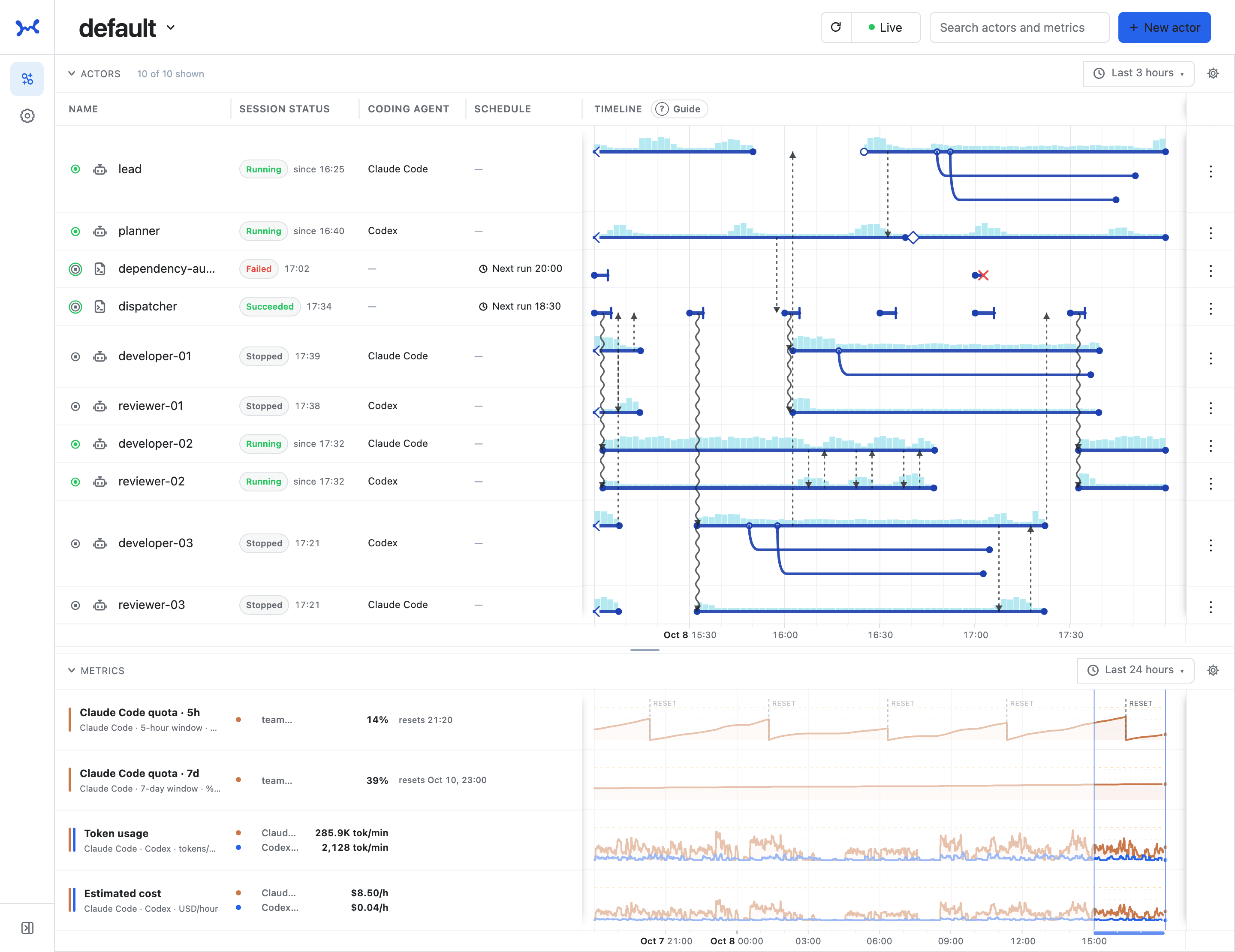
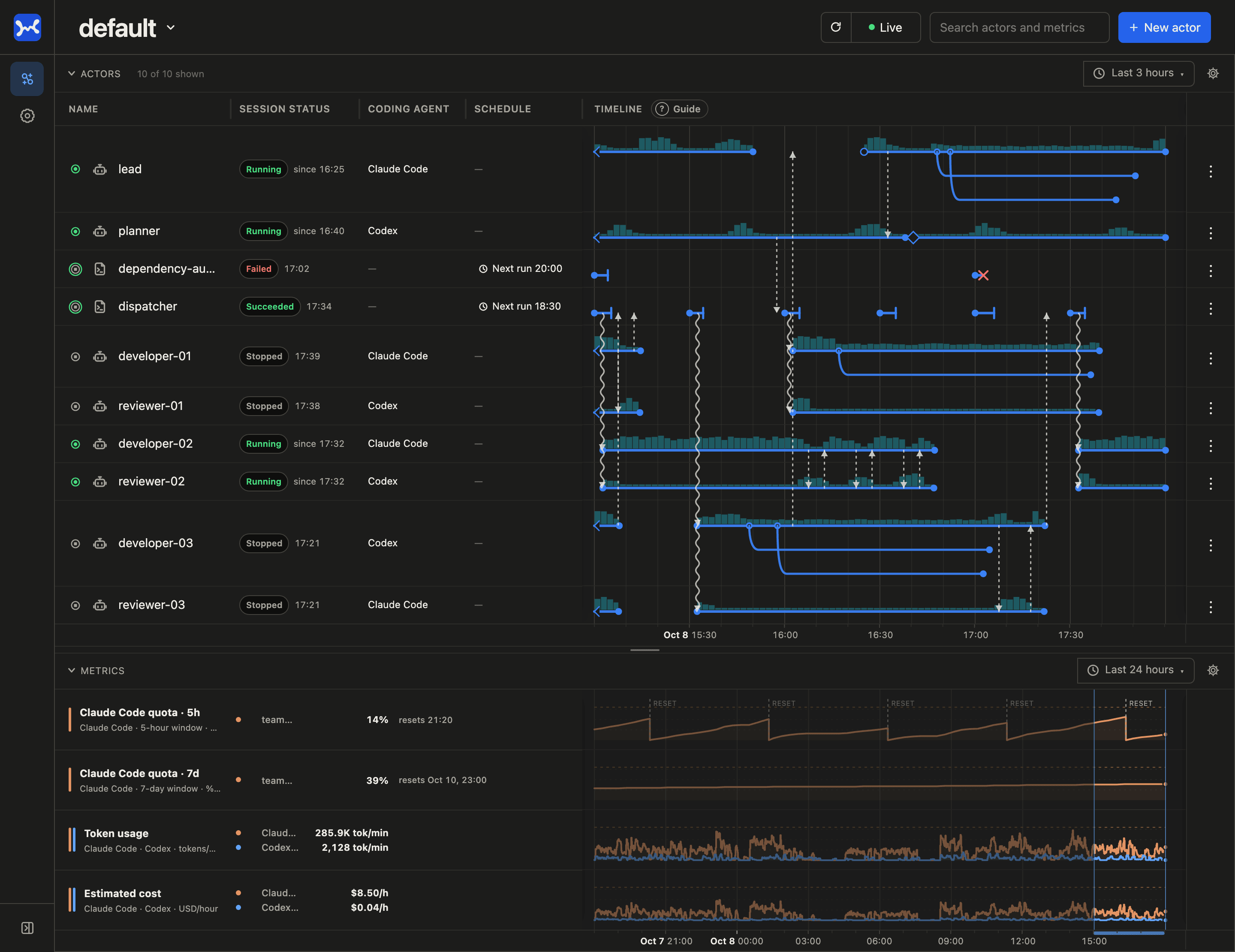
Feld is a harness-agnostic Agent Loop Control Plane for developers who run multiple coding agents in loops. It keeps every Session visible and supports coordination between agents and control by humans.
[!NOTE]
Feld is still experimental. The CLI, API, and store may change incompatibly during 0.x (compatibility promise).
Why Feld?
When you combine multiple agents and scheduled jobs into a loop or a harness (or a software factory), you often stumble in the same places:
- An agent that has stopped still looks like it is running.
- A cron or launchd job has quietly stopped firing at some point.
- The next run starts before the previous one finishes, and the same work begins twice.
- A request sent to a stopped agent is never delivered and disappears.
- Claude Code and Codex differ in how they start and how their state is visible.
All of these come from guessing "who is running" and "what happened when" from the state of tmux, cron, or a home-grown messaging setup.
Feld takes over this part. It gives agents and jobs a persistent identity, and records Session starts and ends, Message delivery, and scheduled runs fired or skipped as facts on one durable timeline. A Message sent to a stopped agent is read by its next Session. Claude Code and Codex share the same identity and Message model. From the Web UI and the CLI, humans can see what is running and where their attention is needed, and decide what comes next.
Policy, such as which agent to run next or when to give up, stays in your harness. You choose the harness freely, and Feld becomes the common control plane beneath it.
What Feld is not
- Not a coding agent. Feld writes no code and does not replace Claude Code or Codex. Coding agents do the work; Feld provides persistent identity, history, and Messages across registered Sessions.
- Not a harness, agent framework, or LLM SDK. Feld does not decide the model, prompt, tools, or plan, nor which agent runs next. You bring the harness and the runtime, and Feld provides a common control plane around them.
- Not a log viewer. Logs are only part of what Feld handles. Feld also brings together lifecycle records, Messages, metrics, and control of Feld-owned Sessions.
How it works
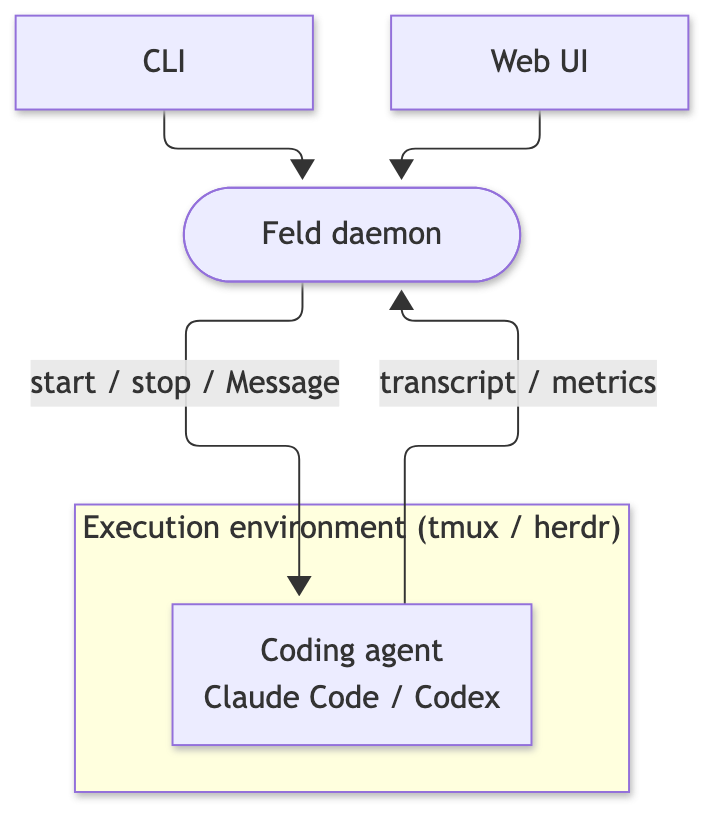
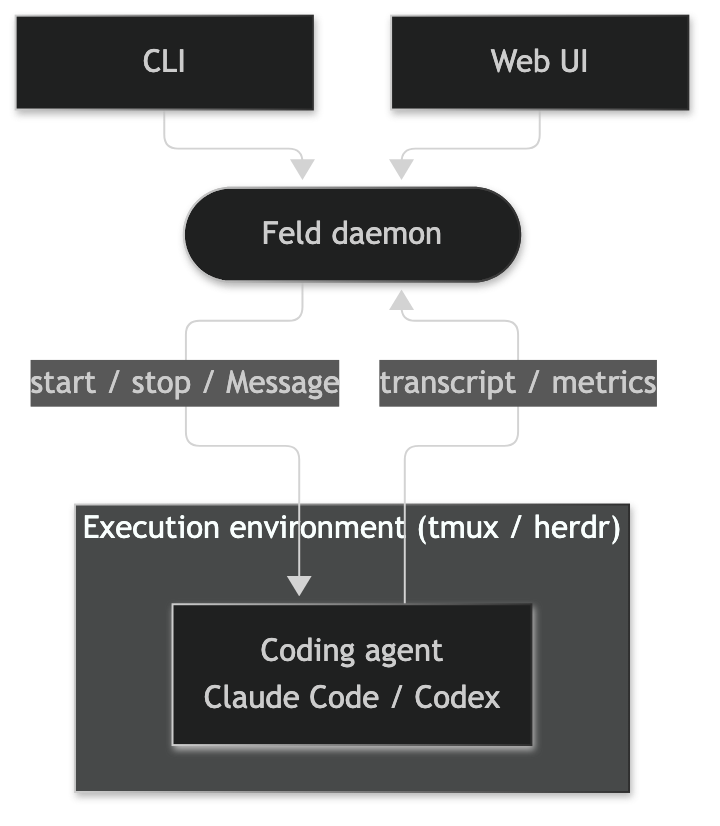
The Feld daemon sits at the center. Humans and harnesses use it through the CLI and the Web UI. Coding agents run inside tmux or herdr just as they normally do. The daemon starts and stops their Sessions, delivers Messages, and records the transcripts and metrics it receives from the agents on one timeline.
| Concept | Meaning |
|---|---|
| Actor | A named, persistent participant. There are two kinds:
|
| Session | One run of an Actor. There are two kinds:
|
| Message | A request or report exchanged between Actors, or between a human and an Actor. A Message to a stopped Actor is read by its next Session |
See the glossary for the full set of terms and how they relate.
Requirements
| Kind | Product | Supported versions |
|---|---|---|
| OS | macOS (Apple Silicon) | — |
| Linux (x86_64) | glibc 2.35 or later | |
| Execution environment | tmux | 3.2 or later |
| herdr | 0.9.0 or later | |
| Coding agent | Claude Code | 2.1.181 or later |
| Codex | 0.156.0 or later |
Feld works with at least one execution environment and one coding agent. Install and sign in to the coding agent beforehand.
Install
With Homebrew (macOS, or Linux with Homebrew):
brew install crestai-labs/tap/feld
Otherwise, use the install script:
curl -fsSL https://raw.githubusercontent.com/crestai-labs/feld/main/install.sh | sh
The script downloads the archive for your machine from GitHub Releases, verifies its checksum, and places feld and the bundled Plugins in ~/.local/bin. Set FELD_INSTALL_DIR to change the location and FELD_VERSION to pick a version. To build from source, see CONTRIBUTING.md.
Upgrade
brew upgrade feld   # or run the install script again
feld init
brew upgrade feld and the install script both replace the executables. Running feld init again puts the new Plugins in ~/.feld/plugins/, replaces the Feld skill and hooks in the Claude Code and Codex settings, and restarts the daemon. The daemon migrates the store when it starts, and Sessions keep running through the restart, so agents need not stop. Details are in Compatibility.
Getting started
feld init
feld ui
feld init sets Feld up, and feld ui opens the Web UI in your browser.
For example, to connect Claude Code to Feld, start claude in a tmux or herdr pane from a new shell, and run:
/feld attach
# or ask "Attach yourself to Feld"
Continue with the Quickstart.
Usage
# Start an agent from Feld (use --runtime codex for Codex)
feld actor create developer-01 --kind agent --runtime claude-code --workdir "$PWD"

# Send a Message
feld message send developer-01 "Make the change, ask reviewer-01 for a review, and report the result"

# Create a Job that runs on cron
feld actor create dispatcher --kind job --cron "0 * * * *" -- python3 dispatch.py

# See state and history
feld actor list
feld session log developer-01
feld record list --actor dispatcher
All commands and options are in the CLI reference. To uninstall, run feld uninstall.
FAQ
Which operating systems are supported?
macOS (Apple Silicon) and Linux (x86_64). See Requirements.
Can I use it on Windows?
Yes, inside WSL2. Native support is under consideration.
Is there a Docker image?
No. The daemon runs on the host.
Does Feld send data anywhere?
No, and it sends no usage statistics either. What Feld reads and writes is described in Data and privacy.
Does it replace Claude Code or Codex?
No. Feld keeps them running as they are and adds a control plane around them.
Documentation
| Document | Contents |
|---|---|
| Quickstart | The guide to read first |
| CLI reference | Commands, options, and output |
| Compatibility | Upgrading, and the compatibility promise during 0.x |
| Data and privacy | What Feld never sends, what it reads and writes, and how to remove it |
docs/spec/ |
The authoritative specification (glossary, CLI, daemon API, Web UI, design) |
| CONTRIBUTING.md | Building from source, tests, and how to file Issues and PRs |
License
Feld is licensed under the Apache License 2.0. You may use it freely, including commercially, and modify and redistribute it. We chose Apache-2.0 because it grants patent rights explicitly, so companies can adopt it with confidence.
Created by Kazuki Yoshida. Developed and maintained by CrestAI.
See NOTICE for the copyright notice and TRADEMARK.md for how the name and logo may be used.
Distributed archives include a list of the bundled third-party software and their licenses (THIRD-PARTY-LICENSES.md).
Yorumlar (0)
Yorum birakmak icin giris yap.
Yorum birakSonuc bulunamadi