code-walkthrough
Health Warn
- License — License: MIT
- Description — Repository has a description
- Active repo — Last push 0 days ago
- Low visibility — Only 5 GitHub stars
Code Fail
- rm -rf — Recursive force deletion command in docs/demo/build.sh
- network request — Outbound network request in skills/code-walkthrough/assets/sw.js
Permissions Pass
- Permissions — No dangerous permissions requested
No AI report is available for this listing yet.
Claude Code plugin that turns a PR, diff or any part of a codebase into a page you read top down, from overview to exact lines. Annotated diff, call graph, line comments and in-place questions to the agent.

code-walkthrough
Turns a diff, a PR, or a part of the codebase you want explained into a page
you read top down, from the big picture to the exact lines.
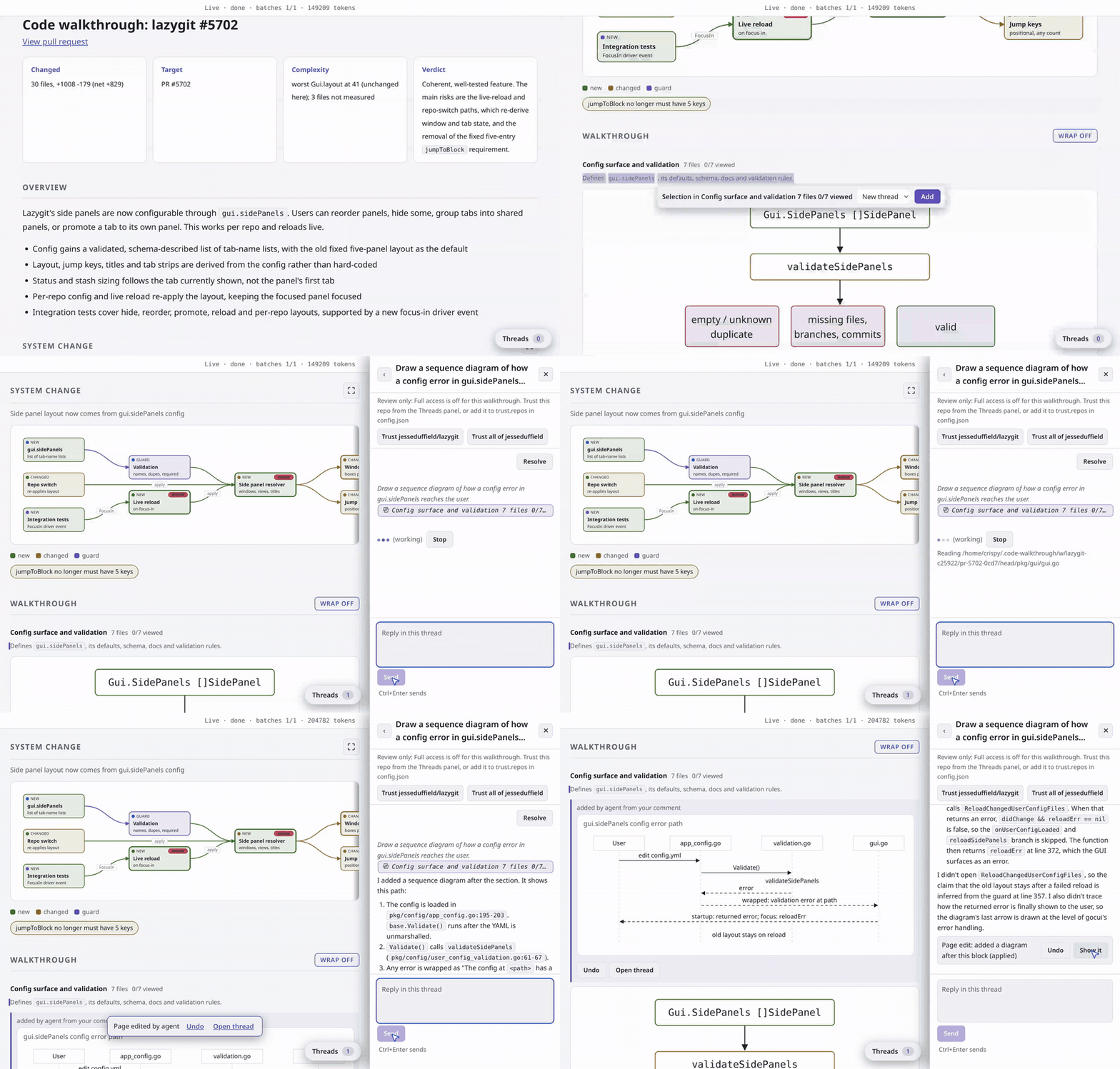
The page above is one /code-walkthrough run on lazygit PR
#5702, "Make the side
panels configurable": 30 files, +1008 -179. Select text on it and click Ask to
question the agent in place; ask it to draw any diagram and it adds one to the
page.
/code-walkthrough                          # working tree plus staged changes
/code-walkthrough this branch              # main...HEAD
/code-walkthrough 123                      # that PR
/code-walkthrough HEAD~3..HEAD
/code-walkthrough explain the auth flow    # code as it stands, no change needed
Why
Agents write code faster than anyone can read it now, so reading and
responding is the bottleneck, not writing. A unified diff is a bad surface to
read on. It hands you 30 files in alphabetical order and leaves you to build
the picture yourself, bottom up.
When you explain a change to someone, you say what it does, then the steps it
takes, then what it touches, and only then point at lines. code-walkthrough
builds the page in that order, so by the time you reach a line of code you
already know where it sits.
Top down, one question per level
- Overview: what changed, and why. Two sentences and a few bullets, no
file names. On the example: lazygit's side panels stop being a fixed five
and become a list you configure. - The PR in one picture, then one per theme. The files grouped into three
to five themes. A model draws one picture of the change and one per theme,
from real names and numbers in the diff; a docs-only change may get none. - Call graph: how far does it reach. The call graph, under "All symbols", resolved
by the compiler or a language server, at package and symbol level. That
shows the blast radius: which new function is called from everywhere and
which is a leaf. - Code: the lines, with the reason beside them. Each file gets a one line
role and each hunk a note on what the code does. Inside a theme, callers
come before callees. - Respond: send it back. Select any text and click Ask to question the
agent in place. It answers in a thread, and can add or replace a block on
the page, such as a sequence diagram; the edit is local and Undo removes it.
Threads are read-only by default. A proposed task has Hand to my session,
which passes it to your own Claude Code. Copy gh command prints the calls
to post your comments as PR review comments. Nothing is posted to the PR
unless you do it from the page, and the page is a local file that only gets
hosted if you ask.
Changed .md files and images have a Diff | Preview switch that swaps the diff for
the rendered file. If you work something out in your head on every review that
could live on this page, open an issue.
Every walkthrough in one place
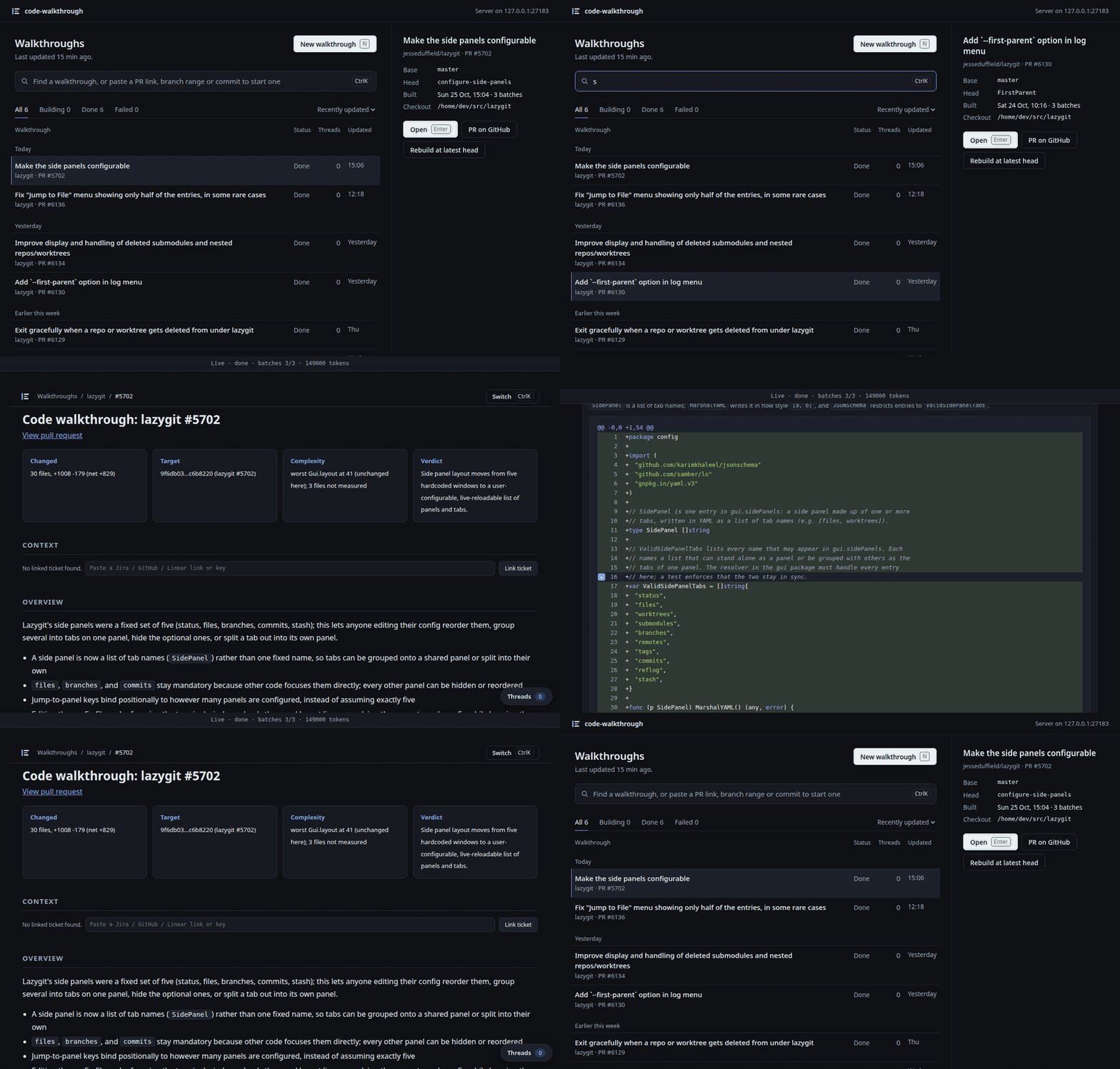
Every walkthrough you build is listed on one dashboard at /walkthrough,
grouped by day, with stacked PRs nested. Search it, or paste a PR link, branch
range or commit to start a new one. It can be installed as an app.
What a run costs
Live mode is the default. On the example PR a build took about 2 minutes and
149k tokens, and each question you ask adds a few tens of thousands more.
Without live mode the skill falls back to parallel Sonnet subagents; the same
PR took about 7 minutes and 490k tokens there. The graphs come from parsers
and take seconds either way.
Live mode runs through a daemon. By default, after running setup, that's
your own Claude Code: whatever account it uses, subscription, API key, or a
gateway, and it counts against that same account. Point it at any
OpenAI-compatible backend instead and it bills per token against that
backend's own API key.
Live mode sends diff hunks, the files the agent reads and your questions to
that backend. Only a model on your own machine (Ollama, vLLM) keeps them
local. Threads can't edit files unless you trust the repo, from the Threads
panel or trust.repos in the config; see skills/code-walkthrough/references/live.md.
Prerequisites
python3, standard library only, nothing to installgitgh, only to target a PR or post comments- optional, for the graphs:
tree-sitter-language-pack,go, or a language
server, depending on the language. See below. - optional, for live mode: one
python3 skills/code-walkthrough/scripts/cw_mcp.py setup
run after installing./code-walkthroughdoes it for you when live mode is
missing. Details inskills/code-walkthrough/references/setup.md.
Language support
Everything built from the diff itself works in any language: the grouping and
reading order, the annotated walkthrough, per-line comments and the
pictures.
The graphs have to parse the code:
| Language | What you need |
|---|---|
| Python, Go, JavaScript, TypeScript | nothing |
| Rust, Java, Ruby, Kotlin, Swift, Scala, C, C++, C#, PHP, Lua, Elixir, Julia | pip install tree-sitter-language-pack |
| Interactive symbol graph | go for Go; pyright-langserver, typescript-language-server or rust-analyzer for Python, TypeScript, Rust |
Where a parser is missing the graph sections are skipped and the page says so,
nothing else changes.
Install
Claude Code plugin only. Other harnesses are untested.
/plugin marketplace add crisperity/code-walkthrough
/plugin install code-walkthrough@crisperity
The first run of /code-walkthrough sets up live mode. On Linux with systemd that includes a
user service that keeps the dashboard at http://127.0.0.1:27183/walkthrough running from login
on; python3 skills/code-walkthrough/scripts/cw_mcp.py service uninstall removes it and the
daemon goes back to starting on demand.
Reviews (0)
Sign in to leave a review.
Leave a reviewNo results found