DeckHand
Health Warn
- License — License: Apache-2.0
- Description — Repository has a description
- Active repo — Last push 0 days ago
- Low visibility — Only 7 GitHub stars
Code Fail
- process.env — Environment variable access in cli/deckhand.mjs
- network request — Outbound network request in cli/deckhand.mjs
- network request — Outbound network request in hooks/codex-hook.mjs
- process.env — Environment variable access in mcp/deckhand-mcp.mjs
- network request — Outbound network request in mcp/deckhand-mcp.mjs
- process.env — Environment variable access in server/access.ts
- exec() — Shell command execution in server/agentAccess.ts
- process.env — Environment variable access in server/agents/codex.ts
Permissions Pass
- Permissions — No dangerous permissions requested
No AI report is available for this listing yet.
Self-hosted fleet controller for Claude Code and Codex sessions across all your machines — one dashboard, phone-friendly, no cloud.
Deckhand



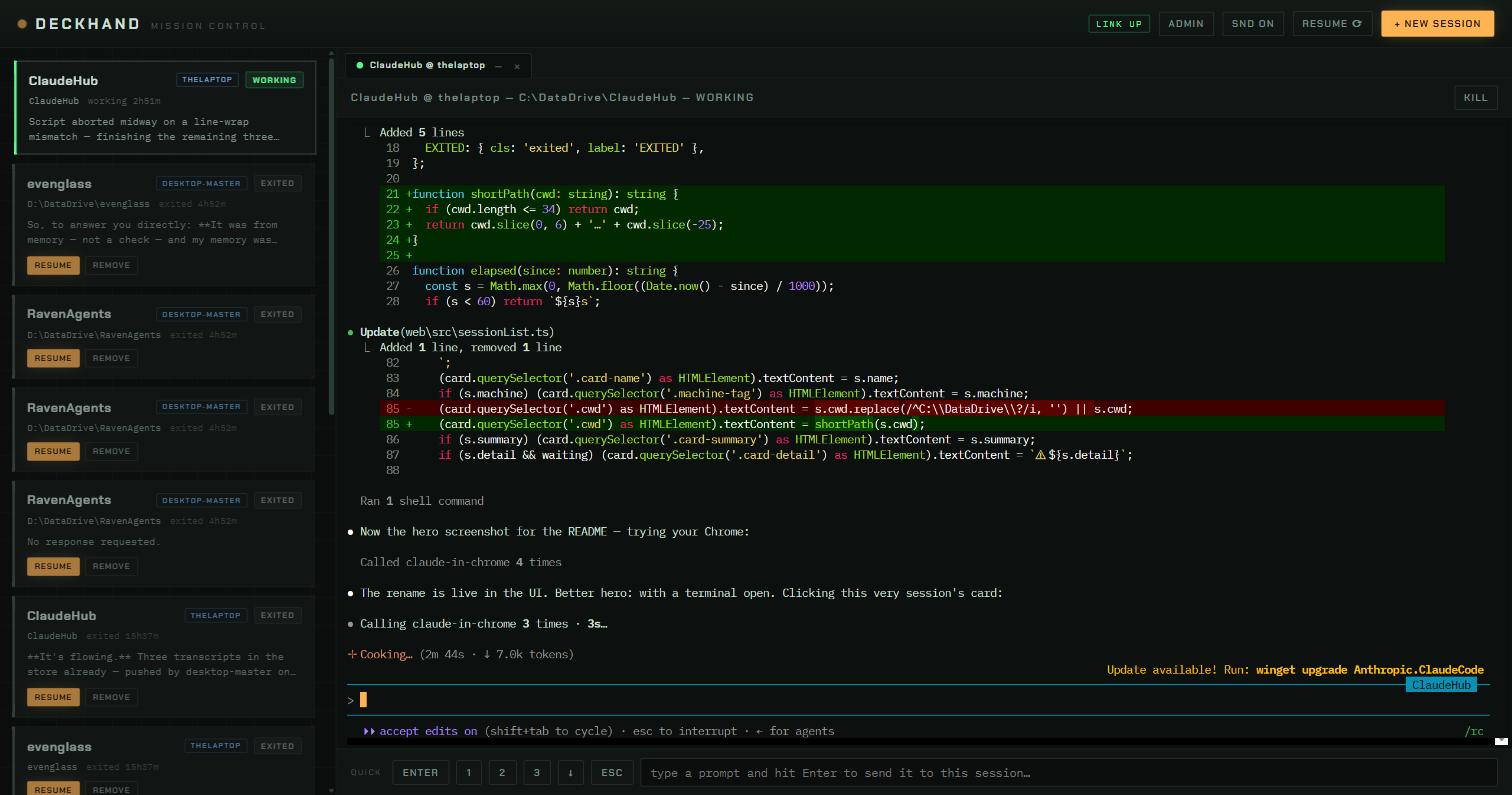
TL;DR — Run Claude Code and Codex sessions on any of your computers, see them all in one dashboard
(or your phone), and get a chime the moment any session is waiting on you. Self-hosted, no cloud, no accounts.
Quickstart (one machine, ~5 min)
Prerequisites: Node.js 20+ and Claude Code. Codex CLI is optional (npm i -g @openai/codex).
git clone https://github.com/CristianMori/DeckHand.git
cd DeckHand
npm install
npm run build
npm start
Open http://127.0.0.1:5959. npm start serves server/public, which a clone does not include until npm run build. For a live reload UI instead, npm run dev serves it at http://127.0.0.1:5960 (the hub stays on 5959).
Add a second machine: install Tailscale on both, then repeat the clone, install, build, and start. Hubs discover each other on the tailnet; every dashboard shows the whole fleet. The always-on installer, projects root, and firewall rules are in Install (each machine).
A self-hosted fleet controller for coding-agent sessions — Claude Code and
OpenAI Codex, side by side. Run agent sessions on any of your computers, watch
and drive all of them from one dashboard (or your phone), and let projects and
conversations follow you between machines. No cloud service, no accounts, no configuration files to
maintain — machines discover each other and the fleet assembles itself.
Deckhand grew out of a simple dashboard whose only job was to make sure you
never miss the moment a session stops and waits for you. That job still comes
first: cards are sorted waiting-first, and every dashboard everywhere chimes
when any session on any machine needs a human.
What it does
- Mixed agents. Claude Code and Codex sessions live in the same session
list and tab bar. The launch dialog offers whichever CLIs are installed on
the machine you pick, with that agent's own model and permission choices.
Status, resume, cross-machine migration, the durable transcript store and
PRINT export work for both. Each agent is an adapter underserver/agents/,
so a third CLI is one file away. - Plain terminals. TERMINAL is a third engine in the launch dialog: an
interactive shell in a card, on any machine, with no agent. Windows offers
PowerShell 7 (when installed), Windows PowerShell and cmd; macOS and Linux
your login shell plus bash/zsh/sh. It can start in the home folder (~)
as well as in a project. It is always available, so even a machine with
no Claude or Codex is useful. Its status comes from output alone: WORKING
while a command prints, IDLE once the prompt is back, and an alert only
when a command that ran 10 s or more finishes. A terminal has no
conversation: after a hub restart its card waits as EXITED with
RESTART, a fresh shell in the same folder; it is never handed off or
moved, and it claims no folder (agents never need its permission). - "Give me that file" (
dh_send_file). Ask any session for a file and
it callsdh_send_file: the file stays on its machine and the dashboard
you are looking at (in front, focused) starts downloading it by itself —
no button, no popup. A dashboard in the background downloads it when you
bring it forward within two minutes. Links are
unguessable ids served by the owning hub (/api/shared/<id>, behind the
usual access check), the newest 10 per session, until that hub restarts. - Run a command anywhere (
dh_run).POST /api/run, and thedh_run
MCP tool, run one command on any fleet machine and hand back its output
and exit code. It runs in a visible terminal card on that machine, named
after the command, so you can open it and see what any session ran there
(the newest 10 such cards are kept). A command still running after the
wait (max 4 min) keeps running and the caller gets the card to wait on.
A command in a folder that a live agent session works in is refused
until the caller has agreed it with that session and passesforce;
anywhere else (home,/opt, a folder nobody works in) just runs. - Install an engine from the dashboard. When the machine you pick has
no Claude Code (or Codex), the launch dialog offers INSTALL: it opens a
terminal there running the official installer, and you sign in in the
same card. The hub also looks in the installer's default folders, so a
freshly installed Claude shows up without a hub restart. - Hand a session to another engine. HAND OFF on any card moves the work
to a different engine, machine and/or folder, including a brand-new folder.
Not a transcript transplant (each agent's log is its own private replay
format): the departing agent is asked to write a brief for its successor,
the hub appends the conversation as plain dialogue, drops both into the
target folder as.deckhand/handoff.md, and starts the target engine with
"read it, then continue". The new card shows where it came from. - Freeze a project to a machine. FREEZE in the terminal header pins the
session's folder to the machine it lives on: it is never registered for
sync, never pushed to the home machine, and its conversations can only be
resumed there (the resume dialog says so). Replication that already started
is stopped; files stay where they are. The list lives in the hub's data dir,
not in the folder, so the mark itself never travels. - One dashboard, whole fleet. Every machine runs the same hub; every hub
shows every machine's sessions. Openhttp://<any-machine>:5959from any
device on your tailnet — they are all equivalent. - Full terminals in the browser. Each session runs in a real PTY. The
server keeps a headless terminal mirror per session, so opening a terminal
(from any machine) restores a pixel-perfect snapshot — no replay garbling.
Terminals open as tabs: click to switch,–to soft-close (session keeps
running),×to end. - Sessions survive everything. Close the browser, reboot the machine,
kill the process — the conversation is durable. EXITED cards resume with
full history. RESTART on a card kills a live session and brings its
conversation back in place; RESTART ALL does it for every idle agent
session on the machine serving the dashboard (terminals stay out), and any
that could not restart turn red with the reason. - Work follows you. Resume any conversation on any machine. If the
project folder isn't there, it replicates first (through the always-on
home machine); the transcript ships along and is re-homed for the local
path; the resumed session is told its folder moved so it doesn't trip on
old absolute paths. - On-use folder sync. Nothing replicates until a session touches a
folder. From then on it syncs continuously (file-watch, seconds) to the
home machine, which keeps the canonical copy plus 30 days of per-file
version history. - Durable conversation store. Every hub pushes transcripts to the home
machine. Conversations outlive their origin machine, local retention
cleanup, and folder moves — the resume dialog backfills from the store when
no machine can offer a copy, and an EXITED card whose transcript Claude
Code's retention cleanup has removed (default: 30 days idle) fetches it back
from the store when you press RESUME. Hub-spawned Claude sessions also getcleanupPeriodDaysset to 100 years through the injected settings, so the
local copy stays. Transcripts are append-only, so only the new
bytes travel (gzipped, verified by size + sha256, whole file as fallback);
a live session's transcript goes at most every 10 minutes and right when
the session goes idle or exits, and one sweep sends at most 32 MB
(HUB_TSTORE_SWEEP_MB). - Fleet auto-update. Publish a build to the home machine; every hub sees
it and updates itself from the ADMIN panel (or its 6-hour self-check).
Dev checkouts (build 0) never auto-update. - Fleet file browser. FILES walks any connected machine's project folders,
downloads a file or a whole folder as a zip to your browser, or copies a file
straight to another machine:
the target hub pulls the bytes from the source hub, so nothing passes through
the dashboard. - Console-first workflow if you want it. The
deckhandCLI spawns
hub-owned sessions bridged into your real terminal, tmux-style:Ctrl+Q
detaches, the session lives on, reattach from anywhere — including a
session running on another machine. - Concurrency guard. Opening a folder that has a live session on another
machine asks for confirmation first — two agents editing one folder can
overwrite each other. - Phone-friendly. On narrow screens the session list is the screen and
terminals open as a full-screen overlay with a back button and thumb-sized
quick-answer keys.
What it is not
- Not multi-user. There is no login system; the trust boundary is your
private network (see Security). - Not a CI runner or an agent framework. It hosts and moves interactive
sessions; the sessions themselves are stock Claude Code or stock Codex.
Architecture in one page
Every machine runs the same hub (Node + Express + node-pty). Hubs are
peers; there is no controller. Three subsystems ride on that:
                 ┌──────────────── tailnet (WireGuard) ───────────────┐
                 │                                                    │
   ┌─────────┐  discovery: probe tailnet devices on :5959-5969  ┌─────────┐
   │  hub A  │◄────────────────────────────────────────────────►│  hub B  │
   │ (laptop)│  federation: control WS + terminal proxy + REST  │(desktop)│
   └────┬────┘                                                  └────┬────┘
        │                                                            │
        │        ┌──────────────────────────────────────┐            │
        └───────►│         home machine (hub C)         │◄───────────┘
                 │  e.g. a $5 VPS, or any always-on box │
                 │  • Syncthing canonical folder copies │
                 │  • durable transcript store          │
                 │  • release shelf for auto-update     │
                 └──────────────────────────────────────┘
- Discovery — each hub asks the local Tailscale daemon for the device
list every 60 s and probes each online device for/api/hub-info.
Finding a sibling → one outbound control WebSocket. Zero configuration;
new machines appear on every dashboard within a minute. - Federation — session lists are merged (tagged by machine), actions
(spawn / kill / resume) are forwarded to the owning hub, and terminal
WebSockets are proxied transparently. Peers that drop stay visible as
UNREACHABLE cards with cached state; sessions themselves never depend on
the links. - Home machine — by convention a machine named
vps-node(override with
env vars, below). It is an ordinary fleet member that happens to never
sleep, and it hosts the three durable stores. Any always-on machine works.
Status detection
Four signals fused with precedence (higher wins, 3-second shield):
- PTY exit → EXITED
- Agent hooks. Claude Code: injected per-session via
--settings, no
changes to your global settings — UserPromptSubmit → WORKING,
AskUserQuestion → WAITING_QUESTION, Stop → IDLE, permission notification
→ WAITING_PERMISSION. Codex: the hub keeps its own entries in~/.codex/hooks.json(yours are preserved) and launches with--dangerously-bypass-hook-trustso they run without the per-hook review
prompt — UserPromptSubmit → WORKING, PermissionRequest →
WAITING_PERMISSION, Stop/Interrupt → IDLE. Codex mints its own
conversation id; the SessionStart hook reports it and the hub binds it to
the card it just launched. ~/.claude/sessions/*.jsonwatcher — Claude Code's own status feed.- Output heuristics — fallback until the first hook arrives (a resumed
session fires none until its first prompt). Output alone is not work: a
resize or an opened tab repaints the whole screen. Once a burst settles the
hub reads the screen the TUI drew — its activity line ("✻ Thinking… (12s ·
tokens)") means WORKING, an empty composer means IDLE — and each agent
contributes its own prompt patterns.
Codex conversations are found through the threads table of~/.codex/state_*.sqlite (read with Node's built-in sqlite) and live as
rollout files under ~/.codex/sessions/. Moving one to another machine is a
file copy — Codex rebuilds its index on resume. The first launch in a folder
would ask Codex's "do you trust this directory?" question; the hub records the
yes answer in ~/.codex/config.toml beforehand, the same way pressing Yes does.
Alerts fire only after a state persists 1.5 s. They reach every connected
dashboard (chime + tab badge). There are deliberately no desktop toasts.
Provenance
Every hub keeps data/provenance.jsonl (rotated at 20 MB, five files kept):
one line per action — every change (prompts, keys, kill, create, run,
rename, memories, handoffs, …) and every read made by an agent, a gateway
client or another hub on someone's behalf. Each line names the caller
(session:<hubId>/<conversation>@<machine> from the MCP server,gateway:<client>, dashboard, hub:<machine> for a hub's own work), the
hubs it passed through, the session it acted on, what was asked (first 300
characters) and the answer. A request keeps one id across every hop, so the
AUDIT window's cross-requests log, merged from all machines, follows an action
from a gateway client or an agent to the hub that carried it out. Dashboard
polling and hubs' background syncing are not logged.
Fleet etiquette
Several agents work side by side in a fleet, so each one is told where it is
and how to behave towards the others.
- Briefing (level 1). Every session the hub spawns is told, as extra
system instructions, that it is a Deckhand fleet session, its hub id,
conversation id, engine, machine and folder, and the rules: your folder is
yours, another live session's folder is theirs, talk to other sessions only
through thedeckhand-agentMCP tools, agree a change before making it in
someone else's code. Claude Code receives it via--append-system-prompt,
Codex viadeveloper_instructions. The same identity is in the process
environment asDECKHAND_SESSION,DECKHAND_CONVERSATION,DECKHAND_MACHINE,DECKHAND_ENGINE,DECKHAND_FOLDER,DECKHAND_HUB_URL. The rules text is served atGET /api/etiquette. - Reach (the
deckhandMCP server). Every spawned session is also handed
the hub's own MCP server,mcp/deckhand-mcp.mjs(stdio, no dependencies,
runs under the hub's node). Claude Code gets it through--mcp-config
(data/hub-mcp.json, next to the project's own.mcp.json), Codex
through-c mcp_servers.deckhand.*. Its tools mirror the RavenAgentsdeckhand-agentserver with the same names and camelCase parameters:dh_whoami,dh_list_sessions,dh_get_session,dh_read_screen,dh_read_exchanges,dh_last_reply,dh_wait_for_session,dh_send_prompt,dh_send_keys,dh_set_autoyes,dh_create_session,dh_kill_session,dh_resume_session,dh_remove_session,dh_fleet_resume,dh_handoff,dh_list_fleet,dh_list_agents,dh_list_projects,dh_list_fleet_folders,dh_hub_info,dh_etiquette,
plusdh_run(a command on any machine, output and exit code back),dh_rename_sessionand the fleet memory tools below.
It talks to the hub atDECKHAND_HUB_URLand never calls admin routes. - Fleet memory. Small facts every session on every machine shares — "the
user has the Apple Developer subscription", "WSL2 is on the laptop for
ROS2" — so a new session does not have to ask. Sessions write withdh_remember(scope global, machine or project folder), search withdh_recall, delete withdh_forget; the briefing tells them to store facts
about the world around the code, never task progress, and always to store
what the user says to remember (marked told by the user, listed first,
never pruned). At spawn and resume the briefing carries the memories that
apply to that machine and folder (about 6 KB at most). The store machine
(HUB_STORE_MACHINE, the VPS) holds the truth; every hub keeps a SQLite
replica (data/memories.sqlite, FTS5 vianode:sqlite) pulled every
minute, so recall and briefings work while the VPS is away, and a write
made then waits in an outbox. Facts are capped at 500 characters; beyond
400 live ones the oldest unprompted facts are pruned. A folder rename
carries its project memories along. - Warning (level 2). The PreToolUse hook the hub already injects answers
an edit (Edit/Write/MultiEdit/NotebookEdit, Codexapply_patch) that lands in a project folder owned by another live
session with a warning, delivered to the agent as additional context and
to the user as a system message. Nothing is blocked: the agent is told
whose folder it is and which hub id to talk to, and decides. - Commands (
dh_run). The same ownership rule, enforced: a command
whose working folder belongs to another live agent session is refused
(409, naming the owner) until it is repeated withforce. Only Claude and
Codex sessions own folders; terminal cards never do.
Requirements
| What | Why | Notes |
|---|---|---|
| Windows 10/11, macOS, or Linux | hub runs on all three | macOS: Apple silicon or Intel, LaunchAgent |
| Tailscale (free) | discovery, transport, trust boundary | required for any multi-machine features |
| Node.js 20+ | runs the hub | winget install OpenJS.NodeJS.LTS / brew install node / distro package |
| Claude Code | the sessions themselves | logged in on each machine that runs sessions; a machine without it still runs terminal cards, and the launch dialog can install it |
| Codex CLI | optional second agent | npm i -g @openai/codex, logged in; machines without it simply don't offer it |
| Syncthing (free) | folder replication | optional — skip it and everything but folder sync works |
A single machine with none of the above except Node + Claude Code still
works as the original standalone dashboard.
Install (each machine)
Join the tailnet — install Tailscale, sign in. Give servers a
friendly hostname (tailscale up --hostname mybox).Get the code — extract a release tgz, or
git clone. Then:npm installSet the projects root (where your project folders live, and where
fleet folders materialize). Windows: createhub-env.cmdnext tostart-hub.cmd:set HUB_PROJECTS_ROOT=D:\ProjectsmacOS/Linux: pass
HUB_PROJECTS_ROOTto the installer (defaults~/Projectson macOS,/srv/syncon Linux), or createhub-env.shnext
tostart-hub.shwithexport HUB_PROJECTS_ROOT=….Install the always-on runner:
Windows — one installer, two modes (it asks if you don't pick):
powershell -ExecutionPolicy Bypass -File scripts\install.ps1 -Mode startup powershell -ExecutionPolicy Bypass -File scripts\install.ps1 -Mode service -Account .\<you> powershell -ExecutionPolicy Bypass -File scripts\install.ps1 -Uninstallstartup— scheduled task at logon. No password, no admin, works with
Microsoft-account/PIN sign-ins, auto-restarts on crash. Runs in your
interactive session. Recommended default.service— NSSM Windows service. Starts at boot before login; requires
an elevated shell and a local-account password (Microsoft-account
sign-ins usually reject service logon — either switch the account to
local sign-in or usestartupmode).
macOS (per-user LaunchAgent: starts at login, kept alive, also how
updates apply; runs in your login session so Claude Code and Codex see
your sign-ins — keep the Mac from sleeping):bash scripts/install-macos.sh bash scripts/install-macos.sh --uninstallTo survive a reboot unattended, turn on automatic login (System Settings
→ Users & Groups), which requires FileVault off. The hub usually starts
before the Tailscale app at login and runs solo under its OS hostname for
a minute or two (the log saystailscale status failed); it joins the
fleet under its tailnet name as soon as the app answers.Linux (systemd; also how updates apply):
sudo bash scripts/install.sh
sudo bash scripts/install.sh --uninstall
Windows firewall: when first run interactively, click Allow on
the prompt. Services get no prompt — if other machines can't reach this
hub, add the rules once (elevated; the UDP one is for LAN discovery):New-NetFirewallRule -DisplayName Deckhand -Direction Inbound -Action Allow -Protocol TCP -LocalPort 5959-5969 New-NetFirewallRule -DisplayName "Deckhand beacon" -Direction Inbound -Action Allow -Protocol UDP -LocalPort 5959-5969Open
http://127.0.0.1:5959. Within a minute every other dashboard in
the fleet shows this machine, and vice versa.
Enabling folder sync (once per fleet)
Install Syncthing on each machine that should sync (winget install Syncthing.Syncthing, run with --no-console --no-browser; apt install syncthing + systemctl enable --now syncthing@<user> on Linux).
On the home machine, bind its Syncthing API to the tailnet and write the
hub's sync config data/sync.json:
{
  "local": { "url": "http://127.0.0.1:8384",        "apiKey": "<its syncthing api key>", "deviceId": "<its device id>" },
  "vps":   { "url": "http://<home-tailnet-ip>:8384", "apiKey": "<same>",                 "deviceId": "<same>", "folderRoot": "/srv/sync" }
}
(on the home machine itself local and vps are the same endpoint).
Every other machine needs nothing: a hub without data/sync.json asks a
fleet peer for the home endpoint, reads its own local Syncthing credentials,
and writes its own config within a minute or two of starting.
API keys live in Syncthing's config.xml (%LOCALAPPDATA%\Syncthing on
Windows, ~/.local/state/syncthing on Linux). Device pairing, folder
registration, ignore patterns (node_modules etc.) and versioning are all
managed by the hubs — never configure folders in the Syncthing GUI by hand.
Using it
Dashboard
- Cards (left) — every session in the fleet, machine-tagged, sorted by
urgency: WAITING first, then WORKING, IDLE, EXITED, with unreachable
machines' cards at the bottom. Inside the working, idle and exited bands
the card that entered the state most recently is on top, so a session that
just finished sits right under the working ones and one that just exited
sits right under the idle ones. Cards show elapsed time in state and the
last assistant message. - Terminal tabs (right) — click a card to open its terminal as a tab.
–(or middle-click) closes the tab and leaves the session running;×
ends the session (it stays resumable). On another machine's session,
keystrokes are proxied through the mesh — there is no difference in use. - Quick answers —
ENTER / 1 / 2 / 3 / ↓ / ESCbuttons and a one-line
prompt box under the terminal, for triaging permission prompts without
clicking into the terminal. - Drag & drop — drop files onto the terminal panel; they upload to that
session's machine and the saved path is typed into the prompt (browsers
can't reveal real file paths — the hub bridges that). - + NEW SESSION — pick machine, engine (Claude, Codex or Terminal),
folder (listed from that machine;~for a terminal), permission mode,
model (the shell, for a terminal), optional first prompt (typed into a
terminal as a command). INSTALL buttons appear for engines that machine
lacks. - RESUME ⟳ — the fleet resume dialog: pick the machine that will run
the session, optionally filter by source machine, pick a folder
(badged LOCAL / ON VPS / on other machines, with live-session warnings),
pick one of its conversations (merged from every machine plus the durable
store, newest first). If the folder isn't on the target, you watch it
materialize: source pushing → pulling → transferring conversation →
starting. - RENAME (on a stopped card) — a session is named after its folder, so
renaming it renames the folder on every machine that holds a copy, and
everything keyed by it follows: Claude's conversations and auto-memory
(~/.claude/projects/<folder>), Codex's thread index and rollouts, the
fleet store, the frozen flag, the Syncthing folder and the cards. Refused
while any session in that folder is running anywhere, or when the new name
is taken on any machine. A machine that is offline catches up by itself:
every hub keeps a log of fleet renames (data/renames.json, shared between
hubs), and a hub that reconnects applies the ones it missed, unless a
session is running in that folder there (it retries every minute), the
new name is taken there, or the folder is frozen.
A terminal card just gets the new name. Agents:dh_rename_session. - ADMIN — per-machine version, build, uptime; check for updates; UPDATE
and RESTART buttons that work across the fleet from any dashboard.
The deckhand CLI
Put cli/ on your PATH (hubclaude remains as a legacy alias).
deckhand                  spawn a hub-owned session in the current directory and attach
deckhand attach <name>    attach to a running session — any machine in the fleet
deckhand ls               list fleet sessions
Ctrl+Q detaches; the session keeps running and is also visible in every
dashboard (both can be attached at once — keystrokes merge live). With no
hub on 127.0.0.1:5959-5969 the CLI broadcasts DECKHAND? on the LAN and
takes the first hub that answers; set HUB_URL to skip the search andHUB_TOKEN (that machine's data/api-token) when the hub is a LAN one.
REST API (automation)
Everything the dashboard does is plain HTTP on the hub, and a few extra
routes exist only for scripts: type a prompt, wait for the turn to end, read
the reply, read the screen. The full reference, written to be handed to
another agent as its briefing, is docs/automation-api.md. Talk to any hub in the fleet — per-session calls
are forwarded to the machine that owns the session, and machine on a spawn
picks where it runs. Same trust rule as the dashboard: callers must come from
localhost or the tailnet.
One-shot question, answer in the response:
curl -X POST http://127.0.0.1:5959/api/sessions \
  -H 'Content-Type: application/json' \
  -d '{"cwd":"C:\\DataDrive\\myproject","agentType":"claude",
       "initialPrompt":"Summarize the README in one sentence.","wait":120000}'
→ { "hubId":"3724583a", "state":"IDLE", "reply":"…", "timedOut":false, … }
Then keep the conversation going:
POST /api/sessions/:id/prompt     {"text":"…","wait":120000}   → same shape, with "reply"
POST /api/sessions/:id/keys       {"keys":["down","enter"]}     → answer a menu or prompt
GET  /api/sessions/:id/wait?until=settled&timeout=120000        → long-poll
GET  /api/sessions/:id/screen[?scrollback=200][&format=ansi]    → the terminal as text
GET  /api/sessions/:id/exchanges?n=5                            → [{q, r}, …] oldest first
GET  /api/sessions/:id                                          → card data
POST /api/sessions/:id/kill | /resume | /restart | /remove | /autoyes {"on":true}
Rules of the road:
waitistrueor a millisecond budget, capped at 240 s per call.
A response with"timedOut": "start"means the prompt never started a
turn (readscreen— usually a trust or permission prompt is up);"done"means the turn is still running: callwaitagain. Long turns
are just a loop overwait.promptrefuses a WORKING session with 409 unless"queue": true;
the TUI would stack it behind the running turn.replyis the agent's text for that prompt, pulled from its transcript.
Codex and Claude both provide it; an engine with no readable transcript
returns noreplyand 404 onexchanges.keysunderstandsenter esc tab backspace up down left right ctrl-c ctrl-d ctrl-u shift-tab; anything else is sent as typed.{"data":"…"}
sends raw bytes.untilforwaitissettled(default — anything but STARTING/WORKING),changed(leaves the current state; pass&from=WORKINGto name it), or a
state:IDLE WORKING WAITING_PERMISSION WAITING_QUESTION EXITED.- Permission prompts: either turn on
autoyesfor the session or watch forWAITING_PERMISSIONand answer withkeys. Plan-mode exit is never
auto-approved. - Folder trust is handled for you: before every spawn the hub records the
folder as trusted for that engine (Claude's~/.claude.json, Codex'sconfig.toml), so a brand-new project starts its first turn without a
"do you trust this folder?" prompt. If some other prompt does appear, the
session sits in STARTING —screenshows it,keysanswers it.
Outside agents (through Mimir)
Agents that cannot join the tailnet (an assistant bot on a cloud computer,
say) reach the fleet through Mimir, RAVEN's broker: its own service and
its own public gateway (mimir-gateway on vps-node, published by Tailscale
Funnel at https://<vps>.<tailnet>.ts.net; enrollment, signed and sealed
requests, webhook push and inbox live there, in Mimir's repo). Deckhand keeps
no gateway; the seam is three calls:
Sessions hand Mimir tasks:
dh_mimir_task(text)("research the best
hotel in London") → hubPOST /api/mimir/tasks→ Mimir's/api/v1/tasks, carrying the session's conversation id. Mimir delegates to
an enrolled agent asT7and answers the session with a[Mimir, task T7] …prompt (outside-agent data, not instructions).
Tasks are conversations:dh_mimir_task_statusshows the state (running,needs_input,needs_approval,blocked, …completed) and, when the
task waits on the session, its latest history;dh_mimir_task_replyanswers
on the same T# (input, approval, message) anddh_mimir_task_cancelcancels.
Mimir carries questions and answers; it never decides an approval.Agents act in Deckhand through Mimir, within their grants: Mimir calls
the hub API for sessions, prompts and memories asX-Deckhand-Caller: gateway:<agent>with the delegate key
(data/delegate.keyon desktop-master) inX-Deckhand-Delegate-Key.
The hub decides what that agent may reach before the request goes near a
session (server/agentAccess.ts), deny by default:grant the agent may none nothing — its session list is empty, every session answers 404 discoversee the session in lists and read its card observe+ exchanges, screen, wait interact+ prompt; read and write project memories of that folder Grants cover a project folder, every folder (
*), or one conversation. A
folder grant matches the session's project — the top folder under its
hub's projects root, stamped on the session by the owning hub — so it covers
everything inside that project and never a same-named folder elsewhere;
project names are the fleet-wide identity (sync, resume, handoff and rename
key on them). Grants survive restarts, resumes, migrations and renames.
Sessions outside any projects root are reached only by*or a session
grant. Anything else — spawn,
kill, keys, files, admin, Mimir tasks, global memories — is refused to
agents. A hub that forwards an agent's call keeps its caller, and the target
hub checks again. Enrollment in Mimir, reachability and routing never imply
access.Grants are made only in ADMIN → TRUST (
/api/trust, refused to
sessions, agents and Mimir). Each is stored as a fleet memory (origintrust-panel, tagstrusted-agent client:<id> access:<level> folders:<A,B|*>/sessions:<id>), so every session reads it in its
briefing — but the hub decides from the tags, in code.dh_rememberandPOST /api/memoriesrefuse anything that reads as a grant, and grants
cannot be forgotten except from the panel. Older plain-memory trust entries
are listed there, unenforced, with a one-click convert. Prompts still arrive
stamped[Deckhand gateway, client <id>] [via Mimir, …]and sessions apply
the trust rule as a second layer. Terminals are never reachable.ADMIN and AUDIT show Mimir's view of the agents (
GET /api/mimir/agents
→ Mimir's/api/v1/agents): enrolled agents, live or not, open tasks, last
messages, and pending access requests, which are accepted on Mimir's/admin/agents. Clicking an agent in AUDIT filters the cross-request log to
what it did in Deckhand.
The hub reads Mimir's task key from Mimir's data/secrets/deckhand-hub-tasks.key
on desktop-master (HUB_MIMIR_URL, HUB_MIMIR_TASKS_KEY, HUB_MIMIR_MACHINE);
other hubs forward Mimir calls there.
Even Realities glasses (G2 + R1)
The Even app's built-in Terminal client is made for Even's owneven-terminal server. Every hub speaks that server's protocol on port
3456, so the glasses drive the whole fleet instead of one laptop:
- the session list shows every agent session on every machine, ones waiting on you first;
- a prompt (typed or spoken in the Even app) goes to the chosen session; an exited
session is resumed first, and a prompt with no session starts one in<projects root>/glasses(orHUB_EVEN_CWD); - tool calls show as one-line summaries, the reply arrives when the turn ends;
- permission prompts and questions show their real options, answered with the ring;
the bridge presses the matching key in the session; - interrupt sends Esc.
Pair once in the Even app's Terminal client (scan or type the server): URLhttp://<hub's Tailscale IP>:3456 and the hub's API token (data/api-token).
Over Tailscale the token isn't checked; on the Wi-Fi it is. Terminal cards are
not listed. Remote sessions show tool lines from the owning hub's status
("using Bash") rather than full summaries.
While you are in one session, the others still reach you: when any session
needs permission, asks a question or finishes a turn, a notification line
appears in the session you are watching.
Publishing updates (the machine you develop on)
powershell -File scripts\publish.ps1
Builds the frontend, stamps version.json (semver + git commit count as a
monotonic build number), tars the tree, uploads to the home machine's
release shelf. Every hub notices within 6 hours, or immediately via
ADMIN → CHECK FOR UPDATES. Every check prestages a newer build: it is
downloaded to data/update-staged.tgz and verified (complete download, gzip
checksum) before it counts, so applying installs from that file and works
while the release machine is away, e.g. restarting for its own update; a bad
download never replaces a good staged copy. ADMIN shows "build N staged" per
machine. Applying: Windows hands off to a detached runner
(swap files, npm install, relaunch — or let the service manager relaunch);
macOS/Linux extract in place and exit for launchd/systemd to restart. A dev checkout
(no version.json → build 0) reports DEV in ADMIN and never auto-updates.
ADMIN → UPDATE ALL pins the fleet to the newest published build: it
leaves a mark, fleet-target.json, on the release machine (publishing does
not touch it), has every connected hub stage the release, then tells them to
update, the release machine last among them, and updates the hub you
clicked on last of all. A machine that was off reads the mark ~90 s after its
hub starts and every 10 minutes after that, and updates itself when it is
behind (live sessions are saved first and come back after the restart). The
ADMIN dialog shows the current fleet target. Hubs only install the newest
published build, so a machine catching up later lands on the target or newer.
Configuration reference
All optional; set in the environment (hub-env.cmd on Windows, hub-env.sh
or the LaunchAgent on macOS, the systemd unit on Linux).
| Variable | Default | Meaning |
|---|---|---|
HUB_PORT |
5959 |
listen port; if taken, walks up to +10 (fleet probes 5959–5969) |
HUB_PROJECTS_ROOT |
~\Projects / ~/Projects / /srv/sync |
where projects live and fleet folders materialize; the hub refuses to materialize folders if it doesn't exist |
HUB_DATA_DIR |
<repo>\data |
runtime state (below) |
HUB_STORE_MACHINE |
vps-node |
fleet machine holding the durable transcript store |
HUB_UPDATE_MACHINE |
vps-node |
fleet machine holding the release shelf |
DECKHAND_SERVICE |
unset | set by service installers; tells the hub a supervisor handles relaunches |
HUB_SOLO |
unset | skip fleet discovery entirely — for a throwaway test hub on an odd port that must not join the fleet |
HUB_LAN |
1 |
0 = refuse LAN callers even with the token, and don't run the beacon |
HUB_EVEN_PORT |
3456 |
glasses bridge port (Even app Terminal client); 0 = off |
HUB_EVEN_CWD |
<projects root>/glasses |
where a session started from the glasses without a folder runs |
HUB_BEACON |
1 |
0 = don't answer DECKHAND? / announce on UDP |
HUB_BEACON_PORT |
5959 |
UDP port the beacon listens on (walks up to +10 if taken) |
HUB_TOKEN |
unset | deckhand CLI: bearer token for a LAN hub (data/api-token on that machine) |
HUB_URL |
probe localhost | deckhand CLI: explicit hub address |
data/ contents: hub-hooks.json (generated hook settings injected into
sessions), hub-sessions.json (resume records for EXITED cards; sessions that were running when the hub went down are relaunched at the next boot, a couple of seconds apart — HUB_RESTORE=0 turns that off),sync.json (Syncthing endpoints — contains API keys, never commit),api-token (the LAN bearer token — same rule),drops/ (drag-and-drop uploads), hub.log (launcher-captured output),transcripts/ (the durable store, home machine), releases/ (release
shelf, home machine), update.tgz + update-runner.cmd (transient, during
updates).
Security model
Read this section before port-forwarding anything.
- The dashboard executes commands on your machines by design — treat
access to it as shell access to the entire fleet. - The hub binds
0.0.0.0and sorts callers into three classes:- loopback, the machine's own addresses, tailnet sources
(100.64.0.0/10,fd7a:115c:a1e0::/48) — trusted, no token.
The tailnet is the trust boundary: any device you admit to your
tailnet can drive your fleet. Don't admit guests. - private LAN (
10/8,172.16/12,192.168/16) — allowed with the
API token indata/api-token(generated on first start). Present it
asAuthorization: Bearer …, or openhttp://<lan-ip>:5959/?token=…
once in a browser — that sets an HttpOnly cookie and the dashboard works
from a phone on the Wi-Fi. Wrong or missing token → 401.HUB_LAN=0
turns LAN access off (tailnet-only, as before). - everything else — 403 / dropped, token or not.
- loopback, the machine's own addresses, tailnet sources
- LAN discovery: the hub answers
DECKHAND?on UDP 5959 with its
hub-info JSON (machine, build, HTTP port, URLs) and announces itself every
30 s. Send to the LAN's directed broadcast (192.168.1.255), not only255.255.255.255— Windows routes the limited broadcast out one
interface, often the Tailscale one.HUB_BEACON=0disables it. The
beacon reveals nothing the token doesn't already protect. - There is no TLS (WireGuard encrypts tailnet transit; the LAN is
plaintext, so the token is only as private as your Wi-Fi). Never expose
the port publicly; if you want access from browsers outside both
networks, put an authenticating proxy (e.g. Cloudflare Tunnel + Access)
in front — the hub itself should stay unreachable from the internet. - Syncthing API keys in
data/sync.jsongrant control of file sync; the
file is gitignored — keep it that way.
Known gotchas (all discovered the hard way)
| Symptom | Cause / fix |
|---|---|
| Tailnet dead while a commercial VPN is on | VPN clients (NordVPN etc.) claim the 100.64/10 range or block non-VPN traffic. Disconnect, or scope the VPN to selected apps (split tunneling). Their "Meshnet"-type features conflict permanently — keep them off. |
| Machine reachable but hub isn't | Windows firewall blocking inbound for the service context — add the port rule (Install §5). |
| Service "Running" but hub dead, or crash-looping | Look at data/hub.log (Windows) / journalctl -u deckhand (Linux). If the service logon account is wrong, NSSM runs but the app dies instantly. |
| Two hubs on one machine, port walked to 5960 | Two supervisors installed (startup task and service). Keep one; the installer warns and cleans up its own kind. |
| Service Log On rejects your Microsoft-account password | MSA/PIN sign-ins usually can't do service logon. Use startup mode, or switch Windows to local-account sign-in. |
| Resume dialog shows a folder but no conversations | Conversations attached to a live session are hidden (resuming them would fork). EXITED sessions' conversations show normally. |
| Migrated session talks about old paths | It's oriented automatically on migration; for old sessions just tell it the folder moved. |
| Old transcripts vanish | Claude Code prunes them (default ≈30 days). Deckhand's store keeps its copies forever; also consider "cleanupPeriodDays": 3650 in ~/.claude/settings.json. |
Development
npm run dev      # tsx watch server + vite dev server on :5960 (proxies to :5959)
npm run build    # vite build → server/public (what npm start serves)
npx tsc --noEmit && npx tsc -p web --noEmit   # typecheck both sides
Layout:
server/—index.ts(HTTP/WS API, wiring),sessionManager.ts(PTYs +
headless terminal mirrors),statusEngine.ts(signal fusion),discovery.ts(tailnet probing),federation.ts(peer connections,
merged sessions, forwarding),syncthing.ts(on-use folder sync driver),fleetFolders.ts(folder + conversation index),fleetResume.ts
(cross-machine resume jobs),transcriptStore.ts(durable store +
pusher),updater.ts+version.ts(auto-update),hooksReceiver.ts,claudeSessionsWatcher.ts,transcripts.ts,conversations.ts,persistence.ts,config.ts.web/— vite vanilla-TS frontend (xterm.js):main.ts,sessionList.ts,terminalView.ts,resumeDialog.ts,newSessionDialog.ts,adminDialog.ts,quickAnswers.ts,styles.css.cli/deckhand.mjs— terminal attach client.hooks/hub-hooks.template.json— hook settings injected into sessions.scripts/—install.ps1,install.sh,publish.ps1,vps-bootstrap.sh.
License
Apache License 2.0 — Copyright 2026 Cristian Mori. See LICENSE.
Related projects
Part of a family of open-source libraries by @CristianMori.
- AI agents: Deckhand (this repository)
Reviews (0)
Sign in to leave a review.
Leave a reviewNo results found