herdr-pocket
Health Uyari
- License — License: AGPL-3.0
- Description — Repository has a description
- Active repo — Last push 0 days ago
- Low visibility — Only 6 GitHub stars
Code Basarisiz
- spawnSync — Synchronous process spawning in .github/windows-agents/e2e.ts
- process.env — Environment variable access in .github/windows-agents/e2e.ts
- network request — Outbound network request in .github/windows-agents/e2e.ts
- process.env — Environment variable access in .github/windows-agents/fake-agent.mjs
- exec() — Shell command execution in apps/admin/src/components/CommandPalette.tsx
Permissions Gecti
- Permissions — No dangerous permissions requested
Bu listing icin henuz AI raporu yok.
Your coding agents on every computer, in your pocket: a self-hosted relay, a small daemon per computer, and an Android app with a voice assistant.
English | 简体中文
See what Claude Code, Codex, Gemini CLI and the other agents on each of your computers are doing, right from your phone (Android, iOS, HarmonyOS NEXT) or desktop (Windows, macOS, Linux).
Message them, press keys, start new ones, or just call Xiaoyang, the assistant, and let her handle it.
Your coding agents on every computer, in your pocket: a self-hosted relay, a small daemon per computer, and mobile & desktop apps with a voice assistant.






Website · Deploy · Models and voice · Download clients · Website source
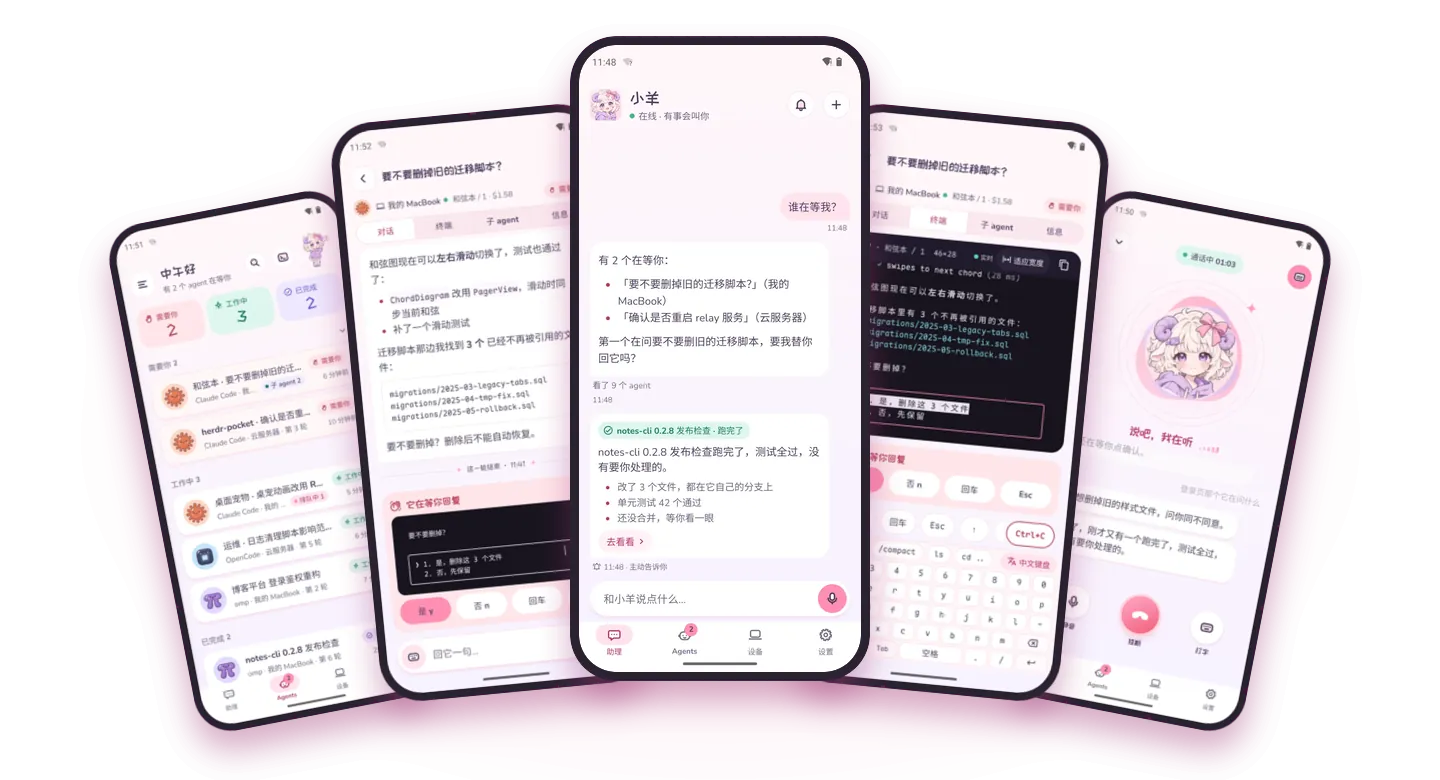
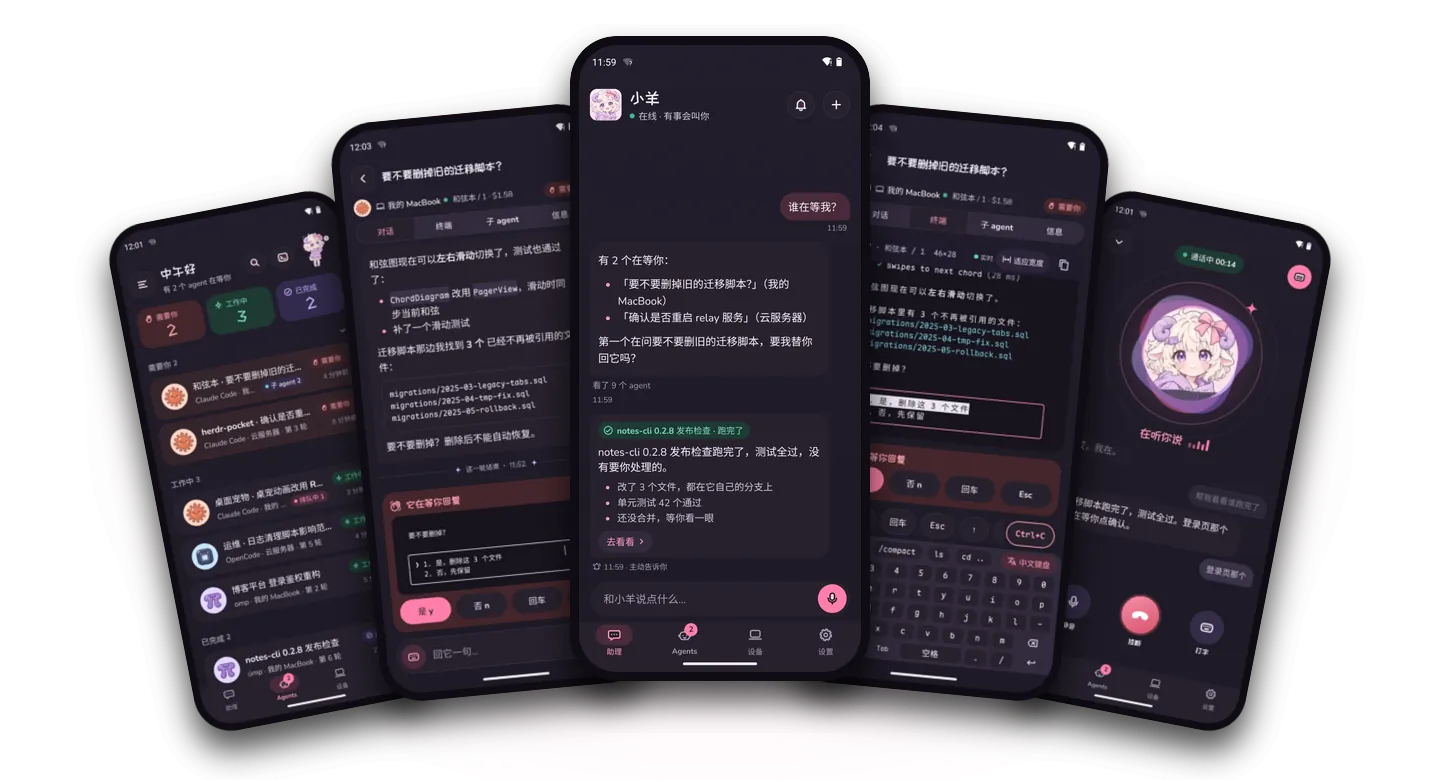
What it does
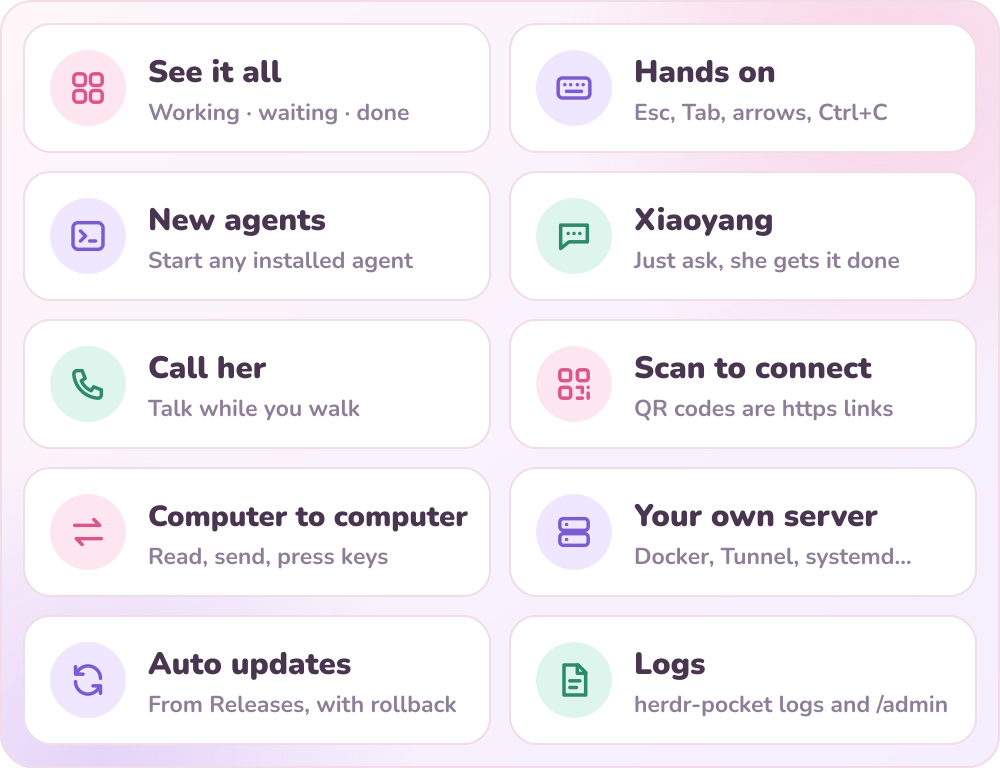
| See it all | The agents on every computer, sorted by state: working, waiting on you, done. Tap one for a formatted conversation (tool calls folded into cards) and a live terminal. |
| Hands on | Send messages and pictures, press Esc / Tab / arrows / Ctrl+C, and answer an agent's numbered choices with one tap. The terminal uses the app's own compact keyboard, so the system keyboard doesn't cover the screen; one tap switches back when you need to type Chinese. |
| New agents | In any space on any computer, start an agent installed on that computer: Claude Code, Codex, Gemini CLI, Kimi, Cursor Agent, Droid, CodeBuddy, Qoder, OpenCode… and hand it its first task at the same time. |
| Xiaoyang | One conversation for all your computers: ask who is waiting on you, where an agent is stuck, how much it has cost; have her pass on a message, press keys, start a new agent. By default she acts directly and tells you exactly how it went. When an agent gets stuck or finishes she speaks up on her own, pushing to the notification shade even while the app is closed, and she can set reminders. |
| Call her | Voice calls with Xiaoyang, so you can direct things while you walk. Supports MOSS-Live and OpenAI Realtime with on-device voiceprint lock and call noise suppression; nothing waits for a confirm tap during a call. |
| Scan to connect | QR codes are plain https links that any camera can scan. The first device on a new server just scans the code printed at startup; no keys to copy. |
| Computer to computer | From one computer's terminal, look at another computer's agents, send them messages and press keys. |
| Your own server | The relay runs on your own machine, with ready-made setups for Docker, Cloudflare Tunnel, Node + systemd, Fly.io, Render and Kubernetes. |
| Auto updates | The phone app, the computer command and the server all update from GitHub Releases. If an update on a computer or the server goes wrong, the old version stays in place, and you can roll back in one step. |
| Logs | Logs from the server, the computers and the phones all collect on the relay. Read them with herdr-pocket logs or the /admin console in your browser, or just ask Xiaoyang "where did it get stuck?" |
How it connects
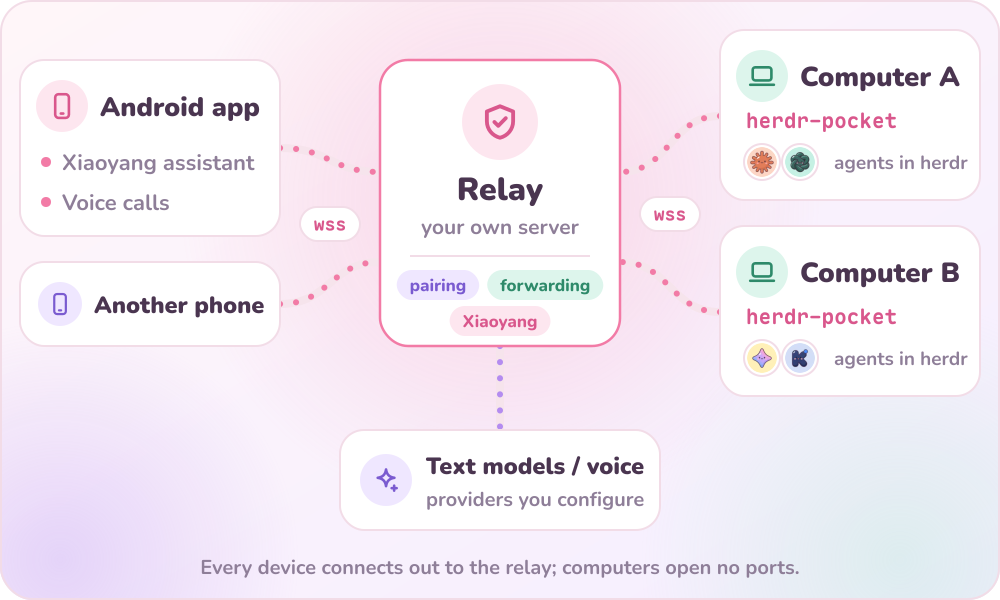
- Computer side
herdr-pocket: one background program per computer. It reads the agents in herdr, sends their state, conversations and terminals to the relay, and carries out what the phone asks for. - Relay: handles device pairing and tokens, online status and request forwarding; Xiaoyang the assistant runs here too. Every device only ever connects out to it, so computers don't need to open any ports.
- Mobile & desktop clients: Android and iOS apps (Expo / React Native with native voice, noise-suppression, and multi-mirror download modules), HarmonyOS NEXT native Stage-model app (
.hap), and cross-platform desktop apps for Windows, macOS, and Linux (Tauri v2).
Quick start
You need: a server (Linux) that your clients and computers can reach, a computer with herdr installed (macOS, Linux or Windows), and a phone (Android, iOS or HarmonyOS NEXT) or desktop client.
1. Deploy the relay
One command (uses Docker if it's there, otherwise Node + systemd):
curl -fsSL https://raw.githubusercontent.com/Crosery/herdr-pocket/main/scripts/install-relay.sh | sudo bash -s -- --domain pocket.example.com
| Your situation | Flags |
|---|---|
| You have a domain and the server can open ports 80/443 (Caddy sets up HTTPS automatically) | --domain pocket.example.com |
| The domain is on Cloudflare and you'd rather not open ports on the server (at home, on an internal network) | --tunnel <token> --domain pocket.example.com |
| No domain, just trying it out | --tunnel quick (a temporary trycloudflare address that changes on restart) |
| A LAN, or you already have your own reverse proxy in front | --port 7420 |
| You don't want to install Docker | add --native |
Plain Docker Compose works too:
mkdir herdr-pocket && cd herdr-pocket
curl -fsSLO https://raw.githubusercontent.com/Crosery/herdr-pocket/main/deploy/docker/compose.yml
docker compose up -d
docker compose logs relay | grep "setup code"   # the setup code for the first device
For Fly.io, Render, Railway, Zeabur, Kubernetes and the details of every route, see the deploy docs. Whichever you pick, keep the database on persistent storage and run only one instance.
2. Connect the first device
While a new server has no devices yet, it prints a one-time setup code and QR code (valid for 30 minutes, single use):
[relay] setup code=MEOW-482193 link=https://pocket.example.com/p/MEOW-482193 expires=…
- Phone first: scan the QR code with your camera and tap “用 Herdr Pocket 打开” (Open with Herdr Pocket) on the page. If the app isn't installed yet, the page has a download link.
- Computer first: hand this link to the computer side; see the next step.
Lost it? Run sudo herdr-pocket-relay setup on the server to see it again; if it has expired, add --new for a fresh one.
3. Install the computer side
curl -fsSL https://raw.githubusercontent.com/Crosery/herdr-pocket/main/scripts/install-host.sh | bash -s -- --server https://pocket.example.com
It installs the herdr-pocket command and a background service that starts automatically (launchd on macOS, a systemd user service on Linux). The terminal shows a QR code: scan it with a phone that's already connected and tap “允许加入” (Allow). If this computer is the first device, replace --server … with the setup link from step 2: … | bash -s -- https://pocket.example.com/p/<setup code>.
The computer needs Node.js 22.18 or newer. If it doesn't have one, the installer downloads a separate copy that leaves the system's Node alone.
Windows (10 1809 or newer, or 11): run this in PowerShell instead. No administrator rights needed; it brings its own Node and starts Herdr Pocket hidden when you log on.
& ([scriptblock]::Create((irm https://raw.githubusercontent.com/Crosery/herdr-pocket/main/scripts/install-host.ps1))) -Server https://pocket.example.com
For the first device, pass the setup link instead: … -Link https://pocket.example.com/p/<setup code>. Details in docs/deploy/host.md.
4. Install a mobile or desktop client
Download your platform package from Releases:
- Android:
herdr-pocket-<version>-android-arm64.apk(with in-app self-update and multi-mirror voice model download) - iOS:
herdr-pocket-<version>-ios-arm64.ipa(unsigned.ipa; install via AltStore, SideStore, TrollStore, or Xcode) - HarmonyOS NEXT:
herdr-pocket-<version>-harmonyos-arm64.hap(unsigned.hap; install or sign with DevEco Studio) - Desktop (macOS / Windows / Linux):
macos-{arm64,x64}.dmg,windows-x64-setup.exe/.msi, orlinux-x64.{AppImage,deb}
5. Add more devices
Any device that's already connected can invite others. Invite codes are single use and valid for 10 minutes:
- Phone: in the app, “设备 → 邀请设备” (Devices → Invite device) shows a QR code, or send the link to another phone with the system share sheet.
- Computer:
herdr-pocket pairprints a QR code in the terminal. - Copy an invite link, then open the app: the home screen offers “用它连接” (Connect with it) right away.
Setting up Xiaoyang
Xiaoyang runs inside the relay and is configured in the server's relay.env (the installer puts it at /opt/herdr-pocket/relay.env; with Docker it sits in the same directory as the compose file). Without a model, everything else in the app still works; there's just no assistant.
# Text models: provider:model, tried in order; when one fails or is too slow, the next takes over
POCKET_DEEPSEEK_API_KEY=sk-...
POCKET_QWEN_API_KEY=sk-...
POCKET_ASSISTANT_MODELS=deepseek:deepseek-flash,qwen:qwen3.7-plus

# Voice calls: MOSS-Live by default (recommended); add the key and you can call
POCKET_VOICE_KEY=...
# POCKET_VOICE_PROVIDER=openai-realtime

# Optional
# POCKET_TIMEZONE=Asia/Shanghai        # time zone Xiaoyang uses for the time and reminders
# POCKET_ASSISTANT_CONFIRM=never       # always: ask before acting in text chats (calls never wait for confirmation)
Built-in text model providers: Xiaomi MiMo, Anthropic, OpenAI, DeepSeek, Qwen (Tongyi Qianwen), Kimi, Zhipu GLM, SiliconFlow, Volcano Engine Ark, OpenRouter, Gemini, and Ollama (local). Five protocols are supported (OpenAI Chat, OpenAI Responses (Codex), Anthropic, Google Gemini, and Ollama), with 1-tap upstream model auto-scanning in the mobile app, desktop app, and /admin. Each provider's address, variables and config-file format are in docs/config.md.
Ask before acting (“动手前先问我”) can also be switched in the app's settings or in /admin; the changed value is stored on the server.
Command line
herdr-pocket up --server pocket.example.com   # register this computer and keep it online (login + run)
herdr-pocket pair                             # show an invite QR code to add a phone or another computer
herdr-pocket status                           # registration and connection state

herdr-pocket agents                           # agents on every online computer
herdr-pocket read  macbook/t42                # look at another computer's terminal
herdr-pocket send  macbook/t42 run the tests
herdr-pocket keys  macbook/t42 esc

herdr-pocket logs --since 1h --level warn     # logs recorded by the relay, the computers and the phones
herdr-pocket update                           # update to the latest version (--check only checks, --rollback goes back)
herdr-pocket run --read-only lets others look but not touch; --allow <device id,…> lets only the listed devices operate this computer. Xiaoyang calls computers as the relay (device id relay), so add it when you use --allow.
On the server, the matching command is herdr-pocket-relay: setup, status, logs, update, version.
Updates
| Command | |
|---|---|
| Phone app | Prompts by itself when a new version is out; you can also check by hand in “设置 → 版本” (Settings → Version) |
| Computer | herdr-pocket update |
| Server | sudo herdr-pocket-relay update; with Docker, docker compose pull && docker compose up -d |
Computer and server updates first unpack the new version into a directory next to the current one and start it once as a trial; only if that works do they switch over and restart. If it fails, the old version is left untouched, and --rollback returns to the previous version. The release process is in docs/deploy/updates.md.
Logs and console
/admin: openhttps://pocket.example.com/adminin a browser and enterPOCKET_ADMIN_TOKEN(the installer generates one). Configure text providers/models (with upstream model auto-scan), realtime voice, and prompts; inspect version, online devices, 24h statistics, pairing QR codes, and live logs; revoke devices or toggle ask before acting.herdr-pocket logs: works from any registered computer. Filter by time, device, kind, level and keyword;--followkeeps watching.- Phone and computer logs are uploaded to the relay periodically, with tokens and keys wiped out before upload.
Security
- A device token appears only once, at pairing, and the server stores only its SHA-256. Revoke a device in the app or in
/adminand it disconnects immediately. - Invite codes are single use and expire after 10 minutes by default; 10 failures from the same IP lock it out for 10 minutes. A setup code exists only while the server has no devices at all.
- The QR code web page only shows what's already in its URL: it doesn't check whether the code is valid, isn't cached, and sends no referrer.
- The relay rewrites agent ownership according to each connection's identity, so a computer can't pose as another. A phone can only choose which program to start by name; it can't make a computer run arbitrary commands.
- Use HTTPS in production. The relay can see the content in plaintext; there's no end-to-end encryption yet, so deploy it on a machine you trust.
Development
| Directory | Contents |
|---|---|
packages/protocol |
Versioned protocol for devices, agents, conversations, RPC, streams and pairing; cross-process changes start here |
packages/update |
Version numbers, GitHub Releases checks, in-place updates and rollback |
apps/relay |
The relay and Xiaoyang the assistant |
apps/hostd |
The computer-side background program and the herdr-pocket command line |
apps/mobile |
Android & iOS mobile app (Expo SDK 58), not part of the root pnpm workspace |
apps/desktop |
Cross-platform desktop app (React + Tauri v2 for macOS, Windows, Linux) and shared HarmonyOS web UI |
apps/harmony |
HarmonyOS NEXT Stage-Model ArkTS shell |
apps/site |
Website and intro video (Vite + three.js; the video is rendered with Remotion) |
deploy/, scripts/ |
Docker, systemd, launchd, Fly, Render and k8s configs, and the install scripts |
pnpm install
pnpm typecheck
pnpm --filter @herdr-pocket/relay test
pnpm --filter @herdr-pocket/hostd test

cd apps/mobile && pnpm install && pnpm typecheck
cd apps/desktop && pnpm install && pnpm typecheck && pnpm build && pnpm build:harmony
You can look around the app without a server: on the connect screen, tap “还没有服务器?先逛逛演示数据” (No server yet? Look around with demo data). Collaboration conventions are in AGENTS.md, the docs index is docs/README.md, and app development and packaging are in apps/mobile/README.md.
License
Copyright © 2026 Crosery
Herdr Pocket is released under the GNU Affero General Public License v3.0 only (AGPL-3.0-only):
- You may freely use, study, modify and redistribute it, including commercially.
- If you distribute a modified version (an installer, an image, an archive), you must include the complete source under the same license.
- Even if you only deploy a modified relay or app for others to use over a network, without distributing the program, you must make the modified source available to those users. This is where the AGPL is stricter than the GPL.
- You may not fold it, or any part of it, into a closed-source product.
- This license grants no trademark rights to the “Herdr Pocket” name or logo. If you publish a modified version, give it a different name and package name, so nobody mistakes it for the official one.
Additional permission under AGPL-3.0 section 7. The website in apps/site may be combined with GSAP (distributed under its own “Standard no-charge” license), and the intro video project in apps/site/video with Remotion (distributed under the Remotion License), without those libraries falling under the AGPL. They keep their own terms: Remotion, for example, requires a paid company license above a certain team size. Neither library is used by the relay, the computer daemon or the mobile and desktop client apps.
Yorumlar (0)
Yorum birakmak icin giris yap.
Yorum birakSonuc bulunamadi