deck
agent
Basarisiz
Health Uyari
- No license — Repository has no license file
- Description — Repository has a description
- Active repo — Last push 0 days ago
- Low visibility — Only 5 GitHub stars
Code Basarisiz
- rm -rf — Recursive force deletion command in install.sh
Permissions Gecti
- Permissions — No dangerous permissions requested
Purpose: This tool is a terminal user interface that acts as a sidebar for managing, monitoring, and quickly switching between tmux sessions.
Security Assessment: The application inherently executes shell commands to manage your tmux sessions and reads file statuses (like git branch information) to display in the UI. A significant security concern is found in the installation script, which contains a `rm -rf` recursive force deletion command. While common in uninstall or update steps, blind execution of remote scripts with force deletion capabilities requires caution. No hardcoded secrets or dangerous system permissions were detected, but users should inspect the script before running it. Overall risk: Medium.
Quality Assessment: The project is written in Rust and was updated very recently, indicating active maintenance. However, there are red flags regarding maturity and legal safety. It lacks a license file, meaning there are no explicit permissions for use, modification, or distribution. Additionally, with only 5 GitHub stars, it has very low community adoption and visibility.
Verdict: Use with caution — it is a helpful utility for tmux power users, but the missing license and risky install script mean you should review the code or build from source rather than piping the install script directly to your shell.
Security Assessment: The application inherently executes shell commands to manage your tmux sessions and reads file statuses (like git branch information) to display in the UI. A significant security concern is found in the installation script, which contains a `rm -rf` recursive force deletion command. While common in uninstall or update steps, blind execution of remote scripts with force deletion capabilities requires caution. No hardcoded secrets or dangerous system permissions were detected, but users should inspect the script before running it. Overall risk: Medium.
Quality Assessment: The project is written in Rust and was updated very recently, indicating active maintenance. However, there are red flags regarding maturity and legal safety. It lacks a license file, meaning there are no explicit permissions for use, modification, or distribution. Additionally, with only 5 GitHub stars, it has very low community adoption and visibility.
Verdict: Use with caution — it is a helpful utility for tmux power users, but the missing license and risky install script mean you should review the code or build from source rather than piping the install script directly to your shell.
Essential tmux sidebar for vibe coding — manage sessions and monitor agents at a glance
README.md
deck
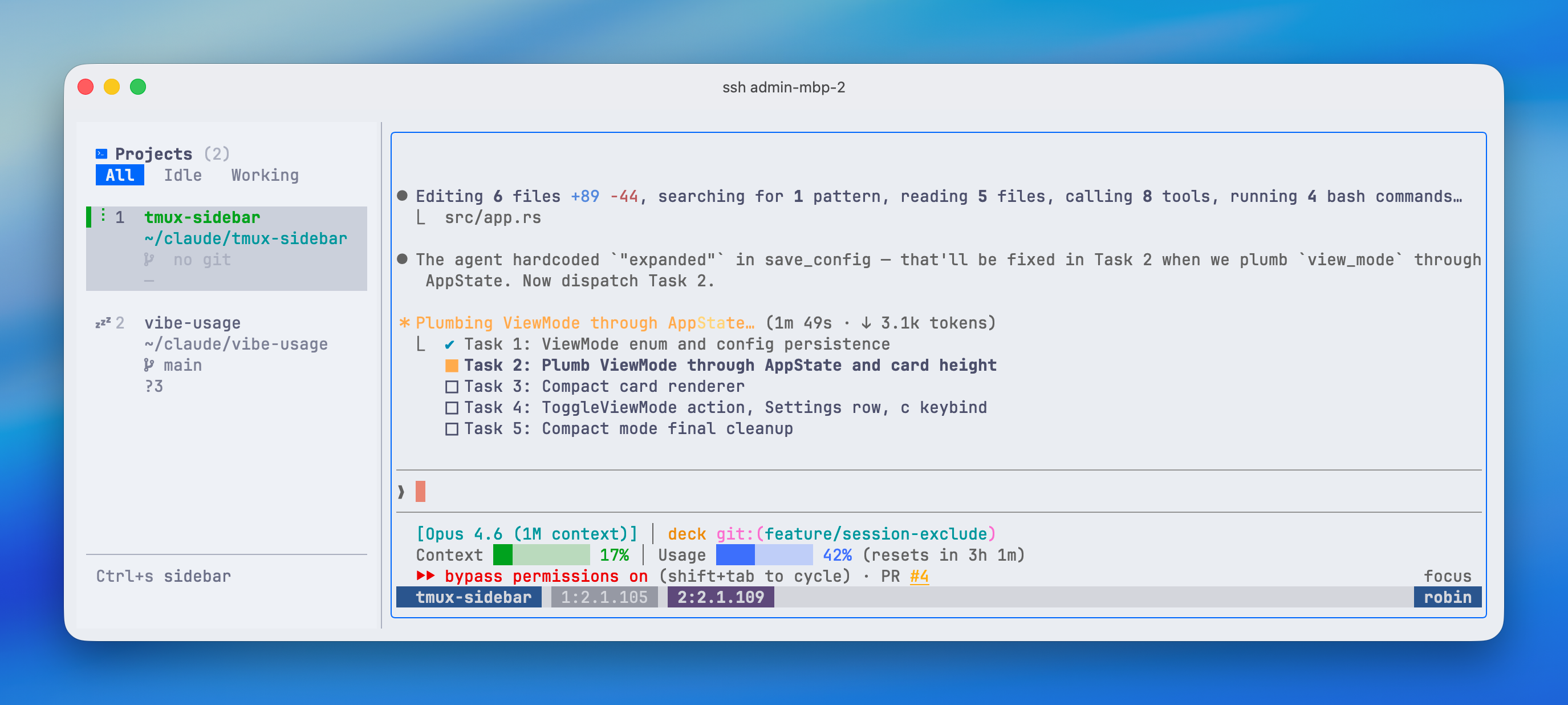
A terminal sidebar for browsing and switching tmux sessions. See your sessions, git status, and terminal output in one view.
Features
- Session sidebar with git branch, ahead/behind, staged/modified/untracked counts
- Instant switch — navigate sessions with j/k or number keys, session switches as you move
- Filter sessions by All / Working / Idle
- Reorder sessions with Alt+Up/Down
- Rename, kill, create sessions without leaving the TUI
- Mouse support — click to switch, right-click for context menu, drag to resize sidebar
- 7 built-in themes — Catppuccin Mocha, Tokyo Night, Gruvbox, Nord, Dracula, Catppuccin Latte, Claude Light
- Horizontal & vertical layouts, compact & expanded view modes, optional borders
- Exclude patterns — hide sessions by glob (
_*) or regex (/^test/) - Tmux theme sync — deck applies its color scheme to tmux automatically
Install
curl -fsSL https://raw.githubusercontent.com/cross-entropy-ai/deck/main/install.sh | sh
Or with Homebrew:
brew tap cross-entropy-ai/tap
brew install deck
Or download a pre-built binary from GitHub Releases.
Usage
deck
Requires tmux installed and available in PATH. Run it inside a tmux session.
Keybindings
| Key | Action |
|---|---|
Ctrl+S |
Toggle focus between sidebar and terminal |
j / k |
Navigate sessions |
1-9 |
Jump to session by number |
Enter |
Switch to session and focus terminal |
x |
Kill session (with confirmation) |
f |
Cycle filter (All / Working / Idle) |
l |
Toggle horizontal/vertical layout |
b |
Toggle borders |
c |
Toggle compact/expanded view |
t |
Open settings |
Alt+Up/Down |
Reorder sessions |
h / ? |
Help |
q |
Quit |
Configuration
Config is stored at ~/.config/deck/config.json:
{
  "theme": "Catppuccin Mocha",
  "layout": "horizontal",
  "show_borders": true,
  "sidebar_width": 28,
  "view_mode": "expanded",
  "exclude_patterns": ["_*"]
}
Exclude patterns support glob syntax (_*, scratch*) and regex wrapped in slashes (/^test-.+$/).
Build from source
cargo build --release
./target/release/deck
Yorumlar (0)
Yorum birakmak icin giris yap.
Yorum birakSonuc bulunamadi