Zelyq
Health Warn
- License — License: AGPL-3.0
- Description — Repository has a description
- Active repo — Last push 0 days ago
- Low visibility — Only 7 GitHub stars
Code Fail
- rm -rf — Recursive force deletion command in .github/workflows/ci.yml
- network request — Outbound network request in apps/agent/evals/cases.ts
- exec() — Shell command execution in apps/agent/evals/checks.ts
- network request — Outbound network request in apps/agent/evals/checks.ts
Permissions Pass
- Permissions — No dangerous permissions requested
No AI report is available for this listing yet.
Open-source AI app builder. Describe an app, watch an agent build it in a real workspace, and edit the result live — on your laptop or your own cloud.
Zelyq
Vibecoding writes code. Zelyq builds like an engineer.
Try it live → zelyq.com
▶ Video Studio — create videos from a prompt or animate a starting image, then preview and download your results.
▶ Image Studio — generate original images with prompts, reference images, and creative controls.
▶ And checking the build at real mobile, tablet, and desktop widths right in the preview — no resizing the window.
▶ And building a real mobile app — pick Expo — React Native when you create a project and the agent builds native screens (View / Text / Expo Router, not div), previewed in the browser via Expo web.
Most "prompt to app" tools generate something that looks right and leave you to find out where it
isn't. Zelyq's agent plans before it acts, verifies its own work before it calls a turn finished,
tells you plainly what it checked versus what it assumed, and stops to ask instead of guessing when
a request is too vague to build responsibly. It writes files, runs commands, starts a dev server,
and reports back — while you watch every tool call, every file it touched, and the running result,
live.





Live demo · Why an engineer · Quickstart ·
How it works · Modes · Architecture ·
Configuration · Self-hosting ·
Roadmap · Contributing
It behaves like an engineer, not a generator
A code generator's job ends when something compiles. An engineer's job includes knowing what they
actually built, whether it works, and when they don't have enough information to keep going
responsibly. Zelyq's agent is built toward the second one:
- It verifies before it calls anything done. The moment the model stops asking for tools, Zelyq
runs the project's own typecheck (or build) and checks the live preview for a crash — automatically,
not because the prompt asked nicely. A turn that broke something gets handed back to fix, not
reported as finished. - It says what it knows versus what it guessed. Turn on Engineer Mode and every turn that
changes something states its purpose up front, then separates what it verified (ran, read, tested)
from what it inferred and what it assumed — instead of one confident-sounding paragraph that blurs
the three together. - It names the alternative it didn't pick. When a real choice existed — an architecture, a
library, a tradeoff with no obviously-better answer — Engineer Mode has it say what it didn't choose
and why, in a sentence or two, not silently. - It plans before it builds, when the ask is big enough to need one. Architect Mode turns a
vague request into a real design package first — requirements, decisions with the alternative named
and why it lost, a data model and API, aDESIGN.mddesign system, a build plan broken into
review-sized tasks — and waits for you to say "build it" before writing any code. Then it
dispatches each task to a bounded builder, has a separate session verify the running app, and
claims "done" only against a checklist it can show you. Turn on Auto Mode and it runs the
passes itself, to a hard ceiling, instead of you typing "keep going". - It has specialists. After a build verifies, named agents finish the job — each owns a spec
file it surveys, writes, and implements, and each streams into the chat as a labelled sub-thread.
The Designer (DESIGN.md— a coherent design system, no generic-AI look), the DevOps
agent (OPERATIONS.md— CI, a Dockerfile,.env.example, deploy config), the Security/QA
agent (QA.md— writes and runs the test suite, runs the security scan), and the Cinematic
engineer (CINEMATIC.md— turns one screen into a scroll-driven film: a hero that scrubs your
footage frame by frame as you scroll, a pinned reveal, a horizontal story, built to a
senior-engineer skill). In Engineer Mode you call any of them yourself: "make it look
professionally designed", "set up CI", "write tests", "make the hero play as I scroll".
See docs/modes.md. - A specialist can pause for something only you have. A cinematic hero is the footage, so the
Cinematic engineer doesn't fake it against a placeholder: it writes a plain-language brief of
exactly what to provide, creates the folder, and stops. You drop the file in and replygo— it
validates what you gave it against the brief and takes it from there. A dispatched pass that asks,
waits, and resumes from a plan it already wrote. - It builds the backend, not just the screen. When a project needs saved data or accounts, the
agent designs a Supabase Postgres schema with Row-Level-Security written per operation, applies the
migration, wires the client, and has a separate session verify that a second user genuinely can't
read the first user's rows. AI features too — a chatbot, an extractor, a classifier — with the
provider key living in the backend, never shipped to the browser. - It builds what was asked, then stops. No invented navbars, no sample-data toggles nobody
requested, no filling a vague ask with guesses. A request too shapeless to build responsibly gets one
clarifying question instead of eight files you didn't want. - It reaches for expert practice only when a task needs it. A catalog of packaged, senior-level
skills — frontend engineering, UI/UX design, application security, CI/CD — loads into a turn only
when its description actually matches, so the agent isn't running a security review on a landing
page or a deployment checklist on a button. - It stops and asks instead of guessing on anything irreversible. Deleting data, an action with no
undo, a request that's really a conversation ("I want to test you," "how would you build X") rather
than a spec — Engineer Mode treats these as a reason to ask, not a reason to improvise.
None of this is a black box promise — every mechanism above is real code, not marketing copy: the
verification gate and Engineer Mode both live in apps/agent/src/session.ts
and apps/agent/src/prompt.ts, and docs/agent-behaviour.md
documents exactly how the turn loop decides what to do.
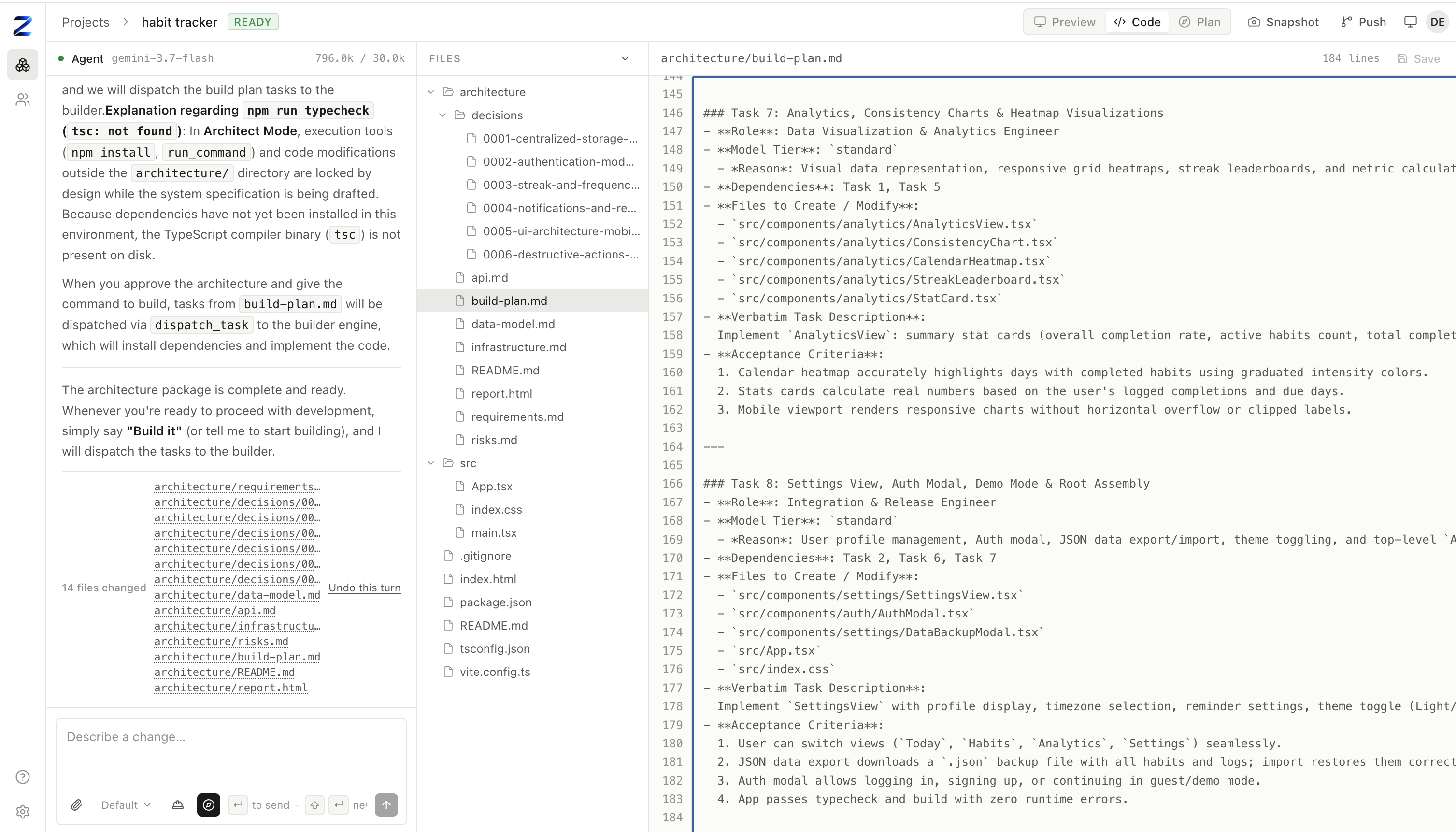
Architect Mode on a real request: a full design package, reviewable before any code exists —
not just this one file, the whole architecture/ package on the left.
 |
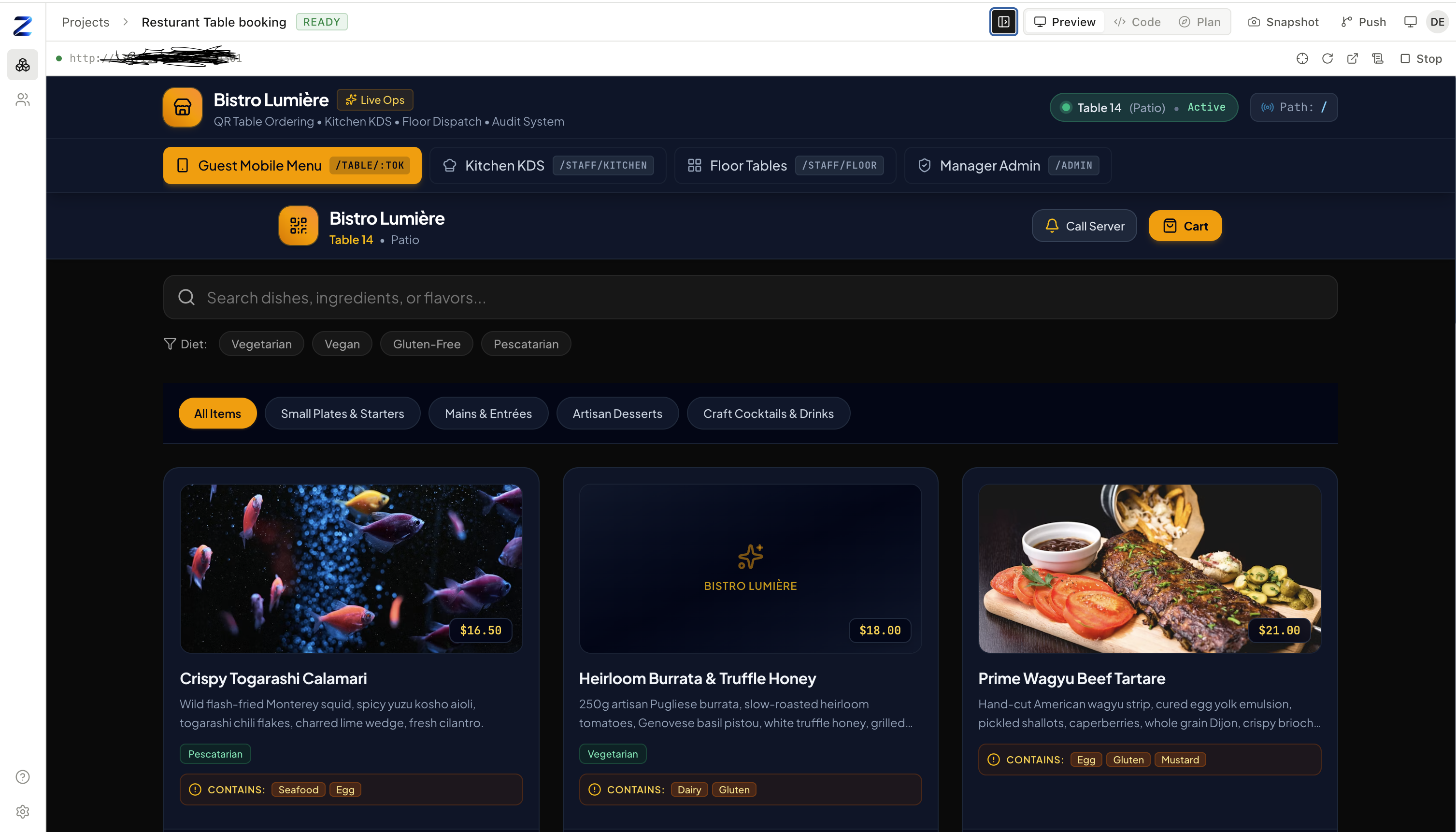 |
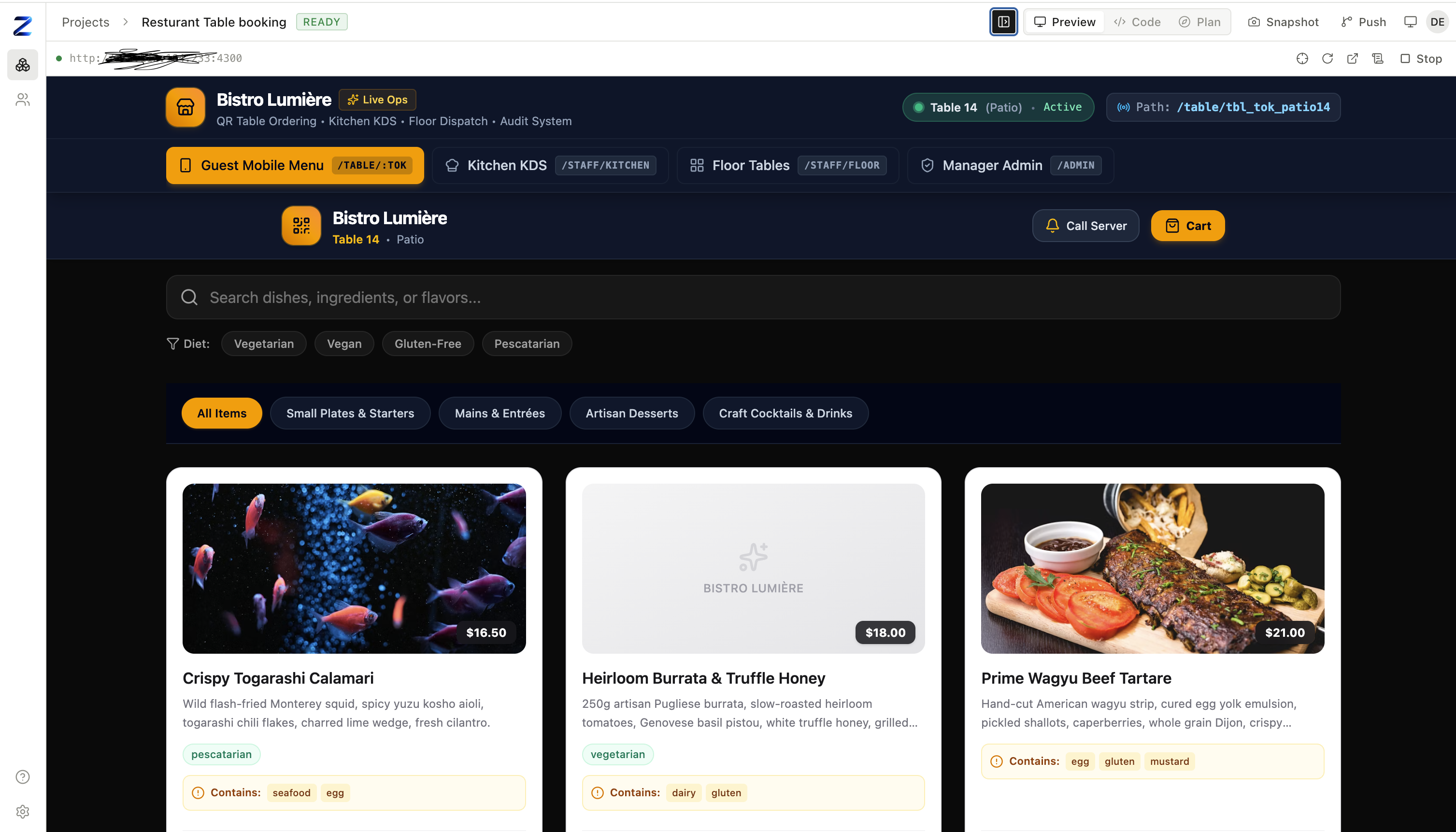
| Before — the build, verified and running. Same restaurant system: guest ordering, a kitchen display, floor dispatch, and manager admin, with real allergen and dietary data. | After — the Designer agent wrote DESIGN.md and applied it:
one dark surface system, the accent colour carried through, real elevation, tighter type. Same content, no
functional change. |
What it is
Most "prompt to app" tools are a product with an engine hidden inside. Zelyq is the engine, and it is
built so that nothing about it is magic and nothing is locked in:
- One execution seam. Every filesystem and shell operation goes through a single
RuntimeDriverinterface, so nothing above it knows where the code runs.local— child
processes on your machine — is the zero-setup default.containeris the same with agent shell
commands and the dev server preview jailed one container per project.remotespeaks a
documented HTTP protocol to a runtime host, and a reference host
ships inapps/runtime-host; one conformance suite runs against all three drivers, so they are
provably interchangeable. Isolation is partial — container mode always blocks one project's
container from reaching another's and blocks the cloud metadata endpoint, but does not otherwise
filter outbound network access unless you opt intoZELYQ_CONTAINER_EGRESS_ALLOWLIST, which you
name and maintain yourself. Read
SECURITY.md before deploying. - Bring your own model — cloud or your own machine. Claude, Gemini, OpenAI, DeepSeek, Mistral,
Grok, Groq, or OpenRouter, chosen with one variable and a key. Or pointZELYQ_PROVIDER=customat
anything speaking the OpenAI dialect — Ollama, vLLM, LM Studio, a gateway of your own — and nothing
about your project ever leaves your network. No proxy, no Zelyq account, no telemetry, either way. - Every turn is a change you can inspect and undo. A snapshot before each turn, a diff of exactly
what changed, one-click revert to any turn — and an audit log of who did what, once more than one
person is working on an instance. - Boring, inspectable storage. SQLite by default (one file), PostgreSQL when you scale. Project
files are plain files on disk — you cancdinto them and take them with you. - Web or mobile. Pick React + Vite or Expo — React Native when you create a project.
The Expo stack previews in the browser via Expo web, and the agent knows it's React Native —
it buildsView/Text/Expo Router, notdiv. Device and store builds are a separate step. /clone <url>— rebuild a live site, page for page. The agent visits the URL with a real
browser, walks the pages, and rebuilds it in your project's framework: aREPLICA.mdplan
first, then the screens, with the real images and fonts mirrored in (substitutes logged where
it couldn't get one), and a screenshot-diff loop against the original. Every fetch is
SSRF-guarded — public hosts only. Only clone what you own or have permission to reproduce.- Image Studio, and an agent that can use it. A signed-in page for generating original images
from a prompt (OpenAI, Google, or xAI — your key, billed to you), with a private library, reference
images, and durable history. Switch it on for a project and the agent can generate artwork for the
app it is building, reuse an image you made yourself, and place either into the project. Anything
it generates lands in your own library. It is off by default per project, because each image
spends money, and bounded by a per-hour and a per-conversation limit you set. The agent is told to
use real stock photography for anything your copy claims is real — a generated landmark is not a
photograph of it. See Image Studio and
agent integration. - Video Studio. A signed-in page for generating short clips from a prompt, or animating a still
image — Google (Veo) or xAI (Grok Imagine), your key, billed to you. Text-to-video and
image-to-video, with the ratio, duration, resolution and audio options each model actually
supports; a starting frame can be uploaded or picked from your Image Studio library. Jobs are long
and asynchronous, so they survive a refresh and a server restart: the provider's operation handle
is persisted, polling resumes on boot, and a submission whose outcome cannot be established says
so rather than quietly generating (and billing) a second time. Finished clips are saved to your own
storage — they keep playing after the provider's temporary URL expires — and stream back with HTTP
range support so seeking works. A finished clip can also be split into a numbered image
sequence — WebP, JPEG, PNG or AVIF, with a poster and a manifest — which is exactly what a
scroll-scrubbed hero paints onto a canvas. See Video Studio and
frame export. /videoand/cinematic— moving footage in a page, built the right way./videoputs a
muted loop behind a section;/cinematicmakes a section play as you scroll, frame by frame on a
canvas. The agent generates the footage itself and knows which technique the request calls for —
a loop when the motion is ambient, a scrubbed sequence when it must follow scroll position, and
real stock photography for anything the copy claims is real. Off per project until you switch it
on, because clips cost real money. See
video agent integration./figma <link>— build from a Figma frame. Connect Figma in Settings (OAuth; the token
stays on the server). Paste a frame's link and the agent pulls its node tree, a render, the
assets, and the design tokens, then rebuilds it in your project — auto-layout becomes
flexbox, Variables become the Tailwind theme — and diffs against the render.
Status
Early, and honest about it. The end-to-end path works — create a project, prompt the agent, watch
it read and edit files, run a live preview — and the interfaces around it were deliberately settled
first. Expect breaking changes before 1.0.
Two limits worth knowing before you invest time. There is no sandbox in local mode: agent shell
commands run as your own user, so that mode is for one trusted developer on one machine — read the
threat model before deploying it anywhere
else. And container mode's outbound network access is unfiltered by default — it blocks the
cloud metadata endpoint and cross-project reachability, but a project can otherwise reach anything on
your network unless you opt into ZELYQ_CONTAINER_EGRESS_ALLOWLIST yourself. See the
roadmap for what is next and what is explicitly out of scope.
Quickstart
# Requires Node >= 20.12 and pnpm >= 9
git clone https://github.com/CrowPus/Zelyq.git
cd Zelyq
pnpm install

cp .env.example .env
# Claude:  ANTHROPIC_API_KEY=sk-ant-...
# Gemini:  ZELYQ_PROVIDER=google and GEMINI_API_KEY=...
# OpenAI, or your own model on your own machine — see Models below

pnpm dev            # builds the libraries, then web :5173 · server :8787 · agent :8788
Open http://localhost:5173, create a project, and type what you want built. The first preview runsnpm install, so give it a minute.
Prefer containers? docker compose -f docker/docker-compose.yml up — see
self-hosting.
How it works
Three processes over four libraries. The agent never touches your disk directly; it goes through the
runtime driver, which is the seam that makes local and cloud identical.
        ┌───────────────┐
        │  apps/web     │  React + Vite — chat, file tree, editor, live preview
        └───────┬───────┘
                │  REST + WebSocket
        ┌───────▼───────┐
        │  apps/server  │  Fastify. Projects, files, previews, snapshots.
        │               │  Owns the database. Relays agent events to the browser.
        └───────┬───────┘
                │  HTTP + SSE
        ┌───────▼───────┐
        │  apps/agent   │  Runs the model loop, executes tools, streams events.
        └───────┬───────┘
                │  RuntimeDriver  (the only path to disk or shell)
     ┌──────────┴───────────┐
┌────▼─────┐        ┌───────▼────────┐
│  local   │        │     remote     │  container / VM / k8s runtime host
│ child_   │        │  HTTP contract │
│ process  │        │                │
└──────────┘        └────────────────┘
| Package | Responsibility |
|---|---|
@zelyq/core |
Domain types and the wire protocol — Zod schemas shared by every process |
@zelyq/runtime |
RuntimeDriver plus the local and remote implementations |
@zelyq/db |
Drizzle schema and migrations, SQLite and PostgreSQL |
@zelyq/tools |
The agent's tools, written once against RuntimeDriver |
Model vendors sit behind a ModelProvider interface. Each keeps its own native conversation history,
because Anthropic requires thinking blocks echoed back unchanged and Gemini requires thought
signatures preserved across tool calls — flattening both into one format loses what the next request
needs.
Full detail: docs/architecture.md.
Models
| Provider | ZELYQ_PROVIDER |
Default model | Key |
|---|---|---|---|
| Claude | anthropic |
claude-opus-5 |
ANTHROPIC_API_KEY |
| Gemini | google |
gemini-3.7-flash |
GEMINI_API_KEY |
| OpenAI | openai |
gpt-5.1 |
OPENAI_API_KEY |
| DeepSeek | deepseek |
deepseek-chat |
DEEPSEEK_API_KEY |
| Mistral | mistral |
mistral-large-latest |
MISTRAL_API_KEY |
| Grok (xAI) | xai |
none — set ZELYQ_MODEL |
XAI_API_KEY |
| Groq | groq |
none — set ZELYQ_MODEL |
GROQ_API_KEY |
| OpenRouter | openrouter |
none — set ZELYQ_MODEL |
OPENROUTER_API_KEY |
| Your own — Ollama, vLLM, LM Studio, anything OpenAI-compatible | custom |
none — set ZELYQ_MODEL |
none required |
Only the selected provider's key is needed. custom also needs ZELYQ_MODEL_BASE_URL pointed at your
endpoint (e.g. http://localhost:11434/v1 for Ollama) — see .env.example. Tested
live against a local, CPU-only 8B model: real tool calls, real self-correction from a validation error,
same behaviour as the cloud providers — just slower without a GPU.
Adding another provider is a registry entry plus one implementation — nothing in the server, the UI,
or the tools changes.
Local vs. cloud
| Local | Cloud | |
|---|---|---|
| Database | SQLite file (./data/zelyq.db) |
PostgreSQL (DATABASE_URL=postgres://…) |
| Project files | ./workspace/<project-id> |
Volume or runtime host storage |
| Shell and dev servers | child_process on your machine |
Runtime host (ZELYQ_RUNTIME=remote) |
| Accounts | Built in — first account owns the instance | Same, with signup closed |
| Model key | Your .env |
Per user |
One variable (ZELYQ_RUNTIME) moves between them. No code changes.
Configuration
Everything is an environment variable, and most of it can also be set in Settings inside the app,
so an instance can be run by someone who never opens a terminal — including entering the model API
key. The environment always wins; fields it supplies appear locked in the UI, labelled with the
variable that supplies them, so the two can never disagree silently.
Keys entered through Settings are encrypted with AES-256-GCM before storage and never sent back to
the browser. Only an instance administrator — the first account created — can see or change them.
Access control
Everyone signs in, and every route checks who they are. Projects belong to a team; your role in that
team decides what you can do:
| Role | Can |
|---|---|
viewer |
Read projects, files, and conversations |
editor |
Everything above, plus prompt the agent, edit files, and run previews |
admin |
Everything above, plus manage members and delete projects |
owner |
Full control, including the team itself |
The first account created owns the instance; set ZELYQ_ALLOW_REGISTRATION=false afterwards so
people join by invitation rather than by signing themselves up.
Roles are not a sandbox. An editor can make the agent run shell commands, which in local mode run
as the server's user — give editor to people you would trust with a shell on that machine.
Security
Local mode runs generated code on your machine with your permissions. It is meant for projects you
trust, on your own machine. It is not a sandbox.
For anything multi-tenant or internet-reachable, run the remote runtime with container isolation. The
threat model, and what Zelyq does and does not protect against, is written out in
SECURITY.md. Read it before you deploy.
Contributing
Issues, discussions, and pull requests are welcome. CONTRIBUTING.md covers the dev
loop, the repository layout, and where a given change usually belongs. Everyone participating follows
the Code of Conduct.
License
Zelyq is open source, licensed under the GNU AGPL-3.0. Run it,
modify it, self-host it, fork it. If you run a modified Zelyq as a service other
people use over a network, the AGPL requires you to offer them your source.
A commercial license — the same code without the AGPL's network-source
requirement — is available for embedding Zelyq in a closed-source product, or for
organisations whose policy blocks AGPL software: [email protected].
Features designated "Zelyq Enterprise" (ee/ paths) are a separate paid
subscription under the Zelyq Enterprise License.
See LICENSING.md for the plain-language version. Releases up to
and including v0.1.0 remain available under Apache-2.0.
© 2026 Dee Empire. "Zelyq" and the Zelyq logo are
trademarks of Dee Empire. Commercial licensing and support: [email protected].
Reviews (0)
Sign in to leave a review.
Leave a reviewNo results found