Void
Health Gecti
- License — License: Apache-2.0
- Description — Repository has a description
- Active repo — Last push 0 days ago
- Community trust — 43 GitHub stars
Code Gecti
- Code scan — Scanned 12 files during light audit, no dangerous patterns found
Permissions Gecti
- Permissions — No dangerous permissions requested
Bu listing icin henuz AI raporu yok.
A Vim-style terminal text editor, rebuilt in Nim: Vim-conformant editing, a real shell pane, fuzzy finder, crash recovery, and a local coding agent whose every edit waits for your approval. No telemetry.
██╗   ██╗ ██████╗ ██╗██████╗
██║   ██║██╔═══██╗██║██╔══██╗
██║   ██║██║   ██║██║██║  ██║
╚██╗ ██╔╝██║   ██║██║██║  ██║
 ╚████╔╝ ╚██████╔╝██║██████╔╝
  ╚═══╝   ╚═════╝ ╚═╝╚═════╝
A terminal text editor that refuses to pick a side.




Getting started · Keys · Configuration · Tips · Arwen · Privacy · Contributing
What is Void?
Void is a terminal-native text editor built from scratch. Although inspired by Vim/Neovim, it does not aim to clone them. It shares a baseline with other terminal editors, that is necessary for a good user experience. After a baseline of a standard feature implementation, It WILL grow into it's own unique identity.
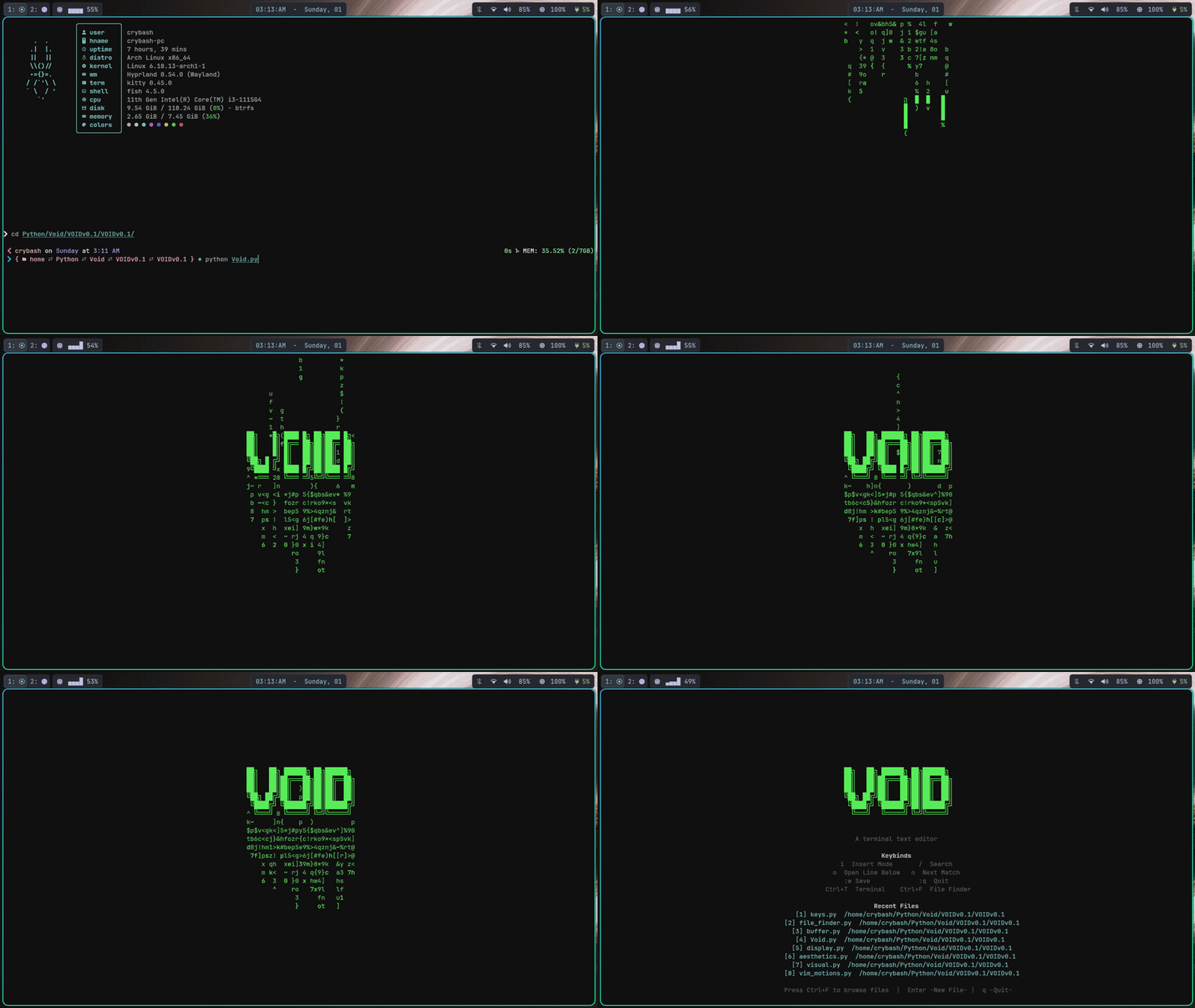
I have Vim motions as the current foundation of movement because I believe that language of movement is simply the fastest way to navigate and manipulate text. There are many features in both IDE's and terminal editors I plan to inherit because some things shouldn't change.
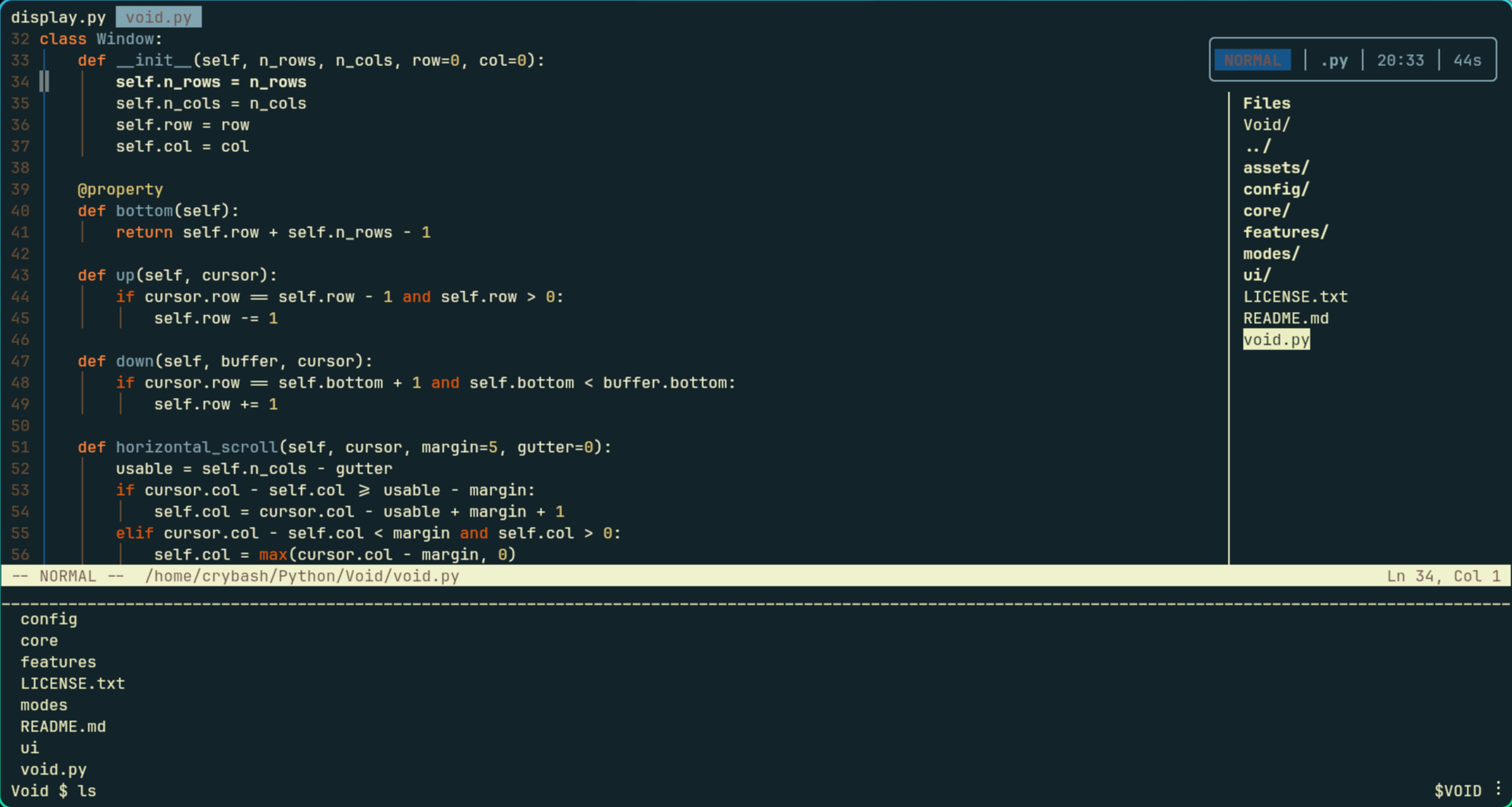
Tabbed editing. An embedded terminal. A file finder panel. Visual selection. Syntax highlighting. Find and replace with confirmation workflows. Auto-pairing. Auto-indentation. Undo history. A floating HUD and Custom configuration file. A local coding agent whose every edit waits for your approval. All of it running inside your terminal, all of it driven by the keyboard, and all of it just the beginning.
Current State
Void is a work in progress. It has rough edges, I am VERY new to shipping any type of software let alone a tool of this scope. There are still plenty of missing features and things will or may break and my ideas aren't all concrete, but that's what it's all about. I want this to be something that it's users find truly useful, but I can't get there without going through the tribulations. This is an actively evolving project, not a polished release BY ANY MEANS. Things will be subject to change, improvement and outright being thrown out.
That being said -- it works. You can open files, edit them, save them, search through them, select and manipulate text visually, manage tabs, run shell commands, and navigate your filesystem without ever leaving the terminal or reaching for a mouse.
Void currently comes in two builds that behave the same and share one config file:
Nim build (void) |
Python build (void-py) |
|
|---|---|---|
| The new, fast editor (0.4.0-dev). Becomes the default at 1.0. | The original (0.3.0b1), kept as the reference. | |
| Runs as | One static binary, no runtime dependencies | Python 3.11+, standard library only |
| Only here | Arwen's agent panel with review, a real shell pane, fuzzy file finder, mouse, themes | Splash animation |
Features
- Vim motions —
hjkl,wbe,ggG,ft;,,%,*#, and more; every Vim behaviour is checked against real Vim - Operators and text objects —
dcy><with any motion or text object (ciw,da",yi(,>ip,dit,d/foo), counts, and.to repeat - Registers and clipboard —
"a–"z, numbered and small-delete registers,"_, and the system clipboard through"+/"*(off unless you ask) - Modal editing — Normal, Insert, Visual, and Command modes
- Visual mode — Character (
v), Line (V), and Block (Ctrl+V) selection with delete, yank, change, and indent operations - Tabbed buffers — Open multiple files, switch between them with
gt/gTor:tabn/:tabp - Integrated terminal —
Ctrl+Topens your shell in a pane under the text: a real terminal with colours, full-screen programs and job control (Nim build) - File finder — Browse folders from a side panel with
Ctrl+F, or press/to fuzzy-find any file in the project (Nim build) - Arwen, a local coding agent —
Ctrl+Aopens her panel. She sees your open buffers live; her edits arrive as changes you accept or reject (AYrRSQ), and after a rejection she asks what you want instead. Her model runs on your machine (Nim build, details) - Mouse — Click to place the cursor, wheel to scroll text and panes (Nim build)
- Search and replace — regex
/and?with incremental highlighting,ignorecase/smartcase,:s/pat/rep/gcwith ranges (:%s,:'<,'>s,:3,7s), and the quick/find/replace/gform - Crash recovery — unsaved edits are journaled; after a crash
:recoverbrings them back - Files changed outside Void — detected and reloaded (undoable), or you're asked if you changed them too
- Your own keybinds —
[keys.normal]etc. inconfig.toml, includingex:commands and insert mappings likejk - Themes —
voidandvoid-light, and any colour overridable in[colors](Nim build) - Syntax highlighting — Token-based highlighting for Python, C++, C, Rust and JavaScript (more languages to come)
- Auto-indentation — Smart indent that respects Python block structures
- Auto-pairing — Brackets, braces, parentheses, and quotes auto-close in Insert mode
- Undo/Redo — Undo tree with
uandCtrl+R; optional undo history that survives restarts - Bracket matching — Highlights the matching bracket or quote under the cursor
- Indent guides — Vertical guides drawn through indentation levels, with active block highlighting
- Cursor line highlighting — Visual emphasis on the current line
- Floating HUD — Mode indicator, filetype, clock, and session timer in a top-right overlay
- Horizontal scrolling — Smooth margin-based scrolling for long lines
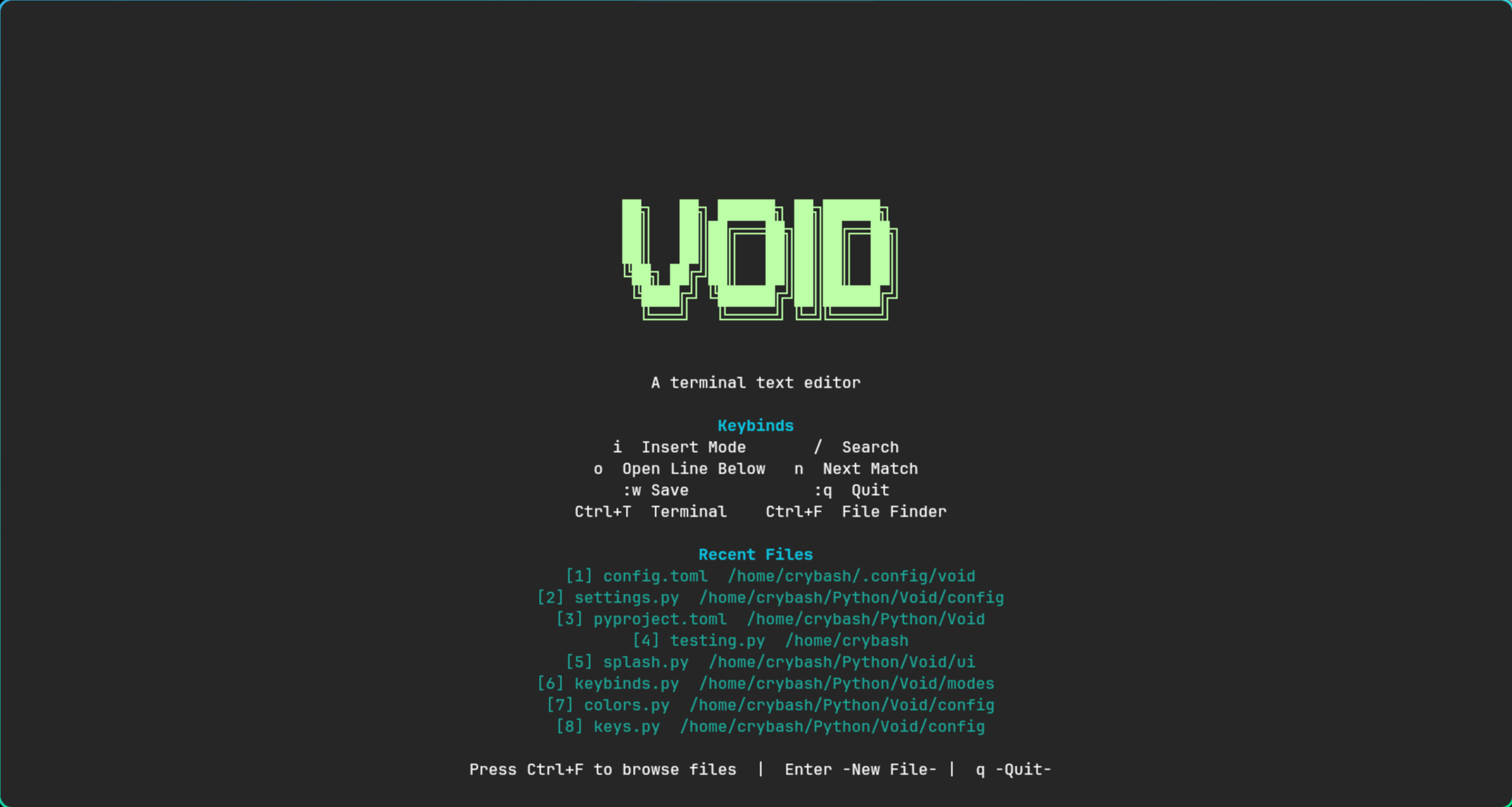
- Splash screen — Startup screen with recent file access and keybind hints (animated matrix rain in the Python build)
- Recent files — Tracks and surfaces your recently opened files on launch
- Custom Config -- Generate default .toml config file with
:config - Fast — the Nim build opens a 100 MB file faster than Vim and uses less memory doing it (numbers)
- Private by design — no telemetry, no network calls; everything Void keeps about you lives owner-only in
$XDG_STATE_HOME/void/, and files like.envor keys are never copied anywhere automatically (sensitive_paths). What Void stores, and how to check
Installation
Full instructions, including terminal setup: docs/getting-started.md.
Nim build (recommended)
Requirements: Linux, a C compiler, and Nim 2.2.x (e.g. choosenim 2.2.14).
git clone https://github.com/cryybash/Void.git
cd Void/voidcore
nimble install -y --depsOnly
nimble app                              # builds voidcore/bin/void
ln -s "$PWD/bin/void" ~/.local/bin/void
nimble dist builds a static binary tarball instead; Arch users can package it with packaging/arch/PKGBUILD.
Python build
Requirements: Python 3.11+ (uv installs this automatically).
git clone https://github.com/cryybash/Void.git
cd Void
uv tool install .     # recommended
pipx install .        # alternative
pip install .         # if you don't have uv or pipx
Usage
void               # Open with splash screen
void myfile.py     # Open a file
void a.py b.py     # One tab per file
Keybinds
Every key, command and mouse action is in docs/keys.md; workflows and tricks are in docs/tips.md. What changed since v0.2.0 is in CHANGELOG.md.
Quick overview:
GLOBAL                                   NORMAL: MOVE
Ctrl-A  Arwen's panel (start / focus)    h j k l      left down up right
Ctrl-T  shell pane (show / focus / hide) w b e        word start, back, end
Ctrl-F  file finder (/ = fuzzy)          0 ^ $        line start, first char, end
F9      push-to-talk with Arwen          gg G  5G     first, last, line 5
                                         f{c} t{c}    find / till char; ; , repeat
NORMAL: EDIT                             %            matching bracket
i a I A gI   insert                      Ctrl-D Ctrl-U  half page down / up
o O          open line below / above     * #          word under cursor
x X          delete char / char before   /re ?re n N  regex search
s S C D      substitute / change / del
r{c} ~ J gJ  replace, case, join         VISUAL
p P          put after / before          v V Ctrl-V   char / line / block
u Ctrl-R .   undo, redo, repeat          d y c > <    operate on selection
"a "+ "_     registers, clipboard, void  :            ex on selected lines
gt gT        next / previous tab
                                         REVIEW (Arwen's changes)
OPERATORS (+ motion or text object)      A  accept all     Y  accept this
d c y > <    dw ciw yi( >ip d/foo<CR>    r  reject this    R  reject all
dd cc yy     whole lines                 S  skip           Q  quit (reject rest)

EX                                       TEXT OBJECTS (i = inner, a = around)
:w :q :wq :x :q! :wa :qa :wqa            iw aw iW aW  word / WORD
:e FILE :tabnew FILE :tabc :tabn :tabp   is as ip ap  sentence / paragraph
:%s/a/b/g  :'<,'>s/a/b/gc  :3,7d         i" i' i`     quotes
:recover :discard :reg :messages         i( i{ i[ i<  brackets (also ib iB)
:arwen TEXT  :accept :reject :hunks      it at        HTML/XML tag
:term :config :checktime :saveas FILE
Project Structure
Void/
├── voidcore/            Nim build
│   ├── src/voidcore/    The core: rope, Document + undo tree, motions, search, editor modes, agent host
│   ├── src/voidui/      The terminal front end: renderer, panes, Arwen's panel, journal, clipboard
│   ├── src/voidapp.nim  The `void` binary
│   └── tests/           Nim tests and the conformance runner
├── void/                Python build (core, edit, modes, ui, features)
├── tests/               pytest suite, differential tests (Nim vs Python), conformance cases
├── docs/                User and developer documentation
├── bench/               Benchmarks against other editors
├── spike/               The Nim prototypes and the report behind the rope design
├── packaging/           Distribution packaging (Arch PKGBUILD)
├── tools/agent_eval/    Test harness for local LLMs (dev tool, not installed)
└── assets/              Logo images and demo GIF
How it fits together: docs/architecture.md.
The Road Ahead
I believe there is a space "in-between" among text editors and IDE's, a space where my eyes are set. On one end, you have Vim/Neovim — fast, endlessly configurable, but quite minimal by design. On the other, you have full blown Dev environments(IDE's) that are rich with features, visually intuitive, but with heavy and inefficient mouse-driven workflows. I imagine Void filling a gap most would say does not exist, a gap in-between that takes the best from both worlds while not paying the consequences. I want to see how far you can really go with something like this. I want to push the boundaries of this space, why? Because I love a good, elegant tool, but most importantly...why not?
A few long term goals include broader language support, LSP and tree-sitter, splits, and a Python scripting and plugin layer. It will also have features that have traditionally been reserved for heavyweight editors, but most excitingly, features you would not expect in a terminal based tool.
This is just the beginning of a project I am already deeply fond of :p
Where it stands: the editor has been rebuilt in Nim. The core beats Vim on every buffer benchmark we run (opening a 100 MB file, memory, edit/undo/redo, replace-all, search; see spike/REPORT.md), the Nim build now does everything the Python build does and more (parity checklist), and it becomes the default editor at 1.0. Next come IDE features and the scripting layer, then a published benchmark against the fastest terminal editors.
Contributing
Bug reports, Vim differences, conformance cases and pull requests are welcome. Start with CONTRIBUTING.md; security problems go through SECURITY.md. Everyone taking part follows the Code of Conduct.
License
Void is licensed under the Apache License 2.0. Copyright 2026 Bailey Lane-Beber; see NOTICE.
Built from scratch. No runtime dependencies. No compromises. Just the terminal.
Yorumlar (0)
Yorum birakmak icin giris yap.
Yorum birakSonuc bulunamadi