ai.diy
Health Uyari
- License — License: MIT
- Description — Repository has a description
- Active repo — Last push 0 days ago
- Low visibility — Only 7 GitHub stars
Code Uyari
- network request — Outbound network request in app/components/assistant-ui/AssistantRuntimeProvider.tsx
- network request — Outbound network request in app/components/assistant-ui/ChatLifecycle.tsx
- network request — Outbound network request in app/components/assistant-ui/PreviewWorkspace.tsx
- network request — Outbound network request in app/components/assistant-ui/Thread.tsx
Permissions Gecti
- Permissions — No dangerous permissions requested
Bu listing icin henuz AI raporu yok.
Open-source, local-first AI workspace with 20+ providers, agents, MCP, browser Python, and an in-browser Linux environment. BYOK and self-hostable.
ai.diy

Your AI workspace lives in your browser.
Live demo: ai-diy-demo.vercel.app
Local-first, bring-your-own-key chat for Node or Docker. Your workspace state stays in the browser by default, while the server relays requests to the model and tools you choose. Provider API keys are not required as persistent server configuration.
Built with React Router, assistant-ui, the Vercel AI SDK, Tailwind CSS, browser-side Pyodide, and CheerpX (in-browser Linux).
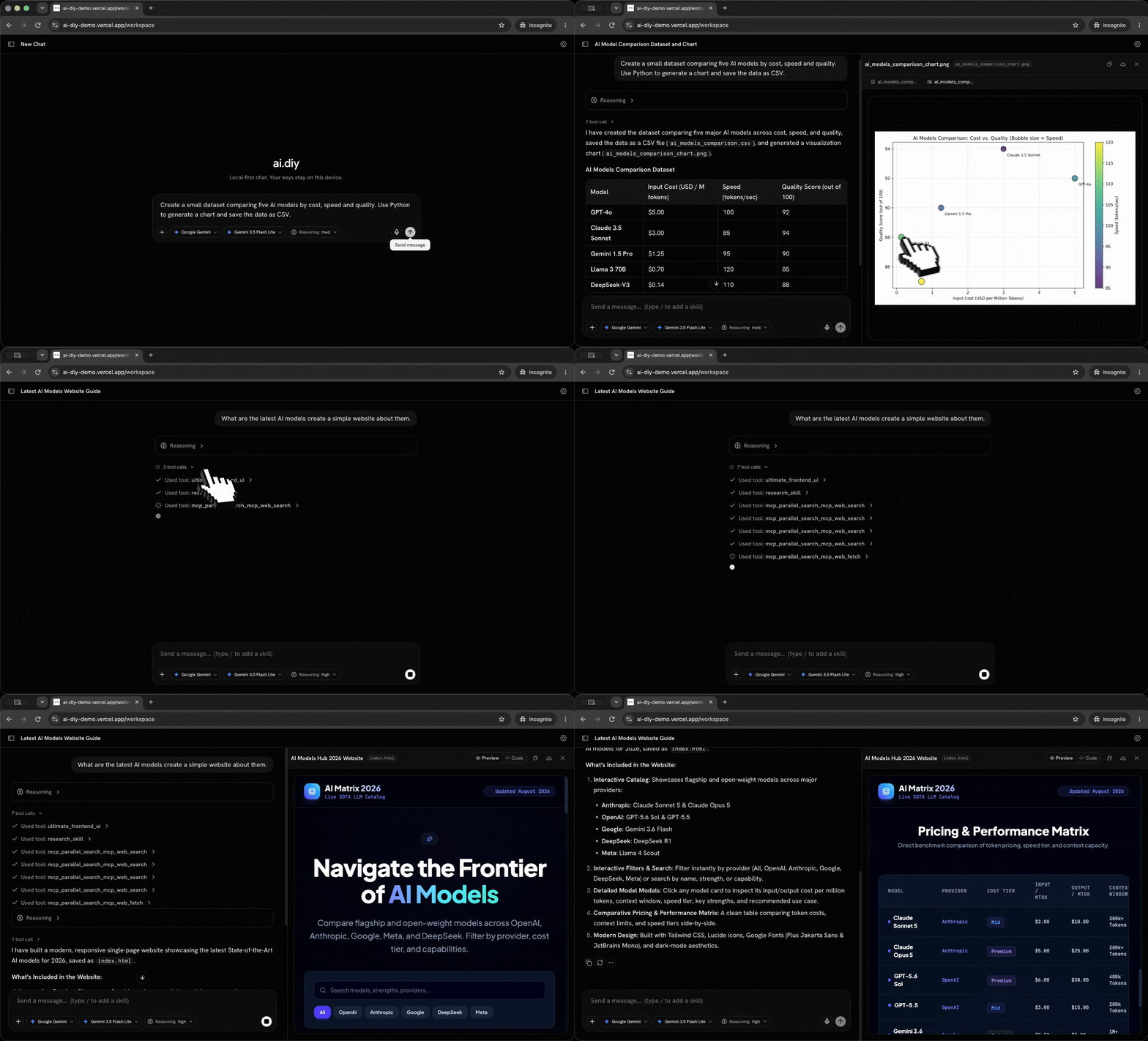
Demo → Deploy → GitHub
- Demo — open the app and try the workspace
- Deploy — one command (Node or Docker Compose)
- GitHub — Cubinghackerz/ai.diy
Quick Start
npm install
npm run build && npm start
Open http://localhost:3000 → Open workspace → add your API key → chat.
Docker Compose
docker compose up --build
Docker (manual)
docker build -t ai-diy .
docker run -p 3000:3000 ai-diy
npm run dev is not recommended (composer regression in Vite). Use the production build above. Details: DEPLOYMENT.md · QA checklist: QA.md · launch brief: PRODUCT_HUNT.md.
Status
Features marked available are wired. Planned items are not claimed as working.
- Available: landing, 20+ provider integrations, model discovery, local persistence, files, browser Python (Canvas capture + IndexedDB persistence for generated images/binaries), in-browser Linux environment (CheerpX/WebVM: bash, python3, gcc, node, apt; no outbound network by default), search + connectors, remote MCP, artifacts, memory, on-device knowledge RAG, usage ledger with soft spend/token/RPM caps, server rate-limit hooks, voice dictation (Web Speech), multi-model Preview, import/export, client-side S3/WebDAV/Google Drive backup, portable skills catalog + install, slash commands (
/Research,/Compaction,/Subagent, …), Agent Mode, subagents (approve → wait → synthesize), encrypted browser settings where supported, Vercel Connect (Beta: token-backed MCP servers +connect_request) - Coming soon: direct GitHub/Supabase/PostgreSQL adapters, custom-provider capability probing
What You Own
| Component | Location |
|---|---|
| Chat UI, settings, history, Canvas artifacts, memory, knowledge base, usage events, Preview | Browser (localStorage + IndexedDB) |
| Dictation, Python, and Linux VM | Browser (Web Speech + Pyodide + CheerpX) |
| LLM relay, model discovery, search, MCP, optional RPM rate limit | Node server |
| Provider API keys | Browser only; relayed per request |
When Web Crypto and IndexedDB are available, settings are encrypted at rest with AES-GCM. The encrypted payload is kept in localStorage and its envelope key is kept separately in IndexedDB. Browser or platform fallbacks may use plaintext storage, and this protection does not defend against a compromised browser profile or malicious same-origin code. Provider keys still pass through the relay in transit; treat hosted instances as able to observe that traffic.
Architecture
Browser-owned workspace
  settings, provider keys, chats, memory, knowledge, Canvas, Preview
                |
                | per-request relay
                v
Node server
  model forwarding, model discovery, optional search/MCP/connectors
                |
                +--> selected cloud or local model provider
                +--> explicitly enabled search, fetch, MCP, or connector service
The server does not need persistent provider API keys. It can still see request traffic while relaying it, and enabled tools can send selected data to their own services. See ARCHITECTURE.md and SECURITY.md.
Skills
Portable skill packages live in skills/. Install from Settings → Skills (search → Install → available via / in the composer).
Built-in slash commands force matching tools for the next send — including /Linux Environment (in-browser Debian VM), /Subagent (spawns approved subagents; the main chat waits for results before continuing), /Research, /Compaction, and design/file-creation skills. Skill tool calls appear in chat as Used skill: ….
Flagship starters include Deep Research, Code Review, GitHub Repository Analysis, PDF Analysis, Incident Investigator, and General Task Solver (understand → select skills → execute → verify → synthesize).
Authoring guide for agents: .cursor/skills/ai-diy-skill-authoring/SKILL.md.
Agent Mode & Subagents
Enable Agent Mode under Settings → Experimental. The model plans, selects installed skills/tools, verifies, and synthesizes. Pair with General Task Solver.
Subagents (same Experimental section, or force with /Subagent): the model calls spawn_subagent / spawn_subagents; you approve each run in a popup; the main chat pauses until those sessions finish (or are declined/cancelled), then continues from structured results. Nested subagents cannot spawn further subagents or ask the user questions.
Knowledge Base
Settings → Knowledge Base uploads documents for private on-device RAG (browser WASM embeddings + HNSW). The model can call knowledge_search / knowledge_list. Nothing is uploaded to a vendor vector store.
Usage Guardrails
Settings → Usage & cost shows provider-reported tokens/cost and optional soft caps (daily spend, tokens, RPM) keyed by API-key fingerprint in IndexedDB. The server also supports sliding-window RPM limits via RATE_LIMIT_RPM / RATE_LIMIT_DISABLED (see .env.example). Soft caps are client-enforced; configure server limits before public exposure.
Available Features
Providers
OpenAI, ChatGPT subscription, Anthropic, Gemini, Groq, Cerebras, Fireworks, Perplexity, Cohere, OpenRouter, xAI, DeepSeek, Bedrock, Azure, Vertex, Vercel Gateway, Together, Mistral, Hugging Face, Ollama, LM Studio, and custom OpenAI-compatible endpoints.
Tools
Web search (DuckDuckGo + connectors), URL fetch, calculator, browser Python, in-browser Linux (linux_run_command / linux_read_file), files/artifacts, research and design skills, local time, memory, knowledge search, ask user, remote MCP (Firecrawl + Parallel bundled keyless), subagents.
Python saves generated files in the working directory; the browser captures up to four files (≤2 MiB each) into Canvas and persists them with the chat when under the client size cap.
The Linux environment is a client-side Debian VM (CheerpX/WebVM) with bash, python3, gcc, node, and apt. Enable it under Settings → Linux environment. There is no outbound network (apt/pip/curl/git that need the internet fail). The VM stays warm in the tab after the first boot. Commands time out at 90s. /workspace is cross-origin isolated (required for SharedArrayBuffer). While a reply or VM command is running, send and new-chat are locked; Stop aborts the wait and unlocks the composer. A corrupt disk overlay is discarded and the VM retries once instead of hanging.
Global custom instructions live under Settings → Instructions. They append to ai.diy's defaults rather than replacing core tool, safety, and active-skill instructions.
Token modes & on-demand tool guides
Token mode (Settings → Token mode, or the token/TTFT chip above any assistant message) controls system-prompt size, tool suite, step budget, and prompt caching: Efficient, Balanced (default), Prompt caching, and Full suite.
Outside Full suite, optional capabilities are registered compactly and their full instructions are served on demand: the model calls load_tool_guide and reads the exact guide for Python, files, URL Doctor, knowledge, memory, skills, and subagents only when a turn actually needs them. Enabled skills appear in the on-demand catalog by name instead of being injected into every prompt. Web search and URL fetch stay always available; the bundled Firecrawl/Parallel MCP schemas are only discovered on turns that ask for live web research.
Import / Export / Backup
ChatGPT, Claude, ShareGPT, Markdown, ai.diy JSON. Client-side backup to S3-compatible storage, WebDAV, or Google Drive (service-account JSON). Credentials stay in the browser and talk only to your storage endpoint.
Note: an older “Cloud storage coming soon” blurb referred to Google Drive OAuth. Client-side S3/WebDAV/Drive service-account backup is available now.
Security
- No LLM keys in server env
- SSRF guards on
fetch_urland private provider/MCP URLs (unlessALLOW_PRIVATE_PROVIDER_URLS=trueon trusted self-host) - Stdio MCP rejected
- Optional server
RATE_LIMIT_RPM(enable before public exposure; see.env.example) - Client soft usage caps in Settings → Usage & cost
- Do not log request bodies or credentials
- In-browser Linux (CheerpX) runs entirely in the tab: Safari is supported; there is no outbound network. A corrupt disk overlay is wiped and retried automatically. The CheerpX runtime is loaded from Leaning Technologies' CDN under the CheerpX Community License (free for FOSS such as this MIT project). Commercial use or self-hosting the runtime requires a license from Leaning Technologies — do not vendor
cx.esm.js.
See DEPLOYMENT.md, SECURITY.md, and .env.example.
Vercel Preview and public deployment
npx vercel
Use this for preview testing. For a public launch, configure a branded domain
and set VITE_SITE_URL at build time before using a production deployment.
Credits
ai.diy stands on a lot of excellent open work:
- assistant-ui and Vercel AI SDK
- React Router and Tailwind CSS
- CheerpX / WebVM by Leaning Technologies
- Pyodide
- Login with ChatGPT
- cmdk, Base UI, Radix UI, Phosphor Icons, Lucide
- models.dev for model catalog data
- Firecrawl and Parallel for the bundled keyless search MCPs
- xterm.js for the in-browser terminal
License
MIT. See LICENSE.
Yorumlar (0)
Yorum birakmak icin giris yap.
Yorum birakSonuc bulunamadi