solenta
Health Gecti
- License — License: MIT
- Description — Repository has a description
- Active repo — Last push 0 days ago
- Community trust — 14 GitHub stars
Code Basarisiz
- rm -rf — Recursive force deletion command in .github/workflows/test.yml
Permissions Gecti
- Permissions — No dangerous permissions requested
Bu listing icin henuz AI raporu yok.
Free desktop app to run AI coding agents in parallel: Claude Code, Codex, Cursor, OpenCode, Kimi, Grok. Worktree per thread, shared memory.

Solenta
Every agent starts where the last one stopped.
A free, open-source desktop app for running AI coding agents in parallel:
Claude Code, Codex, Cursor, Kimi, Grok, and OpenCode, each in its own git worktree,
with one shared local memory. Session ten does not re-learn what session one already ruled out.




Website · Docs · Download · Changelog · Discussions · Issues
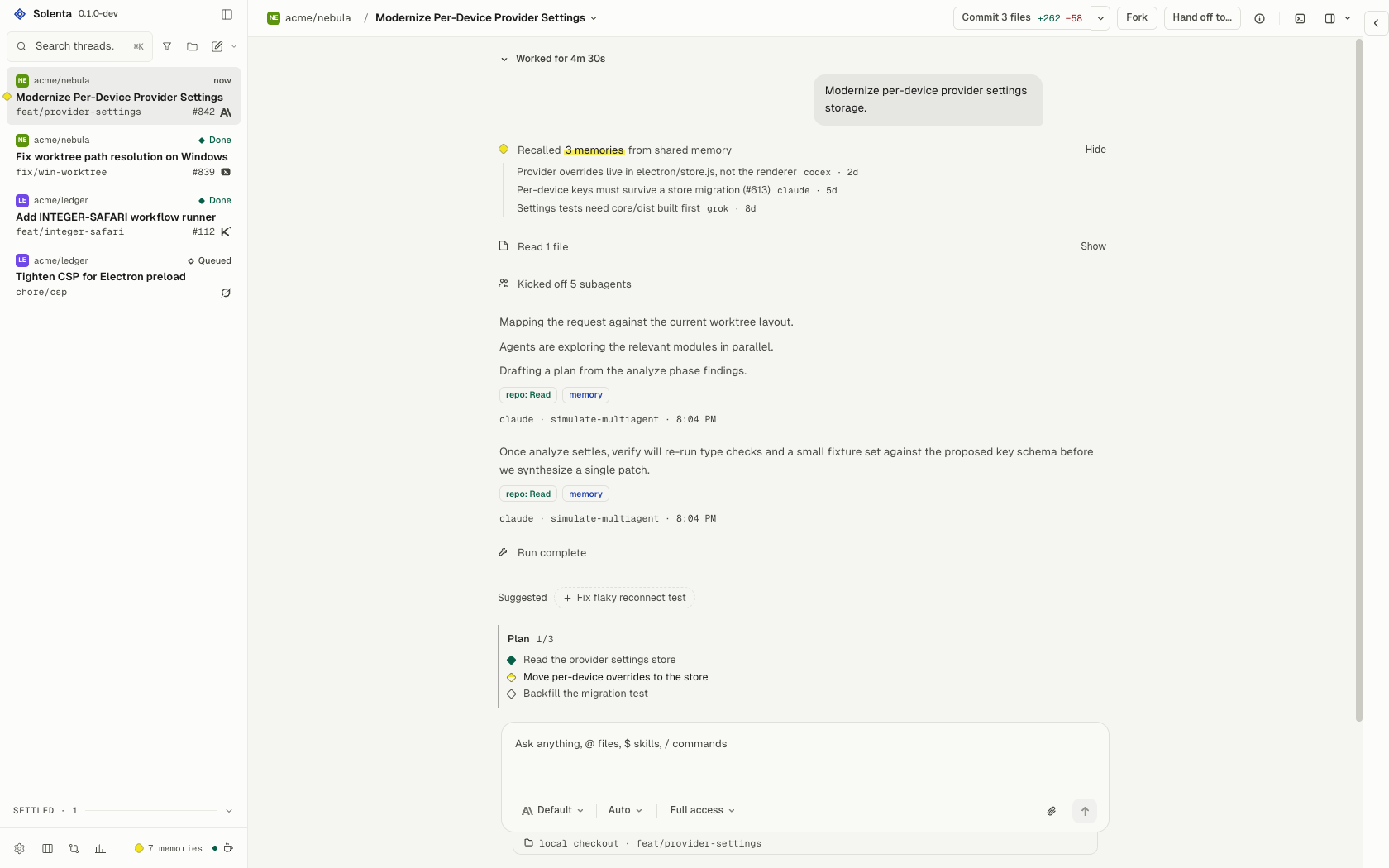
The problem
New coding-agent sessions start blank. Context gets re-pasted across Claude Code,
Codex, and Grok. The tenth thread is not smarter than the first — just more
expensive.
What Solenta remembers
A local memory server is auto-injected into every session. SQLite on disk, FTS +
vector search, HTTP + MCP, localhost-only, bearer-token gated. No per-agent
wiring.
Claude Code · thread 1
  Ruled out a rewrite of auth. Cookie session stays.
  Refresh lives in src/lib/auth.ts.

Codex · thread 3
  The 401 retry is in src/lib/api.ts.
  Moving it breaks the refresh path.

Grok · thread 6
  Starts knowing both. Adds the expiry skew
  and leaves the rest alone.
- Hypothesis ledger — the next thread inherits what the last one already
ruled out. - Provenance and trust score — every entry tracks which agent wrote it and
how reliable that agent has been. - File:line / thread / commit citations — before a fact is injected, its
file citations are checked against the current worktree; contradicted entries
are invalidated. - Embeddings — near-dup and contradiction detection so the store does not
bloat with repeated or conflicting facts. - memory_distill — collapse raw entries into strategy notes.
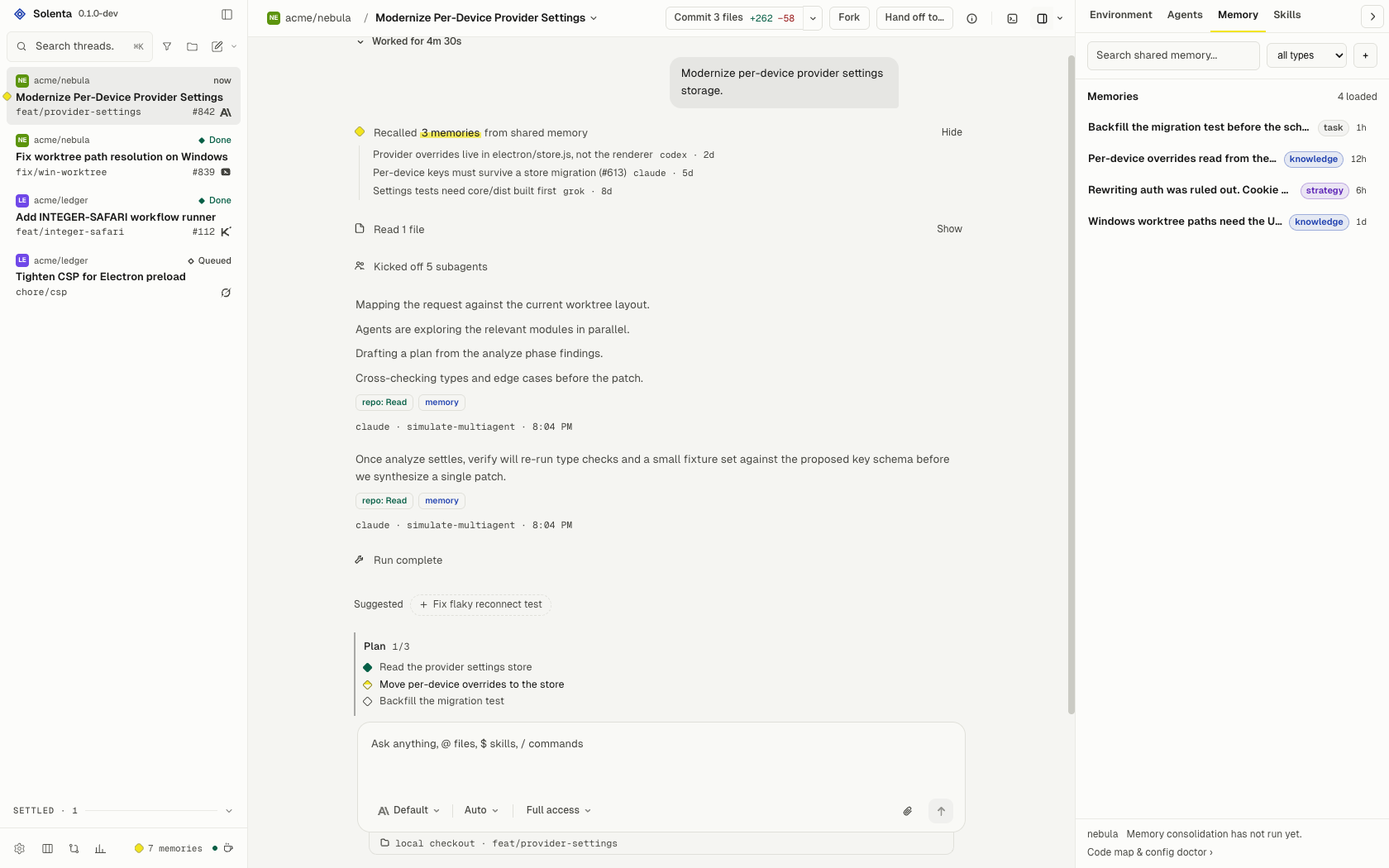
- Memory tab — reads the same SQLite file. Search, filter, and add
entries there. The config doctor and code map live in Settings, Memory,
and lint or regenerate CLAUDE.md / AGENTS.md from shared memory. - Per-repo code index — a symbol index built once and injected into every
dispatched prompt, so a fresh worker starts knowing where things live.
The rest of the desk
Memory is why Solenta exists. The rest is so you can run the agents that write
it.
- Six providers, one UI — Claude Code, Codex, Cursor, Kimi Code, Grok, and
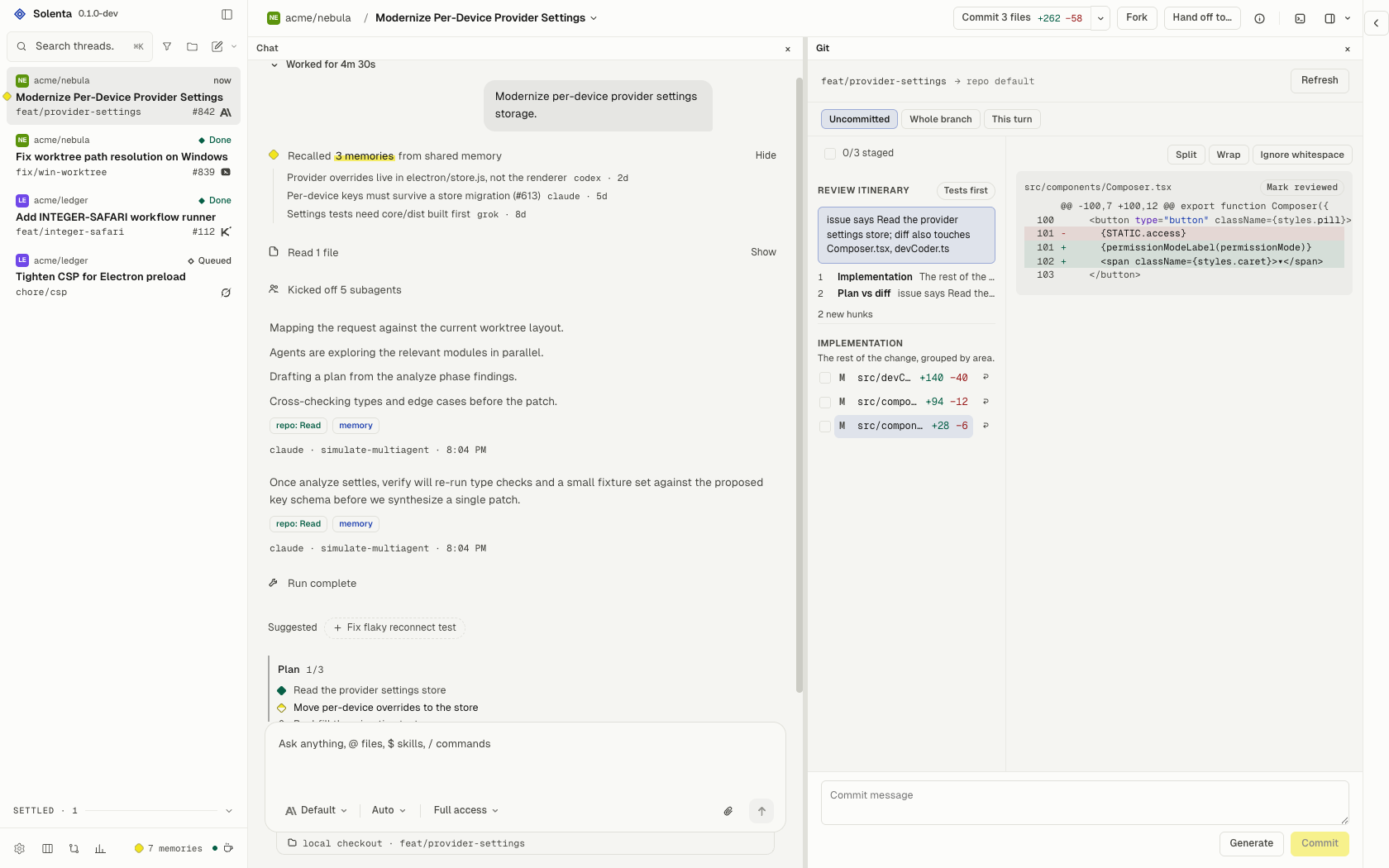
OpenCode, with model overrides, session resume, and quota-reset resume. - Git in the loop — fail-closed worktrees (setup failure never falls back
to the project checkout), Git as a center pane rather than an overlay, a
next-action button (commit → push → PR → checks → merge), live CI badges,
review itinerary, conflict forecast. Settings probes forge readiness
(ghauth) before the header offers Create PR. Oversized PRs (default
400 lines) are refused; the header offers a stacked split. Fork and archived
worktrees are garbage-collected on their own; the branch always survives.
Merge conflicts get a one-click "let the agent resolve it", and an open PR
can be checked out into its own worktree. Jujutsu (jj) projects work too.
Files or single hunks are staged with a checkbox before commit or merge, and
a click on a diff line number leaves an inline comment that goes back to the
agent as a follow-up prompt. PRs can be reviewed in the app (viewed marks,
stacked-PR merge), and GitLab merge requests work alongside GitHub PRs. - Terminal and Browser panes — a long-lived shell in the thread's worktree
(cdand exports persist), and an embedded loopback-only browser on your dev
server. Screenshot the page into the composer, or let the agent navigate,
click, type and screenshot it through thepreviewtool, read a page
snapshot and console/network diagnostics, and switch viewport presets.
Inspect picks an element and attaches it as a composer chip. The terminal
has Find, Clear, Copy and send-selection-to-composer. - Planboard — a project's plan as its GitHub or GitLab issues. Agents on a GitHub
origin use the coder-threads toolsissue_create,issue_list,issue_set_plan,issue_complete,issue_comment, andissue_label(omitted when
the origin is not GitHub), with auto-dispatch fromplan:todo, a
review-load meter on the open PR queue, and issues that close themselves
when the thread's work lands. - Orchestration — workers nest under the thread that started them, crews,
/handoff,/advisor,/committee, a subagent model pool, and
coder-threads host tools so an agent can archive, settle, stop, rename,
merge, or open a PR. - Verify means green — a thread settles done only when its verify command
exits 0. After merge the command re-runs 24h later; a failure starts a
fix thread and reopens the planboard issue. Optional spend caps. - Guardrails on what agents install — skills, MCP servers and packages an
agent tries to install are scanned locally before they land and reported as
trusted, caution, or blocked. A diff that reaches outside the files the task
implied is flagged as blast radius. Stored provider keys are encrypted. - You own it — MIT, no Solenta account, no Solenta cloud, local SQLite,
GitHub issues. The only network traffic is a release check.
Install
[!IMPORTANT]
Solenta drives CLIs; it doesn't ship them. Install and sign into at least one
provider first — Solenta finds them on yourPATH.
Provider Install Sign in Claude Code npm i -g @anthropic-ai/claude-codeclaude→/loginCodex npm i -g @openai/codexcodex loginCursor curl https://cursor.com/install -fsS | bashcursor-agent loginGrok see x.ai/cli grok loginOpenCode npm i -g opencode-aiopencode auth loginKimi Code pip install kimi-clikimi→ follow prompts
Grab an archive from the latest release:
- macOS (Apple Silicon) —
Solenta-<v>-macos-arm64.zip. Unzip, moveSolenta.appto/Applications, double-click. Signed with a Developer ID and
notarized by Apple, so Gatekeeper opens it like any other app. - Windows (x64) —
Solenta-<v>-win32-x64.zip. Unzip anywhere, runsolenta.exe. Unsigned, so SmartScreen asks once. There is no installer
and no winget package; see the note inscripts/package-cross.sh. - Linux (x64) —
Solenta-<v>-linux-x64.tar.gz. Extract, run./solenta.
Updates
Builds are stamped with a channel. prod follows the newest normal release;
nightly follows the newest prerelease and never migrates itself onto prod.
On macOS the app downloads and swaps itself in place. On Windows and
Linux it downloads beside the portable folder and swaps after you Restart
(the running files stay locked until then). A
window that reloads into a new renderer against an old preload hard-blocks
until you Restart. Builds from a dev tree carry no stamp and never
self-update.
Nightly ships as Solenta Nightly.app (com.willem.solenta.nightly,solenta-nightly on linux/win) so it is tellable apart from a prod install at
launch time. Both channels share one userData directory — the bundle is
renamed, the app name inside it is not.
Remote access
- Phones and browsers: Settings > Connections > Let other devices in. Turn
on Solenta Web, add a device, scan its QR code. Tailscale gives HTTPS. - Another computer: Settings > Connections > Connect to another computer.
Enter its SSH host (key login, host key accepted). Solenta starts there if
needed and the token is read over SSH. A Linux host without Solenta gets an
Install button (this version, checksum-verified, into~/solenta); an older
one gets Update. Its agents and their sign-ins are listed after connecting. - Linux server without a display:
~/solenta/solenta --headless --no-sandbox
(implies--serve-web; systemd unit in site/docs.html#headless).
/Applications/Solenta.app/Contents/MacOS/Solenta --serve-web        # 127.0.0.1:4620
/Applications/Solenta.app/Contents/MacOS/Solenta --serve-web=4700 --serve-host 0.0.0.0
Starting from a terminal prints the address, token, a sign-in link and a QR
code (first line solenta-web: token …). The token is persisted at<userData>/web-token, written whenever Solenta Web starts, and is what
Connect reads over SSH. If Solenta is already running, the flag turns Solenta
Web on there instead of starting a second copy. There is no TLS on the LAN
bind.
A remote project is different from Connect: it keeps this window and runs one
repo's git and agent CLIs on the remote host.
How it works
Electron main owns the agents and the disk; the renderer is a React app; preload
exposes a typed window.coder. Providers are a data-driven registry
(electron/providers.js), each spawned and parsed by an adapter, and the runner
keys every event to a run id so a stopped run can never write into a newer one.
| Layer | Path |
|---|---|
| Main (window, store, runner, memory supervisor) | electron/main.js |
| IPC bridges | electron/ipc.js, electron/preload.js |
| Services (projects, threads, settings, spend gate) | electron/services.js |
| Renderer | src/ |
| Workflow engine (pure) | core/ |
| Memory server (MCP + HTTP) | memory-server/ |
Full detail: docs/ARCHITECTURE.md.
Development
npm install
cd core && npm install && npm run build && cd ..
npm install --prefix memory-server # required for MCP tools and Codex input validation
npm run dev              # Vite (HMR) + Electron against the real main process
npm run dev is the loop to develop in: the window loads the Vite dev server,
so every renderer edit hot-reloads while electron/ runs for real — real
services, real git, real providers, real store.
To check a production bundle instead: npx vite build && CODER_PROD=1 npx electron .
npm run dev:browser opens the renderer in a browser with no Electron, backed
by the fixtures in src/devCoder.ts (demo and trailer captures). Fixtures are
not the app: they store what you give them and return something plausible. Do
not read behaviour off them, and never fix a bug there.
npm test                 # all four suites, same as CI (.github/workflows/test.yml)

npm run test:core        # workflow engine — also builds core/dist, which electron needs
npm run test:renderer    # renderer
npm run test:electron    # electron main
npm run test:memory      # memory server (needs `npm ci --prefix memory-server`)
npm run acceptance stays manual: one real claude turn, not part of CI.
bash scripts/package-app.sh builds out/Solenta.app; scripts/publish-release.sh prod|nightly builds every platform, notarizes the mac bundle and cuts the
GitHub release. Cut both channels from one throwaway detached worktree at~/code/coder-release (never the main checkout at ~/code/coder, never the
named leftover ~/code/coder-release-build). After publish, alwaysgit worktree remove ~/code/coder-release. The header ofscripts/publish-release.sh is the operator checklist.
Signing happens in scripts/codesign-app.sh (hardened runtime, entitlements inscripts/entitlements.plist) and reads credentials from the environment only:
| Var | Purpose |
|---|---|
CODESIGN_IDENTITY |
Full identity string. Auto-detected from the keychain when unset. |
APPLE_KEYCHAIN_PROFILE |
notarytool profile name. Preferred over the three below. |
APPLE_ID / APPLE_TEAM_ID / APPLE_APP_PASSWORD |
Fallback. The password is an app-specific password from appleid.apple.com, never the account password. |
Store the profile once instead of exporting a password per shell:
xcrun notarytool store-credentials solenta \
  --apple-id [email protected] --team-id TEAMID --password <app-specific-password>
export APPLE_KEYCHAIN_PROFILE=solenta
Local builds sign but do not notarize (a multi-minute round trip to Apple that
a bundle which never leaves this machine does not need). Only a --tag build —
what publish-release.sh produces — notarizes and staples. Without a Developer
ID cert a local build still succeeds, unsigned, with a loud warning; a release
build fails instead of quietly shipping something Gatekeeper blocks.
Env: CODER_CLAUDE_BIN, CODER_CODEX_BIN, CODER_KIMI_BIN,CODER_GROK_BIN, CODER_OPENCODE_BIN (CLI paths) · CODER_SIMULATE=1 (fake
provider) · CODER_MEMORY_CONFIG / CODER_MEMORY_ENTRY / CODER_NODE_BIN
(memory server) · CODER_PROD=1 (load dist/) · VITE_DEV_SERVER_URL
(default http://localhost:5173).
npm allow-scripts can skip Electron's postinstall, leaving a stub dist with nopath.txt ("Electron failed to install correctly"). Repair from the cache —
match the version to node_modules/electron/package.json:
ditto -x -k ~/Library/Caches/electron/*/electron-v*-darwin-arm64.zip \
  node_modules/electron/dist
printf 'Electron.app/Contents/MacOS/Electron' > node_modules/electron/path.txt
The root package.json already allows scripts for the pinned Electron version.
Also in the box
- First run — a setup wizard checks which agent CLIs are on your
PATH
(with per-provider install hints), adds the first project, and sets the
defaults, then a short tour of the panes. Skippable, shown once. - Teach mode — hints, not solutions, across every provider. Autonomy
steps from Hints to Review to Pair as reviews pass. - Ask mode — read-only Q&A from the code map and memory. No tools, no
worktree, no agent credits. /btw— a side question on the same thread that does not pause, steer,
or queue behind the live run./feedback— send a note straight to the Solenta team from the composer.
The text goes to us, never to the model, and never occupies the live turn.- Usage ping — release builds send one anonymous ping a day (random
install id, version, OS, arch, which agent CLIs you used) so we can count
users. No prompts, paths or repo names; IP is not stored. Opt out withDO_NOT_TRACK=1orSOLENTA_TELEMETRY=0. - Sidebar — flat: no project group headers. A row is status + title +
age; pinned threads sit in a block at the top; snoozed and settled
(archived at the tail) live in shelves. Scope to one project from the
header. Right-click opens a native thread-actions menu. Project icons
auto-detect from the repo (favicon / app icon). Subagents nest under
their thread. - Snooze until tonight or next week; settle-on-merge when the PR lands.
- Suggested work — out-of-scope findings become one-click chips that
start a new thread or file a planboard issue. - Automations — recurring prompts (hourly / daily / weekly) against any
project, repeat a finished thread on a schedule, or fire on GitHub events
(PR opened or merged, review, push, CI result, new issue) and new Linear or
Sentry issues. Describe one in chat and the agent creates it. The issue triage
template labels, dedupes, and questions each new GitHub issue so only
well-formed ones reachplan:todoand auto-dispatch. - Usage and fleet analytics — cost and tokens per provider/model, merge
rate, review tax, rework and cost per merged PR, and felt vs wall-clock
speedup. OTel GenAI spans ship to your tracing backend. - Morning digest — one summary of everything that ran unattended.
- Agent profiles — save a provider + model + effort + permission combination
and apply it in one click. A profile can carry a governance policy
(block / deny / ask / allow rules on tools, bash, writes and network) that
gates Claude's permission asks and writes a signed audit log. - Detached windows — open any thread in its own window (⌘⇧O, the
sidebar menu, or drag the card out) while the main window stays the fleet
view. - Multi-folder projects — list extra folders next to the repo; agents
read and search them, and Claude writes there only after you grant the
folder on the permission card. - Xcode MCP — Apple projects get a one-click MobileBuildMCP or
xcrun mcpbridgepairing in Settings, Skills & MCP. - Spec mode — gated requirements → design → tasks artifacts, each approved
before the next unlocks. tasks.md becomes a dispatch DAG (needs:);
converge appends missing work back onto the file. - Divergence — compare two runs at the first mismatched tool step.
Toggled from Environment (default off), alongside the time-spent segment
in the message footer at the end of a run (also default off). - Claim provenance — assistant claims tagged repo, memory, issue, or
model prior knowledge when ungrounded. - Skills and
/commands — browse and edit theSKILL.mdfiles your
agents can reach. The composer/palette also runs the underlying CLI's
own skills and custom commands. - Permission card — edit the proposed shell command before you approve
it; the agent runs the edit, not the original. - Dev servers — start a project's
devscript from the app and get the URL. - Web mode —
--serve-webserves the same UI over HTTP + WebSocket. - SSH remote projects — register projects on other hosts and run agents
against them. - Windows — WSL-boundary detection, project-add doctor, sandbox badge.
- Worktree GC — per-project retention, batch cleanup, visible disk usage.
- Vibe Kanban import — read the local VK data folder, turn cards into
threads, export a JSON dump of your projects and threads.
Status
Early and moving fast. Expect bugs and rough edges — issues are
welcome, and small PRs more so than large ones.
docs/ARCHITECTURE.md— process split, providers, runner, memory, storedocs/ISSUES.md— symptom / cause / fix log
Acknowledgments
Solenta's design and some of its feature ideas are inspired by
t3code. No code from that project is
used; everything here is original work under the MIT license.
Yorumlar (0)
Yorum birakmak icin giris yap.
Yorum birakSonuc bulunamadi