CcGlanceLine
Health Warn
- License — License: MIT
- Description — Repository has a description
- Active repo — Last push 0 days ago
- Low visibility — Only 5 GitHub stars
Code Fail
- spawnSync — Synchronous process spawning in bench/latency.js
- process.env — Environment variable access in bench/latency.js
- fs module — File system access in bench/latency.js
- fs module — File system access in package.json
- child_process — Shell command execution capability in src/readers/termwidth.ts
- execSync — Synchronous shell command execution in src/readers/termwidth.ts
- process.env — Environment variable access in src/readers/termwidth.ts
Permissions Pass
- Permissions — No dangerous permissions requested
No AI report is available for this listing yet.
A fast, zero-dependency, multi-line status line for Claude Code - model, effort, context, cache, git and session, all at a glance.
ccglance
A fast, zero-dependency, multi-line status line for Claude Code
model · effort · context · cache · git · session — all at a glance


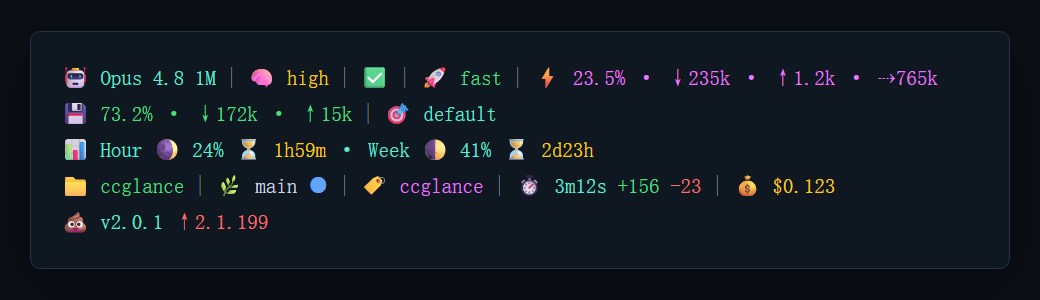
stdin-first · zero runtime dependencies · fixed emoji style — renders the JSON Claude Code pipes to its status-line command; only the
statussegment reads a bounded transcript tail. Written in TypeScript, shipped as compiled JavaScript; runs on Node.js ≥ 22 or Bun.
Docs: Overview · Segments & icons · Development
Terminal Font
Use a Nerd Font in your terminal so emoji, Nerd Font icons, arrows, and box-like
symbols keep consistent width. Maple Mono NF
is a good default; use Maple Mono NF CN if you want better CJK coverage.
ccglance intentionally outputs standard Unicode emoji. A Nerd Font improves text
metrics and symbol coverage, but color emoji are still rendered by the operating
system's emoji font (for example Segoe UI Emoji on Windows, Apple Color Emoji on
macOS, and Noto Color Emoji on many Linux desktops), so their artwork can differ
across platforms.
Install
Option A — npm (global, recommended)
npm install -g @cxmyu/ccglance          # npm
yarn global add @cxmyu/ccglance         # or yarn
pnpm add -g @cxmyu/ccglance             # or pnpm
bun add -g @cxmyu/ccglance              # or bun
Behind a slow registry? Use a mirror:
npm install -g @cxmyu/ccglance --registry https://registry.npmmirror.com
npm downloads the prebuilt dist/ — no compiler runs on your machine — and puts
a ccglance command on your PATH. Requires Node.js >= 22.
After installation:
- ✅ The
ccglancecommand is available everywhere. - ⚙️ Installing alone does not activate the status line — add the
statusLine
block to~/.claude/settings.json(see Configure), then restart
Claude Code. - 🔎 Verify with
ccglance preview(sample render) orccglance --help(usage +
the exactsettings.jsonsetup). Runningccglancein a plain terminal just
prints this help.
Update or remove later with npm update -g @cxmyu/ccglance / npm uninstall -g @cxmyu/ccglance.
Option B — build from source
git clone https://github.com/CxMYu/CcGlanceLine.git
cd CcGlanceLine
npm install             # installs devDeps; the `prepare` script then compiles src/ -> dist/
npm link                # optional: expose `ccglance` on your PATH
npm install already builds dist/ for you via the prepare lifecycle script —
there is no separate build step to run. The compiled entry point isdist/cli.js; the ccglance bin command and node dist/cli.js are the same
file. Verify:
node dist/cli.js preview
Configure
Add a statusLine block to ~/.claude/settings.json:
{
  "statusLine": {
    "type": "command",
    "command": "ccglance",
    "padding": 0
  }
}
On Claude Code >= 2.1.97, you can optionally add "refreshInterval": 30
inside statusLine to keep elapsed time, quota resets, version hints, and other
time-based fields moving while the main session is idle. Keep the base block
above when compatibility with older Claude Code versions matters.
If you didn't install globally, point Node at the compiled file directly:
{
  "statusLine": {
    "type": "command",
    "command": "node /absolute/path/to/ccglance/dist/cli.js"
  }
}
On Windows use a full path, e.g. node D:\\path\\to\\ccglance\\dist\\cli.js.
Cross-platform paths: Claude Code v2.1.47+ expands a leading
~in the
command on every platform, sonode ~/path/to/dist/cli.jsworks too. Prefer~over%USERPROFILE%(unreliable in recent versions); the globalccglance
command needs no path at all."padding": 0drops Claude Code's default leading
indent so the row starts at the left edge.
Windows tip: if status-line startup latency matters, point
command
directly at the compiled file (node D:\\absolute\\path\\to\\ccglance\\dist\\cli.js)
instead of the globalccglancecommand — it usually starts a bit faster.
Contributing
Issues and pull requests are welcome. For code changes, run npm run typecheck,npm run build, and npm run preview before opening a PR; keep the runtime at
zero dependencies and the style fixed (no config loader).
Star History
License
MIT © 2026 CxMYu
Reviews (0)
Sign in to leave a review.
Leave a reviewNo results found