hearback
Health Uyari
- License — License: MIT
- Description — Repository has a description
- Active repo — Last push 0 days ago
- Low visibility — Only 6 GitHub stars
Code Gecti
- Code scan — Scanned 12 files during light audit, no dangerous patterns found
Permissions Gecti
- Permissions — No dangerous permissions requested
Bu listing icin henuz AI raporu yok.
Every player who reports a bug hears back. Agent-native, human-approved bug desk for Discord forums: incremental ledger, approval queue, release closure, MCP for Claude Code / Codex / Agents SDK.
SWLink
A local console and Discord bot for small game communities. The AI drafts; you approve.
SWLink runs on your own computer and opens in your browser. One Discord bot, five jobs:
- Bug forum: sync the forum, let an AI size up each report (what broke, where to look, a draft reply),
then approve replies and tags in one place. When the fix ships, every reporter hears back. - Chat: per channel and for DMs, choose ignore, draft only (you approve), or auto reply with an hourly cap.
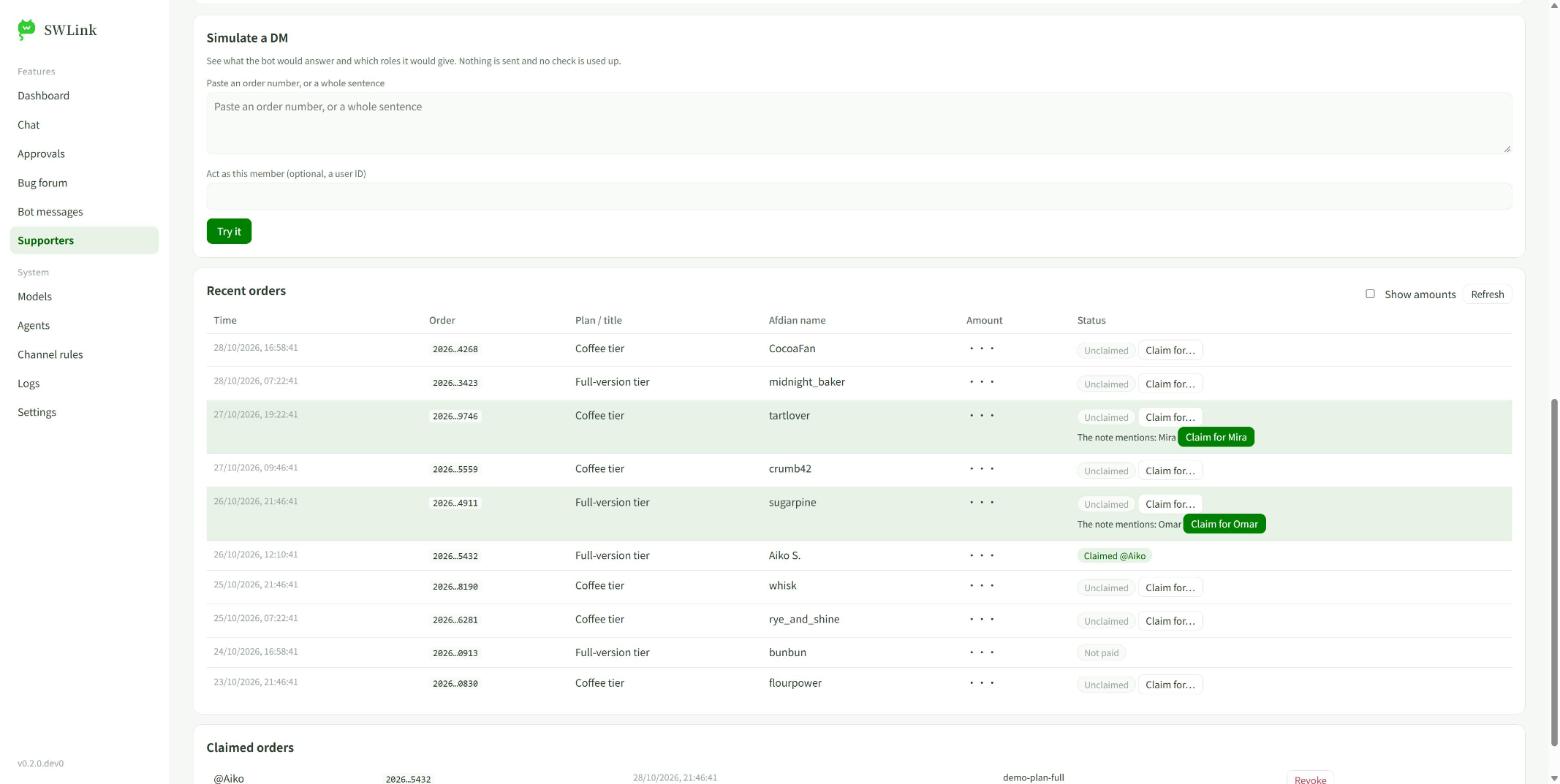
- Supporters: people who paid on Afdian (爱发电) DM the bot their order number and get a supporter role.
Amounts stay private. - Bot messages: fix a typo in, or delete, anything the bot posted.
- Agents: Claude Code, Codex and other MCP clients can triage and propose, but never send.
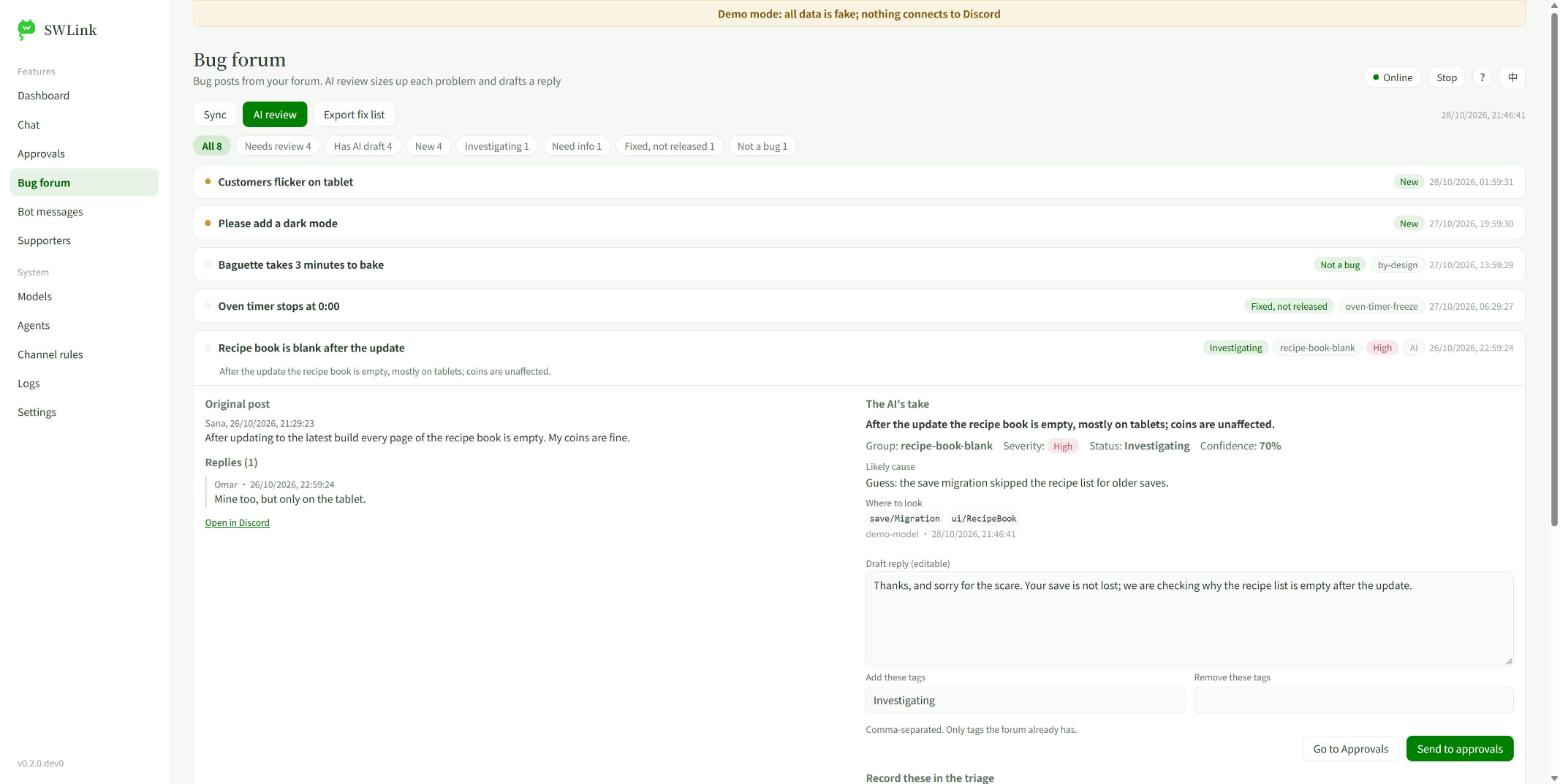
Try it without Discord. Demo mode runs on a fake server, fake orders and a fake model; nothing connects anywhere:
pip install -e ".[all]"
swlink --demo            # or: hearback web --demo --lang zh
中文说明 · 用户手册(中文) · Design ·
How it compares · Agent playbook
Hearback: the bug desk underneath
Every player who reports a bug hears back. SWLink is built on Hearback, an agent-native, human-approved bug
desk for Discord forum channels. AI coding agents triage the reports through a shared ledger and an MCP
server; a human approves every public word; and when the fix ships, every reporter gets told — in their
thread, for the build they actually run. Everything below also works from the command line without the console.
 forum post ─▶ sync (deltas only) ─▶ agents triage + cluster ─▶ proposals ─▶ human ✅ ─▶ bot sends ─▶ re-read verify
                                                                                         │
                         fix ships ─▶ hearback release 1.2.0 ─▶ one reply per reporter ──┘
Why
Small teams (indie and fan game projects, open-source tools) collect bug reports in a Discord forum.
Collecting is easy. The loop after it is what breaks:
- the same root cause is reported six times in six different words;
- an AI agent re-reads the whole forum every session — slow, expensive, and it re-triages old posts;
- replies are public, so an agent must not post on its own — but approving 20 replies one by one is tedious;
- when the fix ships, nobody goes back to tell the 22 people who reported it. They stop reporting.
Hearback was extracted from a workflow that ran a real game community's bug forum: 29 reports,
22 fixes, and every affected reporter notified on release day.
What makes it different
| typical Discord bot / MCP server | Hearback | |
|---|---|---|
| Agent memory | re-reads the forum | ledger: unchanged threads need no per-thread fetch and cost the agent 0 tokens; agents get a few-line delta |
| Safety | agent tools can post immediately | agent tools cannot send. MCP agents can only propose; a human approves (CLI, GUI, or a ✅ in a private staff channel); sending is idempotent and re-read verified. Threat model |
| After the fix | issue closed, reporter forgotten | release closure: hearback release 1.2.0 drafts one reply per affected report, worded per build variant |
| Several agents | collide | claims with leases, triage revisions, audit log — Claude triages while Codex fixes |
| Report quality | whatever users post | reporter onboarding kit: a pinned "how to report a bug" post with an annotated screenshot strip |
| Human touch | bot text is final | desk GUI to edit or delete the bot's own messages afterwards |
Details and sources: docs/LANDSCAPE.md.
Try it in 30 seconds (no Discord needed)
git clone https://github.com/Cynthia-wlan9509/hearback
cd hearback
python -m pip install -e .
hearback demo            # or: hearback demo --lang zh
The demo runs the whole loop against an in-memory fake Discord seeded with 12 reports for a fictional
game, Starlight Bakery: sync → two agents triage (one hits a claim, one a stale revision) → 14 proposals
→ staff approval by reaction (a non-approver's ✅ is ignored) → send → verify → incremental re-sync →
release for the free build, then the full build → dashboard. It finishes in about a second.
Use it on your server
Requires Python 3.11+. The core has no dependencies; the MCP server needs the mcp extra.
- Create a bot at https://discord.com/developers/applications: Bot → Reset Token; enable
Message Content Intent; OAuth2 → URL Generator → scopebotwith View Channels, Read Message History,
Send Messages, Send Messages in Threads, Create Public Threads, Manage Threads, Attach Files, Add Reactions.
Invite it to your server. - Configure:
hearback initwrites a commentedhearback.toml— setforum_id(Developer Mode →
right-click the forum → Copy ID), your build variants, and the forum tag names you use for statuses. - Token: put it in
DISCORD_BOT_TOKENor.hearback/token.txt(gitignored). Hearback never prints it. - Run the loop:
hearback sync                         # deltas only (--full re-reads every thread)
hearback list --unreviewed
hearback show 412233                  # full thread; screenshots are downloaded for multimodal agents
hearback triage 412233 --set status=fixed-pending-release --set cluster=oven-timer --set variants=free
hearback propose reply 412233 --text "Thanks! Found it: the oven timer…" --why "cluster oven-timer"
hearback queue list                   # exactly what will be posted
hearback queue approve --all --yes    # prints every proposal first; or approve from your phone: staff push / poll
hearback send --yes                   # sends, records message ids, re-reads and verifies
hearback release 1.2.0 --variant free # one notification per affected reporter, into the queue
hearback editor opens the desk GUI (approval queue + edit/delete the bot's messages).hearback guide queues the pinned reporter tutorial. hearback log shows who did what.
Plug in your agents
Run pip install -e ".[mcp]", then point any MCP client at hearback mcp. Give every agent its own
actor name so the audit log and claims can tell them apart.
Claude Code — .mcp.json:
{"mcpServers": {"hearback": {"command": "hearback", "args": ["mcp"], "env": {"HEARBACK_ACTOR": "agent:claude"}}}}
OpenAI Codex — ~/.codex/config.toml:
[mcp_servers.hearback]
command = "hearback"
args = ["mcp"]
env = { HEARBACK_ACTOR = "agent:codex" }
OpenAI Agents SDK — see examples/agents_sdk_minimal.py (MCPServerStdio).
MCP tools: sync, list_threads, get_thread, claim, release_claim, update_triage,propose_reply, propose_tags, list_proposals, release_preview, dashboard.
There is deliberately no send, approve, edit or delete tool. Forum text is returned inside fenced,
clearly marked untrusted-data blocks and the server tells the model to treat it as data. That lowers
prompt-injection risk; it does not remove it — which is why nothing an agent writes is public until a
human approves it.
The workflow an agent should follow is in integrations/AGENT_PLAYBOOK.md
(also packaged as a Claude Code skill and an AGENTS.md snippet for Codex).
SWLink: web console and chat bot
SWLink is an optional, opt-in part of Hearback: a local web page plus an always-on chat bot for your Discord
server. You choose which servers, channels and DMs the bot answers in, which agent (system prompt) answers,
which LLM (your own API keys: Anthropic, OpenAI, DeepSeek, or any OpenAI- or Anthropic-compatible relay), and
whether it is off, drafts for your approval, or replies automatically. The same page shows the
approval queue and the bug-forum ledger.
pip install -e ".[all]"        # or pick extras: llm, bot, keyring, mcp
hearback web                   # also: swlink. Opens http://127.0.0.1:8765/ in your browser
First run: Settings (paste the bot token, follow the Developer Portal steps, use the invite link) → LLM
(add a profile and key, press Test) → Channel rules (pick a channel, choose a mode) → Dashboard → Start.hearback web --no-browser --port 0 prints the link instead of opening it and picks a free port.
Want to look around first? hearback web --demo (add --lang zh for Chinese data) opens the same console on made-up
data: a fake server, forum, queue and supporters. It needs no Discord, no key and no network, saves nothing, and its
temporary folder disappears when you stop it. Use it to try the pages, and for screenshots and screen recordings.
Safety model:
- Everything starts off. Auto reply is chosen per channel (or per DM default), asks for confirmation, and is
capped per hour ([swlink] hourly_cap, default 60, counting every model call); past the cap messages are only recorded. - Draft mode puts the model's reply in the normal approval queue as
agent:swlink. A person approves it in the
console (human:web) and sends it; the existing rules (agents cannot approve or send) still apply. - The bot only works in servers it was invited to, through the official bot API. Selfbots (running a normal user
account as a bot) are against Discord's rules and are not supported. - API keys live in the OS keyring (service
hearback-swlink), or inHEARBACK_LLM_KEY_<PROFILE ID>environment
variables. They are never written to.hearback/llm.json, logs, events or any web response. The bot token is
write-only in the console too. - The page is served on
127.0.0.1only, behind a per-run secret in the link, with a Host check, a strict
content-security policy and no external requests. Discord text reaches the model fenced as untrusted data, and
every outgoing message disables mentions. - Recent messages the bot sees are kept in
.hearback/inbox.jsonl(gitignored, last 5000 lines).
Bug forum AI review. Enter the server id and the forum channel id under Settings (they are saved intohearback.toml), press Sync, then AI review. For each thread that nobody has handled yet (or that got new
replies) the model writes a suggestion into triage.ai: summary, cluster, severity, suggested status, likely cause,
where to look, what to ask the reporter, and a draft reply. It never changes the fields a person owns. In the thread
panel you can edit the draft and press Send to approvals (replies and tags still go through the approval queue),
or Adopt triage to copy chosen fields into the real triage. Export fix list writes a markdown task sheet
grouped by cluster for a coding agent. The Bot messages page lists what the bot itself posted in a thread or
channel so you can fix a typo or delete a message. Screenshots (up to 3) and error lines from .txt/.log
attachments are sent along; Sync downloads those attachments.
Supporter roles from Afdian. Discord's own paid roles are US-only, and many Chinese creators collect support on
Afdian (爱发电) instead. The Supporters page links the two: a supporter pays on Afdian, DMs the bot the order
number, the bot checks it with Afdian's open API and gives the supporter role. Paste your Afdian user_id and API token
(the token goes to the OS keyring or HEARBACK_AFDIAN_TOKEN, never to a file), pick the role, try Simulate a DM,
then switch on DM checking. Replies are fixed templates (no model), amounts are never shown or sent anywhere, order
numbers are masked in notices and logs, an order can be claimed once, and the owner can claim or revoke by hand. If the
bot's role sits below the supporter role the page tells you exactly what to drag where.
Safety model
What is enforced, and by what:
| boundary | holds against | how |
|---|---|---|
| MCP tools cannot write to Discord | MCP-only agents (Agents SDK apps, MCP clients without a shell) | the server registers no send/approve/edit/delete tool; a test pins the tool list |
| Approval before anything is public | everyone who does not hold the bot token | only hearback send calls Discord's write endpoints, and only for proposals in approved/; a sent proposal is never sent twice; a proposal rejected mid-send is skipped |
| Agents don't approve their own work | honest agents with a shell (Claude Code, Codex CLI) | queue approve, send, staff poll refuse agent: actors — a tripwire: a shell agent can lie about its name |
| Hard boundary for shell agents | shell agents | run them without the bot token: don't export DISCORD_BOT_TOKEN in their environment and keep .hearback/token.txt out of their sandbox; approve and send from your own terminal, the GUI, or by ✅ reaction |
| Reporter text can't hijack the bot | malicious forum posts | every outgoing message disables mentions; forum-derived template values are sanitised; forum text is fenced as untrusted for agents |
| Phone approvals | spoofed reactions | only allow-listed user ids count; the bot checks the reacted message is its own preview of that proposal; editing a proposal after push invalidates earlier ✅ |
| Secrets | leaks | the token comes from an env var or a gitignored file and is never printed, logged or stored; attachments are fetched only from Discord CDN hosts, without the Authorization header, size-capped, from an allow-list of types; files under .hearback/ cannot be attached to proposals |
Human-only tools write directly by design: hearback editor (edit/delete the bot's messages) andstaff push (posting approval previews to your private staff channel).
Roadmap
- Vision triage agent: screenshot + log understanding, duplicate clustering (Agents SDK).
- Replies in the reporter's language (English / Malay / Chinese communities).
- Codex as the fixer: claim a cluster, fix in the game repo, write the fix and build back → release closure.
- Export to GitHub Issues / Linear.
Status
v0.2 (in development): the core is pull-based and runs when you run it; SWLink adds an optional always-on chat bot. Discord forum channels for the bug desk. Issues and PRs welcome.
Citing and credit
If SWLink / Hearback helps your project, paper or talk, please cite it. GitHub's Cite this repository button
(from CITATION.cff) gives APA and BibTeX, or copy this:
@software{swlink_hearback,
  author  = {Cynthia-wlan9509},
  title   = {SWLink (Hearback): a human-approved bug desk and Discord bot for game communities},
  year    = {2026},
  version = {0.2.0},
  url     = {https://github.com/Cynthia-wlan9509/hearback}
}
Building on it? Forks and derived tools are welcome. The MIT license asks you to keep the copyright notice;
please also say "Based on SWLink / Hearback by Cynthia-wlan9509"
in your README, so people can find the original.
License
MIT © 2026 Cynthia-wlan9509 and contributors
Yorumlar (0)
Yorum birakmak icin giris yap.
Yorum birakSonuc bulunamadi