claude-mission-control
Health Gecti
- License — License: Apache-2.0
- Description — Repository has a description
- Active repo — Last push 0 days ago
- Community trust — 11 GitHub stars
Code Basarisiz
- rm -rf — Recursive force deletion command in package.json
- process.env — Environment variable access in scripts/screenshots.mjs
- network request — Outbound network request in scripts/screenshots.mjs
- process.env — Environment variable access in scripts/showcase-gif.mjs
- network request — Outbound network request in scripts/showcase-gif.mjs
- network request — Outbound network request in src/dashboard/app.js
- eval() — Dynamic code execution via eval() in src/dashboard/security.js
- rm -rf — Recursive force deletion command in src/dashboard/security.js
Permissions Gecti
- Permissions — No dangerous permissions requested
Bu listing icin henuz AI raporu yok.
Real-time command center for Claude Code agents. Monitor all agents from one dashboard, send instructions, track costs, detect stuck/looping agents, 7-layer security radar. Works from your phone via QR code.
Claude Mission Control
You're flying blind. Your agents don't have to be.



One command. Every agent. Real-time.
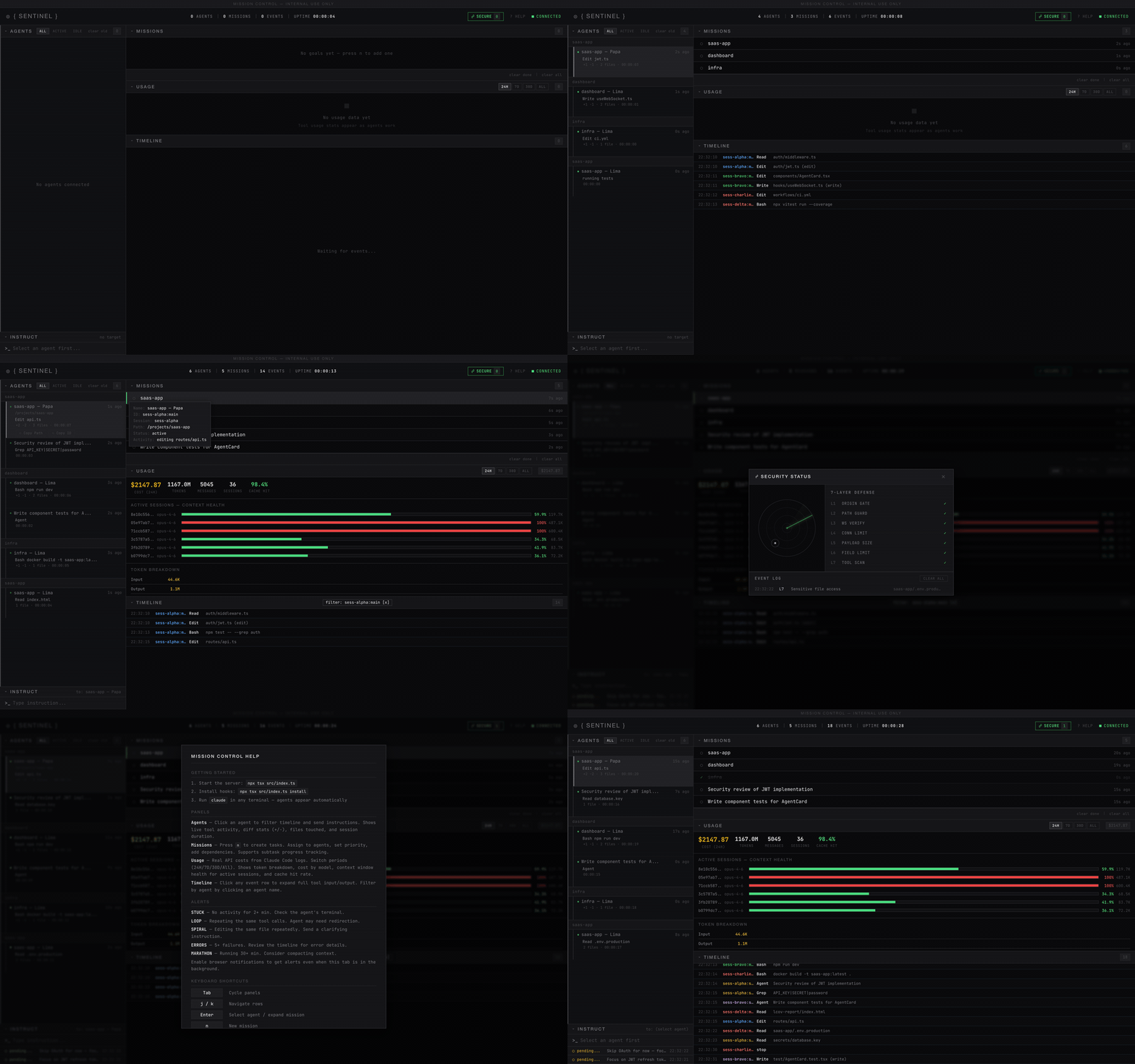
You've been here before
You spin up 3 Claude Code agents. One's building auth. One's writing tests. One's refactoring the API. You Alt-Tab between terminals trying to keep track. Then you realize:
- Agent 1 has been editing the same file for 5 minutes in a loop
- Agent 2 is stuck waiting for something — but you didn't notice for 10 minutes
- Agent 3 just overwrote Agent 1's work because they touched the same file
- You have no idea how much this is costing you
You're paying for AI agents but managing them like it's 1995 — staring at terminal windows and hoping for the best.
There's a better way
Mission Control gives you a real-time command center for all your Claude Code agents. One browser tab. Every agent visible. Full control.
| Without Mission Control | With Mission Control |
|---|---|
| Alt-Tab between 5 terminals | One dashboard shows everything |
| "Is that agent still running?" | Live status: active / idle / stuck / looping |
| No idea what agents are doing | See every tool call as it happens |
| Can't coordinate between agents | Send instructions from the dashboard |
| No cost visibility | Real token costs from API logs |
| Problems discovered too late | Instant alerts: STUCK, LOOP, SPIRAL, ERRORS |
| Desktop only | Phone companion — monitor from anywhere on WiFi |
Why not the others?
There are 20+ projects in this space. Here's why most don't solve the actual problem:
| Tool | What it does | What's missing |
|---|---|---|
| claude-hud (15k stars) | Terminal statusline for one agent | Single-agent only. No missions. No instructions. No web UI. |
| claude-squad (6.7k stars) | TUI to manage agents in tmux | No web dashboard. No cost tracking. No mobile. Can't send instructions. |
| disler/observability (1.3k stars) | Real-time event timeline | Read-only. Can't assign missions or talk to agents. |
| builderz-labs/mission-control (3.6k stars) | Enterprise 40-panel orchestration | Massive. Next.js + React + Zustand + Recharts. 39 migrations. Overkill for most. |
| sniffly (1.2k stars) | Cost analytics from JSONL logs | Analytics only. No live monitoring. No agent control. Python. |
Mission Control is the only tool that combines all of these:
- See all agents in real-time (like claude-hud, but multi-agent + web)
- Talk to agents via instruction injection (nobody else does this)
- Track missions auto-created from agent activity
- Track real API costs from token logs (like sniffly, built-in)
- Alert on stuck agents, loops, and correction spirals
- Phone companion — monitor from your phone on the same WiFi
And it's 2 dependencies (better-sqlite3 + ws). No React. No build step. One command to start.
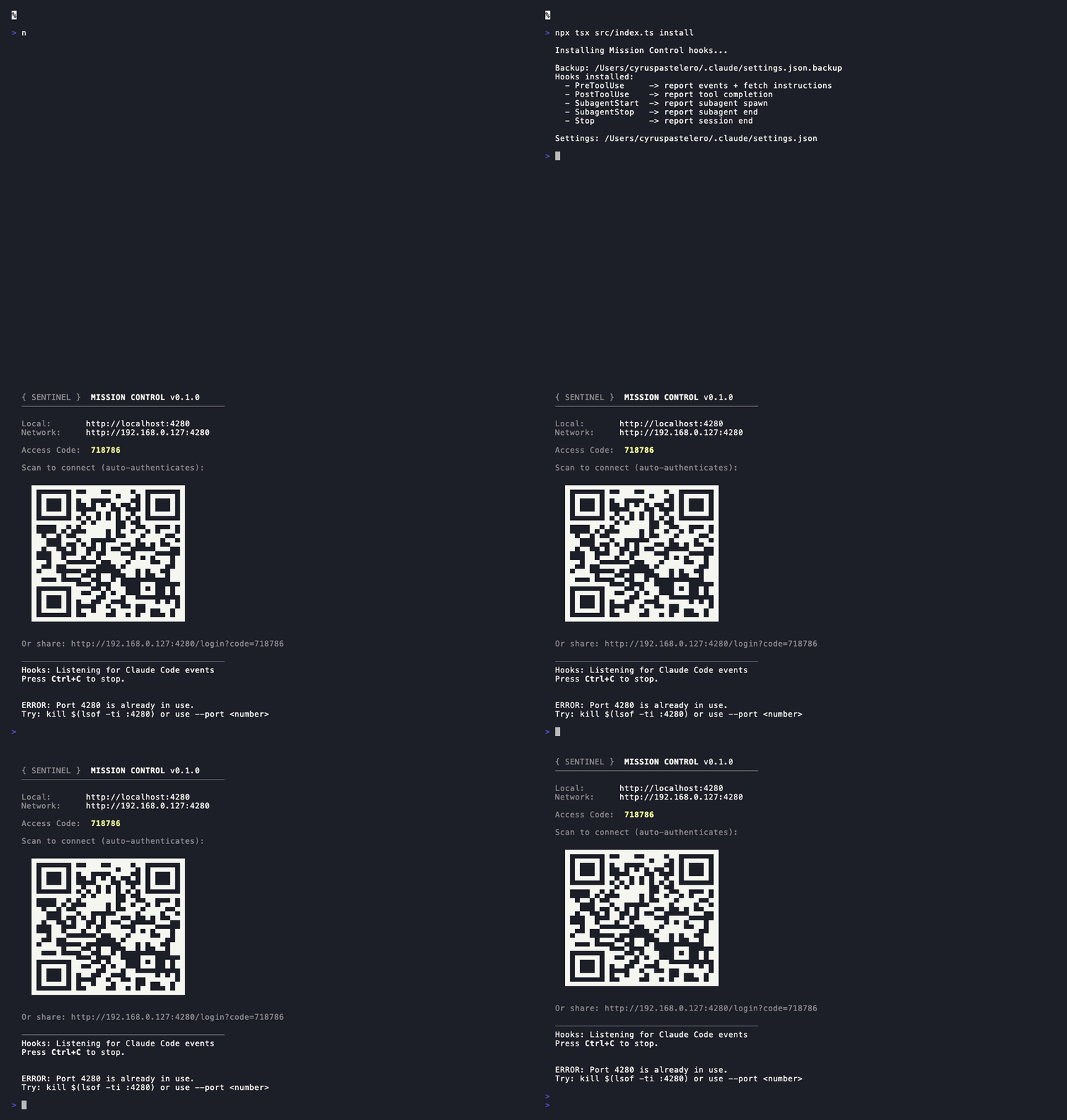
Install hooks, start server, and you're watching agents in under 30 seconds
Setup
Prerequisites
- Node.js 18+ (
node -vto check) - Claude Code installed and working
Step 1: Clone and Install
git clone https://github.com/Cyvid7-Darus10/claude-mission-control.git
cd claude-mission-control
npm install
npm rebuild better-sqlite3
Step 2: Install Hooks into Claude Code
npx tsx src/index.ts install

This adds hooks to ~/.claude/settings.json so Claude Code reports activity to Mission Control. You only need to do this once.
Step 3: Start the Dashboard
npx tsx src/index.ts

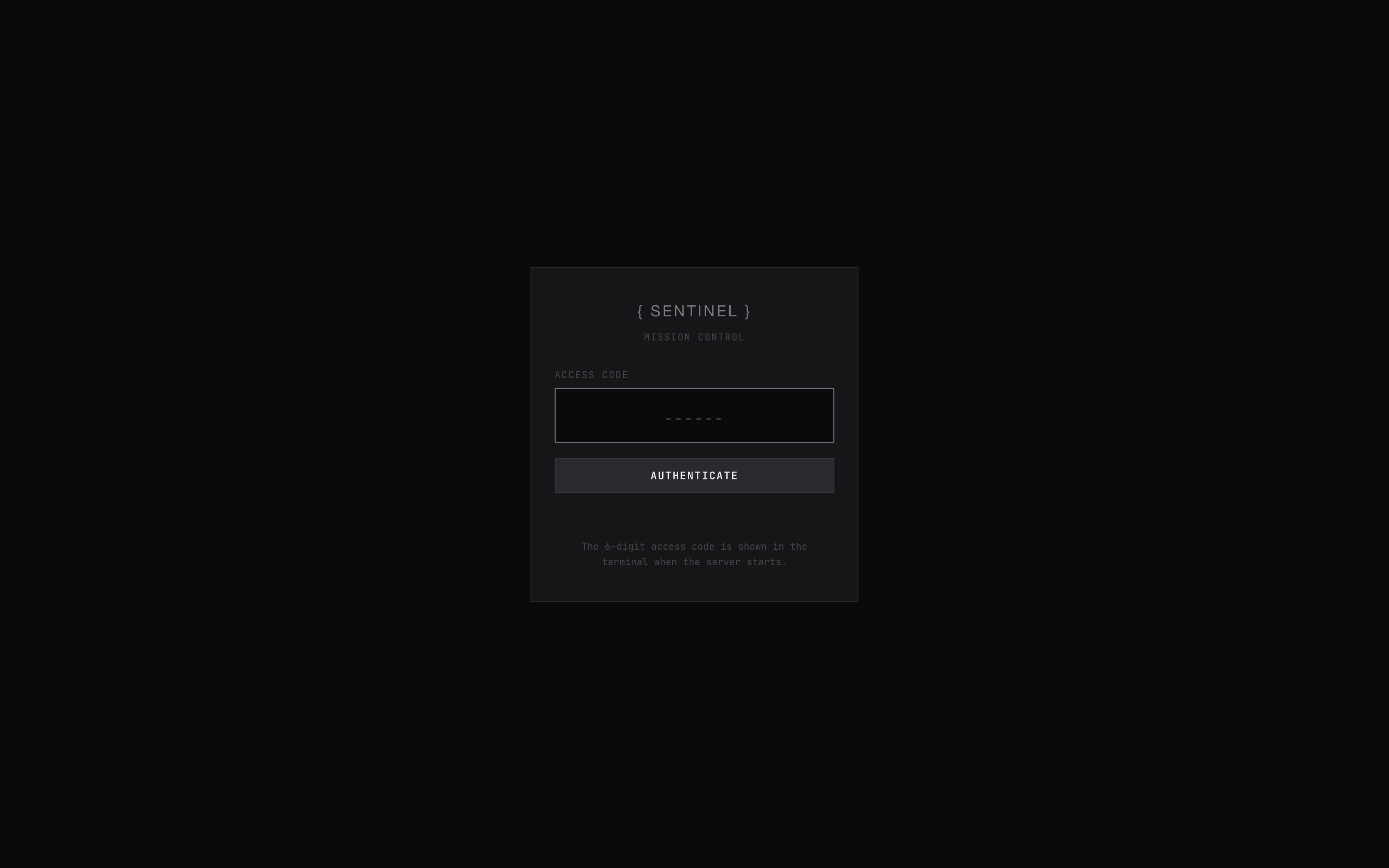
Open http://localhost:4280 in your browser. Enter the 6-digit access code shown in the terminal.
Step 4: Connect Your Phone
The terminal shows a QR code — scan it with your phone to connect instantly (auto-authenticates, no code needed).
Or manually:
- Open the Network URL shown in the terminal (e.g.
http://192.168.1.42:4280) - Enter the 6-digit access code
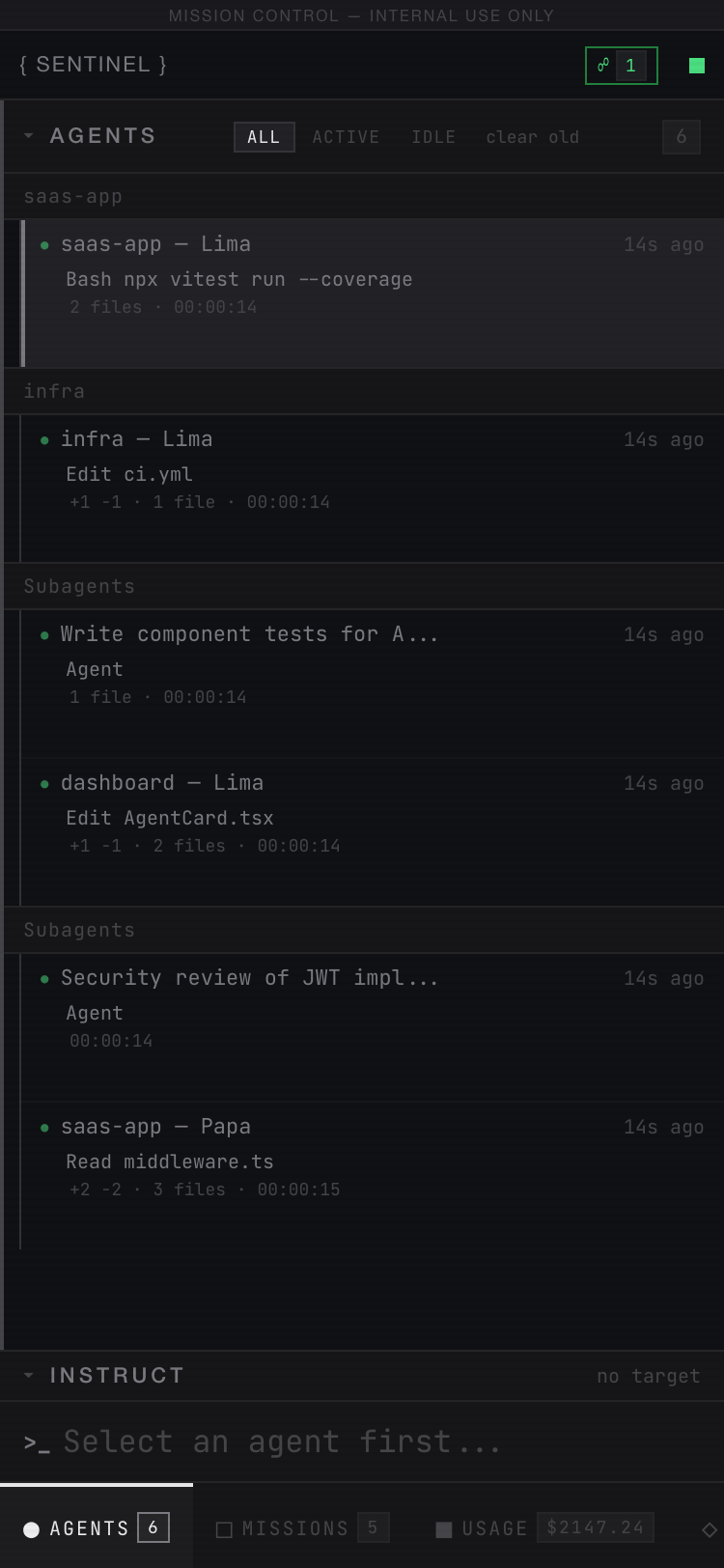 Agents |
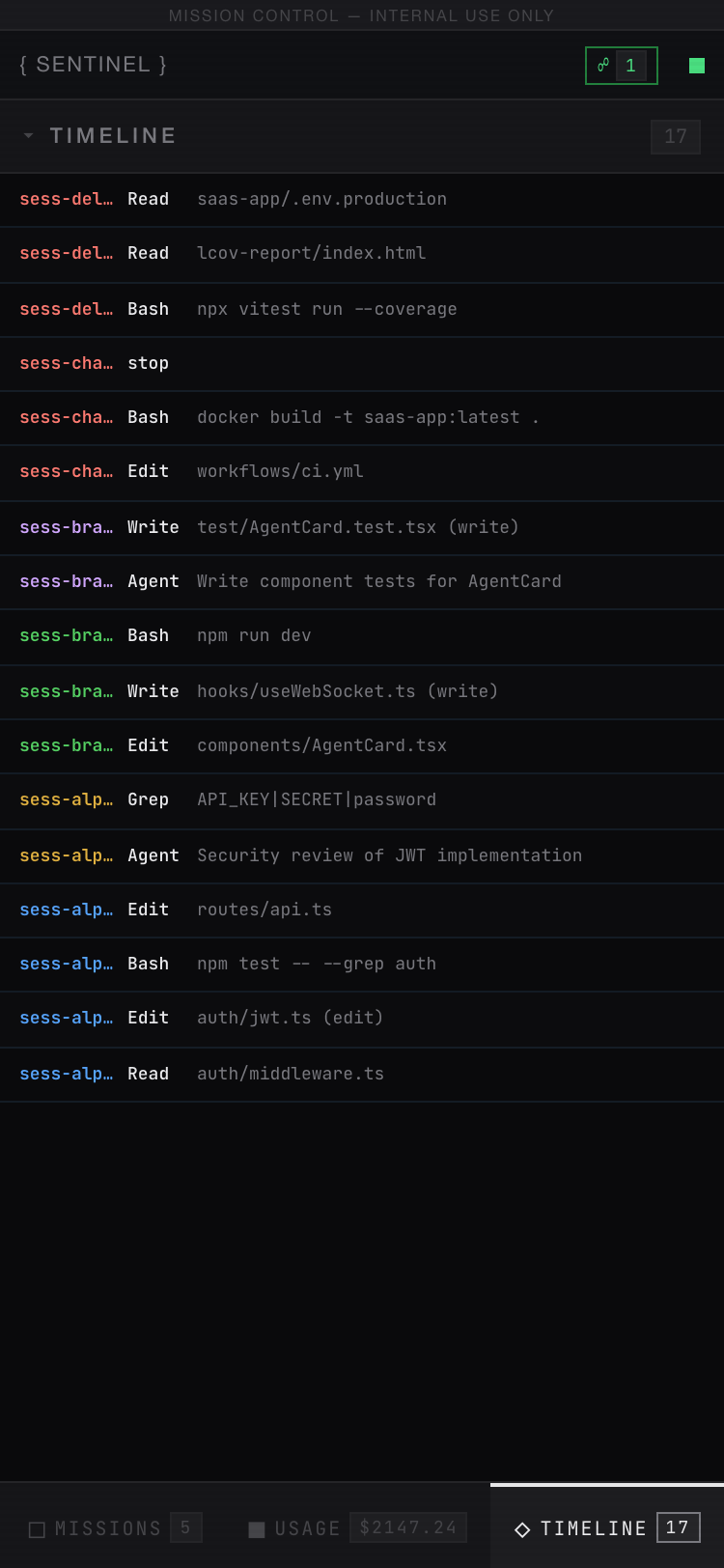 Timeline |
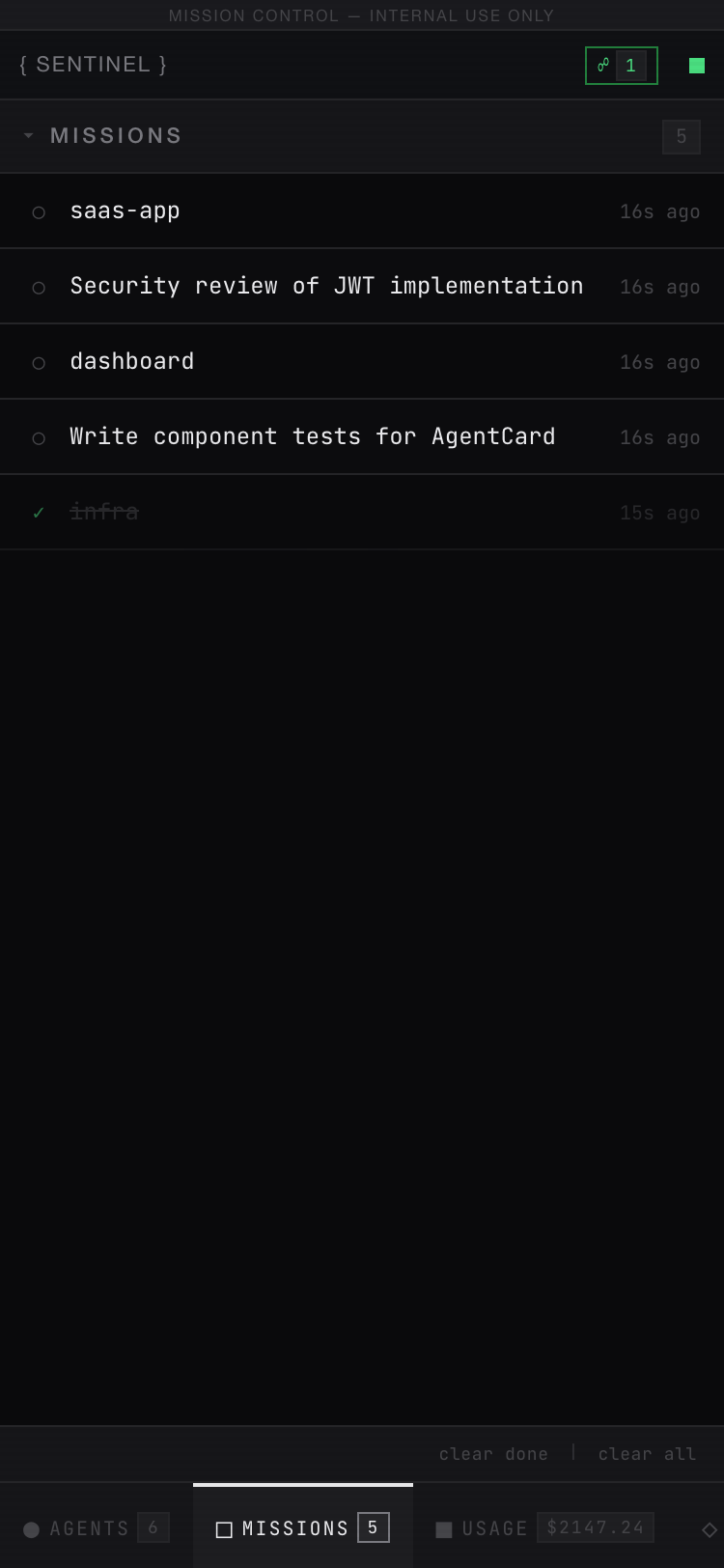 Missions |
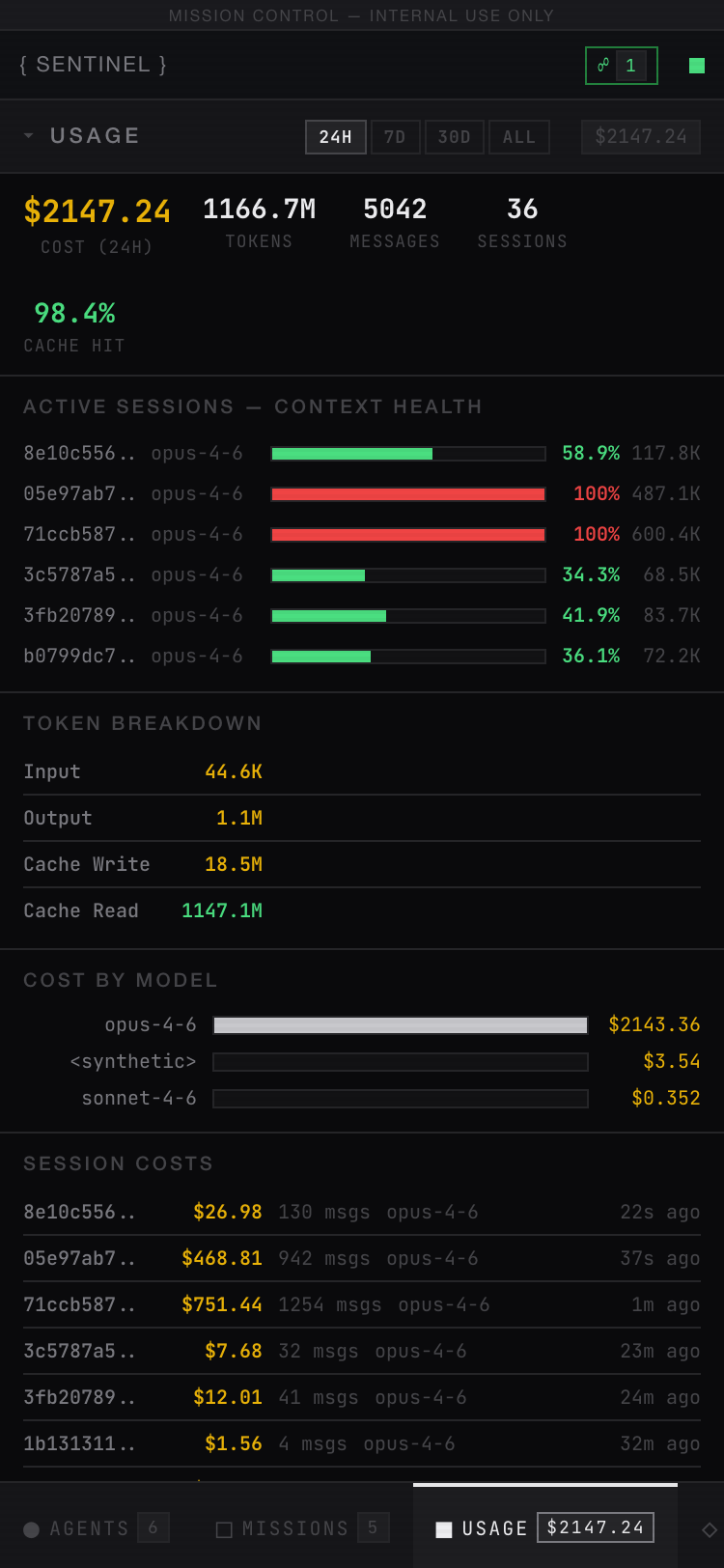 Usage |
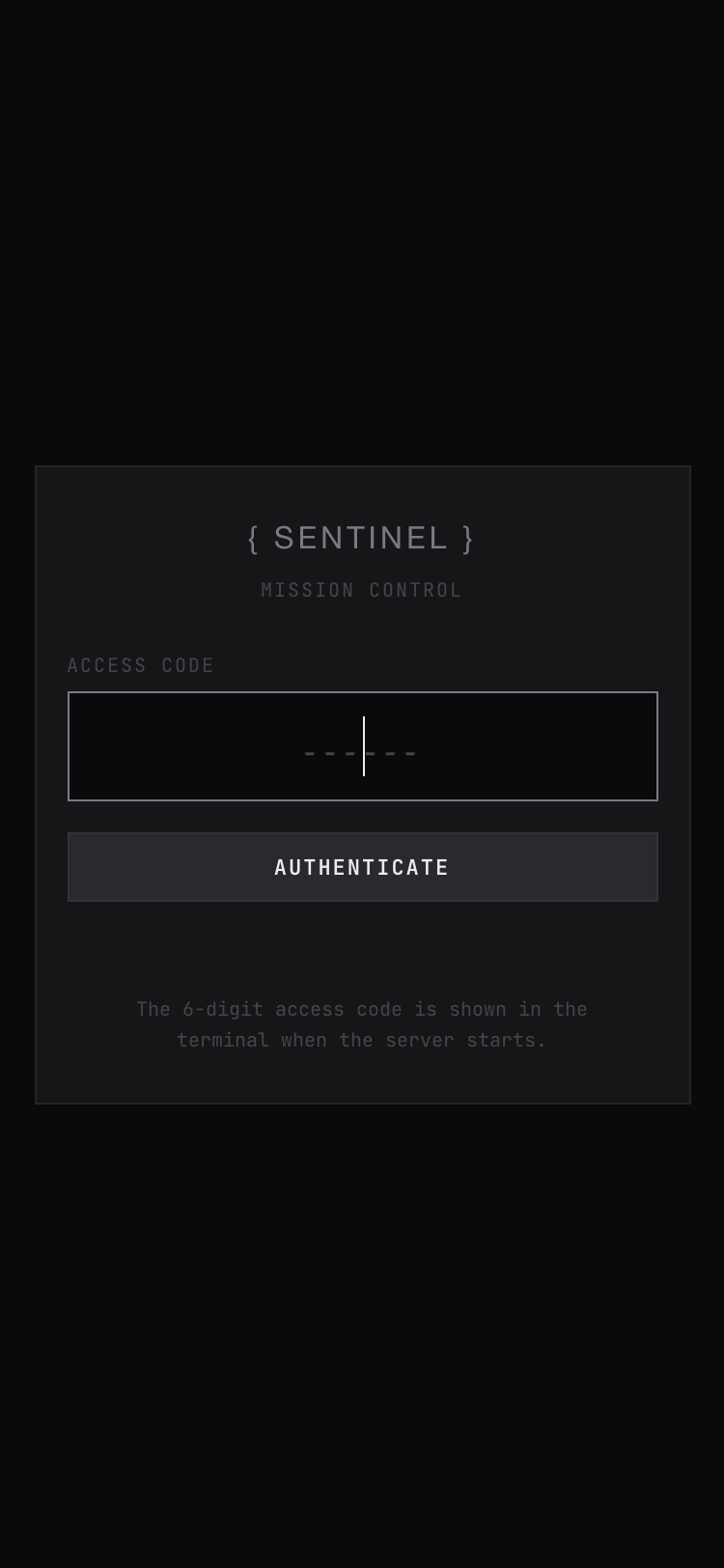 Login |
The access code changes every time the server restarts. Sessions last 24 hours.
Step 5: Use Claude Code Normally
Open another terminal and run claude as usual. Your agent will appear on the dashboard automatically — every tool call streams in real-time.
How It Works
flowchart LR
    A["🤖 Claude Code<br/>Agent runs a tool"]
    H["⚡ Hook Script<br/>PreToolUse / PostToolUse / Stop"]
    S["🖥️ Mission Control<br/>SQLite + WebSocket"]
    D["📊 Dashboard<br/>Real-time updates"]
    I["💬 You<br/>Send instruction"]

    A -->|"hook fires"| H
    H -->|"POST /api/events"| S
    S -->|"WebSocket broadcast"| D
    I -->|"POST /api/instructions"| S
    S -->|"GET on next hook"| H
    H -->|"stderr warning"| A

    style A fill:#1a1a2e,stroke:#58a6ff,color:#e6edf3
    style H fill:#1a1a2e,stroke:#d29922,color:#e6edf3
    style S fill:#1a1a2e,stroke:#3fb950,color:#e6edf3
    style D fill:#1a1a2e,stroke:#bc8cff,color:#e6edf3
    style I fill:#1a1a2e,stroke:#f85149,color:#e6edf3
Features
Mobile Companion
Scan the QR code in the terminal to connect your phone instantly — no typing URLs or access codes. The mobile view features:
- QR code auto-login — scan and you're in, fully authenticated
- Tab bar at the bottom — switch between Agents, Missions, Usage, and Timeline
- Touch-optimized — larger tap targets, swipe-friendly lists
- Live updates — same WebSocket connection, real-time events
- Send instructions — tap an agent, type a message, send from your phone
- Anti-pattern alerts — STUCK, LOOP, SPIRAL badges visible on mobile
Dashboard Panels
| Panel | What It Shows |
|---|---|
| Agents | Live status with filter tabs (All/Active/Idle), current tool + target file, diff stats (+/-), files touched, session duration, anti-pattern alerts. Click to filter timeline + usage. |
| Missions | Auto-created from agent activity. Shows active/completed missions with expand-to-manage actions. CLEAR COMPLETED for bulk cleanup. |
| Usage & Costs | Real token costs from JSONL logs, context window health, daily/model/session cost breakdowns, period selector (24h/7d/30d/All). Scopes to selected agent. |
| Timeline | Every tool call scrolling in real-time — click any row to expand full input/output details. Filter by agent. |
| Instruct | Send instructions to any agent — delivered via stderr on next tool call. Shows pending/delivered status log. |
Agent Monitoring
Each agent row shows rich, at-a-glance status:
| Info | Description |
|---|---|
| Filter tabs | Switch between All / Active / Idle to focus on what matters |
| Status dot | ● active (pulsing), ○ idle (60s), ◌ disconnected (5min) |
| Live activity | Current tool + target file (e.g., Edit auth.ts, Bash npm test) |
| Diff stats | Lines added/removed across all edits (e.g., +142 -38) |
| Files touched | Count of unique files the agent has modified |
| Session duration | Elapsed time since agent first appeared |
| Alert badges | STUCK, LOOP, SPIRAL, ERRORS, MARATHON — with browser desktop notifications |
Mission Board
Zero setup required. Missions auto-create from agent activity — every session gets a mission.
New Claude Code session starts in /projects/mission-control
    → Mission created: "mission-control"

Agent spawns subagent: "Security review of auth module"
    → Mission created: "Security review of auth module"

Agent session ends (Stop hook fires)
    → Mission auto-completed ✓
| Source | Mission Title |
|---|---|
| Main agent | Project folder name (e.g. mission-control, api-service) |
| Subagent | Description from Agent tool (e.g. Fix build errors, Code review) |
Titles are filtered — shell commands, file paths, and URLs are rejected. Same title never creates duplicates.
| Feature | Description |
|---|---|
| Auto-populated | Every session and subagent gets a mission automatically |
| Auto-completed | When a session ends, its mission is marked done |
| Click to expand | Shows assigned agent, path, model, current activity, timestamps |
| Agent highlighting | Click an agent to highlight its linked missions |
| Cleanup | clear done and clear all links for bulk removal |
| Clear old agents | Remove disconnected agents with one click |
Sending Instructions to Agents
You can send messages from the dashboard to any running Claude Code agent. The agent sees your message as a system warning and will follow it.
How to send:
- Click an agent in the Agents panel (left side) — it highlights and the INSTRUCT panel shows
to: <agent-name> - Type your message in the
>_input (or pressito focus it) - Press Enter — the instruction is queued
How delivery works:
sequenceDiagram
    participant You as 👤 You (Dashboard)
    participant DB as 💾 Server / DB
    participant Hook as 🪝 Hook Script
    participant Agent as 🤖 Claude Code Agent

    You->>DB: POST /api/instructions<br/>"Focus on writing tests"
    Note over DB: Status: PENDING<br/>○ pending...

    DB-->>You: WebSocket: instruction:new
    Note over You: Dashboard shows<br/>○ pending...

    Agent->>Agent: Makes next tool call<br/>(Edit, Bash, Read, etc.)
    Agent->>Hook: PreToolUse hook fires

    Hook->>DB: GET /api/instructions/:agentId
    DB-->>Hook: Returns pending instructions
    Note over DB: Status: DELIVERED

    Hook->>Agent: Writes to stderr:<br/>"[Mission Control] Focus on writing tests"

    DB-->>You: WebSocket: instruction:delivered
    Note over You: Dashboard shows<br/>✓ delivered + toast

    Agent->>Agent: Sees warning, adjusts behavior
How to know it was received:
The INSTRUCT panel shows a delivery log under the input:
| Status | Meaning |
|---|---|
○ pending... |
Instruction is queued, waiting for the agent's next tool call |
✓ delivered |
The agent's hook picked it up — the agent has seen your message |
You'll also see a toast notification: ✓ Agent received: "Focus on writing tests..." when delivery happens.
Note: Instructions are delivered on the agent's next tool call, not instantly. If an agent is idle or stuck, the instruction waits until they resume working. This is a limitation of Claude Code's hook system — there's no way to push messages directly, only to inject them when hooks fire.
Usage & Cost Tracking
Mission Control reads Claude Code's JSONL session logs (~/.claude/projects/) to compute real API costs from actual token counts — not estimates. Inspired by sniffly.
| Metric | Source |
|---|---|
| Total Cost | Actual input/output/cache tokens x model pricing (Opus $15/$75, Sonnet $3/$15, Haiku $0.80/$4 per MTok) |
| Token Breakdown | Input, output, cache creation, cache read — with cache hit rate % |
| Context Window Health | Color-coded bars per active session (green < 60%, yellow 60-85%, red > 85%). Detects active sessions by PID liveness |
| Cost by Model | Per-model cost bars (e.g., opus-4-6, sonnet-4-6, haiku-4-5) |
| Daily Costs | Cost per day with horizontal bar chart |
| Session Costs | Per-session cost with message count, model, and recency |
| Period Selector | Switch between 24H, 7D, 30D, and All Time — all queries scoped to selected range |
Data persists in a usage_daily summary table, so historical cost data survives even after raw event retention (default 90 days).
Anti-Pattern Detection
Inspired by agenttop and builderz-labs/mission-control.
| Alert | Trigger | Severity |
|---|---|---|
| STUCK | No events for 2+ minutes | Warning (blinking) |
| LOOP | 3+ identical consecutive write tool calls (Edit, Write, Bash). Read-only tools, Agent spawning, WebSearch, and Task operations are excluded. | Danger (blinking) |
| SPIRAL | Same file edited 3+ times in last 6 tool calls (correction spiral) | Danger (blinking) |
| ERRORS | 5+ tool failures in a session (error burst) | Danger (blinking) |
| MARATHON | Session running 30+ minutes continuously | Info (steady) |
All alerts also trigger browser desktop notifications (with permission) so you can monitor agents while working in other tabs.
Expandable Timeline
Click any timeline event to expand and see the full details:
- File tools: full path, edit diff (old → new), content preview
- Bash: command, stderr/stdout output
- Search: pattern, results
- Errors: error messages, stack traces
Smart per-tool summaries cover 10+ tool types including Agent, SendMessage, WebFetch, Skill, and Task operations.
Security
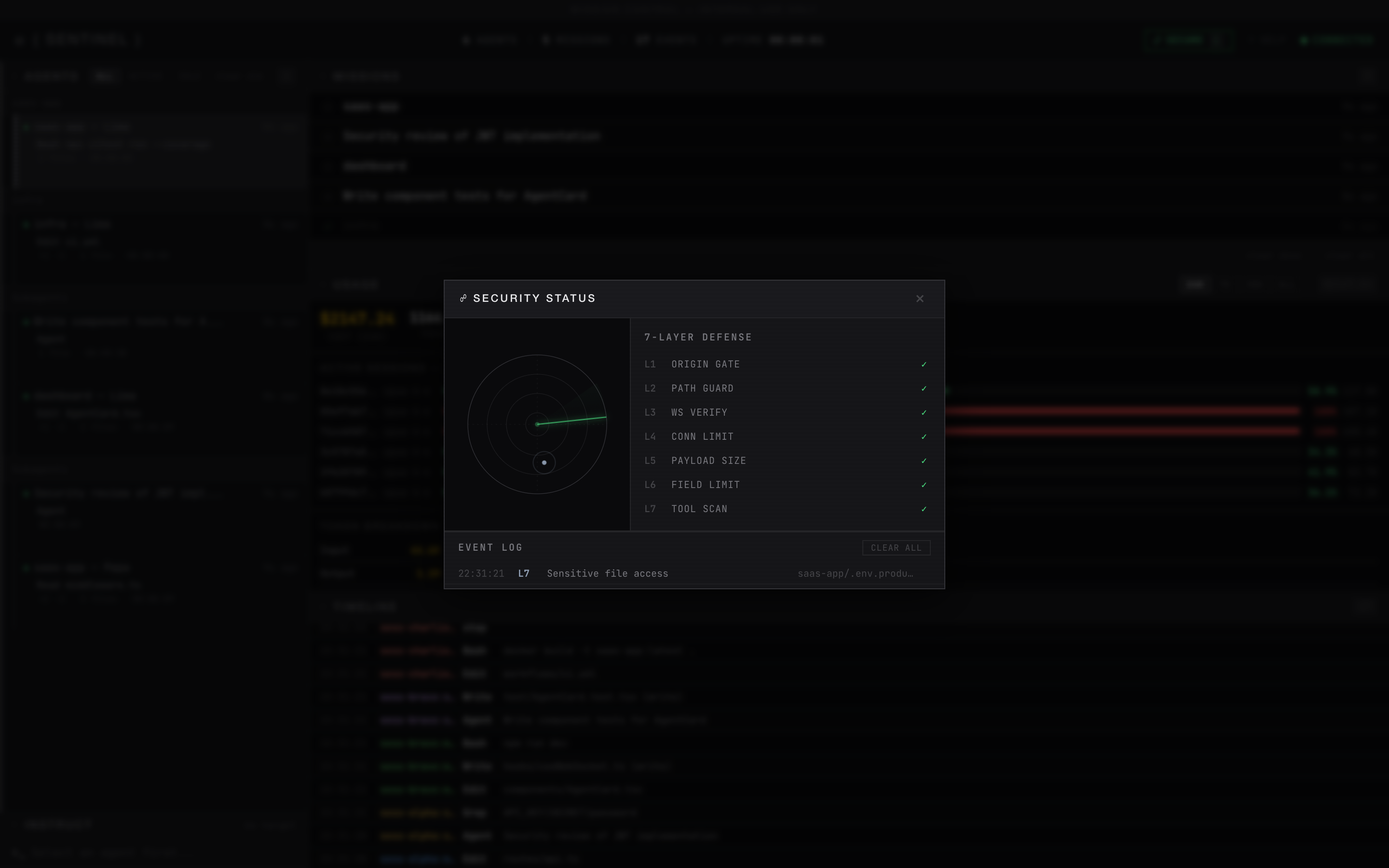
Security panel: radar visualization, 7-layer defense status, and event log
Access control:
| Feature | Description |
|---|---|
| Access Code | Random 6-digit code generated on each server start. Required to view the dashboard. Shown only in the terminal |
| Session Cookies | HttpOnly, SameSite=Lax, 24-hour expiry. No passwords stored |
| WebSocket Auth | WebSocket connections also require a valid session cookie |
| Login Page | Clean login screen at /login — auto-submits when 6 digits entered |
7-layer defense system (visible in the Security panel — click the shield icon):
| Layer | Name | What It Blocks |
|---|---|---|
| L1 | Origin Gate | HTTP requests from unauthorized origins |
| L2 | Path Guard | Path traversal attempts (../) |
| L3 | WS Verify | WebSocket connections from unauthorized origins |
| L4 | Conn Limit | More than 50 simultaneous WebSocket clients |
| L5 | Payload Size | Request bodies exceeding 1MB |
| L6 | Field Limit | Oversized fields (title, description, tool I/O) |
| L7 | Tool Scan | Dangerous commands (rm -rf /, chmod 777, curl | sh), sensitive file access (.env, .ssh/, credentials), secret exposure (API keys, private keys) |
Additional protections:
| Feature | Description |
|---|---|
| Secret Scanner | Scans tool output for leaked secrets — AWS keys, GitHub tokens, API keys, JWTs, private keys |
| Network Access | Accepts connections from localhost and private network IPs (192.168.x.x, 10.x.x.x, 172.16-31.x.x) |
| Hook Token | Hook endpoints (POST /api/events, GET /api/instructions) require a Bearer token stored in ~/.claude-mission-control/hook-token. Generated on server start, read by hook script automatically |
| Auth Rate Limiting | 5 attempts per 15 minutes per IP. Lockout returns 429. |
| Security Headers | X-Frame-Options: DENY, X-Content-Type-Options: nosniff, Referrer-Policy: no-referrer, CSP |
| Constant-Time Auth | Access code and hook token comparison use constant-time algorithms to prevent timing attacks |
| Failed Auth Logging | Invalid access code attempts are logged as security events |
Keyboard Shortcuts
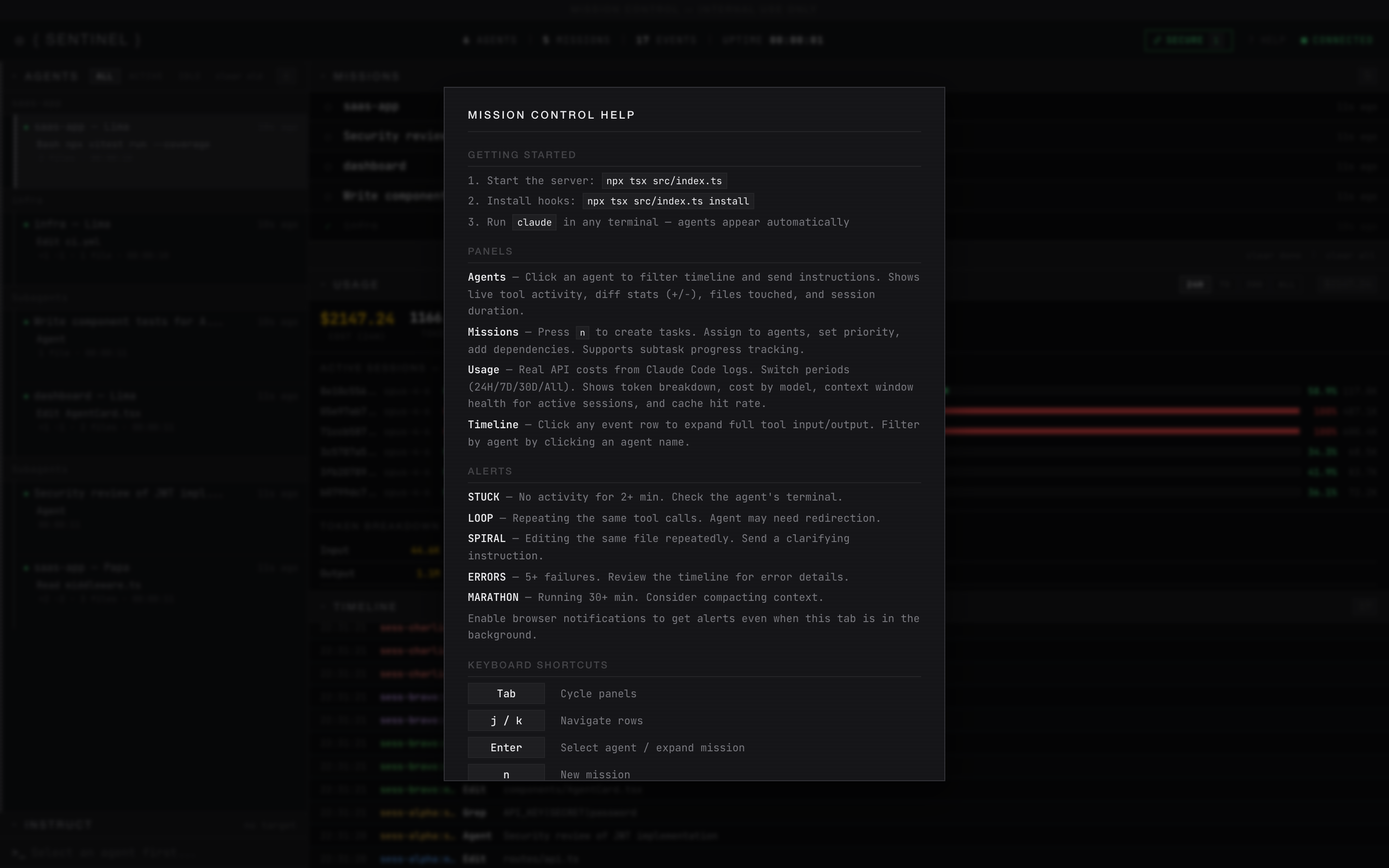
Press ? to open the help overlay
| Key | Action |
|---|---|
Tab |
Cycle focus: Agents → Missions → Usage → Timeline |
j / k |
Navigate up/down in focused panel |
Enter |
Select agent (filters timeline + shows agent usage) |
i |
Focus instruction input |
/ |
Clear timeline filter |
s |
Toggle security panel |
? |
Toggle keyboard shortcuts help |
Esc |
Cancel / unfocus |
Agent Quick Actions
Hover any agent row to reveal action buttons:
| Action | What It Does |
|---|---|
| Copy Path | Copies the agent's working directory to clipboard (e.g. /Users/cyrus/project) — use this to find the right terminal window |
| Copy ID | Copies the session ID to clipboard — useful for debugging or API calls |
Mission Management
Missions auto-create from subagent descriptions. Click any mission to see details (agent, path, model, activity) and manage:
| Action | Description |
|---|---|
| DONE | Mark a mission as completed |
| REOPEN | Move a completed mission back to open |
| DELETE | Remove a mission |
| clear done | Bulk-remove completed missions |
| clear all | Remove all missions |
| clear old (agents) | Remove all disconnected agents |
What Gets Installed Where
| Component | Location |
|---|---|
| Server + dashboard code | Where you cloned the repo |
| SQLite database | ~/.claude-mission-control/data.db |
| Hook token | ~/.claude-mission-control/hook-token (auto-generated, read by hook script) |
| Hook entries | ~/.claude/settings.json (PreToolUse, PostToolUse, SubagentStart, SubagentStop, Stop) |
| Hook script | <repo>/src/hook/mission-control-hook.js |
| Token data source (read-only) | ~/.claude/projects/*/\*.jsonl (Claude Code session logs) |
Commands
npx tsx src/index.ts              # Start the server (default port 4280)
npx tsx src/index.ts --port 5000  # Custom port
npx tsx src/index.ts --open       # Start and open browser
npx tsx src/index.ts install      # Install hooks into Claude Code
npx tsx src/index.ts uninstall    # Remove hooks from Claude Code
API
All endpoints return JSON. Dashboard endpoints require a session cookie (via access code login). Hook endpoints (POST /api/events, GET /api/instructions/:agentId) require a Bearer token (~/.claude-mission-control/hook-token). POST /api/auth is open.
| Method | Endpoint | Auth | Description |
|---|---|---|---|
POST |
/api/auth |
None | Authenticate: { code: "123456" } → sets session cookie |
GET |
/api/dashboard |
Cookie | Stats: agent count, mission count, events |
GET |
/api/agents |
Cookie | List all agents |
PATCH |
/api/agents/:id |
Cookie | Rename an agent |
DELETE |
/api/agents/:id |
Cookie | Delete an agent |
DELETE |
/api/agents/disconnected |
Cookie | Bulk-delete all disconnected agents |
GET |
/api/agents/:id/events |
Cookie | Event history for an agent |
GET |
/api/missions |
Cookie | List missions (optional ?status= filter) |
POST |
/api/missions |
Cookie | Create mission: { title, description, depends_on?, priority? } |
PATCH |
/api/missions/:id |
Cookie | Update status, assign agent, complete/fail |
DELETE |
/api/missions/:id |
Cookie | Delete a mission (any status) |
POST |
/api/events |
Hook token | Receive hook events (used by hook script) |
GET |
/api/events |
Cookie | Query events (optional ?limit=&offset=) |
POST |
/api/instructions |
Cookie | Send instruction: { target_agent_id, message } |
GET |
/api/instructions/:agentId |
Hook token | Get pending instructions (used by hook script) |
GET |
/api/usage?hours=24 |
Cookie | Usage stats (tool calls, sessions, daily costs). hours=0 for all time |
GET |
/api/tokens?hours=24 |
Cookie | Real token usage from JSONL logs (costs, models, cache rates). hours=0 for all time |
WebSocket on same port — connects automatically from the dashboard.
Configuration
| Environment Variable | Default | Description |
|---|---|---|
MC_EVENT_RETENTION_DAYS |
90 |
Days to keep raw events before purging (historical daily stats persist forever in usage_daily) |
MC_COST_PER_TOOL_CALL |
0.003 |
Fallback cost estimate per tool call (used when JSONL logs unavailable) |
MC_DATA_DIR |
~/.claude-mission-control |
Database storage directory |
CLAUDE_MC_PORT |
4280 |
Port for the hook script to POST events to |
Tech Stack
| Component | Choice | Why |
|---|---|---|
| Runtime | Node.js + TypeScript | Single language, npx runnable |
| HTTP | Node.js http (no Express) |
Zero framework deps |
| WebSocket | ws |
Lightweight, battle-tested |
| Database | better-sqlite3 |
Embedded, no external server |
| Dashboard | Vanilla HTML/CSS/JS | No build step, served directly |
| Total deps | 2 (better-sqlite3 + ws) |
Minimal footprint |
Uninstall
# Remove hooks from Claude Code
npx tsx src/index.ts uninstall

# Delete the database
rm -r ~/.claude-mission-control

# Delete the repo
rm -r ~/claude-mission-control
Credits
Inspired by:
- sniffly — JSONL log parsing for real token costs and cache hit rates
- claude-hud — context window health gauge, active session detection via PID
- builderz-labs/mission-control — convergence scoring, secret scanning, visibility-aware polling
- disler/observability — expandable timeline, browser notifications, smart tool summaries
- claude-squad — per-agent diff stats, file tracking, session lifecycle
- agenttop — anti-pattern detection (correction spirals, marathon sessions, error bursts)
- MeisnerDan/mission-control — subtask progress tracking
- claude_code_agent_farm — file activity tracking per agent
- claude-devfleet, agent-flow
License
Apache 2.0 — See LICENSE
Made by Cyrus David Pastelero
Yorumlar (0)
Yorum birakmak icin giris yap.
Yorum birakSonuc bulunamadi