SolidworksMCP
Health Uyari
- License — License: MIT
- Description — Repository has a description
- Active repo — Last push 0 days ago
- Low visibility — Only 7 GitHub stars
Code Gecti
- Code scan — Scanned 12 files during light audit, no dangerous patterns found
Permissions Gecti
- Permissions — No dangerous permissions requested
Bu listing icin henuz AI raporu yok.
MCP server and companion skill for AI agents to build, edit, inspect and export native parametric SOLIDWORKS models.
SolidworksMCP
Major Update
From a short description and reference images to native, editable SOLIDWORKS
models. This update brings a new modeling workflow, a companion agent SKILL,
and measured checks from the first draft to the final delivery.
1. Build complete parametric models
Describe the model in a compact Python shape program. Preview its proportions
before building, then create named solids, native features and equations in
SOLIDWORKS. Keep dimensions as parameters so the saved model can evolve.
2. Edit with confidence
Change parameters or patch just the intended part of the program. Failed edits
restore the saved model; revert takes you back to an earlier state. Long
operations report progress, and completed results survive an MCP reconnect.
3. Deliver a result you can check
Compare the built model with reference images, measure fits and inspect native
body health. Export SLDPRT, STEP and per-body STL with validation results and
file hashes. See exactly what passed and what still needs checking.
Why the companion skill matters
The skill is a core part of the modeling experience. The MCP server provides
CAD tools; the solidworks-mcp skill gives the
agent the workflow and practical SOLIDWORKS knowledge to use them together.
It guides the agent through planning parametric geometry, checking proportions
in a fast draft, building native solids, making focused edits and verifying the
result before export. Tool selection, reusable joint patterns, recovery steps
and known limitations are included, so you can focus your prompt on the model
you want instead of explaining the CAD process each time.
Install the skill alongside the server to give your agent the modeling
guidance used throughout this project. Read the skill
or follow the installation steps.
Get started · Install the skill ·
Modeling guide · All tools
Main tools
get_model_context— Read the active model, parameters, bodies and editable source.model_api_lookup— Find modeling commands, examples and ready-to-use joint templates.execute_model_code— Preview, build, edit or revert a native parametric model.observe_model— Capture native views, custom camera angles and close-ups.measure_reference— Measure dimensions and selected details in a reference image.compare_reference— Compare model proportions with a reference image and highlight deviations.inspect_model— Check native geometry, dimensions, fits and printability.export_model— Export validated SLDPRT, STEP and per-body STL with a results manifest.
Additional tools
Discover and call these operations through expert_tools.
create_parametric_sketch— Build a sketch with named geometry, constraints, dimensions and equations.image_to_sketch— Trace raster drawings and silhouettes into validated sketch geometry.add_dimensions_batch— Add and verify multiple driving dimensions in one operation.analyze_sketch_dof— Find missing constraints, free motions and conflicting sketch relations.create_sketch_on_face— Start a sketch directly on an existing body face.advanced_extrude— Create a verified extrusion with explicit start, end and body-merge conditions.advanced_cut— Cut selected bodies with controlled depth, end conditions and scope.create_revolved_body— Revolve a parametric profile, including arcs and splines, into a separate body.create_swept_member— Sweep a circular, elliptical or custom profile along a path.fillet_edges— Round selected edges with a verified constant-radius fillet.chamfer_edges— Bevel selected edges by distance and angle.shell— Hollow a body to a specified wall thickness, optionally removing faces.mirror_feature— Mirror features or bodies across a plane or planar face.linear_pattern— Repeat features along a direction at a defined spacing.circular_pattern— Repeat features around an axis at a defined angle.reference_plane— Create a construction plane offset from an existing plane or face.create_multibody_insert— Build a matching insert and host pocket with verified clearance.check_clearance— Measure the gap or overlap between two named bodies.probe_section— Sample a section of visible geometry with a radial set of rays.probe_rays— Locate the first visible surface hit along each ray in a batch.set_body_color— Change body color while preserving other material properties.set_body_transparency— Adjust body transparency and verify the applied value.zoom_to— Focus the working view on selected bodies, a feature or a region.open_document— Open an existing SOLIDWORKS document.save_document— Save the active document to its current or a specified path.run_transaction— Execute supported operations with checkpoints, checks and rollback.execute_cad_plan— Run a bounded operation sequence with conditions and references to earlier results.execute_python— Run custom Python against the live SOLIDWORKS API with shared COM helpers.get_capabilities— Check supported operations, export formats and optional vectorization readiness.restart_solidworks— Restart SOLIDWORKS with unsaved-document checks and verified reconnection.
Built with SolidworksMCP
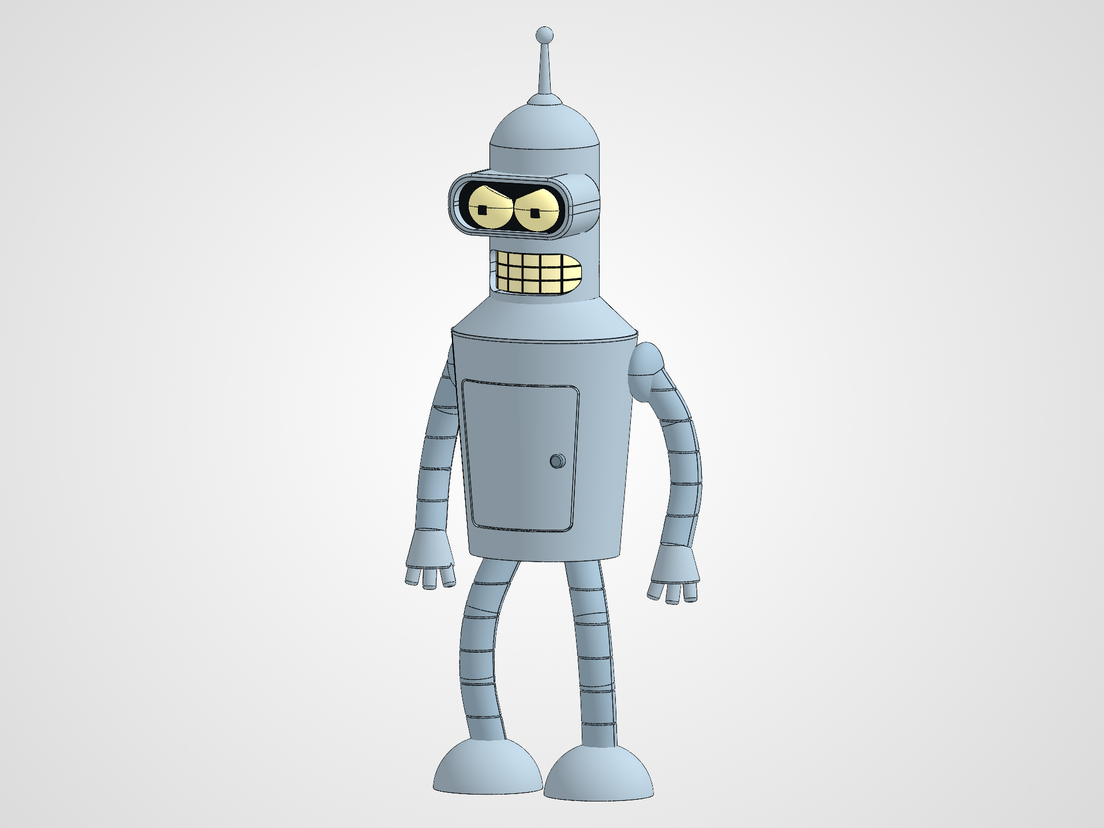
Bender, 150 mm. A compact program builds the visor, convex eyes, curved teeth,
access door, limbs and hands as native solids. Front and side comparisons measure
the result against the approved references.
| Detailed character | Glue assembly |
|---|---|
| 24 healthy native bodies | Nine separate bodies with locating joints |
| Every sampled silhouette level within 1.5 mm | Recorded height change preserves the 0.25 mm joint gaps |
| Native views and comparison overlays | Validated SLDPRT, STEP and nine STL exports |
Start modeling
Install the server and the included
solidworks-mcp skill, then connect your MCP client
to SOLIDWORKS. The skill guides the agent through drafting, building, editing,
verification and export.
No model weights are needed for ordinary CAD work. Download this project as
a ZIP or clone it normally. For image vectorization, install the
optional weights separately.
Start with get_model_context and model_api_lookup(topic="all"). A first shape
program can be as small as:
Height = model.parameter("Height", 80)
model.revolve("Pedestal", [(0, 20), (Height / 4, 20), (Height, 8)])
Pass it to execute_model_code in analyze mode to preview, then create with a
new absolute .SLDPRT path to build. Continue with the modeling guide.
Explore
| You want to… | Open |
|---|---|
| Set up the server and companion skill | Installation |
| Learn the modeling and editing workflow | Modeling guide |
| Find any tool, its parameters or its replacement | Complete tool reference |
| Read test coverage and remaining limits | Validation |
| Follow the release history | Changelog |
License
MIT. Optional model notices: LICENSES.md.
Yorumlar (0)
Yorum birakmak icin giris yap.
Yorum birakSonuc bulunamadi