rea-safe-agents
Health Uyari
- License — License: MIT
- Description — Repository has a description
- Active repo — Last push 0 days ago
- Low visibility — Only 5 GitHub stars
Code Gecti
- Code scan — Scanned 12 files during light audit, no dangerous patterns found
Permissions Gecti
- Permissions — No dangerous permissions requested
Bu listing icin henuz AI raporu yok.
Docker-enforced REA sandbox for Codex and Claude Code: verified isolation, restricted MCP sessions, and agent-readable setup for Linux, macOS, and Windows.
REA Safe Agent











Quick start · At a glance · When it helps · How it works · Tools · Step-by-step setup · Security · Validation · What's new · Credits
REA Safe Agent is a skill that builds a safer, contained environment for
analyzing files with REA.
Especially useful for people who ask an agent to investigate unfamiliar
binaries, archives, application packages or JavaScript. This project provides
a preconfigured way to contain REA and the agent client, limit shared data,
and repeat the verification checks.
- Contain both processes. Run REA and its receiving agent in separate
restricted Docker containers; give the agent zero host mounts. - Choose what enters. Share only frozen, hash-approved copies of selected
files with REA. - Verify the boundary again. Check the actual container settings, reject
host tools and exercise real REA analysis after changes.
Security hardening update: controlled gateway exchanges, 3,702 reproducible
boundary cases, stricter macOS sharing and whole-image vulnerability evidence.
See the strengthening work.
Watch the 68-second overview: what it is for, how the sandbox works and
where its limits are.
https://github.com/user-attachments/assets/3d2b8b9f-f5da-4c90-b569-aa78a668c58e
Full-quality MP4 with
captions and the
scene-by-scene script.
Quick start
Copy this prompt into Codex or Claude Code. The agent reads the guide, checks
your machine and shows you the plan before installing anything:
Set up REA Safe Agent from:
https://github.com/dagoSte/rea-safe-agents

Read SETUP.md, the bundled SKILL.md, the security model and the validation
record. Use this project to analyze untrusted files while containing REA and
the receiving client, limiting shared data and repeating the verification
checks.

Inspect my environment and show the concrete setup plan. Reuse existing
approvals and matching verified artifacts. Request approval only for work
that is not already authorized.

Keep REA, npm and the receiving agent inside separate restricted Docker
containers. Preserve network=none, read-only roots, resource limits and the
27-tool MCP allowlist. The agent must have zero host mounts. Share only
frozen copies of explicitly selected input bytes with REA.

For live analysis, use my own subscription: a `claude setup-token` login
for Claude, or a dedicated ChatGPT login made with `codex-login` for Codex.
Never use API keys, and never reuse my everyday Codex login.

Keep private control files, selected inputs, logins and outputs out of Git
and webroots. Preserve existing global client settings. Never attach REA to
this privileged host conversation or fall back to host execution.

On macOS inspect Docker Desktop's VM shares, following docs/desktop-hardening.md.
Propose a dedicated private staging root and the strict saved-sharing policy;
obtain approval before changing global shares or restarting Desktop, since
other projects may depend on them. Report saved settings separately from
effective VM isolation. Preserve unknown platform results as unknown.

Verify the policy suite, isolation checks and real offline REA analysis
without any model login. Report actual results, image IDs, successful REA
calls, rejected host tools, cleanup and remaining gaps. Claim native
platform coverage only for the host that was actually tested.
Prefer to do it by hand? Follow the step-by-step setup.
The skill guides Codex or Claude Code through setup and verification.
The complete Docker workflow has passed on Linux and macOS (POSIX).
Windows support is experimental. Native Windows policy tests and the
account-profile check have passed; full Docker Desktop integration remains
unverified. See the experimental platform record.
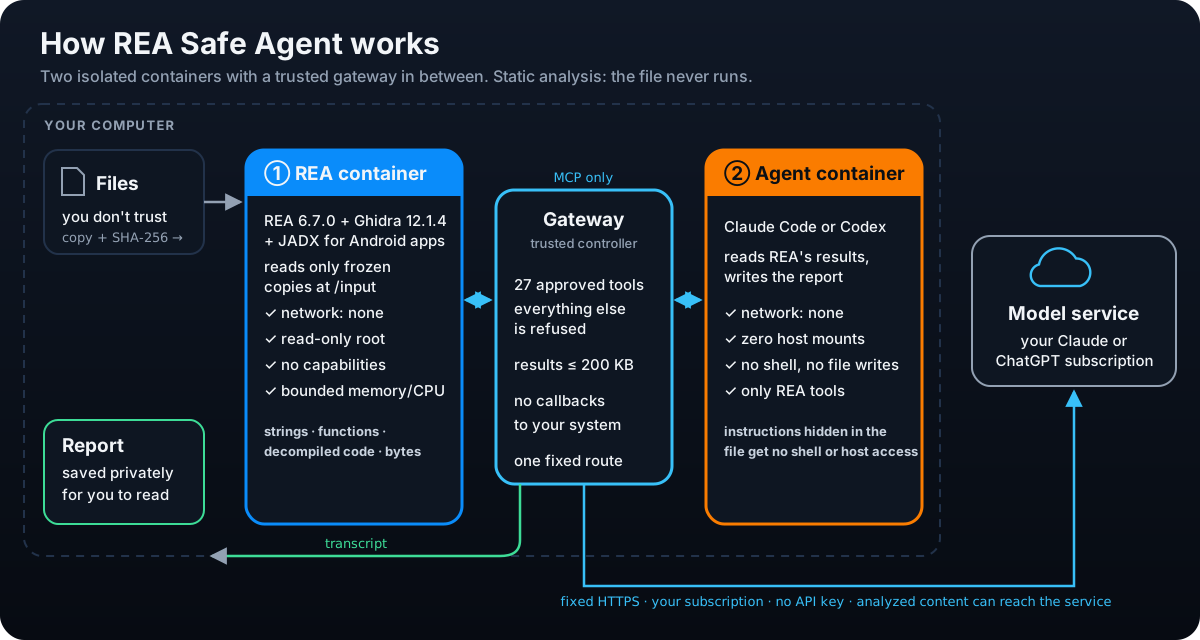
Docker supplies the enforced sandbox. REA and the receiving agent run in
separate restricted Linux containers. Both have read-only roots, no external
network, no capabilities, no Docker socket, and bounded resources. The agent
has zero host mounts; each agent uses its owner's own subscription and no
API key. A small trusted host controller checks both containers before startup
and relays only the approved protocols.
Every npm, REA and analysis-client command stays in Docker. There is no host
execution fallback or global MCP registration.
At a glance
When it helps
Use it when an agent must examine files you do not trust: an unknown binary,
archive, application package or JavaScript bundle. The protected sandbox
contains two risks:
- The file. REA's parsers read it inside their own container, without
network and with only frozen copies of the files you chose. - The agent. It reads REA's results inside a second container, without a
shell, host files or network, so instructions hidden in the file cannot act
on your machine.
It reduces risk; it does not remove it:
- Analysis is static. The file is never executed, so this is not a sandbox
for watching malware run. - A Docker, kernel or hypervisor flaw can still break containment.
- The analyzed content reaches the model service (Anthropic or ChatGPT). Do not
use it on files that must not leave your machine.
Why we built it
You have an unfamiliar archive, application package or JavaScript bundle and
want an agent to explain what is inside. REA provides the analysis tools.
That workflow also gives unknown bytes to parsers and dependencies, then
returns their results to an agent that may be able to execute commands or
modify files. Both processes need an execution boundary.
We created this skill to guide a repeatable deployment that contains REA
and its receiving client in separate Docker containers, exposes only selected
file copies, restricts the available tools, and verifies the effective setup.
The practical value is a prepared workflow with inspectable controls and real
analysis tests that can be run again after a change.
Maintaining that evidence is part of the project. Updates to Codex, Claude,
Docker or the helpers require fresh verification. Docker containment limits
ordinary access to the host; trusted runtime components, selected data and
model interpretation still have the limits described in the
security model.
What is REA?
REA — Reverse Engineer Anything is an open-source
reverse-engineering toolkit, published asrea-agents. Its CLI and MCP server
let agents inspect binaries, archives, application packages and JavaScript
applications. Some operations require external analysis providers.
REA Safe Agent adds deployment safeguards around REA and the agent receiving its
results. REA performs the analysis; the agent interprets the evidence. The
upstream project has its own security policy.
The pinned dependencies have a dated clean npm audit. These are useful checks;
they do not constitute an independent security certification of REA.
How the sandbox works
flowchart TB
    User[User: selects files and submits an analysis prompt]
    Provider[Anthropic or ChatGPT service]
    subgraph Host["Trusted host: Linux or macOS"]
        Selected[Selected file copies]
        Controller[Python controller: fixed protocol broker]
        Key[Dedicated ChatGPT login for Codex: private file]
        Snapshot[Private frozen copies: approved hashes]
        Docker[Local Docker runtime]
        subgraph AgentBox["Agent container: network none, zero host mounts"]
            Agent[Codex or Claude Code with its own subscription login]
            Relay[Local model and MCP relays]
        end
        subgraph REABox["REA container: network none"]
            REA[REA and locked npm dependencies]
            Input[Read-only input snapshot]
        end
    end
    User -->|Prompt| Controller
    Selected -->|Hash and validate before startup| Snapshot
    Snapshot -->|Only host bind mount, read-only| Input
    Input --> REA
    Controller -->|Create, inspect, then start both| Docker
    Docker --> AgentBox
    Docker --> REABox
    Controller <-->|Bounded frames over Docker stdin and stdout| Relay
    Relay <--> Agent
    Controller <-->|Allowlisted MCP calls and untrusted results| REA
    Key --> Controller
    Controller <-->|Fixed HTTPS endpoint, no redirects| Provider
The trusted Python controller, Docker CLI and Docker runtime run on the host.
The REA and agent processes run inside containers. Docker Desktop supplies the
Linux environment on macOS.
The agent communicates through local relays inside its own network namespace.
The controller accepts only a bounded MCP channel to REA and a model channel to
one fixed provider endpoint. It never turns returned text into a host command.
Claude Code signs in with your own claude setup-token login; the gateway checks
that each request carries exactly it, re-sends it to Anthropic and never writes
it to disk. Codex uses a dedicated ChatGPT login that stays with the
controller; the contained Codex holds no credential.
Request fields, beta features and content types are allowlisted; provider-side
MCP connectors, cloud files, remote media and prior cloud conversations are
outside this text-analysis profile.
Inputs are recorded as a manifest of paths, sizes and SHA-256 hashes. Before
starting either container, the controller validates all approved bytes and
creates private temporary copies. REA sees only those copies, mounted read-only;
the original directory is never mounted. Added files are excluded and changed
bytes stop the run. Links, Windows reparse points, special files and oversized
inputs are rejected. Review the selected bytes: path filters cannot determine
whether a file contains a secret.
One analysis from start to finish
- Approve the two pinned image builds, selected files and private control path.
- Build with the committed npm lockfiles and lifecycle scripts disabled.
- Pin both local image IDs and review the input manifest.
- Verify the actual contained client against a localhost dummy model. Require
rejection of shell/file-write tools and a successful real REA MCP call. - Launch a fresh contained analysis with an explicit model, prompt and your
subscription login. No real model request is needed for installation verification. - Save results as private data; remove both exact containers and temporary
input copies. Each analysis starts with fresh client state.
The exact commands are in Step-by-step setup.
A changed helper, image, deployment or host OS invalidates verification.
Inspection and isolation checks run on every launch. The old direct host MCP
entrypoint and host receiving-session CLI are retired.
On macOS, Desktop's VM can have broader host shares than the REA mount.
The dedicated staging guide restricts frozen copies
to one private directory and lets launches require a matching saved-share
policy. This reduces the host surface exposed after a runtime compromise;
it does not prove the VM's effective mounts or eliminate escape risks.
Security controls and scope
| Risk | Enforced control | Remaining trust |
|---|---|---|
| Compromised npm/REA package | REA container, no runtime network/keys/socket, only frozen approved inputs | Selected input bytes can return through MCP; Docker and its kernel remain trusted |
| Instructions hidden in results | Separate agent container, zero host mounts, restricted tools, MCP allowlist, no reverse callbacks | Results can mislead the model; moving them into a privileged conversation changes the boundary |
| Compromised agent process | Same Docker restrictions, no host tools/socket, no credential except Claude's own login, fixed model gateway | The host broker parses untrusted data; Docker/runtime vulnerabilities remain possible |
| Resource abuse | Memory/swap/CPU/process/tmpfs limits, request/byte/depth/time budgets, bounded transcripts | Bounded resource use and authorized model requests can still have a cost |
This is a concrete containment improvement for both REA and the agent. A package
compromise does not automatically give it ordinary host filesystem or shell
access. A Docker/kernel/hypervisor escape could still defeat containment. A
separate VM or machine can add another boundary for higher assurance; it is not
required by this implementation. See the security model.
Available analysis tools
REA 6.7.0 advertises 207 tools. This profile exposes 27 of them and enforces
the same allowlist on calls.
| Tool | Purpose |
|---|---|
open_binary |
Open a target from the frozen /input snapshot, without snapshot import |
binary_session |
Inspect the active analysis session |
inspect_artifact |
Inspect artifact inventory and evidence |
inspect_analysis_view |
Read an available analysis view |
analyze_javascript_application |
Analyze a selected JavaScript application |
close_binary |
Close the session, without snapshot export arguments |
Native executables (ELF, PE, Mach-O) are analyzed by Ghidra 12.1.4, REA's
verified provider. It runs inside the REA container with a pinned JDK 21 and no
network. These 16 read-only queries of the open target are exposed:binary_overview, list_segments, inspect_native_load_image, list_strings,search_strings, list_procedures, search_procedures, procedure_info,procedure_pseudo_code, procedure_assembly, procedure_callees,procedure_callers, xrefs, list_names, read_bytes and analyze_function.
None accepts a filesystem path.
Android apps (APK) are analyzed by JADX, through jadx-headless-mcp 0.7.1,
the bridge REA audited, pinned by SHA-256 and run on the same JDK. The APK is
read statically and never installed or run. These 5 queries are exposed:inspect_android_package (package, version, SDK levels, permissions and the
decoded manifest), search_android_classes, inspect_android_class,inspect_android_method (decompiled Java, with smali as fallback) andtrace_android_references. Each names its APK by path, and the broker accepts
only a file in the frozen /input snapshot. Resource decoding (apktool), JEB,
devices (adb, Frida) and other providers (IDA, Hopper and others), annotation
tools, snapshot import/export and debuggers stay outside the profile.
Each tool result reaches the model as one text copy of at most 200,000 bytes.
Larger results are cut in the middle with an explicit note asking for a
narrower view; neither client may move them out of the model's sight. The list
tools take no offset, so for binaries larger than a few megabytes use the
search tools or a single address or procedure instead.
Codex can also expose passive MCP resource/question helpers. Reverse MCP
requests, shell/debugger execution, arbitrary tools and hosted model tools are
blocked. Internet, browsers, native macOS/Windows applications, devices and
additional providers need a separately reviewed profile. Unsupported requests stop.
npm audit results
On 2026-10-18, audits of both committed dependency lockfiles reported:
| Audited tree | Informational | Low | Moderate | High | Critical | Total |
|---|---|---|---|---|---|---|
| REA 6.7.0, optional dependencies omitted | 0 | 0 | 0 | 0 | 0 | 0 |
| Codex 0.163.0 + Claude Code 2.1.302 | 0 | 0 | 0 | 0 | 0 | 0 |
Both audits ran inside the pinned Node Docker image. Builds use npm ci against
those exact locks. See raw JSON reports, lock hashes and audit scope.
This covers known npm advisories, not OS image packages, malware, undisclosed
flaws or Docker itself. The earlier setup-preview audit is retained separately.
Whole-image scans do report vulnerabilities. A separate digest-pinned
scanner produces full reports and CycloneDX SBOMs for both images, including
unfixed findings. Debian security updates removed 13 reported occurrences per
image in the first comparison; remaining findings and coverage limits are
documented in the image audit. A clean npm audit must not
be read as a clean image audit.
Requirements
- Python 3.11+ on the host (
python3). - A maintained local Docker runtime running Linux containers. The dated
baseline is Desktop 4.95.0+ and Engine 29.8.2+; check current advisories. - A Docker-shareable scratch directory and private control/output directories.
Restrict directory permissions to your account. - For live analysis only: an explicit supported model ID and a subscription:
Claude Pro or Max (aclaude setup-tokenlogin) or ChatGPT Plus or Pro (a
dedicated device-code login made bycodex-login). API keys are not supported.
Remote daemons, native Windows containers and alternate engines are outside the
profile. Unknown path translations or missing runtime controls fail closed.
Step-by-step setup
These commands run from the repository root on Linux or macOS. They use~/.rea-private for private files; any directory works if it is private to your
account and outside Git and web server folders. On Linux, use --context default
instead of desktop-linux. SETUP.md explains each step in depth.
1. Build the two images (once, and after every update; about 1.5 GB for REA):
docker --context desktop-linux build --tag rea-local:6.7.0-ghidra-12.1.4-locked skills/rea-isolated/assets
docker --context desktop-linux build --file skills/rea-isolated/assets/agent/Dockerfile --tag rea-agent-local:codex-0.163.0-claude-2.1.302-locked skills/rea-isolated
2. Choose the files. Put copies of the files to analyze in a private folder.
The originals are never mounted; changed bytes stop the run.
mkdir -p -m 700 ~/.rea-private/control ~/.rea-private/selected ~/.rea-private/runs
cp /path/to/suspicious-file ~/.rea-private/selected/
python3 skills/rea-isolated/scripts/container.py configure --image rea-local:6.7.0-ghidra-12.1.4-locked --context desktop-linux --input-dir ~/.rea-private/selected --output ~/.rea-private/control/rea.json
For macOS with narrowed Desktop sharing, add --staging-root /canonical/private/staging --desktop-share-policy strict to the configure command, following the
dedicated staging guide. Keep originals, control
files, logins and reports outside that root.
For a file above 8 MB, add --profile large. REA then gets 5 GB of memory, 4
CPUs and a 2 GB /tmp, so give Docker at least 8 GB. Step 3 tells you when a
selected file needs it, and a run refuses such a file on the standard profile
before any model request.
3. Choose the agent and verify it. The example configures Claude; for Codex,
use --client codex and codex.json. Repeat after any change:
python3 skills/rea-isolated/scripts/agent_container.py configure --rea-config ~/.rea-private/control/rea.json --image rea-agent-local:codex-0.163.0-claude-2.1.302-locked --client claude --output ~/.rea-private/control/claude.json
python3 skills/rea-isolated/scripts/agent_container.py verify --config ~/.rea-private/control/claude.json
Verification uses a local dummy model and no login. It must printverified-contained-offline.
4a. Sign in for Claude (Claude Pro or Max). In your own terminal window,
not inside an agent chat, run claude setup-token on any machine with Claude
Code installed. It opens the browser; approve, and it prints a token starting
with sk-ant-oat01-. Copy the whole terminal output (Cmd+A, Cmd+C) and save
only the token. On macOS:
(umask 077; pbpaste | tr -d '\n\r ' | grep -o 'sk-ant-oat[0-9A-Za-z_-]*' | tail -1 > ~/.rea-private/claude-login)
On Linux, run (umask 077; read -rs T && printf '%s' "$T" > ~/.rea-private/claude-login; unset T)
and paste the token; nothing is shown while you paste. Then clear the terminal.
4b. Sign in for Codex (ChatGPT Plus or Pro). First, on chatgpt.com, open
Settings → Security and turn on device code sign-in for Codex. Then:
python3 skills/rea-isolated/scripts/agent_container.py codex-login --config ~/.rea-private/control/codex.json --output ~/.rea-private/control/codex-login.json
python3 skills/rea-isolated/scripts/agent_container.py codex-models --codex-login ~/.rea-private/control/codex-login.json
codex-login prints a link and a one-time code: open the link, sign in and
enter the code. This login is used only by REA Safe Agent; never reuse your
everyday Codex login. codex-models lists the model IDs your ChatGPT plan
offers; API model names such as gpt-5.5 are refused for ChatGPT accounts.
5. Run an analysis. Pick a ready prompt with --template or write your
own with --prompt-file, and use a new output folder each time:
| Template | Use it for |
|---|---|
triage |
A suspicious file: capabilities, indicators, obfuscation and a risk assessment |
executable |
Understanding what a program does, function by function |
javascript |
A JavaScript application or package: endpoints, secrets, risky code |
archive |
The contents of an archive or application package |
CLAUDE_CODE_OAUTH_TOKEN="$(cat ~/.rea-private/claude-login)" python3 skills/rea-isolated/scripts/agent_container.py run --config ~/.rea-private/control/claude.json --model claude-opus-5-5 --template triage --output ~/.rea-private/runs/first-claude
python3 skills/rea-isolated/scripts/agent_container.py run --config ~/.rea-private/control/codex.json --model gpt-6.1-sol --template triage --output ~/.rea-private/runs/first-codex --codex-login ~/.rea-private/control/codex-login.json
A template covers every selected file, one at a time; add --target NAME
(repeatable) to choose some of them. Only those effective targets are copied
into the run's snapshot, and the MCP broker refuses other file targets.
A single target gets 32 model requests, 20 Claude turns and 30 minutes;
each extra target adds 24 requests, 15 turns and 15 minutes, capped at
128 requests, 80 turns and 90 minutes. Each large native target adds another
30 minutes, with an absolute session cap of four hours.
The selected files appear to the agent under /input/. The agent's final
answer is saved as report.md in the output folder, headed by the model,
the REA calls, the isolation checks and whether the client actually ended with
that answer. When the transcript has no answer or the file cannot be written,result.json still records the completed analysis, with report_file: null
and the reason in report_error. Print or write the report again, also for
older runs:
python3 skills/rea-isolated/scripts/agent_container.py report --output ~/.rea-private/runs/first-claude
A Codex answer is labelled provider-final only when its visible text matches
the hash recorded from the provider's completed assistant message. Older runs
without that hash, or a mismatched answer, are labelled unverified.
result.json lists the REA calls and isolation checks, andagent.stdout.jsonl holds the full transcript. Treat the report as untrusted
text: the model wrote it from a file you do not trust. Read it in a text editor
or a Markdown viewer that does not render raw HTML.
If something goes wrong
| Message | Fix |
|---|---|
Claude needs the user's own setup-token login |
The login file must contain one token starting with sk-ant-oat. A double-click copies only part of it; repeat step 4a. |
| ChatGPT asks to enable device code access | Turn it on in chatgpt.com Settings → Security, then run codex-login again. |
The '…' model is not supported when using Codex with a ChatGPT account |
Pick a model from codex-models. |
A matching native paired verification is required or Helpers changed |
Something changed since step 3: configure and verify again with a new config file. |
Files above 8 MB need the large REA profile |
Repeat step 2 with --profile large and a new rea.json, then step 3 with a new config file. |
Another run holds this ChatGPT login |
Wait for the other run; if none is running, delete the .lock file the message names. |
Unapproved provider request fields |
The client sent something outside the reviewed profile, so the run stopped by design. Keep the transcript and report it. |
A failed run keeps its transcripts as failed.*.local.log in the output folder.
Skill installation
The Quick start prompt is the easiest route. The repository is
public; the agent can read SETUP.md directly or use a local clone. The shared skill can be copied in full to.agents/skills/rea-isolated/ for Codex or .claude/skills/rea-isolated/ for
Claude. Invoke $rea-isolated or /rea-isolated, respectively. Skill discovery
provides instructions; the separate container workflow enforces the boundary.
Validation
python3 -m unittest discover -s tests -v
python3 tests/verify_runtime.py --context desktop-linux --scratch-root /absolute/private-scratch
The workflow runs native policy checks on Linux, macOS and Windows and includes a real
two-container integration job on Linux. Native macOS integration uses Docker
Desktop. Windows support remains experimental until native Docker integration
is verified; passing Windows Python tests alone does not establish that layer.
The preceding public verification run
passed all four jobs: Linux/macOS/Windows policy checks and native Linux real
analysis through both contained clients. See the dated validation record
for exact pass/skip counts and remaining Windows runtime coverage.
What's new
Improvements since the first public release, newest first.
Gateway boundaries and repeatable security checks
Contain the analysis. Control the exchange. Verify the boundary.
The gateway is the controlled bridge between untrusted analysis, the contained
client and the model service. It checks message structure, byte/depth budgets,
allowed request fields, file targets and tool calls; limits each tool result;
and sends model requests only to fixed HTTPS destinations without redirects.
Hosted tools and reverse MCP callbacks remain blocked.
The security work strengthens both enforcement and its evidence: framing,
streaming responses, final-answer provenance and resource limits have dedicated
regressions, supplemented by 3,702 reproducible generated cases and seven guard
mutations the tests must detect. Non-author reviews reproduce boundary failures
and recheck fixes. These are internal engineering checks, not an external audit.
Around that bridge, dedicated staging narrows macOS Desktop's shared host
surface, while full image reports expose OS and Java findings beyond npm.
Read the validation record,
Desktop sharing guide and
image-audit findings. Runtime and controller flaws,
misleading model output and documented coverage limits still require care.
Desktop sharing, generated boundary tests and image inventories
A configurable private --staging-root keeps frozen copies out of general
temporary folders. On macOS, --desktop-share-policy strict refuses a launch
unless the saved Desktop virtual-share list contains only that root. Missing,
conflicting or unsupported saved settings fail the strict check; no helper
changes global Desktop settings. See the guide and platform limits.
CI now inventories both images using digest-pinned Trivy, retaining full
vulnerability JSON, CycloneDX SBOMs and provenance as artifacts. Scanner errors
and stale databases fail; vulnerability findings remain visible under an
explicit report-only policy. Both Dockerfiles apply available Debian security
updates while preserving the reviewed application pins.
Android apps
APKs are now analyzed by JADX inside the REA container, through
jadx-headless-mcp 0.7.1: the bridge REA 6.7.0 audited (commit 5844800a,
Apache-2.0), downloaded during the image build and checked against its
SHA-256. Five static queries cover the package and its permissions, class
search, class members, decompiled methods and references; the broker accepts
only an APK path in the frozen /input snapshot. The new android template
asks for permissions, components, endpoints, risky capabilities, obfuscation
and a risk assessment. On the standard profile the 12.5 MB F-Droid client
(three DEX files) took 9 seconds for its package summary and under a second
for most other queries, peaking at 1.2 GiB. APKs are therefore exempt from the
8 MB rule for native files; the large profile gives JADX a 2 GiB heap for apps
that need more. The runtime check generates a small APK and requires both
clients to recover its package, permission and a decompiled method through the
audited bridge.
Large binaries
container.py configure --profile large gives REA 5 GB of memory, 4 CPUs, 256
processes and a 2 GB /tmp, with a 2 GB Ghidra heap and up to 29 minutes for
Ghidra's first analysis; the clients then wait up to 30 minutes for one REA
call, and the session gets 30 more minutes per large file. On the standard
profile a 25 MB library filled the 256 MB /tmp and the analysis failed after
minutes of work. On the large profile its first analysis took 14 minutes and
peaked at 3.9 GiB of memory and 542 MiB of /tmp; full string and procedure
listings exceeded REA's own response limit, and searches worked. Pairing now lists selected files above
8 MB, and a run refuses them on the standard profile before any model request.
On the large profile the prompt starts with advice for the model: wait for the
first analysis, begin with binary_overview, and search instead of listing,
since full listings are cut to 200 KB. The runtime check runs Claude against
the large profile, so Docker's handling of these limits is verified as well.
Ready prompts and several files per session
run --template replaces a hand-written prompt with one of the reviewed
prompts: triage, executable, javascript, archive and android, kept inskills/rea-isolated/prompts. Each tells the
model to treat everything inside the files as data, to open and close one
file at a time and to say what REA could not determine. A session can now
cover several selected files: --target picks some of them, and the model
request budget, Claude's turn limit and the session time grow with the number
of files, within fixed caps. A target that is not among the approved files is
refused.
Reports you can read
A completed analysis now leaves report.md in its output folder: the
model's final answer, headed by the model, the client and REA versions, the
REA calls made, the isolation checks and whether the client ended with that
answer (Claude Code's closing result, or a Codex message the provider marked
final whose visible-text hash matches the exported answer). Before, the answer
had to be dug out of the JSON transcript.agent_container.py report --output FOLDER prints and rewrites it, also for
runs made before this change. result.json is saved first, so a report that
cannot be written never loses the analysis: it records report_error instead.
The model wrote the text from an untrusted file, so terminal control
characters are removed, and bidirectional controls and invisible characters
are shown as [U+XXXX]. Header values read back from result.json appear only
in their expected form. The file is written new, private to your account, and
swapped in, so a link or special file placed at report.md is replaced, never
written through.
Weekly pinned-version check
REA Safe Agent pins exact versions of REA, Claude Code, Codex, Ghidra, the
Temurin JDK and the Node base image, so every build uses a reviewed, recorded
set of versions and every client version is reviewed before it is trusted.
Pins also go stale. Every Monday a workflow
compares them with the upstream releases:
- Ghidra is compared within the line REA verifies; a newer line is only noted.
- The Node image digest is compared with the tag's current digest, because a
tag can be rebuilt without a new version number. - Lockfiles, including each platform build of Claude Code and Codex, the
reviewed-client constants and the image tags must agree with the pins. The
constants are read from the code itself, so a comment cannot stand in for
them, and a half-finished update is reported, not taken as current. - Prereleases and malformed answers, such as
00.1.0or digits from another
script, are reported as "could not check", never as current. Redirects are
refused, so the workflow token cannot follow one.
While anything is behind, inconsistent or uncheckable, one labelled issue,
Pinned versions to review, lists it with every file that still mentions
the old version, including forms like v1.2.3; the list comes from Git, and
if Git cannot list the files the issue says so. Dated records such as the
validation log are listed apart and left as history. The issue closes once everything is current. Runs never
overlap, and an issue someone else opened with the same title is never touched.
Run the same check locally with python3 tools/check_versions.py; it exits
with 1 while anything is behind, inconsistent or uncheckable. It never
changes a pin: an update stays a reviewed change, with a new checksum or
digest, rebuilt images and a fresh verification.
Credits and upstream REA
Developed by Stefano D’Agostino.
Thank you to the authors, maintainers and contributors of
REA — Reverse Engineer Anything for building
and sharing the reverse-engineering toolkit that makes this workflow possible.
REA does the analysis; our skill guides the creation and verification of the
contained environment for REA and the agent receiving its results.
This repository contains the launcher, skill, references and
original project branding. Original project code and
documentation are available under the MIT license.
See Contributing for development and testing instructions,
and Security for private vulnerability reporting.
Upstream REA, agent clients and
their dependencies retain their own licenses.
Star History
Yorumlar (0)
Yorum birakmak icin giris yap.
Yorum birakSonuc bulunamadi